Page 270 of 620
270
3-2. Using the audio system
Audio settings
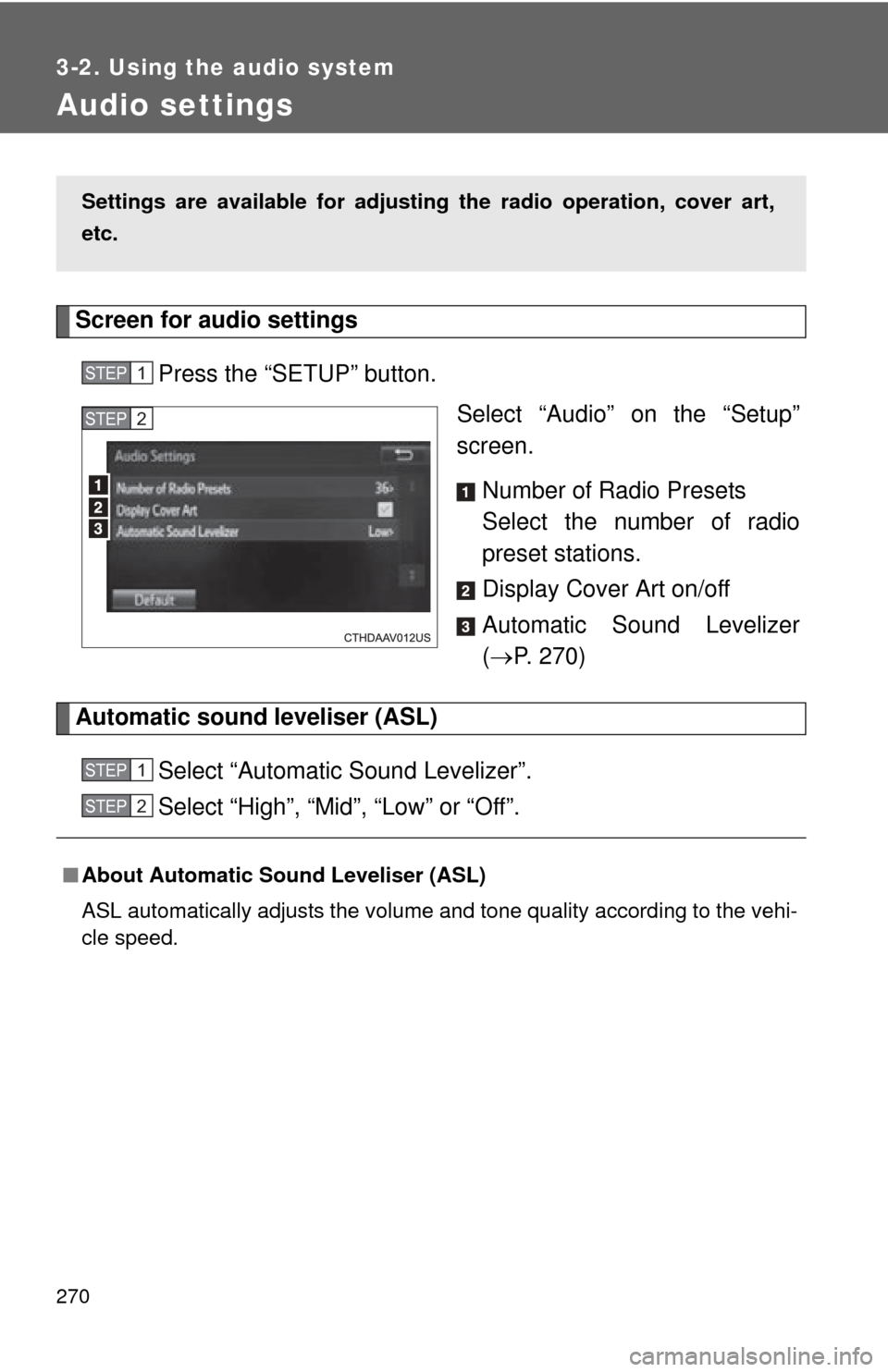
Screen for audio settingsPress the “SETUP” button. Select “Audio” on the “Setup”
screen.
Number of Radio Presets
Select the number of radio
preset stations.
Display Cover Art on/off
Automatic Sound Levelizer
( P. 270)
Automatic sound leveliser (ASL)
Select “Automatic Sound Levelizer”.
Select “High”, “Mid”, “Low” or “Off”.
Settings are available for adjusting the radio operation, cover art,
etc.
STEP1
STEP2
■About Automatic Sound Leveliser (ASL)
ASL automatically adjusts the volume and tone quality according to the vehi-
cle speed.
STEP1
STEP2
Page 278 of 620
278
3-2. Using the audio system
Radio operation
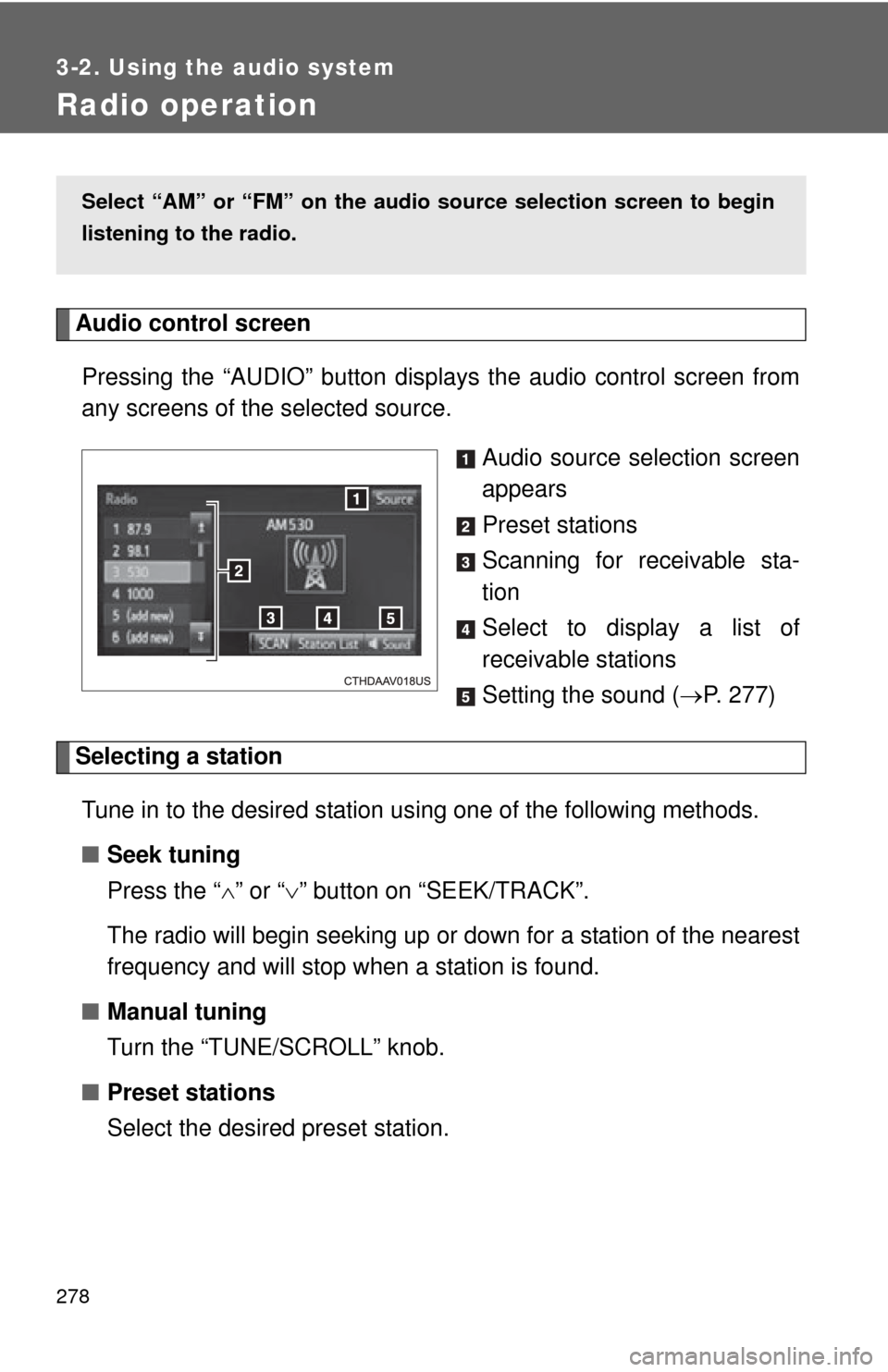
Audio control screenPressing the “AUDIO” button disp lays the audio control screen from
any screens of the selected source.
Audio source selection screen
appears
Preset stations
Scanning for receivable sta-
tion
Select to display a list of
receivable stations
Setting the sound (P. 277)
Selecting a station
Tune in to the desired station using one of the following methods.
■ Seek tuning
Press the “ ” or “ ” button on “SEEK/TRACK”.
The radio will begin seeking up or down for a station of the nearest
frequency and will stop when a station is found.
■ Manual tuning
Turn the “TUNE/SCROLL” knob.
■ Preset stations
Select the desired preset station.
Select “AM” or “FM” on the au dio source selection screen to begin
listening to the radio.
Page 279 of 620
279
3-2. Using the audio system
3
Interior features
Setting station presets
Search for desired stations by turning the “TUNE/SCROLL”
knob or pressing the “ ” or “ ” button on “SEEK/TRACK”.
Select “(add new)”
To change the preset station to a different one, select and hold the
preset station.
Select “Yes”.
Select “OK” after setting the new preset station.
■ Refreshing the station list
Select “Refresh” on the “Station List” screen.
To cancel the refresh, select “Cancel Refresh”.
■Reception sensitivity
●Maintaining perfect radio reception at all times is difficult due to the con-
tinually changing position of the antenna, differences in signal strength
and surrounding objects, such as trains, transmitters, etc.
● The radio antenna is mounted inside the rear window. To maintain clear
radio reception, do not attach metallic window tinting or other metallic
objects to the antenna wire mounted inside the rear window.
STEP1
STEP2
STEP3
STEP4
STEP1
Page 290 of 620
290 3-2. Using the audio system
●While connected to the system, the iPod cannot be operated with its own
controls. It is necessary to use the controls of the vehicle's audio system
instead.
● When the battery level of an iPod is very low, the iPod may not operate. If
so, charge the iPod before use.
● Compatible models ( P. 291)
■ iPod problems
To resolve most problems encountered when using your iPod, disconnect
your iPod from the vehicle iPod connection and reset it. For instructions on
how to reset your iPod, refer to your iPod Owner's Manual.
■ Error messages
MessageCause/Correction procedures
“Connection error.
Please consult your
Owner's Manual for
instructions on how to
connect the iPod.”
This indicates a problem in the iPod or its
connection.
“No music files found.”This indicates that there is no music data
in the iPod.
“No videos found.”This indicates that no video files are
included in the iPod.
“There are no songs
available for playback.
Please add compatible
files to your iPod.”
This indicates that songs are not found in a
selected playlist.
“iPod authorization
unsuccessful.”This indicates that the audio system failed
to authorize the iPod.
Please check your iPod.
Page 338 of 620
338 3-2. Using the audio system
Select to delete contacts from
the contact list.* (P. 342)
Select to reset all setup
items.*
*: For PBAP compatible Bluetooth®
phones only, this function is avail-
able when “Automatic Contact/
History Transfer” is set to off.
( P. 337)
Update contacts from phone
Operation methods differ between PBAP compatible and PBAP
incompatible but OPP compatible Bluetooth
® phones.
If your cellular phone is neither PBAP nor OPP compatible, the con-
tacts cannot be transferred.
■ For PBAP Compatible Bluetooth
® Phones
Select “Update Contacts from Phone”.
Check that a confirmation screen is displayed when the oper-
ation is complete.
This operation may be unnecessary depending on the type of cellu-
lar phone.
Depending on the type of cellular phone, OBEX authentication may
be required when transferring contact data. Enter “1234” into the
Bluetooth
® phone.
If another Bluetooth
® device is connected when transferring contact
data, depending on the phone, the connected Bluetooth® device
may need to be disconnected.
Depending on the type of Bluetooth
® phone being connected, it may
be necessary to perform additional steps on the phone.
STEP1
STEP2
Page 427 of 620

427
4-2. Maintenance
4
Maintenance and care
■
Reset the maintenance data (U.S.A. only)
After the required maintenance is performed according to the maintenance
schedule, please reset the maintenance data.
To reset the data, follow the procedures described below:
Turn the engine switch (vehicles without a smart key system) or the
“ENGINE START STOP” switch (vehicles with a smart key system)
off with the trip meter A reading shown. ( P. 176)
While pressing the display change button ( P. 172), turn the
engine switch to the “ON” position (vehicles without a smart key
system) or “ENGINE START STOP” switch to IGNITION ON mode
(vehicles with a smart key system)
Continue to press and hold the button until the trip meter displays
“000000”.
■ Allow inspection and repairs to be performed by a Toyota dealer
● Toyota technicians are well-trained specialists and are kept up to date
with the latest service information. They are well informed about the
operations of all systems on your vehicle.
● Keep a copy of the repair order. It proves that the maintenance that has
been performed is under warranty coverage. If any problem should arise
while your vehicle is under warranty, your Toyota dealer will promptly
take care of it.
STEP1
STEP2
STEP3
Page 509 of 620
5
When trouble arises
509
5-2. Steps to take in an emergency
(U.S.A. only)
Maintenance required
reminder light
Indicates that mainte-
nance is required accord-
ing to the driven distance
on the maintenance
schedule
*3.
Illuminates for about 3 sec-
onds and then flashes for
about 15 seconds approxi-
mately 4500 miles (7200
km) after the maintenance
data has been reset. If necessary, perform main-
tenance.
Comes on and remains on if
the distance driven exceeds
5000 miles (8000 km) after
the maintenance data has
been reset.
(The indicator will not work
properly unless the mainte-
nance data has been reset.) Perform the necessary
maintenance.
Please reset the mainte-
nance data after the mainte-
nance is performed.
(
P. 427)
Warning lightWarning light/DetailsCorrection procedure
Page 611 of 620

611
Alphabetical index
I/M test ...................................... 433
Identification number
Engine .................................. 552
Vehicle.................................. 552
Ignition switch ................. 147, 150
Illuminated entry system ........ 374
Indicator lights ........................ 185
Initialization
Items to initialize ................... 588
Inside rear view mirror.............. 80
Interior lights Interior lights ......................... 371
Switch ................................... 372
Wattage ................................ 563
Jack Positioning a floor jack ......... 438
Vehicle-equipped jack .......... 520
Jack handle.............................. 520
Keyless entry ............................. 49
Keys
Electronic key ......................... 30
Engine switch ............... 147, 150
If the electronic key does not operate properly ........... 536
If you lose your keys............. 535
Ignition switch ............... 147, 150
Key number ............................ 30
Keyless entry .......................... 49
Keys ....................................... 30
Mechanical key....................... 30
Wireless remote control key ... 49 License plate lights
Replacing light bulbs .............486
Wattage .................................563
Light bulbs Replacing ..............................486
Wattage .................................563
Lights Door courtesy lights ..............371
Emergency flasher switch .....498
Fog light switch .....................198
Hazard light switch ................498
Headlights switch ..................191
Interior light switch ................372
Personal light switch .............373
Replacing light bulbs .............486
Turn signal lever....................168
Vanity lights ...........................385
Wattage .................................563
Load capacity ...........................228
Lock steering column ......148, 154
Maintenance Do-it-yourself maintenance .......................434
General maintenance ............429
Maintenance data..................552
Maintenance requirements....426
Reset the maintenance
data .....................................427
Manual air conditioning system ....................................238
Meter Instrument panel light control .................................181
Meters ...................................172
Mirrors Inside rear view mirror.............80
Outside rear view mirror
defogger..............................253
Outside rear view mirrors ........82
Vanity mirrors ........................385
Moon roof ...................................87
MP3 disc ...................................280I
J
K
L
M