Page 197 of 620

197
2-3. Operating the lights and wipers
2
When driving
■
Light reminder buzzer (except when the light switch is in )
Vehicles without a smart key system
A buzzer sounds when the engine switch is turned “OFF” or to “ACC” posi-
tion and the driver's door is opened with the key removed from the engin\
e
switch while the lights are turned on.
Vehicles with a smart key system
A buzzer sounds when the “ENGINE START STOP” switch is turned off or
turned to ACCESSORY mode and the driver's door is opened while the
lights are turned on.
■ Battery-saving function
In order to prevent the vehicle battery from discharging, if the headlights
and/or tail lights are on when the engine switch is turned to the “LOCK” posi-
tion (vehicles without a smart key system) or when the “ENGINE START
STOP” switch is turned off (vehicles with a smart key system) the battery
saving function will operate and automatically turn off all the lights after
approximately 20 minutes.
When the engine switch is turned to the “ON” position (vehicles without a
smart key system) or when the “ENGINE START STOP” switch is turned to
IGNITION ON mode (vehicles with a smart key system), the battery-saving
function will be disabled.
When any of the following are performed, the battery-saving function is can-
celed once and then reactivated. All the lights will turn off automatically 20
minutes after the battery-saving function has been reactivated:
●When the headlight switch is operated
● When a door is opened or closed
■ Customization that can be co nfigured at Toyota dealer
Settings (e.g. light sensor sensitivity) can be changed.
(Customizable features P. 581)
NOTICE
■To prevent battery discharge
Do not leave the lights on longer than necessary when the engine is not run-
ning.
Page 203 of 620
203
2-3. Operating the lights and wipers
2
When driving
■
The windshield wiper and washers can be operated when
Vehicles without a smart key system: The engine switch is in the “ON” posi-
tion.
Vehicles with a smart key system: The “ENGINE START STOP” switch is in
IGNITION ON mode.
■ If no windshield washer fluid sprays
Check that the washer nozzles are not blocked if there is washer fluid in the
windshield washer fluid reservoir.
Increases the intermittent
windshield wiper frequency
Decreases the intermittent
windshield wiper frequency
Washer/wiper dual opera-
tion
The wipers will automatically
operate a couple of times after
the washer squirts.
Page 243 of 620

243
3-1. Using the air conditioning system
and defogger
3
Interior features
■Switching between outside air and recirculated air modes
Recirculated air mode or outside air mode may be automatically switched in
accordance with the temperature setting and the inside temperature.
■ Fogging up of the windows
●The windows will easily fog up when the humidity in the vehicle is high.
Turning on will dehumidify the air from the outlets and defog the
windshield effectively.
● If you turn off, the windows may fog up more easily.
● The windows may fog up if the recirculated air mode is used.
■ Outside/recirculated air mode
When driving on dusty roads such as tunnels or in heavy traffic, set the out-
side/recirculated air mode button to the recirculated air mode. This is effec-
tive in preventing outside air from enter ing the vehicle interior. During cooling
operation, setting the recirculated air m ode will also cool the vehicle interior
effectively.
■ When the outside temperature exceed s 75°F (24°C) and the air condi-
tioning system is on
● In order to reduce the air conditioning power consumption, the air condi-
tioning system may switch to recirculated air mode automatically. This
may also reduce fuel consumption.
● Vehicles without a smart key system: Recirculated air mode is selected
as a default mode when the engine switch is turned to the “ON” position.
Vehicles with a smart key system: Recirculated air mode is selected as a
default mode when the “ENGINE START STOP” switch is turned to IGNI-
TION ON mode.
● It is possible to switch to outside air mode at any time by pressing
.
Page 251 of 620

251
3-1. Using the air conditioning system
and defogger
3
Interior features
■Using automatic mode
Fan speed is adjusted automatically according to the temperature setting
and the ambient conditions.
Therefore, the fan may stop for a while until warm or cool air is ready to flow
immediately after is pressed.
■ Fogging up of the windows
●The windows will easily fog up when the humidity in the vehicle is high.
Turning on will dehumidify the air from the outlets and defog the
windshield effectively.
● If you turn off, the windows may fog up more easily.
● The windows may fog up if the recirculated air mode is used.
■ Outside/recirculated air mode
●When driving on dusty roads such as tunnels or in heavy traffic, set the
outside/recirculated air mode button to the recirculated air mode. This is
effective in preventing outside air from entering the vehicle interior. Dur-
ing cooling operation, setting the recirculated air mode will also cool the
vehicle interior effectively.
● Outside/recirculated air mode may automatically switch depending on
the temperature setting or the inside temperature.
■ When the outside temperature exceeds 75 F (24C) and the air condi-
tioning system is on
● In order to reduce the air conditioning power consumption, the air condi-
tioning system may switch to recirculated air mode automatically. This
may also reduce fuel consumption.
● Vehicles without a smart key system: Recirculated air mode is selected
as a default mode when the engine switch is turned to the “ON” position.
Vehicles with a smart key system: Recirculated air mode is selected as a
default mode when the “ENGINE START STOP” switch is turned to IGNI-
TION ON mode.
● It is possible to switch to outside air mode at any time by pressing
.
Page 253 of 620
253
3-1. Using the air conditioning system and defogger
3
Interior features
Rear window and outside rear view mirror defoggers
■The defoggers can be operated when
Vehicles without a smart key system
The engine switch is in the “ON” position.
Vehicles with a smart key system
The “ENGINE START STOP” switch is in IGNITION ON mode.
■ The outside rear view mirr or defoggers (if equipped)
Turning the rear window defogger on will turn the outside rear view mirror
defoggers on.
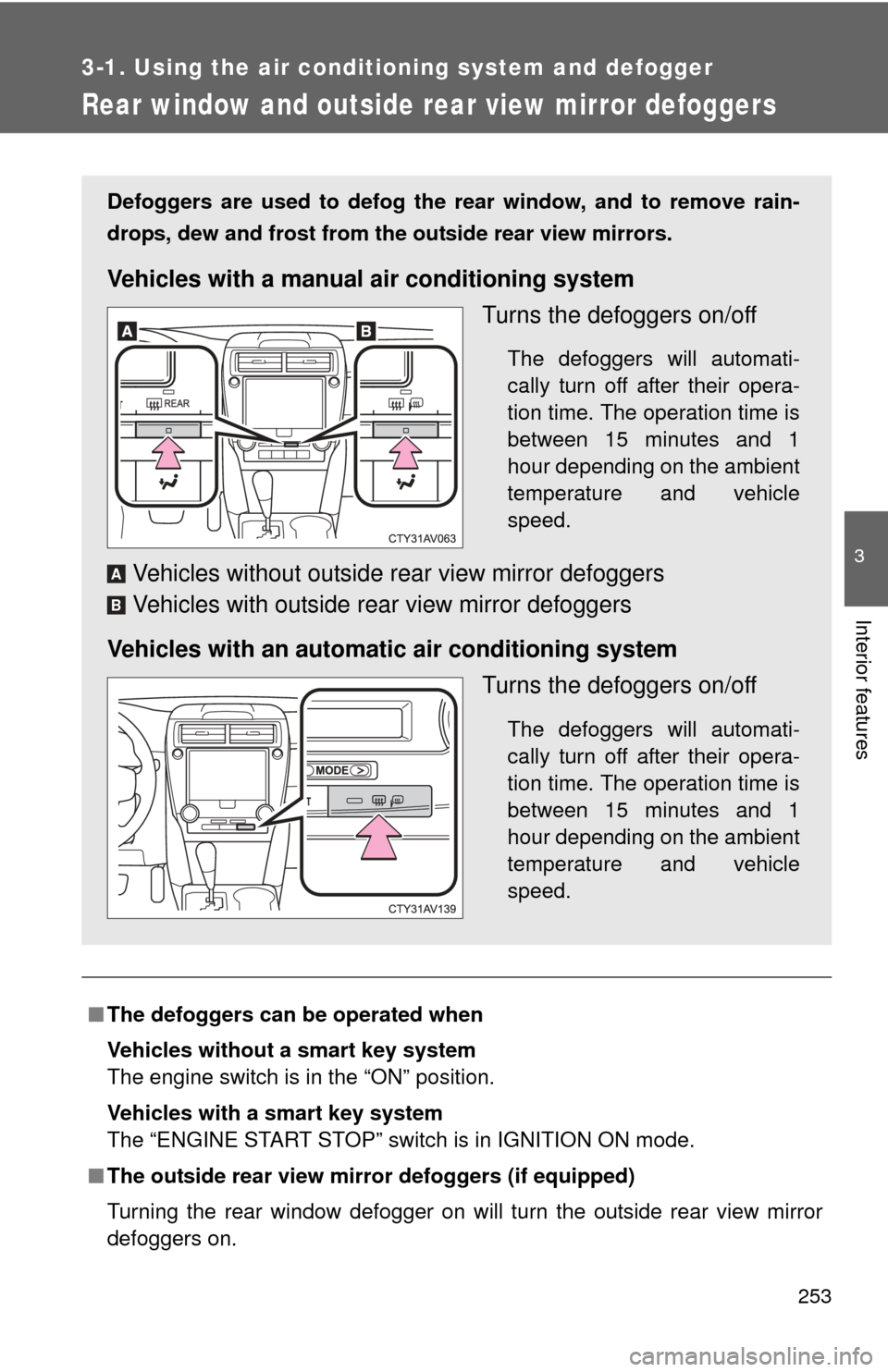
Defoggers are used to defog the rear window, and to remove rain-
drops, dew and frost from the outside rear view mirrors.
Vehicles with a manual air conditioning system
Turns the defoggers on/off
The defoggers will automati-
cally turn off after their opera-
tion time. The operation time is
between 15 minutes and 1
hour depending on the ambient
temperature and vehicle
speed.
Vehicles without outside rear view mirror defoggers
Vehicles with outside rear view mirror defoggers
Vehicles with an automatic air conditioning system Turns the defoggers on/off
The defoggers will automati-
cally turn off after their opera-
tion time. The operation time is
between 15 minutes and 1
hour depending on the ambient
temperature and vehicle
speed.
A
B
Page 268 of 620
268
3-2. Using the audio system
General settings
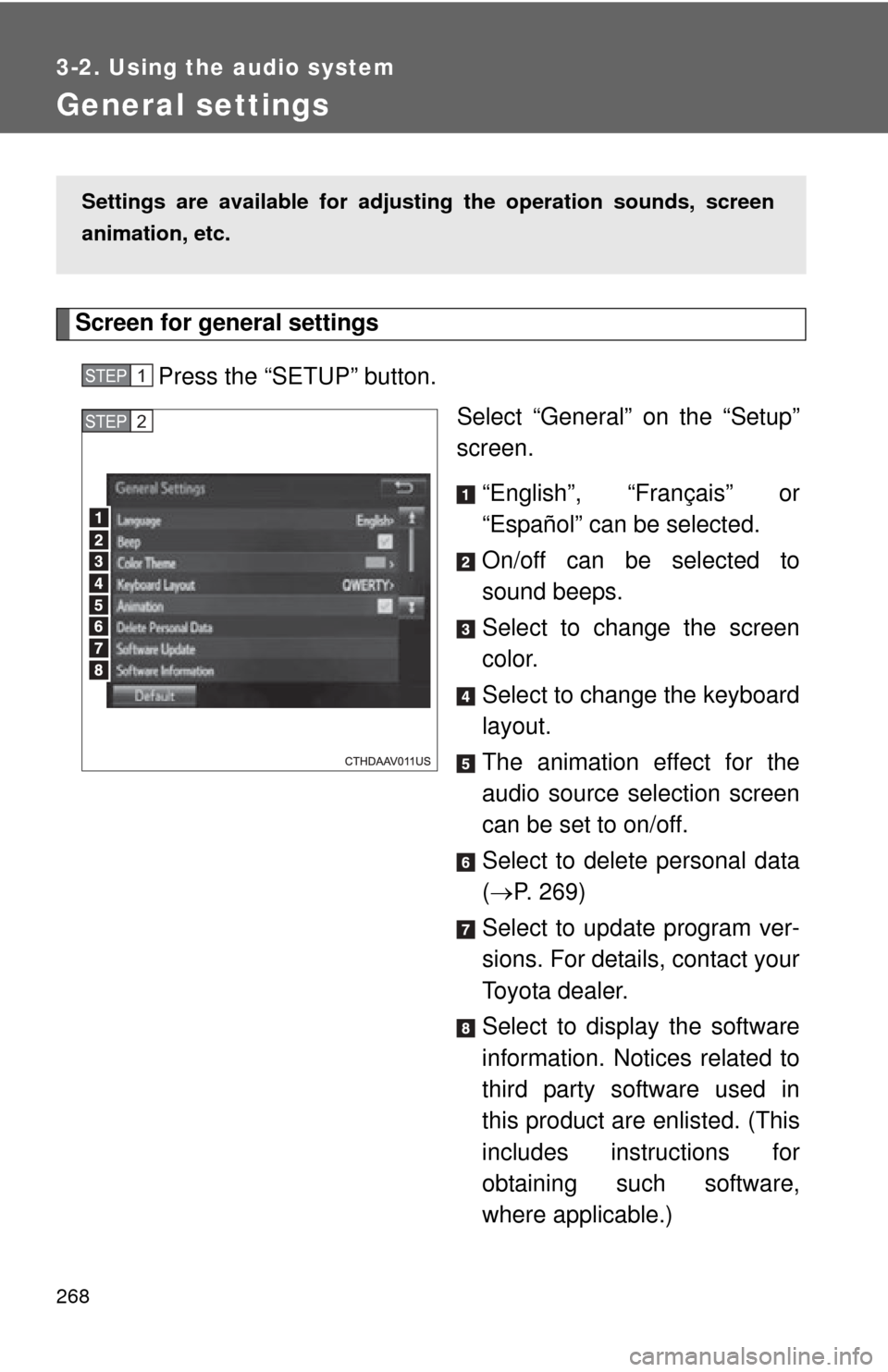
Screen for general settingsPress the “SETUP” button. Select “General” on the “Setup”
screen.
“English”, “Français” or
“Español” can be selected.
On/off can be selected to
sound beeps.
Select to change the screen
color.
Select to change the keyboard
layout.
The animation effect for the
audio source selection screen
can be set to on/off.
Select to delete personal data
( P. 269)
Select to update program ver-
sions. For details, contact your
Toyota dealer.
Select to display the software
information. Notices related to
third party software used in
this product are enlisted. (This
includes instructions for
obtaining such software,
where applicable.)
Settings are available for adjusting the operation sounds, screen
animation, etc.
STEP1
STEP2
Page 310 of 620

310 3-2. Using the audio system
Auto connectionTo turn auto connection mode on, set “Bluetooth* Power” to on.
( P. 314)
When you register a phone, auto connection will be activated. Always
set it to this mode and leave the Bluetooth
® phone in a place where a
connection can be established.
Vehicles with a smart key system
When the “ENGINE START STOP” switch is turned to ACCESSORY or
IGNITION ON mode, the system will search for a nearby cellular phone
you have registered.
Vehicles without a smart key system
When the engine switch is turned to “ACC” or “ON” mode, the system will
search for a nearby cellular phone you have registered.
Next, the system automatically connects with the most recent of the
phones connected to in the past. Then, the connection result is displayed.
Manual connection
When auto connection has failed or “Bluetooth* Power” is turned off,
you must connect the Bluetooth
® device manually.
*: Bluetooth is a registered trademark of Bluetooth SIG, Inc.
Follow the steps in “Connecting a Bluetooth® device” from
“STEP 1”. ( P. 309)
Connecting a Bluetooth® audio player
Registering an additional device Select “Select Devi ce” on the Bluetooth
® audio control
screen.
For more information: P. 3 0 6
STEP1
STEP1
STEP2
Page 311 of 620
311
3-2. Using the audio system
3
Interior features
Selecting a registered device
Select “Select Devi ce” on the Bluetooth
® audio control
screen.
For more information: P. 3 0 9
■Reconnecting a Bluetooth® phone
Vehicles with a smart key system
If the system cannot connect due to poor signal strength with the “ENGINE
START STOP” switch in ACCESSORY or IGNITION ON mode, the system
will automatically attempt to reconnect.
Vehicles without a smart key system
If the system cannot connect due to poor signal strength with the engine
switch in “ACC” or “ON” mode, the system will automatically attempt to
reconnect.
If the phone is turned off, the system will not attempt to reconnect. In this
case, the connection must be made manually, or the phone must be rese-
lected.
STEP1
STEP2