Page 1 of 612
TABLE OF CONTENTS
1
1Before driving
Information on the hybrid system and adjusting and
operating features such as door locks, mirrors, and
steering column.
2When drivingDriving, stopping and safe-driving information.
3Interior fea-
turesAir conditioning and audio systems, as well as other in-
terior features for a comfortable driving experience.
4Maintenance
and careCleaning and protecting your vehicle, performing do-it-
yourself maintenance, and maintenance information.
5When trouble
arisesWhat to do if the vehicle needs to be towed, gets a flat
tire, or is involved in an accident.
6Vehicle
specificationsDetailed vehicle information.
7For ownersReporting safety defects for U.S. owners, and seat belt
and SRS airbag instructions for Canadian owners
IndexAlphabetical listing of information contained in this
manual.
Page 3 of 612

1
2
3
4
5
6
7
3
2-2. Instrument cluster
Gauges and meters................ 174
Indicators and warning lights ................................. 180
Multi-information display ..... 185
2-3. Operating the lights and wipers
Headlight switch .................. 192
Fog light switch ................... 198
Windshield wipers and washer .............................. 200
2-4. Using other driving systems
Cruise control ...................... 204
Driving assist systems ........ 207
Hill-start assist control ......... 212
BSM (Blind Spot Monitor) .......... 214
2-5. Driving information Cargo and luggage ............. 224
Vehicle load limits ............... 228
Winter driving tips ............... 229
Trailer towing ...................... 233
Dinghy towing ..................... 234 3-1. Using the air conditioning
system and defogger
Automatic air conditioning system .............................. 238
Rear window and outside rear view mirror
defoggers ......................... 248
3-2. Using the audio system Audio system types ............ 249
Audio system ...................... 251
Steering wheel audio switches ........................... 254
USB/AUX port .................... 256
Basic audio operations ....... 258
Setup menu ........................ 261
General settings ................. 262
Audio settings ..................... 264
Display settings .................. 265
Voice settings ..................... 267
Selecting the audio source .............................. 268
List screen operation .......... 269
Optimal use of the audio system .............................. 271
Radio operation .................. 272
CD player operation ........... 274
Listening to an iPod ............ 281
Listening to a USB memory device ................. 287
Using the AUX port............. 293
Preparations to use wireless
communication ................. 2943Interior features
Page 5 of 612

1
2
3
4
5
6
7
5
4-1. Maintenance and careCleaning and protecting the vehicle exterior............ 410
Cleaning and protecting the vehicle interior............. 413
4-2. Maintenance Maintenance requirements ..................... 416
General maintenance.......... 418
Emission inspection and maintenance (I/M)
programs........................... 422
4-3. Do-it-yourself maintenance
Do-it-yourself service precautions ....................... 423
Hood ................................... 426
Positioning a floor jack ........ 427
Engine compartment ........... 429
12-volt battery ..................... 439
Tires .................................... 443
Tire inflation pressure ......... 449
Wheels ................................ 453
Air conditioning filter............ 456
Electronic key battery.......... 458
Checking and replacing fuses ................................. 460
Light bulbs........................... 471 5-1. Essential information
Emergency flashers............ 484
If your vehicle needs to be towed........................... 485
If you think something is wrong ............................ 489
5-2. Steps to take in an emergency
If a warning light turns on or a warning buzzer
sounds... .......................... 490
If a warning message is displayed .......................... 500
If you have a flat tire ........... 519
If the hybrid system will not start ............................ 531
If the shift lever cannot be shifted from P ................... 533
If you lose your keys........... 534
If the electronic key does not operate properly ......... 535
If the vehicle’s 12-volt battery is discharged ........ 538
If your vehicle overheats .... 542
If the vehicle becomes stuck ................................. 547
If your vehicle has to be stopped in an
emergency ....................... 548
4Maintenance and care5When trouble arises
Page 16 of 612
16
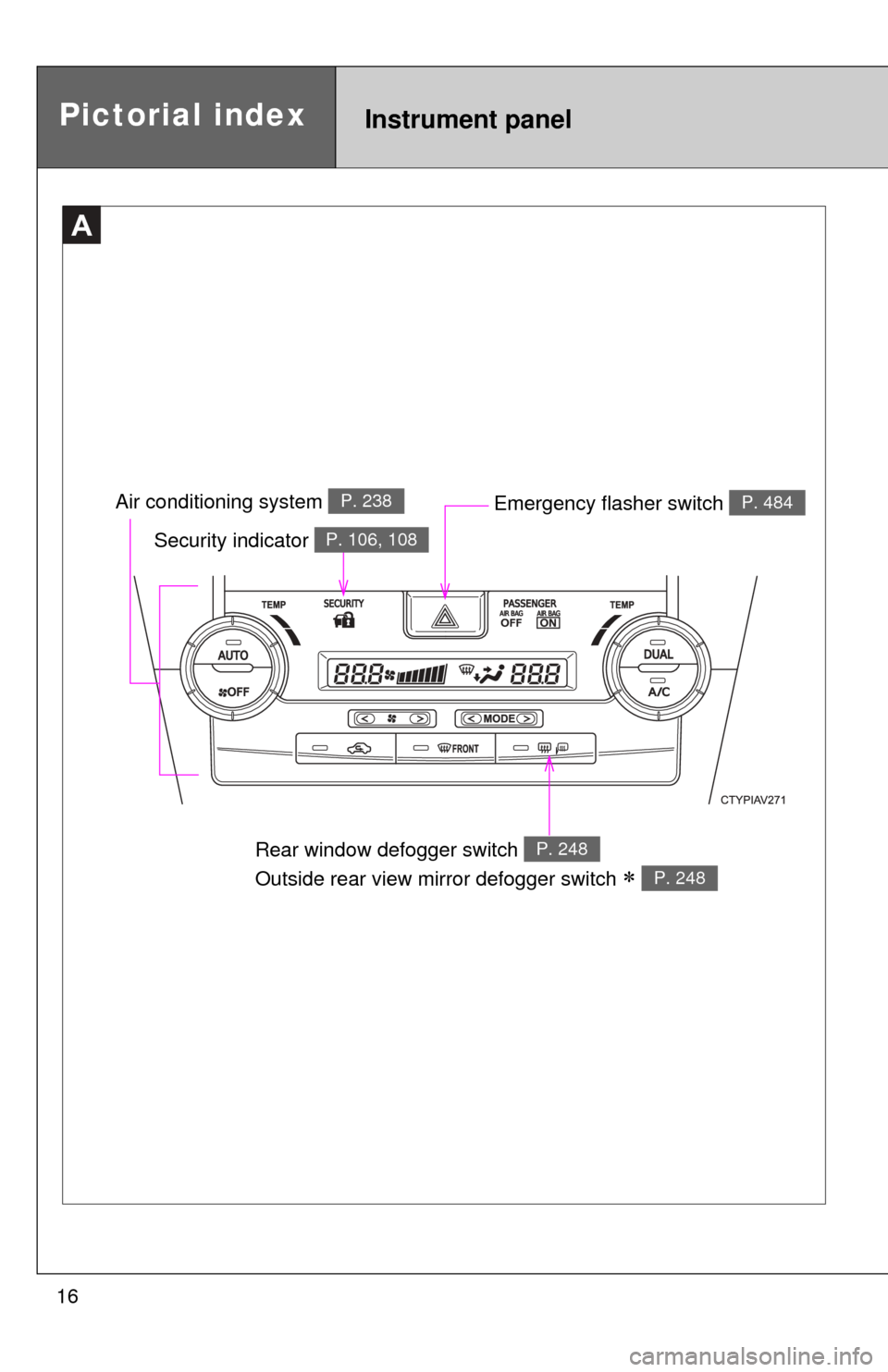
Emergency flasher switch P. 484
Security indicator P. 106, 108
A
Air conditioning system P. 238
Pictorial indexInstrument panel
Rear window defogger switch
Outside rear view mirror defogger switch
P. 248
P. 248
Page 35 of 612
35
1
1-1. Hybrid system
Before driving
Hybrid system precautions
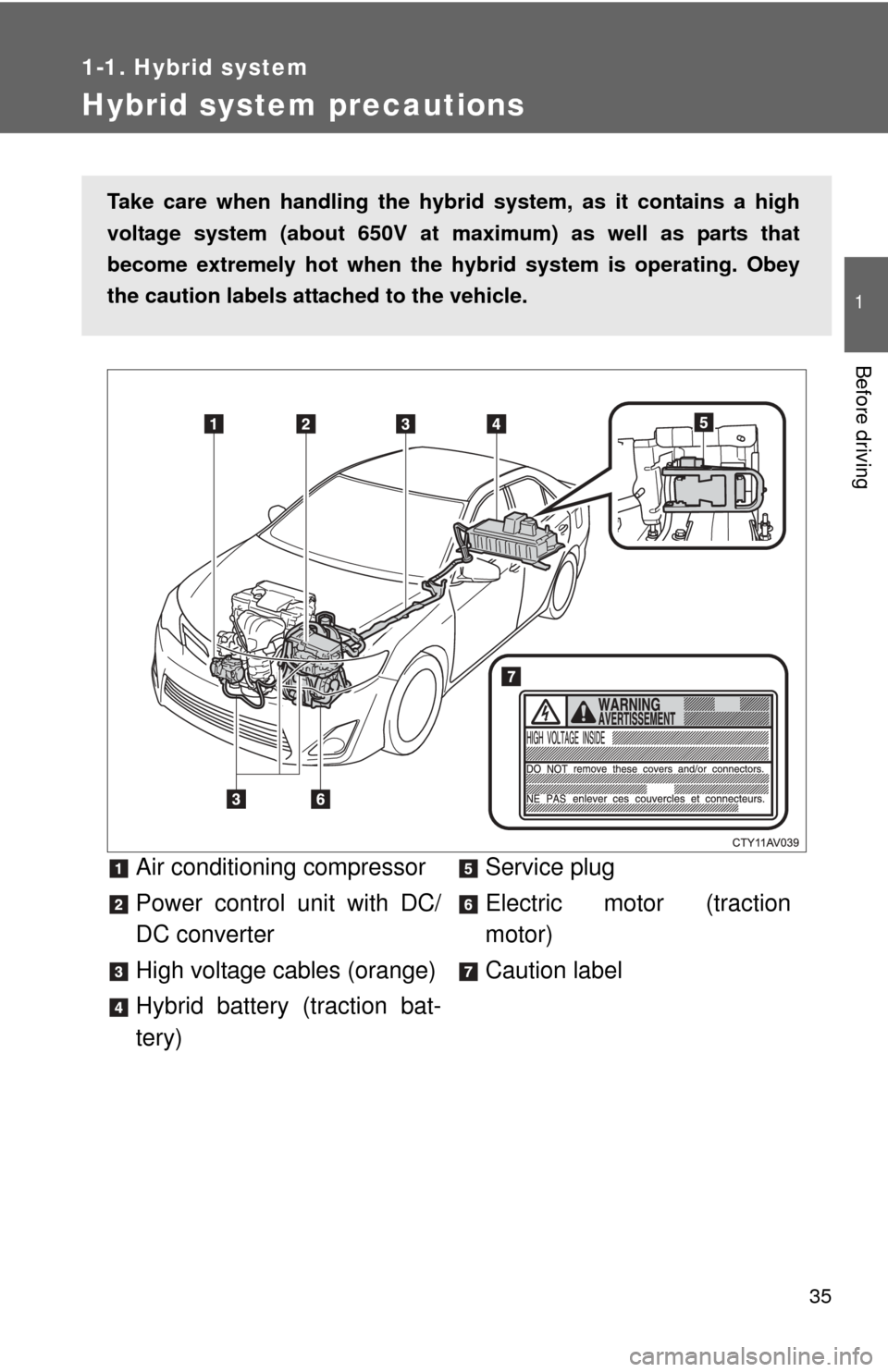
Air conditioning compressor
Power control unit with DC/
DC converter
High voltage cables (orange)
Hybrid battery (traction bat-
tery)Service plug
Electric motor (traction
motor)
Caution label
Take care when handling the hybrid system, as it contains a high
voltage system (about 650V at m
aximum) as well as parts that
become extremely hot when the hy brid system is operating. Obey
the caution labels attached to the vehicle.
Page 46 of 612
46
1-1. Hybrid system
Hybrid vehicle driving tips
For economical and ecological driving, pay attention to the following
points:
■ Using Eco drive mode
(P. 169)
■ Use of the Hybrid System Indicator
More Eco-friendly driving is possible by keeping the Hybrid System
Indicator needle within the Eco area.
■When braking the vehicle
Make sure to operate the brakes gently and in good time. A greater
amount of electrical energy can be retained when slowing down.
■Delays
Repeated acceleration and deceleration, as well as long waits at traffic
lights, will lead to bad fuel consumption. Check traffic reports before
leaving and avoid delays as much as possible. When encountering a
delay, gently release the brake pedal to allow the vehicle to move for-
ward slightly while avoiding overuse of the accelerator pedal. Doing so
can help control excessive gasoline consumption.
■Highway driving
Control your speed and keep at a constant speed. Also, before stop-
ping at a toll booth or similar, allow plenty of time to release the acceler-
ator and gently apply the brakes. A greater amount of electrical energy
can be retained when slowing down.
■Air conditioning
Use the air conditioning only when necessary. Doing so can help con-
trol excessive gasoline consumption.
In summer: In high temperatures, use the recirculated air mode. Doing
so will help to reduce the burden on the air conditioning and reduce fuel
consumption as well.
In winter: Because the gasoline engine will not automatically cut out
until the gasoline engine and the interior of the vehicle are warm, it will
consume fuel. Also, fuel consumption can be improved by avoiding
overuse of the heater.
Page 169 of 612
169
2-1. Driving procedures
2
When driving
■
Operation of the air conditio ning system in Eco drive mode
Eco drive mode controls the heating/cooling operations and fan speed of the
air conditioning system to enhance fuel efficiency. ( P. 238) To improve air
conditioning performance, adjust the fan speed or turn off Eco drive mode.
■ When in heavy traffic
If the shift lever is in N, the hybrid battery (traction battery) will not be
charged. To help prevent the battery from discharging, avoid putting the shift
lever in N for an extended period of time.
■ If the shift lever cannot be shifted from P
P. 533
CAUTION
■When driving on slippery road surfaces
Do not accelerate or shift gears suddenly.
Sudden changes in engine braking may cause the vehicle to spin or skid,
resulting in an accident.
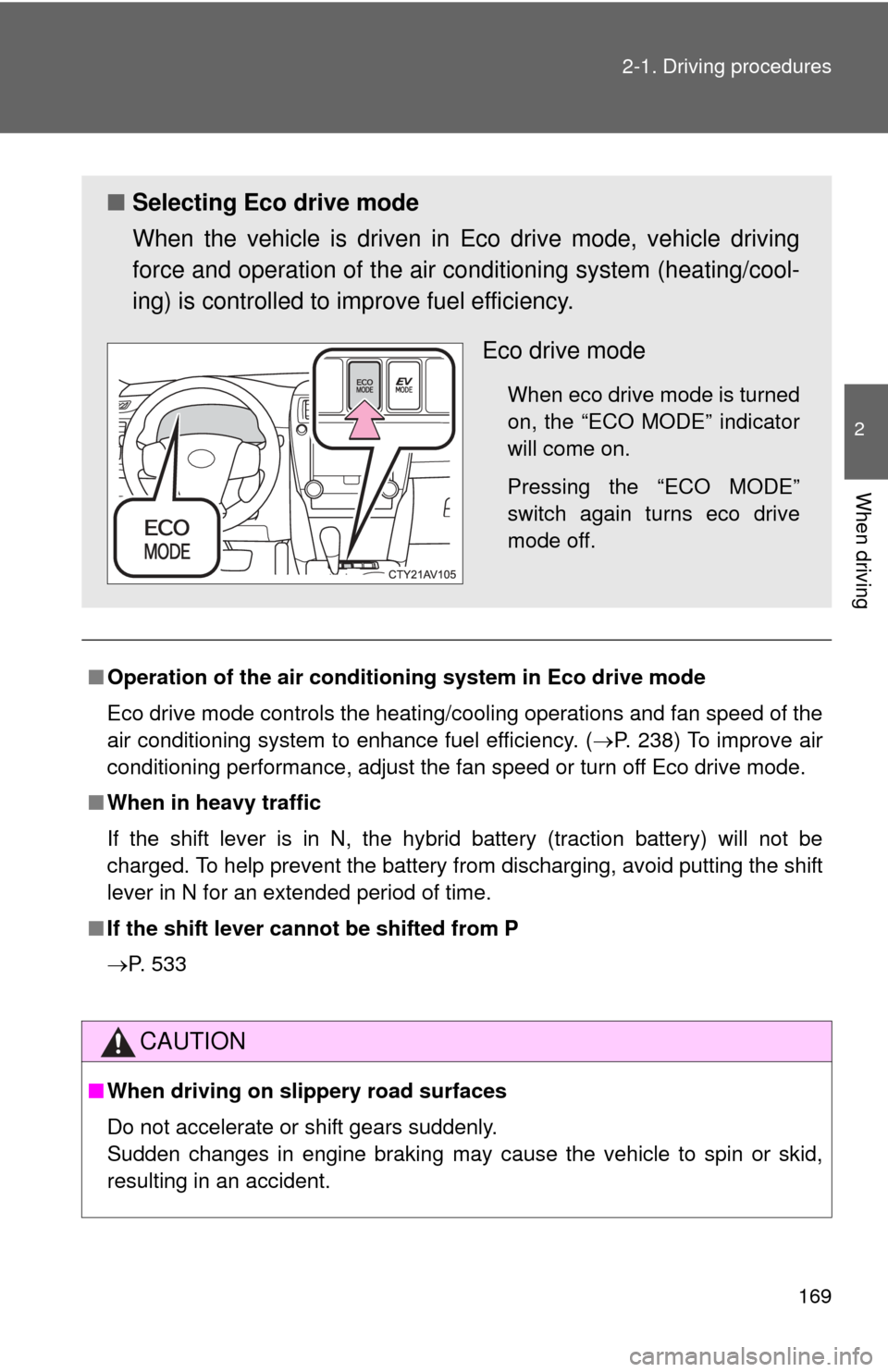
■ Selecting Eco drive mode
When the vehicle is driven in Eco drive mode, vehicle driving
force and operation of the air co nditioning system (heating/cool-
ing) is controlled to improve fuel efficiency.
Eco drive mode
When eco drive mode is turned
on, the “ECO MODE” indicator
will come on.
Pressing the “ECO MODE”
switch again turns eco drive
mode off.
Page 236 of 612
236
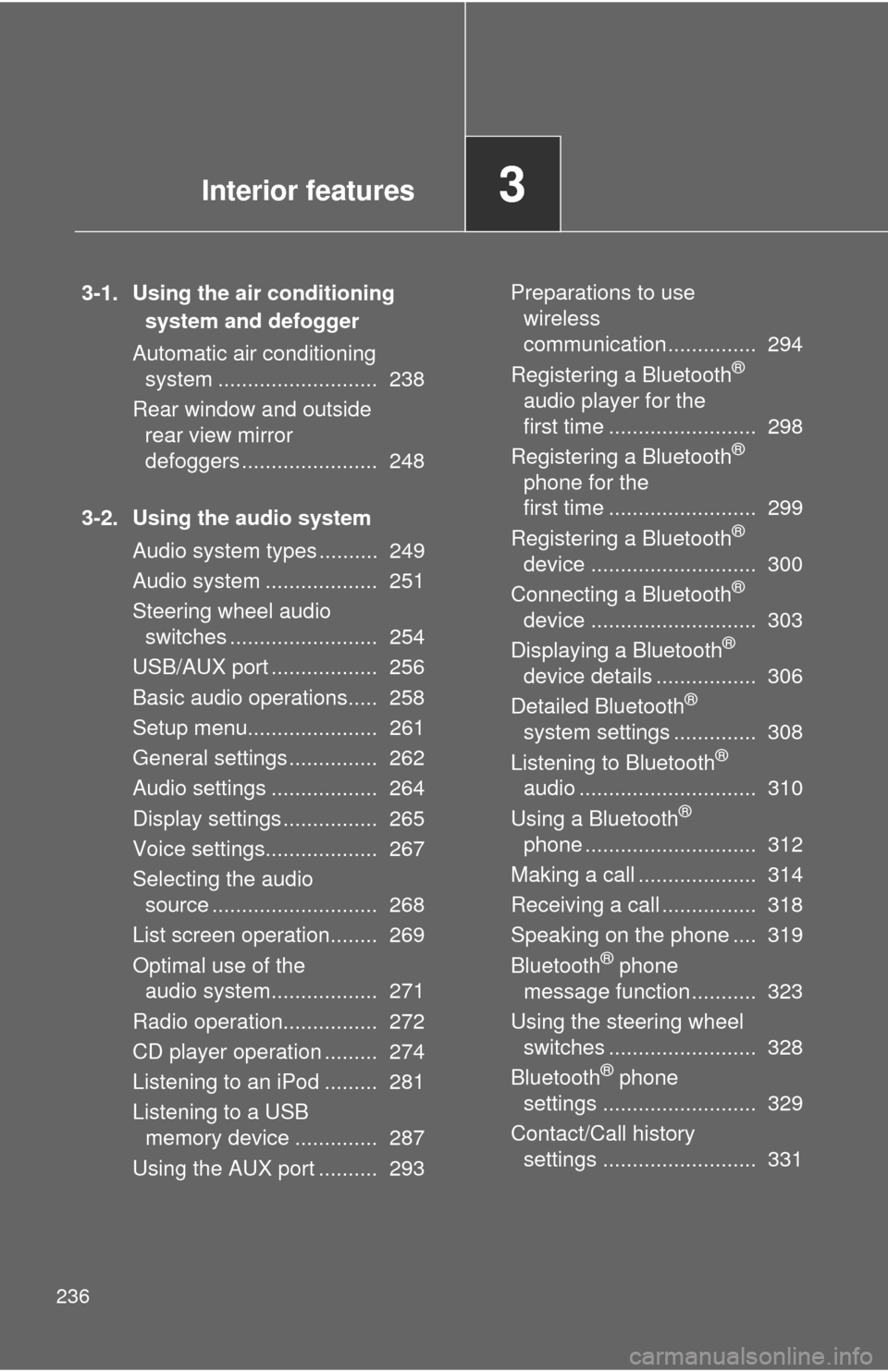
3-1. Using the air conditioning system and defogger
Automatic air conditioning system ........................... 238
Rear window and outside rear view mirror
defoggers ....................... 248
3-2. Using the audio system Audio system types .......... 249
Audio system ................... 251
Steering wheel audio switches ......................... 254
USB/AUX port .................. 256
Basic audio operations..... 258
Setup menu...................... 261
General settings ............... 262
Audio settings .................. 264
Display settings ................ 265
Voice settings................... 267
Selecting the audio source ............................ 268
List screen operation........ 269
Optimal use of the audio system.................. 271
Radio operation................ 272
CD player operation ......... 274
Listening to an iPod ......... 281
Listening to a USB memory device .............. 287
Using the AUX port .......... 293 Preparations to use
wireless
communication ............... 294
Registering a Bluetooth
®
audio player for the
first time ......................... 298
Registering a Bluetooth
®
phone for the
first time ......................... 299
Registering a Bluetooth
®
device ............................ 300
Connecting a Bluetooth
®
device ............................ 303
Displaying a Bluetooth
®
device details ................. 306
Detailed Bluetooth
®
system settings .............. 308
Listening to Bluetooth
®
audio .............................. 310
Using a Bluetooth
®
phone ............................. 312
Making a call .................... 314
Receiving a call ................ 318
Speaking on the phone .... 319
Bluetooth
® phone
message function ........... 323
Using the steering wheel switches ......................... 328
Bluetooth
® phone
settings .......................... 329
Contact/Call history settings .......................... 331
Interior features3