Page 248 of 496
2485-1. Using the air conditioning system and defogger
AVALON (U)_(OM41452U)
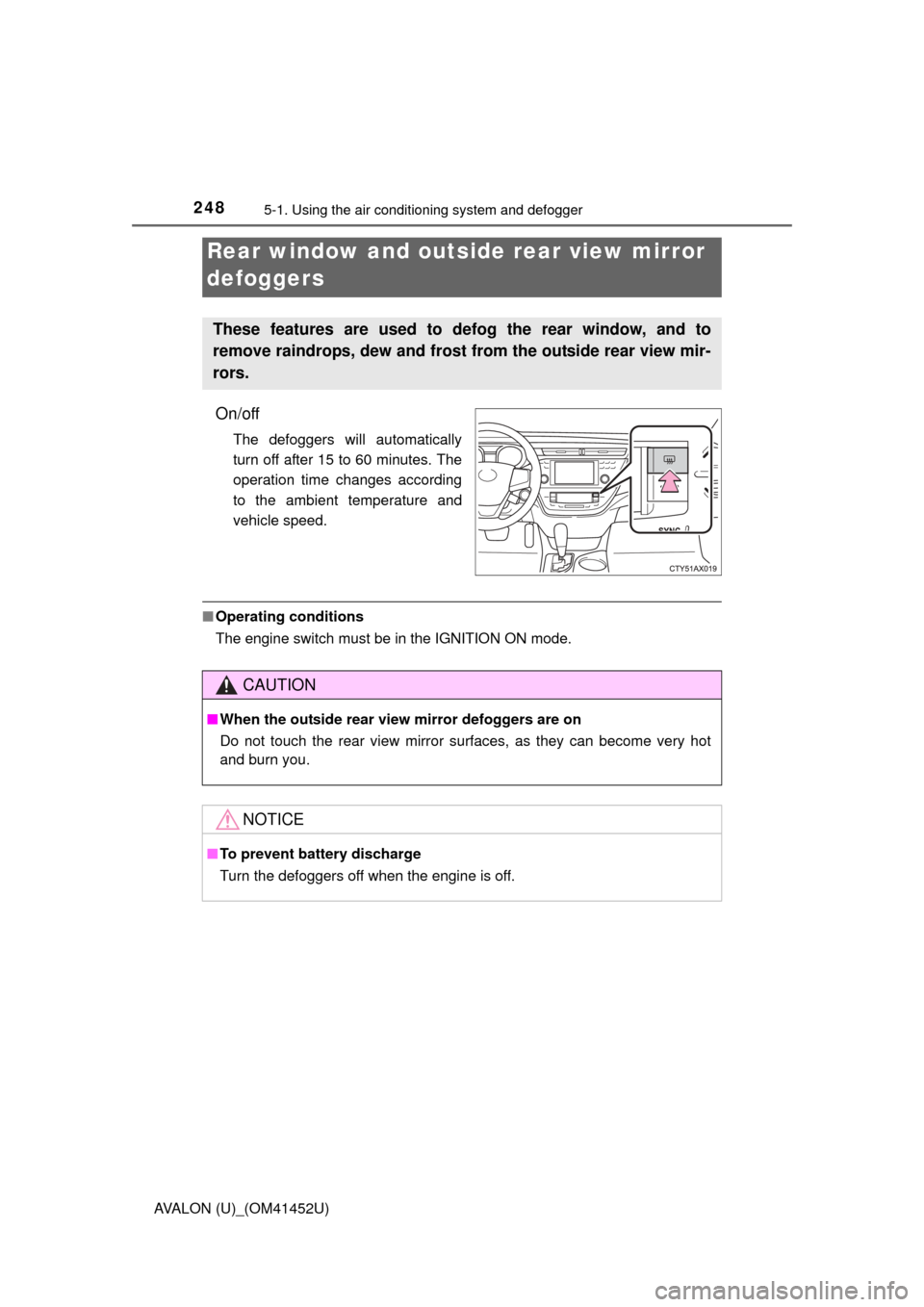
On/off
The defoggers will automatically
turn off after 15 to 60 minutes. The
operation time changes according
to the ambient temperature and
vehicle speed.
■Operating conditions
The engine switch must be in the IGNITION ON mode.
Rear window and outsid e rear view mirror
defoggers
These features are used to defog the rear window, and to
remove raindrops, dew and frost from the outside rear view mir-
rors.
CAUTION
■ When the outside rear view mirror defoggers are on
Do not touch the rear view mirror surfaces, as they can become very hot
and burn you.
NOTICE
■ To prevent battery discharge
Turn the defoggers off when the engine is off.
Page 263 of 496
2635-4. Using the storage features
5
Interior features
AVALON (U)_(OM41452U)■
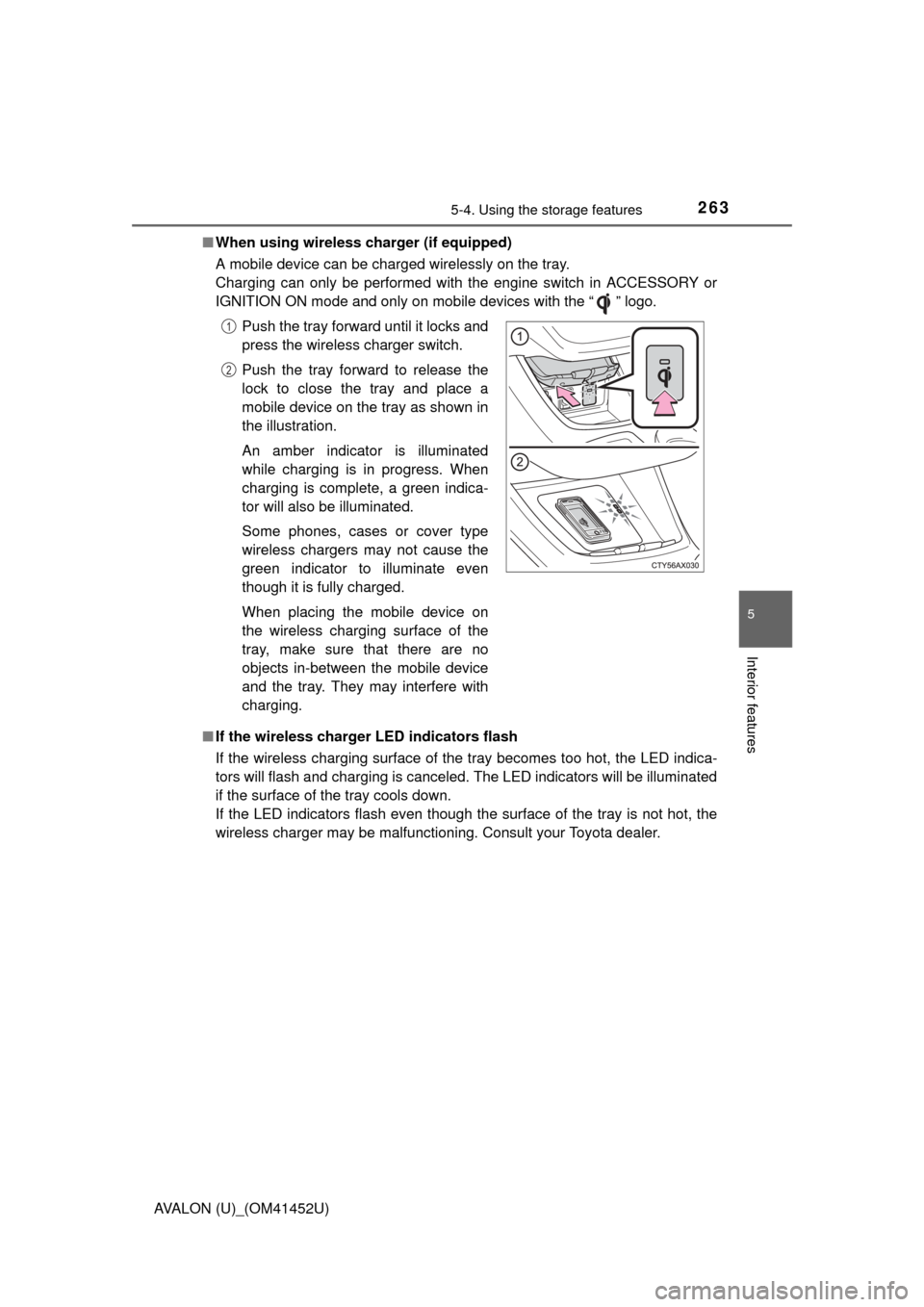
When using wireless charger (if equipped)
A mobile device can be charged wirelessly on the tray.
Charging can only be performed with the engine switch in ACCESSORY or
IGNITION ON mode and only on mobile devices with the “ ” logo.
■ If the wireless charger LED indicators flash
If the wireless charging surface of the tray becomes too hot, the LED indica-
tors will flash and charging is canceled. The LED indicators will be illuminated
if the surface of the tray cools down.
If the LED indicators flash even though the surface of the tray is not hot, the
wireless charger may be malfunctioning. Consult your Toyota dealer. Push the tray forward until it locks and
press the wireless charger switch.
Push the tray forward to release the
lock to close the tray and place a
mobile device on the tray as shown in
the illustration.
An amber indicator is illuminated
while charging is in progress. When
charging is complete, a green indica-
tor will also be illuminated.
Some phones, cases or cover type
wireless chargers may not cause the
green indicator to illuminate even
though it is fully charged.
When placing the mobile device on
the wireless charging surface of the
tray, make sure that there are no
objects in-between the mobile device
and the tray. They may interfere with
charging.
1
2
Page 270 of 496
2705-5. Other interior features
AVALON (U)_(OM41452U)
■The clock is displayed when
The engine switch is in ACCESSORY or IGNITION ON mode.
■ When disconnecting and reco nnecting battery terminals
Type A
The time display will automatically be set to 12:00 AM.
Type B
The time display will automatically be set to 12:00.
■ Time display (Type B)
After pressing “H” or “M” to show the setting screen, press “H” and “M” at the
same time to change between the analog and digital displays.
Page 292 of 496

2925-5. Other interior features
AVALON (U)_(OM41452U)
■Safety Connect Services Information
●Phone calls using the vehicles Bluetooth
® technology will not be possible
during Safety Connect.
● Safety Connect is available beginning Fall 2009 on select Toyota models.
Contact with the Safety Connect response center is dependent upon the
telematics device being in operative condition, cellular connection availabil-
ity, and GPS satellite signal reception, which can limit the ability to reach the
response center or receive emergency service support. Enrollment and
Telematics Subscription Service Agreement required. A variety of subscrip-
tion terms is available; charges vary by subscription term selected.
● Automatic Collision Notification, Emergency Assistance, Stolen Vehicle
Location, and Enhanced Roadside Assistance will function in the United
States, including Hawaii and Alaska, and in Canada. No Safety Connect
services will function outside of the United States in countries other than
Canada.
● Safety Connect services are not subject to section 255 of the Telecommuni-
cations Act and the device is not TTY compatible.
■ Languages
The Safety Connect response center will offer support in multiple languages.
The Safety Connect system will offer voice prompts in English and Spanish.
Please indicate your language of choice when enrolling.
■ When contacting th e response center
You may be unable to contact the response center if the network is busy.
Page 293 of 496
2935-5. Other interior features
5
Interior features
AVALON (U)_(OM41452U)
When the engine switch is turned to IGNITION ON mode, the red indi-
cator light comes on for 2 seconds then turns off. Afterward, the green
indicator light comes on, indicating that the service is active.
The following indicator light patterns indicate specific system usage
conditions:
● Green indicator light on = Active service
● Green indicator light flashing = Sa fety Connect call in process
● Red indicator light (except at vehi cle start-up) = System malfunction
(contact your Toyota dealer)
● No indicator light (off) = Safety Connect service not active
■Automatic Collision Notification
In case of either airbag deployment or severe rear-end collision, the
system is designed to automatical ly call the response center. The
responding agent receives the vehicle’s location and attempts to
speak with the vehicle occupants to assess the level of emergency.
If the occupants are unable to communicate, the agent automati-
cally treats the call as an emergency, contacts the nearest emer-
gency services provider to descri be the situation, and requests that
assistance be sent to the location.
Safety Connect LE D light Indicators
Safety Connect services
Page 303 of 496
_(OM41452U)■
When using a car wash
If the door handle becomes wet while the electronic key is within the ef\
fective
range, the door may")
3036-1. Maintenance and care
6
Maintenance and care
AVALON (U)_(OM41452U)■
When using a car wash
If the door handle becomes wet while the electronic key is within the ef\
fective
range, the door may lock and unlock repeatedly. In that case, follow the fol-
lowing correction procedures to wash the vehicle:
●Place the key in a position 6 ft. (2 m) or more separate from the vehicle
while the vehicle is being washed. (Take care to ensure that the key is not
stolen.)
● Set the electronic key to battery-saving mode to disable the smart key sys-
tem. ( P. 99)
■ Aluminum wheels
●Remove any dirt immediately by using a neutral detergent. Do not use hard
brushes or abrasive cleaners. Do not use strong or harsh chemical clean-
ers.
Use the same mild detergent and wax as used on the paint.
● Do not use detergent on the wheels when they are hot, for example after
driving for long distance in the hot weather.
● Wash detergent from the wheels immediately after use.
■ Bumpers
Do not scrub with abrasive cleaners.
Page 305 of 496
3056-1. Maintenance and care
6
Maintenance and care
AVALON (U)_(OM41452U)
NOTICE
■To prevent paint deterioration and corrosion on the body and compo-
nents (aluminum wheels etc.)
● Wash the vehicle immediately in the following cases:
• After driving near the sea coast
• After driving on salted roads
• If coal tar or tree sap is present on the paint surface
• If dead insects, insect droppings or bird droppings are present on the
paint surface
• After driving in an area contaminated with soot, oily smoke, mine dust, iron powder or chemical substances
• If the vehicle becomes heavily soiled with dust or mud
• If liquids such as benzene and gasoline are spilled on the paint surface
● If the paint is chipped or scratched, have it repaired immediately.
● To prevent the wheels from corroding, remove any dirt and store in a place
with low humidity when storing the wheels.
■ Cleaning the exterior lights
● Wash carefully. Do not use organic substances or scrub with a hard brush.
This may damage the surfaces of the lights.
● Do not apply wax to the surfaces of the lights.
Wax may cause damage to the lenses.
■ To prevent damage to the windshield wiper arms
When lifting the wiper arms away from the windshield, pull the driver side
wiper arm upward first, and repeat for the passenger side. When returning
the wipers to their original position, do so from the passenger side first.
■ When using an automatic car wash (vehicles with rain-sensing wind-
shield wipers)
Set the wipers switch to off.
If AUTO mode is selected, the wipers may operate and the wiper blades
may be damaged.
Page 310 of 496
3106-2. Maintenance
AVALON (U)_(OM41452U)
■Repair and replacement
It is recommended that genuine Toyota parts be used for repairs to ensure
performance of each system. If non-Toyota parts are used in replacement or if
a repair shop other than a Toyota dealer performs repairs, confirm the war-
ranty coverage.
■ Reset the maintenance data (U.S.A. only)
After the required maintenance is performed according to the maintenance
schedule, please reset the maintenance data.
To reset the data, follow the procedure described below:
Turn the engine switch off with the trip meter A reading shown. ( P. 78)
While pressing the trip meter reset knob ( P. 78), turn the engine switch to
IGNITION ON mode
Continue to press and hold the knob until the trip meter displays “000000”.
■ Allow inspection and repairs to be performed by a Toyota dealer
●Toyota technicians are well-trained specialists and are kept up to date with
the latest service information. They are well informed about the operations
of all systems on your vehicle.
● Keep a copy of the repair order. It proves that the maintenance that has
been performed is under warranty cove rage. If any problem should arise
while your vehicle is under warranty, your Toyota dealer will promptly take
care of it.
CAUTION
■ If your vehicle is not properly maintained
Improper maintenance could result in serious damage to the vehicle and
possible death or serious injury.
■ Handling of the battery
● Engine exhaust, some of its constituents, and a wide variety of automobile
components contain or emit chemicals known to the State of California to
cause cancer and birth defects and other reproductive harm. Work in a
well ventilated area.
● Oils, fuels and fluids contained in vehicles as well as waste produced by
component wear contain or emit chemicals known to the State of Califor-
nia to cause cancer and birth defects or other reproductive harm. Avoid
exposure and wash any affected area immediately.
● Battery posts, terminals and related accessories contain lead and lead
compounds which are known to cause brain damage. Wash your hands
after handling. ( P. 330)
1
2
3