Page 302 of 346
302
1. TOYOTA PARKING ASSIST MONITOR
7A curved blue line will appear on the
screen. Keep the steering wheel in its
current position and back up slowly.
Stop when the curved blue line meets
the corner of the desired parking
space.
Curved blue line
Back up keeping the steering wheel in its
current position
Curved blue line
Curved blue line meets the corner hereIf you back up too quickly, you may lose
synchronization with the parallel parking
assist.
8Leaving the vehicle stopped, turn the
steering wheel all the way to the left.
Be sure to turn the steering wheel only
when the vehicle is stopped.
9When the screen changes, keep the
steering wheel in its current position
and back up.
CAUTION
●When backing up, be careful not to hit
any obstacles with your vehicle. Back
the vehicle up slowly.
Page 303 of 346
303
1. TOYOTA PARKING ASSIST MONITOR
9
PERIPHERAL MONITORING SYSTEM
10When the vehicle is parallel with the
road or the shoulder, straighten the
steering wheel.
Check your surroundings visually and
with the mirrors, then back up using the
distance guide lines as a reference,
and stop.
When the vehicle is approximately in the
desired parking location, the parallel park-
ing assist is complete.
1Touch .
The steering wheel has been turned too
far, and the system cannot function.
Return the steering wheel to its original
position.
If the message is displayed before the out-
line is positioned over the desired parking
space, it is likely that the vehicle is too far
away from the shoulder. Check that there
is a gap of approximately 3 ft. (1 m)
between your vehicle and the parked vehi-
cle.
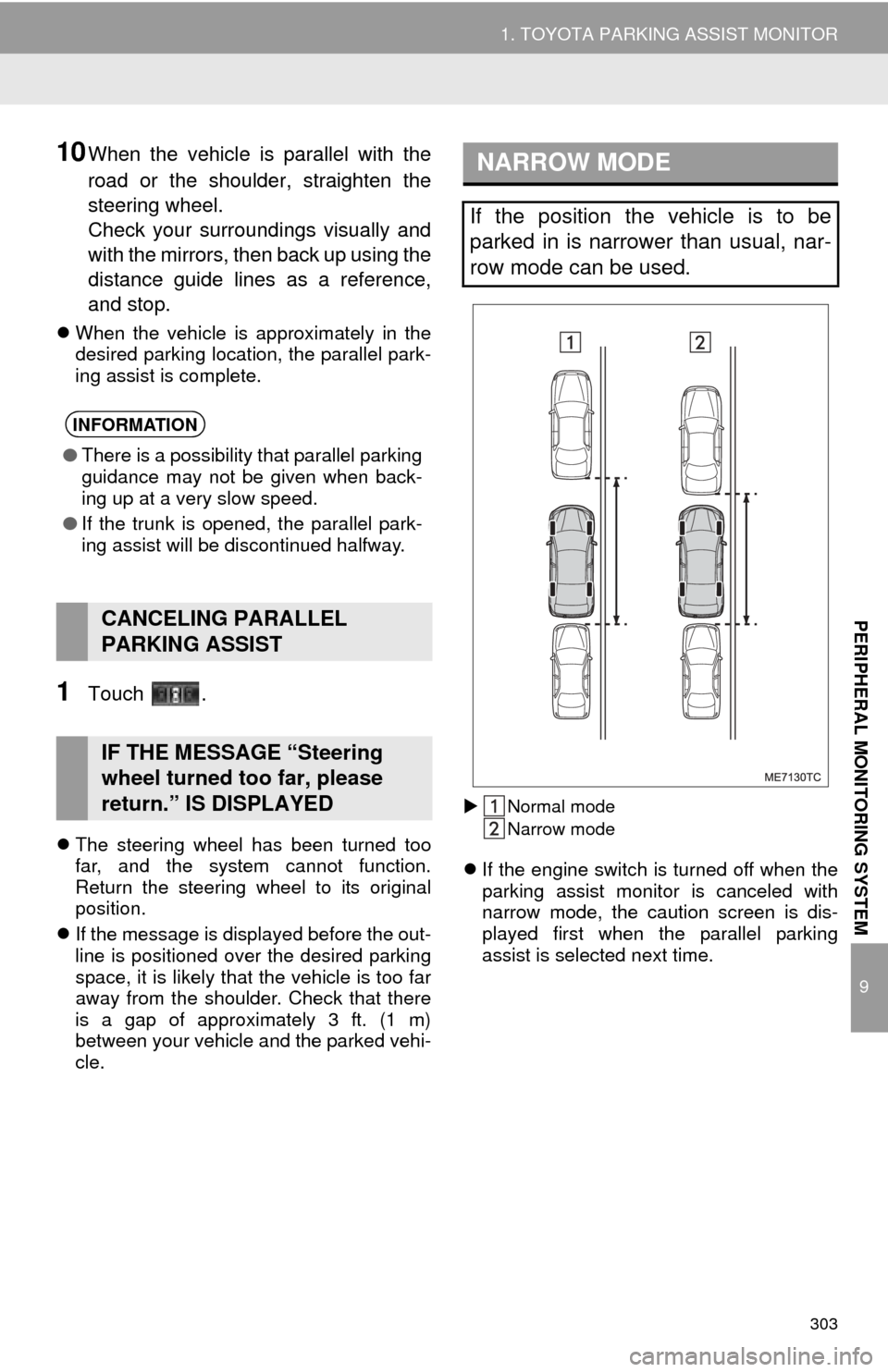
Normal mode
Narrow mode
If the engine switch is turned off when the
parking assist monitor is canceled with
narrow mode, the caution screen is dis-
played first when the parallel parking
assist is selected next time.
INFORMATION
● There is a possibility that parallel parking
guidance may not be given when back-
ing up at a very slow speed.
● If the trunk is opened, the parallel park-
ing assist will be discontinued halfway.
CANCELING PARALLEL
PARKING ASSIST
IF THE MESSAGE “Steering
wheel turned too far, please
return.” IS DISPLAYED
NARROW MODE
If the position the vehicle is to be
parked in is narrower than usual, nar-
row mode can be used.
Page 304 of 346
304
1. TOYOTA PARKING ASSIST MONITOR
1Touch while in parallel parking
assist mode.
2Confirm the warning on the caution
screen. If you agree, touch “I Agree”.
To cancel narrow mode, touch .
3When the system is s witched to narrow
mode, the indicator on will be
turned on.
Touch again to switch the system to
the normal mode.
OPERATING NARROW MODE
Page 305 of 346
305
1. TOYOTA PARKING ASSIST MONITOR
9
PERIPHERAL MONITORING SYSTEM
5. TOYOTA PARKING ASSIST MONITOR PRECAUTIONS
The image adjustment procedure for the
parking assist monitor screen is the same
as the procedure for adjusting the naviga-
tion screen. ( P. 3 2 )
AREA DISPLAYED ON
SCREEN
The parking assist monitor displays an
image of the view from the bumper of
the rear area of the vehicle.
Screen Displayed area
Corners of bumper
INFORMATION
● The area displayed on the screen may
vary according to vehicle orientation
conditions.
● Objects which are close to either corner
of the bumper or under the bumper can-
not be seen on the screen.
● The camera uses a special lens. The
distance of the image that appears on
the screen differs from the actual dis-
tance.
● Items which are located higher than the
camera may not be displayed by the
monitor.
Page 306 of 346

306
1. TOYOTA PARKING ASSIST MONITOR
THE CAMERA
The camera for the parking assist mon-
itor is located above the license plate.
USING THE CAMERA
If the camera lens becomes dirty, it
cannot transmit a clear image. If water
droplets, snow or mud adhere to the
lens, rinse with water and wipe with a
soft cloth. If the lens is extremely dirty,
wash it with a mild cleanser and rinse.
NOTICE
● The parking assist monitor may not
operate properly in the following cases,
or if the precautions described below are
not followed.
• If the back of the vehicle is hit, the
position and mounting angle of the
camera may change.
• As the camera has a water proof con-
struction, do not detach, disassemble
or modify it. This may cause incorrect
operation.
• Do not strongly rub the camera lens. If the camera lens is scratched, it cannot
transmit a clear image.
• Do not allow organic solvent, car wax, window cleaner or glass coat to adhere
to the camera. If this happens, wipe it
off as soon as possible.
• If the temperature changes rapidly,
such as when hot water is poured on
the vehicle in cold weather, the system
may not operate normally.
• When washing the vehicle, do not apply intensive bursts of water to the
camera or camera area. Doing so may
result in the camera malfunctioning.
● Do not expose the camera to strong
impact as this could cause a malfunc-
tion. If this happens, have the vehicle
inspected by your Toyota dealer as soon
as possible.
Page 307 of 346

307
1. TOYOTA PARKING ASSIST MONITOR
9
PERIPHERAL MONITORING SYSTEM
The distance guide lines and the vehicle
width extension guide lines may not actu-
ally be parallel with the dividing lines of the
parking space, even when they appear to
be so. Be sure to check visually.
The distances between the vehicle width
extension guide lines and the left and right
dividing lines of the parking space may not
be equal, even when they appear to be
so. Be sure to check visually.
The distance guide lines give a distance
guide for flat road surfaces. In any of the
following situations, there is a margin of
error between the guide lines on the
screen and the actual distance /course on
the road.
DIFFERENCES BETWEEN
THE SCREEN AND THE
ACTUAL ROADWHEN THE GROUND BEHIND
THE VEHICLE SLOPES UP
SHARPLY
The distance guide lines will appear to
be closer to the vehicle than the actual
distance. Because of this, objects will
appear to be farther away than they ac-
tually are. In the same way, there will
be a margin of error between the
guidelines and the actual distance/
course on the road.
Page 308 of 346

308
1. TOYOTA PARKING ASSIST MONITOR
WHEN THE GROUND BEHIND
THE VEHICLE SLOPES DOWN
SHARPLY
The distance guide lines will appear to
be further from the vehicle than the ac-
tual distance. Because of this, objects
will appear to be closer than they actu-
ally are. In the same way, there will be
a margin of error between the guide-
lines and the actual distance/course on
the road.WHEN ANY PART OF THE
VEHICLE SAGS
When any part of the vehicle sags due
to the number of passengers or the dis-
tribution of the load, there is a margin
of error between the guide lines on the
screen and the actual distance/course
on the road.
WHEN APPROACHING
THREE-DIMENSIONAL
OBJECTS
The estimated course lines target a flat
surfaced objects (such as the road). It
is not possible to determine the posi-
tion of three-dimensional objects (such
as vehicles) using the estimated
course lines and distance guide lines.
When approaching a three-dimension-
al object that extends outward (such as
the flatbed of a truck), be careful of the
following.
A margin of error
Page 309 of 346
309
1. TOYOTA PARKING ASSIST MONITOR
9
PERIPHERAL MONITORING SYSTEM
Estimated course lines
ESTIMATED COURSE LINES
Visually check the surroundings and
the area behind the vehicle. In the case
shown below, the truck appears to be
outside of the estimated course lines
and the vehicle does not look as if it
hits the truck. However, the rear body
of the truck may actually cross over the
estimated course lines. In reality if you
back up as guided by the estimated
course lines, the vehicle may hit the
truck.DISTANCE GUIDE LINES
Visually check the surroundings and
the area behind the vehicle. On the
screen, it appears that a truck is park-
ing at point B. However, in reality if you
back up to point A, you will hit the truck.
On the screen, it appears that A is clos-
est and C is furthest away. However, in
reality, the distance to A and C is the
same, and B is farther than A and C.
Positions of A, B and C
C
A B
C
AB


