Page 4 of 530

TABLE OF CONTENTS4
4RUNNER (U)_(OM35A83U)5-1. Using the air conditioning
system and defogger
Manual air conditioning system ........ 280
Automatic air conditioning system ........ 286
Seat heaters/ seat ventilators ................ 293
5-2. Using the interior lights Interior lights list ................ 295
• Interior lights ................. 296
• Personal lights .............. 296
5-3. Using the storage features
List of storage features...... 298
• Glove box...................... 299
• Console box .................. 299
• Cup holders .................. 300
• Auxiliary box ................. 302
• Coin holder/tissue pocket/
pen holder ..................... 303
• Bottle holders ................ 304
Luggage compartment features ........................... 305 5-4. Other interior features
Other interior features........ 310
• Sun visors ..................... 310
• Vanity mirrors ................ 310
• Clock ............................. 311
• Outside temperature display ........................... 312
• Power outlets (120 V AC) .................... 314
• Power outlets ................ 319
• Armrest.......................... 321
• Assist grips .................... 322
Garage door opener .......... 323
Safety Connect .................. 330
Compass ........................... 335
5Interior features
Page 19 of 530
19Pictorial index
4RUNNER (U)_(OM35A83U)AUX port
*2/USB port*2
Seat heater/ven
tilator switches*1. . . . . . . . . . . . . . . . . . . . . P. 293
Power outlets . . . . . . . . . . . . . . . . . . . . . . . . . . . . . . . . . . . . . P. 319
Front-wheel drive control lever
*1. . . . . . . . . . . . . . . . . . . . . P. 232
Front-wheel drive control switch
*1 . . . . . . . . . . . . . . . . . . . P. 232
Four-wheel drive control switch
*1. . . . . . . . . . . . . . . . . . . . P. 236
Seat heater switches
*1 . . . . . . . . . . . . . . . . . . . . . . . . . . . . . P. 293
Power back window switch . . . . . . . . . . . . . . . . . . . . . . . . . P. 151
*1: If equipped
*2: Refer to “Navigation System Owner’s Manual”.
1
2
3
4
5
6
7
Page 22 of 530

22Pictorial index
4RUNNER (U)_(OM35A83U)Inside rear view mirror . . . . . . . . . . . . . . . . . . . . . . . . . . . . . P. 144
Sun visors . . . . . . . . . . . . . . . . . . . . . . . . . . . . . . . . . . . . . . . P. 310
Vanity mirrors . . . . . . . . . . . . . . . . . . . . . . . . . . . . . . . . . . . . . P. 310
Interior light
*2 . . . . . . . . . . . . . . . . . . . . . . . . . . . . . . . . . . . . P. 296
Personal lights . . . . . . . . . . . . . . . . . . . . . . . . . . . . . . . . . . . . P. 296
Moon roof switches
*1 . . . . . . . . . . . . . . . . . . . . . . . . . . . . . . P. 155
“SOS” button
*1 . . . . . . . . . . . . . . . . . . . . . . . . . . . . . . . . . . . P. 330
Garage door opener switches
*1. . . . . . . . . . . . . . . . . . . . . . P. 323
Microphone
*3
Assist grips . . . . . . . . . . . . . . . . . . . . . . . . . . . . . . . . . . . . . . P. 322
Active traction control switch
*1. . . . . . . . . . . . . . . . . . . . . . P. 240
VSC off switch . . . . . . . . . . . . . . . . . . . . . . . . . . . . . . . . . . . . P. 262
DAC switch
*1. . . . . . . . . . . . . . . . . . . . . . . . . . . . . . . . . . . . . P. 247
Rear differential lock switch
*1 . . . . . . . . . . . . . . . . . . . . . . . P. 244
Crawl Control switch
*1 . . . . . . . . . . . . . . . . . . . . . . . . . . . . . P. 250
Multi-terrain Select switch
*1. . . . . . . . . . . . . . . . . . . . . . . . . P. 253
Auxiliary box
*1. . . . . . . . . . . . . . . . . . . . . . . . . . . . . . . . . . . . P. 302
1
2
3
4
5
6
7
8
9
10
11
12
13
14
15
16
17
Page 111 of 530

1113-2. Opening, closing and locking the doors
3
Operation of each component
4RUNNER (U)_(OM35A83U)●
When the electronic key is in contact with, or is covered by the following
metallic objects
• Cards to which aluminum foil is attached
• Cigarette boxes that have aluminum foil inside
• Metallic wallets or bags
• Coins
• Hand warmers made of metal
• Media such as CDs and DVDs
● When multiple electronic keys are in the vicinity
● When other wireless keys (that emit radio waves) are being used nearby
● When carrying the electronic key together with the following devices that
emit radio waves
• Another vehicle’s electronic key or a wireless key that emits radio waves
• Personal computers or personal digital assistants (PDAs)
• Digital audio players
• Portable game systems
● If window tint with a metallic content or metallic objects are attached to the
back window
■ Note for the entry function
●Even when the electronic key is within the effective range (detection areas),
the system may not operate properly in the following cases:
• The electronic key is too close to the window or outside door handle, near
the ground, or in a high place when the doors are locked or unlocked.
• The electronic key is on the instrument panel or floor, in the glove box, or in the auxiliary box of the instrument panel.
● Do not leave the electronic key on top of the instrument panel or near the
door pockets when exiting the vehicle. Depending on the radio wave recep-
tion conditions, it may be detected by the antenna outside the cabin and the
door will become lockable from the outside, possibly trapping the electronic
key inside the vehicle.
● As long as the electronic key is within the effective range, the doors may be
locked or unlocked by anyone. However, only the doors detecting the elec-
tronic key can be used to unlock the vehicle.
● The doors may lock or unlock if the electronic key is within the effective
range and a large amount of water splashes on the door handle, such as in
the rain or in a car wash. The doors will automatically be locked after
approximately 60 seconds if a door is not opened and closed.
● If the wireless remote control is used to lock the doors when the electronic
key is near the vehicle, there is a possibility that the door may not be
unlocked by the entry function. (Use the wireless remote control to unlock
the doors.)
Page 281 of 530

279
Interior features5
4RUNNER (U)_(OM35A83U)5-1. Using the air conditioning
system and defogger
Manual air conditioning system............................. 280
Automatic air conditioning system............................. 286
Seat heaters/ seat ventilators ................ 293
5-2. Using the interior lights Interior lights list ................ 295
• Interior lights ................. 296
• Personal lights .............. 296 5-3. Using the storage
features
List of storage features ..... 298
• Glove box...................... 299
• Console box .................. 299
• Cup holders .................. 300
• Auxiliary box ................. 302
• Coin holder/tissue pocket/pen holder ......... 303
• Bottle holders ................ 304
Luggage compartment features ........................... 305
5-4. Other interior features Other interior features ....... 310
• Sun visors ..................... 310
• Vanity mirrors................ 310
• Clock ............................. 311
• Outside temperature display........................... 312
• Power outlets (120 V AC) .................... 314
• Power outlets ................ 319
• Armrest ......................... 321
• Assist grips ................... 322
Garage door opener.......... 323
Safety Connect ................. 330
Compass ........................... 335
Page 300 of 530
298
4RUNNER (U)_(OM35A83U)
5-3. Using the storage features
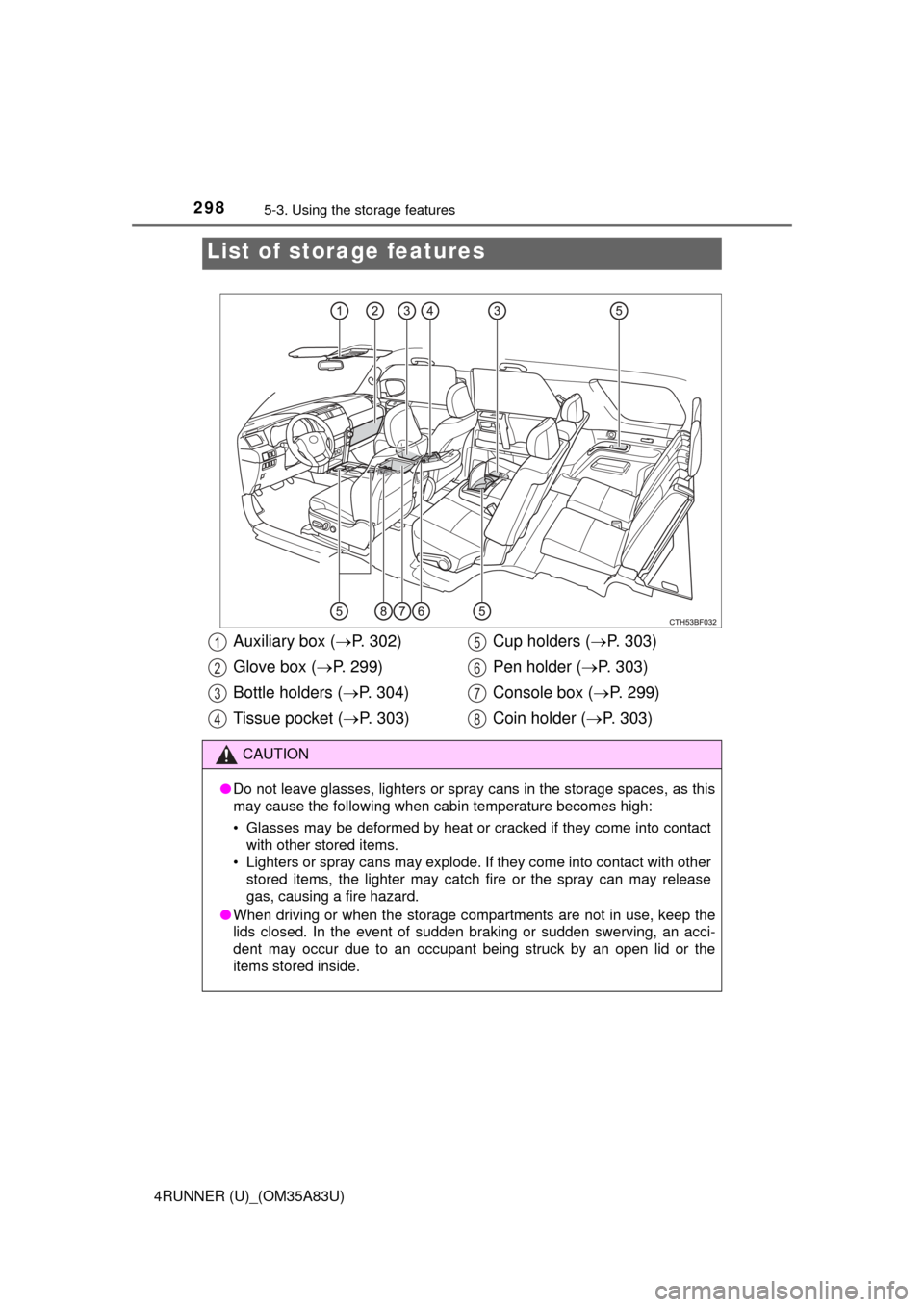
List of storage features
Auxiliary box (P. 302)
Glove box ( P. 299)
Bottle holders ( P. 304)
Tissue pocket ( P. 303) Cup holders (
P. 303)
Pen holder ( P. 303)
Console box ( P. 299)
Coin holder ( P. 303)
CAUTION
●Do not leave glasses, lighters or spray cans in the storage spaces, as this
may cause the following when cabin temperature becomes high:
• Glasses may be deformed by heat or cracked if they come into contact
with other stored items.
• Lighters or spray cans may explode. If they come into contact with other
stored items, the lighter may catch fire or the spray can may release
gas, causing a fire hazard.
● When driving or when the storage compartments are not in use, keep the
lids closed. In the event of sudden braking or sudden swerving, an acci-
dent may occur due to an occupant being struck by an open lid or the
items stored inside.
1
2
3
4
5
6
7
8
Page 304 of 530
3025-3. Using the storage features
4RUNNER (U)_(OM35A83U)
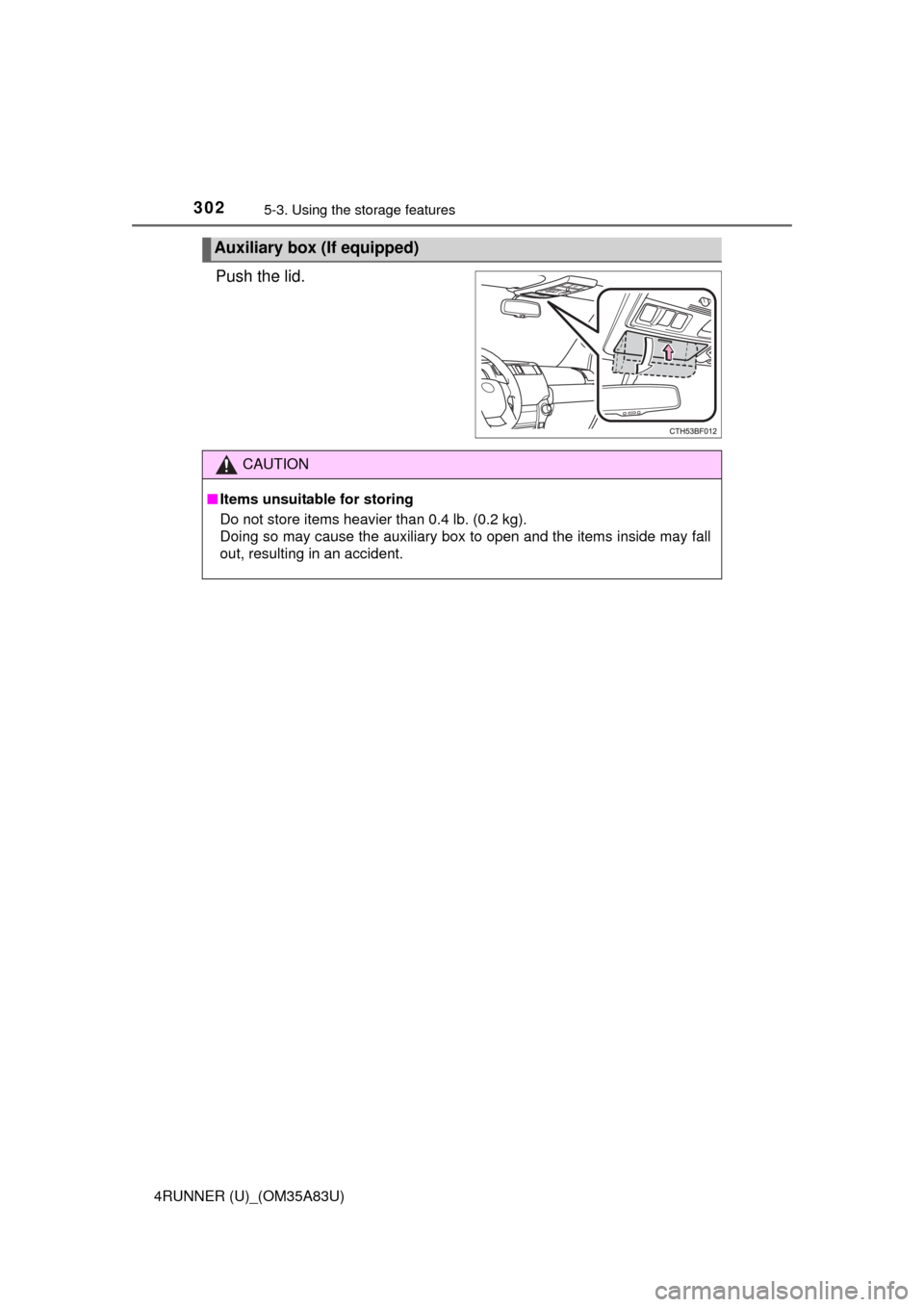
Push the lid.
Auxiliary box (If equipped)
CAUTION
■Items unsuitable for storing
Do not store items heavier than 0.4 lb. (0.2 kg).
Doing so may cause the auxiliary box to open and the items inside may fall
out, resulting in an accident.
Page 358 of 530
3566-3. Do-it-yourself maintenance
4RUNNER (U)_(OM35A83U)
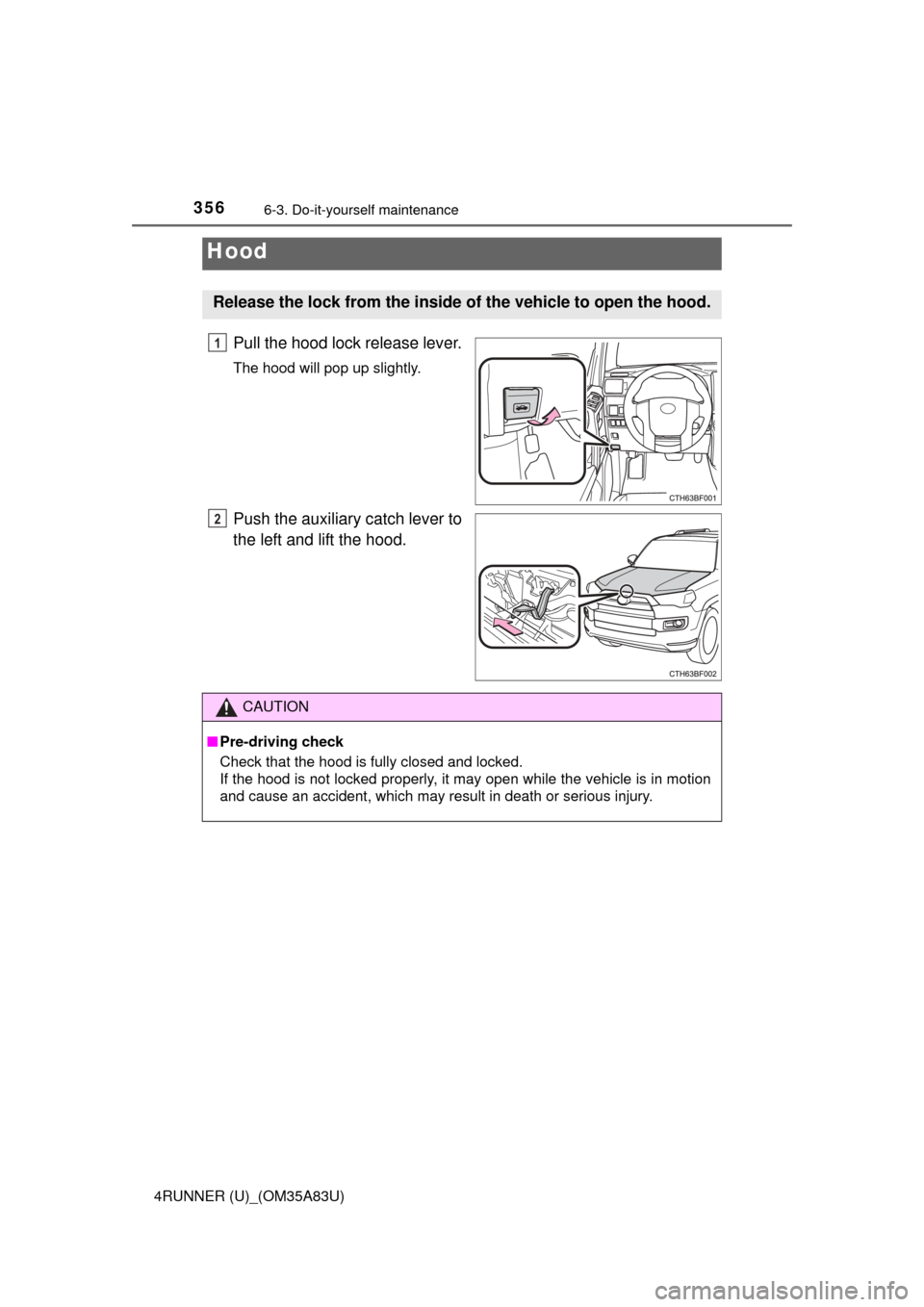
Pull the hood lock release lever.
The hood will pop up slightly.
Push the auxiliary catch lever to
the left and lift the hood.
Hood
Release the lock from the inside of the vehicle to open the hood.
1
2
CAUTION
■Pre-driving check
Check that the hood is fully closed and locked.
If the hood is not locked properly, it may open while the vehicle is in motion
and cause an accident, which may result in death or serious injury.