Page 120 of 530
1203-2. Opening, closing and locking the doors
4RUNNER (U)_(OM35A83U)
CAUTION
■Operating the back door
Observe the following precautions.
Failure to do so may cause parts of the body to be caught, resulting in death
or serious injury.
● Remove any heavy loads, such as snow and ice, from the back door
before opening it. Failure to do so may cause the back door to suddenly
shut again after it is opened.
● When opening or closing the back door, thoroughly check to make sure
the surrounding area is safe.
● If anyone is in the vicinity, make sure they are safe and let them know that
the back door is about to open or close.
● Use caution when opening or closing the back door in windy weather as it
may move abruptly in strong wind.
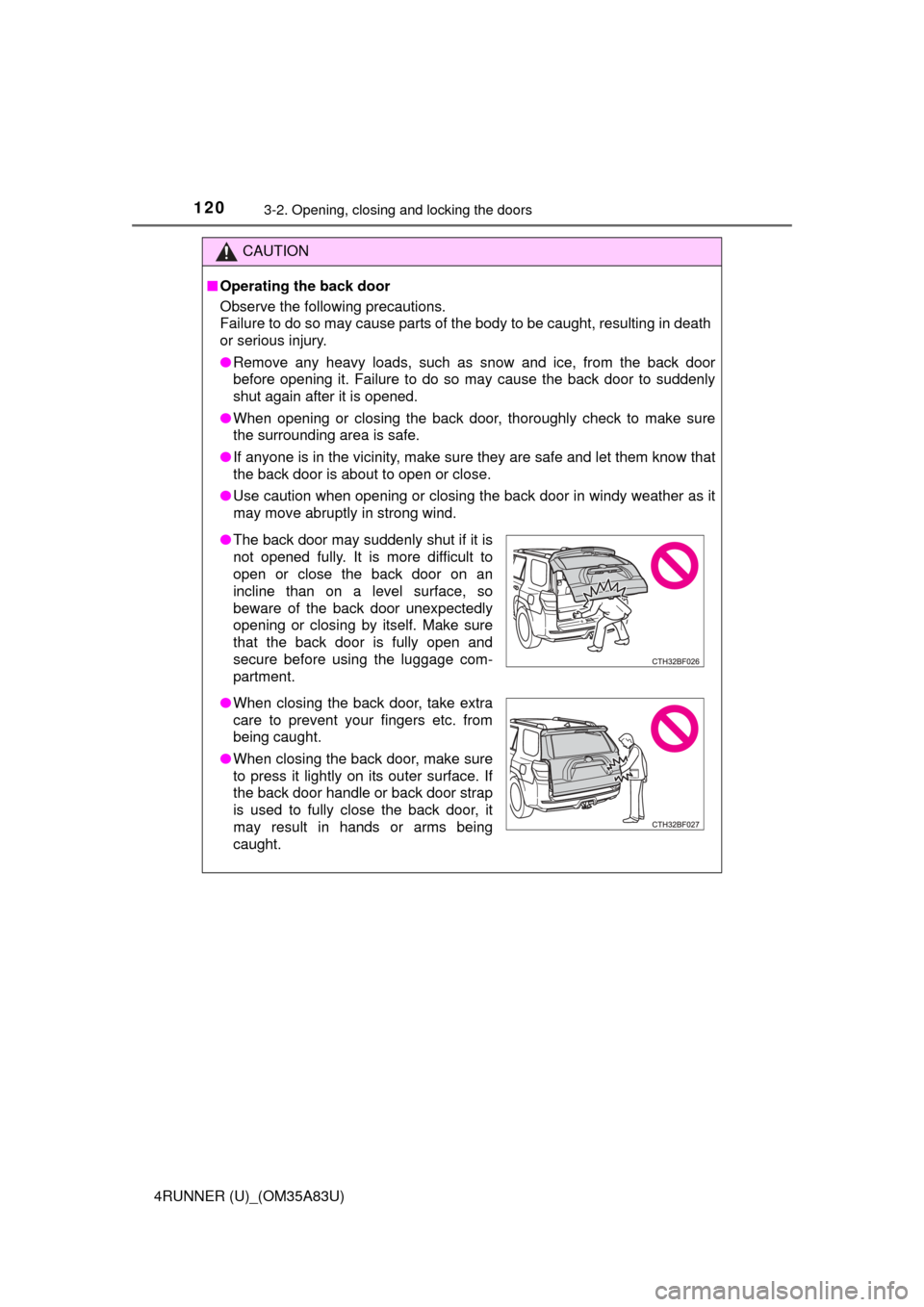
●The back door may suddenly shut if it is
not opened fully. It is more difficult to
open or close the back door on an
incline than on a level surface, so
beware of the back door unexpectedly
opening or closing by itself. Make sure
that the back door is fully open and
secure before using the luggage com-
partment.
● When closing the back door, take extra
care to prevent your fingers etc. from
being caught.
● When closing the back door, make sure
to press it lightly on its outer surface. If
the back door handle or back door strap
is used to fully close the back door, it
may result in hands or arms being
caught.
Page 121 of 530
1213-2. Opening, closing and locking the doors
3
Operation of each component
4RUNNER (U)_(OM35A83U)
CAUTION
●Do not pull on the back door damper stay to close the back door, and do
not hang on the back door damper stay.
Doing so may cause hands to be caught or the back door damper stay to
break, causing an accident.
● If a bicycle carrier or similar heavy object is attached to the back door, it
may suddenly shut again after being opened, causing someone’s hands,
head or neck to be caught and injured. When installing an accessory part
to the back door, using a genuine Toyota part is recommended.
NOTICE
■To prevent damage to the back door components
Do not allow more than one person to get on the rear step bumper at a time.
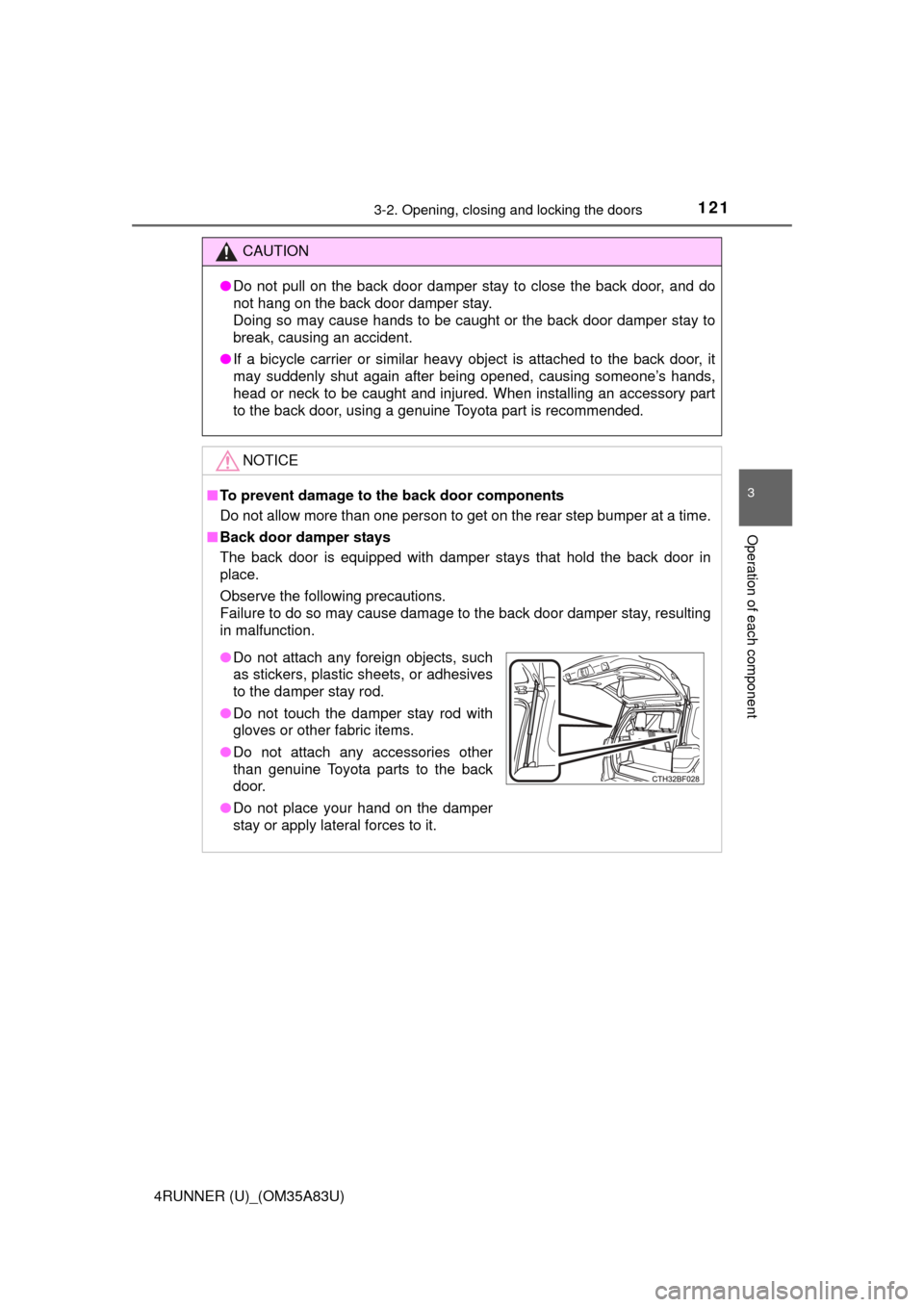
■ Back door damper stays
The back door is equipped with damper stays that hold the back door in
place.
Observe the following precautions.
Failure to do so may cause damage to the back door damper stay, resulting
in malfunction.
● Do not attach any foreign objects, such
as stickers, plastic sheets, or adhesives
to the damper stay rod.
● Do not touch the damper stay rod with
gloves or other fabric items.
● Do not attach any accessories other
than genuine Toyota parts to the back
door.
● Do not place your hand on the damper
stay or apply lateral forces to it.
Page 122 of 530
1223-2. Opening, closing and locking the doors
4RUNNER (U)_(OM35A83U)
Page 123 of 530
1233-2. Opening, closing and locking the doors
3
Operation of each component
4RUNNER (U)_(OM35A83U)
Page 139 of 530

1373-3. Adjusting the seats
3
Operation of each component
4RUNNER (U)_(OM35A83U)
While pressing the recalled
button, press and hold the
door lock switch (either lock
or unlock) until the buzzer
sounds.
If the button could not be regis-
tered, the buzzer sounds contin-
uously for approximately 3
seconds.
■
Recall procedure
Carry the electronic key that has been registered to the driving
position, and then unlock and open the driver’s door using the
smart system or wire less remote control.
The driving position will move to the recorded position.
If the driving position is in a position that has already been recorded, the
seat will not move.
■
Cancelation procedure
Carry only the key you want to cancel and then close the driver’s
door.
If 2 or more keys are in the vehicle, the driving position cannot be
canceled properly.
Turn the engine switch to IGNITION ON mode.
While pressing the “SET” button, press and hold the door lock
switch (either lock or unlock) until the buzzer sounds twice.
If the button could not be canceled, the buzzer sounds continuously for
approximately 3 seconds.
■Recalling the driving position us ing the memory recall function
● Different driving positions can be registered for each electronic key. There-
fore, the driving position that is recalled may be different depending on the
key being carried.
● If a door other than the driver’s door is unlocked with the smart system, the
driving position cannot be recalled. In this case, press the driving position
button which has been set.
■ Customization
The unlock door settings of the memory recall function can be customized.
(Customizable features: P. 485)
4
1
2
Page 151 of 530

1493-5. Opening, closing the windows and moon roof
3
Operation of each component
4RUNNER (U)_(OM35A83U)
■The power windows can be operated when
Vehicles without a smart key system
The engine switch is in the “ACC” or “ON” position.
Vehicles with a smart key system
The engine switch is in IGNITION ON mode.
■ Operating the power windows after turning the engine off
Vehicles without a smart key system
The power windows can be operated for approximately 45 seconds even
after the engine switch is turned to the “ACC” or “LOCK” position. They can-
not, however, be operated once either front door is opened.
Vehicles with a smart key system
The power windows can be operated for approximately 45 seconds even
after the engine switch is turned to ACCESSORY mode or turned off. They
cannot, however, be operated once either front door is opened.
■ Jam protection function
If an object becomes caught between the window and the window frame, win-
dow travel is stopped and the window is opened slightly.
■ When the power window does not close normally
If the jam protection function is operating abnormally and a window cannot be
closed, perform the following operations using the power window switch on
the relevant door.
● Vehicles without a smart key system: After stopping the vehicle, the window
can be closed by holding the power window switch in the one-touch closing
position while the engine switch is turned to the “ON” position.
● Vehicles with a smart key system: After stopping the vehicle, the window
can be closed by holding the power window switch in the one-touch closing
position while the engine switch is turned to IGNITION ON mode.
● If the window still cannot be closed even by carrying out the operation as
explained above, initialize the function by performing the following proce-
dure.
Hold the power window switch in the one-touch closing position. Continue
holding the switch for a further 6 seconds after the window has closed.
Hold the power window switch in the one-touch opening position. Con-
tinue holding the switch for a further 2 seconds after the window has
opened completely.
Hold the power window switch in the one-touch closing position once
again. Continue holding the switch for a further 2 seconds after the win-
dow has closed.
If you release the switch while the window is moving, start again from the
beginning.
If the window continues to close but then re-open slightly even after perform-
ing the above procedure correctly, have the vehicle inspected by your Toyota
dealer.
1
2
3
Page 155 of 530
1533-5. Opening, closing the windows and moon roof
3
Operation of each component
4RUNNER (U)_(OM35A83U)■
Operating the power back window from inside the vehicle after turning
the engine off
Vehicles without a smart key system
The power back window can be operated for approximately 45 seconds even
after the engine switch is turned to the “ACC” or “LOCK” position. It cannot,
however, be operated once either front door is opened.
Vehicles with a smart key system
The power back window can be operated for approximately 45 seconds even
after the engine switch is turned to ACCESSORY mode or turned off. It can-
not, however, be operated once either front door is opened.
■ Jam protection function
If an object becomes caught between the window and the window frame, win-
dow travel is stopped and the window is opened slightly.
■ When the power back window does not close normally
If the jam protection function is operating abnormally and a window cannot be
closed, perform the following operations using the power back window
switch.
●Vehicles without a smart key system: After stopping the vehicle, the window
can be closed by holding the power back window switch in the one-touch
closing position while the engine switch is turned to the “ON” position.
● Vehicles with a smart key system: After stopping the vehicle, the window
can be closed by holding the power back window switch in the one-touch
closing position while the engine switch is turned to IGNITION ON mode.
● If the window still cannot be closed even by carrying out the operation
explained above, initialize the function by performing the following proce-
dure.
Hold the power back window switch in the one-touch closing position.
Continue holding the switch for a further 6 seconds after the window has
closed.
Hold the power back window switch in the one-touch opening position.
Continue holding the switch for a further 2 seconds after the window has
opened completely.
Hold the power back window switch in the one-touch closing position
once again. Continue holding the switch for a further 2 seconds after the
window has closed.
If you release the switch while the window is moving, start again from the
beginning.
If the window continues to close but then re-open slightly even after perform-
ing the above procedure correctly, have the vehicle inspected by your Toyota
dealer.
■ Customization
Settings (e.g. linked operation) can be changed.
(Customizable features P. 485)
1
2
3
Page 158 of 530

1563-5. Opening, closing the windows and moon roof
4RUNNER (U)_(OM35A83U)
■The moon roof can be operated when
Vehicles without a smart key system
The engine switch is in the “ON” position.
Vehicles with a smart key system
The engine switch is in IGNITION ON mode.
■ Operating the moon roof af ter turning the engine off
Vehicles without a smart key system
The moon roof can be operated for approximately 45 seconds even after the
engine switch is turned to the “ACC” or “LOCK” position. They cannot, how-
ever, be operated once either front door is opened.
Vehicles with a smart key system
The moon roof can be operated for approximately 45 seconds after the
engine switch is turned to ACCESSORY mode or turned off. It cannot, how-
ever, be operated once either front door is opened.
■ Jam protection function
If an object is detected between the moon roof and the frame while the moon
roof is closing or tilting down, travel is stopped and the moon roof opens
slightly.
■ To reduce moon roof wind noise
When the moon roof is opened automatically, it will stop slightly before the
fully open position. Driving with the moon roof in this position can help reduce
wind noise.
■ Sunshade
The sunshade can be opened and closed manually. However, the sunshade
will open automatically when the moon roof is opened.