2014 TOYOTA 4RUNNER brake light
[x] Cancel search: brake lightPage 186 of 530
1844-1. Before driving
4RUNNER (U)_(OM35A83U)
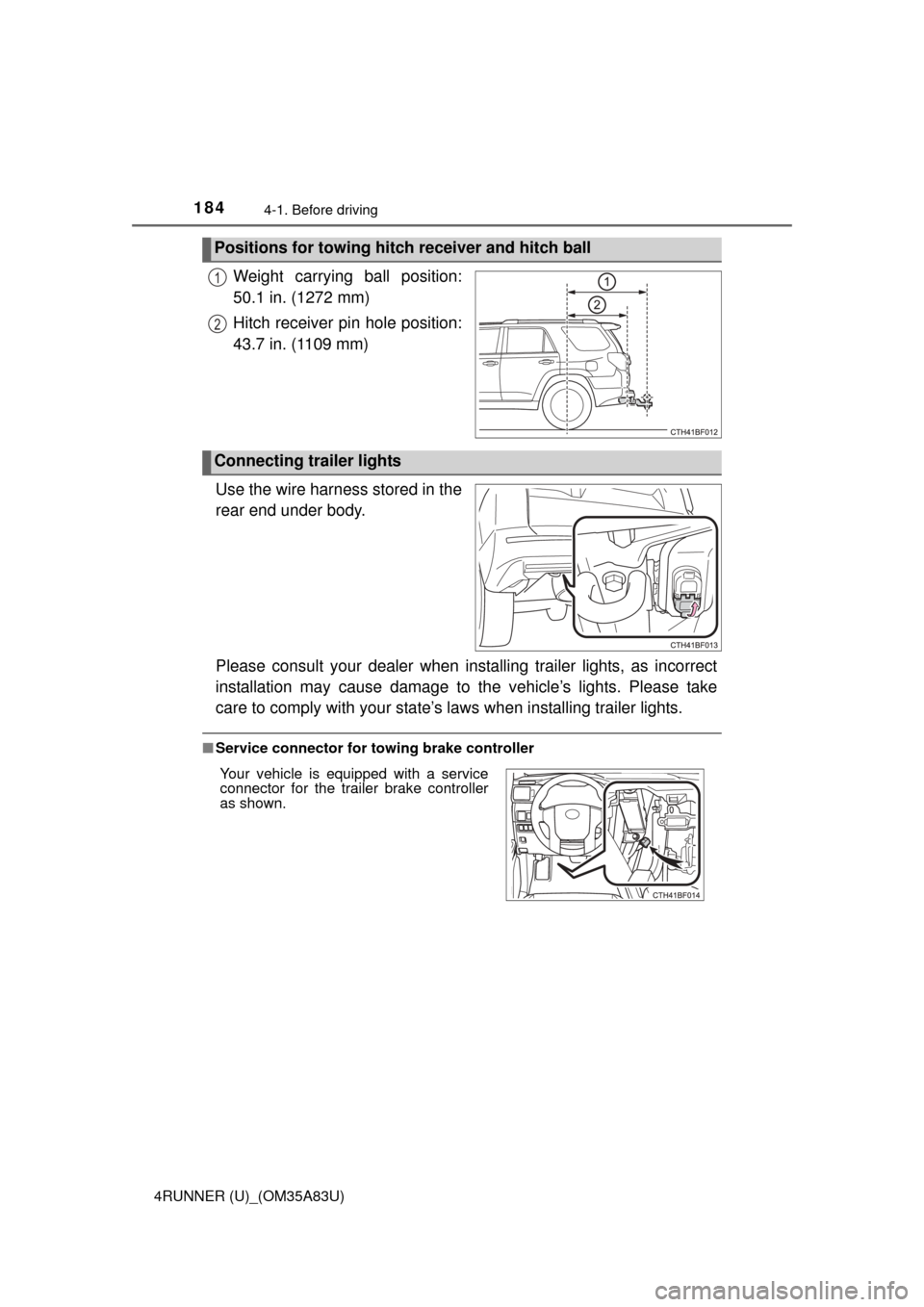
Weight carrying ball position:
50.1 in. (1272 mm)
Hitch receiver pin hole position:
43.7 in. (1109 mm)
Use the wire harness stored in the
rear end under body.
Please consult your dealer when inst alling trailer lights, as incorrect
installation may cause damage to th e vehicle’s lights. Please take
care to comply with y our state’s laws when installing trailer lights.
■Service connector for towing brake controller
Positions for towing hitch receiver and hitch ball
1
2
Connecting trailer lights
Your vehicle is equipped with a service
connector for the trailer brake controller
as shown.
Page 190 of 530

1884-1. Before driving
4RUNNER (U)_(OM35A83U)■
Before towing
Check that the following conditions are met:
●Ensure that your vehicle’s tires are properly inflated. ( P. 468)
● Trailer tires are inflated according to the trailer manufacturer’s recommen-
dation.
● All trailer lights work as required by law.
● All lights work each time you connect them.
● The trailer ball is set at the proper height for the coupler on the trailer.
● The trailer is level when it is hitched.
Do not drive if the trailer is not level, and check for improper tongue weight,
overloading, worn suspension, or other possible causes.
● The trailer cargo is securely loaded.
● The rear view mirrors conform to all applicable federal, state/provincial or
local regulations. If they do not, install rear view mirrors appropriate for tow-
ing purposes.
■ Break-in schedule
If your vehicle is new or equipped with any new power train components
(such as an engine, transmission, differ ential or wheel bearing), Toyota rec-
ommends that you do not tow a trailer until the vehicle has been driven for
over 500 miles (800 km).
After the vehicle has been driven for over 500 miles (800 km), you can start
towing. However, for the next 500 miles (800 km), drive the vehicle at a speed
of less than 45 mph (72 km/h) when towing a trailer, and avoid full throttle
acceleration.
■ Maintenance
●If you tow a trailer, your vehicle will require more frequent maintenance due
to the additional load. (See “Scheduled Maintenance Guide” or “Owner’s
Manual Supplement”.)
● Retighten the fixing bolts of the towing ball and bracket after approximately
600 miles (1000 km) of trailer towing.
■ If trailer sway occurs
One or more factors (crosswinds, passing vehicles, rough roads, etc.) can
adversely affect handling of your vehicle and trailer, causing instability.
●
If trailer swaying occurs:
• Firmly grip the steering wheel. Steer straight ahead.
Do not try to control trailer swaying by turning the steering wheel.
• Begin releasing the accelerator pedal immediately but very gradually to reduce speed.
Do not increase speed. Do not apply vehicle brakes.
If you make no extreme correction with the steering or brakes, your vehicle
and trailer should stabilize. (if enabled, Trailer Sway Control can also help to
stabilize the vehicle and trailer.)
Page 192 of 530
1904-1. Before driving
4RUNNER (U)_(OM35A83U)
CAUTION
●Do not apply the brakes suddenly as you may skid, resulting in jackknifing
and loss of vehicle control. This is especially true on wet or slippery sur-
faces.
● Do not exceed the trailer hitch assembly weight, gross vehicle weight,
gross axle weight and trailer tongue weight capacities.
● Do not use cruise control when towing.
● Slow down and downshift before descending steep or long downhill
grades. Do not make sudden downshifts while descending steep or long
downhill grades.
● Vehicle-trailer instability is more likely on steep long downhills. Before
descending steep or long downhill grades, slow down and downshift. Do
not make sudden downshifts when descending steep or long downhill
grades. Avoid holding the brake pedal down too long or applying the
brakes too frequently. This could cause the brakes to overheat and result
in reduced braking efficiency.
■ Hitch
Trailer hitch assemblies have different weight capacities established by the
hitch manufacturer. Even though the vehicle may be physically capable of
towing a higher weight, the operator must determine the maximum weight
rating of the particular hitch assembly and never exceed the maximum
weight rating specified for the trailer-hitch. Exceeding the maximum weight
rating set by the trailer-hitch manufacturer can cause an accident resulting
in death or serious personal injuries.
■ When towing a trailer
Toyota recommends trailers with brakes that conform to any applicable fed-
eral and state/provincial regulations.
● If the gross trailer weight exceeds unbraked TWR, trailer brakes are
required. Toyota recommends trailers with brakes that conform to all appli-
cable federal and state/provincial regulations.
● Never tap into your vehicle’s hydraulic system, as this will lower the vehi-
cle’s braking effectiveness.
● Never tow a trailer without using a safety chain securely attached to both
the trailer and the vehicle. If damage occurs to the coupling unit or hitch
ball, there is danger of the trailer wandering into another lane.
NOTICE
■When installing a trailer hitch
Use only the position recommended by your Toyota dealer. Do not install
the trailer hitch on the bumper; this may cause body damage.
■ Do not directly splice trailer lights
Do not directly splice trailer lights. Directly splicing trailer lights may damage
your vehicle’s electrical system and cause a malfunction.
Page 211 of 530

2094-3. Operating the lights and wipers
4
Driving
4RUNNER (U)_(OM35A83U)
■Daytime running light system
●To make your vehicle more visible to other drivers, the headlight high beam
turn on automatically (at a decreased intensity) whenever the engine is
started and the parking brake is released. Daytime running lights are not
designed for use at night.
Type A and B: Daytime running lights can be turned off by operating the
switch.
● Compared to turning on the headlights, the daytime running light system
offers greater durability and consumes less electricity, so it can help improve
fuel economy.
■ Headlight control sensor (if equipped)
■ Automatic light off system
Vehicles without a smart key system
● When the headlights come on: The headlights and tail lights turn off 30 sec-
onds after a door is opened and closed if the engine switch is turned to the
“ACC” or “LOCK” position. (The lights turn off immediately if on the
key is pressed after all the doors are locked.)
● When only the tail lights come on: The tail lights turn off automatically if the
engine switch is turned to the “ACC” or “LOCK” position and the driver’s
door is opened.
To turn the lights on again, turn the engine switch to the “ON” position, or turn
the lights off and then back to or .
Vehicles with a smart key system
● When the headlights come on: The headlights and tail lights turn off 30
seconds after a door is opened and closed if the engine switch is turned to
ACCESSORY mode or turned off. (The lights turn off immediately if
on the key is pressed after all the doors are locked.)
● When only the tail lights come on: The tail lights turn off automatically if the
engine switch is turned off and the driver’s door is opened.
To turn the lights on again, turn the engine switch to IGNITION ON mode, or
turn the light switch off and then back to or .
■ Customization
Settings (e.g. light sensor sensitivity) can be changed.
(Customizable features: P. 485)
The sensor may not function properly if an
object is placed on the sensor, or anything
that blocks the sensor is affixed to the
windshield.
Doing so interferes with the sensor
detecting the level of ambient light and
may cause the automatic headlight sys-
tem to malfunction.
Page 231 of 530

2294-5. Using the driving support systems
4
Driving
4RUNNER (U)_(OM35A83U)■
Sensor detection information
●The sensor’s detection areas are limited to the areas around the vehicle’s
front corner and rear bumpers.
● Certain vehicle conditions and the surrounding environment may affect the
ability of the sensor to correctly detect obstacles. Particular instances where
this may occur are listed below.
• There is dirt, snow or ice on the sensor. (Wiping the sensors will resolve
this problem.)
• The sensor is frozen. (Thawing the area will resolve this problem.)
In especially cold weather, if a sensor is frozen the screen may show an
abnormal display, or obstacles may not be detected.
• The sensor is covered in any way.
• The vehicle is leaning considerably to one side.
• On an extremely bumpy road, on an incline, on gravel, or on grass.
• The vicinity of the vehicle is noisy due to vehicle horns, motorcycleengines, air brakes of large vehicles, or other loud noises producing ultra-
sonic waves.
• There is another vehicle equipped with parking assist sensors in the
vicinity.
• The sensor is coated with a sheet of spray or heavy rain.
• The vehicle is equipped with a fender pole or wireless antenna.
• Towing eyelet is installed.
• The bumper or sensor receives a strong impact.
• The vehicle is approaching a tall or curved curb.
• In harsh sunlight or intense cold weather.
• The area directly under the bumpers is not detected.
• If obstacles draw too close to the sensor.
• A non-genuine Toyota suspension (lowered suspension etc.) is installed.
• People may not be detected if they are wearing certain types of clothing.
In addition to the examples above, there are instances in which, because of
their shape, signs and other objects may be judged by the sensor to be closer
than they are.
● The shape of the obstacle may prevent the sensor from detecting it. Pay
particular attention to the following obstacles:
• Wires, fences, ropes, etc.
• Cotton, snow and other materials that absorb sound waves
• Sharply-angled objects
• Low obstacles
• Tall obstacles with upper sections projecting outwards in the direction of
your vehicle
Page 247 of 530
2454-5. Using the driving support systems
4
Driving
4RUNNER (U)_(OM35A83U)
Before using the rear differential lock system:
Stop the vehicle, shift the shift lever to N and shift the front-wheel
drive control lever into L4 to see if this is sufficient. If this has no
effect, additionally use the rear differential lock system.
Be sure the wheels have stopped spinning.
Press the rear differential lock switch.
Gently depress the accelerator pedal.
After the rear differential is locked, the indicator will come on.
Unlock the rear differential as soon as the vehicle moves.
To unlock the rear differential, press the switch again.
■ Locking the rear differential
The following systems do not operate when the rear differential is locked. It is
normal operation for the ABS warning light and VSC OFF indicator to be on at
this time.
•ABS
• Multi Terrain ABS
• Brake assist system
•VSC
• Hill-start assist control
■ The rear differential lock is disengaged when
The front-wheel drive control lever or switch is shifted to H2 or H4.
Never forget to turn off the switch after using this feature.
■ After unlocking the rear differential
Check that the indicator goes off.
■ If the rear differential lock indicator flashes rapidly
There may be a malfunction in the rear differential lock system. Have the
vehicle inspected by your Toyota dealer immediately.
Using the rear differential lock system
1
2
3
4
Page 250 of 530
2484-5. Using the driving support systems
4RUNNER (U)_(OM35A83U)
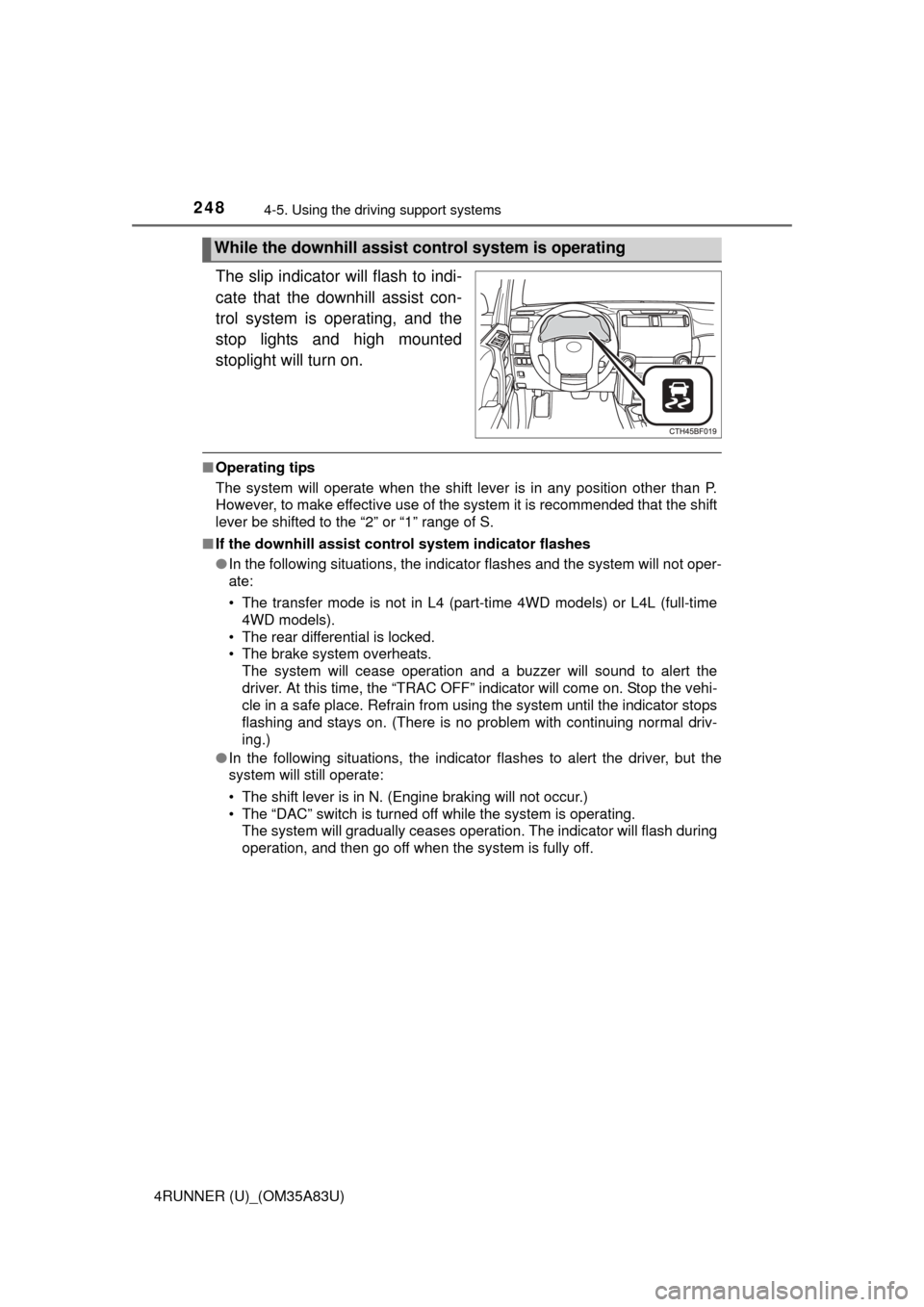
The slip indicator will flash to indi-
cate that the downhill assist con-
trol system is operating, and the
stop lights and high mounted
stoplight will turn on.
■Operating tips
The system will operate when the shift lever is in any position other than P.
However, to make effective use of the system it is recommended that the shift
lever be shifted to the “2” or “1” range of S.
■ If the downhill assist control system indicator flashes
●In the following situations, the indicator flashes and the system will not oper-
ate:
• The transfer mode is not in L4 (part-time 4WD models) or L4L (full-time
4WD models).
• The rear differential is locked.
• The brake system overheats. The system will cease operation and a buzzer will sound to alert the
driver. At this time, the “TRAC OFF” indicator will come on. Stop the vehi-
cle in a safe place. Refrain from using the system until the indicator stops
flashing and stays on. (There is no problem with continuing normal driv-
ing.)
● In the following situations, the indicator flashes to alert the driver, but the
system will still operate:
• The shift lever is in N. (Engine braking will not occur.)
• The “DAC” switch is turned off while the system is operating.
The system will gradually ceases operation. The indicator will flash during
operation, and then go off when the system is fully off.
While the downhill assist control system is operating
Page 254 of 530
2524-5. Using the driving support systems
4RUNNER (U)_(OM35A83U)■
Automatic system cancelation
In the following situations, the system will cease operation and a buzzer will
sound to alert the driver. The Crawl Control indicator will flash until the system
is turned off completely.
●When the shift lever is shifted to P or N
● When the front-wheel drive control lever or switch is shifted to H4
● When the driver’s door is opened
● When the system is malfunctioning
● When the brake system overheats
Stop the vehicle in a safe place. (There is no problem with continuing normal
driving.)
● When the automatic transmission system overheats
Stop the vehicle in a safe place until the automatic transmission fluid tem-
perature warning light goes off.
■ Sounds and vibrations caused by the Crawl Control system
● A sound may be heard from the engine compartment when the engine is
started or just after the vehicle begins to move. This sound does not indicate
that a malfunction has occurred in Crawl Control system.
● Either of the following conditions may occur when the Crawl Control system
is operating. None of these indicates that a malfunction has occurred.
• Vibrations may be felt through the vehicle body and steering.
• A motor sound may be heard after the vehicle comes to a stop.
CAUTION
■When using Crawl Control
● Do not overly rely on Crawl Control. This function does not extend the
vehicle’s performance limitations. A lways check the terrain thoroughly and
drive safely.
● The recommended speed modes for the listed terrains ( P. 251) are only
a reference. The selected mode may not be suitable to actual off-road con-
ditions due to factors such as the type or unevenness of the terrain or the
degree of incline. Check the actual terrain thoroughly and drive safely.
● After activating Crawl Control, make sure that the Crawl Control indicator
comes on. If the indicator flashes, the vehicle is not under system control.
■ Conditions under which the syst em may not operate correctly
When driving on the following surfaces, the system may not be able to
maintain a fixed low speed, which may result in an accident:
● Extremely steep inclines
● Extremely uneven surfaces
● Snow-covered roads, or other slippery surfaces