2014 TESLA MODEL S change wheel
[x] Cancel search: change wheelPage 37 of 159

Creating a Driver ProfileIf Model S is equipped with the optional tech
package, you only need to adjust Model S once. When you first adjust the driver’s seat,steering wheel, or driver’s side mirror, thetouchscreen prompts you to create a driver
profile to save these adjustments. Your profile also saves several other preferences you make
using the touchscreen’s Settings window.
A new driver can also add a driver profile by
touching Controls > Settings > Driver Profiles
(or by touching the driver icon on the
touchscreen's status bar, and touching Create
Driver Profile ). Enter the driver name and
touch Create Profile.
If you change the position of the steering
wheel, driver’s seat, or driver’s side mirror
after you have saved a profile, the touchscreen prompts you to save the new
position or restore the previously saved
position (other preferences are automatically
saved). To use a setting without saving or
restoring, just ignore the prompt.
Restoring a Driver’s ProfileTo adjust Model S based on a
driver’s profile, touch the driver
profile icon, located to the left side
of the Tesla “T” on the touchscreen’s
status bar. Then choose the driver
and the saved adjustments are
automatically made.
Saved Driver Settings
To see what settings are associated with your
driver profile, touch Controls > Settings >
Driver Profiles . Then touch See what’s saved .
A popup window lists the settings that are
associated with a driver profile. These settings
vary depending on the version of software currently running in Model S.
Driver Profiles
Driving35
Page 38 of 159

Adjusting Position
Adjust the steering wheel to the desired driving position by moving the control on the
left side of the steering column.Warning: Do not make adjustments while
driving.
Adjusting Sensitivity
You can adjust the feel and sensitivity of the
steering system to suit your personal preference:
1. On the touchscreen, touch Controls.
2. Choose a steering option:
• Comfort - reduces the effort required to turn the wheel. In town, Model S
feels easier to drive and park.
• Standard - Tesla believes that this setting offers the best handling andresponse in all conditions.
• Sport - Increases the effort required to turn the wheel. When driving athigher speeds, Model S feels more
responsive.
The only way to really know which option you
like best is to try them.
Using Left Steering Wheel Buttons
Use the buttons on the left side of the steering
wheel to change radio stations, control the
media player’s volume, and control what
displays on the left side of the instrument panel (whenever the Navigation app is not
displaying instructions).
Note: The volume control on the steering
wheel does not adjust spoken navigation instructions. To control the volume of
navigation instructions, use the navigation
window on the touchscreen (see Using Maps
on page 81).
1. Next
If you are listening to local or satellite
radio and you have defined more than one
radio preset, press to play the next preset in the radio band that is currently playing.
If you have not defined more than one
preset, press to go to the next available
frequency.
If you are listening to Internet radio, or to
an audio file on a connected Bluetooth or USB device, press to skip to the next song
or station.
2. Scroll Wheel
• To adjust the media volume, roll up or down.
• To mute the media volume, or to pause/play an audio file, tap the
wheel.
• To choose what displays on the left side of the instrument panel, press
and hold the scroll wheel to display
the available options. Then roll the
scroll wheel to browse through the
options. Tap the scroll wheel when the option you want is highlighted.
3. Previous
Same as described above for Next, except
it skips to the previous song or station.
Note: Regardless of how you customize the
left side of the instrument panel, it
automatically changes to display navigation instructions (if applicable), or to let you knowif a door or trunk is open when Model S is in a
driving gear.
Steering Wheel
36Model S Owner's Manual
Page 39 of 159

Using Right Steering Wheel Buttons
Use the buttons on the right side of the steering wheel to control the phone, tochoose and control a Model S feature bytapping the scroll wheel, to use voice
commands, and to choose what displays on the right side of the instrument panel.
Note: Regardless of how you customize the
right side of the instrument panel, it automatically displays the phone menu to
help you easily handle phone calls on your
Bluetooth connected phone.
1. Phone Menu or Voice Commands
During a phone call, press to display the phone menu, which gives you the option
to mute, hold, or end the call.
Press and hold to use voice commands to
call a contact, navigate, or listen to
Internet music. When you hear the tone,
speak your command. Release the button
when you finish speaking. For details, see Using Voice Commands on page 37.
2. Scroll Wheel
• To choose what displays on the right side of the instrument panel, pressand hold the scroll wheel to displaythe available options. Then roll the
scroll wheel to browse through the options. Tap the scroll wheel when the
option you want is highlighted.
• When the right side of the instrument panel displays a menu, rolling the
wheel highlights the next item in a
menu and tapping the wheel selects
the highlighted item. When a menu is
not displayed, rolling the wheel
adjusts your chosen controllable
feature (see Item 3 below).
3. Customize the Scroll Wheel/Exit a Menu
Press, then use the scroll wheel to select
Phone to browse through and select
contacts and recent calls.
Press, then use the scroll wheel to select
Customize to choose the Model S feature
that you want to control whenever you
roll the wheel when a menu is not
displayed. You can choose from:
• All. Allows you to roll the wheel and
choose from all available functions
(listed next).
• Climate Temps . Roll the wheel to
change the temperature, or press the
wheel to turn the climate control
system on and off.
• Fan Speed . Roll the wheel to adjust
the speed of the fan used to cool or
heat the cabin.
• Display Brightness . Roll the wheel to
change the brightness level of the
displays, or press the wheel to restore default settings.
• Sunroof (if equipped). Roll the wheel
to adjust the position of the sunroof.
• Media Source . Roll the wheel to
control what Media Player is playing,
or press the wheel to add/remove the
currently playing station or audio track as a Favorite.
Press the lower right button at any time to either exit a menu, or go back one level in the
menu structure.
Using Voice Commands
You can use voice commands to call a
contact, navigate, or listen to Internet music.
Press and hold the voice button on the upper
right side of the steering wheel. When you
hear the tone, speak your command while
continuing to hold down the voice button.
Release the button when you finish speaking.
• To call a contact on your Bluetooth- connected phone, say “Call” or “Dial,”
followed by the contact’s first and/or last name(s). For example, “Call Eric” or “Call
Mike Phillips.”
• To search for, or navigate to, a location, say “Where is,” “Drive,” or “Navigate,”followed by an address, business name,business category, or landmark. Forexample, “Drive to Tesla in Menlo Park,”
“Drive to Starbucks on Homestead in
Cupertino,” or “Where is Stanford
University?” If you have defined a navigation address for your home or work
locations, you can use a voice command to "Navigate home" or "Navigate to work."
Steering Wheel
Driving37
Page 44 of 159
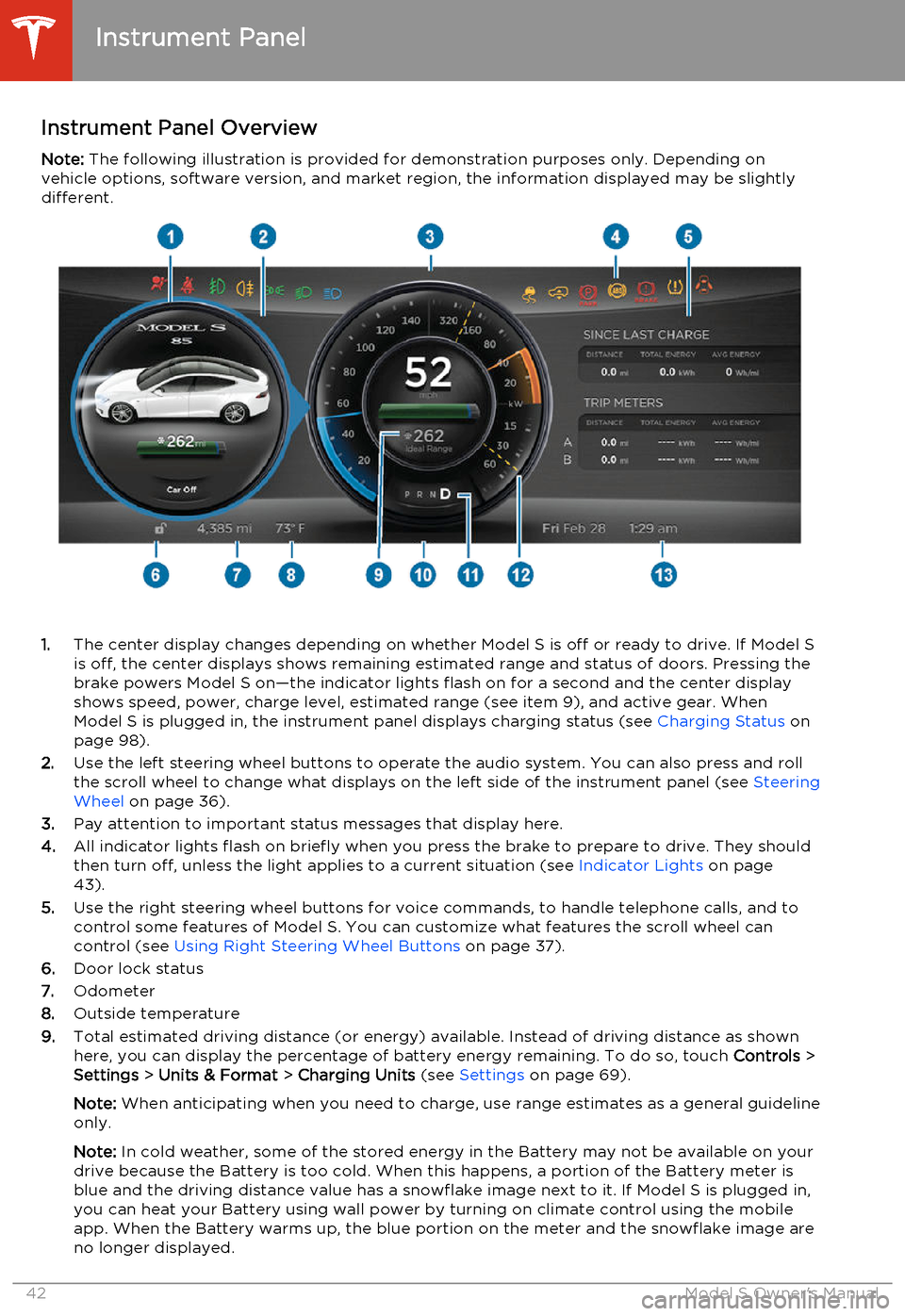
Instrument Panel OverviewNote: The following illustration is provided for demonstration purposes only. Depending on
vehicle options, software version, and market region, the information displayed may be slightly different.
1. The center display changes depending on whether Model S is off or ready to drive. If Model S
is off, the center displays shows remaining estimated range and status of doors. Pressing thebrake powers Model S on—the indicator lights flash on for a second and the center display
shows speed, power, charge level, estimated range (see item 9), and active gear. When
Model S is plugged in, the instrument panel displays charging status (see Charging Status on
page 98).
2. Use the left steering wheel buttons to operate the audio system. You can also press and roll
the scroll wheel to change what displays on the left side of the instrument panel (see Steering
Wheel on page 36).
3. Pay attention to important status messages that display here.
4. All indicator lights flash on briefly when you press the brake to prepare to drive. They should
then turn off, unless the light applies to a current situation (see Indicator Lights on page
43).
5. Use the right steering wheel buttons for voice commands, to handle telephone calls, and to
control some features of Model S. You can customize what features the scroll wheel can control (see Using Right Steering Wheel Buttons on page 37).
6. Door lock status
7. Odometer
8. Outside temperature
9. Total estimated driving distance (or energy) available. Instead of driving distance as shown
here, you can display the percentage of battery energy remaining. To do so, touch Controls >
Settings > Units & Format > Charging Units (see Settings on page 69).
Note: When anticipating when you need to charge, use range estimates as a general guideline
only.
Note: In cold weather, some of the stored energy in the Battery may not be available on your
drive because the Battery is too cold. When this happens, a portion of the Battery meter is
blue and the driving distance value has a snowflake image next to it. If Model S is plugged in,
you can heat your Battery using wall power by turning on climate control using the mobile
app. When the Battery warms up, the blue portion on the meter and the snowflake image are
no longer displayed.
Instrument Panel
42Model S Owner's Manual
Page 51 of 159

Turn SignalsMove the left-hand steering column lever up(before turning right) or down (before turning
left).
The turn signals stop operating when
canceled by the steering wheel, or when you return the lever to the central position.
The corresponding turn signal
indicator lights up on the instrument
panel when a turn signal is
operating. You also hear a clicking
sound.
Lane Change Flash
To indicate a lane change, quickly press the
lever up or down against the spring pressure, then release. The corresponding turn signal
flashes three times.
Hazard Warning Flashers
To turn on the hazard warning flashers, press
the switch located on the side of the
touchscreen closest to the steering wheel. All
turn signals flash. Press again to turn off.
Note: Hazard warning flashers operate even
without a Model S key nearby.
Lights
Driving49
Page 61 of 159

Regenerative Braking
Whenever Model S is moving and your foot is off the accelerator, regenerative braking slows
down Model S and feeds any surplus energy
back to the Battery.
By anticipating your stops and simply removing your foot from the accelerator to
slow down, you can take advantage of
regenerative braking to increase driving range. Of course, this is no substitute for
regular braking when needed for safety.
Note: If regenerative braking is aggressively
slowing Model S, such as on a steep descent,
brake lights turn on to alert other road users
that you are slowing down.
The power meter on the instrument panel displays real-time feedback on the amount of
energy being gained by regenerative braking.
The amount of energy fed back to the Battery
using regenerative braking can depend on the current state of the Battery and the charge
level setting that you are using. If regenerative braking is limited, a dashed yellow line
displays on the power meter. For example,
regenerative braking may be limited if the
Battery is already fully charged or if the
ambient temperature is low.
To Set the Regenerative Braking Level
You can use the touchscreen to change thelevel of regenerative braking:
1. Touch Controls > Driving > Regenerative
Braking .
2. Choose from two levels:
•
Standard . Provides the maximum
amount of regenerative braking. When you release the accelerator,
Model S slows down faster, reducing
the need to use the brakes.
• Low . Limits the amount of
regenerative braking. When you
release the accelerator, Model S takes longer to slow down and coastsfurther.
Parking Brake The parking brake automatically engages
whenever you shift Model S into Park, and
releases whenever you shift into any other
gear.
Note: The parking brake operates on the rear
wheels only, and is independent of the foot-
operated brake system.
Use the touchscreen to manually release the parking brake (which also shifts Model S intoNeutral):
1. Touch Controls > E-Brake & Power Off .
2. Press the brake pedal, then touch Parking
Brake. If Model S was previously in Park, it
shifts into Neutral.
The parking brake indicator lights up on the instrument panel whenever
you use the touchscreen to manually
apply the parking brake.If an electrical issue occurs with the
parking brake, an amber parking
brake fault message displays at the
top center of the touchscreen.Caution: In the unlikely event that
Model S loses electrical power, you
cannot release the parking brake.
Brakes
Driving59
Page 68 of 159

1.Status bar
The top line displays provides shortcuts to
Charging, HomeLink, Driver Profiles,
vehicle information (the Tesla “T”),
software updates, Bluetooth ®
, and Wi-Fi
settings. The status symbols show outside
temperature, network signal strength,
Bluetooth, Wi-Fi settings, passenger
airbag status, and time. If an alert icon
(exclamation mark) is displayed, touch it
to see warning messages that are in
effect.
Note: The airbag status symbol displays
only when Model S is powered on.
2. Apps
There are several ways to display an app
in the main viewing area:
• Tap the app’s icon to display it in the top viewing area. If the app is alreadydisplayed, a second tap displays it infull-screen view (only some apps have a full-screen mode).
• Drag the app’s icon directly onto the top or bottom viewing area.
• Touch and hold the app’s icon to display a popup that lets you choose
whether to display the app in the top or bottom of the main viewing area.Media. See Media and Audio on
page 77.Maps/Navigation (if equipped).
See Using Maps on page 81.Calendar. See Calendar on page
85.Energy. See Getting Maximum
Range on page 57.Web. Access the Internet using
the web browser (if equipped).Camera. Display the area behind
Model S. This area also displays
automatically whenever you shift
into Reverse. See Rear View
Camera on page 64.Phone. See Phone on page 83.
3.Main viewing area
The main viewing area changes
depending on the app you have chosen
(in the example, the Nav and Media apps
are displayed). For some apps (such as
Nav and Web), you can zoom in and out
using standard touchscreen finger
gestures.
4. Maximize/minimize app
Touch the small rectangle to expand the
associated app to fill the entire main
viewing area (some apps are not
expandable). Touch again to display two
apps in half-screen view.
5. Controls
Touch to access all Model S controls and settings (doors, locks, lights, etc).
6. Climate controls (see Climate Controls on
page 72).
7. Volume control
Touch the up and down arrows to
increase or decrease the volume of the
speakers. You can also adjust the volume
using the scroll wheel on the left side of
the steering wheel.
8. Reverse the position of the two currently
displayed apps.Warning: Paying attention to road and
traffic conditions must always be the
driver's highest priority. To ensure the
safety of vehicle occupants as well as other road users, using the touchscreenshould be done only when road andtraffic conditions permit.
Touchscreen Overview
66Model S Owner's Manual
Page 70 of 159

1.Close
Touch the circled X in the top left corner
of a window to close it (or you can touch anywhere outside the window).
2. Sunroof
If Model S is equipped with a sunroof,
touch to adjust its position (see Sunroof
on page 15).
3. Driving
• Suspension If Model S is equipped with Smart AirSuspension, touch to manually raise orlower Model S (see Smart Air
Suspension on page 75). Model S
must be powered on, or you must
press the brake pedal before you can change suspension settings. Smart Air
Suspension causes Model S to self- level, even when powered off.
Therefore, when lifting or towing, you
must disable self-leveling (see Jack
Mode on page 76 and Jacking and
Lifting on page 124).
• Steering mode
Adjust the amount of effort requiredto turn the steering wheel. Sport feels
more responsive whereas Comfort
feels easier to drive and park (see
Steering Wheel on page 36).
• Regenerative braking
When you release the accelerator
when driving, regenerative braking slows Model S and feeds any surplusenergy back to the Battery. If set to
Low, Model S does not slow down as
quickly, but you may experience less
range (see Regenerative Braking on
page 59).
Note: Regardless of the setting, the
energy gained by regenerative
braking is reduced if the Battery is full, or if it is extremely cold or hot(the surplus energy is used to heat orcool the Battery).
• Traction Control
If you turn off Traction Control, a
warning message displays on the
instrument panel. The off setting stays
in effect for the current drive only (see Traction Control on page 60).
• CreepWhen on, Model S slowly moves
forward when in Drive and backward in Reverse when you release the brake
(similar to a conventional vehicle with an automatic transmission). You can
adjust this setting only when Model S is in Park.
4. Cold Weather
If Model S is equipped with the cold weather option, you can control all seatheaters and the heated wipers. Note that
you can also control the front driver and
passenger seats using the main climate
control panel located on the bottom of
the touchscreen (see Climate Controls on
page 72).
5. Trips
View and reset the trip meters that
summarize how far you have driven (see
Trip Information on page 56).
6. Displays
Manually control the touchscreen’s
brightness and control its Day (light
background) or Night (dark background)
setting. When set to Auto, the
touchscreen automatically changes
between the Day and Night setting
depending on the ambient lighting
conditions. You can also put Model S into
an energy saving mode so it consumes
less energy when not in use (see Getting
Maximum Range on page 57). Note that
the Displays settings can also be accessed
from the Settings screen.
7. E-Brake & Power Off
You can manually:
• Apply and release the parking brake (see Parking Brake on page 59).
• Power off (see Powering Off on page
40).
• Keep Model S in Neutral by activating Tow Mode (see Leaving Model S in
Neutral - Tow Mode on page 41).
8. Doors & locks (see Using Interior Door
Handles on page 6)
9. Lights (see Lights on page 46)Warning:
Do not read the touchscreen
while driving. Doing so increases the
likelihood of a collision. Everything you need to know when driving is displayed
on the instrument panel.
Controls
68Model S Owner's Manual