2014 TESLA MODEL S light
[x] Cancel search: lightPage 112 of 159

Cleaning the InteriorFrequently inspect and clean the interior to
maintain its appearance and to prevent premature wear. If possible, immediately wipe
up spills and remove marks. For general
cleaning, wipe interior surfaces using a soft cloth (such as micro fiber) dampened with amixture of warm water and mild non-detergent cleaner (test all cleaners on a
concealed area before use). To avoid streaks,
dry immediately with a soft lint-free cloth.
Interior Glass
Do not scrape, or use any abrasive cleaning
fluid on glass or mirrored surfaces. This can
damage the reflective surface of the mirror
and the heating elements in the rear window.
Airbags
Do not allow any substance to enter an airbag
cover. This could affect correct operation.
Dashboard and Plastic Surfaces
Do not polish the upper surfaces of the
dashboard. Polished surfaces are reflective
and could interfere with your driving view.
Leather Seats
Leather is prone to dye-transfer which can cause discoloration, particularly on light
colored leather. White and tan leather is
coated with an anti-soiling treatment. Wipe
spills as soon as possible using a soft cloth
moistened with warm water and non-
detergent soap. Wipe gently in a circular
motion. Then wipe dry using a soft, lint-free
cloth. Using detergents or commercially
available leather cleaners and conditioners is
not recommended because they can discolor or dry out the leather.
Cloth Seats
Wipe spills as soon as possible using a soft cloth moistened with warm water and non-
detergent soap. Wipe gently in a circular motion. Then wipe dry using a soft, lint-free
cloth. Vacuum the seats as needed to remove
any loose dirt.
Carpets
Avoid over-wetting carpets. For heavily soiled
areas, use a diluted upholstery cleaner.Seat Belts
Extend the belts to wipe. Do not use any type
of detergent or chemical cleaning agent. Allow the belts to dry naturally while
extended, preferably away from direct sunlight.
Tesla Built-In Rear Facing Child Seats
Vacuum the seats to remove any loose dirt.
Wipe the seats with a soft cloth dampened
with warm water. You can also use an
upholstery cleaner designer for automotive use. Extend the belts to wipe. Allow the belts
to dry naturally, preferably away from direct
sunlight.
Touchscreen and Instrument Panel
Clean the touchscreen and instrument panel using a soft lint-free cloth specificallydesigned to clean monitors and displays. Donot use cleaners (such as a glass cleaner) and
do not use a wet wipe or a dry statically- charged cloth (such as a recently washed
microfiber). To wipe the touchscreen without
activating buttons and changing settings, you
can enter screen cleaning mode. Touch
Controls > Displays > Enter Screen Cleaning .
The display darkens to make it easy to see
dust and smudges.
Chrome and Metal Surfaces
Polish, abrasive cleaners or hard cloths can
damage the finish on chrome and metal surfaces.
Cautions for Interior CleaningWarning: If you notice any damage on an
airbag or seat belt, contact Tesla
immediately.Warning: Do not allow any water,
cleaners, or fabric to enter a seat belt
mechanism.Caution: Using solvents (including
alcohol), bleach, citrus, naphtha, or
silicone based products or additives on
interior components can cause damage.
Cleaning
110Model S Owner's Manual
Page 117 of 159

Checking Brake FluidWarning: Contact Tesla immediately if
you notice increased movement of the
brake pedal or a significant loss of brake
fluid. Driving under these conditions can result in extended stopping distances orcomplete brake failure.The Brake indicator on the
instrument panel alerts you if the
quantity of fluid in the brake
reservoir drops below the
recommended level. If it displays
while driving, stop as soon as safety
permits by gently applying the
brakes. Do not continue driving.
Contact Tesla immediately.
Fluid Level Check
Tesla checks the brake fluid level at the
regularly scheduled maintenance intervals. To check it yourself, park Model S on level
ground. When Model S is cool, remove the maintenance panel (see Removing the
Maintenance Panel on page 114.
Check the fluid level visually by looking at the
outside marks on the side of the reservoir
without removing the filler cap.
The brake fluid level should always be
between the MIN and the MAX marks.
Note: Although brake fluid level drops slightly
during normal use as a result of brake pad wear, it should not drop below the MIN mark.
Topping Up the Brake Fluid
Do not top up your brake fluid. Tesla service does this when you bring Model S in for
regular servicing. The following instructions are provided for information purposes andfuture reference only:
1. Clean the filler cap before removing to
prevent dirt from entering the reservoir.
2. Unscrew the cap and remove.
3. Top up the reservoir to the MAX mark
using brake fluid meeting DOT3 or DOT4 specifications.
4. Replace the filler cap.Warning: Only use new fluid from a
sealed air-tight container. Never use previously used fluid or fluid from apreviously opened container—fluid
absorbs moisture which decreases
braking performance.Warning: Brake fluid is highly toxic. Keep
containers sealed and out of the reach of children. In the event of accidentalconsumption, seek medical attention
immediately.Caution: Brake fluid damages painted
surfaces. Immediately soak up any spills
with an absorbent cloth and wash the
area with a mixture of car shampoo and
water.
Fluid Reservoirs
Maintenance115
Page 120 of 159

Fuse Box 1Note: Access to fuse box 1 requires removal of components that must be performed by a Tesla
service technician. The following fuse list is provided only to assist you in determining if a fuse in this box needs to be replaced. Contact Tesla Service if one of these fuses needs to be replaced.FuseRatingCircuit Protected15 AAccessory sensor, radio, USB hub25 AHeadlight leveling system (EU/China Coil Suspension vehicles only)35 AVanity lights, rear view mirror430 AOutboard rear seat heaters (cold weather option)515 ASeat heater (driver’s seat)620 ABase audio amplifier715 ASeat heater (front passenger seat)820 APremium audio amplifier925 ASunroof105 APassive safety restraints115 ASteering wheel switches125 ASensor for Drive mode and Yaw Rate (Stability/Traction Control)1315 AWiper park145 ADrive inverter1520 AElectric parking brake165 AParking sensors1720 AElectric parking brake
Fuses
118Model S Owner's Manual
Page 122 of 159

Fuse Box 2FuseRatingCircuit Protected2825 AWindow lift motor (right rear)2910 AContactor power3025 AWindow lift motor (right front)31-Not used3210 ADoor controls (right side)33-Not used3430 ARear center seat heaters, washer/wiper de-ice (cold weather option)3515 A12V power socket3625 AAir suspension3725 AWindow lift motor (left rear)385 ADriver's seat memory3925 AWindow lift motor (left front)405 ARear door handles4110 ADoor controls (left side)4230 APowered liftgate435 APerm. power sensor, brake switch445 ACharger (charge port)4520 APassive entry (horns)4630 ABody controls (group 2)475 AGlove box light4810 ABody controls (group 1)
Fuses
120Model S Owner's Manual
Page 124 of 159

Fuse Box 3FuseRatingCircuit Protected7140 ACondenser fan (left)7240 ACondenser fan (right)7340 AVacuum pump7420 A12V drive rail (cabin)755 APower steering765 AABS7725 AStability control7820 AHeadlights - high/low beam7930 ALight - exterior/interior
Fuses
122Model S Owner's Manual
Page 126 of 159

Jacking Procedure
Follow the steps below to lift Model S. Ensure that any non-Tesla repair facility is aware of
these lifting points.
1. Position Model S centrally between the lift
posts.
2. If your Model S is equipped with Smart Air
Suspension, it automatically self-levels,even when power is off. Use thetouchscreen to set the suspension as
follows:
• Touch Controls > Driving .
• Press the brake pedal, then touch Very High to maximize the height of
the suspension.
• Touch Jack to disable self-leveling.When Jack mode is active,
Model S displays this indicator
light on the instrument panel,
along with a message telling
you that active suspension is
disabled.
3. Position the lift arm pads under the body
rails at the locations illustrated. DO NOT
position the lift arm pads under the
Battery.
4. Adjust the height and position of the lift
arm pads to ensure they are correctly
located.
5. With assistance, raise the lift, ensuring the
lift arm pads remain in their correct
positions.
Note: Jack mode cancels when Model S is
driven over 4.5 mph (7 km/h).
Warning: If your Model S is equipped with
Smart Air Suspension, it automatically
self-levels, even when power is off. You
MUST disable this system by engaging
Jack mode before lifting or jacking. If you do not disable Smart Air Suspension,
Model S can attempt to self-level, causing serious damage, bodily injury, or death.Warning: Never raise Model S when the
charge cable is connected, even if
charging is not in progress.Warning: Do not work on an incorrectly
support vehicle. Doing so can cause
serious damage, bodily injury, or death.Caution: DO NOT lift from under the
Battery. Place the lift arm pads under the body rails only. The locations illustratedare the only approved lifting points forModel S. Lifting at any other points can
cause damage. Damage caused by lifting Model S is not covered by the warranty.
Jacking and Lifting
124Model S Owner's Manual
Page 144 of 159

Use a Flatbed Only
Use a flatbed trailer only, unless otherwise
specified by Tesla. Do not transport Model S with the tires directly on the ground.Caution: Damage caused by transporting
is not covered by the warranty.Caution: To transport Model S, follow the
instructions exactly as described next.
Disable Self-Leveling (air
suspension vehicles only)
If Model S is equipped with Smart Air
Suspension, it automatically self-levels, even when power is off. To prevent damage, you
must activate Jack mode to disable self- leveling:
1. Touch Controls > Driving on the
touchscreen.
2. Press the brake pedal, then touch Very
High to maximize height.
3. Touch Jack.
When Jack mode is active,
Model S displays this indicator
light on the instrument panel,
along with a message telling you
that active suspension is
disabled.
Note: Jack mode cancels when Model S is
driven over 4.5 mph (7 km/h).
Warning: Failure to activate Jack mode
on a Model S equipped with Smart Air
Suspension can result in the vehicle becoming loose during transport, which
may cause significant damage.Activate Tow Mode
Model S may automatically shift into Park
when it detects the driver leaving the vehicle, even if it has previously been shifted into
Neutral. To keep Model S in Neutral (which disengages the parking brake), you must use
the touchscreen to activate Tow mode:
1. Shift into Park.
2. Press the brake pedal, then on the
touchscreen, touch Controls > E-Brake &
Power Off > Tow Mode .When Tow mode is active, Model S
displays this indicator light on the
instrument panel, along with a
message telling you that Model S is
free-rolling.
Note: Tow mode cancels when Model S is
shifted into Park.
Caution: If the electrical system is not
working, and you therefore cannot
release the electric parking brake,
attempt to quick start the 12V battery.
For instructions, call Tesla. If a situation
occurs where you cannot disengage the
parking brake, use tire skids or transport
Model S for the shortest possible distance
using wheeled dollies. Before doing so,
always check the dolly manufacturer’s specifications and recommended load
capacity.
Instructions for Transporters
142Model S Owner's Manual
Page 147 of 159
Illustrations
Illustrations are provided for demonstration
purposes only. Depending on vehicle options,
software version, region of purchase, and
specific vehicle settings, your Model S may
appear slightly different.
Although the owner information is applicable
to both right-hand drive and and left-hand
drive vehicles, many illustrations show only
left-hand drive vehicles. However, the
essential information that the illustrations are
providing is correct.
Errors or Inaccuracies
All specifications and descriptions are known
to be accurate at time of publishing. However, because continuous improvement is a goal atTesla, we reserve the right to make product
modifications at any time. To communicate any inaccuracies or omissions, or to provide
general feedback or suggestions regarding
the quality of this owner information, send an
email to:
[email protected]
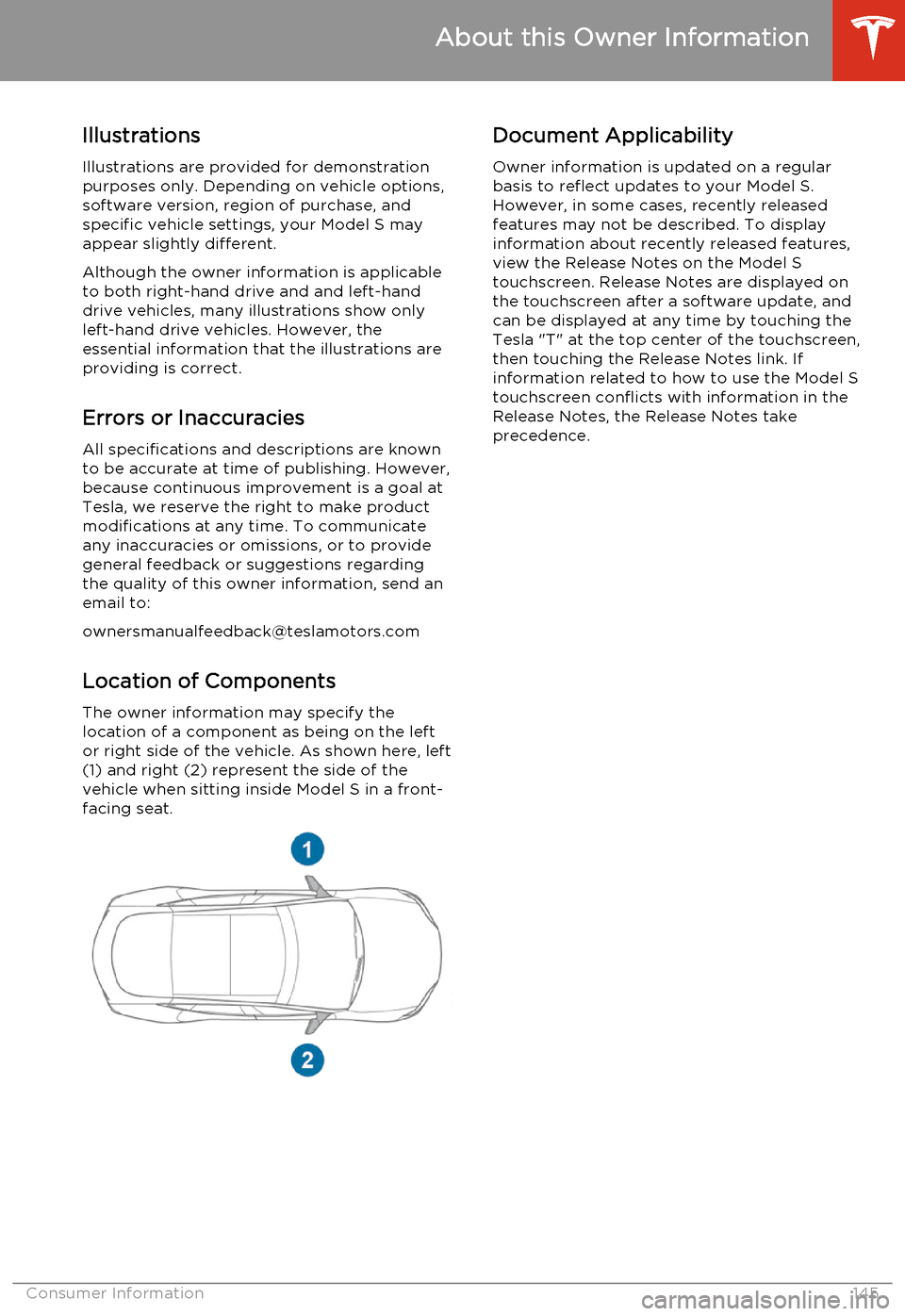
Location of ComponentsThe owner information may specify the
location of a component as being on the left
or right side of the vehicle. As shown here, left
(1) and right (2) represent the side of the vehicle when sitting inside Model S in a front-
facing seat.Document Applicability
Owner information is updated on a regular
basis to reflect updates to your Model S. However, in some cases, recently releasedfeatures may not be described. To displayinformation about recently released features,
view the Release Notes on the Model S
touchscreen. Release Notes are displayed on
the touchscreen after a software update, and
can be displayed at any time by touching the
Tesla "T" at the top center of the touchscreen,
then touching the Release Notes link. If information related to how to use the Model S
touchscreen conflicts with information in the
Release Notes, the Release Notes take
precedence.
About this Owner Information
Consumer Information145