2014 SKODA SUPERB Dot
[x] Cancel search: DotPage 130 of 246
Using a mobile phone connected with the universal telephone preparation
GSM III via the rSAP profile, it is possible to establish a Wi-Fi network in the ve-
hicle and to enable passengers with compatible devices to connect to this net-
work.
Switching Wi-Fi network on/off
Switching on
›
Connect the mobile phone with the universal telephone preparation GSM III
via the rSAP profile » page 124.
›
Select the Wi-Fi menu item in the Mobile phone menu.
The display shows the message Switch on WLAN?
›
Select the Yes menu item.
If no access point 1)
is assigned automatically, then this must be entered man-
ually as per the instructions from the mobile network operator, e.g. “Internet”.
If the Wi-Fi network is switched on, the display will show the following mes-
sage, for example: WLAN SK_WLAN 1234 switched on.
The display then shows a password for the Wi-Fi network connection. The
password can subsequently be found in the Mobile phone - Wi-Fi - Password -
Show menu.
If no data connection via WLAN is available, the display will show the message
Data connection not available. . This can be caused by a weak GSM signal, for
example. Try to establish the connection again at a location with stronger sig-
nal reception.
Switching off
›
Select the Wi-Fi - Off menu item in the Mobile phone menu.
The display shows the message Switch off WLAN ?
›
Select the OK menu item.
The display shows the message WLAN switched off.
Connecting an external device to the WLAN network
Connecting using the Wi-Fi network search
›
Switch on the Wi-Fi network » page 128, Switching Wi-Fi network on/off .
›On the device to be connected, search for available Wi-Fi networks (Wi-Fi) -
see operating instructions for the device to be connected.›
Select the appropriate Wi-Fi network connection in the menu of the net-
works found (e.g. Wi-Fi SK_WLAN 1234 ).
If menu item WPA2 is set in the Mobile phone - Wi-Fi - Settings - Encryption
menu, then the password displayed when the Wi-Fi is switched on must be en-
tered in the device to be connected. The password can be found in the Mobile
phone - Wi-Fi - Password - Show menu.
If menu item Open is set in the Mobile phone - Wi-Fi - Settings - Encryption
menu, the connection is made automatically.
Connecting using WPS (service for easy connection)
›
Switch on the Wi-Fi network » page 128, Switching Wi-Fi network on/off .
›
Open the Mobile phone - Wi-Fi - WPS config. menu in the instrument cluster.
›
In the device to be connected, select the connection using WPS function -
see operating instructions for the device to be connected.
If the Pushbutton menu item is selected in the instrument cluster, the Wi-Fi
connection is made automatically.
If the WPS PIN menu item is selected in the instrument cluster, then a PIN
must be entered in the device to be connected and the instrument cluster.
Use WLAN network in MAXI DOT display
When a Wi-Fi network is switched on, the following menu items are displayed
when the Wi-Fi menu item is selected.
■ Off - Switch off the WLAN network (depending on the context)
■ Device list - Display a list of external devices
■ Active device - Display a list of active devices
■ Block - Block device connections
■ Known devices - Display a list of known devices
■ Rename - Rename the device
■ Block - Block device connections
■ Device blocked - Display of a list of blocked devices
■ Unblock - Remove the connection block
1)
The name of the access point is defined by the mobile operator.
128Operation
Page 143 of 246

Low brake fluid level
An insufficient level of brake fluid may result in problems in the brake system.
The level of the brake fluid is monitored electronically » page 33,
Brake sys-
tem .
Brake booster
The brake booster increases the pressure generated with the brake pedal. The
brake booster only operates when the engine is running.
Handbrake
Fig. 136
Handbrake
Read and observe and on page 140 first.
Apply
›
Pull the handbrake lever firmly upwards.
Releasing
›
Pull the handbrake lever up slightly and at the same time push in the locking
button » Fig. 136 .
›
Move the lever right down while pressing the lock button.
The handbrake indicator light lights up when the handbrake is applied, pro-
vided the ignition is on.
A warning signal sounds if the vehicle is inadvertently driven off with the
handbrake applied.
The following instruction is shown in the MAXI DOT display. Release parking brake!
The handbrake warning is activated if the vehicle is driven at a speed of more
than around 5 km/h for more than 3 seconds.
WARNINGPlease note that the handbrake must be fully released. A handbrake which
is only partially released can result in the rear brakes overheating. This can
have a negative effect on the operation of the brake system – risk of acci-
dent!
CAUTION
After the vehicle has come to a standstill, always tighten the handbrake first
and then put in the first gear gear (vehicles with manual gearbox) or move the
selector lever to the P position (vehicles with automatic gearbox).
Manual gear changing and pedals
Introduction
This chapter contains information on the following subjects:
Manual gear changing
141
Pedals
142
Manual gear changing
Fig. 137
Gearshift pattern of 5 gear or
6 gear manual gearbox
Always depress the clutch pedal all the way down. This prevents uneven wear on the clutch.
The gearshift indicator must be observed when changing gear » page 40.
Only engage reverse gear when the vehicle is stationary. Depress the clutch
pedal and hold it fully depressed. Wait a moment before reverse gear is engag-
ed to avoid any shift noises.
The reversing lights will come on once reverse gear is engaged, provided the
ignition is on.
141Starting-off and Driving
Page 152 of 246

■Potholes, mud or rocks can be hidden under the water making it difficult or
impossible to drive through the body of water.■
Do not drive through salt water. The salt can lead to corrosion. Any vehicle
parts that have come into contact with salt water must be rinsed immediately
with fresh water.
Note
After driving through water, we recommend having the vehicle checked by a
specialist garage.
Driving abroad
Introduction
This chapter contains information on the following subjects:
Unleaded petrol
150
Headlights
150
In certain countries, it may be possible that the ŠKODA Partner network is limi-
ted or has not been established. This is the reason why procuring certain spare
parts may be somewhat complicated and specialist garages may only be able
to make limited repairs.
Unleaded petrol
A vehicle fitted with a petrol engine must always be refuelled with unleaded
petrol » page 180 , Unleaded petrol . Information regarding the locations of fill-
ing stations that offer unleaded petrol is, for example, provided by the auto-
mobile associations.
Headlights
The low beam of your headlights is set asymmetrically. It illuminates the side
of the road on which the vehicle is being driven to a greater extent.
When driving in countries in which the traffic drives on the other side of the
road than in your home country, the asymmetrical low beam may dazzle on-
coming drivers. In order to avoid this, the headlights must be adjusted at a
specialist garage.
Headlights with Xenon lights can be adjusted in the menu of the MAXI DOT
display » page 69 .
NoteYou can find out more information on adjusting the headlights at a specialist
garage.150Driving
Page 155 of 246

The HBA function is automatically deactivated when the brake pedal is re-
leased.
The ABS is activated faster and more effectively with the intervention of the
HBA.
Hill Hold Control (HHC)
Read and observe
and on page 151 first.
When driving on slopes, HHC allows you to move your foot from the brake ped-
al to the accelerator pedal without having to use the handbrake.
The system holds the brake pressure produced by the activation of the brake pedal for approx. 2 seconds after the brake pedal is released.
The brake pressure drops gradually the more you operate the accelerator ped-
al. If the vehicle does not start off within 2 seconds, it starts to roll back.
The HHC is active on slops of >5 % if the driver door is closed. HHC is only ever active on slopes when in forward or reverse start off. When driving downhill, it
is inactive.
Parking aid
Introduction
This chapter contains information on the following subjects:
Function
154
Activation/deactivation
154WARNING■ The parking aid is not a substitute for the driver paying proper attention
and it is always the driver's responsibility to take care when reversing the
vehicle or carrying out similar manoeuvres. Pay particular attention to small
children and animals as they may not be recognised by the system sensors.■
Before reversing, you should make sure that there are no small obstacles,
such as rocks, thin posts, trailer drawbars etc. in front or behind your vehi-
cle. Such obstacles may not be recognised by the system sensors.
WARNING (Continued)■ Under certain circumstances, surfaces of certain objects and types of
clothing cannot reflect the system signals. Thus, these objects or people
who wear such clothing are not recognised by the System sensors.■
External sound sources can have a detrimental effect on the system. Un-
der adverse conditions, this may cause objects or people to not be recog-
nised by the system.
CAUTION
■ If a warning signal sounds for about 3 seconds after activating the system
and there is no obstacle close to your car, this indicates a system fault. The
fault is also indicated by the symbol
flashing in the button » Fig. 147 on
page 154 . Seek help from a specialist garage.■
The sensors must be kept clean (free of ice, etc.) to enable the system to op-
erate properly.
■
Under adverse weather conditions (heavy rain, water vapour, very low or
high temperatures etc.) system function may be limited.
■
Additionally installed modules such as bicycle carriers can impair the function
of the parking aid.
Note
■ The signal tones for front obstacle recognition are factory-set to be higher
than for rear obstacle recognition.■
If not all fields around the vehicle are shown after the system is activated,
the vehicle will need to be moved a few metres forwards or in reverse.
■
The sound of the park-assist can be adjusted via the MAXI DOT display in the
Wizards menu option » page 45.
■
If the system is activated and the selector lever of the automatic gearbox is
in position P (the vehicle cannot move), the warning tone is interrupted and no
obstacles are displayed.
153Assist systems
Page 162 of 246
Operating conditions of the systemFig. 151
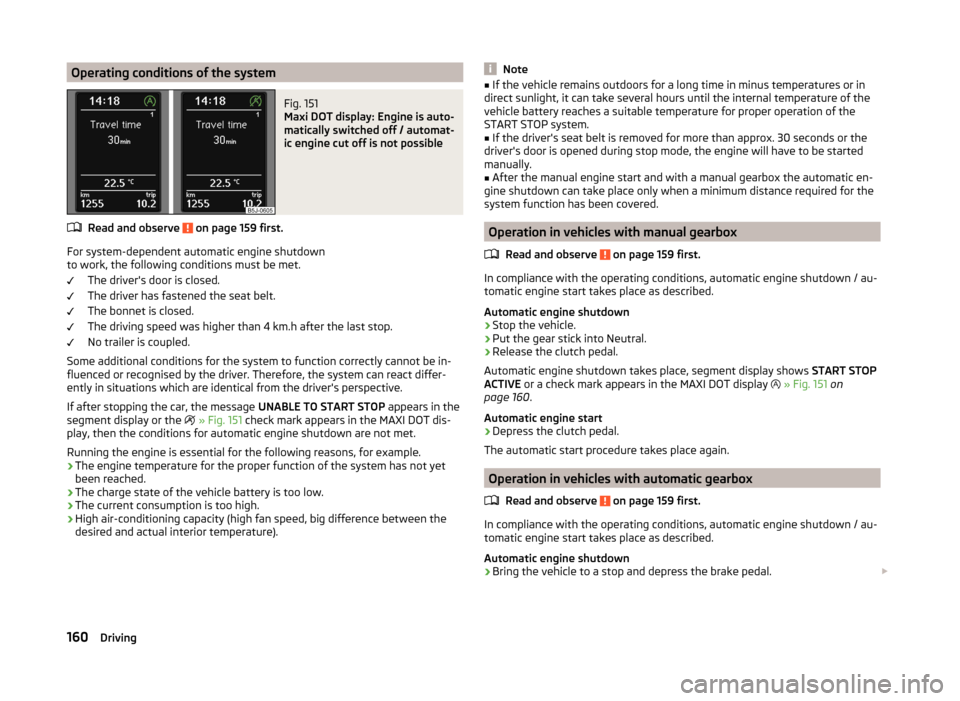
Maxi DOT display: Engine is auto-
matically switched off / automat-
ic engine cut off is not possible
Read and observe on page 159 first.
For system-dependent automatic engine shutdown
to work, the following conditions must be met.
The driver's door is closed.
The driver has fastened the seat belt.
The bonnet is closed.
The driving speed was higher than 4 km.h after the last stop.
No trailer is coupled.
Some additional conditions for the system to function correctly cannot be in-
fluenced or recognised by the driver. Therefore, the system can react differ-
ently in situations which are identical from the driver's perspective.
If after stopping the car, the message UNABLE TO START STOP appears in the
segment display or the
» Fig. 151 check mark appears in the MAXI DOT dis-
play, then the conditions for automatic engine shutdown are not met.
Running the engine is essential for the following reasons, for example.
› The engine temperature for the proper function of the system has not yet
been reached.
› The charge state of the vehicle battery is too low.
› The current consumption is too high.
› High air-conditioning capacity (high fan speed, big difference between the
desired and actual interior temperature).
Note■ If the vehicle remains outdoors for a long time in minus temperatures or in
direct sunlight, it can take several hours until the internal temperature of the
vehicle battery reaches a suitable temperature for proper operation of the
START STOP system.■
If the driver's seat belt is removed for more than approx. 30 seconds or the
driver's door is opened during stop mode, the engine will have to be started
manually.
■
After the manual engine start and with a manual gearbox the automatic en-
gine shutdown can take place only when a minimum distance required for the
system function has been covered.
Operation in vehicles with manual gearbox
Read and observe
on page 159 first.
In compliance with the operating conditions, automatic engine shutdown / au-
tomatic engine start takes place as described.
Automatic engine shutdown
›
Stop the vehicle.
›
Put the gear stick into Neutral.
›
Release the clutch pedal.
Automatic engine shutdown takes place, segment display shows START STOP
ACTIVE or a check mark appears in the MAXI DOT display
» Fig. 151 on
page 160 .
Automatic engine start
›
Depress the clutch pedal.
The automatic start procedure takes place again.
Operation in vehicles with automatic gearbox
Read and observe
on page 159 first.
In compliance with the operating conditions, automatic engine shutdown / au-
tomatic engine start takes place as described.
Automatic engine shutdown
›
Bring the vehicle to a stop and depress the brake pedal.
160Driving
Page 163 of 246

Automatic engine shutdown takes place, segment display shows START STOP
ACTIVE or a check mark appears in the MAXI DOT display » Fig. 151 on
page 160 .
Automatic engine start›
Release the brake pedal.
The automatic start procedure takes place again.
Further information on automatic transmission
The automatic engine shut down takes place when the selector lever is in po-
sitions P, D , S and N and in Tiptronic mode.
When the selector lever is in position P, the engine remains shut down even
after you release the brake pedal. The engine starts automatically by pressing
the gas pedal or by moving the selector lever into a different mode and releas-
ing the brake pedal.
If the engine is off due to the automatic and the selector lever is put to the R
position then the automatic starts the engine.
If the gear selector is moved from position R to the position D, S or N, the vehi-
cle must reach a speed of more than 10 km / h before the automatic engine
shutdown starts.
There is no automatic engine shutdown when the system detects a vehicle
moving due to a large steering angle.
No automatic engine shutdown takes place when the vehicle is moving at low
speed (e.g. during a traffic jam or when tuning) and remains stationary after
pressing the brake pedal lightly. Automatic engine shutdown takes place if you
press the brake pedal down with more force.
System related automatic start-up
Read and observe
on page 159 first.
When the engine is off, the system can automatically start the engine before
the desired journey continues. Some possible reasons for this are:
› The vehicle begins to roll, e.g. on a slope.
› The brake pedal has been actuated several times.
› The current consumption is too high.
Manually deactivating/activating the systemFig. 152
Button for the START-STOP sys-
tem
Read and observe on page 159 first.
Deactivating/activating
›
Press the button
» Fig. 152 .
When start-stop mode is deactivated, the indicator light in the button lights
up.
Note
If the system is deactivated when the engine is turned off automatically, then
the automatic start process takes place.
Information messages
Read and observe
on page 159 first.
The messages and information are indicated in the instrument cluster display. Start the engine manually!
START MANUALLY
One of the conditions for automatic engine start is not satisfied or the driver's
seat belt is not fastened. The engine must be started manually.
On vehicles with the system KESSY the ignition is turned off by the first press
of the start button, only after pressing for the second time is the start process
initiated.
Error: Start-stop system
ERROR START-STOP
A system error is present. Seek help from a specialist garage.
161Assist systems
Page 164 of 246

Fatigue detection (break recommendation)
Introduction
This chapter contains information on the following subjects:
Function
162
Information messages
162WARNING■ For the driving ability is always the driver's responsibility. Never drive if
you feel tired.■
The system may not detect all cases where a break is needed.
■
Therefore, take regular, sufficient breaks during long trips.
■
There will be no system warning during the so-called micro-sleep.
Note
■ In some situations, the system may evaluate the driving incorrectly and thus
mistakenly recommend a break (e.g. sporty driving, adverse weather condi-
tions or poor road conditions).■
The fatigue detection system is designed primarily for motorway driving.
Function
Read and observe
on page 162 first.
The fatigue detection system advises the driver on the basis of informationabout the steering behaviour, to take a break from driving. The system recom-
mends a break at speeds of 65-200 km/h.
After the ignition has been switched on, the system evaluates the steering be-
haviour for 15 minutes. This baseline analysis is constantly compared with the
current steering behaviour.
If the system detects deviations from normal steering behaviour due to possi-
ble fatigue of the driver, it recommends to take a break from driving.
The system deletes the stored baseline analysis if one of the following con-
ditions is met.
› The vehicle is stopped and the ignition switched off.
› The vehicle is stopped, the seat belt removed and the driver's door opened.
› The vehicle is stopped for more than 15 minutes.
If none of these conditions are met or if the driving style is not changed, the
system recommends a driving break again after 15 minutes.
Activation/deactivation
The system can be activated/deactivated via the MAXI DOT display in the Wiz-
ards menu option » page 44.
Information messages
Read and observe
on page 162 first.
In MAXI DOT display the icon appears for a few seconds and the following
message.
Fatigue detected. Take a break!
An audible signal is also emitted.
162Driving
Page 191 of 246

Brake fluid
Introduction
This chapter contains information on the following subjects:
Checking the brake fluid level
189
Changing
189WARNING■ The engine compartment of your car is a hazardous area. The following
warning instructions must be followed at all times when working in the en-
gine compartment » page 182.■
Do not continue your journey if the fluid level has fallen below the MIN
marking » Fig. 165 on page 189 ,
- there is a risk of an accident. Seek help
from a specialist garage.
■
Do not use used brake fluid - the function of the brake system may be im-
paired – risk of accident!
CAUTION
Brake fluid damages the paintwork of the vehicle.
Note
■ The brake fluid is changed as part of a compulsory inspection service.■We recommend using brake fluids from the ŠKODA Original Accessories
range.
Checking the brake fluid level
Fig. 165
Engine compartment: Brake fluid
reservoir
Read and observe and on page 189 first.
The brake fluid reservoir is located in the engine compartment » Fig. 165.
›Switch off the engine.›Open the bonnet.›
Check the level of brake fluid in the reservoir
» Fig. 165.
The level must be between the “MIN” and “MAX” markings.
A slight drop in the fluid level results when driving due to normal wear-and-
tear and automatic adjustment of the brake pads.
There may be an indication of a leak in the brake system, however, if the fluid
level drops significantly within a short time or if it drops below the “MIN” mark-
ing.
If the brake fluid level is too low, this is shown by the indicator light
» page 33 ,
Brake system
lighting up in the instrument cluster.
Changing
Read and observe
and on page 189 first.
Brake fluid absorbs moisture. Over time it therefore absorbs moisture from the
environment.
Excessive water in the brake fluid may be the cause of corrosion in the brake
system.
The water content lowers the boiling point of the brake fluid.
The brake fluid must comply with the following standards or specifications: › VW 50114;
› FMVSS 116 DOT4.
Vehicle battery
Introduction
This chapter contains information on the following subjects:
Open cover
191
Checking the battery electrolyte level
191
Charging
192
Replace
192
Disconnecting or reconnecting
192
Automatic load deactivation
193
189Inspecting and replenishing