2014 SKODA SUPERB interior lights
[x] Cancel search: interior lightsPage 90 of 246

Storage compartments in the doorsFig. 80
Storage compartment: in the front door/in the rear door
Read and observe
on page 87 first.
WARNINGUse the storage compartment only for storing objects which do not project
so that the effectiveness of the side airbag is not impaired.
Storage compartment in the front centre console
Fig. 81
Opening the storage compart-
ment
Read and observe on page 87 first.
Open/close
›
Press on the edge of the roof
A
» Fig. 81 in the direction of the arrow.
Closing takes place in reverse order.
WARNINGThe storage compartment must never be used as an ashtray or for the stor-
age of combustible materials - fire hazard and risk of damage to the stor-
age compartment!
Note
The storage compartment is equipped with an interior light which lights up
when the parking light is on.
Cup holders
Fig. 82
Front centre console: Cup holder
Fig. 83
Rear armrest: Remove cup holder/insert cup holder
Read and observe
on page 87 first.
Two beverage containers can be placed into the cup holder.
Cup holder at the front
On vehicles that are fitted with a cover for cup holders, you can cover the cup holder by pulling on the handle
A
» Fig. 82 in the direction of the arrow.
88Operation
Page 92 of 246
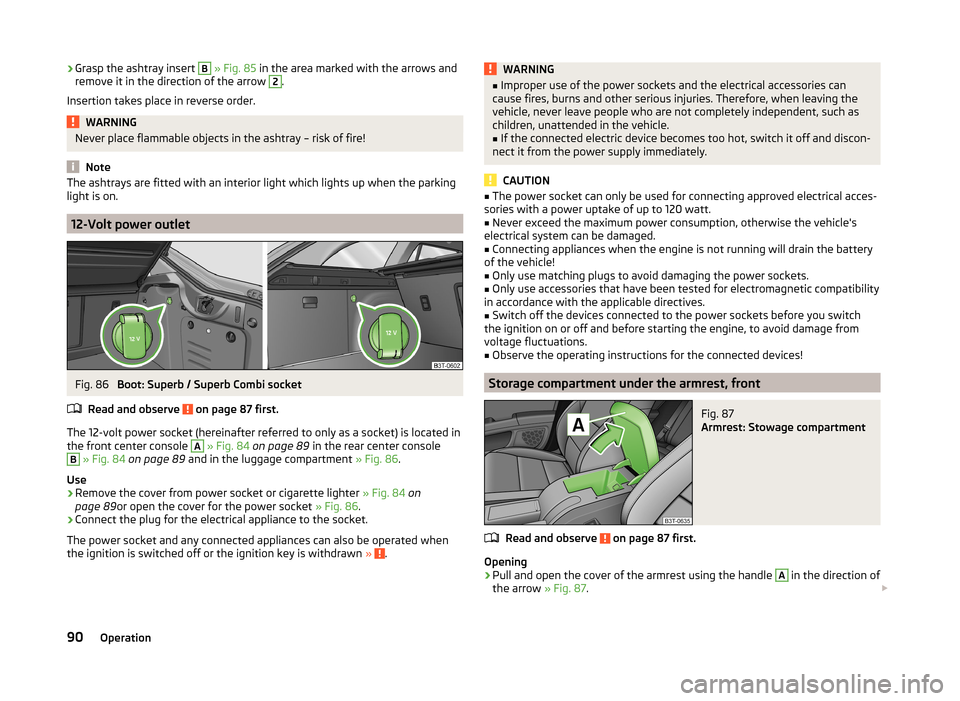
›Grasp the ashtray insert B
» Fig. 85 in the area marked with the arrows and
remove it in the direction of the arrow 2.
Insertion takes place in reverse order.WARNINGNever place flammable objects in the ashtray – risk of fire!
Note
The ashtrays are fitted with an interior light which lights up when the parking
light is on.
12-Volt power outlet
Fig. 86
Boot: Superb / Superb Combi socket
Read and observe
on page 87 first.
The 12-volt power socket (hereinafter referred to only as a socket) is located in
the front center console
A
» Fig. 84 on page 89 in the rear center console
B
» Fig. 84 on page 89 and in the luggage compartment » Fig. 86.
Use
›
Remove the cover from power socket or cigarette lighter » Fig. 84 on
page 89 or open the cover for the power socket » Fig. 86.
›
Connect the plug for the electrical appliance to the socket.
The power socket and any connected appliances can also be operated when
the ignition is switched off or the ignition key is withdrawn »
.
WARNING■
Improper use of the power sockets and the electrical accessories can
cause fires, burns and other serious injuries. Therefore, when leaving the
vehicle, never leave people who are not completely independent, such as
children, unattended in the vehicle.■
If the connected electric device becomes too hot, switch it off and discon-
nect it from the power supply immediately.
CAUTION
■ The power socket can only be used for connecting approved electrical acces-
sories with a power uptake of up to 120 watt.■
Never exceed the maximum power consumption, otherwise the vehicle's
electrical system can be damaged.
■
Connecting appliances when the engine is not running will drain the battery
of the vehicle!
■
Only use matching plugs to avoid damaging the power sockets.
■
Only use accessories that have been tested for electromagnetic compatibility
in accordance with the applicable directives.
■
Switch off the devices connected to the power sockets before you switch
the ignition on or off and before starting the engine, to avoid damage from
voltage fluctuations.
■
Observe the operating instructions for the connected devices!
Storage compartment under the armrest, front
Fig. 87
Armrest: Stowage compartment
Read and observe on page 87 first.
Opening
›
Pull and open the cover of the armrest using the handle
A
in the direction of
the arrow » Fig. 87.
90Operation
Page 93 of 246

Closing›Open the lid to the stop, only then can it be folded downwards and against
the direction of the arrow » Fig. 87.
The sockets marked
AUX-IN input and the MDI input are located in the
storage compartment.
Note
The storage compartment is equipped with an interior light which lights up
when the parking light is on.
Storage net in the front centre console
Fig. 88
Front centre console: Storage
net
Read and observe on page 87 first.
WARNINGOnly store soft objects with a total weight of 0.5 kg in the storage net.
Heavy objects are not secured sufficiently – risk of injury!
CAUTION
Do not place any sharp objects into the net – risk of net damage.Glasses storage boxFig. 89
Opening the glasses storage box
Read and observe on page 87 first.
Opening
›
Press the button
A
» Fig. 89 .
The box folds in the direction of the arrow.
Closing
›
Swivel the lid of the glasses storage box against the direction of the ar-
row » Fig. 89 until it audibly clicks into place.
WARNING■
The compartment must only be opened when removing or inserting the
spectacles and otherwise must be kept closed!■
The box must be closed before leaving and locking the vehicle – risk of
impairment to the functions of the anti-theft alarm system!
CAUTION
Do not put any heat-sensitive objects in the glasses storage box - they may be
damaged.91Seats and useful equipment
Page 116 of 246

Switch the intensive windscreen heater on/off
Air flow to the windows
Air flow to the upper body
Air flow in the footwell
Switching the rear window heater on/off » page 73
Control the seat heater on the front left seat » page 83
Switching automatic mode on » page 114
Switching Climatronic system off
Switch the cooling system on/off » page 114
Switch the temperature setting in Dual mode on/off » page 114
Control the seat heater on the front right seat » page 83
Note
Do not stick anything on or cover the interior temperature sensor E, other-
wise it could have an unfavourable effect on the Climatronic.
automatic mode
The automatic mode is used in order to maintain a constant temperature and
to demist the windows in the interior of the car.
Recommended setting for all periods of the year
›
Set the required temperature between +18 °C and +26 °C: we recommend 22
°C.
›
Press the
» Fig. 125 on page 113 button.
›
Set the air outlet vents 2 and 3 » Fig. 122 on page 108 so that the air flow is
directed slightly upwards.
After pressing, an indicator light in the top right or left corner of the button
lights up, depending on which mode was last selected.
If the warning light in the top right corner of the button lights up, the Cli-
matronic operates in “HIGH”-mode.
The “HIGH” mode is the standard setting of the Climatronic.
When pressing the button again, the Climatronic switches to “LOW”-mode
and the indicator light in the top left corner lights up. The Climatronic uses on-
ly in this mode the lower blower speed. However taking into account the noise
level, this is more comfortable, yet be aware that the effectiveness of the air
conditioning system is reduced particularly if the vehicle is fully occupied.
By pressing the button again, it is changed to “HIGH”-mode.
Automatic mode can be
switched off by pressing one of the buttons for the air
distribution or by increasing/decreasing the blower speed.
Switching the cooling system on/off
›
Press the button
.
The indicator light in the button lights up.
›
Press button
. once more.
The indicator light in the button goes out.
After the cooling system is switched off, only the ventilation and heating func-
tion remains active whereby the minimum temperature that can be reached is
the outside temperature.
Setting the temperature
The interior temperature for the left and right side can be set separately or to-
gether.
For both sides
›
Turn the control dial
A
» Fig. 125 on page 113 to the left or right to increase
or decrease the temperature.
The indicator light in the button lights up.
For the right side
›
Turn the control dial
D
» Fig. 125 on page 113 to the left or right to increase
or decrease the temperature.
The indicator light in the button lights up.
If the warning light in the symbol button is lit, the temperature for both
sides cannot be set with the control dial
A
. This function can be restored by
pressing the symbol button . The indicator light in the button goes out.
The interior temperature can be set between +18 °C and +26 ℃. The interior
temperature is regulated automatically within this range.
If a temperature lower than +18 °C is selected, a blue symbol lights up at the start of the numerical scale.
If a temperature higher than +26 °C is selected, a red symbol lights up at the
start of the numerical scale.
At both end positions, Climatronic functions at maximum cooling/heating out-
put and the temperature is not regulated.
114Operation
Page 117 of 246

CAUTIONLengthy and uneven distribution of the air flow out of the vents (especially
around the feet) and large differences in temperature, for example, when get-
ting out of the vehicle, can cause susceptible individuals to catch a cold.
Recirculation mode - Version 1
Recirculated air mode prevents polluted air outside the vehicle from getting in-
to the vehicle, for example when driving through a tunnel or when standing in
a traffic jam.
If a considerable increase in concentration of pollutants is recognised by the air quality sensor, recirculated air mode will temporarily be switched off.
If the concentration of pollutants decreases to the normal level, the air distri-
bution control is automatically switched off so that fresh air can be guided into
the vehicle interior.
In recirculated air mode air is sucked out of the interior of the vehicle and then
fed back into the interior.
When the automatic air distribution control is switched on, an air quality sen-
sor measures the concentration of pollutants in the drawn in air.
Switching recirculated air mode on
›
Repeatedly press the button until the indicator light on the
left side of
the button is illuminated.
Switch on automatic air distribution control
›
Repeatedly press the button until the warning light on the
right-hand
side of the button lights up.
Switch off automatic air distribution control temporarily
If the air quality sensor does not switch on automatic recirculated air mode
when there is an unpleasant smell, you can switch it on manually.
›
Press the symbol button .
The indicator light lights up in the button on the left side.
Switching recirculated air mode off
›
Press the button or press the symbol button
again until the warning
lights in the button go out.
WARNINGDo not leave recirculated air mode on over a longer period of time, as
“stale” air can cause fatigue of the driver and passengers, reduce attention
levels and also cause the windows to mist up. The risk of having an acci-
dent increases. Switch off recirculated air mode as soon as the windows
start to mist up.
Note
■ If the windscreen mists up, press the symbol button . Press the button
once the windscreen has demisted.■
The automatic air distribution control operates only if the outside tempera-
ture is higher than approx. 2 °C.
Recirculation mode - Version 2
Recirculated air mode prevents polluted air outside the vehicle from getting in-
to the vehicle, for example when driving through a tunnel or when standing in
a traffic jam.
In recirculated air mode air is sucked out of the interior of the vehicle and then
fed back into the interior.
The air recirculation mode is automatically activated after the ignition is
switched if it was on before the ignition was turned off. The indicator light in the button lights up.
Switch off / on
›
Press the
button.
The indicator light in the button goes out.
›
Press the
button again.
The indicator light in the button lights up.
WARNINGDo not leave recirculated air mode on over a longer period of time, as
“stale” air can cause fatigue of the driver and passengers, reduce attention
levels and also cause the windows to mist up. The risk of having an acci-
dent increases. Switch off recirculated air mode as soon as the windows
start to mist up. 115Air conditioning system
Page 118 of 246

NoteIf the windscreen mists up, press the symbol button . Press the button
once the windscreen has demisted.
Controlling blower
The Climatronic system controls the blower stages automatically in line with
the interior temperature.
However, the blower stages can be manually adapted to suit your particular
needs.
›
Repeatedly pressing the symbol button on the left or right reduces or in-
creases blower speed.
If the blower is switched off, the Climatronic system is switched off.
The set blower speed is displayed above the symbol button when the re-
spective number of indicator lights come on.
WARNING■ “Stale air” may result in fatigue in the driver and occupants, reduce atten-
tion levels and also cause the windows to mist up. The risk of having an ac-
cident increases.■
Do not switch off the Climatronic system for longer than necessary.
■
Switch on the Climatronic system as soon as the windows mist up.
Defrosting windscreen
Switching on
›
Press the
button » Fig. 125 on page 113 .
›
Press the
button » Fig. 125 on page 113 .
Switching off
›
Press the symbol button
again or press the symbol button
.
›
Press the symbol button
again.
More air flows out of the air outlet vents 1 » Fig. 122 on page 108 . The temper-
ature control is controlled automatically.
Auxiliary heating (auxiliary heating and ventilation)
Introduction
This chapter contains information on the following subjects:
Switching on/off
117
Radio remote control
118
Conditions for the functioning of auxiliary heating (Aux. heating and ventila-
tion), hereinafter referred to only as auxiliary heating (Aux. heating).
The charge state of the vehicle battery is sufficient.
The fuel supply is adequate (the warning icon is not lit in the display of
the instrument cluster).
Auxiliary ventilation
The auxiliary ventilation enables fresh air to flow into the vehicle interior by
switching off the engine, whereby the interior temperature is effectively de-
creased (e.g. with the vehicle parked in the sun).
Auxiliary heating (aux. heating)
The auxiliary heating (aux. heating) can be used when stationary, when the
engine is switched off to preheat the vehicle and while driving (e.g. during the
heating phase of the engine).
The auxiliary heating (auxiliary heating) functions in connection with the air-
conditioning system or Climatronic.
The auxiliary heating (aux. heating) also warms up the engine. This is not valid
for vehicles with the 3.6 l/191 kW FSI engine.
The auxiliary heating (parking heating) warms up the coolant by combusting
fuel from the vehicle tank. The coolant heats air flowing into the passenger
compartment (as long as the blower fan speed
B
» Fig. 124 on page 110
or » Fig. 125 on page 113 is not set to zero).
116Operation
Page 119 of 246

WARNING■The auxiliary heating (aux. heating) must never be operated in closed
rooms (e.g. garages) – risk of poisoning!■
The auxiliary heating (aux. heating) must not be allowed to run during re-
fuelling – risk of fire.
■
The exhaust pipe of the auxiliary heating (aux. heating) is located on the
underside of the vehicle. Therefore, if you wish to operate the auxiliary
heating (aux. heating), do not park the vehicle in such a way that the ex-
haust gases can come into contact with highly flammable materials (e.g. dry
grass) or easily inflammable substances (e.g. spilt fuel) – risk of fire.
CAUTION
■ Running auxiliary heating (aux. heating) consumes fuel from the vehicle tank
and automatically controls the filling level. If only a low quantity of fuel is
present in the fuel tank, the auxiliary heating (aux. heating) switches off.■
The exhaust pipe of the auxiliary heating (aux. heating), which is located on
the underside of the vehicle, must not be clogged and the exhaust flow must
not be blocked.
■
If the auxiliary heating (aux. heating) is running, the vehicle battery discharg-
es. If the auxiliary heating and ventilation has been operated several times
over a longer period, the vehicle must be driven a few kilometres in order to
recharge the vehicle battery.
Note
■ The auxiliary heating (aux. heating) switches on the blower B » Fig. 124 on
page 110 or » Fig. 125 on page 113 only if it has achieved a coolant temperature
of approx. 50 °C.■
At low outside temperatures, this can result in a formation of water vapour in
the area of the engine compartment. This is quite normal and is not an operat-
ing problem.
■
The air inlet in front of the windscreen must be free (e.g. of ice, snow or
leaves) to ensure that the auxiliary heating (aux. heating) operates properly.
■
So that warm air can flow into the vehicle interior after switching on the aux-
iliary heating, you must maintain the comfort temperature normally selected
by you, leave the fan switched on and leave the air outlet vents in an open po-
sition. It is recommended to put the air flow in the position
or
.
Switching on/offFig. 126
Button for switching on/off the system directly on the operating
part of the air conditioning/Climatronic
Read and observe
and on page 117 first.
The auxiliary heating (aux. heating) can be switched on/off as follows.
Manually switching on using the button on the operating part of the manual air conditioning/Cli-
matronic. The warning light in the button lights up » Fig. 126;
by using the radio remote control » page 118.
Manually switching off using the button on the operating part of the manual air conditioning/Cli-
matronic. The warning light in the button goes out » Fig. 126;
by using the radio remote control » page 118.
After switching off the auxiliary heating, the coolant pump runs for a short pe-
riod.
Automatic switching on/off
The following menu items can be selected from the Aux. heating menu item in
the information display » page 44 (depending on the vehicle equipment):
■ Day of the week - set the current day of the week;
■ Running time - Set the required running time in 5 minute increments. The
running time can be 10 to 60 minutes.
■ Mode - Set the desired heating/ventilation mode;
117Air conditioning system
Page 120 of 246

■Starting time 1 , Starting time 2 , Starting time 3 - for each pre-set time, the
day and the time (hour and minute) can be set for switching on the auxiliary
heating and ventilation. An empty position can be found between Sunday
and Monday when selecting the day. If this empty position is selected, the
activation is performed without taking into account the day.
■ Activate - Activate pre-set mode;
■ Deactivate - Deactivate pre-set mode;
■ Factory setting - Restore factory setting;
■ Back - Return to main menu
Only one programmed pre-set time can be active.
The last programmed pre-set time remains active.
After the auxiliary heating (aux. heating) automatically activates at the set
time, it is necessary to pre-set a time again.
If the menu item Back is selected or no changes are made on the display for
longer than 10 seconds, the set values are stored, but the pre-set time is not
activated.
The system switches itself off at the end of the running time set under the
menu item Running time .
Note
An indicator light on the button » Fig. 126 is illuminated when the system is
running.
Radio remote control
Fig. 127
Auxiliary heating (aux. heating):
Radio remote control
Read and observe and on page 117 first.
Image description » Fig. 127
Aerial
Warning light
Switch on aux. heating
Switch off aux. heating
The transmitter and the battery are housed in the housing of the remote con-
trol. The receiver is located in the interior of the vehicle.
When the battery is fully charged, the range of the remote control is a few
hundred metres. Obstacles between the remote control and the vehicle, bad
weather conditions and a weaker battery in the remote control can clearly re-
duce the range.
To switch the auxiliary heating (aux. heating) on or off, hold the remote control
vertical, with the aerial
A
pointing upwards. The antenna must not be covered
with the fingers or the palm of the hand during this process.
The auxiliary heating can only be switched on/off safely using the radio re-
mote control, if the distance between the radio remote control and the vehicle
is at least 2 m.
After pressing the button, the warning light in the remote control gives the
user different kinds of feedback:
Display warning light B » Fig. 127ImportanceLights up green for around 2 seconds.The auxiliary heating was switched
on.Lights up red for around 2 seconds.The auxiliary heating (aux. heating) is
switched off.Slowly flashes green for around 2 sec-
onds.The ignition signal was not received.Quickly flashes green for around 2
seconds.The auxiliary heating (aux. heating) is
blocked, e. g. because the tank is
nearly empty or there is a fault in the
auxiliary heating (aux. heating).Flashes red for around 2 seconds.The switch off signal was not re-
ceived.Lights up orange for around 2 sec-
onds, then green or red.The battery is weak, however the
switching on or off signal was re-
ceived. AB118Operation