2014 SKODA ROOMSTER lock
[x] Cancel search: lockPage 114 of 204

R - Reverse gear
Reverse gear can only be engaged when the vehicle is stationary and the en-
gine is at idling speed.
Depress the brake pedal and simultaneously press the shiftlock in the selector
lever grip before shifting to R from P or N.N
- Neutral
Power transmission to the drive wheels is interrupted in this mode.
D
- Mode for forwards travel (normal programme)
In mode D, the forward gears are automatically changed according to the en-
gine load, accelerator pedal actuation and driving speed.
S
- Mode for forwards travel (sports programme)
In mode S, the forward gears are shifted automatically up and down at higher
engine speeds than in mode D.
The shiftlock on the selector lever grip must be pressed when moving the se-
lector lever out of D mode into S mode.
Releasing selector lever from P or N modes (selector lever lock)
The selector lever is locked in the P and N modes to prevent the forwards trav-
el mode from being selected accidentally and setting the vehicle in motion.
The warning light lights up in the instrument cluster
» page 46.
The selector lever is released by depressing the brake pedal while simultane- ously pressing the locking button in the selection lever grip.
The selector lever is not locked when shifted quickly through N (e.g. from R to
D ). This, for example, helps to rock out a vehicle that is stuck, e.g. in a bank of
snow. The selector lever lock will engage if the lever is in position N for more
than approximately 2 seconds without the brake pedal being depressed.
The selector lever is locked only when the vehicle is stationary and at speeds
up to 5 km/h.
Note
If you want to move the selector lever from mode P to mode D or vice versa,
move the selector lever quickly. This prevents modes R or N from being selec-
ted accidentally.Manual shifting (Tiptronic)Fig. 111
Selector / MAXI DOT display: gear engaged
Read and observe
and on page 110 first.
Tiptronic mode makes it possible to manually shift gears on the selector lever. This mode can be selected both while halted and while driving.
The gear currently selected is indicated in the display
1
» Fig. 111 .
The gearshift indicator must be observed when changing gear » page 32.
Switching to manual shifting
›
Push the gear selector from position D towards the right, or left in a right-
hand drive vehicle.
Shifting up gears
›
Press the selector lever forwards
+
» Fig. 111 .
Shifting down gears
›
Press the selector lever backwards
-
» Fig. 111 .
When accelerating, the gearbox automatically shifts up into the higher gear
just before the maximum permissible engine speed is reached.
If a lower gear is selected, the gearbox does not shift down until there is no risk of the engine overrevving.
Note
It may be beneficial, for example, when travelling downhill, to use manual
shifting of gears. Shifting to a lower gear reduces the load on the brakes and
hence brake wear » page 108, Information on braking .111Starting-off and Driving
Page 115 of 204

Starting-off and drivingRead and observe
and on page 110 first.
Starting off
›
Start the engine.
›
Firmly depress and hold the brake pedal.
›
Press and hold the shiftlock button on the selector lever grip.
›
Move the selector lever into the desired position » page 110 and then release
the lock button.
›
Release the brake pedal and accelerate.
Stop
›
Fully depress and hold the brake pedal and bring the vehicle to a stop.
›
Keep holding the brake pedal until driving is resumed.
The selector lever position N does not have to be selected when stopping for a
short time, such as at a cross roads.
Parking
›
Fully depress and hold the brake pedal and bring the vehicle to a stop.
›
Firmly apply the handbrake.
›
Press and hold the shiftlock button on the selector lever grip.
›
Move the selector lever into the position P and then release the locking but-
ton.
Kickdown
The kickdown function allows you to achieve maximum acceleration by your vehicle while driving.
When the accelerator pedal is fully depressed, the kickdown function is activa-
ted in any forward driving mode.
The gearbox shifts down one or more gears depending on the vehicle speed
and engine speed, and the vehicle accelerates.
The gearbox does not shift up into the highest gear until the engine has
reached its maximum revolutions for this gear range.
WARNINGRapid acceleration, particularly on slippery roads, can lead to loss of control
of the vehicle – there is a risk of an accident.Malfunction
Read and observe
and on page 110 first.
Emergency programme
The transmission switches to the emergency programme if there is a fault in
the automatic gearbox system.
Indications of an activated emergency programme include the following:
› Only certain gears are selected.
› Reverse gear
R cannot be used.
› Shifting gears in Tiptronic mode is not possible.
Gearbox overheating
The gearbox may, for example, become too hot due to frequent repeated
starting or stop-and-go traffic. Overheating is indicated by the warning
light » page 38 ,
Clutches of the automatic DSG gearbox are too hot
.
Note
Visit a specialist workshop if the gearbox has switched to the emergency pro-
gramme.
Selector lever-emergency unlocking
Fig. 112
Selector lever-emergency un-
locking
Read and observe and on page 110 first.
If the selector lever lock is defective or its power supply is interrupted (e.g. dis-
charged vehicle battery, faulty fuse), the selector lever can no longer be moved
out of position P in the normal manner, and the vehicle can no longer be driv-
en.
The selector lever emergency unlocking procedure is as follows.
›
Firmly apply the handbrake.
112Driving
Page 116 of 204

›Carefully pull up the front left and right cover.›Pull up rear cover.›
Use a finger to press the yellow plastic part in the direction of the ar-
row » Fig. 112 .
›
At the same time, press the locking button in the selector lever and move
the selector lever to N.
The selector lever will be locked once more if it is moved again to P.
Running in
Introduction
This chapter contains information on the following subjects:
New engine
113
New tyres
113
New brake pads
113
New engine
The engine has to be run in during the first 1 500 kilometres.
Up to 1 000 kilometres
›
Do not drive faster than 3/4 of the maximum speed of the gear in use, i.e. 3/4
of the maximum permissible engine speed.
›
No full throttle.
›
Avoid high engine speeds.
›
Do not tow a trailer.
From 1 000 up to 1 500 kilometres
Gradually increase the power output of the engine up to the full speed of the
gear engaged, i.e. up to the maximum permissible engine speed.
The red scale on the rev counter indicates the range in which the system be-
gins to limit the engine speed.
During the first operating hours the engine has higher internal friction than
later until all of the moving parts have harmonized. The driving style which you
adopt during the first approx.1 500 kilometres plays a decisive part in the suc-
cess of running in your car.
Never drive at unnecessarily high engine speeds even after the running-in pe-
riod.
On vehicles fitted with a manual gearbox, at the very latest shift up into the
next gear when the red area is reached. Observe the recommended
gear » page 32 , Recommended gear . Very high engine speeds when accelerat-
ing (accelerator) are automatically restricted »
.
In vehicles with manual transmission, do not drive at unnecessarily low engine
speeds. Shift down a gear when the engine is no longer running smoothly. Ob-
serve the recommended gear » page 32, Recommended gear .
CAUTION
■
The engine is not protected from excessive engine revs caused by shifting
down at the wrong time. This can result in a sudden increase in revs beyond
the permissible maximum rpm and hence engine damage.■
Never rev up a cold engine when the vehicle is stationary or when driving in
individual gears.
For the sake of the environment
Do not drive at unnecessarily high engine speeds. Shifting up sooner helps
save fuel, reduces engine noise and protects the environment.
New tyres
New tyres must firstly be “run in” since they do not offer optimal grip at first.
Therefore, drive especially carefully for the first 500 km or so.
New brake pads
New brake pads do not initially provide optimal braking performance. They first
need to be “run in”. Therefore, drive especially carefully for the first 200 km or
so.
Economical driving and environmental sustainability
Introduction
This chapter contains information on the following subjects:
Looking ahead
114
Economical gear changing.
114
Avoiding full throttle
115
Reducing idling
115
Avoiding short distances
115
Checking tyre pressure
115
113Starting-off and Driving
Page 122 of 204

Assist systems
Brake assist systems
Introduction
This chapter contains information on the following subjects:
Electronic Stability Control (ESC)
119
Antilock Braking System (ABS)
120
Traction Control System (ASR)
120
Electronic Differential Lock (EDL)
120WARNING■ A lack of fuel can cause irregular engine running or cause the engine to
shut down. The brake assist systems would then fail to function – risk of
accident!■
Adjust the speed and driving style to the current visibility, weather, road
and traffic conditions. The increased safety provided by the brake assist
systems must not tempt you to take safety risks – risk of accident!
■
In the event of an ABS fault, visit a specialist garage immediately. Adjust
your style of driving according to the damage to the ABS, as you will not
know the exact extent of the damage or the extent to which this is limiting the braking efficiency.
CAUTION
■ All four wheels must be fitted with the same tyres approved by the manufac-
turer to ensure the brake assist systems operate correctly.■
Changes to the vehicle (e.g. to the engine, brakes, chassis) can influence the
functionality of the brake assist systems » page 132, Services, modifications
and technical alterations .
■
If a fault occurs in the ABS system, the ESC, TCS and EDL will also fail to
work. An ABS fault is indicated with the warning light
» page 42 .
Electronic Stability Control (ESC)
Read and observe
and on page 119 first.
The ESC system helps to maintain control of the vehicle in situations where it
is being operated at its dynamic limits, such as a sudden change in the direc-
tion of travel. Depending on the road surface conditions, the risk of skidding is
reduced, thereby improving the vehicle's driving stability .
The ESC system is automatically activated each time the ignition is switched
on.
The direction which the driver wishes to take is determined based on the
steering angle and the speed of the vehicle and is constantly compared with
the actual behaviour of the vehicle. In the event of deviations occurring, such
as the car beginning to skid, the ESC system will automatically brake the ap-
propriate wheel.
During an intervention of the system, the warning light
flashes in the instru-
ment cluster.
The following systems are integrated into the electronic stabilisation control
(ESC) :
› Antilock brake system (ABS),
› Traction control (TCS),
› Electronic Differential Lock (EDL)
› Hydraulic Brake Assist (HBA)
› Hill Hold Control (HHC).
The ESC system cannot be deactivated. The
» Fig. 117 on page 120 button
can only be used to deactivate the TCS. The warning light comes on in the
instrument cluster when the TCS is deactivated.
In the event of an ESC fault, the ESC warning light illuminates in the instru-
ment cluster
» page 42 .
Hydraulic Brake Assist (HBA)
HBA increases the braking effect and helps to shorten the braking distance.
The HBA is activated by very quick operation of the brake pedal. In order to
achieve the shortest possible braking distance, the brake pedal must be ap-
plied firmly until the vehicle has come to a standstill.
The HBA function is automatically switched off when the brake pedal is re-
leased.
The ABS is activated faster and more effectively with the intervention of the
HBA.
Hill Hold Control (HHC)
When driving on slopes, HHC allows you to move your foot from the brake ped-
al to the accelerator pedal without having to use the handbrake.
The system holds the brake pressure produced by the activation of the brake
pedal for approx. 2 seconds after the brake pedal is released. 119Assist systems
Page 123 of 204

The brake pressure drops gradually the more you operate the accelerator ped-
al. If the vehicle does not start off within 2 seconds, it starts to roll back.
HHC is active on slopes of >5 % when the driver door is closed. HHC is always only active on slopes when in forward or reverse start off. When driving down-
hill, it is inactive.
Antilock Braking System (ABS)
Read and observe
and on page 119 first.
ABS prevents the wheels locking when braking. Thus helping the driver to
maintain control of the vehicle.
The intervention of the ABS is noticeable from the pulsating movements of
the brake pedal which is accompanied by noises.
When the ABS system is active, do not brake periodically or reduce the pres- sure on the brake pedal.
Traction Control System (ASR)
Fig. 117
TCS button
Read and observe and on page 119 first.
If the wheels are slipping, the ASR system adapts the engine speed to the con-
ditions of the road surface. The TCS makes it much easier to start off, acceler-
ate and climb steep hills even if the conditions of the road surface are unfav-
ourable.
The TCS function is automatically activated each time the ignition is switched
on.
During an intervention of the system, the TCS warning light flashes in the
instrument cluster.
The TCS should normally always be enabled. Only in certain exceptional cir-
cumstances can it be sensible to switch the system off, for instance:
› when driving with snow chains;
› when driving in deep snow or on a very loose surface;
› when it is necessary to “rock a vehicle free” when it has got stuck.
Ensure the TCS is activated again afterwards.
You can switch TCS off and on again as needed by pressing the
but-
ton » Fig. 117 . The
warning light comes on in the instrument cluster when the
TCS is deactivated.
The TCS warning light
» page 45 lights up in the instrument cluster when
there is a fault on the TCS.
Electronic Differential Lock (EDL)
Read and observe
and on page 119 first.
If one of the wheels starts to spin, the EDL system brakes the spinning wheel
and transfers the driving force to the other wheels. This ensures the stability
of the vehicle and a quick journey.
EDL switches off automatically to avoid excessive heat generation on the
brake of the wheel being braked. The vehicle can continue to be driven and
has the same characteristics as a vehicle not fitted with EDL. The EDL switches
on again automatically as soon as the brake has cooled down.
Parking aid
Introduction
This chapter contains information on the following subjects:
Function
121
Activation/deactivation
121
120Driving
Page 129 of 204
Hitch and trailer
Hitch
Introduction
This chapter contains information on the following subjects:
Description
126
Adjusting the ready position
127
Fitting the ball head
127
Check proper fitting
128
Removing the ball head
128
Accessories
129
The maximum trailer drawbar load is 50 kg/h.
WARNING■
Check that the ball head is seated correctly and is secured in the mount-
ing recess before starting any journey.■
Do not use the ball head, if it is not correctly inserted into the mounting
recess and secured.
■
Do not use the towing equipment if it is damaged or incomplete.
■
Do not modify or adapt the towing equipment in any way.
■
Never release the ball head while the trailer is still coupled.
■
Keep the mounting recess of the towing equipment clean at all times.
Such dirt prevents the ball head from being attached securely.
CAUTION
■ Take care with the ball bar - there is a risk of paint damage to the bumper.■After removing the ball head, always place the cap on the mounting recess.
Note
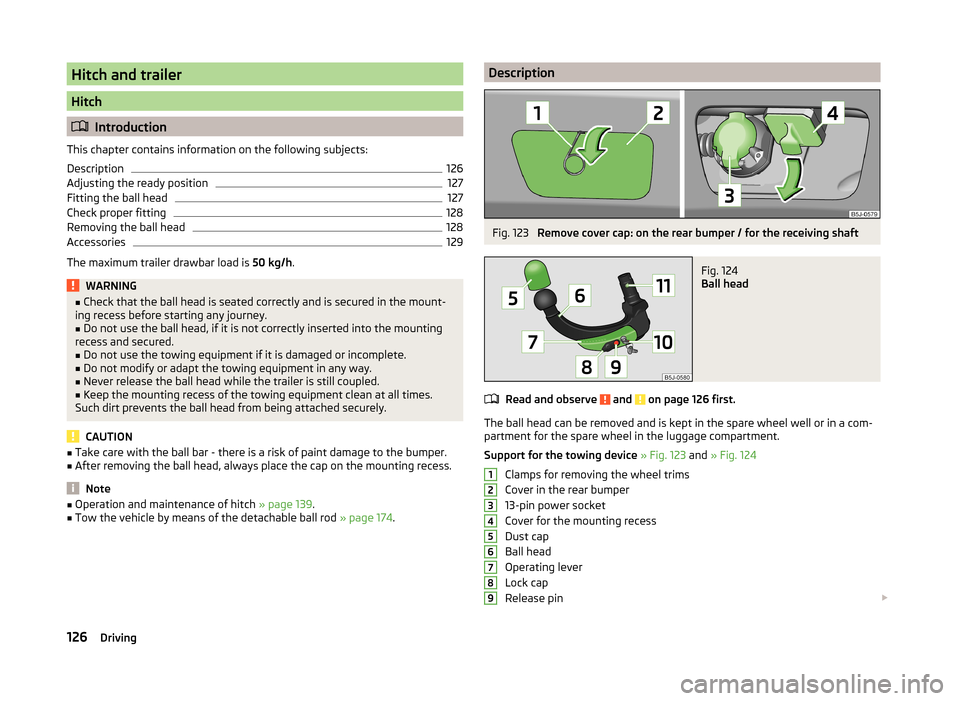
■Operation and maintenance of hitch » page 139.■Tow the vehicle by means of the detachable ball rod » page 174.DescriptionFig. 123
Remove cover cap: on the rear bumper / for the receiving shaft
Fig. 124
Ball head
Read and observe and on page 126 first.
The ball head can be removed and is kept in the spare wheel well or in a com-
partment for the spare wheel in the luggage compartment.
Support for the towing device » Fig. 123 and » Fig. 124
Clamps for removing the wheel trims
Cover in the rear bumper
13-pin power socket
Cover for the mounting recess
Dust cap
Ball head
Operating lever
Lock cap
Release pin
123456789126Driving
Page 130 of 204
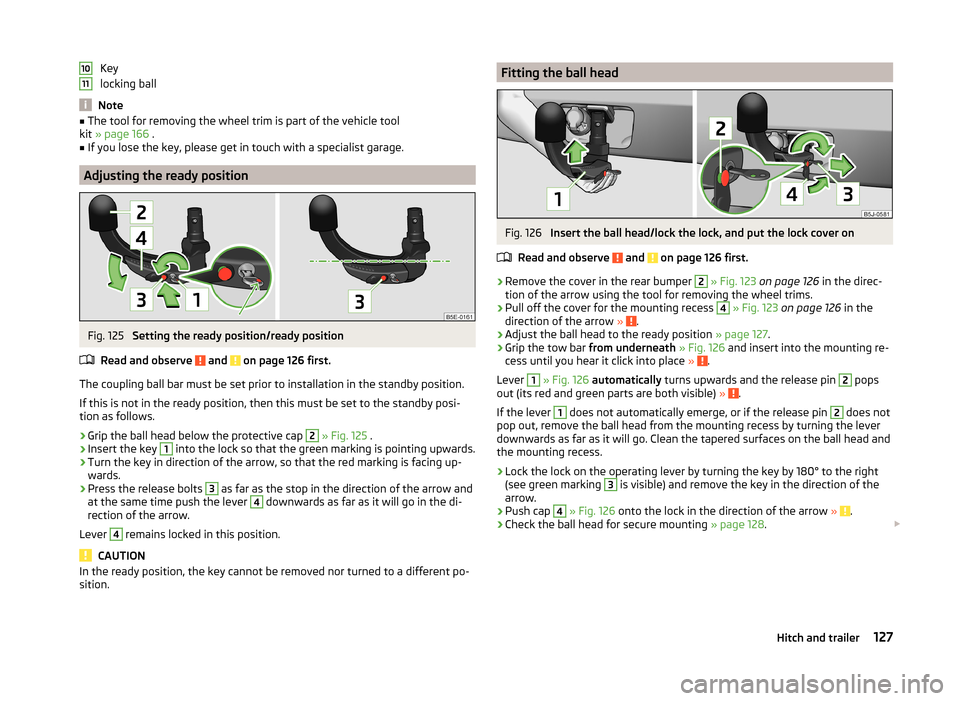
Key
locking ball
Note
■ The tool for removing the wheel trim is part of the vehicle tool
kit » page 166 .■
If you lose the key, please get in touch with a specialist garage.
Adjusting the ready position
Fig. 125
Setting the ready position/ready position
Read and observe
and on page 126 first.
The coupling ball bar must be set prior to installation in the standby position. If this is not in the ready position, then this must be set to the standby posi-
tion as follows.
›
Grip the ball head below the protective cap
2
» Fig. 125 .
›
Insert the key
1
into the lock so that the green marking is pointing upwards.
›
Turn the key in direction of the arrow, so that the red marking is facing up-
wards.
›
Press the release bolts
3
as far as the stop in the direction of the arrow and
at the same time push the lever
4
downwards as far as it will go in the di-
rection of the arrow.
Lever
4
remains locked in this position.
CAUTION
In the ready position, the key cannot be removed nor turned to a different po-
sition.1011Fitting the ball headFig. 126
Insert the ball head/lock the lock, and put the lock cover on
Read and observe
and on page 126 first.
›
Remove the cover in the rear bumper
2
» Fig. 123 on page 126 in the direc-
tion of the arrow using the tool for removing the wheel trims.
›
Pull off the cover for the mounting recess
4
» Fig. 123 on page 126 in the
direction of the arrow » .
›
Adjust the ball head to the ready position » page 127.
›
Grip the tow bar from underneath » Fig. 126 and insert into the mounting re-
cess until you hear it click into place » .
Lever
1
» Fig. 126 automatically turns upwards and the release pin
2
pops
out (its red and green parts are both visible) » .
If the lever
1
does not automatically emerge, or if the release pin
2
does not
pop out, remove the ball head from the mounting recess by turning the lever
downwards as far as it will go. Clean the tapered surfaces on the ball head and
the mounting recess.
›
Lock the lock on the operating lever by turning the key by 180° to the right
(see green marking
3
is visible) and remove the key in the direction of the
arrow.
›
Push cap
4
» Fig. 126 onto the lock in the direction of the arrow » .
›
Check the ball head for secure mounting » page 128.
127Hitch and trailer
Page 131 of 204
WARNING■Carefully remove the cap for the mounting recess - there is a risk of hand
injury.■
Keep your hands outside the lever's range of motion when attaching the
ball head – there is a risk of fingers being injured!
■
Never attempt to pull the operating lever upwards forcibly to turn the
key. Doing so would mean the ball head is not attached correctly.
CAUTION
■ After removing the key, always replace the cover on the lock – there is a risk
of the lock getting dirty.■
Remove the cover from the rear bumper with care - there is a risk of paint
damage to the bumper and the cap.
Note
Store cover 2 and cover 4 » Fig. 123 on page 126 in a suitable place in the
luggage compartment after removing them.
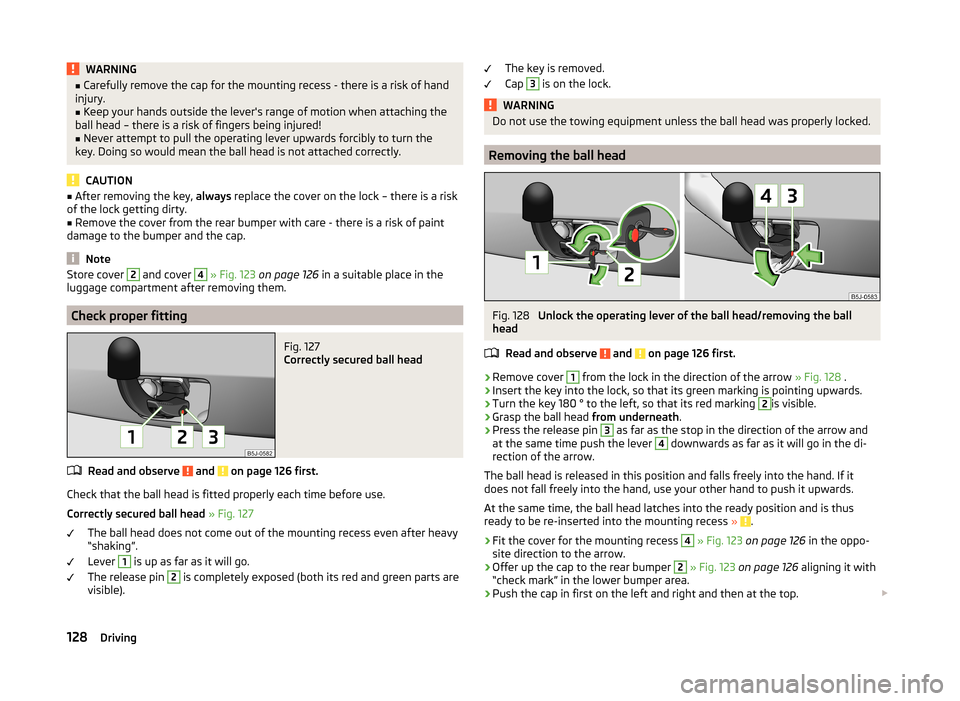
Check proper fitting
Fig. 127
Correctly secured ball head
Read and observe and on page 126 first.
Check that the ball head is fitted properly each time before use.
Correctly secured ball head » Fig. 127
The ball head does not come out of the mounting recess even after heavy
“shaking”.
Lever
1
is up as far as it will go.
The release pin
2
is completely exposed (both its red and green parts are
visible).
The key is removed.
Cap 3
is on the lock.WARNINGDo not use the towing equipment unless the ball head was properly locked.
Removing the ball head
Fig. 128
Unlock the operating lever of the ball head/removing the ball
head
Read and observe
and on page 126 first.
›
Remove cover
1
from the lock in the direction of the arrow » Fig. 128 .
›
Insert the key into the lock, so that its green marking is pointing upwards.
›
Turn the key 180 ° to the left, so that its red marking
2
is visible.
›
Grasp the ball head from underneath.
›
Press the release pin
3
as far as the stop in the direction of the arrow and
at the same time push the lever
4
downwards as far as it will go in the di-
rection of the arrow.
The ball head is released in this position and falls freely into the hand. If it
does not fall freely into the hand, use your other hand to push it upwards.
At the same time, the ball head latches into the ready position and is thus
ready to be re-inserted into the mounting recess »
.
›
Fit the cover for the mounting recess
4
» Fig. 123 on page 126 in the oppo-
site direction to the arrow.
›
Offer up the cap to the rear bumper
2
» Fig. 123 on page 126 aligning it with
“check mark” in the lower bumper area.
›
Push the cap in first on the left and right and then at the top.
128Driving