2014 SKODA ROOMSTER ESP
[x] Cancel search: ESPPage 63 of 204
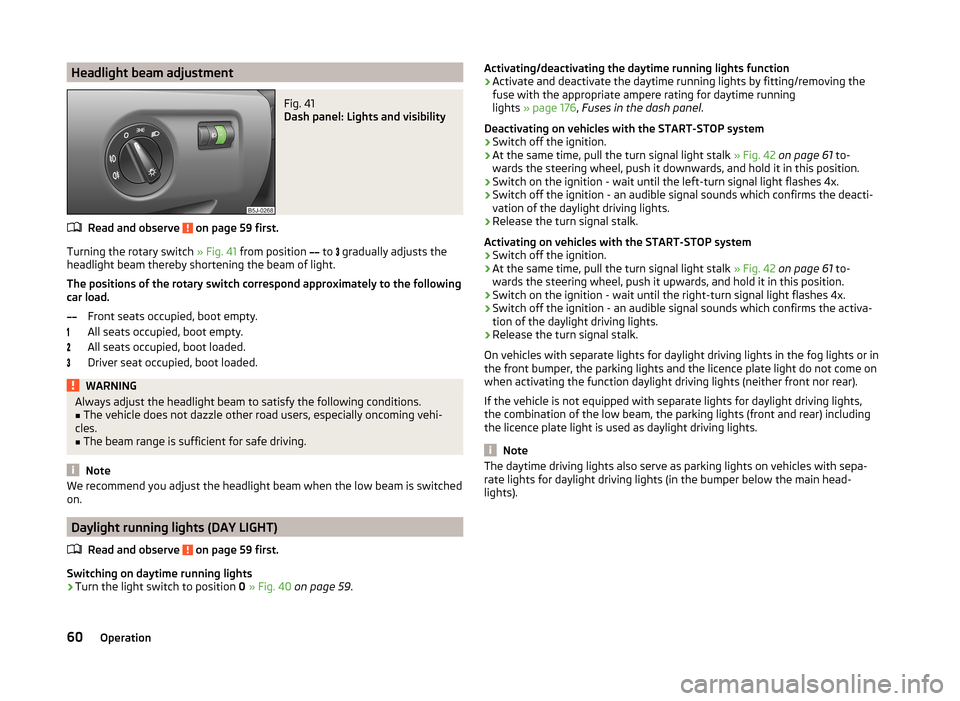
Headlight beam adjustmentFig. 41
Dash panel: Lights and visibility
Read and observe on page 59 first.
Turning the rotary switch » Fig. 41 from position
to
gradually adjusts the
headlight beam thereby shortening the beam of light.
The positions of the rotary switch correspond approximately to the following
car load.
Front seats occupied, boot empty.
All seats occupied, boot empty.
All seats occupied, boot loaded.
Driver seat occupied, boot loaded.
WARNINGAlways adjust the headlight beam to satisfy the following conditions.■The vehicle does not dazzle other road users, especially oncoming vehi-
cles.■
The beam range is sufficient for safe driving.
Note
We recommend you adjust the headlight beam when the low beam is switched
on.
Daylight running lights (DAY LIGHT)
Read and observe
on page 59 first.
Switching on daytime running lights
›
Turn the light switch to position 0 » Fig. 40 on page 59 .
Activating/deactivating the daytime running lights function›Activate and deactivate the daytime running lights by fitting/removing the
fuse with the appropriate ampere rating for daytime running
lights » page 176 , Fuses in the dash panel .
Deactivating on vehicles with the START-STOP system›
Switch off the ignition.
›
At the same time, pull the turn signal light stalk » Fig. 42 on page 61 to-
wards the steering wheel, push it downwards, and hold it in this position.
›
Switch on the ignition - wait until the left-turn signal light flashes 4x.
›
Switch off the ignition - an audible signal sounds which confirms the deacti-
vation of the daylight driving lights.
›
Release the turn signal stalk.
Activating on vehicles with the START-STOP system
›
Switch off the ignition.
›
At the same time, pull the turn signal light stalk » Fig. 42 on page 61 to-
wards the steering wheel, push it upwards, and hold it in this position.
›
Switch on the ignition - wait until the right-turn signal light flashes 4x.
›
Switch off the ignition - an audible signal sounds which confirms the activa-
tion of the daylight driving lights.
›
Release the turn signal stalk.
On vehicles with separate lights for daylight driving lights in the fog lights or in
the front bumper, the parking lights and the licence plate light do not come on
when activating the function daylight driving lights (neither front nor rear).
If the vehicle is not equipped with separate lights for daylight driving lights,
the combination of the low beam, the parking lights (front and rear) including
the licence plate light is used as daylight driving lights.
Note
The daytime driving lights also serve as parking lights on vehicles with sepa-
rate lights for daylight driving lights (in the bumper below the main head-
lights).60Operation
Page 74 of 204

Fold downseat backrest and seat fold down completelyFig. 58
Fold seat fully forwards/lock folded forward seats
Folding the seat backrest forwards
›
Put the belt tongue into the opening on the respective side of the vehicle -
safety position.
›
Remove the head restraint from the rear middle seat » page 72, Head re-
straints .
›
Push the outer rear seats towards the rear as far as they will go » page 70,
Setting theSetting the seats in the longitudinal direction .
›
Pull lever
1
» Fig. 57 on page 70 and fold the seat backrest completely for-
wards.
›
Pull lever
A
» Fig. 58 up and fold the seat forwards fully.
Folding seats fully forwards and locking them
›
If the outer rear seat is fully folded forward, push it towards the rear as far as
it can go.
›
Pull lever
A
» Fig. 58 up and fold the seat forwards fully.
›
Secure the folded forward seat with the aid of the fixing belt
B
to a guide
rod of the head restraint in the front seat » Fig. 58.
WARNINGImmediately lock the folded forward seat with the aid of the fixing belt to a
guide rod of the head restraint for the front seat - risk of injury.CAUTION■ If the outer seat is not in the rear end position when folding forward, damage
can occur to the locking bolts when unlocking the seat.■
Only keep the seats in the folded forward position for as long as necessary to
transport cargo - there is a risk of damaging the front seat backrests. The
seats must be folded back once the cargo has been transported.
Unlocking and removing seats
Fig. 59
Unlocking the folded forward seat/carrying handles on the seat
cushion
›
Fold the seat forward » page 71, Fold downseat backrest and seat fold down
completely .
›
Unlock the folded seat by pressing seat locks
A
» Fig. 59 in the direction of
arrow
1
.
›
Remove the seat using the carrying handles
B
or
C
.
Note
The outer seats are not mutually interchangeable. In the rear area the left seat
is marked with the letter L and the right seat with the letter R.71Seats and stowing
Page 76 of 204
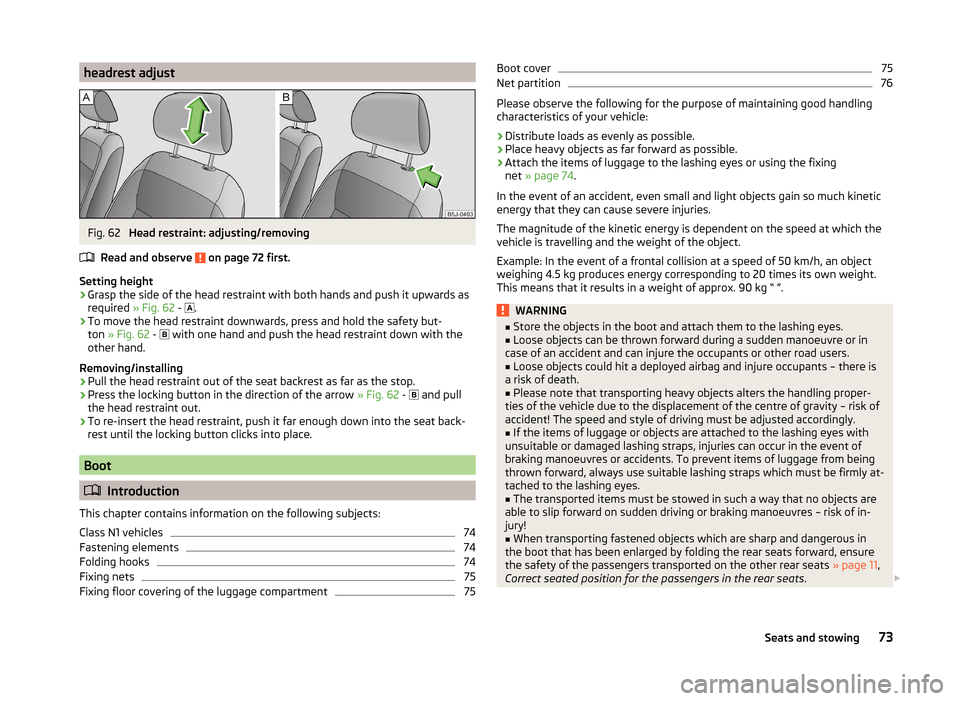
headrest adjustFig. 62
Head restraint: adjusting/removing
Read and observe
on page 72 first.
Setting height
›
Grasp the side of the head restraint with both hands and push it upwards as
required » Fig. 62 -
.
›
To move the head restraint downwards, press and hold the safety but-
ton » Fig. 62 -
with one hand and push the head restraint down with the
other hand.
Removing/installing
›
Pull the head restraint out of the seat backrest as far as the stop.
›
Press the locking button in the direction of the arrow » Fig. 62 -
and pull
the head restraint out.
›
To re-insert the head restraint, push it far enough down into the seat back-
rest until the locking button clicks into place.
Boot
Introduction
This chapter contains information on the following subjects:
Class N1 vehicles
74
Fastening elements
74
Folding hooks
74
Fixing nets
75
Fixing floor covering of the luggage compartment
75Boot cover75Net partition76
Please observe the following for the purpose of maintaining good handling
characteristics of your vehicle:
›
Distribute loads as evenly as possible.
›
Place heavy objects as far forward as possible.
›
Attach the items of luggage to the lashing eyes or using the fixing
net » page 74 .
In the event of an accident, even small and light objects gain so much kinetic
energy that they can cause severe injuries.
The magnitude of the kinetic energy is dependent on the speed at which the
vehicle is travelling and the weight of the object.
Example: In the event of a frontal collision at a speed of 50 km/h, an object
weighing 4.5 kg produces energy corresponding to 20 times its own weight.
This means that it results in a weight of approx. 90 kg “ ”.
WARNING■ Store the objects in the boot and attach them to the lashing eyes.■Loose objects can be thrown forward during a sudden manoeuvre or in
case of an accident and can injure the occupants or other road users.■
Loose objects could hit a deployed airbag and injure occupants – there is
a risk of death.
■
Please note that transporting heavy objects alters the handling proper-
ties of the vehicle due to the displacement of the centre of gravity – risk of
accident! The speed and style of driving must be adjusted accordingly.
■
If the items of luggage or objects are attached to the lashing eyes with
unsuitable or damaged lashing straps, injuries can occur in the event of
braking manoeuvres or accidents. To prevent items of luggage from being
thrown forward, always use suitable lashing straps which must be firmly at-
tached to the lashing eyes.
■
The transported items must be stowed in such a way that no objects are
able to slip forward on sudden driving or braking manoeuvres – risk of in-
jury!
■
When transporting fastened objects which are sharp and dangerous in
the boot that has been enlarged by folding the rear seats forward, ensure
the safety of the passengers transported on the other rear seats » page 11,
Correct seated position for the passengers in the rear seats .
73Seats and stowing
Page 96 of 204

WARNINGNever leave recirculated air mode on over a longer period of time, as “stale
air” can cause fatigue of the driver and the passengers, reduce attention
levels and also cause the windows to mist up. The risk of having an acci-
dent increases. Switch off recirculated air mode as soon as the windows
start to mist up.
Air conditioning system (manual air conditioning system)
Introduction
This chapter contains information on the following subjects:
Operation
93
Setting the air conditioning system
94
Recirculated air mode
94
The cooling system operates only if the following conditions are met. The cooling system is switched on » page 93.
The engine is running.
The outside temperature is above approximately +2 °C.
The blower switch is switched on (positions 1-4).
If the desired interior temperature can also be achieved without activating the
cooling system, fresh air mode should be selected.
If the coolant temperature is too high, the cooling system is switched off to
ensure that the engine cools down.
CAUTION
■ Under certain circumstances, air at a temperature of about 5 °C can flow out
of the vents when the cooling system is switched on.■
Lengthy and uneven distribution of the air flow out of the vents (especially
around the feet) and large differences in temperature, for example, when get-
ting out of the vehicle, can cause susceptible individuals to catch a cold.
Note
■ We recommend that you have the air conditioning system cleaned by a spe-
cialist garage once every year.■
During operation of the air conditioning, an increase in engine idle speed may
occur under certain circumstances in order to ensure sufficient heating com-
fort.
OperationFig. 101
The air conditioning system: Control elements
Read and observe
on page 93 first.
Functions of the individual operating controls » Fig. 101
Set the temperature (turn to the left: to reduce the temperature, turn to
the right: to increase the temperature)
Set the blower level (level 0: blowers off, level 4: the highest blower
speed)
Set the direction of the air outlet » page 90
Switch recirculation on/off » page 94
Switch the cooling system on/off
Note
The warning light in the symbol button lights after activation, even if not all
of the conditions for the function of the cooling system are met » page 93. The
operational readiness of the cooling system is indicated by the indicator light
in the button lighting up.ABC93Heating and air-conditioning
Page 99 of 204

Switch recirculation on/off » page 96
Switch the cooling system on/off
Note
Do not stick anything on or cover the interior temperature sensor 11 » Fig. 102 ;
it could have an unfavourable effect on the Climatronic system.
automatic mode
The automatic mode is used in order to maintain a constant temperature and
to demist the windows in the interior of the car.
Switching on
›
Set a temperature between +18 °C and +29 ℃.
›
Move the air outlet vents 3 » Fig. 99 on page 90 and 4 so that the air flow is
directed slightly upwards.
›
Press the button
» Fig. 102 on page 95 ;
will appear in the display.
Automatic mode can be switched off by pressing any of the air distribution
buttons or by increasing/decreasing the blower speed. The temperature is
nevertheless regulated.
Setting the temperature
Setting temperature
›
Switch on the ignition.
›
Turn the control dial
1
» Fig. 102 on page 95 to the left or to the right to
increase or decrease the temperature.
Switching between Celsius and Fahrenheit
›
Press and hold the and
buttons simultaneously.
The information appears in the display in the desired temperature unit (no.
3
» Fig. 102 on page 95 ).
The interior temperature can be set between +18 °C and +29 ℃. The interior
temperature is regulated automatically within this range.
If you set the temperature below +18 ℃, “LO” appears in the display.
If you set a temperature higher than +29 ℃, “HI” appears in the display.
In both end positions, the Climatronic operates at maximum cooling or heating capacity. No automatic temperature control takes place during this.
CAUTIONLengthy and uneven distribution of the air flow out of the vents (especially
around the feet) and large differences in temperature, for example, when get-
ting out of the vehicle, can cause susceptible individuals to catch a cold.
Recirculated air mode
Recirculated air mode prevents polluted air from outside the vehicle getting in-
to the vehicle, for example when driving through a tunnel or when standing in
a traffic jam.
Switching on
›
Press the button
» Fig. 102 on page 95 .
The display shows the icon.
Switching off
›
Press the button
» Fig. 102 on page 95 again.
The icon in the display goes out.
WARNINGNever leave recirculated air mode on over a longer period of time, as “stale
air” can cause fatigue of the driver and the passengers, reduce attention
levels and also cause the windows to mist up. The risk of having an acci-
dent increases. Switch off recirculated air mode as soon as the windows
start to mist up.
Note
If recirculated air mode is switched on for around 15 minutes, the symbol
will begin to flash in the display as a sign that the recirculated air mode is
switched on long-term. If the recirculated air mode is not switched off, the
symbol flashes for around 5 minutes.
Controlling blower
The Climatronic system controls the blower stages automatically in line with
the interior temperature. However, the blower level can be manually adjusted
to suit your particular needs.
›
Turn control dial
10
» Fig. 102 on page 95 to the left or to the right to in-
crease or decrease the blower speed.
If the blower is switched off, the Climatronic system is switched off.
96Operation
Page 100 of 204

The blower speed set is indicated by displaying the corresponding number of
segments in icon 9 » Fig. 102 on page 95 in the display.WARNING■
“Stale air” may result in fatigue in the driver and occupants, reduce atten-
tion levels and also cause the windows to mist up. The risk of having an ac-
cident increases.■
Do not switch off the Climatronic system for longer than necessary.
■
Switch on the Climatronic system as soon as the windows mist up.
Defrosting windscreen
Switching on
›
Press the button
» Fig. 102 on page 95 .
Switching off
›
Press the button
» Fig. 102 on page 95 again or press the
button.
More air flows out of the air outlet vents 1 and 2 » Fig. 99 on page 90 . The
temperature control is controlled automatically.
Communication and multimedia
Universal telephone preinstallation GSM II
Introduction
This chapter contains information on the following subjects:
Mobile phones and two-way radio systems
97
Introductory information
98
Phone Phonebook
98
Operating the phone on the multifunction steering wheel
99
Inserting the mobile phone and adapter
99
Managing telephone calls with the help of the adapter
100
Connecting the mobile phone to the hands-free system
100
Symbols in the MAXI DOT display
101
Telephone operation in the MAXI DOT display
101
Mobile phones and two-way radio systems
ŠKODA permits the operation of mobile phones and two-way radio systems
with a professionally installed external aerial and a maximum transmission
power of up to 10 watts.
Please consult a ŠKODA Partner for information about the possibility of instal- ling and operating mobile phones and two-way radio systems with a transmis-
sion power of more than 10 W.
Operating mobile phones or two-way radio systems may interfere with the
functionality of the electronic systems in your vehicle.
This could be for the following reasons.
› no external aerial.
› external aerial incorrectly installed.
› transmission power greater than 10 watts.
WARNING■
Concentrate fully at all times on your driving! As the driver, you are fully
responsible for the operation of your vehicle.■
Only use the device in such a way that you are in full control of your vehi-
cle in every traffic situation – there is the risk of accidents!
97Communication and multimedia
Page 107 of 204

Operating the radio and navigation system on the multifunction steering wheelFig. 106
Multifunction steering wheel:
control buttons
The multifunction steering wheel has buttons for operating the basic func-
tions of factory-fitted radio and navigation system » Fig. 106.
The radio and navigation system can of course still be operated on the devices.
A description is included in the relevant operating instructions.
If the side lights are switched on, the buttons on the multifunction steering wheel are illuminated.
The buttons apply for the respective operating mode of the current radio or
navigation system.
The following functions can be completed by pressing or turning the buttons.Button/
wheel » Fig. 106ActionRadio, traffic informationCD/MP3/Navigation1Press brieflySwitch off/on tone1Press button for a
long period of timeSwitch the unit on/off
1Turn upwardsIncrease volume1Turn downwardsDecrease volume2Press brieflyChange to the next preset radio stationInterruption of the traffic reportChanging to the next title2Press button for along period of timeSearch forwardsFast forward
3Press brieflyChange to the previous preset radio station Interruption of the traffic reportChanging to the previous title3Press button for along period of timeSearch backwardsFast rewindNote■The functions of button 1 are different for vehicles fitted with a universal
telephone preinstallation GSM II » page 99.■
The loudspeakers in the vehicle are adjusted to the power output of the ra-
dio and navigation system of 4x20°W.
AUX and MDI inputs
The AUX input is located below the front armrest and is marked with
.
The MDI input (AUX and USB) is located at the front under the storage com-
partment on the passenger side. 104Operation
Page 116 of 204

›Carefully pull up the front left and right cover.›Pull up rear cover.›
Use a finger to press the yellow plastic part in the direction of the ar-
row » Fig. 112 .
›
At the same time, press the locking button in the selector lever and move
the selector lever to N.
The selector lever will be locked once more if it is moved again to P.
Running in
Introduction
This chapter contains information on the following subjects:
New engine
113
New tyres
113
New brake pads
113
New engine
The engine has to be run in during the first 1 500 kilometres.
Up to 1 000 kilometres
›
Do not drive faster than 3/4 of the maximum speed of the gear in use, i.e. 3/4
of the maximum permissible engine speed.
›
No full throttle.
›
Avoid high engine speeds.
›
Do not tow a trailer.
From 1 000 up to 1 500 kilometres
Gradually increase the power output of the engine up to the full speed of the
gear engaged, i.e. up to the maximum permissible engine speed.
The red scale on the rev counter indicates the range in which the system be-
gins to limit the engine speed.
During the first operating hours the engine has higher internal friction than
later until all of the moving parts have harmonized. The driving style which you
adopt during the first approx.1 500 kilometres plays a decisive part in the suc-
cess of running in your car.
Never drive at unnecessarily high engine speeds even after the running-in pe-
riod.
On vehicles fitted with a manual gearbox, at the very latest shift up into the
next gear when the red area is reached. Observe the recommended
gear » page 32 , Recommended gear . Very high engine speeds when accelerat-
ing (accelerator) are automatically restricted »
.
In vehicles with manual transmission, do not drive at unnecessarily low engine
speeds. Shift down a gear when the engine is no longer running smoothly. Ob-
serve the recommended gear » page 32, Recommended gear .
CAUTION
■
The engine is not protected from excessive engine revs caused by shifting
down at the wrong time. This can result in a sudden increase in revs beyond
the permissible maximum rpm and hence engine damage.■
Never rev up a cold engine when the vehicle is stationary or when driving in
individual gears.
For the sake of the environment
Do not drive at unnecessarily high engine speeds. Shifting up sooner helps
save fuel, reduces engine noise and protects the environment.
New tyres
New tyres must firstly be “run in” since they do not offer optimal grip at first.
Therefore, drive especially carefully for the first 500 km or so.
New brake pads
New brake pads do not initially provide optimal braking performance. They first
need to be “run in”. Therefore, drive especially carefully for the first 200 km or
so.
Economical driving and environmental sustainability
Introduction
This chapter contains information on the following subjects:
Looking ahead
114
Economical gear changing.
114
Avoiding full throttle
115
Reducing idling
115
Avoiding short distances
115
Checking tyre pressure
115
113Starting-off and Driving