2014 SKODA RAPID lock
[x] Cancel search: lockPage 109 of 200

Just depress the brake pedal, if you would like to change from the mode N to
D .
Defective selector lever lock
If the selector lever lock is defective or its power supply is interrupted (e.g. dis-
charged vehicle battery, faulty fuse), the selector lever can no longer be moved
out of position P in the normal manner and the vehicle can no longer be driven.
The selector lever must be emergency released » page 167.
Note
If you want to move the selector lever from mode P to mode D or vice versa,
move the selector lever quickly. This prevents modes R or N from being acci-
dentally selected.
Manual shifting of gears (Tiptronic)
Fig. 95
Selector lever
Read and observe and on page 104 first.
Tiptronic mode makes it possible to manually shift gears on the selector lever. This mode can be selected both while stopping and while driving.
The currently selected gear is indicated in the display » Fig. 94 on page 105 .
The gearshift indicator must be observed when changing gear » page 43.
Switching to manual shifting
›
Push the gear selector from mode D towards the right, or left in a right-hand
drive vehicle.
Shifting up gears
›
Push the selector lever forwards
+
» Fig. 95 .
Shifting down gears
›
Push the selector lever backwards
-
» Fig. 95 .
Note■
It may be beneficial, for example, when travelling downhill, to use manual
shifting of gears. Shifting to a lower gear reduces the load on the brakes and
hence the wear on the brakes » page 102, Information on braking .■
When accelerating, the gearbox automatically shifts up into the higher gear
just before the maximum permissible engine speed is reached.
■
If a lower gear is selected, the gearbox does not shift down until there is no
risk of the engine over revving.
Starting-off and driving
Read and observe
and on page 104 first.
Starting off
›
Start the engine.
›
Firmly depress and hold the brake pedal.
›
Press the lock button in the direction of
1
» Fig. 94 on page 105 and hold.
›
Move the selector lever into the desired position » page 105 and then release
the lock button.
›
Release the brake pedal and accelerate.
Stopping (while the car is moving)
›
Depress the brake pedal and bring the vehicle to a stop.
›
Keep holding the brake pedal until driving is resumed.
The selector lever position N does not have to be selected when stopping for a
short time, such as at a cross roads.
Kickdown
The kickdown function allows you to achieve the maximum acceleration of
your vehicle while driving.
When the accelerator pedal is fully depressed, the kickdown function is activa-
ted in any forward driving mode.
The gearbox shifts down one or more gears depending on the vehicle speed
and engine speed, and the vehicle accelerates.
The gearbox does not shift up into the highest gear until the engine has
reached its maximum revolutions for this gear range.
WARNINGRapid acceleration, particularly on slippery roads, can lead to loss of vehicle
control – risk of accident!106Driving
Page 112 of 200

Assist systems
Braking and stabilisation systems
Introduction
This chapter contains information on the following subjects:
Electronic Stability Control (ESC)
109
Antilock Braking System (ABS)
109
Traction Control System (TCS)
109
Electronic Differential Lock (EDL)
110
Hydraulic Brake Assist (HBA)
110
Hill Hold Control (HHC)
110
This chapter deals with the functions of the braking and stabilisation systems,
with the error indicator referred to in chapter » page 34, Indicator lights .
The braking and stabilisation systems are automatically activated each time
the ignition is switched on.
WARNING■ A lack of fuel can cause irregular engine running or cause the engine to
shut down. The brake assist systems would then fail to function – risk of
accident!■
The increased safety provided by the brake assist systems must not
tempt you to take safety risks – risk of accident!
■
Adjust the speed and driving style to the current visibility, weather, road
and traffic conditions.
Electronic Stability Control (ESC)
Fig. 97
Press the ESC system: Activat-
ing/deactivating TCS
Read and observe on page 109 first.
The ESC improves vehicle stability in dynamic driving situations, such as when the vehicle starts to skid.
The ESC monitors whether the desired direction of the current vehicle motion
is occurring. In case of any deviation (e.g. oversteer), the ESC automatically
brakes individual wheels to maintain the desired direction.
During an intervention of the system, the warning light
flashes in the instru-
ment cluster.
The ESC system cannot be deactivated. The
» Fig. 97 button can only be
used to deactivate the TCS » page 109.
The warning light lights up in the instrument cluster when the ASR is deacti-
vated.
The TCS should normally always be enabled. The system should be deactivated
only in the following situations, for example.
› When driving with snow chains.
› When driving in deep snow or on a very loose surface.
› When “rocking a car free” when it has become stuck.
Antilock Braking System (ABS)
Read and observe
on page 109 first.
ABS prevents the wheels locking when braking. Thus helping the driver to
maintain control of the vehicle.
The intervention of the ABS is noticeable from the pulsating movements of
the brake pedal which is accompanied by noises.
When the ABS system is active, do not brake periodically or reduce the pres-
sure on the brake pedal.
Traction Control System (TCS)
Read and observe
on page 109 first.
TCS prevents the spinning of the wheels of the driven axle. TCS reduces thedrive power transmitted to the wheels in the case of slipping wheels. Thus, for
example, driving on road surfaces with low grip is made easier.
If your vehicle is fitted with the ESC system, the ASR is integrated into the ESC
system » page 109 .
109Assist systems
Page 113 of 200

NoteFor vehicles without stabilization control (ESC), during a TCS intervention the
control indicator in the instrument cluster flashes.
Electronic Differential Lock (EDL)
Read and observe
on page 109 first.
EDL prevents the turning of the respective wheel of the driven axle. EDL
brakes the spinning wheel, if necessary, and transmits the driving force to the
other driving wheel. Driving becomes easier on road surfaces with different
traction under each wheel of the driven axle.
The EDL switches off automatically in order to avoid excessive heat generation
on the brake of the wheel being braked. The vehicle can continue to be driven
and has the same characteristics as a vehicle not fitted with EDL. Once the
brakes have cooled down, there is an automatic re-activation of EDL.
Hydraulic Brake Assist (HBA)
Read and observe
on page 109 first.
The HBA increases the braking effect and helps to reduce the braking dis-
tance.
The HBA is activated by the very quick operation of the brake pedal. In order to
achieve the shortest possible braking distance, the brake pedal must be ap-
plied firmly until the vehicle has come to a standstill.
The HBA function is automatically deactivated when the brake pedal is re-
leased.
Hill Hold Control (HHC)
Read and observe
on page 109 first.
When driving on slopes, HHC allows you to move your foot from the brake ped-al to the accelerator pedal without having to use the handbrake.
The system holds the brake pressure produced by the activation of the brake pedal for approx. 2 seconds after the brake pedal is released.
The brake pressure drops gradually the more you operate the accelerator ped-
al. If the vehicle does not start off within 2 seconds, it starts to roll back.
The HHC is active from a 5% slope if the driver's door is closed. HHC is only ev-
er active on slopes when in forward or reverse start off.
Parking aid
Introduction
This chapter contains information on the following subjects:
Function
111
Activation/deactivation
111
The parking aid (hereinafter referred to only as a system) draws attention via
acoustic signals and an indication in the radio or navigation display when ma-
noeuvring around obstacles in the vicinity of the vehicle.
The system uses ultrasound waves to calculate the distance between the
bumper and an obstacle. The ultrasonic sensors are integrated in the rear
bumper » Fig. 98 on page 111 .
WARNING■
The system only serves to support and does not relieve the driver of the
responsibility for the vehicle operation.■
Moving persons or objects may not be recognized by the system sensors.
■
Under certain circumstances, surfaces of certain objects and types of
clothing cannot reflect the system signals. For this reason, such people or
objects may not be recognised by the system sensors.
■
External noise sources may affect the signals of the system sensors. Un-
der adverse conditions, this may cause objects or people not to be recog-
nised by the system.
■
Before reversing, you should make sure that there are no small obstacles,
such as rocks, thin posts, trailer drawbars etc. behind your vehicle. Such ob-
stacles may not be recognised by the system sensors.
CAUTION
■ Keep the system sensors clean, snow-and ice-free and do not cover with any
objects of any kind, otherwise the system functioning may be impaired.■
Under adverse weather conditions (heavy rain, water vapour, very low or
high temperatures etc.), the system function may be limited - “incorrect recog-
nition of obstacle”.
■
Additionally installed accessories such as e.g. bicycle carriers can impair the
system function.
110Driving
Page 119 of 200

Hitch and trailer
Hitch
Introduction
This chapter contains information on the following subjects:
Description
116
Adjusting the ready position
117
A correctly set ready position
117
Assembling the bar ball - Step 1
118
Assembling the bar ball - Step 2
118
Check proper fitting
119
Removing the bar ball - Step 1.
119
Removing the bar ball - Step 2.
119
Accessories
120
The maximum trailer drawbar load is 50 kg.
WARNING■
Check that the tow bar is seated correctly and is secured in the mounting
recess before the start of every journey.■
Do not use the ball head, if it is not correctly inserted into the mounting
recess and secured.
■
Do not use the towing equipment if it is damaged or incomplete.
■
Do not modify or adapt the towing device in any way.
■
Never release the tow bar while the trailer is still coupled.
■
Keep the mounting recess of the towing equipment clean at all times.
Such dirt prevents the ball head from being attached securely.
CAUTION
■ Take care with the ball bar - there is a risk of paint damage to the bumper.■When the tow bar is removed always place the cover onto the mounting re-
cess - there is a danger of soiling the mounting recess.
Note
■ Operation and maintenance of hitch » page 131.■The towing vehicle by means of the detachable ball rod » page 165.DescriptionFig. 103
Carrier for the towing device/tow bar
Read and observe
and on page 116 first.
The ball head can be removed and is kept in the spare wheel well or in a com-
partment for the spare wheel in the luggage compartment.
Support for the towing device and tow bar » Fig. 103
Cap
Mounting recess
Dust cap
locking ball
Centering
Handwheel
Key
Lock cap
Red marking on the handwheel
Tow ball
Green marking on the handwheel
White marking on ball bar
Note
On the bottom of the key is a code number. If you lose a key, please contact a
specialist garage, who will be able to use this code number to provide you with
a new one.123456789101112116Driving
Page 120 of 200

Adjusting the ready positionFig. 104
Remove cap from the lock / insert key into the lock
Fig. 105
Setting the ready position
Read and observe
and on page 116 first.
The tow bar must be set prior to installation to the standby posi-
tion » page 117 , A correctly set ready position .
If this is not in the ready position, then this must be set to the standby posi-
tion as follows.
›
Grip the tow bar below the protective cap.
›
Remove the cover
A
from the lock in the direction of the arrow
1
» Fig. 104 .
›
Insert the key into the lock
B
in the direction of arrow
2,
so that the arrow
on the key symbol
shows.
›
Turn the key
B
to the stop in the direction of arrow
3,
so that the arrow on
the key symbol
» Fig. 105 shows.
›
Pull the hand wheel
C
in the direction of the arrow
4
and turn in the direc-
tion of the arrow
5
to the stop.
The hand wheel C remains locked in this position.WARNINGIf the tow bar cannot be correctly placed in the ready position, then it must
not be used.
A correctly set ready position
Fig. 106
Ready position
Read and observe
and on page 116 first.
Correctly adjusted standby position » Fig. 106
The key
A
is in the unlocked position - the arrow on the key points to the
symbol
.
The locking ball
B
can be pushed fully into the tow bar.
The red marking
C
on the hand wheel points to the white marking on the
ball bar.
There is a clear gap of approx. 4 mm
D
between the hand wheel and the
tow bar.
The ball bar is thus set ready for installation.
CAUTION
When in the ready position, the key cannot be removed from the lock.117Hitch and trailer
Page 121 of 200

Assembling the bar ball - Step 1Fig. 107
Remove cap for receiving shaft / use ball bar
Read and observe
and on page 116 first.
Preliminary work
Before installing the tow bar the following work must be carried out.
›
Remove the end cap for receiving shaft
A
in the direction of arrow
1
» Fig. 107 .
The tow bar must be set to the standby position » page 117, A correctly set
ready position . If this is not in the standby position, then it must be set to the
standby position » page 117, Adjusting the ready position .
Fitting
›
Grip the tow bar from underneath » Fig. 107 and insert into the mounting re-
cess in arrow direction
2
until you hear it click into place » .
The hand wheel
B
rotates back automatically and rests on the ball rod » .
WARNING■
Do not hold the handwheel with your hand when attaching the ball bar -
there is a risk of finger injury.■
If the tow bar is not in the ready position, it cannot be fitted in the
mounting recess.
Note
Store the cover of the mounting recess in a suitable place in the luggage com-
partment store after removal.Assembling the bar ball - Step 2Fig. 108
Secure the lock and remove key / place cap on lock
Read and observe
and on page 116 first.
›
First, perform step 1 of the ball rod assembly » page 118.
›
Turn the key
A
in the direction of arrow
1,
so that the arrow on the key
symbol » Fig. 108
shows.
›
Remove the key in the direction of the arrow
2
.
›
Fit the cap
B
on the lock in the direction of the arrow
3
.
›
Check that the tow bar is securely attached » page 119.
WARNING■
After fitting the tow bar, always secure the lock and remove the key.■The tow bar must not be operated with the key inserted.
CAUTION
After removing the key, always replace the cover on the lock – there is a risk of
the lock getting dirty.118Driving
Page 122 of 200
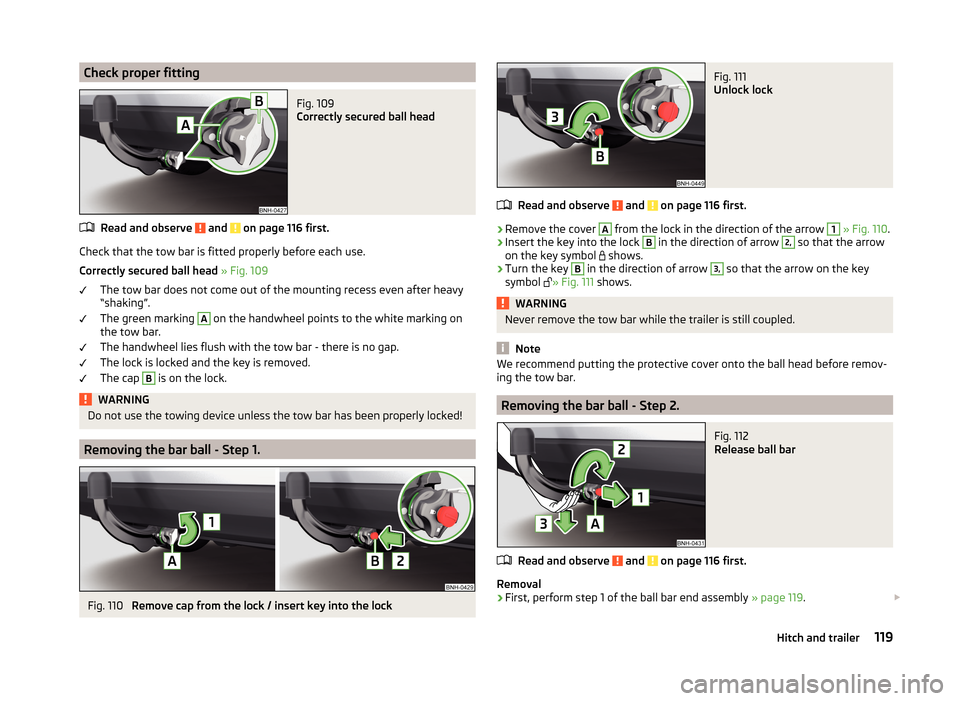
Check proper fittingFig. 109
Correctly secured ball head
Read and observe and on page 116 first.
Check that the tow bar is fitted properly before each use.
Correctly secured ball head » Fig. 109
The tow bar does not come out of the mounting recess even after heavy
“shaking”.
The green marking
A
on the handwheel points to the white marking on
the tow bar.
The handwheel lies flush with the tow bar - there is no gap.
The lock is locked and the key is removed.
The cap
B
is on the lock.
WARNINGDo not use the towing device unless the tow bar has been properly locked!
Removing the bar ball - Step 1.
Fig. 110
Remove cap from the lock / insert key into the lock
Fig. 111
Unlock lock
Read and observe and on page 116 first.
›
Remove the cover
A
from the lock in the direction of the arrow
1
» Fig. 110 .
›
Insert the key into the lock
B
in the direction of arrow
2,
so that the arrow
on the key symbol shows.
›
Turn the key
B
in the direction of arrow
3,
so that the arrow on the key
symbol » Fig. 111
shows.
WARNINGNever remove the tow bar while the trailer is still coupled.
Note
We recommend putting the protective cover onto the ball head before remov-
ing the tow bar.
Removing the bar ball - Step 2.
Fig. 112
Release ball bar
Read and observe and on page 116 first.
Removal
›
First, perform step 1 of the ball bar end assembly » page 119.
119Hitch and trailer
Page 124 of 200
NoteWe recommend that you use accessories from ŠKODA Original Accessories.
Trailer
Introduction
This chapter contains information on the following subjects:
Attaching and detaching trailers
121
Loading a trailer
122
Towing a trailer
122
Anti-theft alarm system
122
If your vehicle has already been factory-fitted with a towing device or is fitted
with a towing device from ŠKODA Original Accessories, then it meets all of the
technical requirements and national legal regulations for towing a trailer.
Note
If there is an error in the trailer lighting, check the fuses in the fuse box in the
dash panel » page 169.
Attaching and detaching trailers
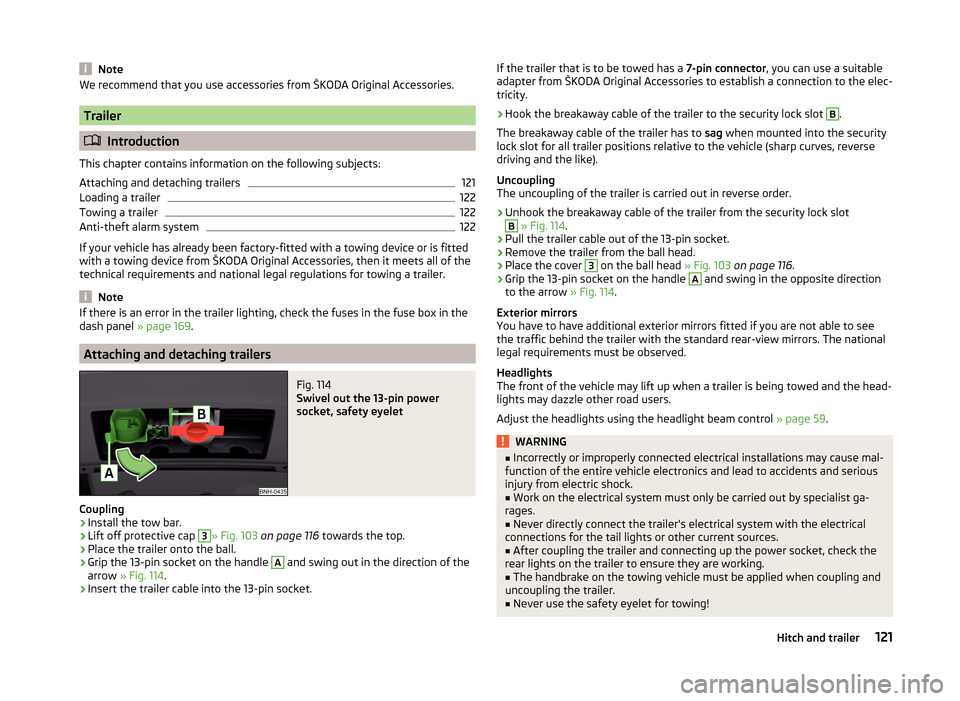
Fig. 114
Swivel out the 13-pin power
socket, safety eyelet
Coupling
›
Install the tow bar.
›
Lift off protective cap
3
» Fig. 103 on page 116 towards the top.
›
Place the trailer onto the ball.
›
Grip the 13-pin socket on the handle
A
and swing out in the direction of the
arrow » Fig. 114 .
›
Insert the trailer cable into the 13-pin socket.
If the trailer that is to be towed has a 7-pin connector, you can use a suitable
adapter from ŠKODA Original Accessories to establish a connection to the elec-
tricity.›
Hook the breakaway cable of the trailer to the security lock slot
B
.
The breakaway cable of the trailer has to sag when mounted into the security
lock slot for all trailer positions relative to the vehicle (sharp curves, reverse
driving and the like).
Uncoupling
The uncoupling of the trailer is carried out in reverse order.
›
Unhook the breakaway cable of the trailer from the security lock slot
B
» Fig. 114 .
›
Pull the trailer cable out of the 13-pin socket.
›
Remove the trailer from the ball head.
›
Place the cover
3
on the ball head » Fig. 103 on page 116 .
›
Grip the 13-pin socket on the handle
A
and swing in the opposite direction
to the arrow » Fig. 114.
Exterior mirrors
You have to have additional exterior mirrors fitted if you are not able to see
the traffic behind the trailer with the standard rear-view mirrors. The national
legal requirements must be observed.
Headlights
The front of the vehicle may lift up when a trailer is being towed and the head-
lights may dazzle other road users.
Adjust the headlights using the headlight beam control » page 59.
WARNING■
Incorrectly or improperly connected electrical installations may cause mal-
function of the entire vehicle electronics and lead to accidents and serious
injury from electric shock.■
Work on the electrical system must only be carried out by specialist ga-
rages.
■
Never directly connect the trailer's electrical system with the electrical
connections for the tail lights or other current sources.
■
After coupling the trailer and connecting up the power socket, check the
rear lights on the trailer to ensure they are working.
■
The handbrake on the towing vehicle must be applied when coupling and
uncoupling the trailer.
■
Never use the safety eyelet for towing!
121Hitch and trailer