2014 SKODA RAPID lights
[x] Cancel search: lightsPage 52 of 200

Information on the oil change service is displayed at first, followed by informa-
tion on the inspection when button 4 is pressed again.
› The number
1 or 2 is displayed in position A
.
› The symbol
and the number of days remaining until the next service inter-
val are displayed in position
B
.
› The symbol
and the number of kilometres remaining until the next service
interval are displayed in position
C
.
Resetting the service interval display
We recommend that the display reset is completed by a specialist garage.
We recommend that you do not reset the service interval display yourself. In-
correctly setting the service interval display could cause problems to the vehi-
cle.
Variable service interval
For vehicles with variable service intervals, after resetting the oil change serv-
ice display, the values of a new service interval are displayed, which are based
on the previous operating conditions of the vehicle.
These values are then continuously matched according to the actual operating
conditions of the vehicle.
Unlocking and opening
Unlocking and locking
Introduction
This chapter contains information on the following subjects:
With the key on the lock cylinder unlock / lock
50
Unlocking/locking with the remote control key
50
Opening/closing a door
51
Safe securing system
51
Individual settings
52
Locking and unlocking the vehicle with the central locking button
52
Child safety lock
53
Malfunctions
53
Your car is equipped with a central locking system.
The central locking system allows you to lock and unlock all doors, the fuel fill-
er flap and boot lid at the same time.
Depending on the equipment configuration, the following is true after
unlocking
› The turn signal lights flash twice as confirmation that the vehicle has been
unlocked.
› The doors, the boot lid and the fuel filler flap are unlocked.
› The interior light, which is switched by the door contact, comes on.
› The SafeLock system is switched off.
› The indicator light in the driver door stops flashing.
› The anti-theft alarm system is deactivated.
If you unlock the vehicle and do not open a door or the boot lid within the next
30 seconds, the vehicle will lock again automatically and the SafeLock system
or anti-theft alarm system will be switched on. This function is intended to
prevent the car being unlocked unintentionally.
Depending on the equipment configuration, the following is true after
locking
› The turn signal lights flash once as confirmation that the vehicle has been
locked.
› The doors, the boot lid and the fuel filler flap are locked.
› The interior lights connected over the door contact go off.
49Unlocking and opening
Page 53 of 200

›The SafeLock system is switched on.
› The warning light in the driver door begins flashing.
› The anti-theft alarm system is activated.
If the doors or the boot lid remain open after the vehicle has been locked, the
turn signal lights do not flash until they have been closed.WARNING■ Never leave the key in the vehicle when you exit the vehicle. Unauthor-
ized persons, such as children, for example, could lock the car, turn on the
ignition or start the engine - there is a danger of injury and accidents!■
When leaving the vehicle, never leave persons who are not completely in-
dependent, such as children, unattended in the vehicle. The children might,
for example, release the handbrake or take the vehicle out of gear. The ve-
hicle could then start to move – risk of injury and accidents! These individu-
als might also not be able to leave the vehicle on their own or to help
themselves. Can be fatal at very high or very low temperatures!
CAUTION
■ Each key contains electronic components; therefore it must be protected
against moisture and severe shocks.■
Keep the groove of the keys absolutely clean. Impurities (textile fibres, dust,
etc.) have a negative effect on the functionality of the locking cylinder and ig-
nition lock.
■
The battery must be replaced if the central locking or anti-theft alarm system
does react to the remote control at less than approx. 3 metres
away » page 166 .
■
When leaving the vehicle, always check if it is locked.
■
If the driver's door has been opened, the vehicle cannot be locked.
Note
In the event of an accident in which the airbags are deployed, the locked doors
are automatically unlocked in order to enable rescuers to gain access to the
vehicle.With the key on the lock cylinder unlock / lockFig. 30
Left side of the vehicle: Turning
the key for unlocking and locking
the vehicle
Read and observe and on page 50 first.
The key allows you to unlock or lock the vehicle via the lock cylinder in the
driver's door.
Unlocking / locking the vehicle with the key » Fig. 30
Unlocking the vehicle
Locking the vehicle
Unlocking/locking with the remote control key
Fig. 31
Remote control key
Read and observe and on page 50 first.
Function and description of the remote control key » Fig. 31
Unlocking the vehicle
Locking the vehicle
Unlocking / locking the boot lid
Button for the fold out / fold in of the key
Warning light
AB50Using the system
Page 56 of 200

Child safety lockFig. 34
Back door: left / right
Read and observe
and on page 50 first.
The child safety lock prevents the rear door from being opened from the in- side. The door can only be opened from the outside.
Switching the cooling system on and off » Fig. 34
Switching on
Switching off
You can switch the child safety lock on and off using the vehicle key.
Malfunctions
Read and observe
and on page 50 first.
Failure of the central locking
If the central locking system fails only the driver's door can be locked or un-
locked with the key. The other doors and the boot lid can be or emergency re-
lease or locked.
› Emergency locking of the door
» page 167.
› Emergency unlocking of the boot lid
» page 167.
Displaying an error
If the indicator light in the driver's door initially flashes quickly for around 2
seconds, and then lights up for 30 seconds without interruption before flash-
ing again slowly, you will need to seek the assistance of a specialist garage.
Discharged battery in the remote control key
If the red indicator light B » Fig. 31 on page 50 does not flash when you press
a button on the remote control key, the battery is empty.
Replace the battery » page 166.
Anti-theft alarm system
Introduction
This chapter contains information on the following subjects:
Activating/deactivating
54
Interior monitor and towing protection
54
The anti-theft alarm system increases the level of protection against people
trying to break into the vehicle.
The alarm system triggers audible and visual signals if an attempt is made to
break into the vehicle (hereafter referred to only as alarm).
Triggering the alarm
The alarm is triggered when the following unauthorized actions are carried out
on the locked vehicle.
› Opening the bonnet.
› Opening the boot lid.
› Opening the doors.
› Manipulation of the ignition lock.
› Towing the vehicle
» page 54.
› Movement in the vehicle
» page 54.
› Sudden and significant voltage drop of the electrical system.
› Uncoupling the trailer
» page 121, Attaching and detaching trailers .
If the driver's door of a vehicle with a remote control is unlocked and opened by the lock cylinder, then the alarm is triggered.
Switching off the alarm
The alarm is turned off by pressing the button on the radio remote control
key or switching on the ignition.
CAUTION
Before leaving the vehicle, check that the doors and windows are closed in or-
der to ensure that the alarm system is fully operational. 53Unlocking and opening
Page 59 of 200

Note■When driving always use the existing heating, air conditioning and ventila-
tion system for ventilating the interior of the vehicle. If the windows are
opened, dust as well as other dirt can get into the vehicle and in addition the wind noise is more at certain speeds.■
The window lift mechanism is equipped with protection against overheating.
Repeated opening and closing of the window can cause this mechanism to
overheat. If this happens, it will not be possible to operate the window for a
short time. You will be able to operate the window again as soon as the over-
heating protection has cooled down.
Opening/closing the windows
Fig. 37
Power window buttons
Read and observe
and on page 55 first.
All windows can be operated from the driver's seat.
Power window buttons » Fig. 37
Left front door
Right front door
Left rear door
Left rear door:
Disable / enable the buttons in the rear doors
Opening
›
Lightly press the appropriate button down and hold it until the window has
moved into the desired position.
Releasing the button causes the window to halt immediately.
ABCDEThe driver's window can be completely opened automatically by briefly press-
ing the button as far as it will go. Renewed pressing of the button causes the
window to stop.
Closing›
Pull gently on the top edge of the corresponding button and hold until the
window has moved into the desired position.
Releasing the button causes the window to halt immediately.
Disable / enable the buttons in the rear doors
›
Press the button
E
» Fig. 37 .
When the buttons are disabled in the rear doors, the indicator light
in the
button
E
lights up.
WARNINGIf the rear seats are accommodating people who are not completely inde-
pendent, e.g. children, it is recommended that for safety reasons the but-
tons in the rear doors are disabled with the button E
.
Force limit
Read and observe
and on page 55 first.
The electrical power windows are fitted with a force limiter.
If there is an obstacle, the closing process is stopped and the window goes
down by several centimetres.
If the obstacle prevents the window from being closed during the next 10 sec-
onds, the closing process is interrupted once again and the window goes down
by several centimetres.
If you attempt to close the window again within 10 seconds of the window be-
ing moved down for the second time, even though the obstacle was not yet
been removed, the closing process is only stopped. During this time it is not
possible to automatically close the window. The force limiter is still switched
on.
The force limiter is only switched off if you attempt to close the window again
within the next 10 seconds - the window will now close with full force!
If you wait longer than 10 seconds, the force limiter is switched on again.
56Using the system
Page 61 of 200

Lights and visibility
Lights
Introduction
This chapter contains information on the following subjects:
Operating the light function
58
Daytime running lights(DAY LIGHT)
59
Turn signal and main beam
60
Automatic driving lamp control
60
Fog lights
61
Fog lights with CORNER function
61
Rear fog light
61
COMING HOME / LEAVING HOME
62
Hazard warning light system
62
Parking light
63
Driving abroad
63
Unless otherwise stated, the lights only work when the ignition is switched on.
The position of some of the controls on right-hand drive models may differ
from that shown in » Fig. 39 on page 58 . The symbols which mark the indi-
vidual positions of the controls are identical.
WARNING■ The activation of the lights should only be undertaken in accordance with
national legal requirements.■
The driver is always responsible for the correct settings and use of the
lights.
WARNING (Continued)■ The automatic driving lamp control only operates as a support and
does not release the driver from his responsibility to check the lights and, if
necessary, to switch on the light depending on the prevailing light condi-
tions. The light sensor cannot, for example, detect rain or snow. Under
these conditions we recommend switching on the low beam or fog lights!■
Never drive with only the side lights on! The side lights are not bright
enough to light up the road sufficiently in front of you or to be seen by oth-
er oncoming traffic. Therefore always switch on the low beam when it is
dark or if visibility is poor.
Note
The headlights may mist up temporarily. When the driving lights are switched
on, the light outlet surfaces are free from mist after a short period, although
the headlight lenses may still be misted up in the peripheral areas. This mist
has no influence on the life of the lighting system.
Operating the light function
Fig. 39
Light switch and control dial for
headlight range adjustment
Read and observe on page 58 first.
Switching lights on and off
Depending on the equipment configuration, the light switch
A
» Fig. 39 can be
moved to the following positions.
Turn switch Switching off lights (except daytime running lights)Automatic switching lights on and off » page 60
58Using the system
Page 62 of 200

Switching on the parking light or parking lights1)
» page 63
Switch on low beam 1)
Pull switch Switch on the front fog lamp » page 61
Switching on the rear fog light » page 61
Headlight range control
Turning the dial B
» Fig. 39 from the position
to
gradually adjusts the
headlight range control and thereby shortens the light cone.
The positions of the width of illumination correspond approximately to the fol-
lowing car load.
Front seats occupied, boot empty
All seats occupied, boot empty
All seats occupied, boot loaded
Driver seat occupied, boot loaded
We recommend you adjust the headlight beam when the low beam is switched
on.
WARNINGAlways adjust the headlight beam to meet the following conditions.■The vehicle does not dazzle other road users, especially oncoming vehi-
cles.■
The beam range is sufficient for safe driving.
Note
■ An audible warning signal will sound if the light switch is in the or posi-
tion, the ignition key is removed and the driver's door is opened. The audible
warning signal is switched off after a few seconds or as a result of door con-
tact when the driver's door is closed. However, the side lights remain on to illu-
minate the parked vehicle if necessary.■
If leaving the vehicle without needing the parking lights on, always turn
the light switch to position
.
Daytime running lights(DAY LIGHT)
Read and observe
on page 58 first.
The daytime running lights (the only function) provides the lighting of the frontvehicle range.
The lights are switched on automatically if the following conditions are met.
The light switch is in the position
or
» Fig. 39 on page 58 .
The ignition is switched on.
The parking aid is activated.
Deactivating the function
›
Switch off the ignition.
›
Remove the fuse for the daytime running lights » page 169, Fuses in the
dash panel .
Activating the function
›
Switch off the ignition.
›
Use a fuse of appropriate amperage for the daytime running
lights » page 169 , Fuses in the dash panel .
Disable function on vehicles with the START-STOP system or with the
automatic driving light control
›
Switch off the ignition.
›
Slide the turn signal light lever ( » Fig. 40 on page 60 ) downwards and hold
it in this position.
›
Switch on the ignition – wait until the left-turn signal light flashes 4x.
›
Switch off the ignition – an audible signal sounds which confirms the deacti-
vation of the function.
›
Release the turn signal stalk.
Function on vehicles with the START-STOP system or with the automatic
driving light control
›
Switch off the ignition.
›
Slide the turn signal light lever ( » Fig. 40 on page 60 ) upwards and hold it in
this position.
›
Switch on the ignition – wait until the right-turn signal light flashes 4x.
›
Switch off the ignition – an audible signal sounds which confirms the activa-
tion of the function.
1)
On vehicles with the instrument cluster - Version 1
» page 30 the symbol also illuminates on the light
switch.
59Lights and visibility
Page 63 of 200
›Release the turn signal stalk.WARNINGWhen the daytime running light is switched on, the side lights (neither at
the front nor the rear) and the number plate lights are not lit. Therefore al-
ways switch on the low beam when the visibility is poor.
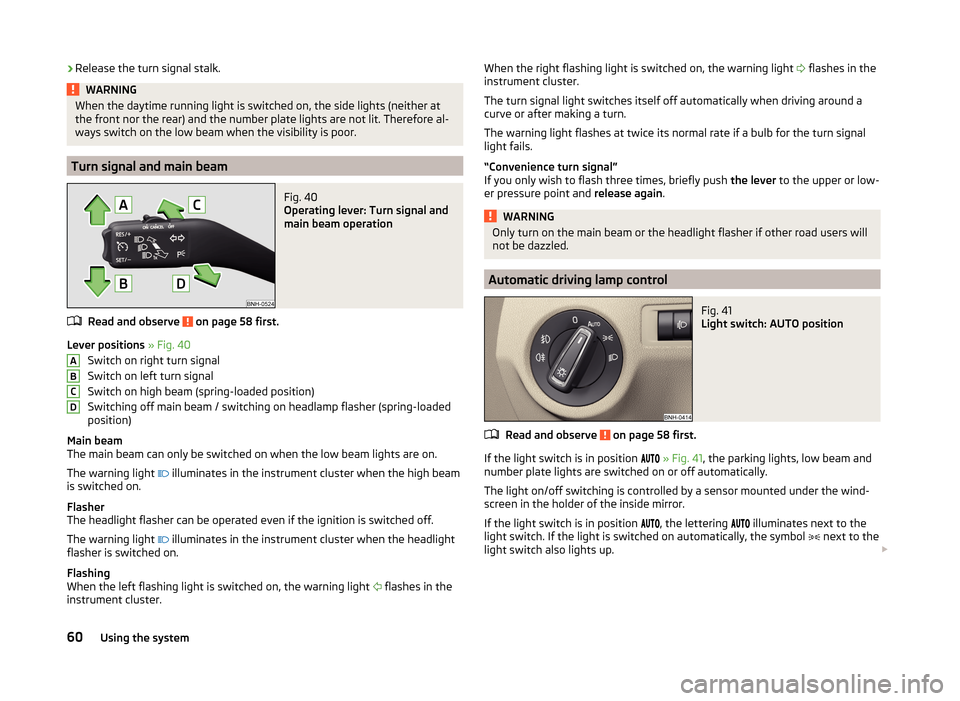
Turn signal and main beam
Fig. 40
Operating lever: Turn signal and
main beam operation
Read and observe on page 58 first.
Lever positions » Fig. 40
Switch on right turn signal
Switch on left turn signal
Switch on high beam (spring-loaded position)
Switching off main beam / switching on headlamp flasher (spring-loaded
position)
Main beam
The main beam can only be switched on when the low beam lights are on.
The warning light
illuminates in the instrument cluster when the high beam
is switched on.
Flasher
The headlight flasher can be operated even if the ignition is switched off.
The warning light
illuminates in the instrument cluster when the headlight
flasher is switched on.
Flashing
When the left flashing light is switched on, the warning light
flashes in the
instrument cluster.
ABCDWhen the right flashing light is switched on, the warning light flashes in the
instrument cluster.
The turn signal light switches itself off automatically when driving around a
curve or after making a turn.
The warning light flashes at twice its normal rate if a bulb for the turn signal
light fails.
“Convenience turn signal”
If you only wish to flash three times, briefly push the lever to the upper or low-
er pressure point and release again.WARNINGOnly turn on the main beam or the headlight flasher if other road users will
not be dazzled.
Automatic driving lamp control
Fig. 41
Light switch: AUTO position
Read and observe on page 58 first.
If the light switch is in position
» Fig. 41 , the parking lights, low beam and
number plate lights are switched on or off automatically.
The light on/off switching is controlled by a sensor mounted under the wind- screen in the holder of the inside mirror.
If the light switch is in position
, the lettering
illuminates next to the
light switch. If the light is switched on automatically, the symbol
next to the
light switch also lights up.
60Using the system
Page 64 of 200

Automatic driving light control during rain
The low beam lights are switched on automatically if the following conditions
are met.
The light switch is in position
» Fig. 41 .
Automatic wiping with rain - position 1
or wiping - position
2
or
3
is
turned on » page 66, Activating the windscreen wipers and washers .
The windscreen wipers are on for more than 15 s.
The light turns off about 4 minutes after turning off the wipers.
CAUTION
Do not attach any stickers or similar objects in front of the light sensor on the
windscreen to avoid impairing the function or its reliability.
Fog lights
Fig. 42
Light switch - Switch front and
rear fog light
Read and observe on page 58 first.
Switching on/off
›
Turn the light switch to position
or
» Fig. 42 .
›
Pull the light switch to position
1
.
The fog lights are switched off in the reverse order.
The warning light
lights up in the instrument cluster when the fog lights are
switched on » page 34.
Fog lights with CORNER function
Read and observe
on page 58 first.
The CORNER function lights the front fog lamp on each side of the vehicle to
illuminate the area around the vehicle when turning, parking, etc.
The CORNER function is switched on automatically if the following conditions
are met.
The turn signal is switched on or the front wheels are turned sharply to
the right or left 1)
.
The engine is running.
The vehicle is stopped or moves at a speed of no more than 40 km/h.
The low beam is switched on or the light switch is in the position and
the low beam is switched on.
The daytime running lights are not switched on.
The fog lights are not switched on.
Note
The two fog lights are switched on when you shift into the reverse gear.
Rear fog light
Read and observe
on page 58 first.
Switching on/off
›
Turn the light switch to position or
» Fig. 42 on page 61 .
›
Pull the light switch to position
2
.
The rear fog light is switched off in the reverse order.
The warning light lights up in the instrument cluster when the rear fog light
is switched on » page 34.
If the vehicle is not fitted with fog lights, the rear fog light is switched on by
pulling out the light switch directly to the only possible setting.
Only the rear fog light on the trailer lights up if the vehicle has a factory-fitted
towing device or a towing device from ŠKODA original accessories and it is
driven with a trailer.
1)
If both switch-on conditions are conflicting, for example, if the front wheels are turned to the left and
the right turn signal light is switched on, the turn signal light has the higher priority.
61Lights and visibility