2014 Seat Toledo lights
[x] Cancel search: lightsPage 94 of 200

Operation
Air conditioning selection Basic air conditioning control settings recom-
mended for the corresponding operating
modes:SettingsControl positionButtonAir vents 4ABC12
Windscreen and side window de-
frost
a)Required tempera-
ture3 or 4 Do not switch onSwitched on automati-
callyb)Open and direct towards the
side window
Heat as quickly as possibleClockwise as far asit will go3 Switch on brieflyOffOpening
Mild heatingRequired tempera-
ture2 or 3 / Do not switch onOffOpening
Heat as quickly as possibleAnti-clockwise as far
as it will goBriefly 4, then 2 or 3 Switch on briefly
c)IgnitionOpening
Optimum coolingRequired tempera-
ture1 or 2 Do not switch onIgnitionOpen and direct towards the
roof
Fresh air mode - blowerAnti-clockwise as faras it will goRequired position Do not switch onOffOpening
a)
This type of setting is not recommended in countries with high air humidity. The windows could cool too quickly and cause them to mist over on the outside.
b) The lamp in button 2
lights up, even if not all of the conditions for cooling system operations are met. Cooling is indicated as available once all of the conditions are met
››› page 90, General notes .
c) In certain conditions, air recirculation mode can switch on automatically ››› page 92, a lamp illuminates in the button. Note
● Controls A
››› Fig. 87 ››› p
age 90, B ,
C and buttons
1 and
2 .
● Air vents 4 ››› page 88 . ●
We recommend you leave the air vents 3
››› page 88 in the open position. Air recirculation
Air recirculation prevents unpleasant smells,
e.g. when passing through a tunnel or in
queuing traffic, from entering the interior.
92
Page 100 of 200
Operation
Starting the engine
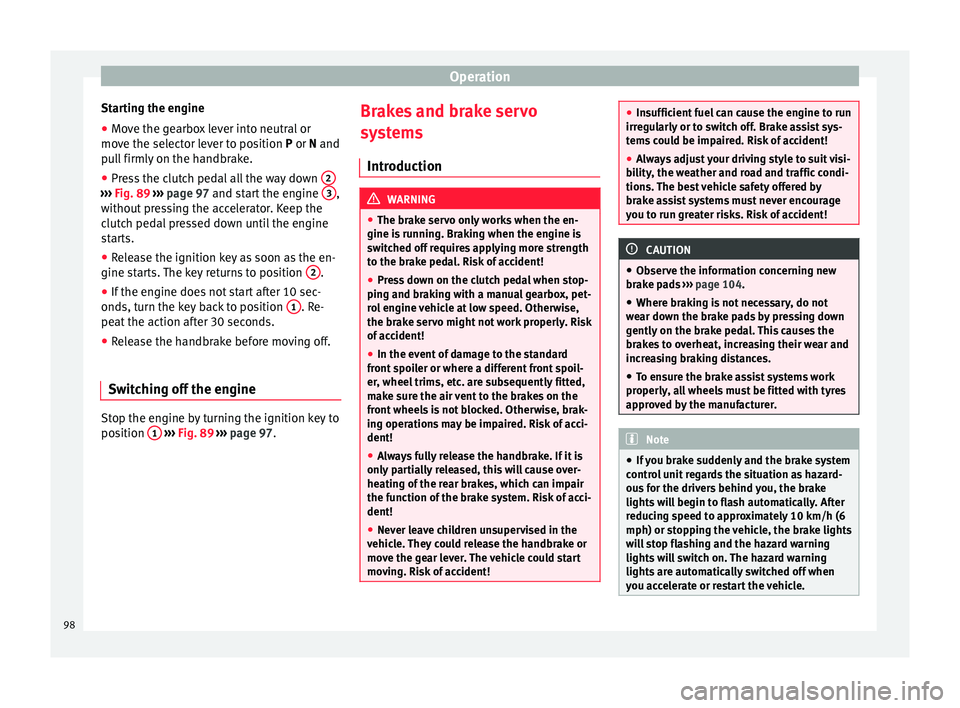
● Move the gearbox lever into neutral or
move the selector lever to position P
or N and
pull firmly on the handbrake.
● Press the clutch pedal all the way down 2›››
Fig. 89
›
›› p
age 97 and start the engine 3 ,
without pressing the accelerator. Keep the
clutch pedal pressed down until the engine
starts.
● Release the ignition key as soon as the en-
gine starts. The key returns to position 2 .
● If the engine does not start after 10 sec-
onds, turn the key back to position 1 . Re-
peat the action after 30 seconds.
● Release the handbrake before moving off.
Switching off the engine Stop the engine by turning the ignition key to
position
1
›››
Fig. 89 ›
›
›
page 97. Brakes and brake servo
systems
Introduction WARNING
● The brake servo only works when the en-
gine is running. Braking when the engine is
switched off requires applying more strength
to the brake pedal. Risk of accident!
● Press down on the clutch pedal when stop-
ping and braking with a manual gearbox, pet-
rol engine vehicle at low speed. Otherwise,
the brake servo might not work properly. Risk
of accident!
● In the event of damage to the standard
front spoiler or where a different front spoil-
er, wheel trims, etc. are subsequently fitted,
make sure the air vent to the brakes on the
front wheels is not blocked. Otherwise, brak-
ing operations may be impaired. Risk of acci-
dent!
● Always fully release the handbrake. If it is
only partially released, this will cause over-
heating of the rear brakes, which can impair
the function of the brake system. Risk of acci-
dent!
● Never leave children unsupervised in the
vehicle. They could release the handbrake or
move the gear lever. The vehicle could start
moving. Risk of accident! ●
Insufficient fuel can cause the engine to run
irregularly or to switch off. Brake assist sys-
tems could be impaired. Risk of accident!
● Always adjust your driving style to suit visi-
bility, the weather and road and traffic condi-
tions. The best vehicle safety offered by
brake assist systems must never encourage
you to run greater risks. Risk of accident! CAUTION
● Observe the information concerning new
brake pads ››› page 104
.
● Wher e br
aking is not necessary, do not
wear down the brake pads by pressing down
gently on the brake pedal. This causes the
brakes to overheat, increasing their wear and
increasing braking distances.
● To ensure the brake assist systems work
properly, all wheels must be fitted with tyres
approved by the manufacturer. Note
● If you brake suddenly and the brake system
control unit regards the situation as hazard-
ous for the drivers behind you, the brake
lights will begin to flash automatically. After
reducing speed to approximately 10 km/h (6
mph) or stopping the vehicle, the brake lights
will stop flashing and the hazard warning
lights will switch on. The hazard warning
lights are automatically switched off when
you accelerate or restart the vehicle. 98
Page 101 of 200

Driving
●
On long, steep gradients, reduce your
speed and change to a lower gear (manual
gearbox) or move the selector lever to a lower
gear position (automatic gearbox). This uses
the force of the engine and the brakes do not
suffer as much. If you still have to brake, do
so intermittently, pressing down repeatedly
on the brake pedal.
● Vehicle modifications (e.g. to the engine,
brakes, frame or a combination of wheels and
tyres) could impair the brake assist systems
››› page 122, Accessories and modifications
to the vehicle .
● In the event of a fault in the ABS system,
the ESC, TCS and EDL are switched off auto-
matically. A fault in the ABS is indicated by
the ››› page 36 warning lamp. Brakes
Wear
The rate of wear of the brake pads depends
on the driving style and on the way in which
the vehicle is used. The brake pads will wear
more quickly if you use your vehicle frequent-
ly in urban traffic and short trips or drive in a
sporty style. Under these
demanding condi-
tions , visit your specialised service, even be-
f or
e the scheduled service date, so that the
thickness of the brake pads can be meas-
ured. Wet roads or road salt
If brakes are wet or frozen, or if you are driv-
ing on roads which have been gritted with
salt, braking power may set in later than nor-
mal. Dry the brakes as soon as possible by
braking repeatedly.
Corrosion
Long periods of inactivity and little use can
lead to rust on the brake discs and dirt on the
brake pads. Where the brake system is sub-
jected to light stress or in the case of corro-
sion, clean the brake discs by braking fully
several times at a high speed.
Brake system fault
If you notice that the braking distance sud-
denly increases and the brake pedal can be
pressed down more fully, there may be a fault
in the brake system. Visit a specialised serv-
ice immediately and adjust your driving style
to the extent of the damage and to limit the
effect of the brakes.
Low brake fluid level
Insufficient brake fluid could cause faults in
the brake system. The brake fluid level is con-
trolled electronically
››› page 33, Brake sys-
tem . Brake servo
The brake servo supplements the pressure
you exert on the brake pedal. The brake servo
only works when the engine is running.
Handbrake Fig. 90
Centre console: handbrake. Applying the handbrake
– Pull the handbrake lever up all the way.
Releasing the handbrake
– Pull the handbrake lever up slightly and
press the unlock button at the same time
››› Fig. 90 .
– Keep the b
utton pressed down and push
the lever all the way down.
The warning lamp lights up when the hand-
brake is applied with the ignition on .
99
Technical specifications
Advice
Operation
Safety
Page 102 of 200

Operation
Manual gearbox Changing gears Fig. 91
Gear shift diagram of a 5- or 6-speed
manual gearbox When changing gear, always depress the
clutch pedal fully and keep it pressed down
to avoid excessive clutch wear.
In order to drive at an optimum RPM, follow
the gear change indications
››› page 32.
Engage reverse gear only when the vehicle is
stopped. On engaging reverse gear while the
engine is running, first wait a moment with
the clutch pedal pressed down fully to limit
gear shift noise.
The reverse lights switch on when the reverse
gear is selected and the ignition is on. WARNING
Never engage reverse gear when moving for-
ward. Risk of accident! Note
Do not rest your hand on the gear lever while
driving. The pressure of your hand could lead
to premature wear of the gear system. Automatic gearbox
Basic information The gearbox changes up and down automati-
cally. The gearbox can be set to
Tiptronic
mode. The gears can be changed manually in
this mode ›››
page 102 .
The en gine c
an only be started
in positions P
or N. If, on engaging the steering lock,
switching the ignition on/off or starting the
engine, the selector lever is not in these posi-
tions, the informative display will show Move
the selector lever to position P/N! , or P/N
is
shown on the general dash panel display.
At temperatures below -10 °C (14 °F), the en-
gine can only be started in position P.
Mov
e the selector lever to position P when
parking the vehicle on a flat surface. On a
slope, the handbrake should be firmly ap-
plied before moving the selector lever to the park position. This reduces the load on the
lock mechanism while making it easier to
move the selector lever from position P.
If, while the vehicle is moving, the selector
lever is accidentally moved to position
N, re-
le
ase the accelerator and wait for the engine
to idle before moving it back into position. WARNING
● Never press the accelerator when selecting
the automatic gearbox operating mode when
the vehicle is stationary. Risk of accident!
● Never move the selector lever to positions
R or P when driving. Risk of accident!
● If the vehicle is to be stopped with a gear
selected and the engine idling (e.g. waiting
or moving slowly at traffic lights), press down
on the brake pedal because the transmission
is not entirely interrupted when the engine is
idling and the vehicle will tend to start mov-
ing.
● Apply the handbrake firmly and put the se-
lector lever in position P before opening the
bonnet and working on the vehicle with the
engine running. Risk of accident! Strictly fol-
low the safety instructions ››› page 132, En-
gine compartment.
● When s t
opping on a slope (hill), try not to
stop the vehicle from moving by pressing the
“accelerator” with a gear selected. This could
overheat the clutch. If the clutch risks being
burnt due to this force, it would switch off 100
Page 104 of 200

Operation
P – Parking position
In this position, the driven wheels are me-
chanically locked.
The parking position can only be selected
when the vehicle is stationary.
If you want to move the selector lever from
this position, press the interlock button on
the selector lever knob while pressing down
on the brake pedal.
If the battery is drained, the selector lever
cannot be moved from position P.
R – Reverse
Reverse gear must be engaged only when the
vehicle is stationary and the engine is idling.
To move the selector lever to position R from
positions P or
N, press the interlock button
on the selector lever knob and press down on
the brake pedal.
The reverse lights come on when the selector
lever is in position R and the ignition is on.
N – Neutral (idling)
Neutral (idling) is engaged in this position.
To move the selector lever from position N (if
the lever has remained in this position for
more than 2 seconds) to position D or R at
speeds of less than 5 km/h (3 mph) and
when the vehicle is stationary, press down on
the brake pedal. D – Drive (forwards)
In this position, the gearbox automatically
changes to a lower or higher gear, depending
on engine requirements, the driving speed
and the gear shift programme.
To move the selector lever to position D from
position N
at speeds of less than 5 km/h (3
mph) and when the
vehicle is stationary,
press down on the brake pedal.
In some situations (e.g. on mountain roads or
when towing a trailer or caravan), it can be
advantageous to switch temporarily to the
manual shift programme ››› page 102 so that
the gear ratios can be selected manually to
suit driving conditions.
S – Sports driving position
Shifting up later than usual makes full use of
the engine power. This shifts down earlier in
relation to position D
.
T
o move the selector lever to position S from
position
D, press the interlock button on the
selector lever knob. Tiptronic gearbox Fig. 93
Selector lever: Tiptronic. The Tiptronic gearbox allows the driver to
change gears manually using the selector
lever.
Activating the manual gearbox
– From position D
, push the selector lever to
the right
. The selected position of the se-
lector lever is shown on the general instru-
ment panel display together with the gear
engaged 1
››› Fig. 92 .
Shif tin
g up
– Push the selector lever gently forwards + ›››
Fig. 93 .
Shif tin
g down
– Push the selector lever gently backwards
-
››› Fig. 93 .
102
Page 108 of 200

Operation
●
Refuelling just once with leaded petrol dis-
ables the exhaust system! Economical and environmentally
friendly driving
Fuel consumption, environmental pollution
and wear to the engine, brakes and tyres de-
pends in large part on your driving style. By
adopting an economical driving style and an-
ticipating the traffic situation ahead, you can
easily reduce fuel consumption by 10-15%.
Some tips on how to help you reduce pollu-
tion while saving money are listed below.
Drive anticipating the traffic situation
A vehicle uses most fuel when accelerating.
When you anticipate situations, you have to
brake less often and, thus, accelerate less. If
it is possible, let the vehicle roll with a
gear
engaged , for example, if you see a red light
ahe a
d. The braking effect achieved in this
way helps to reduce the wear of brakes and
tyres; emissions and fuel consumption are
reduced to zero (disconnection due to iner-
tia).
Change gear early to save energy
An effective way of saving fuel is to change
up
quickly through the gears. Running the
engine at high rpm in the lower gears uses
an unnecessary amount of fuel. Manual gearbox:
shift up from first to second
gear as soon as possible. We recommend
that, whenever possible, you change to a
higher gear upon reaching 2000 rpm. Follow
the “recommended gear” indication that ap-
pears on the instrument panel ››› page 32,
Recommended gear display.
Avoid driving at high speed
We advise you not to drive at the top speed
permitted by the vehicle. Fuel consumption,
exhaust emissions and noise levels all in-
crease very rapidly at higher speeds. Driving
at moderate speeds will help to save fuel.
Avoid idling
It is worthwhile switching off the engine
when waiting in a traffic jam, at level cross-
ings or at traffic lights with a long red phase.
The fuel saved after only 30 - 40 seconds is
greater than the amount of fuel needed to re-
start the engine.
The engine takes a long time to warm up
when it is idling. Mechanical wear and pollu-
tant emissions are also especially high dur-
ing this initial warm-up phase. It is therefore
best to drive off immediately after starting
the engine. Avoid running the engine at high
speed. Periodic maintenance
Periodic maintenance work guarantees that,
before beginning a journey, you will not con-
sume more than the required amount of fuel.
A well-serviced engine gives you the benefit
of
improved fuel efficiency as well as maxi-
mum reliability and an enhanced resale val-
ue.
A badly serviced engine can consume up to
10% more fuel than necessary.
Avoid short journeys
To reduce the consumption and emission of
polluting exhaust gases, the engine and the
exhaust gas filtration systems should reach
the optimum operating temperature.
With the en
gine cold, fuel consumption is
proportionally higher. The engine does not
warm up and fuel consumption does not nor-
malise until having driven approximately four
kilometres (2.5 miles). This is why we recom-
mend avoiding short trips whenever possi-
ble.
Maintain the correct tyre pressures
Bear in mind that keeping the tyres at an ad-
equate pressure saves fuel. If the tyre pres-
sure is just one bar (14.5 psi/100 kPa) too
low, fuel consumption can increase by as
much as 5%. Due to the greater rolling resist-
ance, under-inflation also increases tyre wear
wear and impairs handling.
106
Page 111 of 200

Driver assistance systems
The
warning lamp on the general instru-
ment
panel starts flashing when the system
is working.
The
stability (ESC) system includes the fol-
lowing systems:
● Anti-lock brake system (ABS),
● Traction control system (TCS),
● Electronic differential lock (EDL),
● Hydraulic brake assist system (HBA),
● Hill hold control (HHC).
The ESC system cannot be switched on. The
››› Fig. 95 button can only be used to
sw it
ch off the TCS system. The warning
lamp lights up on the general instrument
panel if the TCS system is switched off.
The ASR should be switched on at all times.
Only under certain circumstances should the
system be switched off, e.g.
● driving with chains,
● driving in deep snow or on very soft surfa-
ces,
● During the “swinging movement” required
to remove a stuck vehicle
Switch the ASR back on as soon as possible. Brake assist system (HBA)*
The HBA system is activated when you press
down on the brake pedal suddenly. It increa-
ses braking power, helping to reduce braking
distances. To reduce braking distance as
much as possible, keep the brake pedal
pressed down firmly until the vehicle comes
to a standstill.
With the help of this system, the ABS is acti-
vated more quickly and more efficiently.
The brake assist function is deactivated auto-
matically when the brake pedal is released.
Hill hold control (HHC)*
The HHC system makes it easier to start the
vehicle on hills. The system maintains the
brake pressure created by pressing down on
the brake pedal for 2 seconds after it has
been released. Your foot can be removed
from the brake pedal and you can use the ac-
celerator pedal and move away on a hill with-
out having to use the handbrake. The brake
pressure drops as the accelerator pedal is
pressed. If the vehicle cannot be started, it
will start to move backwards after 2 seconds.
The HHC is activated on gradients of over
5%, if the driver door is closed. It only works
for starting on hills, moving both forward and
in reverse. It is not activated during start-up
down hill.
Anti-lock system (ABS) The ABS system prevents the wheels locking
during braking. This helps the driver keep
control of the vehicle.
The driver is made aware of ABS assistance
by the pulsating of the brake pedal
and a
characteristic noise.
Keep the brake pedal pressed down while the
ABS is working. The ABS will switch off when
the brake pedal is released. Never brake in-
termittently while the ABS is working!
Traction control system (ASR) If the wheels start to slip, the TCS adapts the
engine speed to the driving conditions. Par-
ticularly in unfavourable conditions, the TCS
helps starting, accelerating and hill starts.
The TCS
1)
warning lamp on the general
dash panel flashes when the system is work-
ing. 1)
Valid for vehicles not fitted with the stability con-
trol system (ESC). 109
Technical specifications
Advice
Operation
Safety
Page 113 of 200

Driver assistance systems
●
To ensure that the parking aid system
works properly, the sensors must be kept
clean (e.g. free of ice).
● If the parking aid system is switched on
when the automatic gearbox selector lever is
in position P, the acoustic signal will be inter-
rupted (the car cannot be moved). Cruise control*
Introduction The cruise control system allows you to drive
at a constant speed of 30 km/h (19 mph) or
higher without having to press the accelera-
tor. However, the speed is only maintained
within the margin permitted by the engine
power and the braking effect of the engine.
The
warning lamp lights up on the general
instrument panel if cruise control is switched
on. WARNING
● For safety reasons the cruise control sys-
tem must not be used in dense traffic or
where roads conditions are poor (e.g. due to
ice, aquaplaning, loose grit, snow). – Risk of
accident!
● The programmed speed can only be re-es-
tablished if it is not too high for current traf-
fic conditions. ●
Always switch the cruise control system off
after using it in order to avoid involuntary
use. CAUTION
● The cruise control cannot maintain a con-
stant speed when the vehicle is moving
downhill. The vehicle tends to accelerate un-
der its own weight. Therefore, shift down or
use the brake pedal in good time to slow the
vehicle. Note
● In vehicles with an automatic gearbox, the
cruise control system cannot be switched on
if the selector lever is in position P, N or R.
● In vehicles with a manual gearbox, the
cruise control cannot be switched on if first
gear or reverse gear is engaged. Setting speed
Fig. 97
Turn signal and main beam headlight
lever: cruise control buttons. Setting speed
– Move knob A
››› Fig. 97 to the ON posi-
tion.
– Briefly press rocker switch B in
SET
posi-
tion when
you have reached the speed you
wish to set.
On releasing rocker switch B in
SET
, the cur-
r
ent speed is stored and will remain constant
without having to press the accelerator ped-
al.
111
Technical specifications
Advice
Operation
Safety