2014 Seat Altea light
[x] Cancel search: lightPage 147 of 321

145
Seats and storage
Luggage compartment net*
There is a storage net in the luggage compartment for secur-
ing objects.
Fig. 107 Luggage com-
partment net
– Use the fastening rings located on the side of the luggage com-
partment to attach the storage net ⇒ Fig. 107.
Note
● Do not exceed the maximum authorised weight for the vehicle
⇒ page 297.
Other storage compartments
Other storage compartments can be found:
● in the centre console,
● in the door trims (front and rear), ●
in the side trims of the luggage compartment,
● in the spare wheel recess in the luggage compartment (only on vehicles
with an optional anti-puncture kit*.
The clothes hooks are located on the rear roof handles.
WARNING
● Do not store loose objects on the dash panel. These objects could be
flung through the passenger compartment when the vehicle is moving
(e.g. while accelerating, braking or cornering) and distract the driver.
Risk of accident.
● Ensure that no objects can fall from the centre console or other stor-
age compartments into the driver footwell while the vehicle is moving. In
the event of a sudden braking manoeuvre, you will not be able to use the
brake, clutch or accelerator. Risk of accident.
● Clothing hung on the coat hooks must not restrict the driver's view.
Risk of accident. The coat hooks are intended only for use with light arti-
cles of clothing. Do not leave any hard, sharp or heavy objects in hanging
articles of clothing. During sudden braking manoeuvres or accidents, es-
pecially those involving airbag deployment, these objects could injure
the vehicle occupants.
Safety FirstOperating instructionsPractical TipsTechnical Specifications
Page 152 of 321

150Seats and storage
Fitting mobile storage compartment
–Fold down the small section of the rear seat backrest, in order
to access the large section of the backrest.
– Fit the mobile storage compartment mounting plate H
⇒ Fig. 114 from the inside of the vehicle, through the rear part
of the seat. It should be fitted between the backrest and the
seat, in the central seat area.
– Push the plate until it clips the cushion frame. The rings of the
mobile storage compartment mounting plate appear at the front
of the seat.
– If it is difficult to make the plate clip, tilt the rear backrest of the
large section forwards slightly and then lean the backrest back-
wards to make the fitting of the mobile storage compartment
onto the mounting plate easier.
– Place the mobile storage compartment onto the foam of the
central seat.
– Set both mounting pieces together E
⇒ Fig. 113, with both
mounting rings G ⇒ Fig. 114 and press hard until both the
clips completely connect with the rings.
Removing mobile storage compartment
– Pull each of the buttons ⇒ Fig. 113 F
on the clips (red buttons)
forwards, until they snap out of place.
– Fold the larger seat down and remove the mobile storage com-
partment mounting plate. Ashtray*, cigarette lighter* and power
sockets
Ashtray*
Fig. 115 Ashtray located
in the front drink holder
Opening and closing the ashtray
– To open the ashtray, lift the cover ⇒ Fig. 115.
– To close, push the cover down.
Emptying the ashtray
– Extract the ashtray and empty it.
WARNING
Never put paper in the ashtray. Hot ash could ignite the paper in the ash-
tray and cause a fire.
Page 153 of 321

151
Seats and storage
Cigarette lighter*
Fig. 116 The cigarette
lighter is located in the
power socket on the front
of the centre console
– Press on the cigarette lighter ⇒ Fig. 116 to activate it ⇒
.
– Wait for the lighter to spring out.
– Pull out the cigarette lighter and light the cigarette on the glow-
ing coil.
WARNING
● Improper use of the cigarette lighter can lead to serious injuries or
start a fire.
● Using the lighter carefully. Carelessness or negligence when using
the cigarette lighter can cause burns and serious injuries.
● The lighter only works when the ignition is turned on or the engine is
running. To avoid the risk of fire, never leave children alone inside the ve-
hicle.
Power sockets
Electrical equipment can be connected to any of the 12 volt
sockets.
Fig. 117 Power socket,
centre console, front
Fig. 118 Altea XL/Free-
track Model: power sock-
et in luggage compart-
ment
Safety FirstOperating instructionsPractical TipsTechnical Specifications
Page 158 of 321

156Seats and storage
–Extract the shelf from its slot, in its rest position and pull out-
wards. The storage compartment should remain closed.
To remove the storage compartment
– Pull outwards until the compartment is freed from the pivot
point ⇒ Fig. 124.
WARNING
Do not place heavy or hard objects on the rear shelf, because they will
endanger the vehicle occupants in case of sudden braking.
CAUTION
● Before closing the rear lid, ensure that the rear shelf is correctly fitted.
● An overloaded luggage compartment could mean that the rear shelf is
not correctly seated and it may be bent or damaged.
● If the luggage compartment is overloaded, remove the tray.
Note
● Ensure that, when placing items of clothing on the luggage compart-
ment cover, rear visibility is not reduced.
● If the vehicle is fitted with a storage compartment*, it should only be
used to store the emergency triangles* and light objects. Applies to the model: ALTEA XL / ALTEA FREETRACK
Retractable rear shelf
Fig. 125 Using the rear
shelf
Fig. 126 Removing the
rear shelf
Using the rear shelf
– Use the handle A
to pull the shelf back until you hear a “click”
⇒ Fig. 125.
Page 167 of 321
165
Air conditioning
– The functions will be switched on when its buttons are pressed.
When these functions are activated, they are indicated on the
radio display. In addition, all these functions are lit with LEDs.
Press the button again to switch off the function.
The temperature can be adjusted separately for the left and right sides of
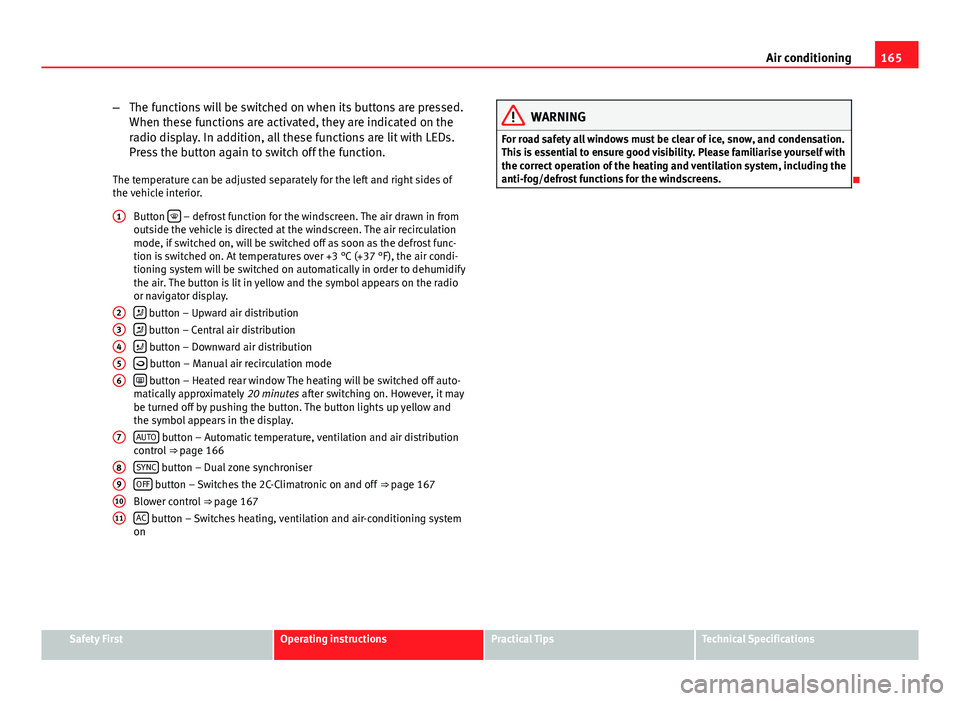
the vehicle interior. Button
– defrost function for the windscreen. The air drawn in from
outside the vehicle is directed at the windscreen. The air recirculation
mode, if switched on, will be switched off as soon as the defrost func-
tion is switched on. At temperatures over +3 °C (+37 °F), the air condi-
tioning system will be switched on automatically in order to dehumidify
the air. The button is lit in yellow and the symbol appears on the radio
or navigator display.
button – Upward air distribution
button – Central air distribution
button – Downward air distribution
button – Manual air recirculation mode
button – Heated rear window The heating will be switched off auto-
matically approximately 20 minutes after switching on. However, it may
be turned off by pushing the button. The button lights up yellow and
the symbol appears in the display.
AUTO
button – Automatic temperature, ventilation and air distribution
control ⇒ page 166
SYNC
button – Dual zone synchroniser
OFF button – Switches the 2C-Climatronic on and off ⇒ page 167
Blower control ⇒ page 167
AC
button – Switches heating, ventilation and air-conditioning system
on
1
23456
7
891011
WARNING
For road safety all windows must be clear of ice, snow, and condensation.
This is essential to ensure good visibility. Please familiarise yourself with
the correct operation of the heating and ventilation system, including the
anti-fog/defrost functions for the windscreens.
Safety FirstOperating instructionsPractical TipsTechnical Specifications
Page 168 of 321

166Air conditioning
Viewing Climatronic information
Information about the Climatronic system can be displayed
on the radio or radio and navigation screen mounted at fac-
tory.
Fig. 134 Navigation dis-
play with information
about the Climatronic
Fig. 135 Radio display
with information about
Climatronic The LEDs on the Climatronic controls indicate that the selected function has
been activated.
In addition, the radio or radio and navigation displays mounted at factory
briefly display the current settings of the Climatronic if any are modified.
The symbols used on the radio or radio and navigation displays are the
same as the symbols used for the Climatronic controls.
Automatic mode
In automatic mode air temperature, air flow and distribution
are automatically regulated so that a specified temperature
is attained as quickly as possible and then maintained. The temperature can be adjusted separately for the left and right
sides of the vehicle interior.
Switching on automatic mode
– Press the AUTO
⇒
Fig. 133 button. “AUTO High” is shown on the
radio display (high fan speed).
– Press the AUTO
button again ⇒ Fig. 133. “AUTO Low” is shown
on the radio display (low fan speed).
Depending upon the version and finish, the vehicle may include:
A pleasant temperature is quickly reached in automatic mode at a tempera-
ture of +22 °C (+72 °F). Therefore, we recommend you not to change this ad-
justment, except as necessary to suit individual preferences or particular cir-
cumstances. It is possible to select interior temperatures from +18 °C
(+64 °F) to +26 °C (+80 °F). These are approximate temperatures and the ac-
tual temperature may be slightly higher or lower depending on the ambient
conditions.
Page 169 of 321

167
Air conditioning
Climatronic maintains a constant temperature. The temperature of the air
supplied to the interior, the blower speed and the air distribution are regu-
lated automatically. The system also considers the sunlight radiation, so
there is no need for manual readjustment. Therefore, automatic mode al-
most always provides the best comfort for the vehicle occupants throughout
the year.
Automatic mode is switched off whenever an adjustment is made using the
buttons for the air distribution, air flow or
or the air recirculation button
. The temperature will continue to be regulated within the parameters
manually selected by the user.
Note
There are two automatic modes:
● Automatic mode LO: This calculates the air flow for two people.
● Automatic mode HI: This calculates the air flow for more than two peo-
ple.
Manual mode
In manual mode you can adjust the air temperature, air flow and distribution as required.
Fig. 136 On the dash panel: 2C Climatronic controls.
Safety FirstOperating instructionsPractical TipsTechnical Specifications
Page 170 of 321

168Air conditioning
Switching on manual mode
–To enter manual mode, press one of the buttons ⇒ Fig. 136 1
to 5 or press the air flow control 10. The selected function is
shown on the radio or navigator display.
Temperature
There are separate temperature selectors for the left and right sides of the
vehicle interior. The selected temperature is displayed above the selector. It
is possible to select interior temperatures from +18 °C (+64 °F) to +26 °C
(+80 °F). These are approximate temperatures and the actual temperature
may be slightly higher or lower depending on the ambient conditions.
If you select temperatures below +18 °C (+64 °F) the indication LO will ap-
pear on the screen. In this setting the system runs at maximum cooling out-
put and the temperature is not regulated.
If you select temperatures above +26 °C (+80 °F) the indication HI will ap-
pear on the screen. In this setting the system runs at maximum heating out-
put and the temperature is not regulated.
Blower
The air flow may be adjusted freely using the control 10
. Always have the
blower running at a low setting to ensure a constant flow of fresh air into
the vehicle. Pushing the button to the minimum -1, turns the Climatronic
off.
Air distribution
The air distribution is adjusted using the buttons
, and . It is also
possible to open and close some of the air vents separately.
Switching the air conditioning on and off
When the AC
button is on (LED lit), the air conditioning system is on.
When the AC
button is off (LED off), the air conditioning system is off. When the
AC
button is off, the air conditioning system is switched off to
save fuel. The temperature continues to self-regulate. The set temperature
can then only be reached if it is higher than the outside temperature.
Driver and passenger temperature control
The SYNC
button controls the synchronisation of the 2 Climatronic climate
zones.
When the SYNC
button is off (LED off), the climate zone of the Climatronic is
personalised. For example: driver side temperature +22 °C (+72 °F) and pas-
senger side temperature +24 °C (+75 °F).
When the SYNC
button is on (LED lit), the climate zone of the Climatronic is
synchronised. For example: driver side temperature +22 °C (+72 °F) and
passenger side temperature +22 °C (+72 °F).
If the SYNC
button is on and the passenger side temperature is changed,
the function is automatically deactivated.
Air recirculation mode
Air recirculation mode prevents fumes or unpleasant smells
from coming from the outside. – Press the button
⇒ Fig. 136
2 to switch air recirculation
mode on or off. It is switched on if the following symbol appears
in the display .
Air recirculation mode prevents strong odours in the ambient air from enter-
ing the vehicle interior, for example when passing through a tunnel or in a
traffic jam.
With low outside temperatures, the air recirculation increases the effective-
ness of the heating system by heating the air inside the vehicle rather than
the air from outside.