2014 Seat Altea Page 71
[x] Cancel search: Page 71Page 75 of 321

73
Cockpit
Configuration menu
This menu is used to make the settings for the vehicle func-
tions. Open Configuration menu
– Select the option Configuration from the main menu: “Main
menu” and press button OK
A ⇒ Fig. 45 on the windscreen
wiper lever. or
– Press button
or on the multifunction steering wheel*
⇒ Fig. 46 until the Configuration menu is displayed.
Example of menu use ⇒ page 68.
Displayed on the
screeneffect
Multifunction display
data.This menu is used to establish the data in the mul-
tifunction display menu to be displayed on the in-
strument panel ⇒ page 70
ConvenienceThis menu allows you to make the settings for the
convenience functions in the vehicle.
Lights and visibilityFrom this menu it is it possible to alter the vehicle
lighting settings.
TimeThe hours and minutes of the clock and the naviga-
tion system can be changed. Choose between 12
and 24-hour format and change to summer time.
Winter tyresThe menu allows the setting of a speed at which an
optical and acoustic warning will be given by the
system. You can use this function, for example, if
you have fitted winter tyres which are not suited for
the top speed of your vehicle. Please see the sec-
tion “Wheels and tyres”.
LanguageThe display texts and the navigation system texts
can be seen in different languages.
UnitsThis option allows you to select the units for dis-
playing temperature, fuel consumption values and
distances.
sel. speedThe instrument panel also displays the speed in
another different unit of measurement (mph or km/
h) to that given on the speedometer.
Inter ServiceConsult service messages and reset service interval
display here.
Factory settingsThe manufacturer's predefined values for the func-
tions of this menu are restored.
Backa)This returns to the main menu.a)
Only if the windscreen wiper lever is used (MFI).
Note
● For electronic and vehicle equipment one or more of these menus will be
displayed.
● SEAT dealerships are able to programme other functions or change the
existing functions depending upon the vehicle equipment.
● The Configuration menu is only accessible when the vehicle is at a
standstill.
Convenience menu
From this menu it is it possible to alter the vehicle conven-
ience settings.
Open menu Convenience
– Choose the option Configuration from the main menu and press
the button OK
A ⇒ Fig. 45 on the windscreen wiper lever.
Safety FirstOperating instructionsPractical TipsTechnical Specifications
Page 76 of 321

74Cockpit
–Press button
or on the multifunction steering wheel*
⇒ Fig. 46 until the Configuration menu is displayed.
– Choose the option Convenience from the main menu and press
the button A
on the windscreen wiper lever.
Example of menu use ⇒ page 68
Displayed on the
screeneffect
Central locking.One door: individual unlocking activated.
Auto lock: The doors are automatically locked when
the vehicle is travelling at more than approx
15 km/h (10 mph).
Auto unlock: the doors are unlocked when the key
is removed from the ignition.
Elec. window controlOpening and closing electric windows: this deter-
mines whether to open or close all the windows
when the vehicle is unlocked or locked. The open
function can also be activated for the driver door
only.
Exterior mirror ad-
just.If synchronised adjustment is selected, when the
driver side exterior mirror is adjusted, the passen-
ger exterior mirror is also moved.
Factory settingsThe predefined factory values for the functions of
this menu are restored.
BackThis returns to the Configuration menu
Note
For electronic and vehicle equipment one or more of these menus will be
displayed. Lights and visibility menu
From this menu it is it possible to alter the vehicle lighting
settings.
Open Lights and visibility Menu
– Select the option Configuration from the main menu: “Main
menu” and press button OK
A ⇒ page 68 on the windscreen
wiper lever. or
– Press button
or on the multifunction steering wheel*
⇒ Fig. 46 until the Configuration menu is displayed.
– Select the option Lights & visibil. from the menu and press but-
ton A
on the windscreen wiper lever.
Example of menu use ⇒ page 68.
Displayed on the
screeneffect
Coming Home/
Leaving HomeThis option permits the adjustment of the time dur-
ing which the headlights remain lit after the vehicle
is locked, and also permits the function to be
switched on and off
Indicator conf.The convenience turn signal function can be activa-
ted or deactivated here. With the convenience
mode activated, the turn signal will blink at least
three times when turned on.
Factory settingsThe predefined factory values for the functions of
this menu are restored.
BackThis returns to the Configuration menu
Page 79 of 321
77
Cockpit
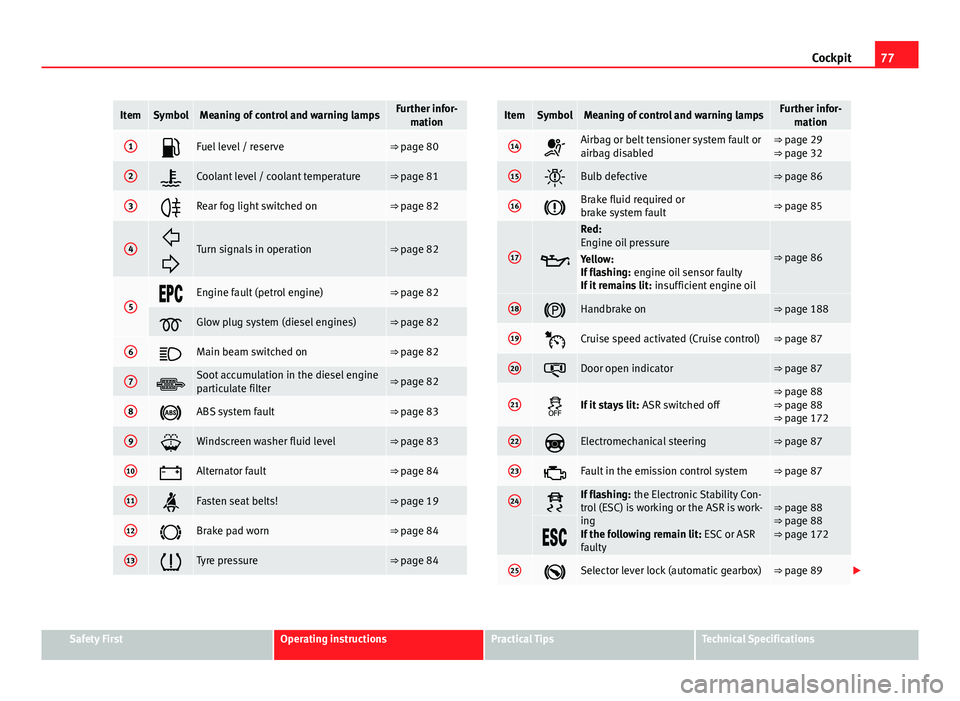
ItemSymbolMeaning of control and warning lampsFurther infor-
mation
1Fuel level / reserve⇒ page 80
2Coolant level / coolant temperature⇒ page 81
3Rear fog light switched on⇒ page 82
4
Turn signals in operation⇒ page 82
5Engine fault (petrol engine)⇒ page 82
Glow plug system (diesel engines)⇒ page 82
6Main beam switched on⇒ page 82
7Soot accumulation in the diesel engine
particulate filter⇒ page 82
8ABS system fault⇒ page 83
9Windscreen washer fluid level⇒ page 83
10Alternator fault⇒ page 84
11Fasten seat belts!⇒ page 19
12Brake pad worn⇒ page 84
13Tyre pressure⇒ page 84
ItemSymbolMeaning of control and warning lampsFurther infor- mation
14Airbag or belt tensioner system fault or
airbag disabled⇒ page 29
⇒ page 32
15Bulb defective⇒ page 86
16Brake fluid required or
brake system fault⇒ page 85
17
Red:
Engine oil pressure
⇒ page 86Yellow:
If flashing: engine oil sensor faulty
If it remains lit: insufficient engine oil
18Handbrake on⇒ page 188
19Cruise speed activated (Cruise control)⇒ page 87
20Door open indicator⇒ page 87
21If it stays lit: ASR switched off⇒ page 88
⇒ page 88
⇒ page 172
22Electromechanical steering⇒ page 87
23Fault in the emission control system⇒ page 87
24If flashing: the Electronic Stability Con-
trol (ESC) is working or the ASR is work-
ing
If the following remain lit: ESC or ASR
faulty⇒ page 88
⇒ page 88
⇒ page 172
25Selector lever lock (automatic gearbox)⇒ page 89
Safety FirstOperating instructionsPractical TipsTechnical Specifications
Page 80 of 321

78Cockpit
WARNING
● Failure to observe control lamps and warning messages can result in
serious personal injury or damage to your vehicle.
● The risk of an accident increases if your vehicle breaks down. Use a
warning triangle to draw the attention of other road users in order to pre-
vent danger to third parties.
● The engine compartment is a dangerous area. Before you open the
bonnet to work on the engine or in the engine compartment, you must
switch the engine off and allow it to cool to reduce the risk of scalding or
other injuries. Read and observe the relevant warnings ⇒ page 235.
Note
● The appropriate control lamp for a fault will light up in vehicles without
warning or information messages in the display.
● In vehicles with warning or information messages on the screen, the ap-
propriate control lamp for a fault will light up and a warning or information
message will also appear on the screen. Applies to the model: ALTEA / ALTEA XL
Overview of control and warning lamps (vehicles with LPG)
The control lamps indicate a number of different functions
and possible faults.
Fig. 49 Instrument panel control and warning lamps in vehicles with LPG
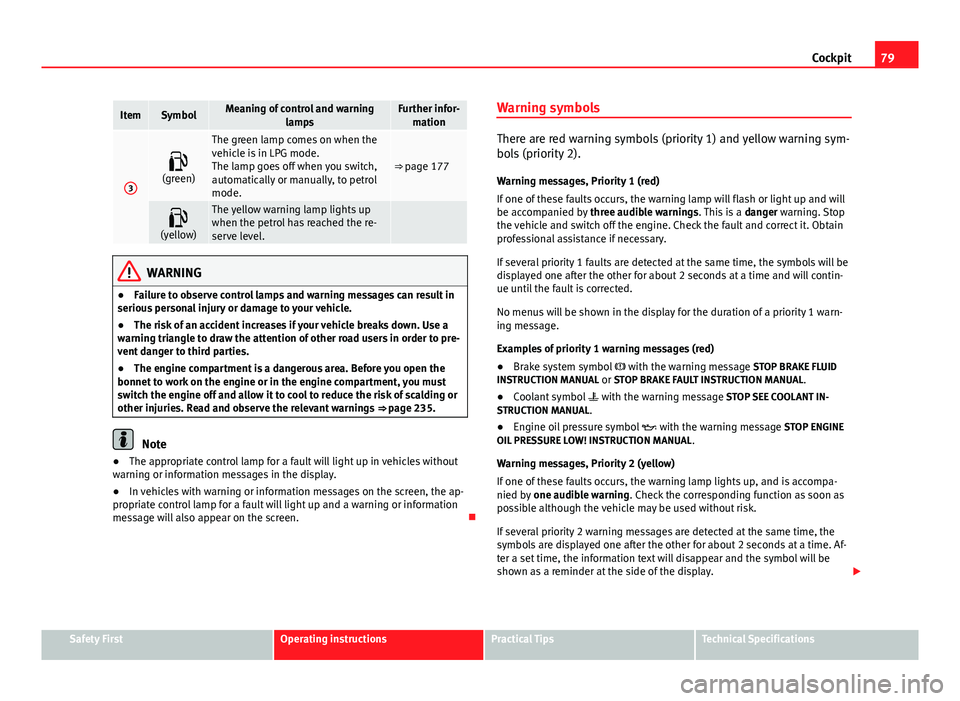
ItemSymbolMeaning of control and warning lampsFurther infor-mation
1Red: Coolant level/coolant tempera-
ture⇒ page 81
2Blue: Cold engine warning⇒ page 81
Page 81 of 321
79
Cockpit
ItemSymbolMeaning of control and warning
lampsFurther infor-mation
3
(green)
The green lamp comes on when the
vehicle is in LPG mode.
The lamp goes off when you switch,
automatically or manually, to petrol
mode.
⇒ page 177
(yellow)The yellow warning lamp lights up
when the petrol has reached the re-
serve level.
WARNING
● Failure to observe control lamps and warning messages can result in
serious personal injury or damage to your vehicle.
● The risk of an accident increases if your vehicle breaks down. Use a
warning triangle to draw the attention of other road users in order to pre-
vent danger to third parties.
● The engine compartment is a dangerous area. Before you open the
bonnet to work on the engine or in the engine compartment, you must
switch the engine off and allow it to cool to reduce the risk of scalding or
other injuries. Read and observe the relevant warnings ⇒ page 235.
Note
● The appropriate control lamp for a fault will light up in vehicles without
warning or information messages in the display.
● In vehicles with warning or information messages on the screen, the ap-
propriate control lamp for a fault will light up and a warning or information
message will also appear on the screen. Warning symbols
There are red warning symbols (priority 1) and yellow warning sym-
bols (priority 2).
Warning messages, Priority 1 (red)
If one of these faults occurs, the warning lamp will flash or light up and will
be accompanied by three audible warnings. This is a danger warning. Stop
the vehicle and switch off the engine. Check the fault and correct it. Obtain
professional assistance if necessary.
If several priority 1 faults are detected at the same time, the symbols will be
displayed one after the other for about 2 seconds at a time and will contin-
ue until the fault is corrected.
No menus will be shown in the display for the duration of a priority 1 warn-
ing message.
Examples of priority 1 warning messages (red)
● Brake system symbol with the warning message STOP BRAKE FLUID
INSTRUCTION MANUAL or STOP BRAKE FAULT INSTRUCTION MANUAL .
● Coolant symbol with the warning message STOP SEE COOLANT IN-
STRUCTION MANUAL.
● Engine oil pressure symbol with the warning message STOP ENGINE
OIL PRESSURE LOW! INSTRUCTION MANUAL .
Warning messages, Priority 2 (yellow)
If one of these faults occurs, the warning lamp lights up, and is accompa-
nied by one audible warning. Check the corresponding function as soon as
possible although the vehicle may be used without risk.
If several priority 2 warning messages are detected at the same time, the
symbols are displayed one after the other for about 2 seconds at a time. Af-
ter a set time, the information text will disappear and the symbol will be
shown as a reminder at the side of the display.
Safety FirstOperating instructionsPractical TipsTechnical Specifications
Page 82 of 321

80Cockpit
Priority 2 warning messages will not be shown until all Priority 1 warning
messages have been dealt with!
Examples of priority 2 warning messages (yellow): 1)
● Fuel warning light with the information text PLEASE REFUEL.
● Windscreen washer fluid symbol with the information text REFILL
WINDSCREEN WASHER FLUID . Top up the washer fluid level.
Information messages displayed on the screen*
Message a)Description
SERVICEThe service interval has ended. Take the vehicle to a
Technical Service.
IMMOBILISERImmobiliser system active. The vehicle will not start. Take
the vehicle to a Technical Service.
ERRORInstrument panel faulty. Take the vehicle to a Technical
Service.
CLEAN AIR FIL-
TERWarning: The air filter must be cleaned
NO KEYWarning: Correct key cannot be found in the vehicle.KEY BATTERYWarning: Key battery low. Change the battery.
CLUTCHWarning: Press the clutch to start. In vehicles with man-
ual gearbox and Start-Stop system.
--> P/NWarning: Place the selector level in position P/N to start.
Only in vehicles with automatic gearbox.
--> PWarning: Place the selector lever in position P to stop the
engine.
STARTINGWarning: The engine starts automatically. Start-Stop sys-
tem activated.
START MANUAL- LYWarning: The engine must be started manually. Start-
Stop system activated.
ERROR START-STOPWarning: Start-Stop system error.
START-STOP IM-POSSIBLEWarning: Although the Start-Stop system is switched on,
the engine cannot be stopped automatically. Not all the
necessary conditions are met
START-STOP AC- TIVEWarning: Start-Stop system activated. Vehicle in Stop
mode.
SWITCH OFFWarning: Start-Stop system activated. Switch off the igni-
tion when you leave the vehicle.
STOP TRANS-
MISSION TOO HOTWarning: Stop the engine. Gearbox overheated.
BRAKEWarning: To start the engine, press the brake pedal. Only
in vehicles with automatic gearbox.
COASTINGFUNCTIONWarning: Coasting mode active. Transmission engaged.
Only in vehicles with automatic gearbox.
CHECK SAFE- LOCKNotification of central locking function activated.
a)These messages may vary according the version of the vehicle model.
Fuel level/reserve
This symbol lights up to indicate that the fuel tank is under
the reserve level.
It lights up when only 7 litres of fuel remain in the tank. You will also hear
an audible warning. It reminds you to fuel up the fuel tank as soon as possi-
ble ⇒ page 228.
1)
Depending on the version of the model.
Page 83 of 321

81
Cockpit
The instrument panel displays the following message 1)
: PLEASE REFUEL! .
Coolant level* / temperature (red)
The warning lamp lights up if the coolant temperature is too
high or if the coolant level is too low.
There is a fault if:
● The warning symbol does not go out again after a few seconds.
● The warning lamp lights up or flashes while the vehicle is moving, and
three acoustic warning signals ⇒
are emitted.
This means that either the coolant level is too low or the coolant tempera-
ture is too high.
Coolant temperature too high
The instrument panel displays the following message 1)
: CHECK COOLANT IN-
STRUCTION MANUAL ⇒ page 242.
First look at the coolant temperature gauge. The coolant temperature is too
high if the needle is over the warning area on the dial. Stop the vehicle,
switch the engine off and wait for it to cool down. Check the coolant level.
If the coolant level is correct, the overheating may be caused by a malfunc-
tion of the radiator fan. Check the radiator fan fuse and have it replaced if
necessary ⇒ page 272.
If the control lamp lights up again after driving on for a short distance, stop
the vehicle and switch the engine off . Contact a Technical Service or a spe-
cialised workshop. Coolant level too low
The instrument panel displays the following message
1)
: STOP CHECK COOL-
ANT INSTRUCTION MANUAL.
First look at the coolant temperature gauge. If the needle is in the normal
range, top up with coolant at the earliest opportunity ⇒
.
WARNING
● If your vehicle is immobilised for technical reasons, move it to a safe
distance from traffic. Turn the engine off, turn the hazard lights on and
place the warning triangle.
● Never open the bonnet if you can see or hear steam or coolant escap-
ing from the engine compartment. Risk of scalding. Wait until you can no
longer see or hear escaping steam or coolant.
● The engine compartment is a dangerous area. Before carrying out any
work in the engine compartment, switch off the engine and allow it to
cool down. Always note the corresponding warnings ⇒ page 235.
Applies to the model: ALTEA / ALTEA XL Coolant temperature (blue)
This lamp lights up when the coolant is below approximately +45 °C
(+113 °F). When it exceeds this temperature the lamp turns off.
1)
Depending on the version of the model.
Safety FirstOperating instructionsPractical TipsTechnical Specifications
Page 84 of 321

82Cockpit
Rear fog light
This warning lamp lights up when the rear fog light is switched on . For
further information see ⇒ page 115.
Turn signals
The control lamp flashes when the turn signals are in opera-
tion.
Depending on which turn signal is operating, either the left or right
turn signal lamp flashes. Both control lamps will flash at the same time
when the hazard warning lights are switched on.
If any of both turn signals fails, the warning lamp will start flashing twice
faster than normal.
For further information on the turn signals, please see ⇒ page 122.
Engine management*
This warning lamp monitors the engine management sys-
tem for petrol engines.
The warning lamp (Electronic Power Control) lights up when the ignition
is switched while the system operation is verified. It should go out once the
engine is started.
If there is a fault in the electronic engine management system while you are
driving, this warning lamp will light up. Stop the vehicle and seek technical
assistance. Glow plug system/engine fault
The warning lamp lights up to show that the glow plugs are
preheating the diesel engine. It flashes if there is an engine
fault.
Control lamp is lit
The control lamp lights up while the glow plug system is preheating.
When the warning lamp goes off, the engine should be started straight
away.
Control lamp flashes
If a fault develops in the engine management system while you are driving,
the glow plug system lamp will flash . Take the vehicle to a specialised
workshop as soon as possible and have the engine checked.
Main beam headlights
This control lamp lights up when the main beams are on.
The warning lamp is switched on once main beams are on or once the
headlight flasher is operating.
For further information see ⇒ page 122.
Soot accumulation in the diesel engine particulate filter *
If the lamp lights up you should help the filter clean itself by driving in
the appropriate manner.