2014 Seat Altea radio
[x] Cancel search: radioPage 97 of 321

95
Steering wheel controls
ENo function specifiedNo function specifiedNo function specifiedNo function specified
Accept incoming call
(press briefly)
Reject incoming call
(press and hold down)
End ongoing call /estab- lish call (press briefly)
Switch to private mode (press and hold down)
Redial last number (press and hold down) a)
F
Activation of voice recogni-
tion for mobile phone con-
nected to the system (if the phone has this function)* / MUTEActivation of voice recognition
for mobile phone connected to the system (if the phone has this function)* / MUTEActivation of voice recog-nition for mobile phone
connected to the system (if the phone has this function)* / MUTEActivation of voice recog-nition for mobile phone
connected to the system (if the phone has this function)* / MUTEActivation of voice recog-nition for mobile phone
connected to the system (if the phone has this function)* / MUTE
GNext preset b)Next trackb)No function specifiedOperates on instrument
panelOperates on instrument
panel/No function speci- fied
HPrevious preset b)Previous trackb)No function specifiedOperates on instrument
panelOperates on instrument
panel/No function speci- fied
IChange menu on instrument panelChange menu on instrumentpanelChange menu on instru-ment panelNo function specifiedChange menu on instru- ment panel
JChange menu on instrument panelChange menu on instrumentpanelChange menu on instru-ment panelNo function specifiedChange menu on instru- ment panel
KOperates on instrument pan- elOperates on instrument panelOperates on instrumentpanelOperates on instrumentpanelOperates on instrument
panel/No function speci- fied
LOperates on instrument pan- elOperates on instrument panelOperates on instrumentpanelOperates on instrumentpanelOperates on instrument
panel/No function speci- fied
a)For a more detailed description of how to use this button, please refer to the Radio navigation System User Handbook (SEAT Media System)
b) Only if the panel is in Audio menu.
Safety FirstOperating instructionsPractical TipsTechnical Specifications
Page 98 of 321

96Opening and closing
Opening and closing
Central locking
Basic functions
The central locking system enables you to lock and unlock
all doors and the rear lid by just pushing the button. Description
Central locking can be activated by using any of the following options:
● the key, by inserting it into the driver door cylinder and rotating it man-
ually,
● the central lock button in the vehicle interior ⇒ page 99.
● the radio frequency remote control , using the buttons on the key,
⇒ page 104
Various functions are available to improve the vehicle safety: Deadlock system
Selective unlocking system*
Automatic speed-dependent locking and unlocking system*
Self-locking system to prevent involuntary unlocking
Emergency unlocking system
Unlocking the vehicle* Press button
⇒ Fig. 62 on remote control to unlock all the doors and
rear lid.
–
–
–
–
–
– Locking the vehicle*
Press button
⇒
Fig. 62 on the remote control to lock all doors and
the rear lid or turn the key in the door to lock all doors and the rear lid.
WARNING
● Never leave children or disabled persons in the vehicle. In case of
emergency, they may not be able to leave the vehicle or manage on their
own.
● Never allow children to play in or around the vehicle. A locked vehicle
can be subjected to extremely high and low temperatures, depending on
the time of year, thus causing serious injuries/illness. It could even have
fatal consequences. Close and lock both the rear lid and all the other
doors when you are not using the vehicle.
● Always take you car keys with you when you leave the vehicle. Misuse
of the keys, for example, by children, may result in serious damage and
accident.
–The engine may accidentally be started and be out of control.
– If the ignition is switched on, the electric equipment could be acti-
vated with risk of injury, for example, in the electric windows.
– The doors can be locked using the remote control key. This could
become an obstacle for assistance in an emergency situation.
– Always take the key with you when you leave the vehicle.
● Never remove the key from the ignition if the vehicle is in motion. The
steering lock could suddenly engage, and you would not be able to steer
the vehicle.
–
Page 106 of 321

104Opening and closing
Radio frequency remote control
Locking and unlocking the vehicle
The radio frequency remote control key is used to lock and
unlock the vehicle from a distance.
Fig. 62 Assignment of
buttons on the remote
control key
Fig. 63 Range of the ra-
dio frequency remote
control
Using the button ⇒ Fig. 62 (arrow) on the control, the key blade is released.
Unlocking the vehicle
⇒ Fig. 62 1.
Locking the vehicle
⇒ Fig. 62 2.
Unlocking the rear lid. Press button
⇒ Fig. 62 3 until all the turn signals
on the vehicle flash briefly. When the unlocking button
3 is pressed,
you have 2 minutes to open the door. Once this time has passed, it will lock
again.
Also, the battery indicator on the key ⇒ Fig. 62, will flash.
The remote control transmitter and the batteries are integrated in the key.
The receiver is inside the vehicle. The maximum range depends on different
factors. The range is reduced as the batteries start to lose power.
Selective unlocking*
When the button
⇒ Fig. 62 1, is pressed once, the driver door is un-
locked, all others remain locked.
Press the button
⇒ Fig. 62 1 twice to unlock all doors.
Page 107 of 321

105
Opening and closing
WARNING
● An improper use of the key can cause serious injuries.
● Never leave children or disabled persons in the vehicle. In case of
emergency, they may not be able to leave the vehicle or manage on their
own.
● Never forget the keys inside the vehicle. Otherwise, this could result
in serious injuries, accidents or even the theft of your vehicle. Always
take the key with you when you leave the vehicle.
● An uncontrolled use of the key could start the engine or activate any
electric equipment (e.g. electric windows), causing risk of accident. The
vehicle can be locked when using the remote control key. This could com-
plicate the aid in case of emergency.
Note
● The radio frequency remote control can be programmed by means of
pressing the unlocking button once; as a result, only the driver door will un-
lock. When the button is pressed once more, all doors and the rear lid will
be unlocked.
● The radio frequency remote control functions only when you are in range
⇒ Fig. 63 (red area).
● If the vehicle is unlocked using the
1 button, it will lock again auto-
matically if any of the doors or the rear lid are not opened within 30 sec-
onds after unlocking it. This function prevents the vehicle from remaining
unlocked if the unlock button is pressed by mistake.
● If the vehicle cannot be opened and closed using the radio frequency re-
mote control, the remote control key will have to be re-synchronised
⇒ page 105. Changing the battery
If the battery indicator does not flash when the buttons are pushed, the bat-
tery must be replaced.
CAUTION
The use of inappropriate batteries may damage the radio frequency remote
control. For this reason, always replace the dead battery with another of the
same size and power.
For the sake of the environment
Used batteries must be disposed of at an appropriate waste facility or
through an authorised service, given that their components can affect the
environment.
Synchronising the remote control key
If it is not possible to unlock or lock the door with the remote
control, it should be re-synchronised.
– Press the
⇒ Fig. 62 button on the remote control.
– Then close the vehicle using the key bit within one minute.
It is possible that the vehicle could no longer be opened and closed with
the remote control if the button
is repeatedly pressed outside of the ef-
fective range of the radio frequency remote control. The remote control key
will have to be resynchronised.
Spare remote control keys are available in your Technical Service, where
they must be matched to the locking system.
Up to four remote control keys can be used.
Safety FirstOperating instructionsPractical TipsTechnical Specifications
Page 108 of 321

106Opening and closing
Anti-theft alarm system*
Description of anti-theft alarm system*
The anti-theft alarm triggers if unauthorised movements are
detected around the vehicle.
The anti-theft alarm makes it more difficult to break into the vehicle or steal
it. Audible and visible alarms are triggered if the vehicle is opened using
the key, or if unauthorised access to the vehicle is forced.
The anti-theft alarm system is automatically switched on when locking the
vehicle. The system is then primed.
When does the system trigger an alarm?
The system triggers an alarm if the following unauthorised actions are car-
ried out when the vehicle is locked:
● Opening the vehicle mechanically using the key and with the ignition off
● Opening a door
● Opening the bonnet
● Opening the rear lid
● Switching on the ignition
● Movements in the vehicle interior
● Undue manipulation of the alarm
● Battery handling
The acoustic signals sound and the turn signals flash for approx. 30 sec-
onds. This may be repeated up to 10 times depending on the country.
Opening the doors mechanically (emergency opening)
If the radio frequency remote control function fails, you will have to use the
key to unlock the vehicle. This is done as follows: ●
Unfold the key by pressing the button shown by the (arrow).
● Use the lock on the driver door to unlock the vehicle. The anti-theft
alarm system remains active, but an alarm is not triggered immediately.
● Switch on the ignition within 15 seconds. When the ignition is switched
on, the electronic immobiliser recognises a valid vehicle key and deacti-
vates the anti-theft alarm system. If you do not switch on the ignition within
15 seconds, the alarm is triggered (in certain markets, such as the Nether-
lands, there is no 15 second waiting time and the alarm is activated imme-
diately after opening the door).
Opening all the doors in manual mode
In vehicles without alarm, when opening the driver door manually all the
doors are opened.
How to switch the alarm off
When the vehicle is unlocked via the unlocking button of the radio frequen-
cy remote control or when the key is inserted in the ignition lock.
Note
● If, after the audible warning goes off, another monitored area is ac-
cessed (e.g. the rear lid is opened after a door has been opened), the alarm
is triggered again.
● Vehicle monitoring remains active even if the battery is disconnected or
not working for any reason.
● The alarm is triggered immediately if one of the battery cables is discon-
nected while the alarm system is active.
Page 154 of 321

152Seats and storage
Electrical accessories may be connected to the 12 volt power socket in the
front centre console ⇒ Fig. 117 and in the luggage compartment*. The ap-
pliances connected to each power point must not exceed a power rating of
120 Watt.
WARNING
The power sockets and the connected accessories will only operate when
the ignition is on or when the engine is running. Improper use of the
sockets or electrical accessories can lead to serious injuries or cause a
fire. To avoid the risk of injury, never leave children alone inside the vehi-
cle.
Note
● The use of electrical appliances with the engine switched off will cause a
battery discharge.
● Before using any electrical accessories, see the instructions in
⇒ page 226. Auxiliary audio input (AUX-IN)*Fig. 119 Auxiliary audio
connection
– Lift the AUX cover ⇒ Fig. 119.
– Insert the plug as far as possible (see Radio manual).
Page 155 of 321

153
Seats and storage
AUX RSE connection*
Fig. 120 AUX RSE con-
nection
This connector may be used as an audio input (red and white connectors) or
audio and video connector (red, white and yellow connectors). For more de-
tails about the use of this audio and video source, see the RSE manual. MEDIA-IN* connectorFig. 121 Connection in
central armrest compart-
ment
For information concerning the use of this equipment, please see the Radio
handbook.
Safety FirstOperating instructionsPractical TipsTechnical Specifications
Page 167 of 321
165
Air conditioning
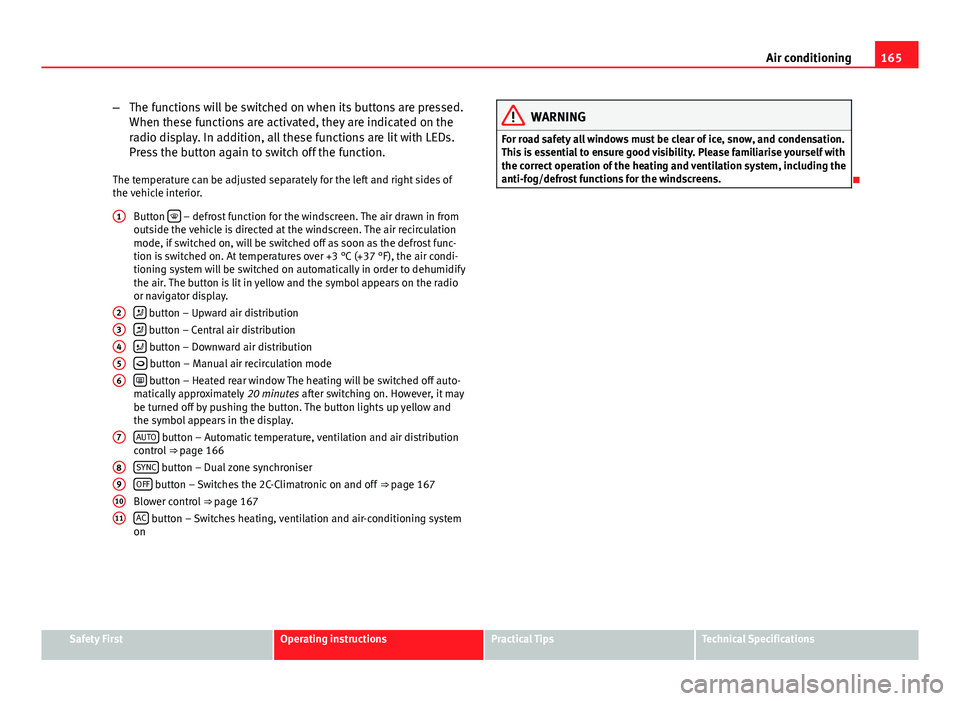
– The functions will be switched on when its buttons are pressed.
When these functions are activated, they are indicated on the
radio display. In addition, all these functions are lit with LEDs.
Press the button again to switch off the function.
The temperature can be adjusted separately for the left and right sides of
the vehicle interior. Button
– defrost function for the windscreen. The air drawn in from
outside the vehicle is directed at the windscreen. The air recirculation
mode, if switched on, will be switched off as soon as the defrost func-
tion is switched on. At temperatures over +3 °C (+37 °F), the air condi-
tioning system will be switched on automatically in order to dehumidify
the air. The button is lit in yellow and the symbol appears on the radio
or navigator display.
button – Upward air distribution
button – Central air distribution
button – Downward air distribution
button – Manual air recirculation mode
button – Heated rear window The heating will be switched off auto-
matically approximately 20 minutes after switching on. However, it may
be turned off by pushing the button. The button lights up yellow and
the symbol appears in the display.
AUTO
button – Automatic temperature, ventilation and air distribution
control ⇒ page 166
SYNC
button – Dual zone synchroniser
OFF button – Switches the 2C-Climatronic on and off ⇒ page 167
Blower control ⇒ page 167
AC
button – Switches heating, ventilation and air-conditioning system
on
1
23456
7
891011
WARNING
For road safety all windows must be clear of ice, snow, and condensation.
This is essential to ensure good visibility. Please familiarise yourself with
the correct operation of the heating and ventilation system, including the
anti-fog/defrost functions for the windscreens.
Safety FirstOperating instructionsPractical TipsTechnical Specifications