Page 68 of 214

1.62
�Electrotechnical system
warning light
When the warning light comes on, this
indicates that the traction battery tem-
perature is too low or that the engine or
traction battery temperature is too high.
Opt for a calmer driving style.
The warning light can lead to a drop
in vehicle performance.
If it comes on when you start the vehi-
cle, this indicates a fault in the second-
ary 12 V battery.
�Low traction battery level
warning light
It flashes when the traction battery
charge level has reached the reserve
threshold. Please see the informa-
tion on “Displays and indicators” in
Section 1.
� ECO mode function light
This lights up when the function is ac-
tivated.
WARNING LIGHTS (3/3)
�Electrotechnical system
warning light
If it lights up while driving, this means
there is an electrotechnical fault in the
“400 Volt” electrical circuit. Please see
an authorised dealer as soon as pos-
sible.
\bElectronic Stability Program
( ESC) and traction control
system warning light
There are several reasons for the warn-
ing light coming on: please refer to the
information on “Driver correction de-
vices and aids” in Section 2.
Tyre pressure loss warning
Please refer to the information
on the “Tyre pressure loss warning” in
Section 2.
2 Door(s) open warning light
xAnti-lock braking warning
light
This lights up when the ignition is
switched on and goes out after a few
seconds.
If it does not go out after the ignition is
switched on, or lights up when driving,
there is a fault with the ABS. Braking
will then be as normal, without the ABS.
Contact an approved Dealer as soon as
possible. The presence and operation of the warning lights DEPEND ON THE EQUIPMENT\
AND COUNTRY.
A
Page 81 of 214
1.75
REAR-VIEW MIRRORS
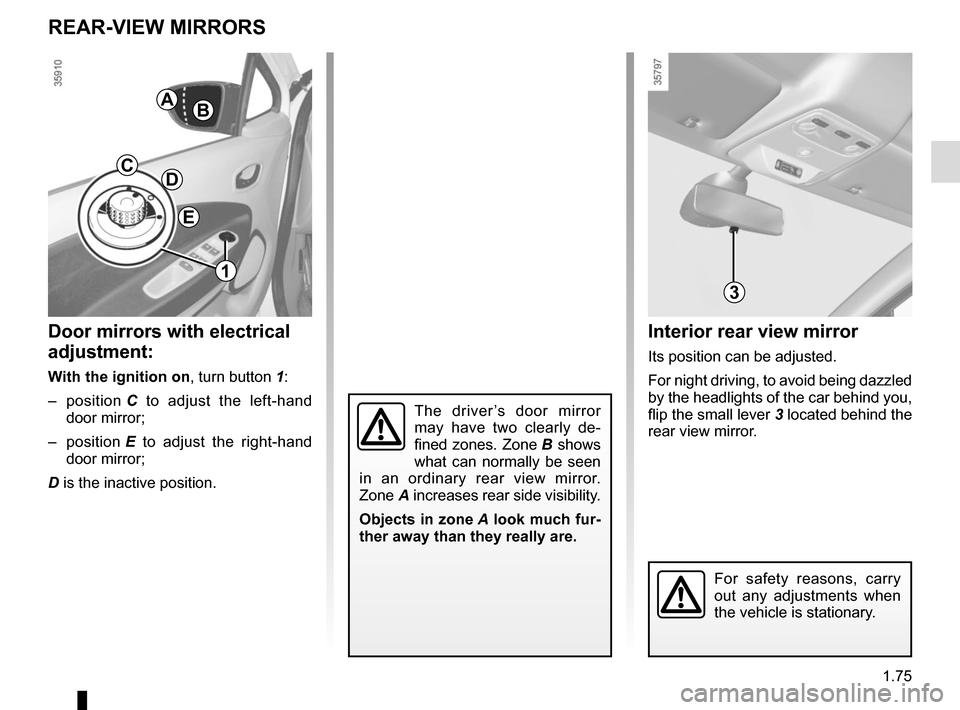
Interior rear view mirror
Its position can be adjusted.
For night driving, to avoid being dazzled
by the headlights of the car behind you,
flip the small lever 3 located behind the
rear view mirror.
Door mirrors with electrical
adjustment:
With the ignition on , turn button 1:
– position C to adjust the left-hand
door mirror;
– position E to adjust the right-hand
door mirror;
D is the inactive position.
AB
DC
E
1
3
The driver’s door mirror
may have two clearly de-
fined zones. Zone B shows
what can normally be seen
in an ordinary rear view mirror.
Zone A increases rear side visibility.
Objects in zone A look much fur-
ther away than they really are.
For safety reasons, carry
out any adjustments when
the vehicle is stationary.
Page 82 of 214

1.76
AUDIBLE AND VISUAL SIGNALS
Horn
Press steering wheel boss A.
Headlight flasher
Pull stalk 1 towards you to flash the
headlights.
éHazard warning lights
Press switch 2. This switch il-
luminates all four direction indicators
and the side-mounted indicator lights
simultaneously. It must only be used in
an emergency to warn drivers of other
vehicles that you have had to stop in
an area where stopping is prohibited or
unexpected or that you are obliged to
drive under special conditions.
Depending on the vehicle, the hazard
warning lights may come on automati-
cally under heavy deceleration. You can
switch them off by pressing switch 2.
Direction indicators
Move stalk 1 parallel to the steering
wheel and in the direction you are going
to turn it.
One-touch mode
When driving, it is possible that the
steering wheel may not be turned suf-
ficiently to return the stalk automatically
to its starting position.
In this case, briefly turn stalk 1 to the in-
termediate position, then release it: the
stalk returns to its original point and the
indicator light flashes three times.
A
2
1
Page 84 of 214

Before driving at night, check that the electrical equipment is operatin\
g
correctly and adjust the headlight beams (if your vehicle is not carryi\
ng
its n")
1.78
EXTERIOR LIGHTING AND SIGNALS (1/3)
Before driving at night, check that the electrical equipment is operatin\
g
correctly and adjust the headlight beams (if your vehicle is not carryi\
ng
its normal load). As a general precaution, check that the lights are not ob-
scured (by dirt, mud, snow or objects being transported).
31
kDipped beam
headlights
Manual operation
Turn the ring 2 until the symbol is oppo-
site mark 3. This indicator light on the
instrument panel comes on.
Automatic operation
(depending on vehicle)
Turn ring 2 until the AUTO symbol is op-
posite mark 3: with the engine running,
the dipped beam headlights switch on
or off automatically depending on the
brightness of the light outside, without
any action on stalk 1.2
If driving on the left in a left-hand
drive vehicle (or vice versa), drivers
must have the lights adjusted by an
authorised dealer for the duration of
the trip.
1
uSide lights
Turn the ring 2 until the symbol
is opposite mark 3. This indicator light
on the instrument panel comes on.
Daytime running lights
The daytime running lights come on au-
tomatically when the engine is started.
Page 85 of 214

1.79
EXTERIOR LIGHTING AND SIGNALS (2/3)
Switching off the lights
There are two possibilities:
– manually, move ring 2 to position 0;
– the lights will go out automatically when the engine is switched off, the
driver’s door is opened or the vehicle
is locked. In this case, the next time
the engine is started the lights will be
switched back on according to the
position of the ring 2.
NB: if the fog lights are lit, the lights are
not switched off automatically.
Lights-on reminder buzzer
If the lights are on after the engine is
switched off, a warning beep sounds
when the driver’s door is opened to
warn you that the lights are still on.
“See-me-home lighting”
function
Depending on the vehicle, this func-
tion allows you to briefly switch on the
dipped beam headlights (to provide
light when opening a gate, etc.).
With the engine and lights off and the
ring 2 in the position 0, pull stalk 1 to-
wards you: the dipped beam headlights
light up for approximately 30 seconds.
To increase this duration, pull the stalk
up to four times (total time restricted to
two minutes).
To switch off the lights before they go
out automatically, turn ring 2 to any po-
sition, then return it to position 0.12
áMain beam headlights
With the dipped beam head-
lights lit, pull stalk 1 towards you. This
indicator light on the instrument panel
comes on.
To return to the dipped headlight posi-
tion, pull stalk 1 towards you again.
Page 86 of 214
1.80
EXTERIOR LIGHTING AND SIGNALS (3/3)
When driving in fog or snow, or
when transporting objects which are
higher than the roof, the headlights
do not come on automatically.
The driver remains in full control of
switching on the fog lights: the indi-
cator lights on the instrument panel
inform you whether the fog lights
are lit (indicator light on) or not (indi-
cator light off).
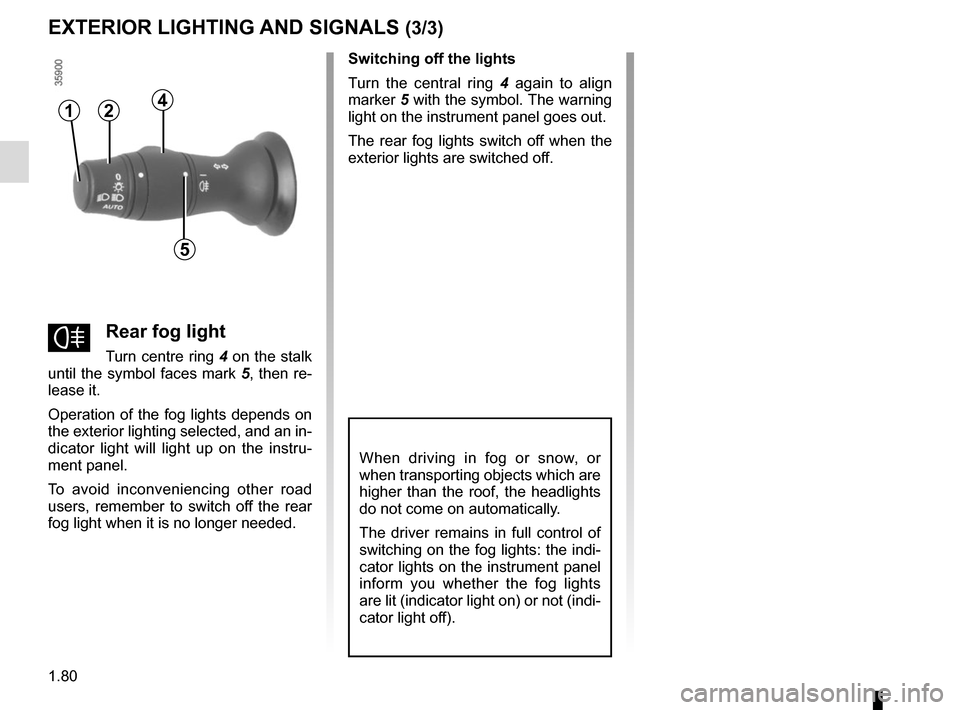
fRear fog light
Turn centre ring 4 on the stalk
until the symbol faces mark 5, then re-
lease it.
Operation of the fog lights depends on
the exterior lighting selected, and an in-
dicator light will light up on the instru-
ment panel.
To avoid inconveniencing other road
users, remember to switch off the rear
fog light when it is no longer needed. Switching off the lights
Turn the central ring
4 again to align
marker 5 with the symbol. The warning
light on the instrument panel goes out.
The rear fog lights switch off when the
exterior lights are switched off.
412
5
Page 87 of 214
1.81
For manual settings
Examples of positions for adjusting control A according to the load
0 Driver alone or with front passenger
1 Driver with one front passenger and two or
three rear passengers
2 Driver with one front passenger, three rear
passengers and luggage
2 Driver with luggage or load reaching the
maximum authorised load weight
3 Driver and luggage (reaching the maximum
permissible all-up weight)
4 Do not use
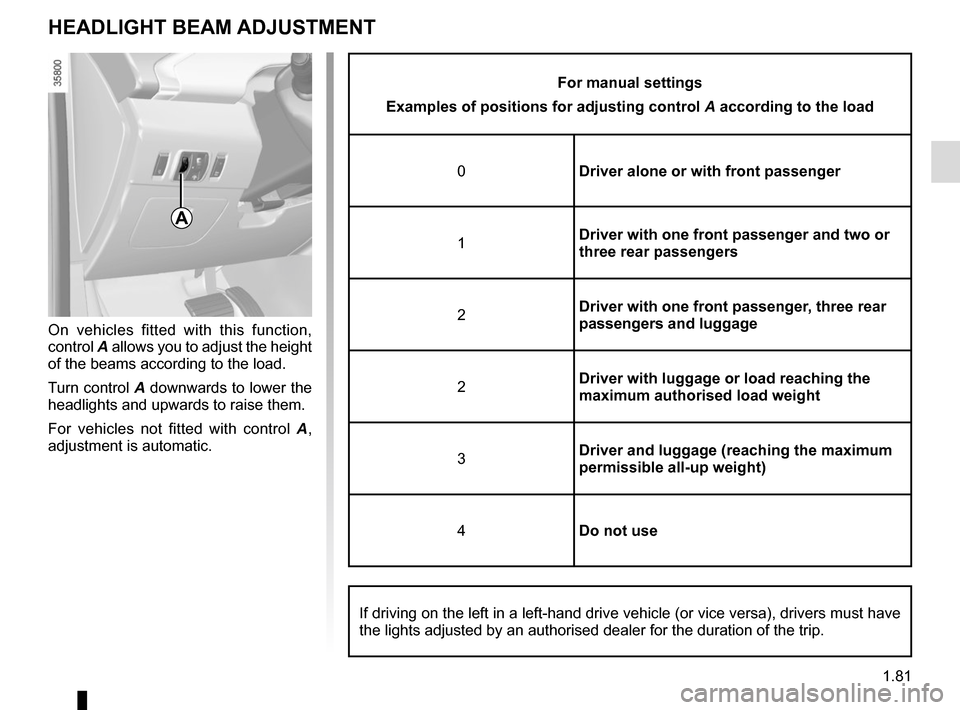
On vehicles fitted with this function,
control A allows you to adjust the height
of the beams according to the load.
Turn control A downwards to lower the
headlights and upwards to raise them.
For vehicles not fitted with control A ,
adjustment is automatic.
HEADLIGHT BEAM ADJUSTMENT
A
If driving on the left in a left-hand drive vehicle (or vice versa), d\
rivers must have
the lights adjusted by an authorised dealer for the duration of the trip\
.
Page 94 of 214

2.4
Only engage D or R when the vehi-
cle is stopped, with your foot on the
brake and the accelerator pedal re-
leased.
Driving
While driving, press the accelerator
pedal to achieve the desired speed.
The reversing lights will come on as
soon as reverse gear is selected (with
the ignition on).
GEAR CONTROL (1/2)
2
1
Operates similar to an automatic gear-
box.
Selector lever 1The display 3 on the instrument panel
indicates the gear lever position.
P: park
R: reverse
N: neutral
D: forward drive
OperationTo start the engine, please refer to the
information on “Starting/Stopping the
engine” in Section 2.
To move out of position P, you must de-
press the brake pedal before pressing
unlocking button 2.
With the foot on the brake pedal (warn-
ing light
c on the display 3 goes out),
move the lever out of position P.
The vehicle can only start of the
gear selector is in position P.
The vehicle can only be started if
the charging cord is unplugged from
the vehicle.
Obstructions to the driver
On the driver’s side, only
use mats suitable for the
vehicle, attached with the
pre-fitted components, and check
the fitting regularly. Do not lay one
mat on top of another. There is a
risk of wedging the pedals
Put the lever 1 to position D or R.
The vehicle moves forward once
you release the brake pedal (without
pressing on the accelerator pedal).
3