Page 76 of 214

1.70
TRIP COMPUTER AND WARNING SYSTEM: information messages
Examples of messagesInterpreting the display selected
«Disconnect cable to start up» Indicates that the charging cord is still plugged into the vehicle.
«Please insert keycard» Indicates that the cardRENAULT is not in the reader.
«Steering wheel not locked» Indicates that the steering column has not been locked.
«Apply brakes» Follow these instructions: risk of damage to the motor.
«Check connections» Unplug, then plug in the vehicle.
If the message still shows, this may be caused by the external charging \
conditions
or by the home installation.
«Check charging post» Indicates a possible electrical fault or a defective charging cable: cha\
nge the charg-
ing terminal or location or have the cable checked.
«Power cut while charging» Indicates an electrical fault while charging. Restart charging.
If this does not work, have the electrical installation checked.
«Charging refused no contract» Charging prohibited by your battery rental organisation. Rectify the sit\
uation.
These can help in the vehicle starting phase, or give information about \
a selection or a driving status.
Examples of information messages are given in the following pages.
Page 78 of 214
1.72
TRIP COMPUTER AND WARNING SYSTEM: warning message
These appear with the warning light û and require you to stop immediately, for your own safety, as soon as traffic
conditions allow. Stop your engine and do not restart it. Contact an Authorised Dealer.
Examples of warning messages are given in the following pages. Note: the messages appear on the display either individually
or alternately (when there are several messages to be displayed), and \
may be accompanied by a warning light and/or a beep.
Examples of messages Interpreting the display selected
«Braking system fault» Indicates a fault in the braking system.
«Power steering fault» Indicates a fault in the steering.
«Electrical motor fault» Indicates that the vehicle is losing power.
«Electrical fault danger» Indicates a fault in the electric system.
“ PUNCTURE “ Indicates that at least one wheel is punctured or severely underinflated\
.
Page 82 of 214

1.76
AUDIBLE AND VISUAL SIGNALS
Horn
Press steering wheel boss A.
Headlight flasher
Pull stalk 1 towards you to flash the
headlights.
éHazard warning lights
Press switch 2. This switch il-
luminates all four direction indicators
and the side-mounted indicator lights
simultaneously. It must only be used in
an emergency to warn drivers of other
vehicles that you have had to stop in
an area where stopping is prohibited or
unexpected or that you are obliged to
drive under special conditions.
Depending on the vehicle, the hazard
warning lights may come on automati-
cally under heavy deceleration. You can
switch them off by pressing switch 2.
Direction indicators
Move stalk 1 parallel to the steering
wheel and in the direction you are going
to turn it.
One-touch mode
When driving, it is possible that the
steering wheel may not be turned suf-
ficiently to return the stalk automatically
to its starting position.
In this case, briefly turn stalk 1 to the in-
termediate position, then release it: the
stalk returns to its original point and the
indicator light flashes three times.
A
2
1
Page 92 of 214

2.2
STARTING, STOPPING THE ENGINE (1/2)
Driver’s responsibility
Never leave your vehi-
cle with the key inside and
never leave a child (or a
pet) unsupervised, even for a short
while.
There is a risk that they could start
the engine or operate electrical
equipment (electric windows etc.)
and trap part of their body (neck,
arms, hands, etc.).
Risk of serious injury.
Never switch off the ignition before
the vehicle has come to a complete
stop. Switching off the engine di-
sables the assistance equipment:
brakes, power-assisted steering,
etc., and the passive safety devices
such as airbagsand pretensioners.
The vehicle can only be started if
the charging cord is unplugged from
the vehicle.
The vehicle can only be started if the
selection lever is at P. Please see
the information on “Gear control” in
Section 2.
Remote control RENAULT
card
When you get into the vehicle, insert the
RENAULT card fully into card reader 2.
To start
– position the gear lever to the posi- tion P only;
– press button 1. The message
READY comes on, on the instrument
panel, along with a beep.
The message disappears when the
vehicle speed is above 3 mph (5 km/h).
Hands-free RENAULT card
The RENAULT card must be inserted
in card reader 2 or in detection zone 3.
To start
– position the gear lever to the position P only ;
– depress the brake pedal;
– press button 1. The message
READY comes on, on the instrument
panel, along with a beep.
The message disappears when the
vehicle speed is above 3 mph (5 km/h).
3
1
2
Page 93 of 214

2.3
Operating faults
In certain cases, the hands-free
RENAULT card may not work:
– the card battery RENAULT is drai-ned, flat 12 V battery, etc.
– near to appliances operating on the same frequency as the card (moni-
tor, mobile phone, video game, etc.);
– vehicle located in a high electroma- gnetic radiation zone.
The message “Please insert keycard”
appears on the instrument panel.
Insert the RENAULT card fully into card
reader 2.
Conditions for stopping the
engine
The vehicle must be stationary, with the
lever positioned to N or P.
STARTING, STOPPING THE ENGINE (2/2)
Hands-free RENAULT card
With the card in the vehicle, press
button 1: the engine switches off and
the message READY goes out on the
instrument panel. The steering column
is locked when the driver’s door is
opened or the vehicle is locked.
If the card is no longer in the passenger
compartment when you try to switch
the engine off, the message “No key-
card Press and hold” appears on the
instrument panel: press the button 1 for
longer than two seconds.
With the engine switched off, any ac-
cessories being used (radio, etc.) will
continue to function for approximately
10 minutes.
When the driver’s door is opened, the
accessories stop working.
Remote control RENAULT card
With the card in reader 2 , press
button 1: the engine will stop. The mes-
sage READY goes out on the instru-
ment panel.
Removing the card from the reader
locks the steering column.
Special note
If the card is no longer in the reader
when you try to switch the engine off,
the message “No keycard Press and
hold” will appear on the instrument
panel: press the button 1 for longer
than two seconds.
1
When you leave your vehi-
cle, especially if you have
your RENAULT card with
you, check that the engine
is completely switched off.
2
Page 106 of 214

2.16
Electronic stability program
ESC with understeer control
and traction control
Electronic stability control ESC
This system helps you to keep control
of the vehicle in critical driving condi-
tions (avoiding an obstacle, loss of grip
on a bend, etc.).
Operating principle
A sensor in the steering wheel detects
the direction selected by the driver.
Other sensors throughout the vehicle
measure the actual direction.
The system compares driver input to
the actual trajectory of the vehicle and
corrects the trajectory if necessary by
controlling the braking of certain wheels
and/or engine power. In the event that
the system is engaged, indicator light
� flashes on the instrument panel.Understeer control
This system optimises the action of the
ESC in the case of pronounced under-
steer (loss of front axle road holding).
Traction control
This system helps to limit wheelspin of
the drive wheels and to control the ve-
hicle when pulling away accelerating or
decelerating.
Operating principle
Using the wheel sensors, the system
measures and compares the speed of
the drive wheels at all times and slows
down their over-rotation. If a wheel is
starting to slip, the system brakes au-
tomatically until the drive supplied be-
comes compatible with the level of grip
under the wheel again.
Operating faults
When the system detects an operat-
ing fault the message “Check ESC” and
warning light
© appear on the in-
strument panel. In this case, the ESC
and traction control system are deacti-
vated.
Consult an approved dealer.
DRIVER CORRECTION DEVICES AND AIDS (2/4)
Page 118 of 214
2.28
REVERSING CAMERA (1/2)
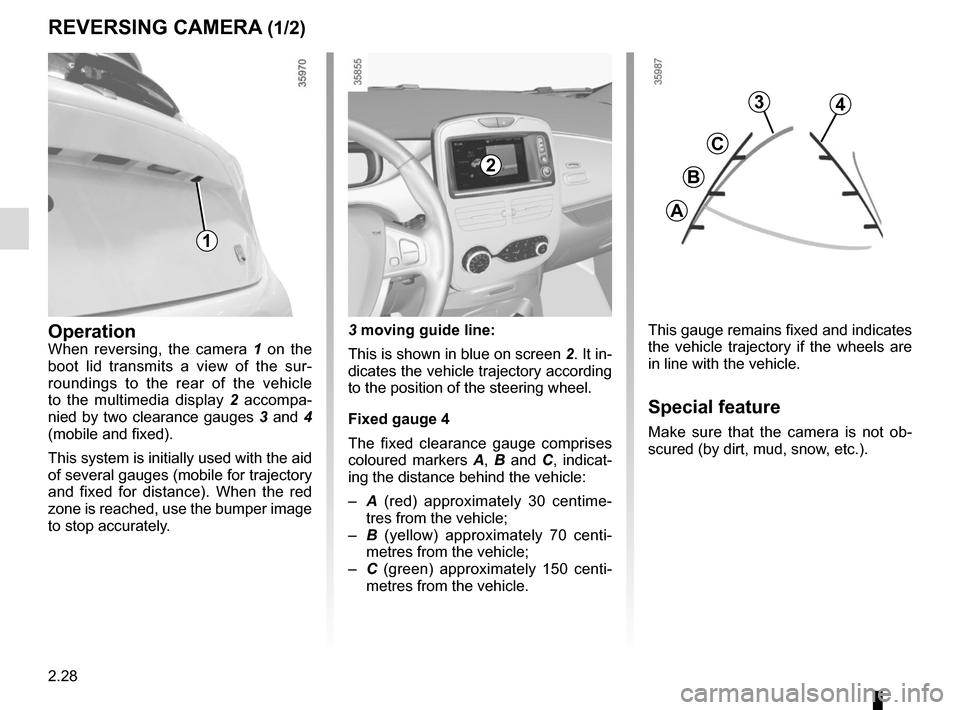
This gauge remains fixed and indicates
the vehicle trajectory if the wheels are
in line with the vehicle.
Special feature
Make sure that the camera is not ob-
scured (by dirt, mud, snow, etc.).
OperationWhen reversing, the camera 1 on the
boot lid transmits a view of the sur-
roundings to the rear of the vehicle
to the multimedia display 2 accompa-
nied by two clearance gauges 3 and 4
(mobile and fixed).
This system is initially used with the aid
of several gauges (mobile for trajectory
and fixed for distance). When the red
zone is reached, use the bumper image
to stop accurately. 3 moving guide line:
This is shown in blue on screen
2. It in-
dicates the vehicle trajectory according
to the position of the steering wheel.
Fixed gauge 4
The fixed clearance gauge comprises
coloured markers A, B and C , indicat-
ing the distance behind the vehicle:
– A (red) approximately 30 centime-
tres from the vehicle;
– B (yellow) approximately 70 centi-
metres from the vehicle;
– C (green) approximately 150 centi-
metres from the vehicle.
3
C
B
A
4
2
1
Page 149 of 214
3.29
The presence and location of this equip-
ment depends on the vehicle version.
1 Multimedia touchscreen display;
2 Multimedia sockets;
3 Voice commands;
4 Steering column control;
5 Microphone.
Refer to the equipment instructions
for information on how to operate
this equipment.
Using the telephone
We remind you of the need
to conform to the legislation
in force concerning the use
of such equipment.
MULTIMEDIA EQUIPMENT
1
5
3
2
4

