2014 RENAULT CAPTUR Page 45
[x] Cancel search: Page 45Page 8 of 244
1.2
The RENAULT card is used
for:
– locking/unlocking the doors and tail-gate (doors, tailgate) and the fuel
filler flap (see the following pages);
– switch on the vehicle lighting re- motely (refer to the following pages);
– starting the engine; refer to the in- formation on “Starting the engine” in
Section 2.
Battery lifeMake sure that the correct battery type
is being used, and that the battery is in
good condition and inserted correctly.
Its service life is approximately two
years: replace it when the message
“KEYCARD BATTERY LOW” appears
on the instrument panel (refer to the in-
formation on the “RENAULT card: bat-
tery” in section 5).
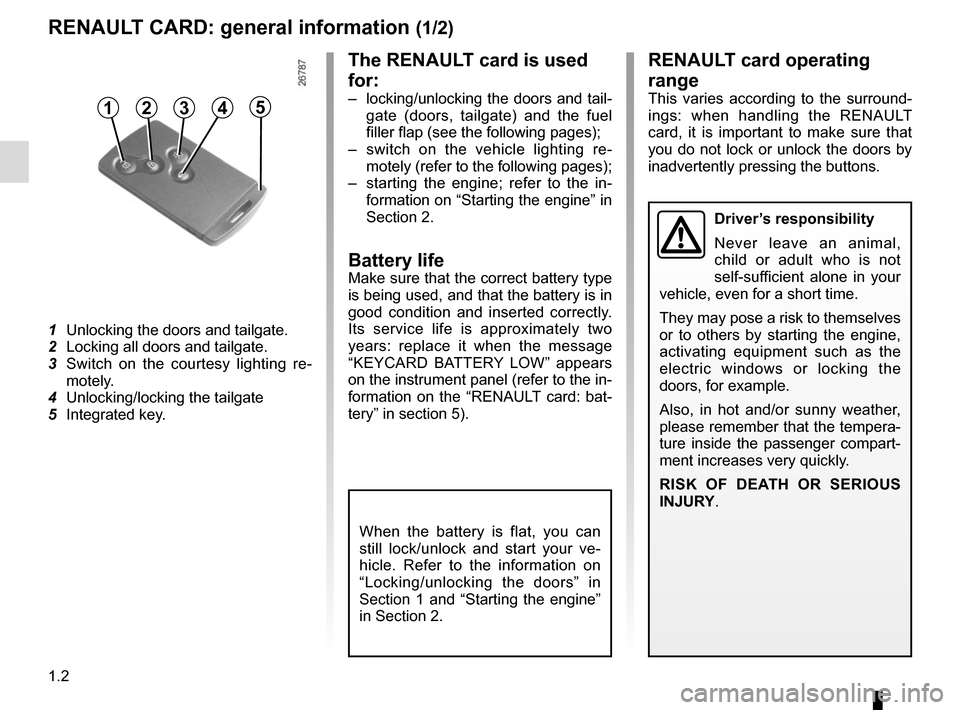
1
Unlocking the doors and tailgate.
2 Locking all doors and tailgate.
3 Switch on the courtesy lighting re- motely.
4 Unlocking/locking the tailgate
5 Integrated key.
RENAULT CARD: general information (1/2)
Driver’s responsibility
Never leave an animal,
child or adult who is not
self-sufficient alone in your
vehicle, even for a short time.
They may pose a risk to themselves
or to others by starting the engine,
activating equipment such as the
electric windows or locking the
doors, for example.
Also, in hot and/or sunny weather,
please remember that the tempera-
ture inside the passenger compart-
ment increases very quickly.
RISK OF DEATH OR SERIOUS
INJURY.
When the battery is flat, you can
still lock/unlock and start your ve-
hicle. Refer to the information on
“Locking/unlocking the doors” in
Section 1 and “Starting the engine”
in Section 2.
45123
RENAULT card operating
range
This varies according to the surround-
ings: when handling the RENAULT
card, it is important to make sure that
you do not lock or unlock the doors by
inadvertently pressing the buttons.
Page 17 of 244
1.11
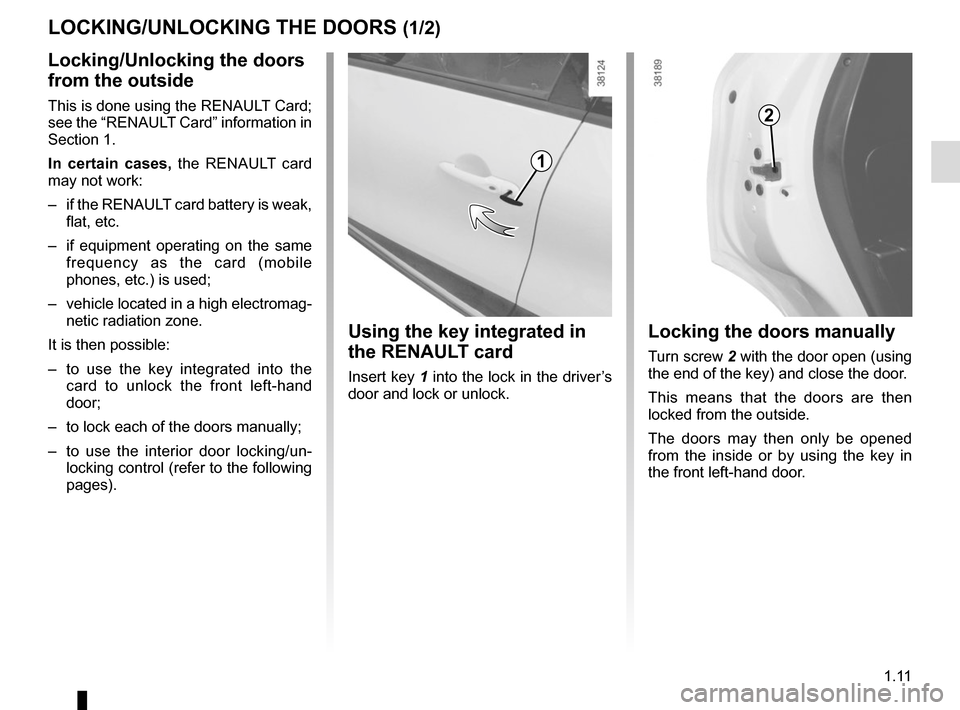
Locking the doors manually
Turn screw 2 with the door open (using
the end of the key) and close the door.
This means that the doors are then
locked from the outside.
The doors may then only be opened
from the inside or by using the key in
the front left-hand door.
Using the key integrated in
the RENAULT card
Insert key 1 into the lock in the driver’s
door and lock or unlock.
Locking/Unlocking the doors
from the outside
This is done using the RENAULT Card;
see the “RENAULT Card” information in
Section 1.
In certain cases, the RENAULT card
may not work:
– if the RENAULT card battery is weak, flat, etc.
– if equipment operating on the same frequency as the card (mobile
phones, etc.) is used;
– vehicle located in a high electromag- netic radiation zone.
It is then possible:
– to use the key integrated into the card to unlock the front left-hand
door;
– to lock each of the doors manually;
– to use the interior door locking/un- locking control (refer to the following
pages).
LOCKING/UNLOCKING THE DOORS (1/2)
1
2
Page 37 of 244

1.31
CHILD SAFETY: fitting a child seat (1/4)
Some seats are not suitable for fitting
child seats. The diagram on the follow-
ing page shows you how to attach a
child seat.
The types of child seat indicated may
not be available. Before using a differ-
ent child seat, check with the manufac-
turer that it can be fitted.
Ensure that the child seat
or the child’s feet do not
prevent the front seat from
locking correctly. Refer to
the information on the “Front seat”
in Section 1.
Check that when installing the child
seat in the vehicle it is not at risk of
coming loose from its base.
If you have to remove the headrest,
check that it is correctly stored so
that it does not come loose under
harsh braking or impact.
Always attach the child seat to the
vehicle even if it is not in use so that
it does not come loose under harsh
braking or impact.
In the front seat
The laws concerning children travel-
ling in the front passenger seat differ in
every country. Consult the legislation in
force and follow the indications on the
diagram on the following page.
Before fitting a child seat in this seat (if
authorised):
– lower the seat belt as far as possible;
– move the seat as far back as possi- ble;
– gently tilt the seatback away from vertical (approximately 25°);
– on equipped vehicles, raise the seat base as far as possible.
In all situations, reinsert the headrest to
its full extent so that it does not interfere
with the child seat (see the information
on “Front headrests” in Section 1);
RISK OF DEATH OR
SERIOUS INJURY: Before
installing a child seat on the
front passenger seat, check
that the airbag has been deacti-
vated (please refer to “Child safety:
front passenger airbag deactivation
and activation” in Section 1).
After installing the child seat, if neces-
sary, the seat may be advanced (so as
to leave enough space in the rear seats
for passengers or other child seats).
For a rear-facing child seat, do not let
it touch the dashboard or move it to the
furthest forward position.
Do not change other settings after in-
stalling the child seat.
Page 40 of 244

The table below summarises the information already shown on the diagram \
on the previous page, to ensure the regula-
tions in force are respected.
Type o")
1.34
CHILD SAFETY: fitting a child seat (4/4)
The table below summarises the information already shown on the diagram \
on the previous page, to ensure the regula-
tions in force are respected.
Type of child seatWeight of
the child Seat sizeFront passenger
seat (5) (1) Rear side seats Rear centre
seat
Carrycot fitted across the
vehicle
Group 0 < 10 kg F, G X U (2) X
Rear-facing shell seat
Group 0 or 0+ < 10 kg and <
13 kg
E U - IL U - IL (3) X
rear-facing seat
Group 0+ and 1 < 13 kg and 9 to
18 kg
C, D U - IL U - IL (3) X
Forward-facing seat
Group 1 9 to 18 kg A, B, B1 IUF - IL U - IUF - IL (4) X
Booster seat
Group 2 and 3 15 to 25 kg and
22 to 36 kg
- X U (4) X
X = Seat not suitable for fitting child seats.
U= Seat which allows a child seat with “Universal” approval to be ins\
talled using a seat belt; check that it can be fitted.
IUF/IL = On equipped vehicles, seat which allows an approved “Universal/semi-u\
niversal or vehicle specific” child seat to be at-
tached using the ISOFIX system; check that it can be fitted.
(1) raise the seat to the maximum and position it as far back as possi\
ble, tilting the seatback slightly (approximately 25°).
(2) A carrycot can be installed across the vehicle and will take up at least \
two seats. Position the child with their feet nearest the
door.
(3) Move the front seat as far forward as possible to install a rear-facing \
child seat, then move back the seat in front as far as it will
go, although without allowing it to come into contact with the child sea\
t.
(4) Forward-facing child seat; position the seatback of the child seat in co\
ntact with the seatback of the vehicle seat. In all sit ua-
tions, remove the rear headrest of the seat on which the child seat is p\
ositioned. This must be done before fitting the child s eat.
Refer to the information on “Rear headrests” in Section 3.
(5) RISK OF DEATH OR SERIOUS INJURY: before installing a child seat on the front passenger seat, check that \
the
air bag has been deactivated (refer to “Child safety: front passenge\
r air bag deactivation/activation” Section 1).
Page 54 of 244

1.48
ON-BOARD COMPUTER: general information (1/2)
On-board computer 1
Depending on the vehicle, this includes
the following functions:
– distance travelled;
– journey settings;
– information messages;
– operating fault messages (con-
nected to the
© warning light);
– warning messages (connected to the
® warning light);
– vehicle settings customisation menu.
All these functions are described on the
following pages.
Display selection keys 2
and 3
Scroll through the following information
upwards (key 2) or downwards (key 3)
by pressing briefly and successively
(the display depends on the vehicle
equipment and country).
a) total mileage and trip mileage re-
corder;
b) fuel used;
c) average fuel consumption;
d) current fuel consumption;
e) estimated range;
2
3
f) distance travelled;
g) average speed;
h) distance before service;
– service counter;
– oil change counter;
i) Reset the tyre pressure
j) cruise control/speed limiter pro- grammed speed;
k) clock and temperature;
l) trip log, operating faults and informa- tion message readout.1
Page 61 of 244

1.55
TRIP COMPUTER AND WARNING SYSTEM: information messages
Examples of messagesInterpreting the display selected
« PARKING BRAKE ON » Indicates that the parking brake has been applied.
« PLEASE REMOVE KEYCARD » Request to remove the RENAULT card from the reader when you leave the vehicle.
« TRACTION
CONTROL OFF » Indicates that you have deactivated the traction control function.
« TURN STEERINGWHEEL + START » Turn the steering wheel slightly whilst pressing the vehicle start button\
to unlock the steering
column.
« STEERING WHEEL NOT LOCKED » Indicates that the steering column has not been locked.
These can help in the vehicle starting phase, or give information about \
a selection or a driving status.
Examples of information messages are given in the following pages.
Page 62 of 244

1.56
TRIP COMPUTER AND WARNING SYSTEM: operating fault messages
These appear with the © warning light and mean that you should drive very carefully to an author\
ised dealer as
soon as possible. If you fail to follow this recommendation, you risk da\
maging your vehicle.
They disappear when the display selection key is pressed or after severa\
l seconds and are stored in the computer log. The
© warning light stays on. Examples of operating fault messages are given \
in the following pages.
Examples of messages Interpreting the display selected
« CLEAN DIESEL FILTER » Indicates the presence of water in the diesel filter; contact an approve\
d Dealer
as soon as possible.
« CHECK VEHICLE » Indicates a fault in one of the pedal sensors, battery management system\
or oil
level sensor.
« CHECK AIRBAG » Indicates a fault in the restraint system in addition to the seat belts.\
In the event
of an accident, it is possible that they may not be triggered.
« Check antipollution system » Indicates a fault in the vehicle’s particle filter system.
Page 63 of 244

1.57
TRIP COMPUTER AND WARNING SYSTEM: warning message
These appear with the ® warning light and require you to stop immediately, for your own safety, as soon as traf-
fic conditions allow. Stop your engine and do not restart it. Contact an approved Dealer.
Examples of warning messages are given in the following pages. Note: the messages appear on the display either individually
or alternately (when there are several messages to be displayed), and \
may be accompanied by a warning light and/or a beep.
Examples of messages Interpreting the display selected
« ENGINE FAILURE HAZARD » Indicates an injection fault, the vehicle’s engine has overheated or there is a
serious engine fault.
« BRAKING SYSTEM FAULT » Indicates a fault in the braking system.
« BATTERY CHARGING FAULT » Indicates a fault in the vehicle battery charging circuit (alternator e\
tc.).
« PUNCTURE » Indicates that at least one wheel is punctured or severely underinflated\
.