Page 194 of 244
5.14
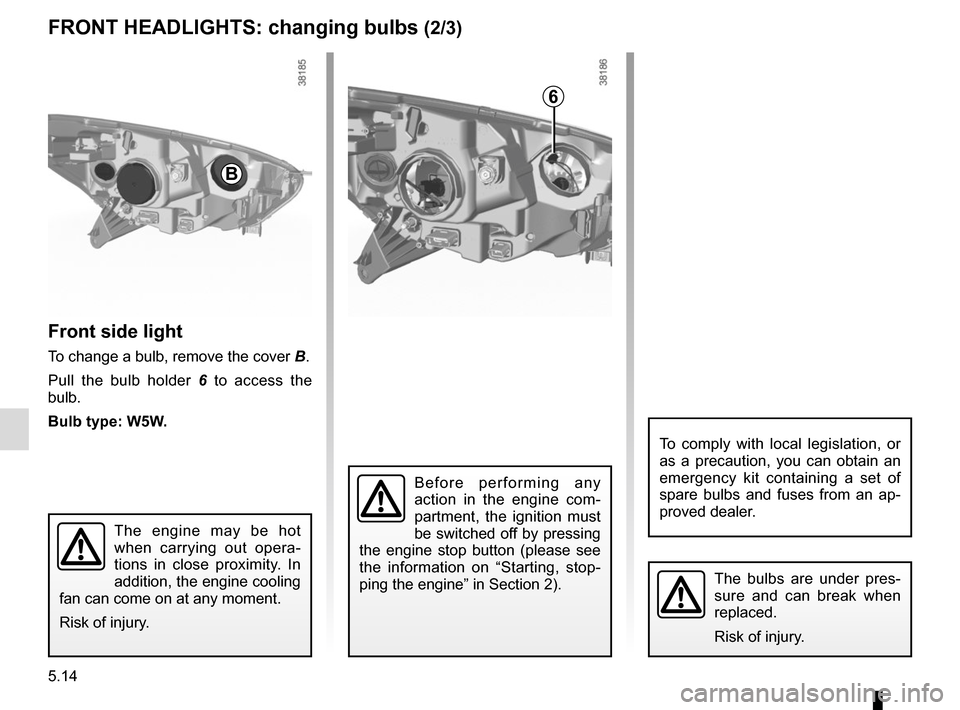
Front side light
To change a bulb, remove the cover B.
Pull the bulb holder 6 to access the
bulb.
Bulb type: W5W.
The bulbs are under pres-
sure and can break when
replaced.
Risk of injury.
FRONT HEADLIGHTS: changing bulbs (2/3)
The engine may be hot
when carrying out opera-
tions in close proximity. In
addition, the engine cooling
fan can come on at any moment.
Risk of injury.
To comply with local legislation, or
as a precaution, you can obtain an
emergency kit containing a set of
spare bulbs and fuses from an ap-
proved dealer.
6
B
Before performing any
action in the engine com-
partment, the ignition must
be switched off by pressing
the engine stop button (please see
the information on “Starting, stop-
ping the engine” in Section 2).
Page 195 of 244
5.15
Daytime running lights 7
Please see an authorised dealer.
Front fog lights 8
– Access the bulb holder via the un-
derneath of the vehicle;
– unclip the flap;
– turn the bulb holder a quarter turn.
Bulb type: H16LL.
Type of bulb for vehicles fitted with
cornering lights: H11LL.
Additional lights
If you wish to fit fog lights to your ve-
hicle, please see an authorised dealer.
Any operation on (or modi-
fication to) the electrical
system must be performed
by an approved dealer
since an incorrect connection might
damage the electrical equipment
(harness, components and in partic-
ular the alternator). In addition, your
Dealer has all the parts required for
fitting these units.
FRONT HEADLIGHTS: changing bulbs (3/3)
7
8
Page 196 of 244
5.16
Pull on the outside A of the light and
remove the rear light unit.
Remove the bulb holder by releasing
clip 2, then clips 3.
Change the bulb.
Refit the bulb holder and push the unit
in fully until it locks in place.
Check that the light is properly locked
in position.
Tighten screws 1.
The bulbs are under pres-
sure and can break when
replaced.
Risk of injury.
4 Side light and brake light
Bulb type: P21/5W.
5 Direction indicator lights
Bulb type: PY21.Side lights/brake and
direction indicator lights
Open the boot lid and remove screws 1.
REAR AND SIDE LIGHTS: changing bulbs (1/2)
4
5
1
A2
3
Page 197 of 244
5.17
REAR AND SIDE LIGHTS: changing bulbs (2/2)
The bulbs are under pres-
sure and can break when
replaced.
Risk of injury.
Side indicator lights 10
The wing mirror needs to be removed;
consult an authorised dealer.
Bulb type: W5W.
10
Number plate lights 8
– Unclip light 8 by pressing tab 9;
– remove the light cover to gain access to the bulb.
Bulb type: W5W.
9
8
High-level brake light 6
Consult an approved dealer.
Reversing lights and rear fog
lights 7
The front bumper needs to be removed;
consult an authorised dealer.
7
6
Page 198 of 244
5.18
Courtesy light
Unclip the lens (using a flat-blade
screwdriver or similar).
Remove the bulb concerned.
Bulb type 1: W5W.
INTERIOR LIGHTING: changing bulbs (1/2)
The bulbs are under pres-
sure and can break when
replaced.
Risk of injury.
1
Soft lighting 2
Please contact an authorised dealer.
2
Page 199 of 244
5.19
3
Luggage compartment light
Unclip light 3 by pressing the tabs on
each side (using a flat-blade screw-
driver or similar).
Disconnect the light.
4
5
Press tab 4 to release the bulb holder
and access bulb 5.
Bulb type: C5W festoon type bulb.
The bulbs are under pres-
sure and can break when
replaced.
Risk of injury.
INTERIOR LIGHTING: changing bulbs (2/2)
Page 206 of 244
5.26
Radio location 1
Unclip the blanking cover. The aerial, +
and – supply and speaker wire connec-
tions are located behind it.
Door speakers 2
To install any equipment, please con-
sult an authorised dealer.
FITTING A RADIO
1
2– In all cases, it is very important to
follow the manufacturer’s instruc-
tions carefully.
– The specifications of the brack- ets and wires (available from our
network) vary depending on the
equipment level of your vehicle
and the type of radio.
Consult an approved Dealer to find out the correct part number.
– No work may be carried out on the vehicle’s electrical or radio
circuits, except by approved
dealers: an incorrectly connected
system may result in damage
being caused to the electrical
equipment and/or the compo-
nents connected to it.
Page 207 of 244

5.27
ACCESSORIES
Electrical and electronic accessoriesBefore installing this type of accessory (particularly for transmitters\
/receivers: frequency bandwidth, power level, po-
sition of the aerial, etc.), make sure it is compatible with your vehic\
le. You can get advice from an authorised dealer.
Connect accessories with a maximum power of 120 watts only. Fire hazard.
No work may be carried out on the vehicle’s electrical or radio circuits, except by authorised dealers: an incorre\
ctly connecte d
system may result in damage being caused to the electrical equipment and\
/or the components connected to it.
If the vehicle is fitted with any aftermarket electrical equipment, make\
sure that the installation is correctly protected by a fuse.
Establish the rating and position of this fuse.
Use of transmission/receiving devices (telephones, CB equipment etc.).\
Telephones and CB equipment with integrated aerials may cause interferenc\
e to the electronic systems originally fitted to the
vehicle: it is advisable only to use equipment with an external aerial. \
Furthermore, we remind you of the need to conform
to the legislation in force concerning the use of such equipment.
Fitting after-market accessoriesIf you wish to install accessories on the vehicle: please contact an aut\
horised dealer. Also, to ensure the correct operation o f
your vehicle, and to avoid any risk to your safety, we recommend that you use only accessories specifically designed for y\
our
vehicle, which are the only accessories for which the manufacturer will \
provide a warranty.
If you are using an anti-theft device, only attach it to the brake pedal\
.
Obstructions to the driver
On the driver’s side, only use mats suitable for the vehicle, attached with the pre-fi\
tted components, and check the fitting re gu-
larly. Do not lay one mat on top of another. There is a risk of wedging the pedals