Page 12 of 666

�DOOR LOCKS .........................34
▫ Manual Door Locks .....................34
▫ Power Door Locks — If Equipped ..........36
� WINDOWS ...........................38
▫ Power Vent Windows — If Equipped ........38
▫ Power Windows .......................38
� SLIDING SIDE DOOR ....................43
▫ Power Sliding Side Door — If Equipped ......44
▫ Sliding Side Door Child Protection Lock ......48
� LIFTGATE ............................51
▫ Power Liftgate — If Equipped .............52
� OCCUPANT RESTRAINTS ................55
▫ Lap/Shoulder Belts ....................58 ▫
Seat Belts In Passenger Seating Positions ......64
▫ Automatic Locking Retractor Mode (ALR) — If
Equipped ............................64
▫ Energy Management Feature ..............65
▫ Seat Belt Pretensioners ..................66
▫ Supplemental Active Head Restraints (AHR) . . .66
▫ Enhanced Seat Belt Use Reminder System
(BeltAlert®) ..........................70
▫ Seat Belts And Pregnant Women ...........71
▫ Seat Belt Extender .....................72
▫ Supplemental Restraint System
(SRS) — Air Bags ......................72
▫ Air Bag System Components ..............74
▫ Advanced Front Air Bag Features ...........75
10 THINGS TO KNOW BEFORE STARTING YOUR VEHICLE
Page 14 of 666
A WORD ABOUT YOUR KEYS
Your vehicle uses a keyless ignition system. This system
consists of a Key Fob with Remote Keyless Entry (RKE)
transmitter and a Wireless Ignition Node (WIN) with
integral ignition switch. You can insert the Key Fob into
the ignition switch with either side up.
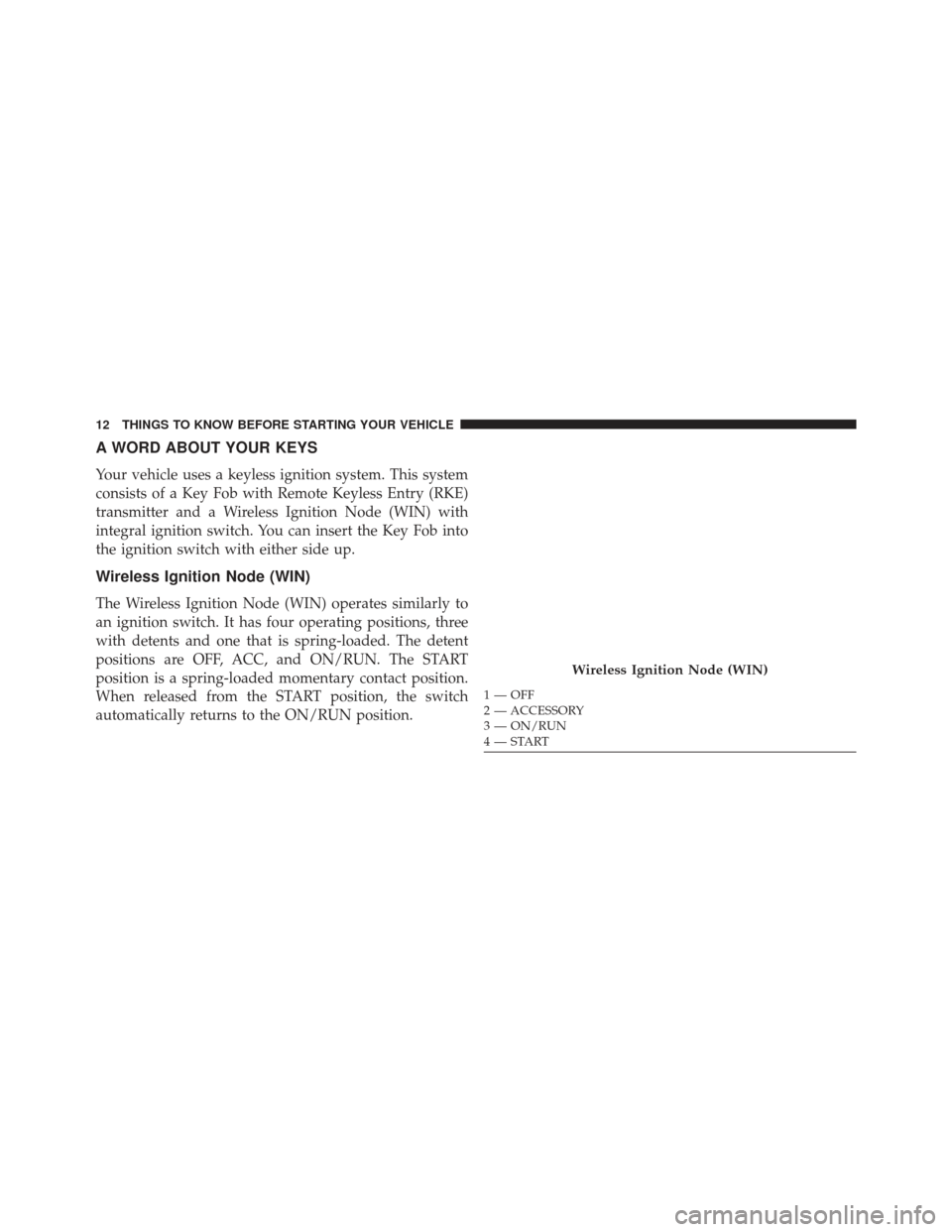
Wireless Ignition Node (WIN)
The Wireless Ignition Node (WIN) operates similarly to
an ignition switch. It has four operating positions, three
with detents and one that is spring-loaded. The detent
positions are OFF, ACC, and ON/RUN. The START
position is a spring-loaded momentary contact position.
When released from the START position, the switch
automatically returns to the ON/RUN position.
Wireless Ignition Node (WIN)
1 — OFF
2 — ACCESSORY
3 — ON/RUN
4 — START
12 THINGS TO KNOW BEFORE STARTING YOUR VEHICLE
Page 17 of 666
CAUTION!
An unlocked car is an invitation to thieves. Always
remove the Key Fob from the ignition and lock all
doors when leaving the vehicle unattended.
Key-In-Ignition Reminder
Opening the driver’s door when the Key Fob is in the
ignition and the ignition switch position is OFF or ACC,
a chime will sound to remind you to remove the key.
NOTE:The Key-In-Ignition reminder only sounds when
the Key Fob is placed in the OFF or ACC ignition
position.
SENTRY KEY®
The Sentry Key® Immobilizer system prevents unauthor-
ized vehicle operation by disabling the engine. The
system does not need to be armed or activated. Operation
is automatic, regardless of whether the vehicle is locked
or unlocked.
The system uses Key Fob with factory-mated Remote
Keyless Entry (RKE) transmitter and Wireless Ignition
Node (WIN) to prevent unauthorized vehicle operation.
Therefore, only Key Fobs that are programmed to the
vehicle can be used to start and operate the vehicle. The
system will shut the engine off in two seconds if an
invalid Key Fob is used to start the engine.
After turning the ignition switch to the ON/RUN posi-
tion, the Vehicle Security Light will turn on for three
seconds for a bulb check. If the light remains on after the
bulb check, it indicates that there is a problem with the
electronics. In addition, if the light begins to flash after
2
THINGS TO KNOW BEFORE STARTING YOUR VEHICLE 15
Page 32 of 666

2. Closeness to a radio transmitter such as a radio stationtower, airport transmitter, and some mobile or CB
radios.
REMOTE STARTING SYSTEM — IF EQUIPPED
This system uses the Remote Keyless Entry
(RKE) transmitter to start the engine conve-
niently from outside the vehicle while still
maintaining security. The system has a range of
approximately 300 ft (91 m).
NOTE:
• The vehicle must be equipped with an automatic
transmission to be equipped with Remote Start.
• Obstructions between the vehicle and the Key Fob may
reduce this range.
How To Use Remote Start
All of the following conditions must be met before the
engine will Remote Start:
• Shift lever in PARK
• Doors closed
• Hood closed
• Liftgate closed
• Hazard switch off
• Brake switch inactive (brake pedal not pressed)
• Ignition key removed from ignition switch
• Battery at an acceptable charge level
• RKE PANIC button not pressed
• System not disabled from previous remote start event
30 THINGS TO KNOW BEFORE STARTING YOUR VEHICLE
Page 34 of 666

To Enter Remote Start Mode
Press and release the REMOTE START button
on the RKE transmitter twice within five sec-
onds. The vehicle doors will lock, the parking
lights will flash and horn will chirp twice (if
programmed). Then, the engine will start and the vehicle
will remain in the Remote Start mode for a 15-minute
cycle.
NOTE:
• If your power door locks were unlocked, Remote Start
will automatically lock the doors.
• The park lights will turn on and remain on during
Remote Start mode.
• For security, power window and power sunroof op-
eration (if equipped) are disabled when the vehicle is
in the Remote Start mode. •
The engine can be started two consecutive 15-minute
cycles with the RKE transmitter. However, the ignition
switch must be turned to the ON/RUN position.
To Enter The Vehicle After Remote Start
To enter the vehicle while the engine is running during a
Remote Start, you must first unlock the vehicle using the
UNLOCK button on the transmitter. After the vehicle is
unlocked, you can enter the vehicle, insert the Key Fob
into the ignition switch and turn it to the ON/RUN
position, otherwise the engine will shut off at the end of
15-minute cycle.
To Exit Remote Start Mode And Drive The Vehicle
Before the end of the 15-minute cycle, press and release
the UNLOCK button on the RKE transmitter to unlock
the doors and disarm the Vehicle Security Alarm (if
equipped). Then, prior to the end of the 15-minute cycle,
insert the Key Fob into the ignition switch and turn the
switch to the ON/RUN position.
32 THINGS TO KNOW BEFORE STARTING YOUR VEHICLE
Page 39 of 666

If you press the power door lock switch while the sliding
door is open, the sliding door will lock.
Automatic Door Locks — If Equipped
When enabled, the door locks will lock automatically
when the vehicle’s speed exceeds 15 mph (24 km/h). The
auto door lock feature can be enabled or disabled by your
authorized dealer per written request of the customer.
Please see your authorized dealer for service.
Unlock Doors Automatically On Exit — If
Equipped
The Unlock Doors Automatically On Exit feature unlocks
all of the vehicle doors when any door is opened. This
will occur only after the shift lever has been shifted into
the PARK position, after the vehicle has been driven (the
shift lever has been shifted out of PARK and all doors
closed).
The Unlock Doors Automatically On Exit feature will not
operate if there is any manual operation of the power
door locks (lock or unlock).
Front Passenger Power Door Switches
1 — Window Open/Close
2 — Power Door Locks
2
THINGS TO KNOW BEFORE STARTING YOUR VEHICLE 37
Page 40 of 666
On vehicles equipped with the optional Electronic Ve-
hicle Information Center (EVIC), refer to “Electronic
Vehicle Information Center (EVIC)/Personal Settings
(Customer-Programmable Features)” in “Understanding
Your Instrument Panel” for further information.
NOTE:Use the Lock Doors Automatically at 15 mph
(24 km/h) and Unlock Doors Automatically On Exit
features in accordance with local laws.
WINDOWS
Power Vent Windows — If Equipped
The Power Vent Window Switch located on the driver’s
door trim panel allows the driver to operate the two vent
windows from the driver’s seat.Power Windows
You can control either the front or rear windows using
switches located on the driver’s door trim panel. The
switches will operate only when the ignition switch is in
the ON/RUN or ACC position and during power acces-
sory delay.
Power Vent Window Switch Open/Close
38 THINGS TO KNOW BEFORE STARTING YOUR VEHICLE
Page 43 of 666

Auto-Down Feature — If Equipped
The front window switches may be equipped with an
Auto-Down feature. Press the window switch past the
detent, release, and the window will go down automati-
cally.
To open the window part way, press the window switch
part way and release it when you want the window to
stop.
The power window switches remain active for up to 10
minutes (depending on the accessory delay setting) after
the ignition switch has been turned to OFF. Opening a
vehicle front door will cancel this feature.
Auto Up Feature With Anti-Pinch Protection — If
Equipped
The front driver and front passenger switches may be
equipped with an Auto Up feature. Lift the window
switch fully upward to the second detent, release, and the
window will go up automatically.
To stop the window from going all the way up during the
Auto Up operation, push down on the switch briefly.
To close the window part way, lift the window switch to
the first detent and release when you want the window to
stop.
NOTE:
•If the window runs into any obstacle during auto-
closure, it will reverse direction and then go back
down. Remove the obstacle and use the window
switch again to close the window.
2
THINGS TO KNOW BEFORE STARTING YOUR VEHICLE 41