Page 220 of 244
03
10.62
Partner-2-VU_en_Chap10c_RD45_ed02_2014
MAIN MENU
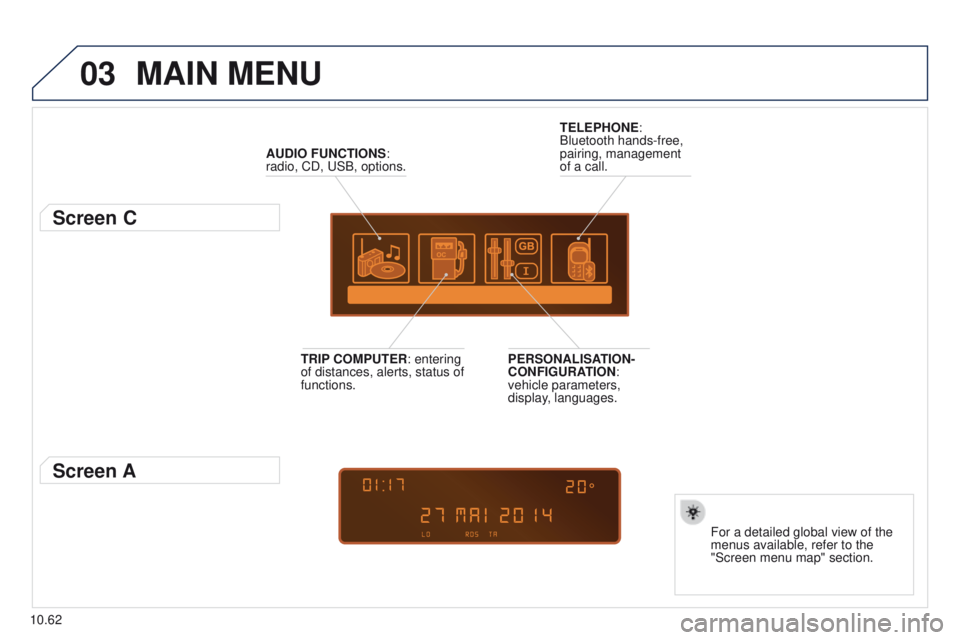
AUDIO FUNCTIONS:
radio, CD, USB, options.
Screen C
For a detailed global view of the
menus available, refer to the
"Screen menu map" section.
TELEPHONE:
Bluetooth hands-free,
pairing, management
of a call.
PERSONALISATION-
CONFIGURATION:
vehicle parameters,
display, languages.
TRIP COMPUTER: entering
of distances, alerts, status of
functions.
Screen A
Page 224 of 244
05
10.66
Partner-2-VU_en_Chap10c_RD45_ed02_2014
PEUGEOT CONNECT USB
The system puts together playlists (temporary memory) created
over a period which depends on the capacity of the USB device.
The other sources are available during this time.
The playlists are updated each time the ignition is switched off or
each time a USB memory stick is connected.
When connecting for the first time, the classification suggested
is by folder. When you reconnect, the classification selected
previously is retained.Connect the memory stick to the port, directly or
using a lead. If the audio equipment is switched
on, the USB source is detected as soon as it
is connected. Play begins automatically after a
delay which depends on the capacity of the USB
memory stick.
The file formats supported are .mp3 (mpeg1
layer 3 only) and .wma (standard 9 only,
128
kbits/sec compression).
Certain playlist formats are supported (.m3u, ...)
On reconnection of the previous memory stick
used, play is resumed automatically with the last
track played.
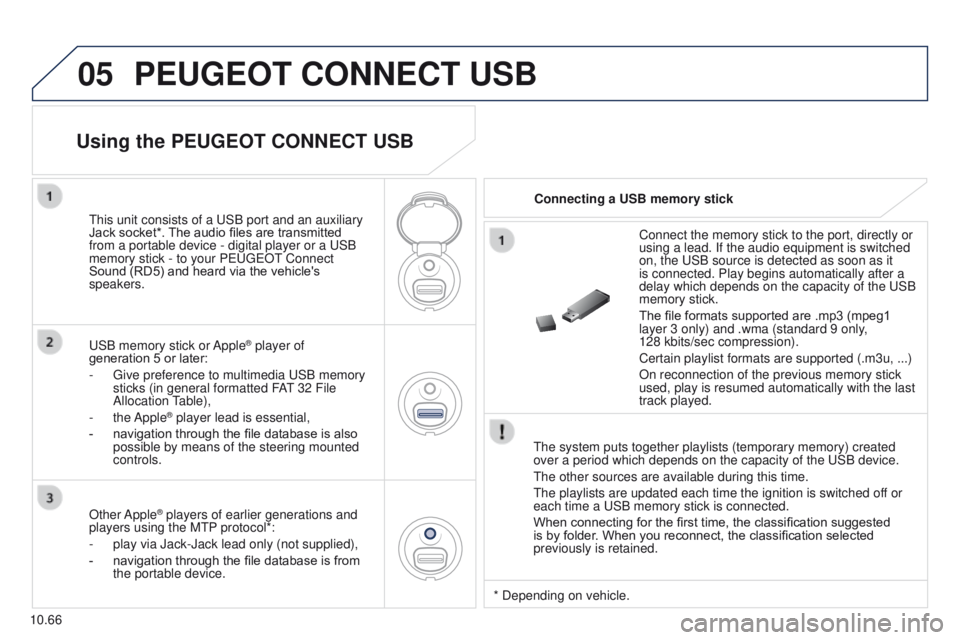
This unit consists of a USB port and an auxiliary
Jack socket*. The audio files are transmitted
from a portable device - digital player or a USB
memory stick - to your PEUGEOT Connect
Sound (RD5) and heard via the vehicle's
speakers.
USB memory stick or Apple
® player of
generation 5 or later:
-
Give preference to multimedia USB memory
sticks (in general formatted F
AT 32 File
Allocation Table),
-
the Apple® player lead is essential,
-
navigation through the file database is also
possible by means of the steering mounted
controls.
Using the PEUGEOT CONNECT USB
Connecting a USB memory stick
Other Apple
® players of earlier generations and
players using the MTP protocol*:
-
play via Jack-Jack lead only (not supplied),
-
navigation through the file database is from
the portable device. * Depending on vehicle.
Page 225 of 244

05
10.67
Partner-2-VU_en_Chap10c_RD45_ed02_2014
Using the PEUGEOT CONNECT USB
Press LIST briefly to display the
previously selected classification.
Navigate through the list using the left/
right and up/down buttons.
Confirm the selection by pressing OK.The lists available are Artist, Genre and Playlist (as defined in the
Apple
® player).
Selection and Navigation are described in steps 1 to 4 above.
Do not connect a hard disk or USB connection device other
than audio equipment to the USB port. This could damage your
installation. Connecting an Apple
® player via the USB port
Press one of these buttons to gain
access to the previous / next track on
the classification list currently being
played.
Press and hold one of the buttons for
fast forward or backward play.
Press one of these buttons to
gain access to the previous / next
Genre, Folder, Artist or Playlist on
the classification list currently being
played.
Press and hold LIST to display the
different classifications.
Select by Folder / Artist / Genre / Playlist,
press OK to select the classification
required, then press OK again to confirm.
-
by Folder: all folders containing audio
files recognised on the peripheral
device.
-
by
Artist: all of the artist names
defined in the ID3 Tags, classified in
alphabetical order.
-
by Genre: all of the genres defined in
the
ID3 Tags.
-
by Playlist: in accordance with the
playlists recorded on the USB device.
PEUGEOT CONNECT USB
Page 226 of 244
05
10.68
Partner-2-VU_en_Chap10c_RD45_ed02_2014
The display and control is via the portable device.
First adjust the volume of your portable device.
Then adjust the volume of your audio
system.
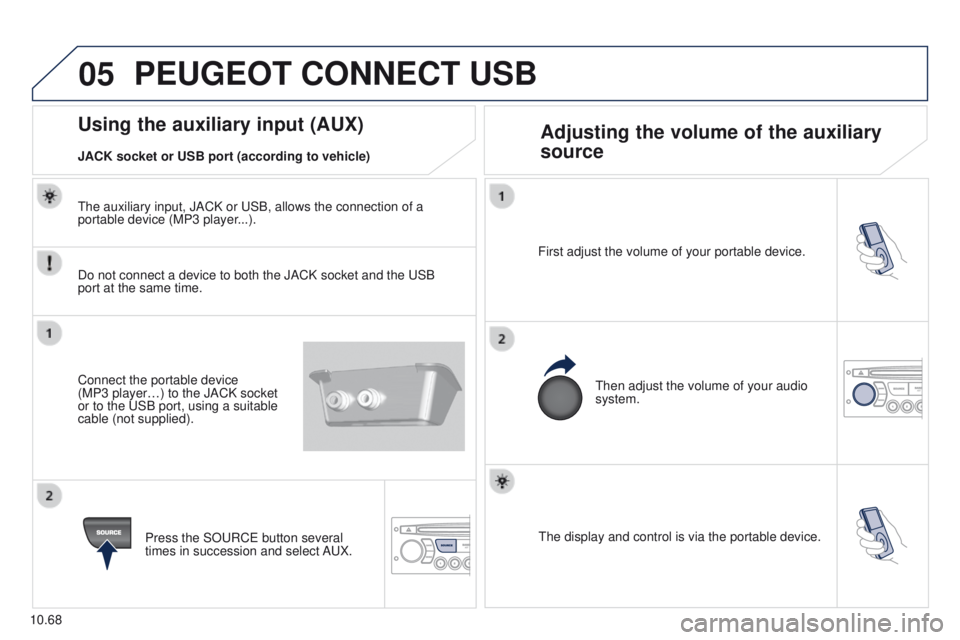
Using the auxiliary input (AUX) Adjusting the volume of the auxiliary
source
JACK socket or USB port (according to vehicle)
PEUGEOT CONNECT USB
Do not connect a device to both the JACK socket and the USB
port at the same time.
Connect the portable device
(MP3
player…) to the JACK socket
or to the USB port, using a suitable
cable (not supplied).
Press the SOURCE button several
times in succession and select AUX.
The auxiliary input, JACK or USB, allows the connection of a
portable device (MP3 player...).
Page 234 of 244
09
10.76
Partner-2-VU_en_Chap10c_RD45_ed02_2014
SCREEN MENU MAP(S)
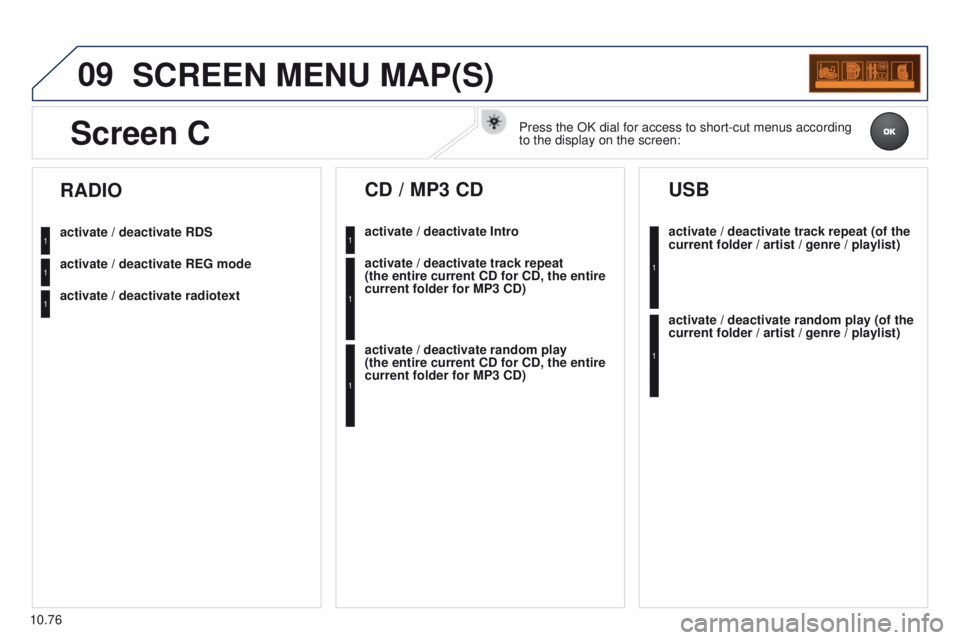
activate / deactivate RDS
activate / deactivate REG mode
activate / deactivate radiotext
RADIO
activate / deactivate Intro
CD / MP3 CD
activate / deactivate track repeat
(the entire current CD for CD, the entire
current folder for MP3 CD)
activate / deactivate random play
(the
entire current CD for CD, the entire
current folder for MP3 CD) activate / deactivate track repeat (of the
current folder / artist / genre / playlist)
USB
activate / deactivate random play (of the
current folder / artist / genre / playlist)
1
1
1
1
1
1
1
1
Screen CPress the OK dial for access to short-cut menus according
to the display on the screen:
Page 237 of 244
10.79
Partner-2-VU_en_Chap10c_RD45_ed02_2014
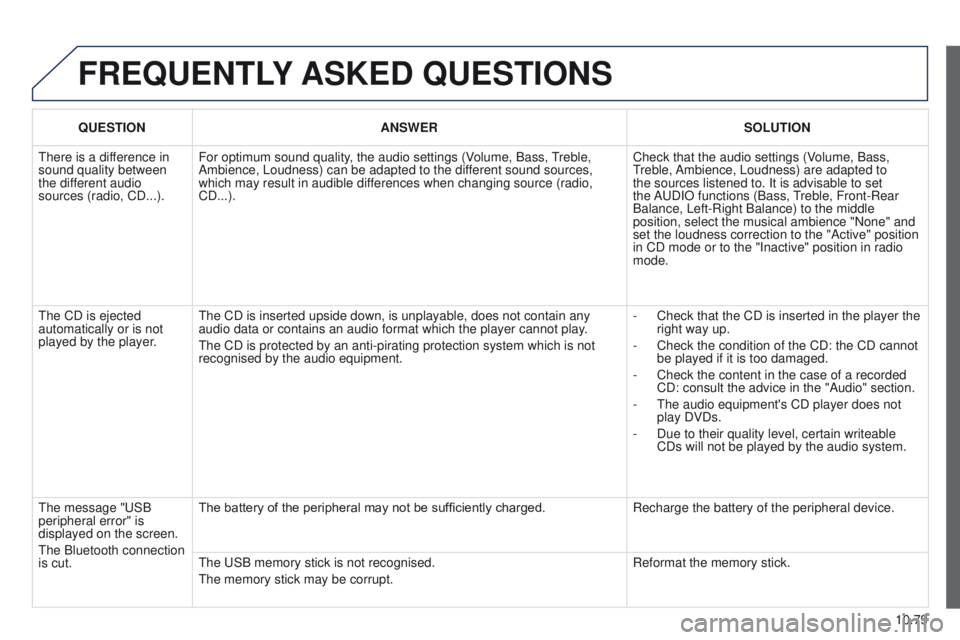
FREQUENTLY ASKED QUESTIONS
QUESTION ANSWER SOLUTION
There is a difference in
sound quality between
the different audio
sources (radio, CD...). For optimum sound quality, the audio settings (Volume, Bass, Treble,
Ambience, Loudness) can be adapted to the different sound sources,
which may result in audible differences when changing source (radio,
CD...). Check that the audio settings (Volume, Bass,
Treble, Ambience, Loudness) are adapted to
the sources listened to. It is advisable to set
the AUDIO functions (Bass, Treble, Front-Rear
Balance, Left-Right Balance) to the middle
position, select the musical ambience "None" and
set the loudness correction to the "Active" position
in CD mode or to the "Inactive" position in radio
mode.
The CD is ejected
automatically or is not
played by the player. The CD is inserted upside down, is unplayable, does not contain any
audio data or contains an audio format which the player cannot play.
The CD is protected by an anti-pirating protection system which is not
recognised by the audio equipment. -
Check that the CD is inserted in the player the
right way up.
-
Check the condition of the CD: the CD cannot
be played if it is too damaged.
-
Check the content in the case of a recorded
CD: consult the advice in the "Audio" section.
-
The audio equipment's CD player does not
play DVDs.
-
Due to their quality level, certain writeable
CDs will not be played by the audio system.
The message "USB
peripheral error" is
displayed on the screen.
The Bluetooth connection
is cut. The battery of the peripheral may not be sufficiently charged.
Recharge the battery of the peripheral device.
The USB memory stick is not recognised.
The memory stick may be corrupt. Reformat the memory stick.
Page:
< prev 1-8 9-16 17-24