Page 145 of 240
Failed bulb or lamp
143
QUICK HELP
8
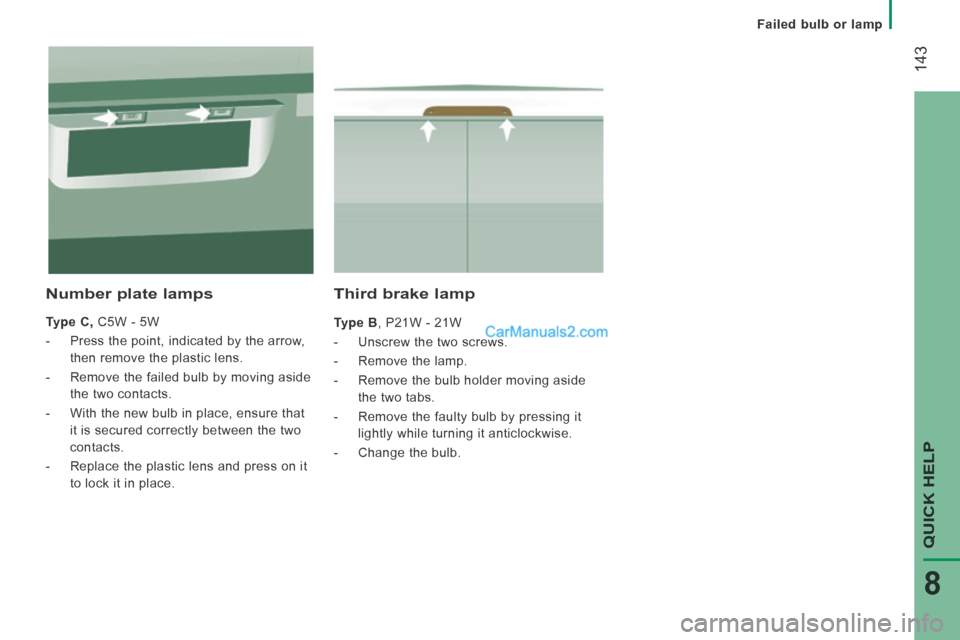
Third brake lamp
Type B , P21W - 21W
- Unscrew the two screws.
- Remove the lamp.
- Remove the bulb holder moving aside the two tabs.
- Remove the faulty bulb by pressing it lightly while turning it anticlockwise.
- Change the bulb.
Number plate lamps
Type C, C5W - 5W
- Press the point, indicated by the arrow, then remove the plastic lens.
- Remove the failed bulb by moving aside the two contacts.
- With the new bulb in place, ensure that it is secured correctly between the two
contacts.
- Replace the plastic lens and press on it to lock it in place.
Page 151 of 240

Puncture
149
QUICK HELP
8
- If a pressure of at least 3 bars is not
reached within 5 minutes, disconnect
the compressor from the valve and the
power socket, then move the vehicle
forward by approximately 10 metres to
distribute the sealant fluid inside the
tyre.
- Then repeat the inflating operation: ● if a pressure of at least 3 bars is not
reached within 10 minutes, switch off
your vehicle: the tyre has suffered
too much damage and repair has not
been possible.Contact a PEUGEOT
dealer or a qualified workshop.
● if the tyre has been inflated to a pressure of 4 bars , set off again
immediately.
After driving for approximately 10 minutes,
stop and check the pressure of the tyre
again.
Adjust the pressure if necessary and contact
a PEUGEOT dealer or a qualified workshop
as soon as possible.
Checking and adjusting the pressure
The compressor can only be used to check
and adjust the pressure.
- Disconnect the hose I and connect it to
the tyre valve directly; the cartridge will
then be connected to the compressor
and the filling fluid will not be injected.
If it is necessary to deflate the tyre, connect
the hose I to the tyre valve and press the
yellow button, placed in the centre of the
switch on the compressor.
Replacing the cartridge
To replace the sealant cartridge, carry out
the following operations:
- disconnect the hose I ,
- turn the cartridge to be replaced anticlockwise and lift it,
- insert the new cartridge and turn it clockwise,
- reconnect the hose I and connect the
hose B in its location.
The cartridge contains ethylene-glycol, a
product which is harmful if swallowed and
which causes irritation to the eyes.
Keep out of reach of children.
After use, do not discard the cartridge in the
environment, take it to a PEUGEOT dealer or an
appropriate waste disposal organisation.
This puncture repair kit and replacement cartridges
are available from PEUGEOT dealers.
Page 168 of 240
01
" Telephone "
allows the connection of a mobile telephone via Bluetooth.
" Vehicle information "
gives access to the ambient temperature, the clock, the compass and the trip computer.
" Settings "
allows certain functions to be activated, deactivated or settings adjusted.
" Radio "
allows the selection of different radio sources and certain functions to be activated, deactivated or settings adjusted.
" Navigation "
allows settings for the navigation system and the choice of a destination.
" Media "
allows selection of different music sources and certain functions to be activated, deactivated or settings adjusted.
GENERAL OPERATION
10.2
Page 197 of 240
10.31
Level 1Level 2Level 3Comment
More
Ambient temp. Displays the ambient temperature.
More
Clock Displays the clock.
More
Compass Displays the direction of travel.
More
Trip
Current trip Range
Displays the trip computer. Make a long press on button "Trip A" or "Trip B" to reset the trip in question.
Current fuel consumption
Trip A
Average fuel consumption
Average speed
Distance travelled
Journey time
Trip B
Average fuel consumption
Average speed
Distance travelled
Journey time
Page 201 of 240
10.35
Level 1Level 2Level 3Comment
Settings
Voice commands
Voice response time
Brief
Set the response time for the voice system.
Long
Display command list
Never
Display suggestions with the different options during a voice session. With help
Always
Settings
Clock and Date
Set time and format Set the time.
Display time mode
On
Set the display mode for the digital clock in the status bar.
Off
Sync time
On
Set the automatic display of time.
Off
Set date Set the date.
Page 207 of 240
10.41
Level 1Level 2Level 3Comment
Settings
Radio settings
DAB announcements
On
Activate or deactivate options.
Off
Categories
Activate or deactivate option: Alarm, Event announcement, Finance fl ash, Info fl ash, Programme info, Special event, Sport info, Public transport info, Alarm info, Weather fl ash.
Settings
Restore settings
Ye s
Restore the default settings for the screen, clock, sounds and the radio.
No