Page 9 of 352
.
7
Familiarisation
Interior
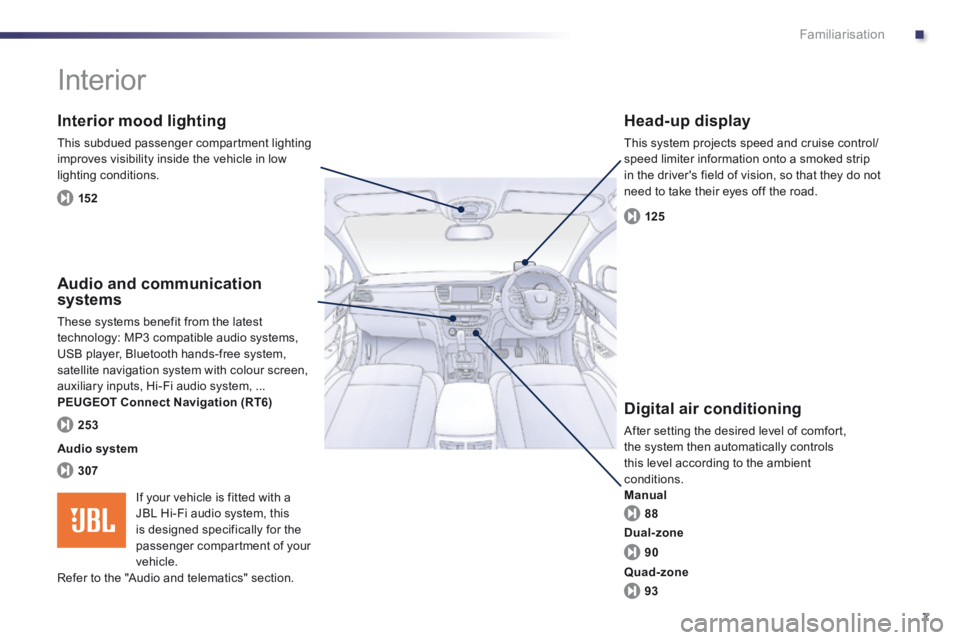
Interior mood lighting
This subdued passenger compartment lighting improves visibility inside the vehicle in low lighting conditions.
Head-up display
This system projects speed and cruise control/speed limiter information onto a smoked strip in the driver's field of vision, so that they do not need to take their eyes off the road.
Digital air conditioning
After setting the desired level of comfort, the system then automatically controls this level according to the ambient conditions. Manual
Audio and communication systems
These systems benefit from the latest technology: MP3 compatible audio systems, USB player, Bluetooth hands-free system, satellite navigation system with colour screen, auxiliary inputs, Hi-Fi audio system, ... PEUGEOT Connect Navigation (RT6)
152
125
88
307
253
Audio system
90
93
Dual-zone
Quad-zone
If your vehicle is fitted with a JBL Hi-Fi audio system, this is designed specifically for the
passenger compartment of your vehicle. Refer to the "Audio and telematics" section.
Page 43 of 352
1
41
Monitoring
Setting the date and time
Audio system / Bluetooth
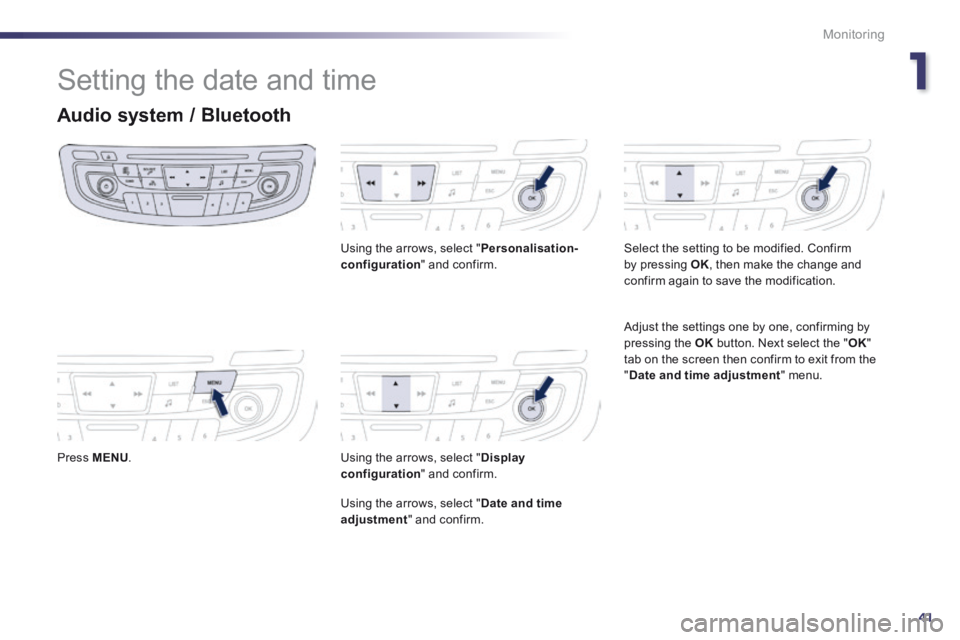
Press MENU .
Using the arrows, select " Personalisation-configuration " and confirm.
Using the arrows, select " Display configuration " and confirm.
Using the arrows, select " Date and time adjustment " and confirm.
Select the setting to be modified. Confirm by pressing OK , then make the change and confirm again to save the modification.
Adjust the settings one by one, confirming by pressing the OK button. Next select the " OK " tab on the screen then confirm to exit from the " Date and time adjustment " menu.
Page 210 of 352
208Practical information
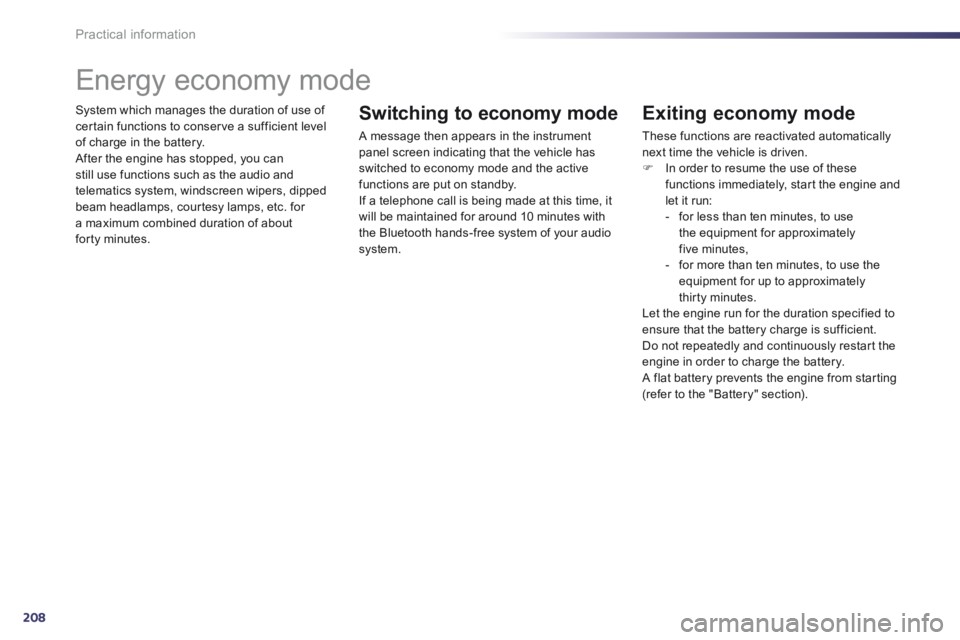
System which manages the duration of use of certain functions to conserve a sufficient level of charge in the battery. After the engine has stopped, you can still use functions such as the audio and telematics system, windscreen wipers, dipped beam headlamps, courtesy lamps, etc. for a maximum combined duration of about forty minutes.
Energy economy mode
Switching to economy mode
A message then appears in the instrument panel screen indicating that the vehicle has switched to economy mode and the active functions are put on standby. If a telephone call is being made at this time, it
will be maintained for around 10 minutes with the Bluetooth hands-free system of your audio system.
Exiting economy mode
These functions are reactivated automatically next time the vehicle is driven. In order to resume the use of these functions immediately, start the engine and let it run: - for less than ten minutes, to use the equipment for approximately five minutes, - for more than ten minutes, to use the equipment for up to approximately thirty minutes. Let the engine run for the duration specified to ensure that the battery charge is sufficient. Do not repeatedly and continuously restart the engine in order to charge the battery. A flat battery prevents the engine from starting (refer to the "Battery" section).
Page 218 of 352
216
Practical information
The fitting of electrical equipment or accessories which are not recommended by PEUGEOT may result in a failure of your vehicle's electronic system and excessive electrical consumption. Please note this precaution. You are advised to contact a PEUGEOT representative to be shown the range of recommended equipment and accessories.
Installation of radio communication transmitters
Before installing any after-market radio communication transmitter, you can contact a PEUGEOT dealer for the specification of transmitters which can be fitted (frequency, maximum power, aerial position, specific installation requirements), in line with the Vehicle Electromagnetic Compatibility Directive (2004/104/EC).
Depending on the legislation in force in the country, it may be compulsory to have a high visibility safety vest, warning triangle and spare bulbs and fuses available in the vehicle.
You can also obtain products for cleaning and maintenance (exterior and interior) and topping up fluids (screenwash, ...), as well as refills (cartridge for temporary tyre repair kit...) from PEUGEOT dealers.
"Multimedia":
audio systems, portable navigation system, Takara/Sony portable video screen, Bluetooth system, speakers, DVD player, Wi-Fi, driving aids, video support, microwave unit...
Page 255 of 352
253
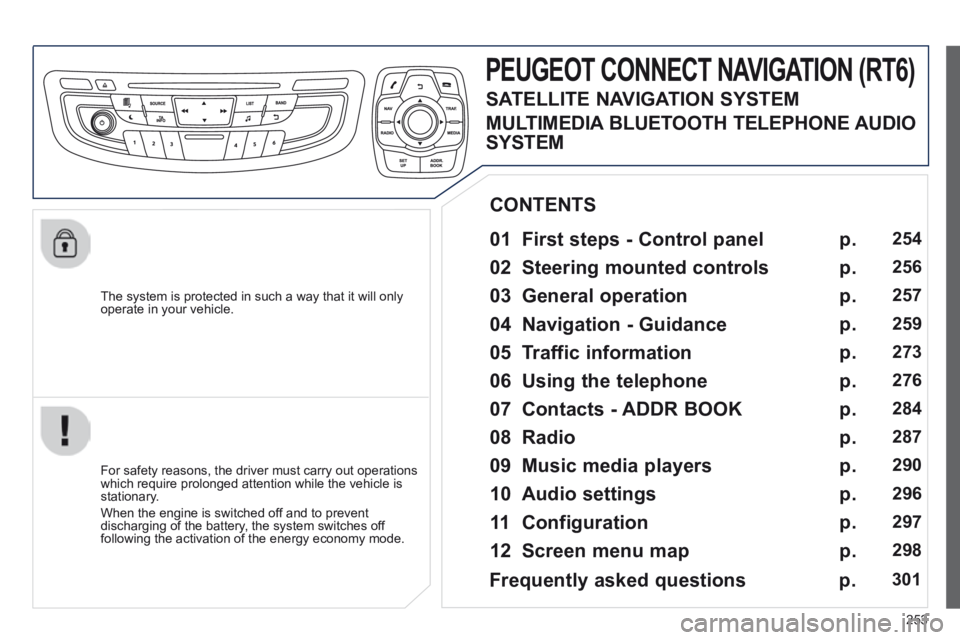
The system is protected in such a way that it will only operate in your vehicle.
PEUGEOT CONNECT NAVIGATION (RT6)
01 First steps - Control panel
For safety reasons, the driver must carry out operations which require prolonged attention while the vehicle is stationary.
When the engine is switched off and to prevent discharging of the battery, the system switches off following the activation of the energy economy mode.
CONTENTS
02 Steering mounted controls
03 General operation
04 Navigation - Guidance
05 Traffic information
06 Using the telephone
07 Contacts - ADDR BOOK
08 Radio
09 Music media players
10 Audio settings
11 Configuration
12 Screen menu map p.
p.
p.
p.
p.
p.
p.
p.
p.
p.
p.
p.
254
256
257
259
273
276
284
287
290
296
297
298
Frequently asked questions
p. 301
SATELLITE NAVIGATION SYSTEM
MULTIMEDIA BLUETOOTH TELEPHONE AUDIO
SYSTEM
Page 256 of 352
254
01 FIRST STEPS
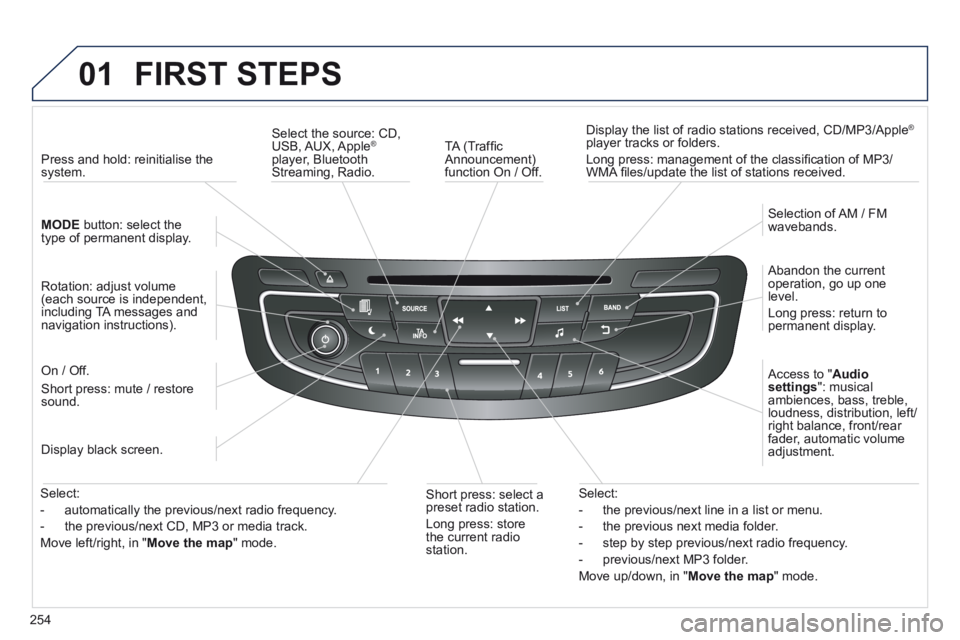
TA (Traffi c Announcement) function On / Off.
Display the list of radio stations received, CD/MP3/Apple ®
player tracks or folders.
Long press: management of the classifi cation of MP3/WMA fi les/update the list of stations received.
Select the source: CD, USB, AUX, Apple ®
player, Bluetooth Streaming, Radio.
Access to " Audio settings ": musical ambiences, bass, treble, loudness, distribution, left/right balance, front/rear fader, automatic volume adjustment.
Abandon the current operation, go up one level.
Long press: return to permanent display.
Selection of AM / FM wavebands.
Display black screen.
MODE button: select the type of permanent display.
Short press: mute / restore sound.
Press and hold: reinitialise the system.
Short press: select a preset radio station.
Long press: store the current radio station.
Select:
- the previous/next line in a list or menu.
- the previous next media folder.
- step by step previous/next radio frequency.
- previous/next MP3 folder.
Move up/down, in " Move the map " mode.
Rotation: adjust volume (each source is independent, including TA messages and navigation instructions).
Select:
- automatically the previous/next radio frequency.
- the previous/next CD, MP3 or media track.
Move left/right, in " Move the map " mode.
On / Off.
Page 278 of 352
276
06 USING THE TELEPHONE
Access to the "TELEPHONE" menu
" " " " " " " " " " " " " " " " " " PhonePhonePhonePhonePhonePhonePhonePhonePhonePhonePhonePhonePhonePhonePhonePhonePhonePhonePhone " " " " " " " " " " " " " " " " " "
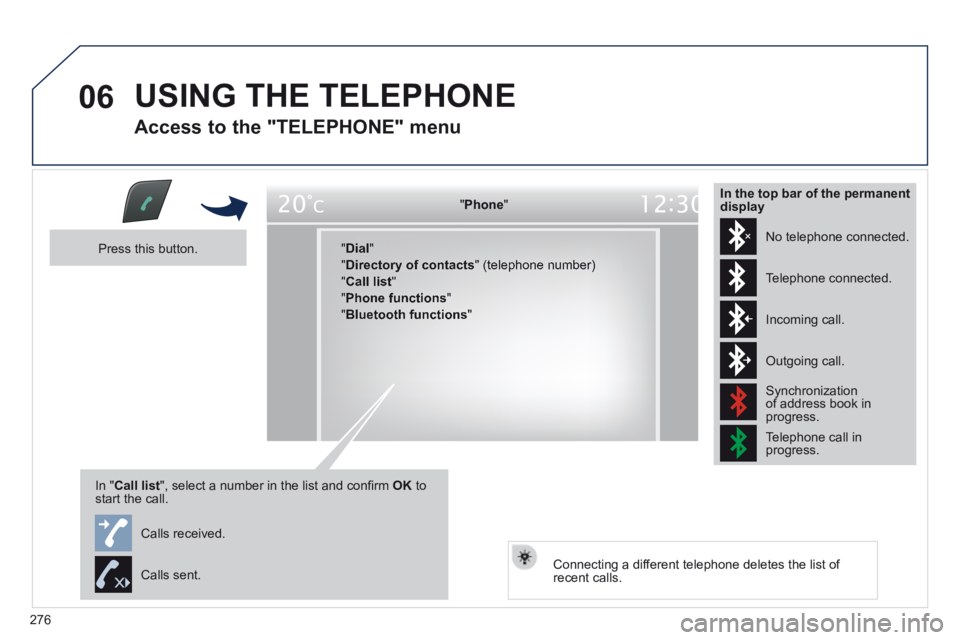
" Dial "
" Directory of contacts " (telephone number)
" Call list "
" Phone functions "
" Bluetooth functions "
Press this button.
In " Call list ", select a number in the list and confi rm OK to start the call.
Connecting a different telephone deletes the list of recent calls.
No telephone connected.
Telephone connected.
Incoming call.
Outgoing call.
Synchronization of address book in progress.
Telephone call in progress.
In the top bar of the permanent display
Calls received.
Calls sent.
Page 279 of 352
277
06
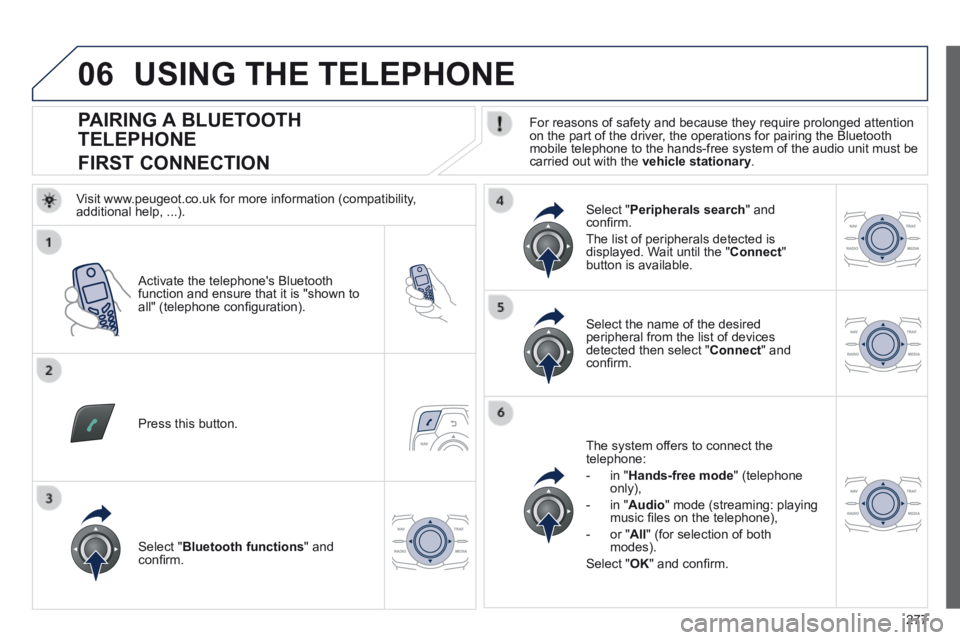
PAIRING A BLUETOOTH
TELEPHONE
FIRST CONNECTION For reasons of safety and because they require prolonged attention on the part of the driver, the operations for pairing the Bluetooth mobile telephone to the hands-free system of the audio unit must be carried out with the vehicle stationary .
Activate the telephone's Bluetooth function and ensure that it is "shown to all" (telephone confi guration).
Press this button.
Select the name of the desired peripheral from the list of devices detected then select " Connect " and confi rm.
The system offers to connect the telephone:
- in " Hands-free mode " (telephone only),
- in " Audio " mode (streaming: playing music fi les on the telephone),
- or " All " (for selection of both modes).
Select " OK " and confi rm.
Select " Bluetooth functions " and confi rm.
Select " Peripherals search " and confi rm.
The list of peripherals detected is displayed. Wait until the " Connect " button is available.
USING THE TELEPHONE
Visit www.peugeot.co.uk for more information (compatibility, additional help, ...).