Page 318 of 352
316
04
CD, USB
AUDIO
PLAYING A COMPILATION
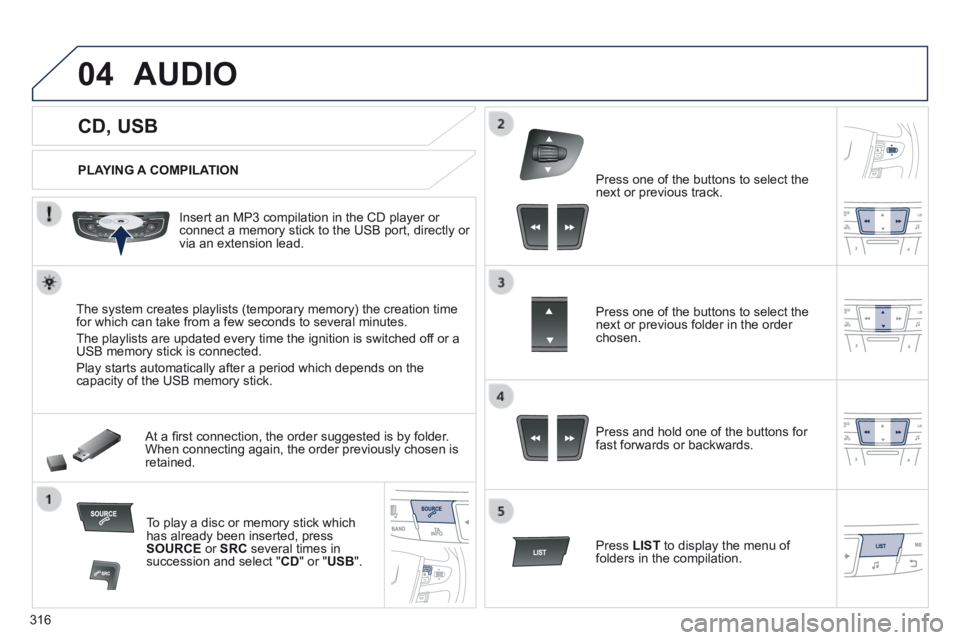
Insert an MP3 compilation in the CD player or connect a memory stick to the USB port, directly or via an extension lead.
The system creates playlists (temporary memory) the creation time for which can take from a few seconds to several minutes.
The playlists are updated every time the ignition is switched off or a USB memory stick is connected.
Play starts automatically after a period which depends on the capacity of the USB memory stick.
At a fi rst connection, the order suggested is by folder. When connecting again, the order previously chosen is retained.
To play a disc or memory stick which has already been inserted, press SOURCE or SRC several times in succession and select " CD " or " USB ".
Press one of the buttons to select the next or previous track.
Press one of the buttons to select the next or previous folder in the order chosen.
Press and hold one of the buttons for fast forwards or backwards.
Press LIST to display the menu of folders in the compilation.
Page 323 of 352
 321
05 USING THE TELEPHONE
PAIRING A TELEPHONE
FIRST CONNECTION
The services offered depend on the network, the SIM card and the compatibility of the B\
luetooth telephone used.
Co")
321
05 USING THE TELEPHONE
PAIRING A TELEPHONE
FIRST CONNECTION
The services offered depend on the network, the SIM card and the compatibility of the B\
luetooth telephone used.
Consult your telephone's manual and your operator to fi nd out which services are available to you.
Activate the telephone's Bluetooth function and ensure that it is "visible to all" (refer to the telephone user guide).
Press MENU . A window is displayed " Search in progress… ".
Select the telephone to be connected from the list. Only one telephone can be connected at a time.
Select " Search for a device ".
For safety reasons and because they require prolonged attention on the p\
art of the driver, the operations for pairing of the Bluetooth mobile telephone with the Bluetooth hands-free system of your audio system must\
be carried out with the vehicle stationary and the ignition on.
Visit www.peugeot.co.uk for more information (compatibility, additional help, ...).
Select " Bluetooth connection " and confi rm.
Page 347 of 352
.
345
Visual search
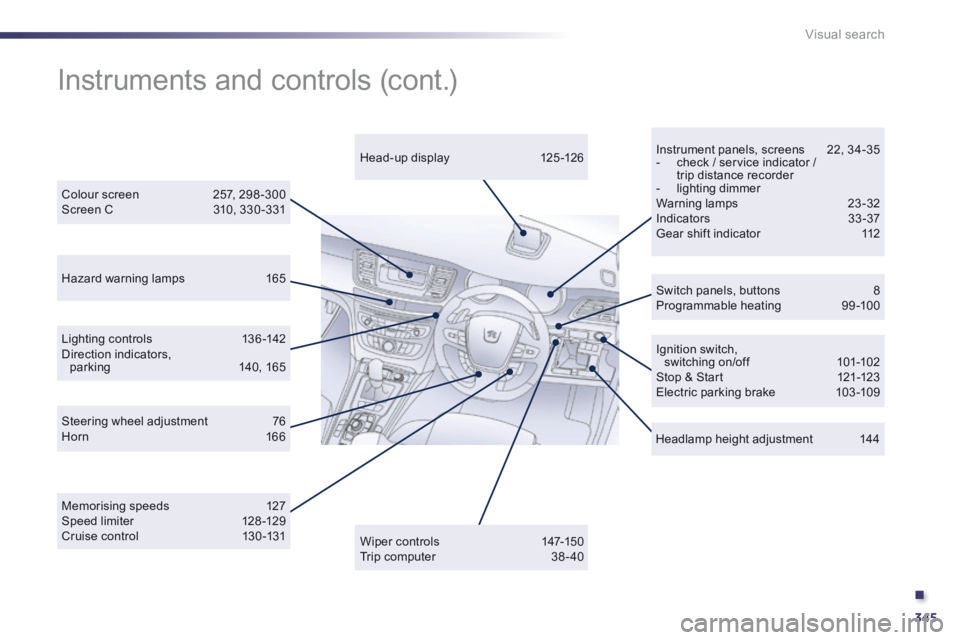
Instrument panels, screens 22, 34-35 - check / service indicator / trip distance recorder - lighting dimmer Warning lamps 23-32 Indicators 33 -37 Gear shift indicator 112
Hazard warning lamps 165
Colour screen 257, 298 -300 Screen C 310, 330 -331
Switch panels, buttons 8 Programmable heating 99-100
Steering wheel adjustment 76 Horn 166
Memorising speeds 127 Speed limiter 128 -129 Cruise control 130 -131
Lighting controls 136 -142 Direction indicators, parking 140, 165
Instruments and controls (cont.)
Head-up display 125 -126
Wiper controls 147-150 Trip computer 38 - 40
Ignition switch, switching on/off 101-102 Stop & Start 121-123 Electric parking brake 103 -109
Headlamp height adjustment 144