2014 Peugeot 508 Hybrid Electronic key
[x] Cancel search: Electronic keyPage 49 of 380

47
508_en_Chap02_ouvertures_ed02-2014
Deadlocking
Deadlocking renders the exterior and
interior door controls inoperative.
It also deactivates the manual central
control button.
th
erefore, never leave anyone inside
the vehicle when it is deadlocked.
Using the key
F turn the key to the rear in the driver's door lock to lock the vehicle completely.
F
t
u
rn the key to the rear again within five
seconds to deadlock the vehicle. Deadlocking is confirmed by fixed
lighting of the direction indicators for
approximately two seconds.
Using the remote control
F Press the closed padlock to lock
the vehicle completely or press
the closed padlock for more
than two seconds to close the
windows automatically in addition
to locking.
Using the electronic key
By the doors:
F W ith the electronic key in the recognition
zone, press a finger on the door handle (at
the markings) to lock the vehicle.
F
W
ithin five seconds, press the door handle
again to deadlock the vehicle. By the tailgate (SW only):
F
W
ith the electronic key in the recognition
zone, press the button to lock the vehicle.
F
W
ithin five seconds, press the button to
deadlock the vehicle.
F
P
ress the closed padlock again within
five
seconds to deadlock the vehicle.
2
Access
Page 51 of 380
49
508_en_Chap02_ouvertures_ed02-2014
emergency procedure
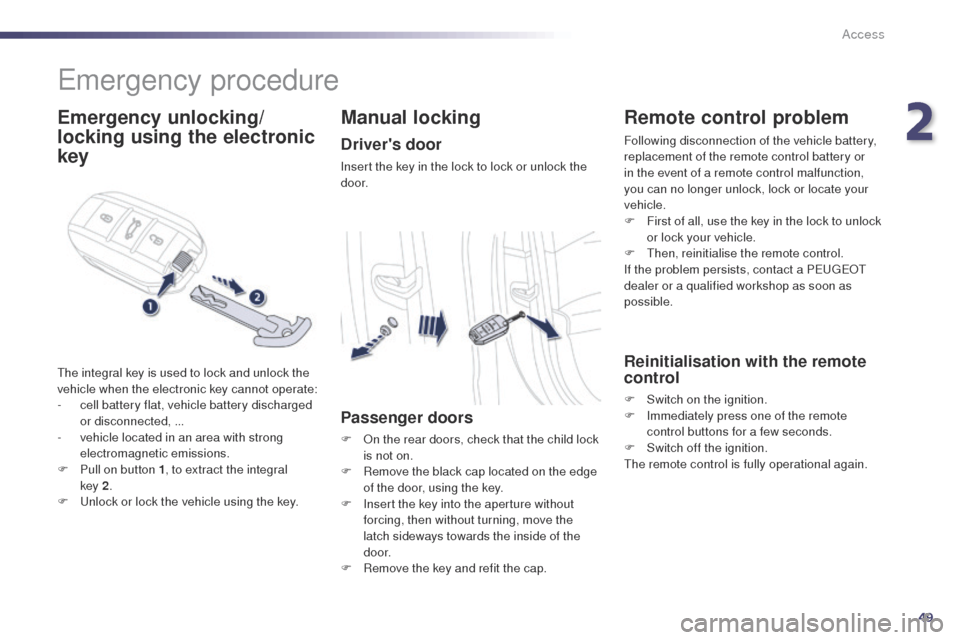
Emergency unlocking/
locking using the electronic
key
the integral key is used to lock and unlock the
vehicle when the electronic key cannot operate:
-
c
ell battery flat, vehicle battery discharged
or disconnected, ...
-
v
ehicle located in an area with strong
electromagnetic emissions.
F
P
ull on button 1 , to extract the integral
key
2.
F
u
n
lock or lock the vehicle using the key.
Manual locking
Driver's door
Insert the key in the lock to lock or unlock the
d o o r.
Passenger doors
F On the rear doors, check that the child lock is not on.
F
R
emove the black cap located on the edge
of the door, using the key.
F
I
nsert the key into the aperture without
forcing, then without turning, move the
latch sideways towards the inside of the
d o o r.
F
R
emove the key and refit the cap.
Remote control problem
Following disconnection of the vehicle battery,
replacement of the remote control battery or
in the event of a remote control malfunction,
you can no longer unlock, lock or locate your
vehicle.
F
F
irst of all, use the key in the lock to unlock
or lock your vehicle.
F
t
hen
, reinitialise the remote control.
If the problem persists, contact a P
e
uge
Ot
dealer or a qualified workshop as soon as
possible.
Reinitialisation with the remote
control
F Switch on the ignition.
F I mmediately press one of the remote
control buttons for a few seconds.
F
S
witch off the ignition.
th
e remote control is fully operational again.
2
Access
Page 52 of 380

50
508_en_Chap02_ouvertures_ed02-2014
Changing the battery of the key
Battery ref.: CR2032 / 3 volts.this replacement battery is available from a
P
e
uge
Ot
dealer or a qualified workshop.
A message appears in the instrument panel
screen when replacement of the battery is
needed.
F
u
n
clip the cover using a small screwdriver
at the cutout.
F
L
ift off the cover.
F
R
emove the flat battery from its location.
F
F
it the new battery into its location
observing the original direction of fitment.
F
C
lip the cover onto the casing.Do not throw the remote control
batteries away, they contain metals
which are harmful to the environment.
ta
ke them to an approved collection
point.
Reinitialisation with the
electronic key
F Switch of the ignition.
F I mmediately press one of the remote
control buttons for a few seconds.
F
S
witch on the ignition
th
e electronic key is fully operational again.
Changing the battery of the
electronic key
Battery ref.: CR2032 / 3 volts.this replacement battery is available from a
P
e
uge
Ot
dealer or a qualified workshop.
A message is displayed in the instrument panel
screen when replacement of the battery is
needed.
F
u
n
clip the cover using a pointed object at
the key ring.
F
S
lide the flat battery out of its location.
F
S
lide the new battery into its location
observing the original direction of fitment.
F
C
lip the cover in place starting at the front.
F
R
einitialise the electronic key.
Access
Page 53 of 380

51
508_en_Chap02_ouvertures_ed02-2014
Lost keys, remote control, electronic key
Visit a PeugeOt dealer with the vehicle's V5 registration document and your personal identification documents.th
e Pe ugeOt dealer will be able to retrieve the key code and the transponder code required to order a replacement.
Remote control
the high frequency remote control is a sensitive system; do not operate it while it is in your pocket as there is a possibility that it may unlock
the vehicle, without you being aware of it.
Do not repeatedly press the buttons of your remote control out of range and out of sight of your vehicle. You run the risk of stopping it from
working and the remote control would have to be reinitialised.
th
e remote control does not operate when the key is in the ignition, even when the ignition is switched off.
Locking the vehicle
Driving with the doors locked may make access to the passenger compartment by the emergency services more difficult in an emergency.
As a safety precaution (with children on board), remove the key from the ignition or take the electronic key when you leave the vehicle, even for
a short time.
Electrical interference
the Keyless en try and Starting electronic key may not operate if close to certain electronic devices: telephone, laptop computer, strong
magnetic fields, ...
Anti-theft protection
Do not make any modifications to the electronic engine immobiliser system; this could cause malfunctions.
Don't forget to turn the steering to engage the steering lock.
When purchasing a second-hand vehicle
Have the key codes memorised by a Pe ugeOt dealer, to ensure that the keys in your possession are the only ones which can start the vehicle.
2
Access
Page 102 of 380

100
Driving
Starting-switching off the engine
F Insert the key in the ignition switch.
F tu rn the key fully towards the dashboard to
position 3 (Starting) .
F
W
hen the engine starts, release the key.
Starting using the key Switching off using the key
Key left in the ignition
If the key is left in the ignition switch,
there is an audible signal on opening
the driver's door.
With a manual gearbox
, put the gear lever in neutral.
With an electronic gearbox , put the gear lever in N.
With an automatic gearbox , put the gear lever in P or N.
to e
nsure the correct operation and
durability of the engine and gearbox,
when the ambient temperature is
below
-
23°C, it is necessary to leave the
engine running at idle for four minutes. F
Imm
obilise the vehicle.
F
t
u
rn the key fully towards you to position 1
(Stop) .
F
R
emove the key from the ignition switch.
Switching off the engine leads to a loss
of braking assistance.
508_en_Chap04_conduite_ed02-2014
Page 103 of 380

101
For Diesel vehicles, in very cold
weather the engine will not start until
the pre-heater warning lamp has
gone of f. If the vehicle is not immobilised, the
engine will not stop.
Switching off using the
electronic key
F Immobilise the vehicle.F
W
ith the electronic key inside
the vehicle, press the " S TA R T/
STOP " button.
th
e engine stops and the steering column is
locked.
Accessory position
With the electronic key inside the
vehicle, press the "StA Rt/ StO P"
button, with no action on the pedals,
to switch the ignition on or off and so
activate accessories.
If one of the starting conditions is not
met, a reminder message appears in
the instrument panel screen. In some
circumstances, it is necessary to
turn the steering wheel slightly while
pressing the "S
tA
R
t/
S
tO
P" button
to assist unlocking of the steering;
a message warns you when this is
needed.
F
W
ith the electronic key inside the vehicle,
press the brake pedal on vehicles with
automatic or electronic gearbox, or depress
the clutch pedal fully on vehicles with a
manual gearbox, then maintain pressure
until the engine starts.
Starting using the
electronic key
F Press the " START/STOP"
button.
508_en_Chap04_conduite_ed02-2014
4
Driving
Page 104 of 380

102
Anti-theft protection
Electronic engine immobiliser
the keys contain an electronic chip which has
a secret code. When the ignition is switched
on, this code must be recognised in order for
starting to be possible.
th
is electronic engine immobiliser locks the
engine management system a few minutes
after the ignition is switched off and prevents
starting of the engine by anyone who does not
have the key.
In the event of a malfunction, you are informed
by a message in the instrument panel screen.
In this case, your vehicle does not start; contact
a P
e
uge
Ot
dealer as soon as possible.
Emergency starting with the
electronic key
When the electronic key is in the recognition
zone and your vehicle does not start after
pressing the "S
tA
R
t/
S
tO
P" button:
F
O
pen the housing below the "S
tA
R
t/
St
OP " button.
F
I
nsert the electronic key in the location A .
F
P
ress the "S
tA
R
t/
S
tO
P" button.
Once the engine has started, you can
remove the electronic key and close the
housing.
Emergency switch-off using the
electronic key
In the event of an emergency only, the engine
can be switched of without conditions. to d o
this, press and hold the "S
tA
R
t/
S
tO
P" button
for about 3 seconds.
In this case the steering column locks as soon
as the vehicle stops.
if the electronic key is no longer in the
recognition zone when you request switching
off the engine, a message appears in the
instrument panel.
F
P
ress and hold the "S
tA
R
t/
S
tO
P" button
for about 3 seconds if you want to force
switching off the engine (note that restarting
will not be possible without the key).
th
e electronic key must always remain
inside the vehicle while in use.
Driving
Page 122 of 380

120
Stop & Startthe Stop & Start system puts the engine temporarily into standby - StO P mode - during stops in the traffic (red lights, traffic jams, or other...). th e
engine restarts automatically - StA Rt mode - as soon as you want to move off. th e restart takes place instantly, quickly and silently.
Per fect for urban use, the Stop & Start system reduces fuel consumption and exhaust emissions as well as the noise level when stationary.
Operation
Going into engine STOP mode
the "ECO" indicator lamp comes
on in the instrument panel and the
engine goes into standby:
-
w
ith a manual gearbox, at speeds below
12 mph (20 km/h), or vehicle stationary
with the e-
tH
P 165 version, when you put
the gear lever into neutral and release the
clutch pedal,
-
w
ith an electronic gearbox , at speeds
below 5 mph (8 km/h), when you press the
brake pedal or you put the gear selector in
position N ,
-
w
ith an automatic gearbox, vehicle
stationary, when you press the brake pedal
or you put the gear selector in position N .
If your vehicle is fitted with the system, a time
counter calculates the sum of the periods in
S
tO
P mode during a journey. It rests itself to
zero every time the ignition is switched on with
t h e key. Never refuel with the engine in S
tO
P
mode; you must switch off the ignition
with the key. For your comfort, during parking
maoeuvres, S
tO
P mode is not
available for a few seconds after
coming out of reverse gear.
S
tO
P mode does not affect the
functionality of the vehicle, such as for
example, braking, power steering...
Special cases: STOP mode not
available
StOP mode is not invoked when:
- t he driver's door is open,
-
t
he driver's seat belt is not fastened,
-
t
he vehicle has not exceeded 6 mph
(10 km/h) since the last engine start using
t h e key,
-
t
he vehicle is stopped on a steep slope
(up or down),
-
t
he electric parking brake is applied or
being applied,
-
t
he engine is needed to maintain a
comfortable temperature in the passenger
compartment,
-
d
emisting is active,
-
s
ome special conditions (battery charge,
engine temperature, braking assistance,
ambient temperature...) where the engine is
needed to assure control of a system.
In this case, the "ECO" indicator
lamp flashes for a few seconds then
goes off.
This operation is perfectly normal.
Driving