2014 Peugeot 508 Hybrid Eco off
[x] Cancel search: Eco offPage 30 of 380

28
Service indicator
More than 1 800 miles (3 000 km)
remain before the next service is due
When the ignition is switched on, no service
information appears in the screen.
th
is is a check against the planned servicing
intervals in the manufacturer's servicing
schedule.
It is calculated from the last service indicator
reset according to the number of miles travelled
and the time elapsed since the last service.
For BlueHDi Diesel versions only (depending
on country of sale), the level of deterioration of
the engine oil is also taken into account.
Between 600 miles (1 000 km) and
1 800 miles (3 000 km) remain before
the next service is due
For 5 seconds after the ignition is switched on, the
spanner symbolising the service operations comes
on.
t
h
e distance recorder display line indicates the
distance remaining before the next service is due.
Example: 1 700 miles (2 800 km) remain before
the next service is due.
For 5 seconds after the ignition is switched on, the
screen indicates:
5 seconds after the ignition is switched on,
the spanner goes off ; the distance recorder
resumes its normal operation.
t
h
e screen then
indicates the total and trip distances.
Less than 600 miles (1 000 km)
remain before the next service is due
Example: 560 miles (900 km) remain before
the next service is due.
For 5 seconds after the ignition is switched on,
the screen indicates:
5 seconds after the ignition is switched on,
the distance recorder resumes its normal
operation. The spanner remains on to
indicate that a service must be carried out
soon.
Illumination of the key is accompanied
by a message in the instrument panel
screen.
With BlueHDi Diesel versions the
Service
warning lamp may come on as
soon as the ignition is switched on.
Monitoring
Page 31 of 380

29
Service overdue
For 5 seconds after the ignition is switched on,
the spanner flashes to indicate that the service
must be carried out as soon as possible.
Example: the service is overdue by 186 miles
(3 0 0 k m).
For 5 seconds after the ignition is switched on,
the screen indicates:
th
e spanner may also come on if
you have exceeded the period since
the last service, as indicated in the
maintenance and warranty guide.
With BlueHDi Diesel versions, the
spanner can also come on in advance
of the service interval, according to the
level of deterioration of the engine oil,
which depends on the driving conditions
in which the vehicle is used.
Following this operation, if you wish to
disconnect the battery, lock the vehicle
and wait at least five minutes for the
zero reset to be registered.
5 seconds after the ignition is switched on, the
distance recorder resumes its normal operation.
The spanner remains on
.
Service indicator zero reset
After each service, the service indicator must
be reset to zero.
Retrieving the service
information
You can access the service information at any
time.
F
P
ress the trip distance recorder zero reset
button.
t
h
e service information is displayed for a
few seconds, then disappears.
If you have carried out the service on your
vehicle yourself:
F
s
witch off the ignition,
F
p
ress and hold the trip distance recorder
zero reset button,
F
s
witch on the ignition; the distance recorder
display begins a countdown,
F
w
hen the display indicates "=0"
, release
the button; the spanner disappears.
1
Monitoring
Page 32 of 380

30
Engine oil level indicator*
Oil level incorrect
this is indicated by the display of the message
"Oil level incorrect" in the instrument panel
screen, accompanied by the service warning
lamp and an audible signal.
If the low oil level is confirmed by a check using
the dipstick, the level must be topped up to
avoid damage to the engine.
Oil level indicator fault
this is signalled by the display of the message "Oil
level measurement invalid" in the instrument panel.
Contact a P
e
uge
Ot
dealer or a qualified
workshop.
In the event of a fault with the electric indicator,
the oil level is no longer monitored.
If the system is faulty, you must check the
engine oil level using the manual dipstick
located under the bonnet.
th
e total mileage is displayed in zone A of the
screen and the trip mileage in zone B .
With the trip mileage displayed, press the
button for a few seconds.
Mileage recorder
Trip recorder zero reset
On versions fitted with an electric oil level indicator, the state of the engine oil level is displayed in
the instrument panel for a few seconds, after the servicing information.
th
e level read will only be correct if
the vehicle is on level ground and the
engine has been off for more than
30
minutes.
Oil level correct
* Depending on version.Refer to the "Checking levels" section.
Refer to the "Checking levels" section.
Monitoring
Page 37 of 380

35
touch screen
It gives access to:
- m enus for adjusting settings for vehicle
functions and systems,
-
a
udio and display configuration menus,
-
a
udio system and telephone controls and
the display of associated information.
And, depending on equipment, it allows:
-
t
he display of alert messages and the
visual parking sensors information,
-
a
ccess to the controls for the navigation
system and Internet services, and the
display of associated information.
For reasons of safety, the driver
should only carr y out operations
that require close attention, with the
vehicle stationary.
Some functions are not accessible
when driving.General operation
Recommendations
It is necessary to press firmly, particularly for
"flick" gestures (scrolling through lists, moving
the map...).
A light wipe is not enough.
th
e screen does not recognise pressing with
more than one finger.
th
is technology allows use at all temperatures
and when wearing gloves.
Do not use pointed objects on the touch
screen.
Do not touch the touch screen with wet hands.
us
es a soft clean cloth to clean the touch
screen.
State of indicator lamps
Some buttons contain an indicator lamp that
gives the state of the corresponding function.
gr
een indicator: you have switched on the
corresponding function.
Orange indicator: you have switched off the
corresponding function.
1
Monitoring
Page 51 of 380
49
508_en_Chap02_ouvertures_ed02-2014
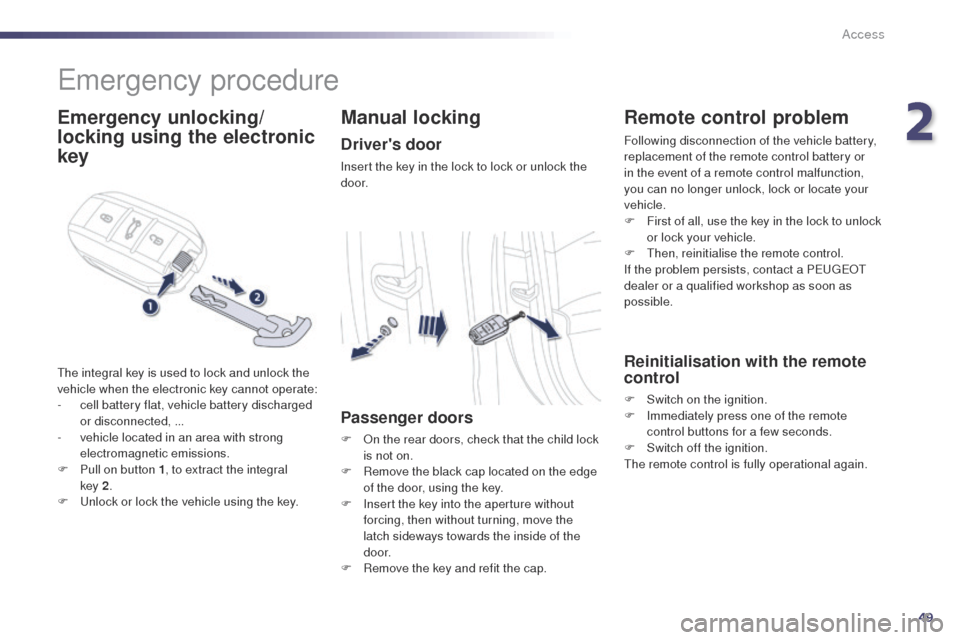
emergency procedure
Emergency unlocking/
locking using the electronic
key
the integral key is used to lock and unlock the
vehicle when the electronic key cannot operate:
-
c
ell battery flat, vehicle battery discharged
or disconnected, ...
-
v
ehicle located in an area with strong
electromagnetic emissions.
F
P
ull on button 1 , to extract the integral
key
2.
F
u
n
lock or lock the vehicle using the key.
Manual locking
Driver's door
Insert the key in the lock to lock or unlock the
d o o r.
Passenger doors
F On the rear doors, check that the child lock is not on.
F
R
emove the black cap located on the edge
of the door, using the key.
F
I
nsert the key into the aperture without
forcing, then without turning, move the
latch sideways towards the inside of the
d o o r.
F
R
emove the key and refit the cap.
Remote control problem
Following disconnection of the vehicle battery,
replacement of the remote control battery or
in the event of a remote control malfunction,
you can no longer unlock, lock or locate your
vehicle.
F
F
irst of all, use the key in the lock to unlock
or lock your vehicle.
F
t
hen
, reinitialise the remote control.
If the problem persists, contact a P
e
uge
Ot
dealer or a qualified workshop as soon as
possible.
Reinitialisation with the remote
control
F Switch on the ignition.
F I mmediately press one of the remote
control buttons for a few seconds.
F
S
witch off the ignition.
th
e remote control is fully operational again.
2
Access
Page 52 of 380

50
508_en_Chap02_ouvertures_ed02-2014
Changing the battery of the key
Battery ref.: CR2032 / 3 volts.this replacement battery is available from a
P
e
uge
Ot
dealer or a qualified workshop.
A message appears in the instrument panel
screen when replacement of the battery is
needed.
F
u
n
clip the cover using a small screwdriver
at the cutout.
F
L
ift off the cover.
F
R
emove the flat battery from its location.
F
F
it the new battery into its location
observing the original direction of fitment.
F
C
lip the cover onto the casing.Do not throw the remote control
batteries away, they contain metals
which are harmful to the environment.
ta
ke them to an approved collection
point.
Reinitialisation with the
electronic key
F Switch of the ignition.
F I mmediately press one of the remote
control buttons for a few seconds.
F
S
witch on the ignition
th
e electronic key is fully operational again.
Changing the battery of the
electronic key
Battery ref.: CR2032 / 3 volts.this replacement battery is available from a
P
e
uge
Ot
dealer or a qualified workshop.
A message is displayed in the instrument panel
screen when replacement of the battery is
needed.
F
u
n
clip the cover using a pointed object at
the key ring.
F
S
lide the flat battery out of its location.
F
S
lide the new battery into its location
observing the original direction of fitment.
F
C
lip the cover in place starting at the front.
F
R
einitialise the electronic key.
Access
Page 53 of 380

51
508_en_Chap02_ouvertures_ed02-2014
Lost keys, remote control, electronic key
Visit a PeugeOt dealer with the vehicle's V5 registration document and your personal identification documents.th
e Pe ugeOt dealer will be able to retrieve the key code and the transponder code required to order a replacement.
Remote control
the high frequency remote control is a sensitive system; do not operate it while it is in your pocket as there is a possibility that it may unlock
the vehicle, without you being aware of it.
Do not repeatedly press the buttons of your remote control out of range and out of sight of your vehicle. You run the risk of stopping it from
working and the remote control would have to be reinitialised.
th
e remote control does not operate when the key is in the ignition, even when the ignition is switched off.
Locking the vehicle
Driving with the doors locked may make access to the passenger compartment by the emergency services more difficult in an emergency.
As a safety precaution (with children on board), remove the key from the ignition or take the electronic key when you leave the vehicle, even for
a short time.
Electrical interference
the Keyless en try and Starting electronic key may not operate if close to certain electronic devices: telephone, laptop computer, strong
magnetic fields, ...
Anti-theft protection
Do not make any modifications to the electronic engine immobiliser system; this could cause malfunctions.
Don't forget to turn the steering to engage the steering lock.
When purchasing a second-hand vehicle
Have the key codes memorised by a Pe ugeOt dealer, to ensure that the keys in your possession are the only ones which can start the vehicle.
2
Access
Page 54 of 380

52
508_en_Chap02_ouvertures_ed02-2014
System which protects and provides a deterrent
against theft and break-ins. It provides the
following types of monitoring:
Alarm
- Exterior perimeter
the system checks for opening of the vehicle.the alarm is triggered if anyone tries to open a
door, the boot or the bonnet...
- Interior volumetric
the system checks for any variation in the
volume in the passenger compartment.
th
e alarm is triggered if anyone breaks a
window, enters the passenger compartment or
moves inside the vehicle.
- Tilt
the system checks for any change in the
attitude of the vehicle.
th
e alarm is triggered if the vehicle is lifted,
moved or knocked.
Self-protection function
the system checks for the putting out of
service of its components.
th
e alarm is triggered if the battery, the
central control unit or the wires of the
siren are put out of service or damaged.
For all work on the alarm system,
contact a P
e
uge
Ot
dealer or a
qualified workshop.
Locking the vehicle with full
alarm system
Activation
F Switch off the ignition and get out of the vehicle.
F Press the locking button on the remote control or lock the vehicle
using the Keyless
e
n
try and
Starting system.
th
e monitoring system is active: the indicator
lamp on the button flashes once per second.
After the locking button on the remote control
is pressed or the vehicle locked using the
Keyless e
n
try and Starting system, the exterior
perimeter monitoring is activated after a delay
of 5 seconds, the interior volumetric monitoring
after 45 seconds and anti-tilt monitoring after
90 seconds.
If an opening (door, boot...) is not closed
fully, the vehicle is not locked but the exterior
perimeter monitoring will be activated after a
delay of 45 seconds.
F
P
ress the unlocking button on
the remote control or unlock the
vehicle using the Keyless e
n
try
and Starting system.
Deactivation of the volumetric
monitoring
the volumetric protection system is
deactivated: the indicator lamp in the
button goes off.
Access