2014 Peugeot 308 AUX
[x] Cancel search: AUXPage 312 of 400
04
310
308_EN_CHAP10C_SMEGPLUS_ED02-2013
CD, MP3 CD, USB player, auxiliary input
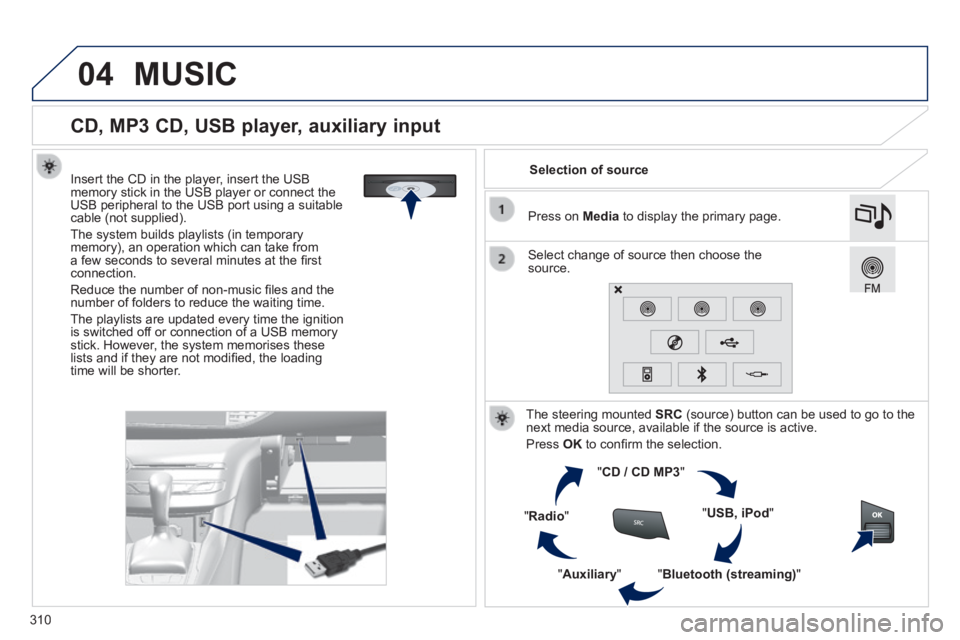
Insert the CD in the player, insert the USB memory stick in the USB player or connect the USB peripheral to the USB port using a suitable cable (not supplied) .
The system builds playlists (in temporary memory), an operation which can take from a few seconds to several minutes at the fi rst connection.
Reduce the number of non-music fi les and the number of folders to reduce the waiting time.
The playlists are updated every time the ignition is switched off or connection of a USB memory stick. However, the system memorises these lists and if they are not modifi ed, the loading time will be shorter.
Selection of source
The steering mounted SRC (source) button can be used to go to the next media source, available if the source is active.
Press OK to confi rm the selection.
" CD / CD MP3 "
" USB, iPod "
" Bluetooth (streaming) " " Auxiliary "
" Radio "
Select change of source then choose the source.
Press on Media to display the primary page.
MUSIC
Page 313 of 400
04
3 11
308_EN_CHAP10C_SMEGPLUS_ED02-2013
CD, MP3 CD / USB player
The audio equipment will only play audio fi les with".wma, .aac, .fl ac, .ogg and. mp3" fi le extensions and with a bit rate of between 32 Kbps and 320 Kbps.
It also supports VBR (Variable Bit Rate) mode.
No other type of fi le (.mp4, ...) can be played.
WMA fi les must be of the standard wma 9 type.
The sampling rates supported are 11, 22, 44 and 48 KHz.
It is advisable to restrict fi le names to 20 characters, without using of special characters (e.g.: " " ? ; ù) to avoid any playing and displ\
aying problems.
In order to be able to play a recorded CDR or CDRW, when recording it is preferable to select the ISO 9660 level 1, 2 or Joliet standard.
If the disc is recorded in another format it may not be played correctly.
It is recommended that the same recording standard is always used for an individual disc, with as low a speed as possible (4x maximum) for optimum sound quality.
In the particular case of a multi-session CD, the Joliet standard is recommended.
Information and advice
The system supports USB mass storage devices, BlackBerry ®
devices or Apple ® players via the USB port located in the glove box ® players via the USB port located in the glove box ®
(if your vehicle has one). The adaptor cable not supplied.
Control of the peripheral device is with the audio system controls.
Other peripherals, not recognised on connection, must be connected to the auxiliary socket using a Jack cable (not supplied).
In order to be read, a USB memory stick must be formatted FAT 16 or 32.
MUSIC
The system does not support two identical devices connected at the same time (two memory sticks, two Apple ® players) but it is possible ® players) but it is possible ®
to connect one memory stick and one Apple ® player at the same ® player at the same ®
time.
It is recommended that offi cial Apple ® USB cables are used to ® USB cables are used to ®
ensure correct operation.
Page 316 of 400
04
308_EN_CHAP10C_SMEGPLUS_ED02-2013
Using the auxiliary input (AUX)
(cable not supplied)
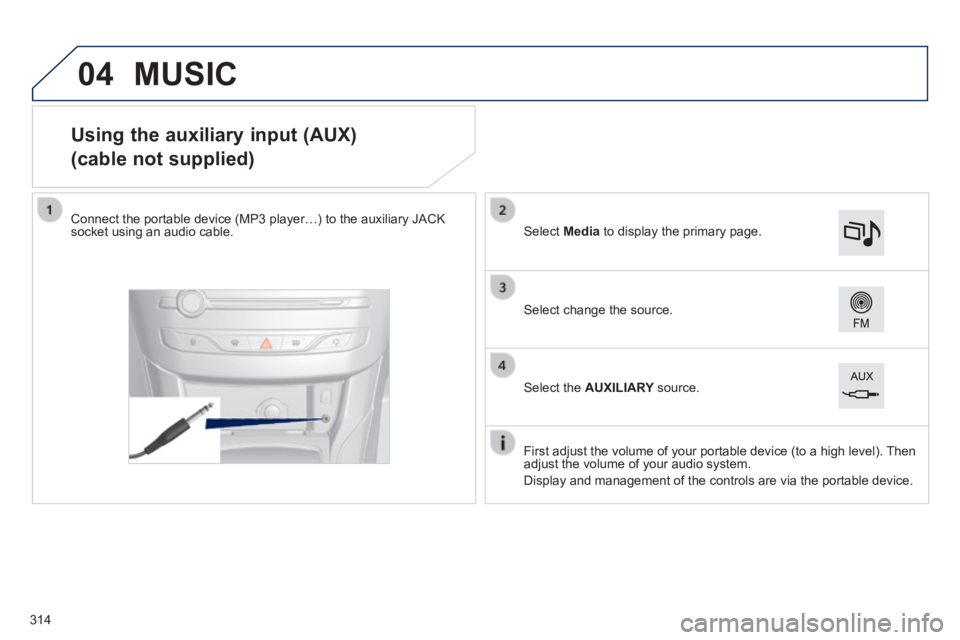
Connect the portable device (MP3 player…) to the auxiliary JACK socket using an audio cable.
First adjust the volume of your portable device (to a high level). Then adjust the volume of your audio system.
Display and management of the controls are via the portable device.
Select change the source.
Select Media to display the primary page.
Select the AUXILIARY source. AUXILIARY source. AUXILIARY
MUSIC
314
Page 317 of 400
04
315
308_EN_CHAP10C_SMEGPLUS_ED02-2013
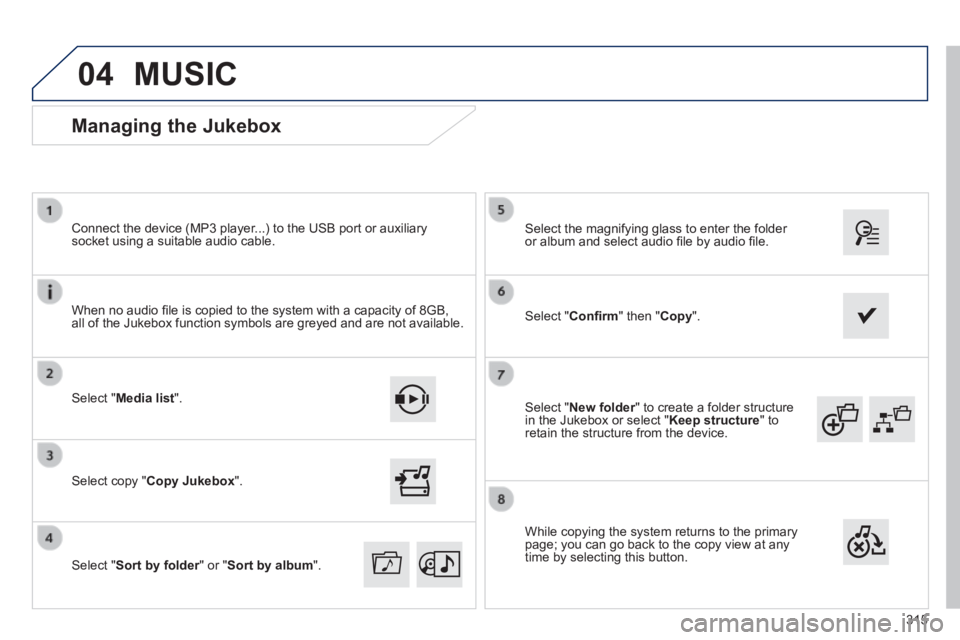
Select " New folder " to create a folder structure New folder " to create a folder structure New folderin the Jukebox or select " Keep structure " to retain the structure from the device.
Select the magnifying glass to enter the folder or album and select audio fi le by audio fi le.
Managing the Jukebox
Select " Media list ".
Connect the device (MP3 player...) to the USB port or auxiliary socket using a suitable audio cable.
Select copy " Copy Jukebox ".
MUSIC
When no audio fi le is copied to the system with a capacity of 8GB, all of the Jukebox function symbols are greyed and are not available.
Select " Sort by folder " or " Sort by folder " or " Sort by folderSort by album ".
Select " Confi rm " then " Copy ".
While copying the system returns to the primary page; you can go back to the copy view at any time by selecting this button.
Page 368 of 400
01
366
308_EN_CHAP10D_RD45_ED02_2013
FIRST STEPS
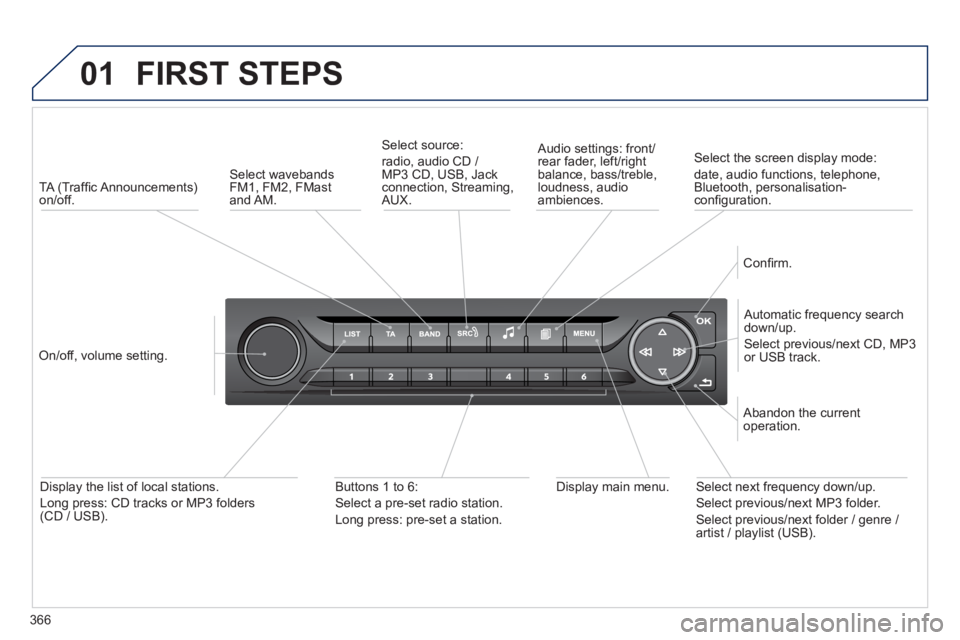
TA (Traffi c Announcements) on/off.
On/off, volume setting.
Automatic frequency search down/up.
Select previous/next CD, MP3 or USB track.
Select source:
radio, audio CD / MP3 CD, USB, Jack connection, Streaming, AUX.
Audio settings: front/rear fader, left/right balance, bass/treble, loudness, audio ambiences.
Confi rm.
Display main menu. Display the list of local stations.
Long press: CD tracks or MP3 folders (CD / USB).
Buttons 1 to 6:
Select a pre-set radio station.
Long press: pre-set a station.
Select next frequency down/up.
Select previous/next MP3 folder.
Select previous/next folder / genre / artist / playlist (USB).
Abandon the current operation.
Select wavebands FM1, FM2, FMast and AM.
Select the screen display mode:
date, audio functions, telephone, Bluetooth, personalisation-confi guration.
Page 376 of 400
05
374
308_EN_CHAP10D_RD45_ED02_2013
PEUGEOT CONNECT USB
The system puts together playlists (temporary memory) created over a period which depends on the capacity of the USB device.
The other sources are available during this time.
The playlists are updated each time the ignition is switched off or each time a USB memory stick is connected.
When connecting for the fi rst time, the classifi cation suggested is by folder. When you reconnect, the classifi cation selected previously is retained.
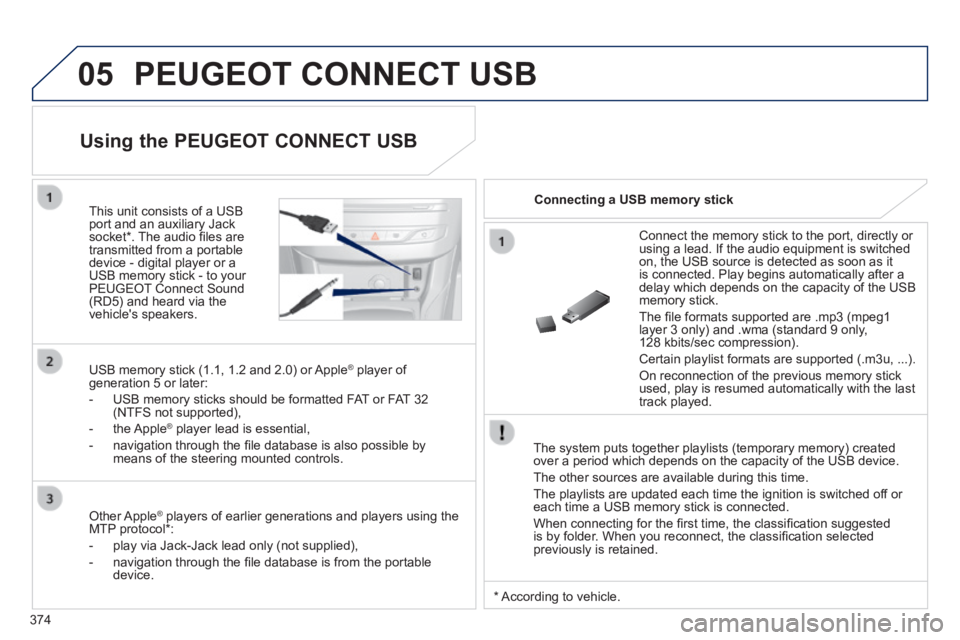
Connect the memory stick to the port, directly or using a lead. If the audio equipment is switched on, the USB source is detected as soon as it is connected. Play begins automatically after a delay which depends on the capacity of the USB memory stick.
The fi le formats supported are .mp3 (mpeg1 layer 3 only) and .wma (standard 9 only, 128 kbits/sec compression).
Certain playlist formats are supported (.m3u, ...) .
On reconnection of the previous memory stick used, play is resumed automatically with the last track played.
This unit consists of a USB port and an auxiliary Jack socket * . The audio fi les are transmitted from a portable device - digital player or a USB memory stick - to your PEUGEOT Connect Sound (RD5) and heard via the vehicle's speakers.
USB memory stick (1.1, 1.2 and 2.0) or Apple ® player of ® player of ®
generation 5 or later:
- USB memory sticks should be formatted FAT or FAT 32 (NTFS not supported),
- the Apple ® player lead is essential, ® player lead is essential, ®
- navigation through the fi le database is also possible by means of the steering mounted controls.
Using the PEUGEOT CONNECT USB
Connecting a USB memory stick
Other Apple ® players of earlier generations and players using the ® players of earlier generations and players using the ®
MTP protocol * :
- play via Jack-Jack lead only (not supplied),
- navigation through the fi le database is from the portable device.
* According to vehicle.
Page 378 of 400
05
SRC
376
308_EN_CHAP10D_RD45_ED02_2013
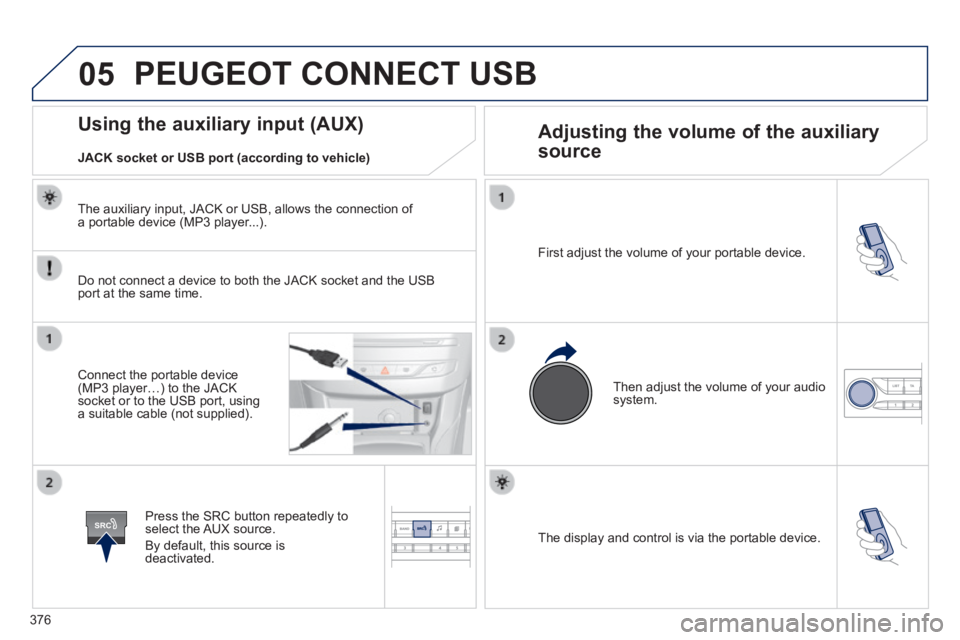
The display and control is via the portable device.
First adjust the volume of your portable device.
Then adjust the volume of your audio system.
Using the auxiliary input (AUX) Adjusting the volume of the auxiliary
source
JACK socket or USB port (according to vehicle)
PEUGEOT CONNECT USB
Do not connect a device to both the JACK socket and the USB port at the same time.
Connect the portable device (MP3 player…) to the JACK socket or to the USB port, using a suitable cable (not supplied).
Press the SRC button repeatedly to select the AUX source.
By default, this source is deactivated.
The auxiliary input, JACK or USB, allows the connection of a portable device (MP3 player...).
Page 389 of 400
387
.
Alphabetical index
308_EN_CHAP11_INDEX ALPHA _ED02-2013
230 V socket .............................................84, 88
Accessories .........................................263, 264Accessory position .......................................11 0Accessory socket, 12V .............................84, 87AdBlue® ........................................................AdBlue® ........................................................AdBlue®271Additive, AdBlue ......................................25, 271Adjusting headlamps ....................................180Adjusting head restraints ................................79Adjusting the steering wheel ..........................75Airbags ....................................................23, 19 9Airbags, curtain .....................................202, 203Airbags, front........................................200, 203Airbags, lateral ......................................202, 203Air conditioning ...........................10, 97, 99, 101Air conditioning, digital .................................101Air conditioning, manual ...........................9 7, 9 9Air distribution adjustment ..............98, 10 0, 103Air filter ..........................................................Air filter ..........................................................Air filter283Air flow ............................................................10Air flow adjustment ...........................97, 99, 103Air intake .......................................................105Air recirculation .............................................105Air vents ..........................................................95Alarm ...............................................................65Anti-theft .................................................5 0 , 112Armrest ...............................................84, 86, 89Armrest, front ..................................................86Armrest, rear ...................................................Armrest, rear ...................................................Armrest, rear89Assistance call .............................188, 289, 290Audible warning ............................................188Audio cable ...........................310, 313, 314, 376Audio streaming (Bluetooth) .........310, 313, 379Automatic braking on risk of collision .....................................22, 151, 15 4
Automatic emergency braking ................................................151, 15 4Automatic illumination of headlamps ......................................174, 178Automatic operation of hazard warning lamps ..........................................................187Automatic rain sensitive windscreen wipers .................................................181, 183Auxiliary sockets .......84, 87, 310, 314, 374, 376
Changing a fuse ....................................245 -250Changing a wheel .................................2 27-2 3 3Changing a wiper blade ........................18 4, 256Changing the date ...............................42, 43, 44Changing the remote control battery.........................................52, 62Changing the time ...............................42, 43, 44Checking levels .....................................280-282Checking the engine oil level ..................29, 280Checking tyre pressures (using the kit) ..............................................226Checks ..................................................267-284Child lock .......................................................220Children .................................198, 200, 204-220Child seats ....................204 -206, 210, 211, 219Child seats, conventional ..............................210Child seats, ISOFIX ......................213, 215, 216Cold climate screen ......................................259Collision risk alert .........................................151Colour screen .......................................294, 295Connectors, audio ............87, 310, 314, 374, 376Container, AdBlue .........................................276Coolant level ...........................................26, 281Coolant temperature indicator ........................Coolant temperature indicator ........................Coolant temperature indicator26Courtesy lamps .............................................185Cruise control ................................132, 13 6, 13 9Cruise control, active ....................................13 9Cup holder .......................................................Cup holder .......................................................Cup holder84
A
B
C
D
Battery ...........................................251-254, 283Battery, charging ...........................................254Battery, remote control .......................52, 62, 63Bicycle carrier ...............................................Bicycle carrier ...............................................Bicycle carrier263Blind spot sensors ........................................15 6Blue HDi ........................................................271Bluetooth (hands-free) ..........................352, 377Bluetooth (telephone) ............................352, 377Bonnet ...........................................................267Bonnet stay ...................................................267Boot ...........................................................90, 91Boot (opening) ...........................................54, 58Brake discs ....................................................284Brake lamps ..........................................240, 242Brake pads ....................................................284Brakes .....................................................24, 284
Capacity, fuel tank ..........................................72CD .........................................................310, 370CD MP3 .................................................310, 371Central locking ..........................................46-53Changing a bulb ....................................235 -244
DAB (Digital Audio Broadcasting) ....................308, 309, 372, 373Date (setting) .......................................42, 43, 44Daytime running lamps ........235, 236, 238, 239Deactivating ESP ..........................................195Deactivating the passenger airbag ...............200Deadlocking ..............................................49, 57