2014 Peugeot 308 USB port
[x] Cancel search: USB portPage 333 of 400
05
331
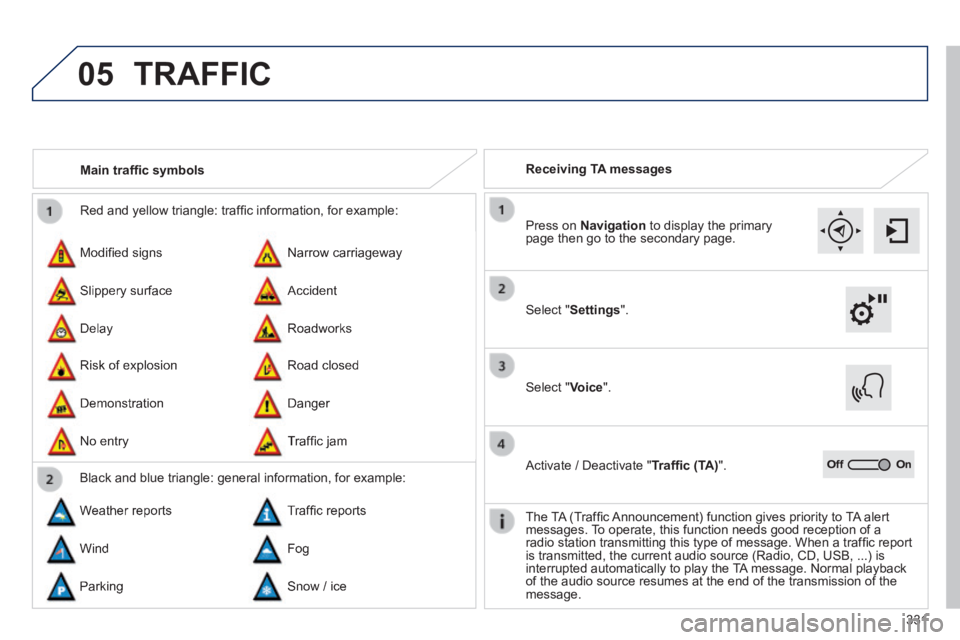
Red and yellow triangle: traffi c information, for example:
Modifi ed signs
Risk of explosion
Narrow carriageway
Road closed
Slippery surface
Demonstration
Accident
Danger
Delay
No entry
Roadworks
Traffi c jam
Main traffi c symbols
Black and blue triangle: general information, for example:
Weather reports Traffi c reports
Wind Fog
Parking Snow / ice
Receiving TA messages
TRAFFIC
Select " Settings ".
Press on Navigation to display the primary page then go to the secondary page.
Select " Voice ".
Activate / Deactivate " Traffi c (TA) ".
The TA (Traffi c Announcement) function gives priority to TA alert messages. To operate, this function needs good reception of a radio station transmitting this type of message. When a traffi c report is transmitted, the current audio source (Radio, CD, USB, ...) is interrupted automatically to play the TA message. Normal playback of the audio source resumes at the end of the transmission of the message.
Page 349 of 400
07 PEUGEOT CONNECT APPS
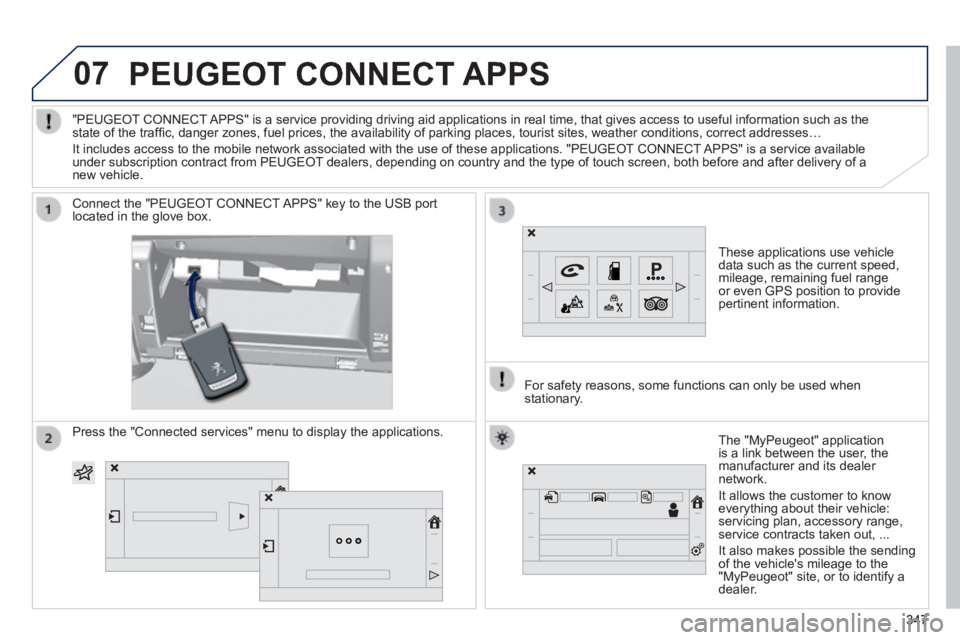
These applications use vehicle data such as the current speed, mileage, remaining fuel range or even GPS position to provide pertinent information.
Connect the "PEUGEOT CONNECT APPS" key to the USB port located in the glove box.
The "MyPeugeot" application is a link between the user, the manufacturer and its dealer network.
It allows the customer to know everything about their vehicle: servicing plan, accessory range, service contracts taken out, ...
It also makes possible the sending of the vehicle's mileage to the "MyPeugeot" site, or to identify a dealer.
"PEUGEOT CONNECT APPS" is a service providing driving aid applications in real time, that\
gives access to useful information such as the state of the traffi c, danger zones, fuel prices, the availability of parking places, tourist sites, weather conditions, correct addresses…
It includes access to the mobile network associated with the use of thes\
e applications. "PEUGEOT CONNECT APPS" is a service available under subscription contract from PEUGEOT dealers, depending on country and the type of touch screen, both before\
and after delivery of a new vehicle.
For safety reasons, some functions can only be used when stationary.
Press the "Connected services" menu to display the applications.
347347347
Page 365 of 400
FREQUENTLY ASKED QUESTIONS
363
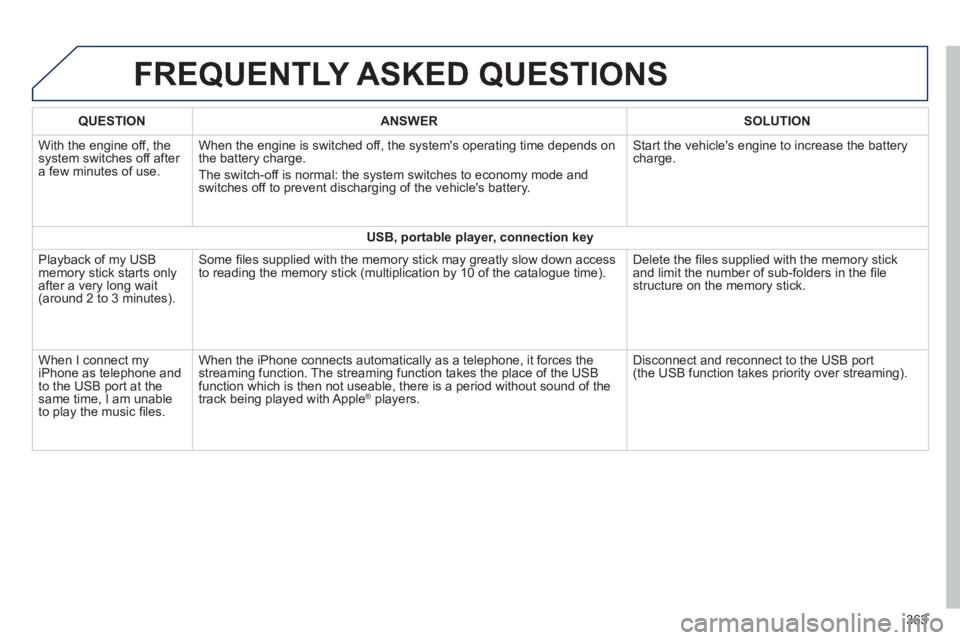
QUESTIONANSWERSOLUTION
With the engine off, the system switches off after a few minutes of use.
When the engine is switched off, the system's operating time depends on the battery charge.
The switch-off is normal: the system switches to economy mode and switches off to prevent discharging of the vehicle's battery.
Start the vehicle's engine to increase the battery charge.
USB, portable player, connection key
Playback of my USB memory stick starts only after a very long wait (around 2 to 3 minutes).
Some fi les supplied with the memory stick may greatly slow down access to reading the memory stick (multiplication by 10 of the catalogue time\
). Delete the fi les supplied with the memory stick and limit the number of sub-folders in the fi le structure on the memory stick.
When I connect my iPhone as telephone and to the USB port at the same time, I am unable to play the music fi les.
When the iPhone connects automatically as a telephone, it forces the streaming function. The streaming function takes the place of the USB function which is then not useable, there is a period without sound of t\
he track being played with Apple ® players. ® players. ®
Disconnect and reconnect to the USB port (the USB function takes priority over streaming).
Page 376 of 400
05
374
PEUGEOT CONNECT USB
The system puts together playlists (temporary memory) created over a period which depends on the capacity of the USB device.
The other sources are available during this time.
The playlists are updated each time the ignition is switched off or each time a USB memory stick is connected.
When connecting for the fi rst time, the classifi cation suggested is by folder. When you reconnect, the classifi cation selected previously is retained.
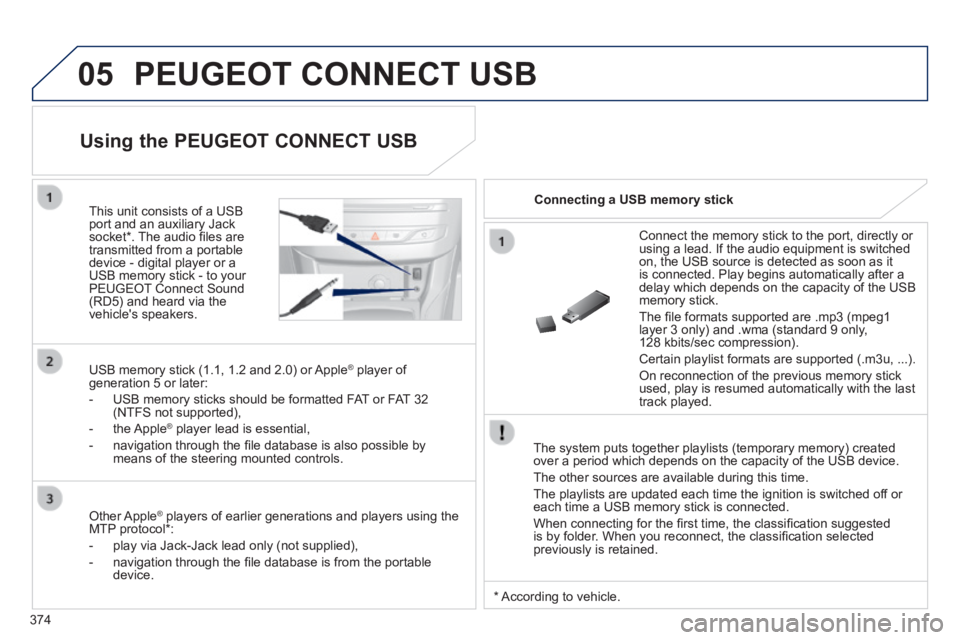
Connect the memory stick to the port, directly or using a lead. If the audio equipment is switched on, the USB source is detected as soon as it is connected. Play begins automatically after a delay which depends on the capacity of the USB memory stick.
The fi le formats supported are .mp3 (mpeg1 layer 3 only) and .wma (standard 9 only, 128 kbits/sec compression).
Certain playlist formats are supported (.m3u, ...) .
On reconnection of the previous memory stick used, play is resumed automatically with the last track played.
This unit consists of a USB port and an auxiliary Jack socket * . The audio fi les are transmitted from a portable device - digital player or a USB memory stick - to your PEUGEOT Connect Sound (RD5) and heard via the vehicle's speakers.
USB memory stick (1.1, 1.2 and 2.0) or Apple ® player of ® player of ®
generation 5 or later:
- USB memory sticks should be formatted FAT or FAT 32 (NTFS not supported),
- the Apple ® player lead is essential, ® player lead is essential, ®
- navigation through the fi le database is also possible by means of the steering mounted controls.
Using the PEUGEOT CONNECT USB
Connecting a USB memory stick
Other Apple ® players of earlier generations and players using the ® players of earlier generations and players using the ®
MTP protocol * :
- play via Jack-Jack lead only (not supplied),
- navigation through the fi le database is from the portable device.
* According to vehicle.
Page 377 of 400
05
LIST
LIST
375
Using the PEUGEOT CONNECT USB
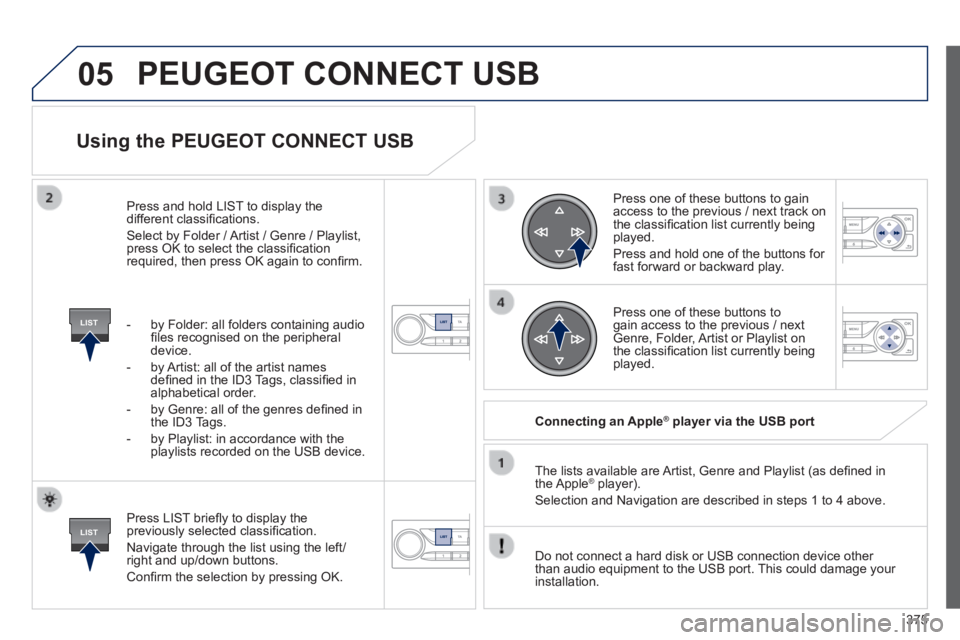
Press LIST briefl y to display the previously selected classifi cation.
Navigate through the list using the left/right and up/down buttons.
Confi rm the selection by pressing OK.
The lists available are Artist, Genre and Playlist (as defi ned in the Apple ® player). ® player). ®
Selection and Navigation are described in steps 1 to 4 above.
Do not connect a hard disk or USB connection device other than audio equipment to the USB port. This could damage your installation.
Connecting an Apple ® Connecting an Apple ® Connecting an Apple player via the USB port ® player via the USB port ®
Press one of these buttons to gain access to the previous / next track on the classifi cation list currently being played.
Press and hold one of the buttons for fast forward or backward play.
Press one of these buttons to gain access to the previous / next Genre, Folder, Artist or Playlist on the classifi cation list currently being played.
Press and hold LIST to display the different classifi cations.
Select by Folder / Artist / Genre / Playlist, press OK to select the classifi cation required, then press OK again to confi rm.
- by Folder: all folders containing audio fi les recognised on the peripheral device.
- by Artist: all of the artist names defi ned in the ID3 Tags, classifi ed in alphabetical order.
- by Genre: all of the genres defi ned in the ID3 Tags.
- by Playlist: in accordance with the playlists recorded on the USB device.
PEUGEOT CONNECT USB
Page 378 of 400
05
SRC
376
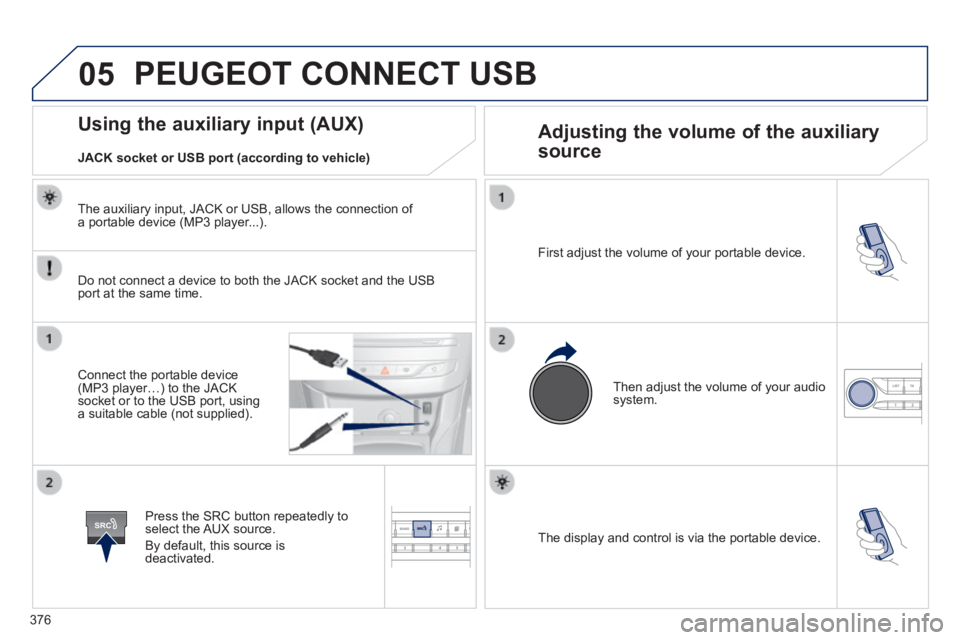
The display and control is via the portable device.
First adjust the volume of your portable device.
Then adjust the volume of your audio system.
Using the auxiliary input (AUX) Adjusting the volume of the auxiliary
source
JACK socket or USB port (according to vehicle)
PEUGEOT CONNECT USB
Do not connect a device to both the JACK socket and the USB port at the same time.
Connect the portable device (MP3 player…) to the JACK socket or to the USB port, using a suitable cable (not supplied).
Press the SRC button repeatedly to select the AUX source.
By default, this source is deactivated.
The auxiliary input, JACK or USB, allows the connection of a portable device (MP3 player...).
Page 392 of 400
390
Alphabetical index
Service indicator .............................................Service indicator .............................................Service indicator27Servicing .........................................................10Setting the clock .................................42, 43, 44Sidelamps .............173, 235, 236, 238 -240, 242Side repeater ................................................Side repeater ................................................Side repeater239Ski flap ............................................................89Snow chains ..................................................234Spare wheel ..........................................227, 228Speed limiter .........................................Speed limiter .........................................Speed limiter132, 13 3Spotlamps, side ....................................179, 2 3 9Starting using another battery ......................253Starting the engine .......................108, 109, 124Steering mounted controls, audio ...................................................2 9 7, 3 6 7Stop & Start ................................24, 35, 72, 106, 129, 130, 251, 267, 283Storage ..........................................84, 86, 89 -91Storage wells ............................................90, 91Stowing rings ............................................90, 91Switching off the engine ...............1 0 8 , 1 0 9 , 111Synchronising the remote control .............52, 62Synthesiser, voice .........................................335System settings .............................................344
Tables of fuses ......................................245 -250Tank, AdBlue® additive® additive® .........................271, 276Ta n k , f u e l ...................................................22, 72Technical data ...............................................285Telephone .............................................3 52, 371Temperature adjustment ...................97, 99, 101Temperature control for heated seats ............79Temperature, coolant ......................................26Temporary puncture repair kit ......................221
Radio ....................................................304, 369RDS .......................................................307, 369Rear foglamp.........................240, 241, 243, 244Rear screen (demisting) ................................107Recharging the battery .................................254Reduction of electrical load ..........................255Refilling AdBlue.............................................276Regeneration of the particle emissions filter ............................................emissions filter ............................................emissions filter283Reinitialising the remote control ...............52, 62Remote control .........................46-48, 53-57, 63Removable screen (snow shield)..........259, 260Removing a wheel ........................................230Removing the mat ...........................................85Repair kit, puncture .......................................221Replacing bulbs ....................................235 -244
Safety for children .................198, 200, 204-220Screen, instrument panel ..................12, 32, 123Screen menu map ................................298, 300, 302, 316, 318, 320, 336, 348, 350, 380 -382Screen, monochrome ...................................380Screen, multifunction (with audio equipment) ........................44, 368Screen, multifunction (without audio equipment) ............................45Screenwash ..................................................182Screenwash fluid level ..........................183, 282Screen-wash reservoir .................................Screen-wash reservoir .................................Screen-wash reservoir282SCR (Selective Catalytic Reduction) ............271Seat adjustment ..............................................76Seat belts ......................................19 6 -198, 210Seats, rear .................................................Seats, rear .................................................Seats, rear81, 82Serial number, vehicle ..................................287
T
RS
Park Assist ....................................................162Parking brake, manual ....................15, 113, 284Parking brake, electric ............20, 114, 119, 284Parking sensors, front ...................................160Parking sensors, rear....................................159Particle emission filter ...........................Particle emission filter ...........................Particle emission filter281-283Passenger compartment filter ......................Passenger compartment filter ......................Passenger compartment filter283PEUGEOT CONNECT APPS .......................3 47PEUGEOT Connect Assistance ...................290PEUGEOT Connect SOS .............................290PEUGEOT Connect Sound (RD5) ................365Player, CD MP3 .....................................310, 371Port, USB ..................84, 87, 310, 314, 374, 376Priming the fuel system ................................270Protecting children ................198, 200, 204-220Puncture ........................................................221
Replacing fuses ....................................245 -250Replacing the air filter ...................................Replacing the air filter ...................................Replacing the air filter283Replacing the oil filter ...................................Replacing the oil filter ...................................Replacing the oil filter283Replacing the passenger compartment filter ......................................compartment filter ......................................compartment filter283Replacing wiper blades.........................18 4, 256Resetting the service indicator .......................Resetting the service indicator .......................Resetting the service indicator28Resetting the trip recorder ..............................Resetting the trip recorder ..............................Resetting the trip recorder30Reversing camera .........................................161Reversing lamp .....................................240, 242Risk areas (update) .......................................325Roof bars ...............................................262, 263Roof blind ........................................................71Routine checks ....................................283, 284Running out of fuel (Diesel) ..........................270