2014 PEUGEOT 3008 fuel
[x] Cancel search: fuelPage 29 of 389
1
Monitoring27
Instrument panels
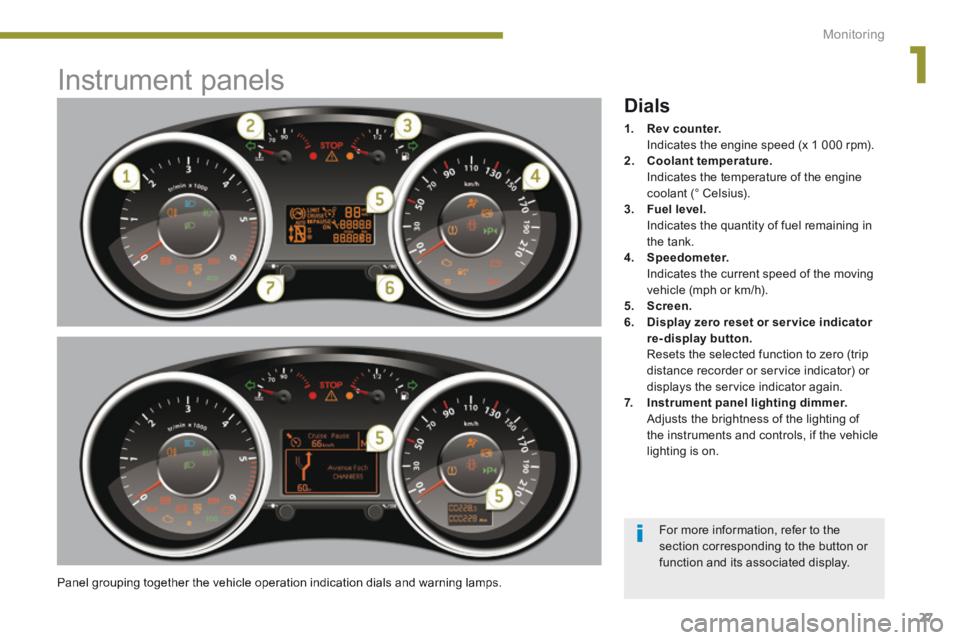
Panel grouping together the vehicle operation indication dials and warning lamps.
Dials
1. Rev counter. Indicates the engine speed (x 1 000 rpm). 2. Coolant temperature. Indicates the temperature of the engine coolant (° Celsius). 3. Fuel level. Indicates the quantity of fuel remaining in the tank. 4. Speedometer. Indicates the current speed of the moving vehicle (mph or km/h). 5. Screen.6. Display zero reset or ser vice indicator re-display button. Resets the selected function to zero (trip distance recorder or service indicator) or displays the service indicator again. 7. Instrument panel lighting dimmer. Adjusts the brightness of the lighting of the instruments and controls, if the vehicle lighting is on.
For more information, refer to the section corresponding to the button or function and its associated display.
Page 31 of 389

1
Monitoring29
Vehicle parameters
This menu allows you to activate or deactivate certain driving and comfort equipment * : - wiper linked with reverse gear (refer to the "Visibility" section), - selective unlocking (refer to the "Access" section), - guide-me-home and welcome lighting (refer to the " Visibility" section), - interior mood lighting (refer to the "Visibility" section), - directional headlamps (refer to the "Visibility" section),
- automatic or manual parking brake (refer to the "Driving" section).
Choice of units
This menu allows you to select the units: temperature (°Celsius or °Fahrenheit) and fuel consumption (l/100 km, mpg or km/l).
Choice of language
This menu allows you to select the display language.
Main menu
Press button 1 for access to the main menu and select one of the following functions: - " Vehicle parameters", - "Choice of language", - "Choice of units". Press button 2 or 3 to move in the screen. Press button 1 again to confirm the selection.
Indicator and warning lamps
When the ignition is switched on
Certain warning lamps come on for a few seconds when the vehicle's ignition is switched on. When the engine is started, these same warning lamps should go off. If they remain on, before moving off, refer to the information on the warning lamp concerned.
Associated warnings
The illumination of certain warning lamps may be accompanied by an audible signal and a message in the multifunction screen.
Visual indicators informing the driver that a system is in operation (operation or deactivation indicator lamps) or of the occurrence of a fault (warning lamp).
The main menu and its associated functions can only be accessed when stationary, via buttons 1 to 4 . A message appears in the screen, above a certain speed threshold, indicating that the main menu cannot be displayed. The trip computer displays can only be
accessed while driving, via buttons 2and 3 (refer to the "Trip computer" section).
The warning lamps may come on continuously (fixed) or flash. Certain warning lamps may come on in one of two different modes. Only by relating the type of illumination to the operating status of the vehicle can it be ascertained whether the situation is normal or whether a fault has occurred.
* According to country.
Page 38 of 389
Monitoring
36
Warning lampis onCauseAction / Observations
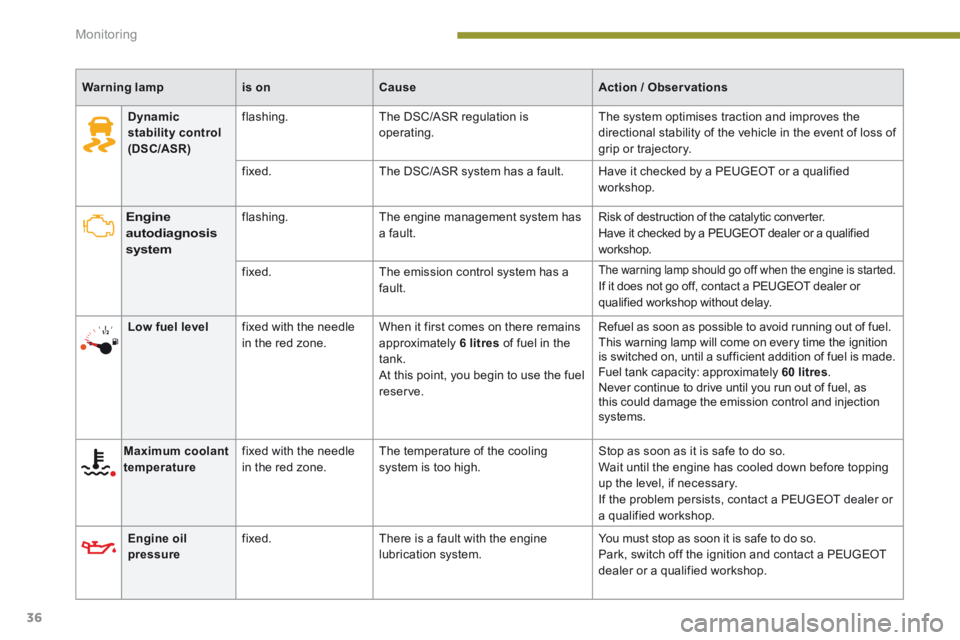
Engine autodiagnosis system
flashing. The engine management system has a fault. Risk of destruction of the catalytic converter. Have it checked by a PEUGEOT dealer or a qualified workshop.
fixed. The emission control system has a fault.
The warning lamp should go off when the engine is started. If it does not go off, contact a PEUGEOT dealer or qualified workshop without delay.
Low fuel level fixed with the needle in the red zone. When it first comes on there remains approximately 6 litres of fuel in the tank. At this point, you begin to use the fuel reserve.
Refuel as soon as possible to avoid running out of fuel. This warning lamp will come on every time the ignition is switched on, until a sufficient addition of fuel is made. Fuel tank capacity: approximately 60 litres . Never continue to drive until you run out of fuel, as this could damage the emission control and injection systems.
Maximum coolant temperature fixed with the needle in the red zone. The temperature of the cooling system is too high. Stop as soon as it is safe to do so. Wait until the engine has cooled down before topping up the level, if necessary. If the problem persists, contact a PEUGEOT dealer or a qualified workshop.
Engine oil pressure fixed. There is a fault with the engine lubrication system. You must stop as soon it is safe to do so. Park, switch off the ignition and contact a PEUGEOT dealer or a qualified workshop.
Dynamic stability control (DSC/ASR)
flashing. The DSC/ASR regulation is operating. The system optimises traction and improves the directional stability of the vehicle in the event of loss of grip or trajectory.
fixed. The DSC/ASR system has a fault. Have it checked by a PEUGEOT or a qualified workshop.
Page 39 of 389
1
Monitoring37
Warning lampis onCauseAction / Observations
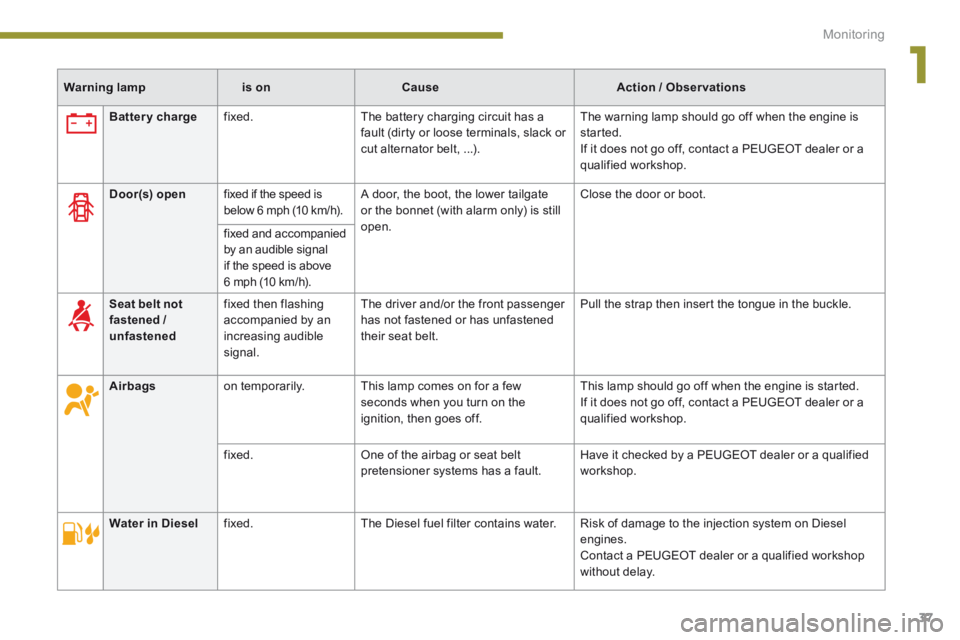
Battery charge fixed. The battery charging circuit has a fault (dirty or loose terminals, slack or cut alternator belt, ...).
The warning lamp should go off when the engine is started. If it does not go off, contact a PEUGEOT dealer or a qualified workshop.
Door(s) open fixed if the speed is below 6 mph (10 km/h). A door, the boot, the lower tailgate or the bonnet (with alarm only) is still open.
Close the door or boot.
fixed and accompanied by an audible signal if the speed is above 6 mph (10 km/h).
Seat belt not fastened / unfastened
fixed then flashing accompanied by an increasing audible signal.
The driver and/or the front passenger has not fastened or has unfastened their seat belt.
Pull the strap then insert the tongue in the buckle.
Airbags on temporarily. This lamp comes on for a few seconds when you turn on the ignition, then goes off.
This lamp should go off when the engine is started. If it does not go off, contact a PEUGEOT dealer or a qualified workshop.
fixed. One of the airbag or seat belt pretensioner systems has a fault. Have it checked by a PEUGEOT dealer or a qualified workshop.
Water in Diesel fixed. The Diesel fuel filter contains water. Risk of damage to the injection system on Diesel engines. Contact a PEUGEOT dealer or a qualified workshop without delay.
Page 46 of 389
Multifunction screens
44
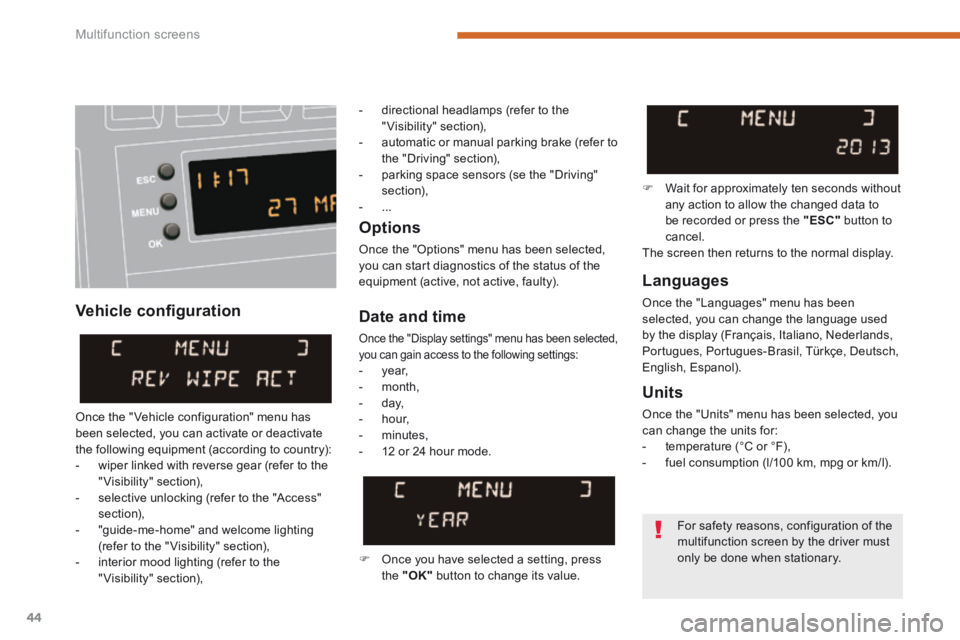
Vehicle confi guration
Options
Once the "Options" menu has been selected, you can start diagnostics of the status of the equipment (active, not active, faulty). Languages
Once the "Languages" menu has been selected, you can change the language used by the display (Français, Italiano, Nederlands, Portugues, Portugues-Brasil, Türkçe, Deutsch, English, Espanol).
Date and time
Once the "Display settings" menu has been selected, you can gain access to the following settings: - year, - month, - day, - hour,
- minutes, - 12 or 24 hour mode.
Units
Once the "Units" menu has been selected, you can change the units for: - temperature (°C or °F), - fuel consumption (l/100 km, mpg or km/l).
Once you have selected a setting, press the "OK" button to change its value.
Wait for approximately ten seconds without any action to allow the changed data to be recorded or press the "ESC" button to cancel. The screen then returns to the normal display.
Once the " Vehicle configuration" menu has been selected, you can activate or deactivate the following equipment (according to country): - wiper linked with reverse gear (refer to the "Visibility" section), - selective unlocking (refer to the "Access" section), - "guide-me-home" and welcome lighting (refer to the " Visibility" section), - interior mood lighting (refer to the "Visibility" section),
For safety reasons, configuration of the
multifunction screen by the driver must only be done when stationary.
- directional headlamps (refer to the "Visibility" section), - automatic or manual parking brake (refer to the "Driving" section), - parking space sensors (se the "Driving" section), - ...
Page 48 of 389
Multifunction screens
46
Date and time Languages
Once the "Languages" menu has been selected, you can change the language used by the display.
Units
Once the "Units" menu has been selected, you can change the units of the following parameters: - temperature (°C or °F), - fuel consumption (l/100 km, mpg or km/l).
Once you have selected a setting, press t h e " " or " " buttons to change its value.
Press the " " or " " buttons to switch respectively to the previous or next setting. Press the "OK" button to record the
change and return to the normal display or press the " < ] arrow" button to cancel.
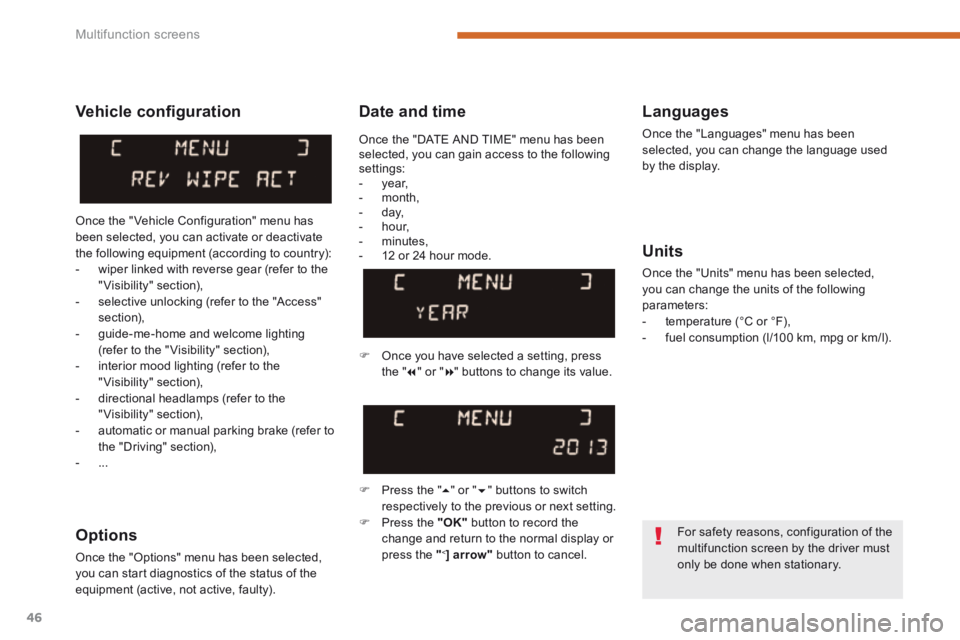
Vehicle confi guration
Once the " Vehicle Configuration" menu has been selected, you can activate or deactivate the following equipment (according to country): - wiper linked with reverse gear (refer to the "Visibility" section), - selective unlocking (refer to the "Access" section), - guide-me-home and welcome lighting (refer to the " Visibility" section), - interior mood lighting (refer to the "Visibility" section), - directional headlamps (refer to the "Visibility" section),
- automatic or manual parking brake (refer to the "Driving" section), - ...
Options
Once the "Options" menu has been selected, you can start diagnostics of the status of the equipment (active, not active, faulty).
For safety reasons, configuration of the multifunction screen by the driver must only be done when stationary.
Once the "DATE AND TIME" menu has been selected, you can gain access to the following settings: - year, - month, - day, - hour, - minutes, - 12 or 24 hour mode.
Page 53 of 389
2
Multifunction screens51
"SETUP" menu (PEUGEOT Connect Navigation (RT6))
Press the "SETUP" button for access to the "SETUP" menu. This allows you to select from the following functions: - "Languages", - "Date and time", - "Display", - " Vehicle parameters", - "Units", - "System".
"SETUP" menu (PEUGEOT Connect
Media Navigation (NG4 3D))
Press the "SETUP" menu for access to the "SETUP" menu . It allows you to adjust settings for the following functions: - "Languages and voice functions" - "Date and time", - "Display screen",
- "Units", - "System parameters".
Languages (PEUGEOT Connect Navigation (RT6))
This menu allows you to select the language used by the display.
Languages and voice functions (PEUGEOT Connect Media Navigation (NG4 3D))
This menu allows you to: - select the language used by the display, - select the settings for voice recognition (on/off, instructions on use, personal voice training...), - adjust the volume of the voice synthesiser.
Date and time
Press "SETUP". Select "Display configuration" and confirm. Select "Adjust date and time" and confirm. Select "Synchronise minutes with GPS" for the adjustment of minutes to be done automatically by satellite reception. Select the setting to modify. Conform by pressing "OK", then adjust the setting and confirm again. Adjust the settings one by one. Select "OK" in the screen then confirm to save the settings.
Display
This menu allows you to set the brightness of the screen, the screen colour scheme and the colour of the map (day/night or auto mode).
System parameters
This menu allows you to restore the factory configuration, display the software version and activate scrolling text.
For safety reasons, configuration of the multifunction screen by the driver must only be done when stationary.
* According to country.
Units
This menu allows you to select the units: temperature (°C or °F) and fuel consumption (km/l, l/100 or mpg).
Vehicle parameters (PEUGEOT Connect Navigation (RT6))
This menu allows you to activate or deactivate certain driving and comfort equipment * : - wiper linked with reverse gear (refer to the "Visibility" section), - selective unlocking (refer to the "Access" section), - guide-me-home and welcome lighting (refer to the " Visibility" section), - interior mood lighting (refer to the "Visibility" section), - directional headlamps (refer to the "Visibility" section), - automatic or manual parking brake (refer to the "Driving" section), - ...
Page 55 of 389
2
Multifunction screens53
Trip computer
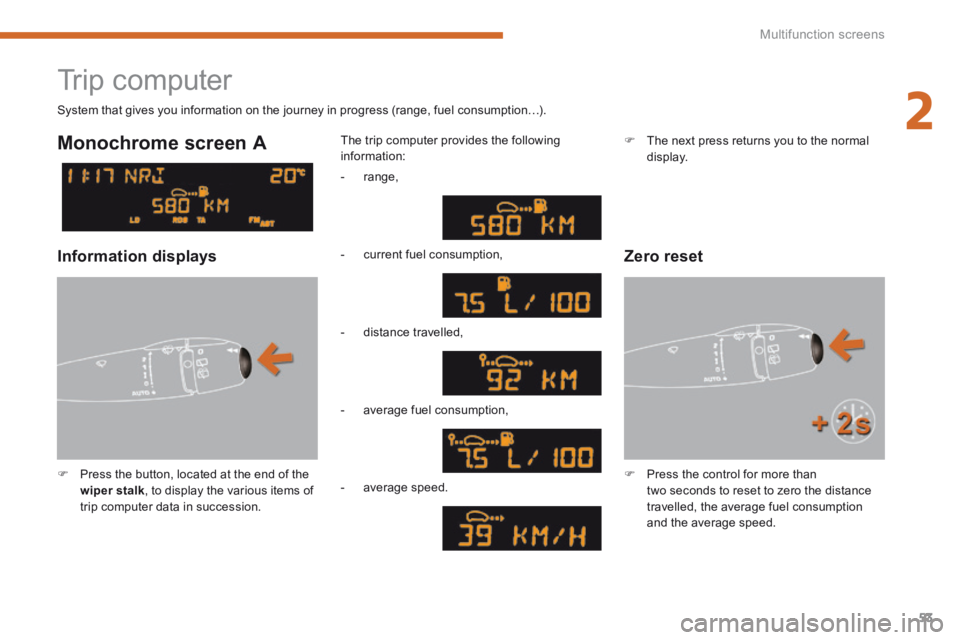
Press the button, located at the end of the wiper stalk , to display the various items of trip computer data in succession.
The trip computer provides the following information:
System that gives you information on the journey in progress (range, fuel consumption…).
Press the control for more than two seconds to reset to zero the distance travelled, the average fuel consumption and the average speed.
Monochrome screen A
Zero reset Information displays
- range,
- current fuel consumption,
- distance travelled,
- average fuel consumption,
- average speed.
The next press returns you to the normal display.