Page 95 of 217

Instruments and controls93
Select using the left adjuster wheel onthe steering wheel
Turn the adjuster wheel to call up the
required function.
Press the adjuster wheel to open the
BC menu, to select marked items and
confirm commands. In the BC menu
press to operate the stop watch or
restart measurement and calculation.
System settings
Press the Settings button of the
Infotainment system. Menu item
Audio then opens.
Call up System with the left arrow
button and select with the OK button.
The first function of the System menu
is highlighted. Some of the functions
appear on the display in an
abbreviated form.
The functions are displayed in the
following order:
■ Time synchronisation
■ Time, setting hours
■ Time, setting minutes
■ Date, setting day
■ Date, setting month
■ Date, setting year
■ Ignition logic
■ Language selection
■ Setting units of measure
Automatic time synchronisation
The RDS (Radio Data System) signal of most VHF transmitters
automatically sets the time, identified
by } in the display.
Page 96 of 217

94Instruments and controls
Some transmitters do not send a
correct time signal. In such cases,
switch off automatic time
synchronisation and set the time
manually.
Deactivate ( Clock Sync.Off ) or
activate ( Clock Sync.On ) automatic
time synchronisation with the arrow
buttons.
Setting date and time
To set date and time manually, select
the menu item for time and date
settings and make the desired
setting.
The value ready for modification is
marked with arrows. Use the arrow
buttons to make the required setting.
The setting is saved when the menu item is exited.
Ignition logic
See Infotainment system instruction
manual.
Language selection
The display language for some
functions can be selected.
Select the required language with the
arrow buttons.
Setting units of measure
Select the required unit of
measurement with the arrow buttons.
Graphic-Info-Display,
Colour-Info-Display Depending on the vehicle
configuration the vehicle has a
Graphic-Info-Display or
Colour-Info-Display. The
Info-Display is located in the
instrument panel above the
Infotainment system.
Page 99 of 217
Instruments and controls97
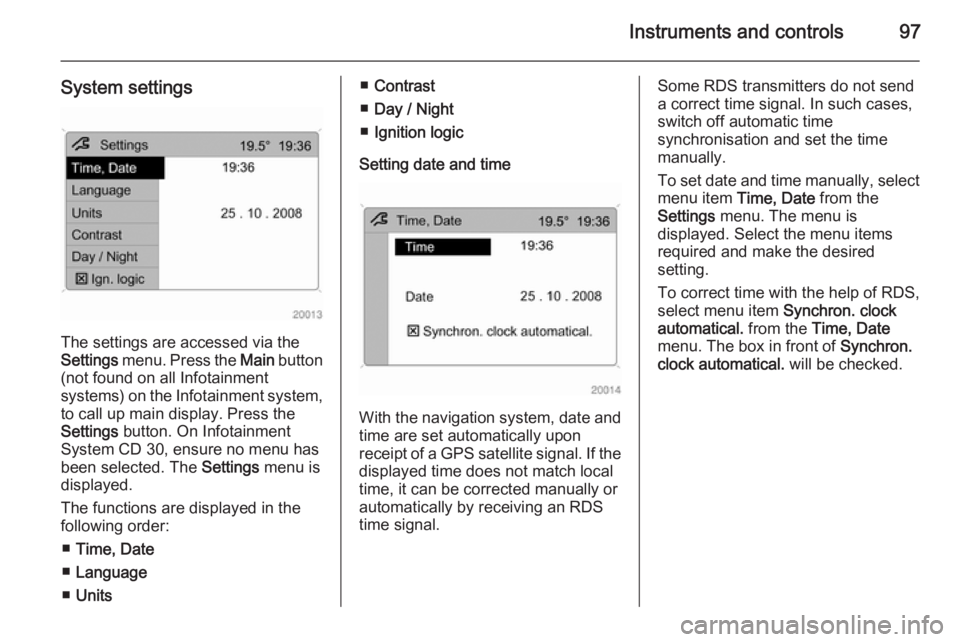
System settings
The settings are accessed via the
Settings menu. Press the Main button
(not found on all Infotainment
systems) on the Infotainment system,
to call up main display. Press the
Settings button. On Infotainment
System CD 30, ensure no menu has
been selected. The Settings menu is
displayed.
The functions are displayed in the
following order:
■ Time, Date
■ Language
■ Units
■Contrast
■ Day / Night
■ Ignition logic
Setting date and time
With the navigation system, date and
time are set automatically upon
receipt of a GPS satellite signal. If the
displayed time does not match local
time, it can be corrected manually or
automatically by receiving an RDS
time signal.
Some RDS transmitters do not send a correct time signal. In such cases,
switch off automatic time
synchronisation and set the time
manually.
To set date and time manually, select
menu item Time, Date from the
Settings menu. The menu is
displayed. Select the menu items
required and make the desired
setting.
To correct time with the help of RDS,
select menu item Synchron. clock
automatical. from the Time, Date
menu. The box in front of Synchron.
clock automatical. will be checked.
Page 101 of 217

Instruments and controls99
Adjusting contrast
(Graphic-Info-Display)
Select menu item Contrast from the
Settings menu. The menu is
displayed. Confirm the required
setting.
Setting display mode
The display can be adjusted to suit
the lighting conditions:
Select menu item Day / Night from the
Settings menu. The options are
displayed.
Automatic ; adapted based on vehicle
lighting.
Always day design ; black or coloured
text on a light background.
Always night design ; white or
coloured text on a dark background.
Selections are indicated by a o in
front of the menu item.
Ignition logic
See Infotainment system instruction
manual.Vehicle messages
Warning chimes
When starting the engine or whilst driving
Only one warning chime will sound at a time.
The warning chime regarding
unfastened seat belts has priority
over any other warning chime.
■ If seat belt is not fastened.
■ When operating the turn and lane- change signals.
■ When the vehicle is being driven and the electrical parking brake is
applied 3 137.
■ When releasing the electrical parking brake without applying the
foot brake 3 90.
■ If there is a fault in the braking system 3 85.
■ If the parking assist detects an object 3 142.
Page 102 of 217
100Instruments and controls
■ During automatic self-cleaning ofthe diesel particle filter 3 128.
■ In vehicles equipped with engine overspeed warning; when vehicle
speed exceeds 120 km/h 3 91.
When the vehicle is parked and/ or the driver's door is opened ■ When the key is in the ignition switch.
■ With exterior lights on.
Tyre pressure
Check controlIn vehicles with tyre pressure
monitoring system, if low tyre
pressures are detected, relevant
information appears on the
information display.
Reduce speed and check tyre
pressure at the next opportunity.
Tyre pressure monitoring system
3 176.
Check tyre pressures 3 176, 3 207.
If there is a considerable loss of
pressure, a corresponding message
appears indicating the relevant tyre.
Steer out of the flow of traffic as
quickly as possible without
endangering other vehicles. Stop and
check the tyres. Mount the spare
wheel 3 182, 3 185.
Tyre pressure monitoring system 3 176.
Page 103 of 217

Instruments and controls101Trip computerTrip computer in Board-
Info-Display
The trip computer provides
information on driving data, which is
continually recorded and evaluated
electronically. Access trip computer
vehicle data by pressing the BC
button on the Infotainment system or
the left adjuster wheel on the steering wheel.
Some of the functions appear on the
display in an abbreviated form. Once
a function has been selected, the
subsequent rows of the trip computer
function are displayed.
The functions are displayed in the
following order:
■ Instantaneous consumption
■ Average consumption
■ Effective consumption
■ Average speed
■ Distance travelled■ Range
■ Stop watch
Board-Info-Display 3 92.
Instantaneous consumption
Display of the instantaneous
consumption.
Display changes depending on
speed:
Display in l/h=below 13 km/hDisplay in
l/100 km=above 13 km/hAverage consumption
Display of average consumption. The measurement can be reset at any
time.
Effective consumption
Display of the amount of fuel
consumed. The measurement can be reset at any time.
Average speed Display of average speed. The
measurement can be reset at any
time.
Stoppages in the journey with the
ignition off are not included in the
calculations.
Distance travelled
Display of distance travelled. The
measurement can be reset at any
time.
Range
Range is calculated from current fuel
tank content and instantaneous
consumption. The display shows
average values.
Page 105 of 217

Instruments and controls103
page provides information on range,
average consumption and
instantaneous consumption.
To display other trip computer data, press the BC button on the
Infotainment system and select the
trip computer menu in the display.
The information of the two trip
computers can be reset separately,
making it possible to display different
trip distances.
Graphic-Info-Display,
Colour-Info-Display 3 94.
RangeRange is calculated from current fuel
tank content and instantaneous
consumption. The display shows average values.
After refuelling, the range is updated
automatically after a brief delay.
If the fuel in the tank allows less than
50 km of travel, the warning Range
appears on the display.
If the fuel in the tank allows less than
30 km of travel, the warning Refuel!
appears on the display.
Acknowledge the menu item 3 94.
Instantaneous consumption
Display of the instantaneous
consumption.
Display changes depending on
speed:Display in l/h=below 13 km/hDisplay in
l/100 km=above 13 km/h
Distance travelled
Display of distance travelled. The
measurement can be reset at any
time.
Average speed
Display of average speed. The
measurement can be reset at any
time.
Stoppages in the journey with the
ignition off are not included in the
calculations.
Effective consumption Display of the amount of fuel
consumed. The measurement can be
reset at any time.
Page 106 of 217

104Instruments and controls
Average consumption
Display of average consumption. The measurement can be reset at any
time.
Resetting trip computer
information
Select BC 1 or BC 2 from the trip
computer menu.
Select the desired trip computer
information and reset by pressing the
left adjuster wheel on the steering
wheel or the OK button on the
Infotainment system.
To reset all information of a trip
computer, select menu item All
values . After resetting, "- - -" is
displayed for the trip computer
information selected. The
recalculated values are displayed
after a brief delay.
Stop watch
Select menu item Timer from the
Board Computer menu. The Timer
menu is displayed.
To start, select menu item Start. To
reset, select menu item Reset.
The desired stop watch display can
be selected from the Options menu:
Driving Time excl. Stops : The time the
vehicle is in motion is recorded.
Stationary time is not included.
Driving Time incl. Stops : The time the
vehicle is in motion is recorded. The
time the vehicle is stationary with the
key in the ignition switch is included.
