2014 OPEL ANTARA lock
[x] Cancel search: lockPage 94 of 217

92Instruments and controlsInformation displaysBoard-Info-Display
The Info-Display is located in the
instrument panel above the
Infotainment system.
Info-Display indicates:
■ time 3 77
■ outside temperature 3 76
■ date 3 77
■ Infotainment system - see Infotainment system instruction
manual
The Info-Display is located in the
instrument panel above the
Infotainment system.
An F in the display indicates a fault.
Have the cause of the fault remedied by a workshop.
Trip computer, Board-Info-Display
3 101.
Selecting functions
Functions and settings of the
Infotainment system can be accessed via the Info-Display.
Functions are selected and executed
in the menu on the display using the
arrow buttons on the Infotainment
system or the left adjuster wheel on
the steering wheel.
If a check control warning message
appears on the Info-Display, the
display is blocked from other
functions. Acknowledge the message
by pressing the OK button or the left
adjuster wheel. If there are several
warning messages, acknowledge
them one at a time.
Check control 3 100.Select using the Infotainment system
buttons
In the Settings menu, use the OK
button to call up the required function.
Use the arrow buttons to change
settings.
In the BC menu, use the OK button to
call up the required function. Use the
OK button to operate the stop watch
or restart measurement and
calculation.
Page 96 of 217

94Instruments and controls
Some transmitters do not send a
correct time signal. In such cases,
switch off automatic time
synchronisation and set the time
manually.
Deactivate ( Clock Sync.Off ) or
activate ( Clock Sync.On ) automatic
time synchronisation with the arrow
buttons.
Setting date and time
To set date and time manually, select
the menu item for time and date
settings and make the desired
setting.
The value ready for modification is
marked with arrows. Use the arrow
buttons to make the required setting.
The setting is saved when the menu item is exited.
Ignition logic
See Infotainment system instruction
manual.
Language selection
The display language for some
functions can be selected.
Select the required language with the
arrow buttons.
Setting units of measure
Select the required unit of
measurement with the arrow buttons.
Graphic-Info-Display,
Colour-Info-Display Depending on the vehicle
configuration the vehicle has a
Graphic-Info-Display or
Colour-Info-Display. The
Info-Display is located in the
instrument panel above the
Infotainment system.
Page 97 of 217

Instruments and controls95
Info-Display indicates:■ time 3 77
■ outside temperature 3 76
■ date 3 77
■ Infotainment and navigation systems - see Infotainment systeminstruction manual
■ system settings
The Info-Display is located in the
instrument panel above the
Infotainment system. The
Graphic-Info-Display presents the
information in monochrome. The
Colour-Info-Display presents the
information in colour.
The type of information and how it is
displayed depends on the equipment
of the vehicle and the settings of the
trip computer and Infotainment
system. Some information appears
on the display in an abbreviated form.
An F in the display indicates a fault.
Have the cause of the fault remedied
by a workshop.
Trip computer, Graphic-Info-Display,
Colour-Info-Display 3 102.
Selecting functions
The functions and settings of the
Infotainment system can be accessed
via the Info-Display.
Functions are selected and executed
in the menu on the display using the
arrow buttons and the central
multifunction knob on the
Infotainment system or the left
adjuster wheel on the steering wheel.
If a check control warning message
appears on the Info-Display, the
display is blocked from other
functions. Acknowledge the message by pressing an arrow button, the
multifunction knob or the left adjusterwheel. If there are several warning
messages, acknowledge them one at a time.
Check control 3 100.
Select using the Infotainment
system buttons
Select a function via the Infotainment
system arrow buttons. The menu of
the selected function is displayed.
Select using the central
multifunction knob The multifunction knob is the central
control element for the menus:
Page 99 of 217
Instruments and controls97
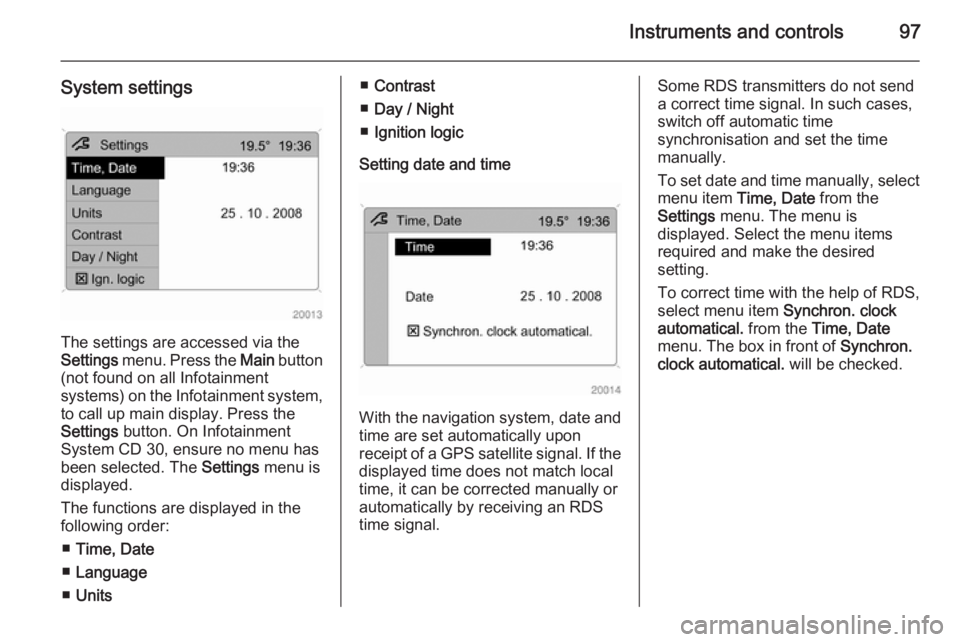
System settings
The settings are accessed via the
Settings menu. Press the Main button
(not found on all Infotainment
systems) on the Infotainment system,
to call up main display. Press the
Settings button. On Infotainment
System CD 30, ensure no menu has
been selected. The Settings menu is
displayed.
The functions are displayed in the
following order:
■ Time, Date
■ Language
■ Units
■Contrast
■ Day / Night
■ Ignition logic
Setting date and time
With the navigation system, date and
time are set automatically upon
receipt of a GPS satellite signal. If the
displayed time does not match local
time, it can be corrected manually or
automatically by receiving an RDS
time signal.
Some RDS transmitters do not send a correct time signal. In such cases,
switch off automatic time
synchronisation and set the time
manually.
To set date and time manually, select
menu item Time, Date from the
Settings menu. The menu is
displayed. Select the menu items
required and make the desired
setting.
To correct time with the help of RDS,
select menu item Synchron. clock
automatical. from the Time, Date
menu. The box in front of Synchron.
clock automatical. will be checked.
Page 115 of 217

Lighting113
Rear reading lights
Left and right rear reading lights are
individually operable. Press to
activate and deactivate.
Sunvisor lights
Illuminates when the vanity mirror
cover is opened 3 32.
Lighting features
Entry lighting
Welcome lighting Depending upon outside light
conditions, when unlocking the
vehicle with the remote control the
hazard warning lights flash twice and
the exterior and interior lights
illuminate for 20 seconds. This
function facilitates locating the vehicle
when it is dark.
Exit lighting The low beam and reversing lights
illuminate for 30 seconds after the
driver exits the vehicle and closes the
door.Switching on
1. Switch off ignition.
2. Remove ignition key.
3. Open driver's door.
4. Pull turn signal lever.
5. Close driver's door.
If the driver's door is not closed the
lights switch off after two minutes.
Exit lighting can be deactivated by
inserting the key in the ignition switch or by pulling the turn signal lever
again while the driver's door is open.
Page 125 of 217

Driving and operating123Driving and operatingDriving hints............................... 123
Starting and operating ...............123
Engine exhaust .......................... 128
Automatic transmission .............. 129
Manual transmission ..................133
Drive systems ............................ 134
Brakes ........................................ 136
Ride control systems .................138
Driver assistance systems .........141
Fuel ............................................ 144
Trailer hitch ................................ 147Driving hints
Control of the vehicleNever coast with engine not
running (except during Autostop)
Many systems will not function in this
situation ( e.g. brake servo unit, power
steering). Driving in this manner is a
danger to yourself and others. All
systems function during an Autostop,
but there will be a controlled reduction
in power steering assist and vehicle
speed is reduced.
Stop-start system 3 125.
Pedals
To ensure the pedal travel is
uninhibited, there must be no mats in the area of the pedals.
Power steering Never leave the steering wheel on full
lock when the vehicle is stationary as this may damage the power steering
pump.
Control indicator 2 3 87.Starting and operating
New vehicle running-in
Do not brake unnecessarily hard for
the first few journeys.
During the first drive, smoke may
occur because of wax and oil
evaporating off the exhaust system.
Park the vehicle in the open for a
while after the first drive and avoid
inhaling the fumes.
During the running-in period fuel and
engine oil consumption may be
higher and the cleaning process of the diesel particle filter may take
place more often. Autostop may be inhibited to allow for charging of the
battery.
Diesel particle filter 3 128.
Page 126 of 217

124Driving and operatingIgnition switch positionsLOCK=Ignition offACC=Steering wheel lock
released, ignition offON=Ignition on, for diesel
engine: preheatingSTART=StartingStarting the engine
Manual transmission: operate clutch
and brake pedals.
Automatic transmission: operate
brake pedal and move selector lever
to P or N.
Do not operate accelerator pedal.
Diesel engines: turn the key to
position ON for preheating until
control indicator ! extinguishes
3 88.
Turn key briefly to position START
and release. Key returns
automatically to position ON.
Before restarting or to switch off the
engine, turn key back to LOCK.
Start attempts should not last longer
than 15 seconds. If engine does not
start, wait 10 seconds before
repeating starting procedure.
The increased engine speed
automatically returns to normal idling
speed as the engine temperature
rises. Drive at a moderate speed,
especially in cold weather, until
normal engine operating
temperatures have been reached.
During an Autostop, the engine can
be started by depressing the clutch
pedal.
Stop-start system 3 125.
Starting the vehicle at low
temperatures In extremely cold temperatures, i.e.
below -20 °С, it may be necessary to
crank the engine for up to
30 seconds for it to start.
Turn key to position START and hold
until engine starts. Start attempts
should not last longer than
Page 129 of 217

Driving and operating127
If the selector lever is shifted out of
neutral before depressing the clutch
first, control indicator - illuminates.
Control indicator - 3 90.
Restart of the engine by the
stop-start system
The selector lever must be in neutral to enable an automatic restart.
If one of the following conditions occurs during an Autostop, the
engine will be restarted automatically
by the stop-start system.
■ The stop-start system is manually deactivated
■ the bonnet is opened
■ the driver's seat belt is unfastened and the driver's door is opened
■ the engine temperature is too low
■ the charging level of the vehicle battery is below a defined level
■ the brake vacuum is not sufficient
■ the vehicle is driven at least at walking speed
■ the defrosting function is activated■ the climate control system requests
an engine start
■ the air conditioning is manually switched on
If an electrical accessory, e.g. a
portable CD player, is connected to
the power outlet, a brief power drop
during restart might be noticeable.
Parking ■ Do not park the vehicle on an easily
ignitable surface. The high
temperature of the exhaust system
could ignite the surface.
■ Always apply the electrical parking brake.
Pull switch m.
For maximum force, e.g. parking
with a trailer or on inclines, pull
switch m twice.
■ Switch off the engine and turn the ignition key to position LOCK, push
key into ignition switch and remove.
Turn the steering wheel until the
steering wheel lock is felt to
engage.For vehicles with automatic
transmission, depress foot brake
and shift into P before pushing key
into ignition switch and removing.
■ If the vehicle is on a level surface or
uphill slope, engage first gear ormove the selector lever to P before
switching off the ignition. On an
uphill slope, turn the front wheels
away from the kerb.
If the vehicle is on a downhill slope, engage reverse gear or move the
selector lever to P before switching
off the ignition. Turn the front
wheels towards the kerb.
■ Lock the vehicle with button p on
the radio remote control 3 21 and
activate the anti-theft alarm system 3 24.