Page 314 of 372
●Keep the battery surface clean and dry.
Clean the battery with a solution of baking
soda and water.
● Make certain the terminal connections are
clean and securely tightened.
● If the vehicle is not to be used for 30 days or
longer, disconnect the negative (-) battery
terminal cable to prevent discharge.
NOTE:
Care should be taken to avoid situations
that can lead to potential battery discharge
and potential no-start conditions such as: 1. Installation or extended use of electronic accessories that consume battery power
when the engine is not running (Phone char-
gers, GPS, DVD players, etc.)
2. Vehicle is not driven regularly and/or only driven short distances. In these cases, the
battery may need to be charged to maintain
battery health.WARNING
●Do not expose the battery to electrical
sparks, flames or smoking. Hydrogen
gas generated by the battery is explo-
sive. Explosive gases can cause blind-
ness or injury. Do not allow battery fluid
to contact your skin, eyes, fabrics or
painted surfaces. Sulfuric acid can
cause blindness or severe burns. After
touching a battery or battery cap, do not
touch or rub your eyes. Thoroughly
wash your hands. If the acid contacts
your eyes, skin or clothing, immediately
flush with water for at least 15 minutes
and seek medical attention.
● Do not operate the vehicle if the fluid in
the battery is low. Low battery fluid can
cause a higher load on the battery
which can generate heat, reduce battery
life, and in some cases lead to an
explosion.
● When working on or near a battery, al-
ways wear suitable eye protection and
remove all jewelry.
● Do not tip the battery. Keep the vent
caps tight and the battery level. ●
Battery posts, terminals and related ac-
cessories contain lead and lead com-
pounds. Wash hands after handling.
● Keep battery out of the reach of
children.
BATTERY
Maintenance and do-it-yourself8-13
Page 315 of 372
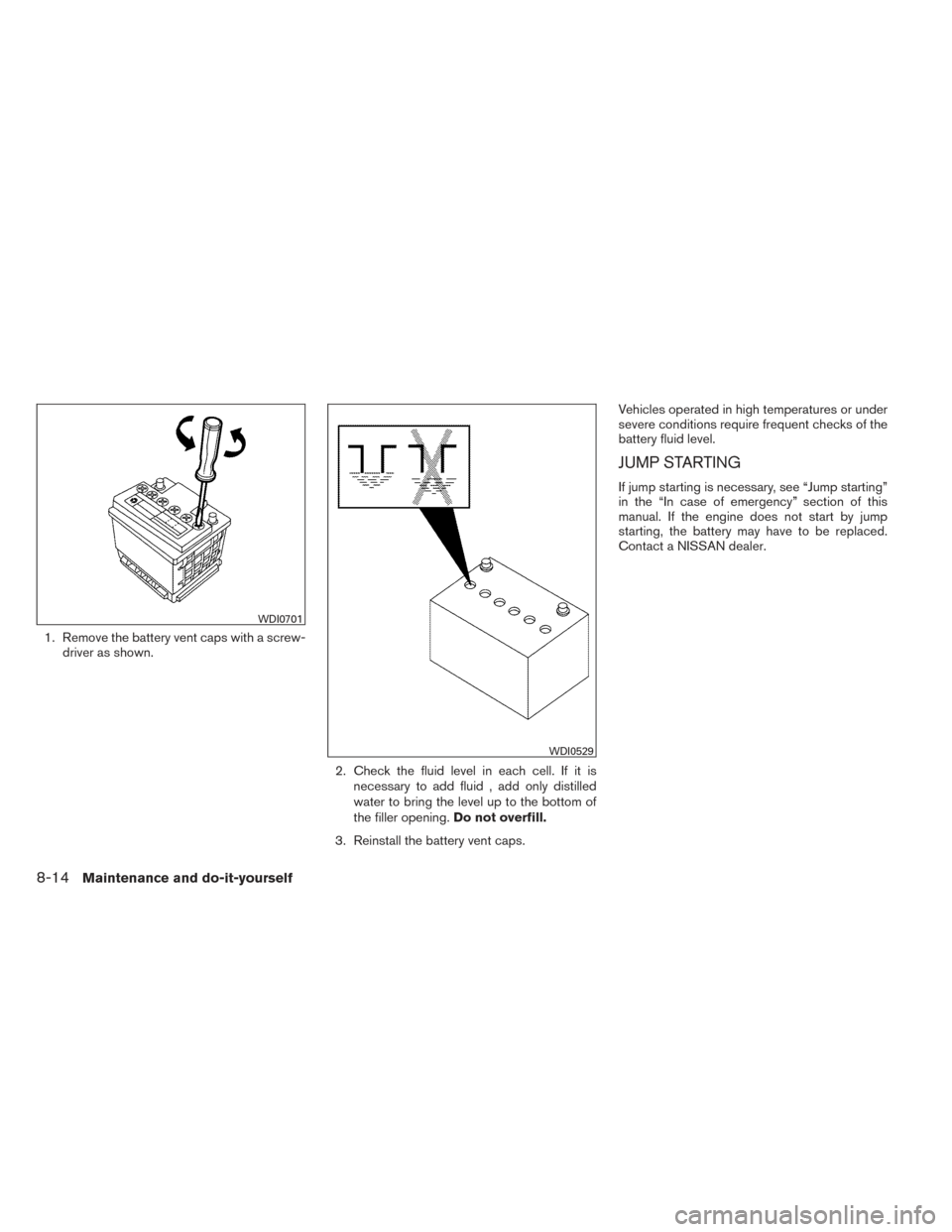
1. Remove the battery vent caps with a screw-driver as shown.
2. Check the fluid level in each cell. If it isnecessary to add fluid , add only distilled
water to bring the level up to the bottom of
the filler opening. Do not overfill.
3. Reinstall the battery vent caps. Vehicles operated in high temperatures or under
severe conditions require frequent checks of the
battery fluid level.
JUMP STARTING
If jump starting is necessary, see “Jump starting”
in the “In case of emergency” section of this
manual. If the engine does not start by jump
starting, the battery may have to be replaced.
Contact a NISSAN dealer.
WDI0701
WDI0529
8-14Maintenance and do-it-yourself
Page 316 of 372
CAUTION
●Do not ground accessories directly to
the battery terminal. Doing so will by-
pass the variable voltage control sys-
tem and the vehicle battery may not
charge completely.
● Use electrical accessories with the en-
gine running to avoid discharging the
vehicle battery.
Your vehicle is equipped with a variable voltage
control system. This system measures the
amount of electrical discharge from the battery
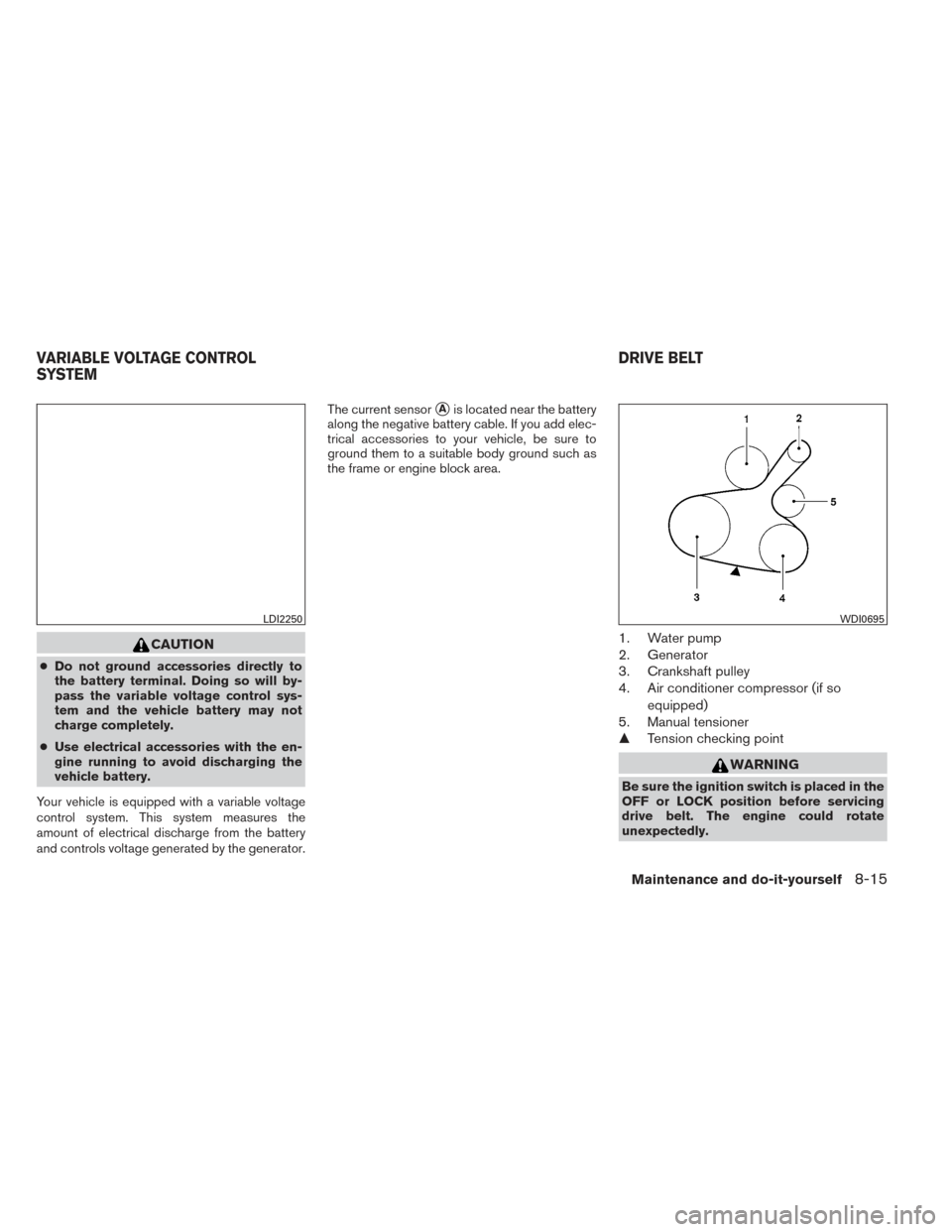
and controls voltage generated by the generator. The current sensor
�Ais located near the battery
along the negative battery cable. If you add elec-
trical accessories to your vehicle, be sure to
ground them to a suitable body ground such as
the frame or engine block area.
1. Water pump
2. Generator
3. Crankshaft pulley
4. Air conditioner compressor (if so
equipped)
5. Manual tensioner
� Tension checking point
WARNING
Be sure the ignition switch is placed in the
OFF or LOCK position before servicing
drive belt. The engine could rotate
unexpectedly.
LDI2250WDI0695
VARIABLE VOLTAGE CONTROL
SYSTEM DRIVE BELT
Maintenance and do-it-yourself8-15
Page 323 of 372
CAUTION
Be careful not to allow children to swallow
the battery or removed parts.
KEYFOB (if so equipped)
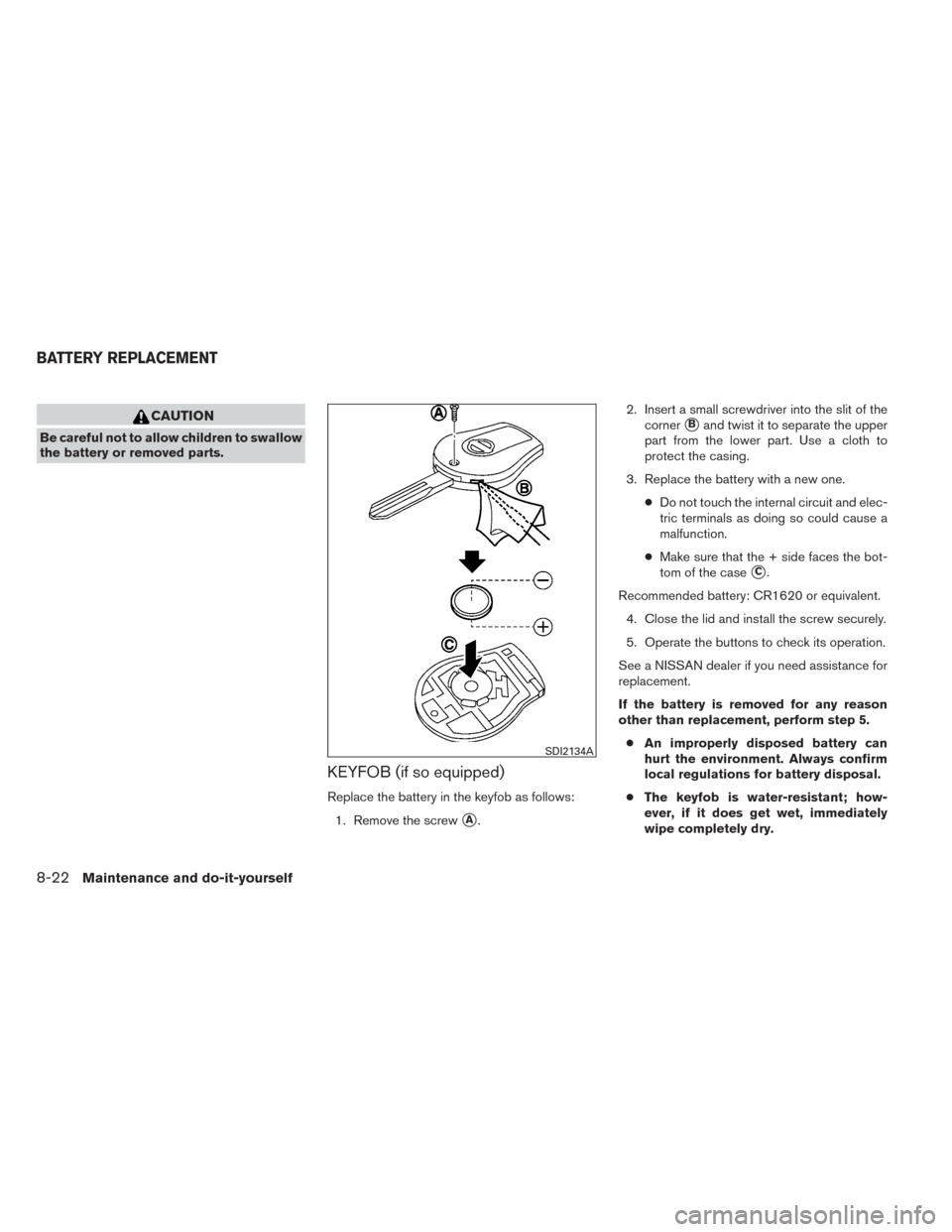
Replace the battery in the keyfob as follows:1. Remove the screw
�A. 2. Insert a small screwdriver into the slit of the
corner
�Band twist it to separate the upper
part from the lower part. Use a cloth to
protect the casing.
3. Replace the battery with a new one. ●Do not touch the internal circuit and elec-
tric terminals as doing so could cause a
malfunction.
● Make sure that the + side faces the bot-
tom of the case
�C.
Recommended battery: CR1620 or equivalent. 4. Close the lid and install the screw securely.
5. Operate the buttons to check its operation.
See a NISSAN dealer if you need assistance for
replacement.
If the battery is removed for any reason
other than replacement, perform step 5. ● An improperly disposed battery can
hurt the environment. Always confirm
local regulations for battery disposal.
● The keyfob is water-resistant; how-
ever, if it does get wet, immediately
wipe completely dry.
SDI2134A
BATTERY REPLACEMENT
8-22Maintenance and do-it-yourself
Page 324 of 372
●The operational range of the keyfob
extends to approximately 33 ft (10 m)
from the vehicle. This range may vary
with conditions.
Operation is subject to the following two
conditions: (1) This device may not cause
harmful interference, and (2) this device
must accept any interference received, in-
cluding interference that may cause unde-
sired operation of the device.
NISSAN INTELLIGENT KEY® (if so
equipped)
Replace the battery in the Intelligent Key as fol-
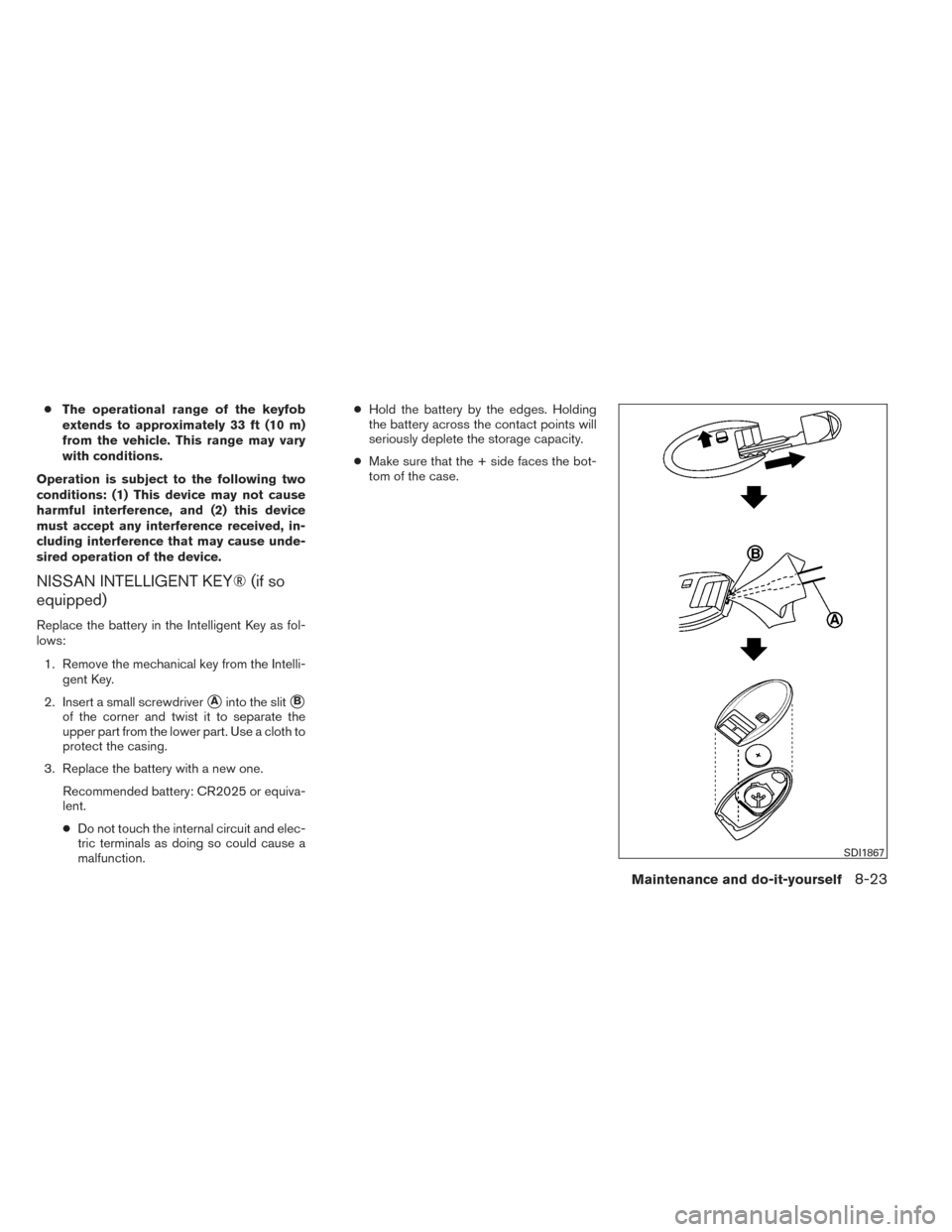
lows: 1. Remove the mechanical key from the Intelli- gent Key.
2. Insert a small screwdriver
�Ainto the slit�B
of the corner and twist it to separate the
upper part from the lower part. Use a cloth to
protect the casing.
3. Replace the battery with a new one. Recommended battery: CR2025 or equiva-
lent.
●Do not touch the internal circuit and elec-
tric terminals as doing so could cause a
malfunction. ●
Hold the battery by the edges. Holding
the battery across the contact points will
seriously deplete the storage capacity.
● Make sure that the + side faces the bot-
tom of the case.
SDI1867
Maintenance and do-it-yourself8-23
Page 326 of 372
●Only touch the base when handling the
bulb. Never touch the glass envelope.
Touching the glass could significantly
affect bulb life and/or headlight
performance.
● Use the same number and wattage as
shown in the chart.
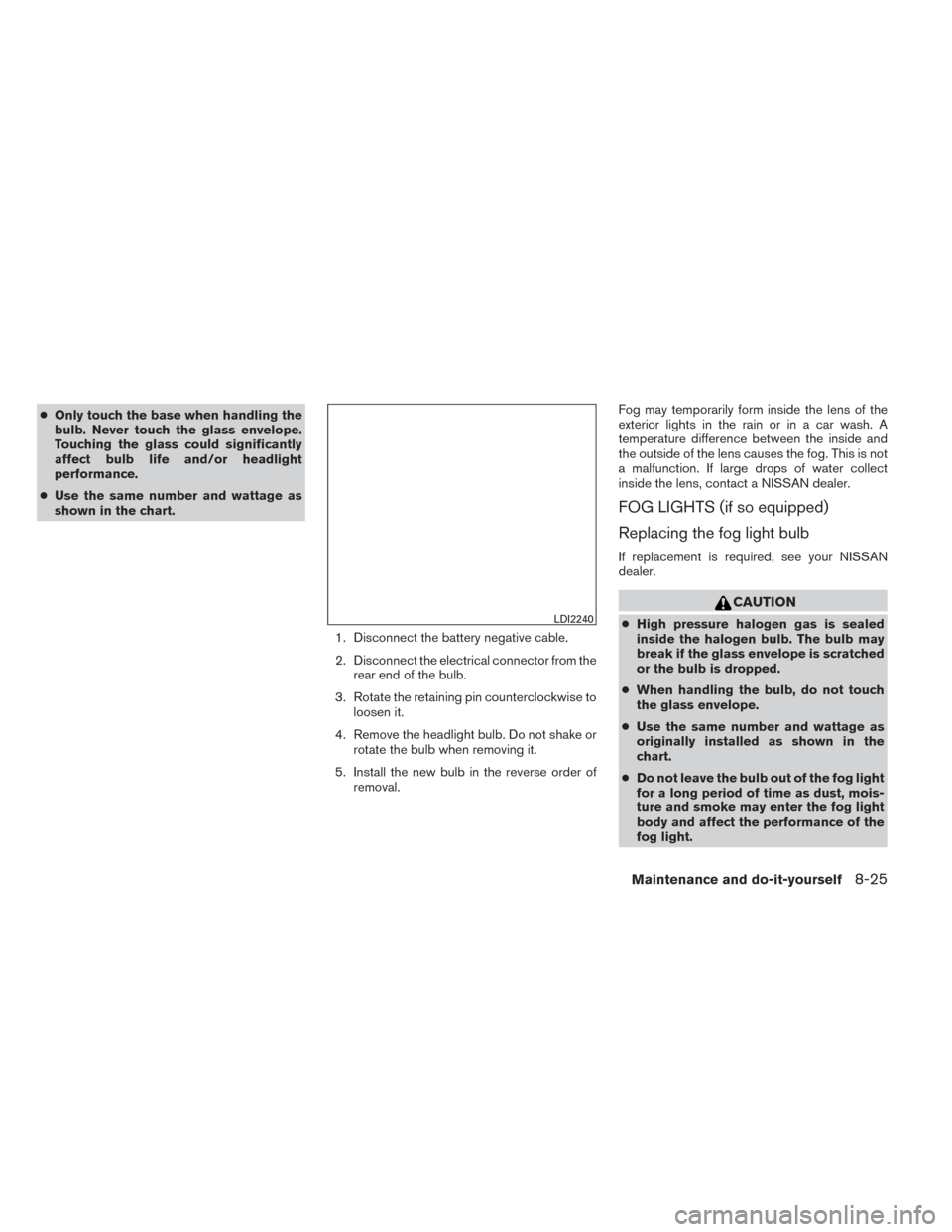
1. Disconnect the battery negative cable.
2. Disconnect the electrical connector from therear end of the bulb.
3. Rotate the retaining pin counterclockwise to loosen it.
4. Remove the headlight bulb. Do not shake or rotate the bulb when removing it.
5. Install the new bulb in the reverse order of removal. Fog may temporarily form inside the lens of the
exterior lights in the rain or in a car wash. A
temperature difference between the inside and
the outside of the lens causes the fog. This is not
a malfunction. If large drops of water collect
inside the lens, contact a NISSAN dealer.
FOG LIGHTS (if so equipped)
Replacing the fog light bulb
If replacement is required, see your NISSAN
dealer.
CAUTION
●
High pressure halogen gas is sealed
inside the halogen bulb. The bulb may
break if the glass envelope is scratched
or the bulb is dropped.
● When handling the bulb, do not touch
the glass envelope.
● Use the same number and wattage as
originally installed as shown in the
chart.
● Do not leave the bulb out of the fog light
for a long period of time as dust, mois-
ture and smoke may enter the fog light
body and affect the performance of the
fog light.LDI2240
Maintenance and do-it-yourself8-25
Page 329 of 372
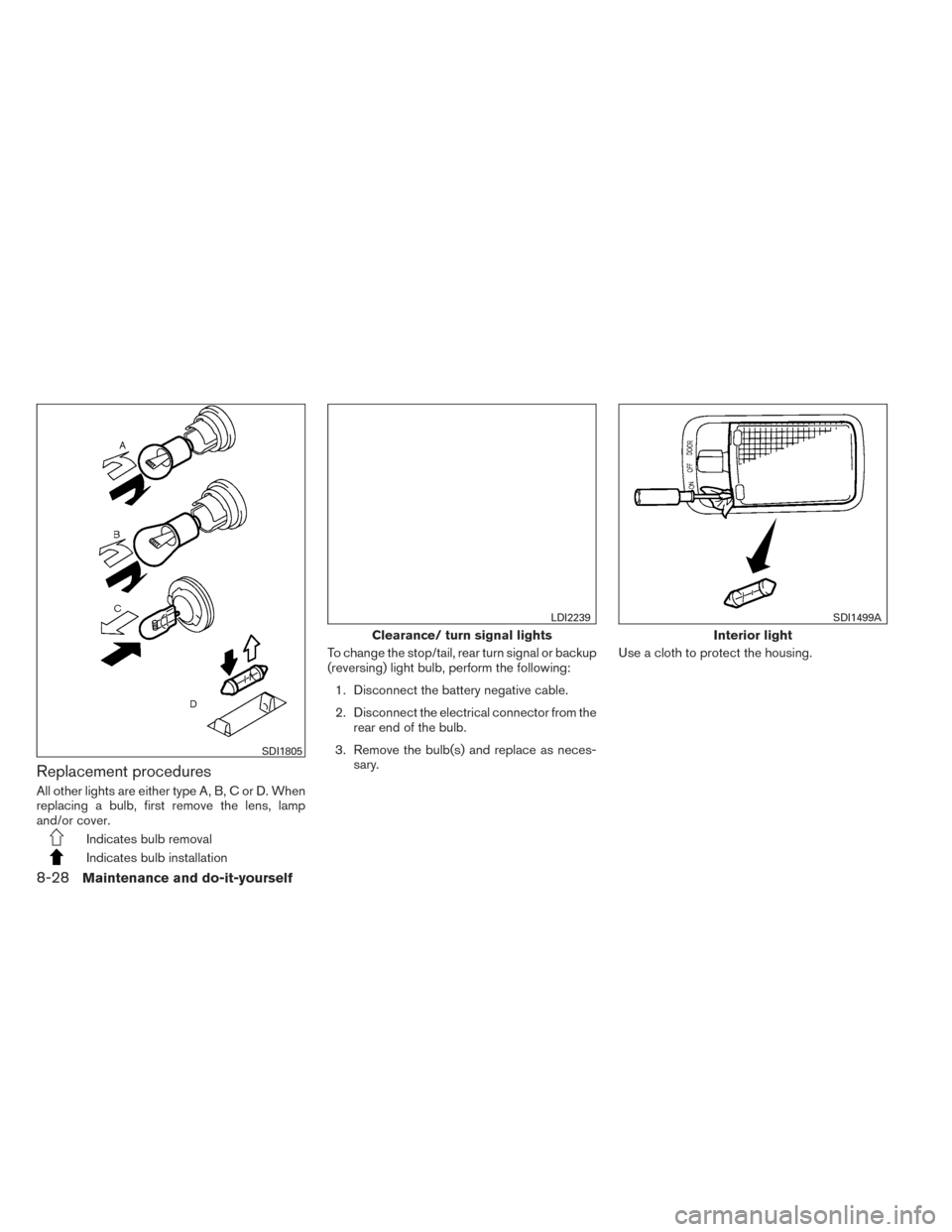
Replacement procedures
All other lights are either type A, B, C or D. When
replacing a bulb, first remove the lens, lamp
and/or cover.
Indicates bulb removal
Indicates bulb installationTo change the stop/tail, rear turn signal or backup
(reversing) light bulb, perform the following:
1. Disconnect the battery negative cable.
2. Disconnect the electrical connector from the rear end of the bulb.
3. Remove the bulb(s) and replace as neces- sary. Use a cloth to protect the housing.
SDI1805
Clearance/ turn signal lights
LDI2239
Interior light
SDI1499A
8-28Maintenance and do-it-yourself
Page 361 of 372
Due to legal requirements in some states and
Canadian Provinces, your vehicle may be re-
quired to be in what is called the “ready condi-
tion” for an Inspection/Maintenance (I/M) test of
the emission control system.
The vehicle is set to the “ready condition” when it
is driven through certain driving patterns. Usually,
the ready condition can be obtained by ordinary
usage of the vehicle.
If a powertrain system component is repaired or
the battery is disconnected, the vehicle may be
reset to a “not ready” condition. Before taking the
I/M test, check the vehicle’s
inspection/maintenance test readiness condi-
tion. Place the ignition switch in the ON position
without starting the engine. If the Malfunction
Indicator Light (MIL) comes on steady for 20 sec-
onds and then blinks for 10 seconds , the I/M test
condition is “not ready”. If the MIL does not blink
after 20 seconds, the I/M test condition is
“ready”. Contact a NISSAN dealer to set the
“ready condition” or to prepare the vehicle for
testing.This vehicle is equipped with an Event Data Re-
corder (EDR) . The main purpose of an EDR is to
record, in certain crash or near crash-like situa-
tions, such as an air bag deployment or hitting a
road obstacle, data that will assist in understand-
ing how a vehicle’s systems performed. The EDR
is designed to record data related to vehicle
dynamics and safety systems for a short period of
time, typically 30 seconds or less. The EDR in this
vehicle is designed to record such data as:
● How various systems in your vehicle were
operating;
● Whether or not the driver and passenger
safety belts were buckled/fastened;
● How far (if at all) the driver was depressing
the accelerator and/or brake pedal; and,
● How fast the vehicle was traveling.
● Sounds are not recorded. These data can help provide a better understand-
ing of the circumstances in which crashes and
injuries occur. NOTE: EDR data are recorded by
your vehicle only if a nontrivial crash situation
occurs; no data are recorded by the EDR under
normal driving conditions and no personal data
(e.g. name, gender, age and crash location) are
recorded. However, other parties, such as law
enforcement, could combine the EDR data with
the type of personally identifying data routinely
acquired during a crash investigation.
To read data recorded by an EDR, special equip-
ment is required and access to the vehicle or the
EDR is needed. In addition to the vehicle manu-
facturer and NISSAN dealer, other parties, such
as law enforcement, that have the special equip-
ment, can read the information if they have ac-
cess to the vehicle or the EDR. EDR data will only
be accessed with the consent of the vehicle
owner or lessee or as otherwise required or per-
mitted by law.
READINESS FOR INSPECTION/
MAINTENANCE (I/M) TEST
EVENT DATA RECORDERS (EDR)
9-20Technical and consumer information