2014 NISSAN TEANA DISPLAY UNIT
[x] Cancel search: DISPLAY UNITPage 4654 of 4801

WCS-12
< SYSTEM DESCRIPTION >
DIAGNOSIS SYSTEM (METER)
SPECIAL FUNCTION
Special menu
W/L ON HISTORY
• “W/L ON HISTORY” indicates the “TIME” w hen the warning/ indicator lamp is turned on.
• The “TIME” above is:
- 0: The condition that the warning/indicator lamp has been turned on 1 or more times after starting the engine
and waiting for 30 seconds.
- 1 - 39: The number of times the engine was restarted after the 0 condition.
- NO W/L ON HISTORY: No warning/ indicator lamp history is stored.
NOTE:
• W/L ON HISTORY is not stored for approximately 30 seconds after the engine starts.
• Brake warning lamp does not store any history when the parking brake is applied or the brake fluid level gets
low.
LDW IND
[ON/OFF] Displays [ON/OFF] condition of LDW warning indicator message in the informa-
tion display.
TPMS MALF
[ON/OFF] Displays [ON/OFF] condition of TPMS warning indicator.
Display item [Unit]
MAIN
SIGNALS Description
Display item Description
W/L ON HISTORY Lighting history of warning lamp and indicator lamp can be checked.
Revision: November 20132014 Altima NAMRevision: November 20132014 Altima NAM
Page 4686 of 4801
DIAGNOSIS SYSTEM (BCM)WT-11
< SYSTEM DESCRIPTION >
C
D
F
G H
I
J
K L
M A
B
WT
N
O PAIR PRESSURE MONITOR
AIR PRESSURE MONITOR : CONSULT Fu nction (BCM-AIR PRESSURE MONITOR)
INFOID:0000000009955586
CAUTION:
After disconnecting the CONSULT vehicle interface (VI) from the data link connector, the ignition must
be cycled OFF → ON (for at least 5 seconds) → OFF. If this step is not performed, the BCM may not go
to ”sleep mode”, potentiall y causing a discharged battery and a no-start condition.
NOTE:
The Signal Tech II Tool (J-50190) can be used to perform the following functions. Refer to the Signal Tech II
User Guide for additional information.
• Activate and display TPMS transmitter IDs
• Display tire pressure repor ted by the TPMS transmitter
• Read TPMS DTCs
• Register TPMS transmitter IDs
SELF DIAGNOSTIC RESULT
NOTE:
Before performing Self Diagnostic Result, be sure to regi ster the transmitter ID or the actual malfunction may
be different from that displayed on CONSULT.
Refer to BCS-52, "DTC Index"
.
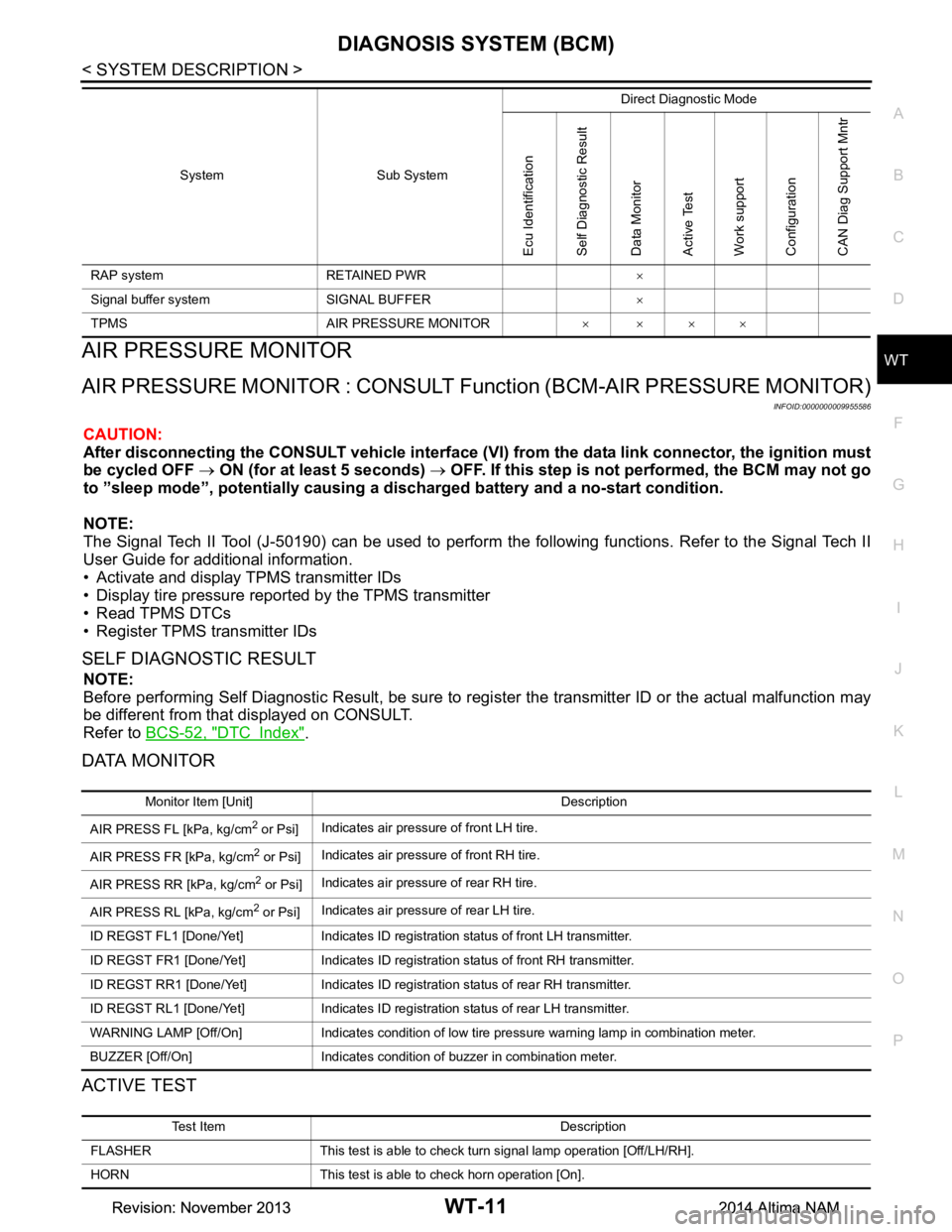
DATA MONITOR
ACTIVE TEST
RAP system RETAINED PWR ×
Signal buffer system SIGNAL BUFFER ×
TPMS AIR PRESSURE MONITOR ××××
System Sub System
Direct Diagnostic Mode
Ecu Identification
Self Diagnostic Result
Data Monitor
Active Test
Work support
Configuration
CAN Diag Support Mntr
Monitor Item [Unit] Description
AIR PRESS FL [kPa, kg/cm
2 or Psi] Indicates air pressure of front LH tire.
AIR PRESS FR [kPa, kg/cm
2 or Psi] Indicates air pressure of front RH tire.
AIR PRESS RR [kPa, kg/cm
2 or Psi] Indicates air pressure of rear RH tire.
AIR PRESS RL [kPa, kg/cm
2 or Psi] Indicates air pressure of rear LH tire.
ID REGST FL1 [Done/Yet] Indicates ID registration status of front LH transmitter.
ID REGST FR1 [Done/Yet] Indicates ID registration status of front RH transmitter.
ID REGST RR1 [Done/Yet] Indicates ID registration status of rear RH transmitter.
ID REGST RL1 [Done/Yet] Indicates ID registration status of rear LH transmitter.
WARNING LAMP [Off/On] Indicates condition of low tire pressure warning lamp in combination meter.
BUZZER [Off/On] Indicates condition of buzzer in combination meter.
Test Item Description
FLASHER This test is able to check turn signal lamp operation [Off/LH/RH].
HORN This test is able to check horn operation [On].
Revision: November 20132014 Altima NAMRevision: November 20132014 Altima NAM
Page 4700 of 4801
ID REGISTRATION PROCEDUREWT-25
< BASIC INSPECTION >
C
D
F
G H
I
J
K L
M A
B
WT
N
O P
ID REGISTRATION PROCEDURE
DescriptionINFOID:0000000009464492
This procedure must be performed:
• after replacement of a transmitter or BCM (with individual tire pressure display).
• after replacement of a transmitter, BCM or rotation of the wheels (without individual tire pressure display).
Work ProcedureINFOID:0000000009464493
TPMS ID registration can be performed using one of the following procedures:
• Transmitter Activation tool (J-45295-A) with CONSULT (preferred method)
• Signal Tech II tool (J-50190) with CONSULT (preferred method)
• Signal Tech II tool (J-50190) without CONSULT
• CONSULT only
TPMS REGISTRATION WITH TRANSMI TTER ACTIVATION TOOL (J-45295-A)
With CONSULT
1. Turn the ignition switch ON.
2. Using CONSULT, select “WORK SUPPORT” in BC M (AIR PRESSURE MONITOR). Then, select “ID
REGIST.”
3. Select “Start” on “ID REGIST” screen.
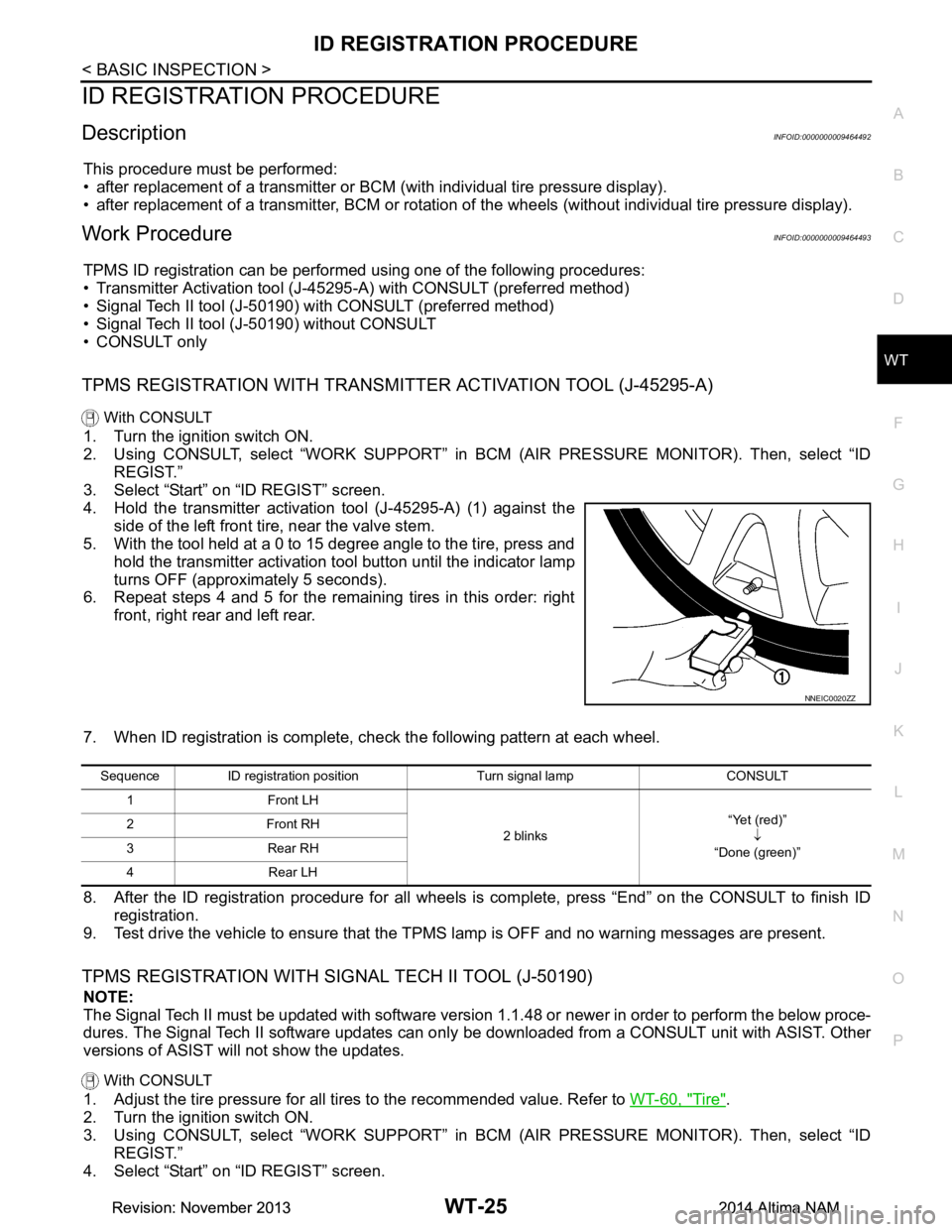
4. Hold the transmitter activation tool (J-45295-A) (1) against the side of the left front tire, near the valve stem.
5. With the tool held at a 0 to 15 degree angle to the tire, press and
hold the transmitter activation tool button until the indicator lamp
turns OFF (approximately 5 seconds).
6. Repeat steps 4 and 5 for the remaining tires in this order: right
front, right rear and left rear.
7. When ID registration is complete, check the following pattern at each wheel.
8. After the ID registration procedure for all wheels is complete, press “End” on the CONSULT to finish ID registration.
9. Test drive the vehicle to ensure that the TPMS lamp is OFF and no warning messages are present.
TPMS REGISTRATION WITH SIGNAL TECH II TOOL (J-50190)
NOTE:
The Signal Tech II must be updated with software version 1.1.48 or newer in order to perform the below proce-
dures. The Signal Tech II software updates can onl y be downloaded from a CONSULT unit with ASIST. Other
versions of ASIST will not show the updates.
With CONSULT
1. Adjust the tire pressure for all tires to the recommended value. Refer to WT-60, "Tire".
2. Turn the ignition switch ON.
3. Using CONSULT, select “WORK SUPPORT” in BC M (AIR PRESSURE MONITOR). Then, select “ID
REGIST.”
4. Select “Start” on “ID REGIST” screen.
NNEIC0020ZZ
Sequence ID registration position Turn signal lamp CONSULT
1 Front LH
2 blinks“Yet (red)”
↓
“Done (green)”
2Front RH
3 Rear RH
4 Rear LH
Revision: November 20132014 Altima NAMRevision: November 20132014 Altima NAM
Page 4719 of 4801
WT-44
< DTC/CIRCUIT DIAGNOSIS >
C1734 BCM
C1734 BCM
DTC LogicINFOID:0000000009464510
NOTE:
The Signal Tech II Tool (J-50190) can be used to perform the following functions. Refer to the Signal Tech II
User Guide for additional information.
• Activate and display TPMS transmitter IDs
• Display tire pressure reported by the TPMS transmitter
• Read TPMS DTCs
• Register TPMS transmitter IDs
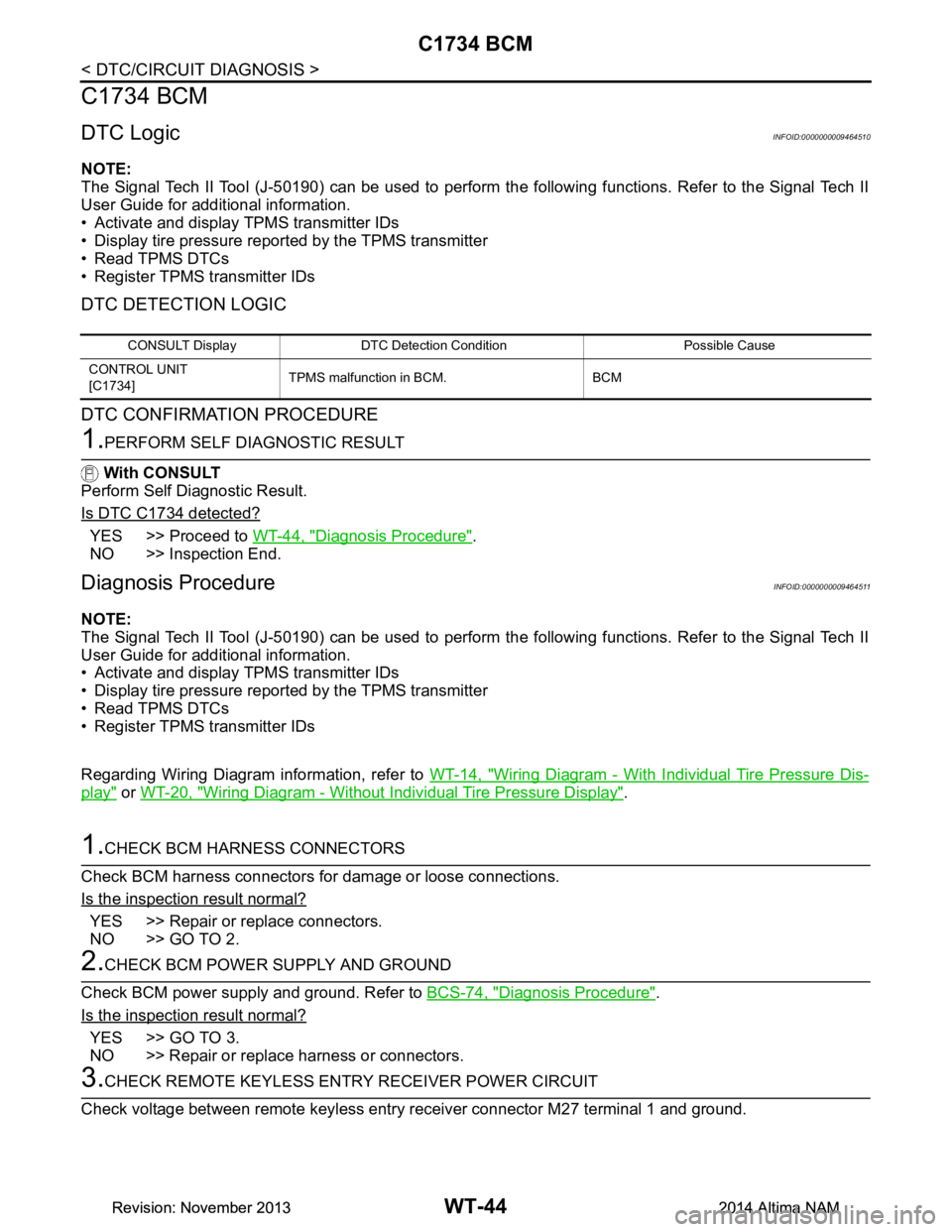
DTC DETECTION LOGIC
DTC CONFIRMATION PROCEDURE
1.PERFORM SELF DIAGNOSTIC RESULT
With CONSULT
Perform Self Diagnostic Result.
Is DTC C1734 detected?
YES >> Proceed to WT-44, "Diagnosis Procedure".
NO >> Inspection End.
Diagnosis ProcedureINFOID:0000000009464511
NOTE:
The Signal Tech II Tool (J-50190) can be used to perform the following functions. Refer to the Signal Tech II
User Guide for additional information.
• Activate and display TPMS transmitter IDs
• Display tire pressure reported by the TPMS transmitter
• Read TPMS DTCs
• Register TPMS transmitter IDs
Regarding Wiring Diagram information, refer to WT-14, "Wiring Diagram - With Individual Tire Pressure Dis-
play" or WT-20, "Wiring Diagram - Without Individual Tire Pressure Display".
1.CHECK BCM HARNESS CONNECTORS
Check BCM harness connectors fo r damage or loose connections.
Is the inspection result normal?
YES >> Repair or replace connectors.
NO >> GO TO 2.
2.CHECK BCM POWER SUPPLY AND GROUND
Check BCM power supply and ground. Refer to BCS-74, "Diagnosis Procedure"
.
Is the inspection result normal?
YES >> GO TO 3.
NO >> Repair or replace harness or connectors.
3.CHECK REMOTE KEYL ESS ENTRY RECEIVER POWER CIRCUIT
Check voltage between remote keyless entry receiver connector M27 terminal 1 and ground.
CONSULT Display DTC Detectio n Condition Possible Cause
CONTROL UNIT
[C1734] TPMS malfunction in BCM. BCM
Revision: November 20132014 Altima NAMRevision: November 20132014 Altima NAM
Page 4749 of 4801

WW-14
< SYSTEM DESCRIPTION >
DIAGNOSIS SYSTEM (IPDM E/R)
APPLICATION ITEM
CONSULT performs the following functions via CAN communication with IPDM E/R.
ECU IDENTIFICATION
The IPDM E/R part number is displayed.
SELF DIAGNOSTIC RESULT
Refer to PCS-20, "DTC Index".
DATA MONITOR
Direct Diagnostic Mode Description
Ecu Identification The IPDM E/R part number is displayed.
Self Diagnostic Result The IPDM E/R self diagnostic results are displayed.
Data Monitor The IPDM E/R input/output data is displayed in real time.
Active Test The IPDM E/R activates outputs to test components.
CAN Diag Support Mntr The result of transmit/receive diagnosis of CAN communication is displayed.
Monitor Item [Unit] Main
Signals Description
MOTOR FAN REQ [%] ×Indicates cooling fan speed signal received from ECM on CAN communication
line
AC COMP REQ [On/Off] ×Indicates A/C compressor request signal received from ECM on CAN commu-
nication line
TAIL&CLR REQ [On/Off] ×Indicates position light request signal received from BCM on CAN communica-
tion line
HL LO REQ [On/Off] ×Indicates low beam request signal received from BCM on CAN communication
line
HL HI REQ [On/Off] ×Indicates high beam request signal received from BCM on CAN communication
line
FR FOG REQ [On/Off] ×Indicates front fog light request signal received from BCM on CAN communica-
tion line
FR WIP REQ [Stop/1LOW/Low/Hi] ×Indicates front wiper request signal received from BCM on CAN communication
line
WIP AUTO STOP [STOP P/ACT P] ×Indicates condition of front wiper auto stop signal
WIP PROT [Off/BLOCK] ×Indicates condition of front wiper fail-safe operation
IGN RLY1 -REQ [On/Off] Indicates ignition switch ON signal received from BCM on CAN communication
line
IGN RLY [On/Off] ×Indicates condition of ignition relay
PUSH SW [On/Off] Indicates condition of push-button ignition switch
INTER/NP SW [On/Off] Indicates condition of CVT shift position
ST RLY CONT [On/Off] Indicates starter relay status signal received from BCM on CAN communication
line
IHBT RLY -REQ [On/Off] Indicates starter control relay signal received from BCM on CAN communication
line
ST/INHI RLY [Off/ ST /INHI] Indicates condition of starter relay and starter control relay
DETENT SW [On/Off] Indicates condition of CVT shift selector (park position switch)
DTRL REQ [Off] Indicates daytime light request signal received from BCM on CAN communica-
tion line
HOOD SW [On/Off] Indicates condition of hood switch
THFT HRN REQ [On/Off] Indicates theft warning horn request signal received from BCM on CAN commu-
nication line
Revision: November 20132014 Altima NAMRevision: November 20132014 Altima NAM