2014 NISSAN QUEST tow
[x] Cancel search: towPage 96 of 482
Malfunction Indicator Light (MIL)
If the malfunction indicator light comes on
steady or blinks while the engine is running, it
may indicate a potential emission control and/or
Continuously Variable Transmission (CVT) mal-
function.
The malfunction indicator light may also come on
steady if the fuel-filler cap is loose or missing, or
if the vehicle runs out of fuel. Check to make
sure the fuel-filler cap is installed and closed
tightly, and that the vehicle has at least 3 US
gallons (11.4 liters) of fuel in the fuel tank.
After a few driving trips, the
light should
turn off if no other potential emission control
system malfunction exists.
If this indicator light remains on for 20 seconds
and then blinks for 10 seconds when the engine
is not running, it indicates that the vehicle is not
ready for an emission control system inspection/
maintenance test. (See “Readiness for inspec-
tion/maintenance (I/M) test” (P.9-27).)
Operation:
The malfunction indicator light will come on in
one of two ways:
. Malfunction indicator light on steady — An
emission control system and/or CVT mal-
function has been detected. Check the fuel-
filler cap if the LOOSE FUEL CAP warning appears on the dot matrix liquid crystal
display. If the fuel-filler cap is loose or
missing, tighten or install the cap and
continue to drive the vehicle. The
light
should turn off after a few driving trips. If the
light does not turn off after a few driving
trips, have the vehicle inspected by a
NISSAN dealer. You do not need to have
your vehicle towed to the dealer.
. Malfunction indicator light blinking — An
engine misfire has been detected which may
damage the emission control system.
To reduce or avoid emission control system
damage:
1) Do not drive at speeds above 45 MPH
(72 km/h).
2) Avoid hard acceleration or deceleration.
3) Avoid steep uphill grades.
4) If possible, reduce the amount of cargo being hauled or towed.
The malfunction indicator light may stop
blinking and remain on.
Have the vehicle inspected by a NISSAN
dealer. You do not need to have your vehicle
towed to the dealer.
CAUTION
Continued vehicle operation without
having the emission control system
and/or CVT system checked and re-
paired as necessary could lead to poor
driveability, reduced fuel economy, and
possible damage to the emission con-
trol system.
Overdrive off indicator light
The overdrive off indicator light illuminates when
the overdrive off mode is selected.
For additional information, see “Continuously
Variable Transmission (CVT)” (P.5-13) of this
manual.
Security indicator light
The light blinks when the ignition switch is in the
ACC, OFF or LOCK position. This function
indicates the security system equipped on the
vehicle is operational.
If the security system is malfunctioning, this light
will remain on while the ignition switch is in the
ON position. For additional information, see
“Security systems” (P.2-27) .
Instruments and controls2-17
Page 110 of 482
SIC3664
The windshield wiper and washer operates
when the ignition switch is in the ON position.
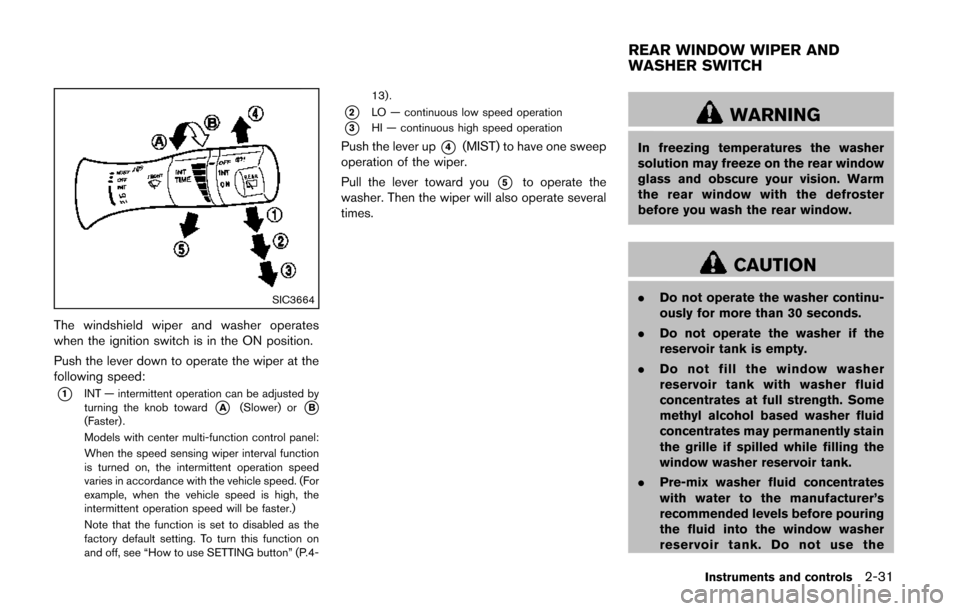
Push the lever down to operate the wiper at the
following speed:
*1INT — intermittent operation can be adjusted by
turning the knob toward*A(Slower) or*B(Faster) .
Models with center multi-function control panel:
When the speed sensing wiper interval function
is turned on, the intermittent operation speed
varies in accordance with the vehicle speed. (For
example, when the vehicle speed is high, the
intermittent operation speed will be faster.)
Note that the function is set to disabled as the
factory default setting. To turn this function on
and off, see “How to use SETTING button” (P.4-13).
*2LO — continuous low speed operation
*3HI — continuous high speed operation
Push the lever up*4(MIST) to have one sweep
operation of the wiper.
Pull the lever toward you
*5to operate the
washer. Then the wiper will also operate several
times.
WARNING
In freezing temperatures the washer
solution may freeze on the rear window
glass and obscure your vision. Warm
the rear window with the defroster
before you wash the rear window.
CAUTION
. Do not operate the washer continu-
ously for more than 30 seconds.
. Do not operate the washer if the
reservoir tank is empty.
. Do not fill the window washer
reservoir tank with washer fluid
concentrates at full strength. Some
methyl alcohol based washer fluid
concentrates may permanently stain
the grille if spilled while filling the
window washer reservoir tank.
. Pre-mix washer fluid concentrates
with water to the manufacturer’s
recommended levels before pouring
the fluid into the window washer
reservoir tank. Do not use the
Instruments and controls2-31
REAR WINDOW WIPER AND
WASHER SWITCH
Page 114 of 482
seconds.
For automatic headlights off delay setting, see
“Vehicle information and settings (models with
center multi-function control panel)” (P.4-8).
SIC3670
Headlight beam select
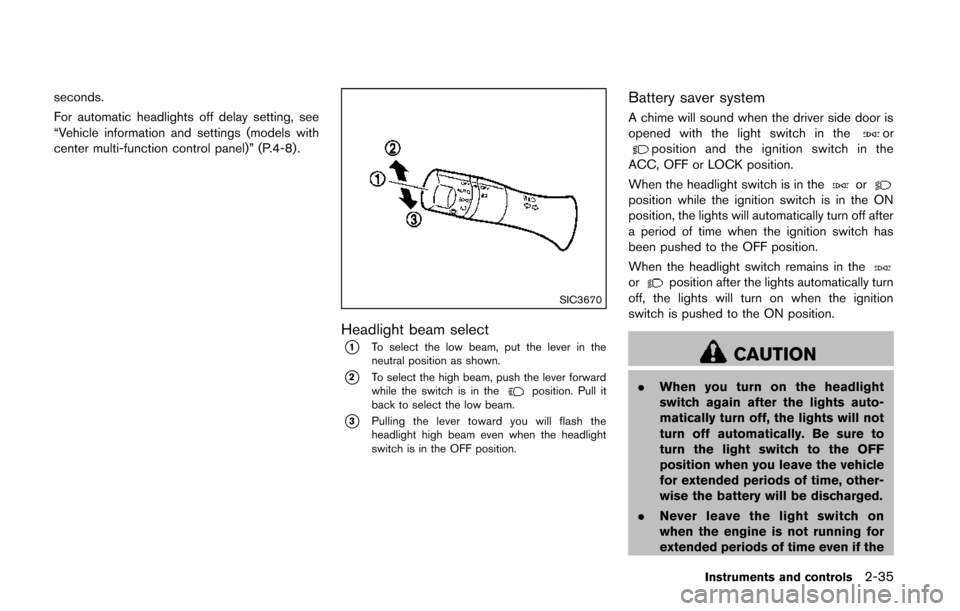
*1To select the low beam, put the lever in the
neutral position as shown.
*2To select the high beam, push the lever forward
while the switch is in theposition. Pull it
back to select the low beam.
*3Pulling the lever toward you will flash the
headlight high beam even when the headlight
switch is in the OFF position.
Battery saver system
A chime will sound when the driver side door is
opened with the light switch in theorposition and the ignition switch in the
ACC, OFF or LOCK position.
When the headlight switch is in the
orposition while the ignition switch is in the ON
position, the lights will automatically turn off after
a period of time when the ignition switch has
been pushed to the OFF position.
When the headlight switch remains in the
orposition after the lights automatically turn
off, the lights will turn on when the ignition
switch is pushed to the ON position.
CAUTION
. When you turn on the headlight
switch again after the lights auto-
matically turn off, the lights will not
turn off automatically. Be sure to
turn the light switch to the OFF
position when you leave the vehicle
for extended periods of time, other-
wise the battery will be discharged.
. Never leave the light switch on
when the engine is not running for
extended periods of time even if the
Instruments and controls2-35
Page 126 of 482
SIC47212nd row center console
2nd row center console
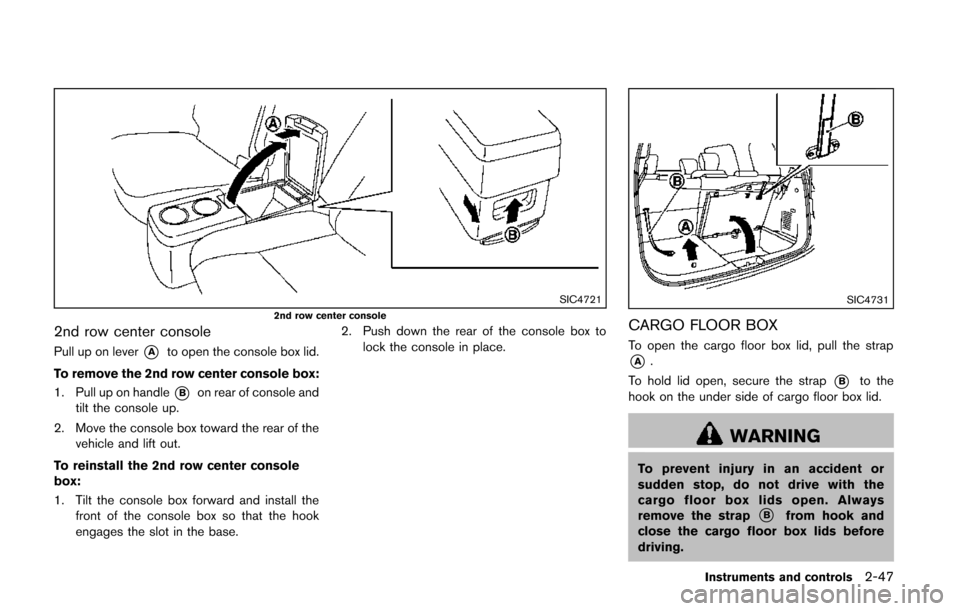
Pull up on lever*Ato open the console box lid.
To remove the 2nd row center console box:
1. Pull up on handle
*Bon rear of console and
tilt the console up.
2. Move the console box toward the rear of the vehicle and lift out.
To reinstall the 2nd row center console
box:
1. Tilt the console box forward and install the front of the console box so that the hook
engages the slot in the base. 2. Push down the rear of the console box to
lock the console in place.
SIC4731
CARGO FLOOR BOX
To open the cargo floor box lid, pull the strap
*A.
To hold lid open, secure the strap
*Bto the
hook on the under side of cargo floor box lid.
WARNING
To prevent injury in an accident or
sudden stop, do not drive with the
cargo floor box lids open. Always
remove the strap
*Bfrom hook and
close the cargo floor box lids before
driving.
Instruments and controls2-47
Page 156 of 482
push the LOCK button on the Intelligent Key
after the door is closed. See “Remote keyless
entry system” (P.3-21) .
OPERATING SLIDING DOOR BY
POWER ASSIST
To operate, pull the inside or outside door
handle until you hear the buzzer, the door will
automatically open or close.
If the door handle is operated while the sliding
door is moving, the door will reverse directions
and stop at either the full open or closed
position.
SLIDING DOOR AUTO REVERSE
FUNCTION
If an obstacle is detected while the power
sliding door is being operated, the door will
reverse directions and return to the full open or
full closed position.
If you touch the sensor of the sliding door while
the sliding door is closing automatically, the door
will start moving in the reverse direction and
stop at the fully opened position.
WARNING
.Radio waves could adversely affect
electric medical equipment. Those
who use a pacemaker should con-
tact the electric medical equipment
manufacturer for the possible influ-
ences before use.
. The Intelligent Key transmits radio
waves when the buttons are
pushed. The FAA advises that radio
waves may affect aircraft navigation
and communication systems. Do not
operate the Intelligent Key while on
an airplane. Make sure the buttons
are not operated unintentionally
when the unit is stored for a flight.
The Intelligent Key system can operate all the
door locks (including the lift gate) using the
remote keyless function or pushing the request
switch on the vehicle without taking the key out
from a pocket or purse. The operating environ-
ment and/or conditions may affect the Intelligent
Key system operation.
Be sure to read the following before using the
Intelligent Key system.
CAUTION
. Be sure to carry the Intelligent Key
with you when operating the vehi-
cle.
. Never leave the Intelligent Key in
the vehicle when you leave the
vehicle.
The Intelligent Key is always communicating with
the vehicle as it receives radio waves. The
Intelligent Key system transmits weak radio
signals. Environmental conditions may interfere
with the operation of the Intelligent Key system
under the following operating conditions.
. When operating near a location where
strong radio signals are transmitted, such
as a TV tower, power station and broad-
casting station.
. When in possession of wireless equipment,
such as a cellular telephone, transceiver,
and CB radio.
. When the Intelligent Key is in contact with or
covered by metallic materials.
. When any type of radio wave remote control
is used nearby.
. When the Intelligent Key is placed near an
electric appliance such as a personal
Pre-driving checks and adjustments3-13
INTELLIGENT KEY SYSTEM
Page 179 of 482
3-36Pre-driving checks and adjustments
SPA1829
Foldable outside mirrors
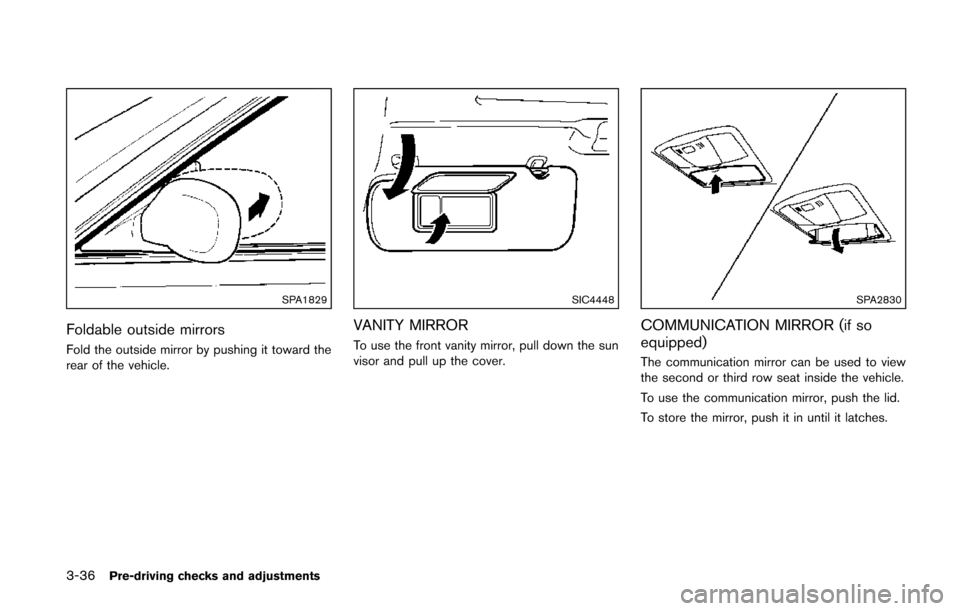
Fold the outside mirror by pushing it toward the
rear of the vehicle.
SIC4448
VANITY MIRROR
To use the front vanity mirror, pull down the sun
visor and pull up the cover.
SPA2830
COMMUNICATION MIRROR (if so
equipped)
The communication mirror can be used to view
the second or third row seat inside the vehicle.
To use the communication mirror, push the lid.
To store the mirror, push it in until it latches.
Page 188 of 482
HOW TO USE MULTI-FUNCTION
CONTROLLER
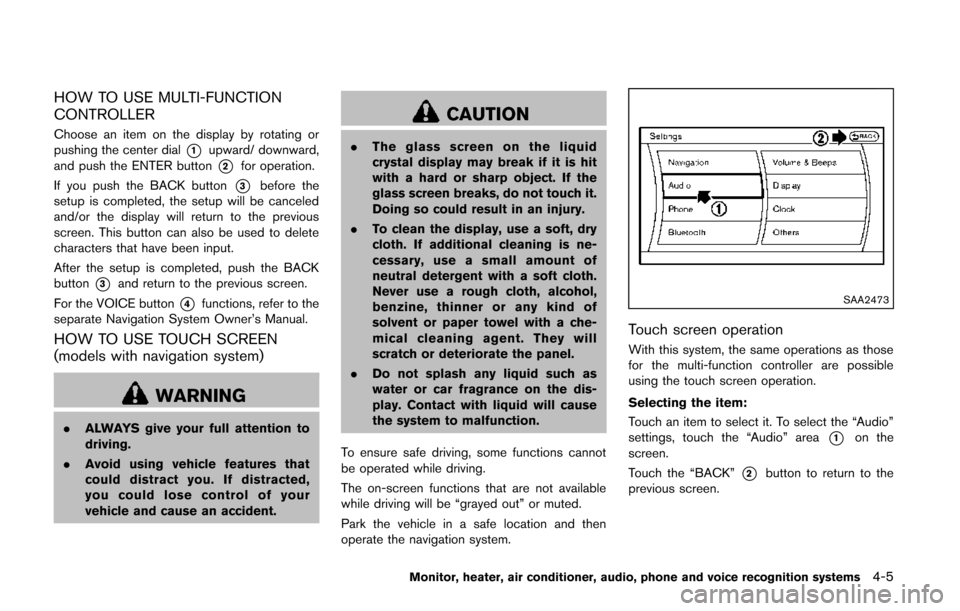
Choose an item on the display by rotating or
pushing the center dial
*1upward/ downward,
and push the ENTER button
*2for operation.
If you push the BACK button
*3before the
setup is completed, the setup will be canceled
and/or the display will return to the previous
screen. This button can also be used to delete
characters that have been input.
After the setup is completed, push the BACK
button
*3and return to the previous screen.
For the VOICE button
*4functions, refer to the
separate Navigation System Owner’s Manual.
HOW TO USE TOUCH SCREEN
(models with navigation system)
WARNING
. ALWAYS give your full attention to
driving.
. Avoid using vehicle features that
could distract you. If distracted,
you could lose control of your
vehicle and cause an accident.
CAUTION
.The glass screen on the liquid
crystal display may break if it is hit
with a hard or sharp object. If the
glass screen breaks, do not touch it.
Doing so could result in an injury.
. To clean the display, use a soft, dry
cloth. If additional cleaning is ne-
cessary, use a small amount of
neutral detergent with a soft cloth.
Never use a rough cloth, alcohol,
benzine, thinner or any kind of
solvent or paper towel with a che-
mical cleaning agent. They will
scratch or deteriorate the panel.
. Do not splash any liquid such as
water or car fragrance on the dis-
play. Contact with liquid will cause
the system to malfunction.
To ensure safe driving, some functions cannot
be operated while driving.
The on-screen functions that are not available
while driving will be “grayed out” or muted.
Park the vehicle in a safe location and then
operate the navigation system.
SAA2473
Touch screen operation
With this system, the same operations as those
for the multi-function controller are possible
using the touch screen operation.
Selecting the item:
Touch an item to select it. To select the “Audio”
settings, touch the “Audio” area
*1on the
screen.
Touch the “BACK”
*2button to return to the
previous screen.
Monitor, heater, air conditioner, audio, phone and voice recognition systems4-5
Page 220 of 482
SAA2021
Moving near a projecting object
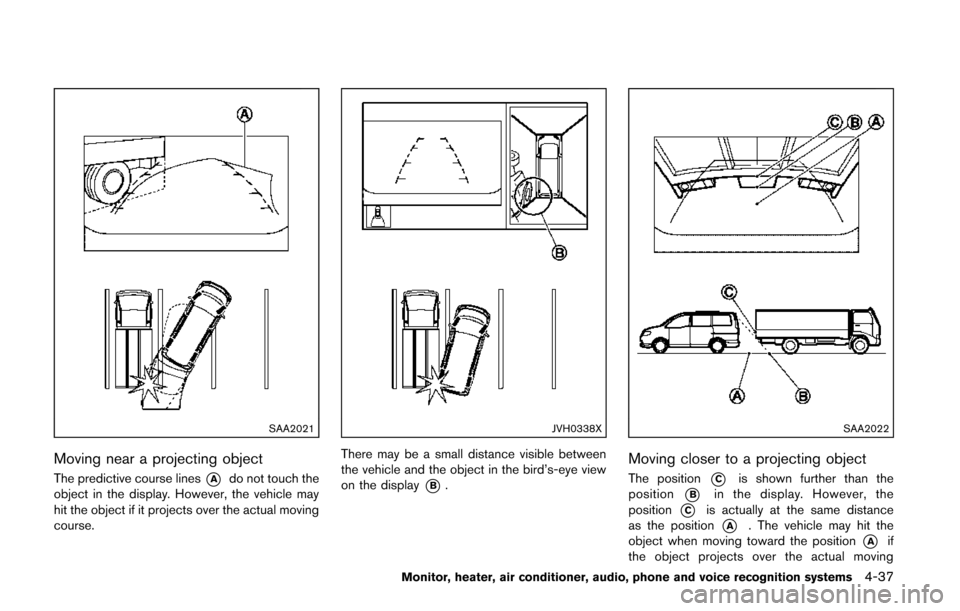
The predictive course lines*Ado not touch the
object in the display. However, the vehicle may
hit the object if it projects over the actual moving
course.
JVH0338X
There may be a small distance visible between
the vehicle and the object in the bird’s-eye view
on the display
*B.
SAA2022
Moving closer to a projecting object
The position*Cis shown further than the
position
*Bin the display. However, the
position
*Cis actually at the same distance
as the position
*A. The vehicle may hit the
object when moving toward the position
*Aif
the object projects over the actual moving
Monitor, heater, air conditioner, audio, phone and voice recognition systems4-37