2014 NISSAN MAXIMA AUX
[x] Cancel search: AUXPage 250 of 432
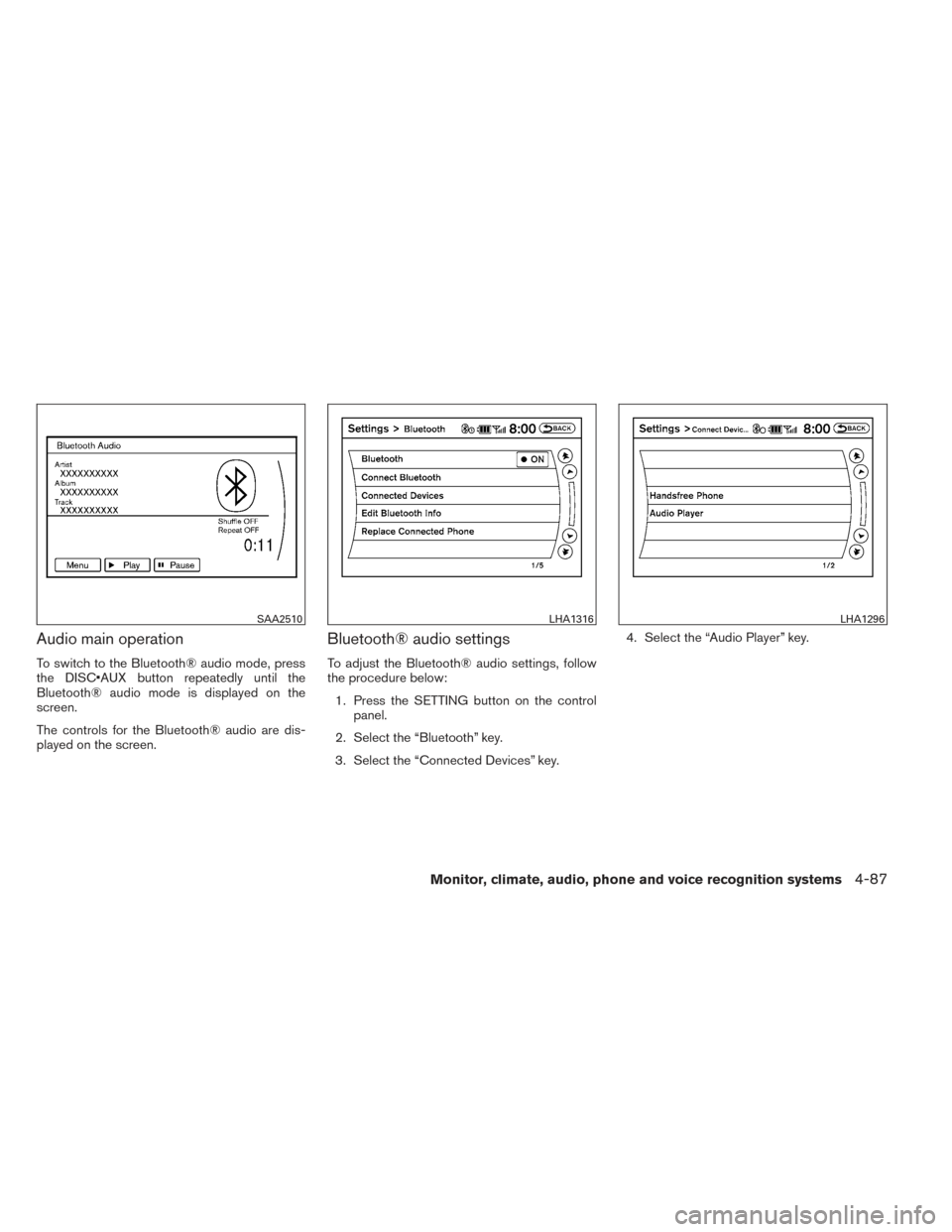
Audio main operation
To switch to the Bluetooth® audio mode, press
the DISC•AUX button repeatedly until the
Bluetooth® audio mode is displayed on the
screen.
The controls for the Bluetooth® audio are dis-
played on the screen.
Bluetooth® audio settings
To adjust the Bluetooth® audio settings, follow
the procedure below:1. Press the SETTING button on the control panel.
2. Select the “Bluetooth” key.
3. Select the “Connected Devices” key. 4. Select the “Audio Player” key.
SAA2510LHA1316LHA1296
Monitor, climate, audio, phone and voice recognition systems4-87
Page 253 of 432
SOURCE select switch
Push the source select switch to change the
mode in the following sequence:
Models without Navigation System:
AM→FM1 →FM2 →XM1 →XM2 →XM3
(satellite radio, if so equipped) →USB/iPod®* (if
so equipped) →CD/DVD* →AUX* →AM.
Models with Navigation System:
AM →FM1 →FM2 →XM1 →XM2 →XM3
(satellite radio, if so equipped) →CD/DVD* →
USB/iPod®* →Bluetooth® Audio* →AUX* →
AM.
* These modes are only available when compat-
ible media storage is inserted into the device.
Volume control switch
Push the volume control switch to increase or
decrease the volume.
Menu control
switch/ENTER button
While the display is showing a MAP, STATUS or
Audio screen, tilt the Menu Control switch up-
ward or downward to select a station, track, CD
or folder. For most audio sources, tilting the
switch up/down for more than 1.5 seconds pro- vides a different function than a tilting up/down
for less than 1.5 seconds.
AM and FM:
● Tilt up/down for less than 1.5 seconds to
increase or decrease the preset station.
● Tilt up/down for more than 1.5 seconds to
seek up or down to the next station.
● Press the ENTER button to show the list of
preset stations.
XM (if so equipped): ● Tilt up/down for less than 1.5 seconds to
increase or decrease the preset station.
● Tilt up/down for more than 1.5 seconds to
go to the next or previous category.
● Press the ENTER button to show the XM
Menu.
iPod® (if so equipped): ● Tilt up/down for less than 1.5 seconds to
increase or decrease the track number.
● Press the ENTER button to show the iPod
Menu.
CD: ● Tilt up/down for less than 1.5 seconds to
increase or decrease the track number. ●
Tilt up/down for more than 1.5 seconds to
increase or decrease the folder number (if
playing compressed audio files) .
● Press the ENTER button to show the CD
Menu.
DVD (if so equipped): ● Tilt up/down for less than 1.5 seconds to
increase or decrease the track number.
● Tilt up/down for more than 1.5 seconds to
increase or decrease the title number.
● Press the ENTER button to select an item
from the DVD display.
● When the transparent operation menu ap-
pears, the switch will control the menu.
USB (if so equipped): ● Tilt up/down for less than 1.5 seconds to
increase or decrease the track number.
● Tilt up/down for more than 1.5 seconds to
increase or decrease the folder number.
● Press the ENTER button to show the USB
Menu.
Bluetooth® Audio (if so equipped): ● Tilt up/down for less than 1.5 seconds to
increase or decrease the track number.
4-90Monitor, climate, audio, phone and voice recognition systems
Page 254 of 432
AUX:● Press the ENTER button to show the AUX
Menu.
ANTENNA
Window antenna
The antenna pattern is printed inside the rear
window.
CAUTION
● Do not place metalized film near the
rear window glass or attach any metal
parts to it. This may cause poor recep-
tion or noise.
● When cleaning the inside of the rear
window, be careful not to scratch or
damage the rear window antenna.
Lightly wipe along the antenna with a
dampened soft cloth. When installing a CB, ham radio or car phone in
your vehicle, be sure to observe the following
precautions; otherwise, the new equipment may
adversely affect the engine control system and
other electronic parts.
WARNING
●
A cellular phone should not be used for
any purpose while driving so full atten-
tion may be given to vehicle operation.
Some jurisdictions prohibit the use of
cellular phones while driving.
● If you must make a call while your ve-
hicle is in motion, the hands free cellu-
lar phone operational mode (if so
equipped) is highly recommended. Ex-
ercise extreme caution at all times so
full attention may be given to vehicle
operation.
● If you are unable to devote full attention
to vehicle operation while talking on
the phone, pull off the road to a safe
location and stop your vehicle.
CAUTION
● Keep the antenna as far away as pos-
sible from the electronic control
modules.
● Keep the antenna wire more than 8 in
(20 cm) away from the electronic control
system harnesses. Do not route the an-
tenna wire next to any harness.
● Adjust the antenna standing-wave ratio
as recommended by the manufacturer.
● Connect the ground wire from the CB
radio chassis to the body.
● For details, consult a NISSAN dealer.
CAR PHONE OR CB RADIO
Monitor, climate, audio, phone and voice recognition systems4-91
Page 292 of 432
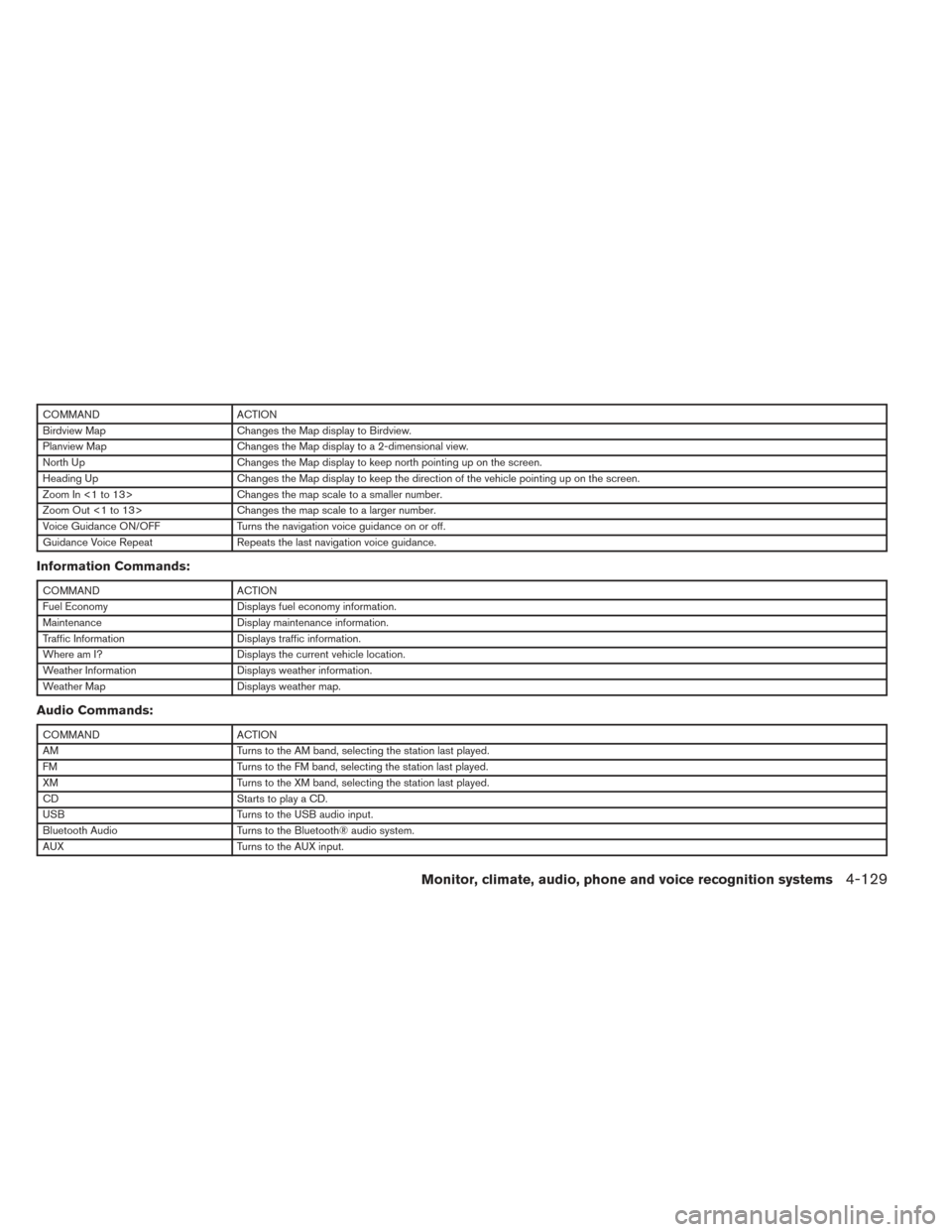
COMMANDACTION
Birdview Map Changes the Map display to Birdview.
Planview Map Changes the Map display to a 2-dimensional view.
North Up Changes the Map display to keep north pointing up on the screen.
Heading Up Changes the Map display to keep the direction of the vehicle pointing up on the screen.
Zoom In <1 to 13> Changes the map scale to a smaller number.
Zoom Out <1 to 13> Changes the map scale to a larger number.
Voice Guidance ON/OFF Turns the navigation voice guidance on or off.
Guidance Voice Repeat Repeats the last navigation voice guidance.
Information Commands:
COMMANDACTION
Fuel Economy Displays fuel economy information.
Maintenance Display maintenance information.
Traffic Information Displays traffic information.
Where am I? Displays the current vehicle location.
Weather Information Displays weather information.
Weather Map Displays weather map.
Audio Commands:
COMMANDACTION
AM Turns to the AM band, selecting the station last played.
FM Turns to the FM band, selecting the station last played.
XM Turns to the XM band, selecting the station last played.
CD Starts to play a CD.
USB Turns to the USB audio input.
Bluetooth Audio Turns to the Bluetooth® audio system.
AUX Turns to the AUX input.
Monitor, climate, audio, phone and voice recognition systems4-129
Page 424 of 432
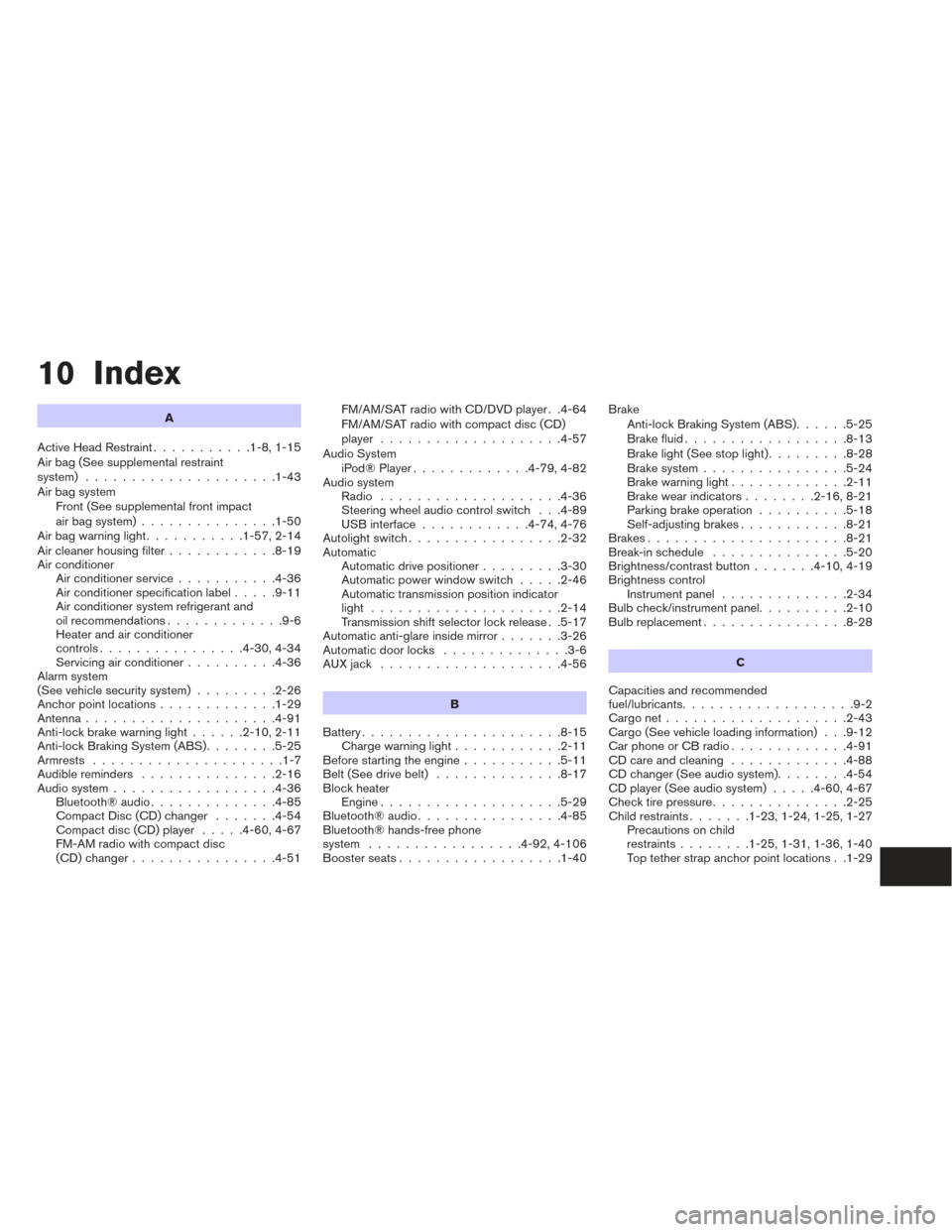
10 Index
A
Active Head Restraint ...........1-8,1-15
Air bag (See supplemental restraint
system) .....................1-43
Air bag system Front (See supplemental front impact
air bag system) ...............1-50
Airbagwarninglight...........1-57,2-14
Air cleaner housing filter ............8-19
Air conditioner Air conditioner service ...........4-36
Air conditioner specification label .....9-11
Air conditioner system refrigerant and
oil recommendations .............9-6
Heater and air conditioner
controls................4-30,4-34
Servicing air conditioner ..........4-36
Alarm system
(See vehicle security system) .........2-26
Anchor point locations .............1-29
Antenna.....................4-91
Anti-lock brake warning light ......2-10,2-11
Anti-lock Braking System (ABS) ........5-25
Armrests .....................1-7
Audible reminders ...............2-16
Audio system ..................4-36
Bluetooth®audio..............4-85
Compact Disc (CD) changer .......4-54
Compact disc (CD) player .....4-60,4-67
FM-AM radio with compact disc
(CD) changer ................4-51 FM/AM/SAT radio with CD/DVD player . .4-64
FM/AM/SAT radio with compact disc (CD)
player ....................4-57
Audio System iPod®Player.............4-79,4-82
Audio system Radio ....................4-36
Steering wheel audio control switch . . .4-89
USB interface ............4-74,4-76
Autolight switch .................2-32
Automatic Automatic drive positioner .........3-30
Automatic power window switch .....2-46
Automatic transmission position indicator
light .....................2-14
Transmission shift selector lock release . .5-17
Automatic anti-glare inside mirror .......3-26
Automatic door locks ..............3-6
AUXjack ....................4-56
B
Battery ......................8-15
Charge warning light ............2-11
Before starting the engine ...........5-11
Belt (See drive belt) ..............8-17
Block heater Engine ....................5-29
Bluetooth®audio................4-85
Bluetooth® hands-free phone
system .................4-92,4-106
Boosterseats..................1-40 Brake
Anti-lock Braking System (ABS) ......5-25
Brakefluid..................8-13
Brakelight(Seestoplight).........8-28
Brake system ................5-24
Brake warning light .............2-11
Brake wear indicators ........2-16,8-21
Parking brake operation ..........5-18
Self-adjusting brakes ............8-21
Brakes ......................8-21
Break-inschedule ...............5-20
Brightness/contrast button .......4-10,4-19
Brightness control Instrument panel ..............2-34
Bulb check/instrument panel ..........2-10
Bulbreplacement................8-28
C
Capacities and recommended
fuel/lubricants ...................9-2
Cargonet....................2-43
Cargo (See vehicle loading information) . . .9-12
Car phone or CB radio .............4-91
CD care and cleaning .............4-88
CD changer (See audio system) ........
4-54
CD player (See audio system) .....4-60,4-67
Check tire pressure ...............2-25
Child restraints .......1-23,1-24,1-25,1-27
Precautions on child
restraints ........1-25,1-31,1-36,1-40
Top tether strap anchor point locations . .1-29