2014 NISSAN MAXIMA air condition
[x] Cancel search: air conditionPage 140 of 432
WARNING
●Radio waves could adversely affect
electric medical equipment. Those who
use a pacemaker should contact the
electric medical equipment manufac-
turer for the possible influences before
use.
● The Intelligent Key transmits radio
waves when the buttons are pressed.
The FAA advises the radio waves may
affect aircraft navigation and communi-
cation systems. Do not operate the In-
telligent Key while on an airplane. Make
sure the buttons are not operated unin-
tentionally when the unit is stored for a
flight.
The Intelligent Key system can operate all the
door locks using the remote controller function or
pushing the request switch on the vehicle without
taking the key out from a pocket or purse. The
operating environment and/or conditions may af-
fect the Intelligent Key system operation.
Be sure to read the following before using the
Intelligent Key system.
CAUTION
● Be sure to carry the Intelligent Key with
you when operating the vehicle.
● Never leave the Intelligent Key in the
vehicle when you leave the vehicle.
The Intelligent Key is always communicating with
the vehicle as it receives radio waves. The Intel-
ligent Key system transmits weak radio waves.
Environmental conditions may interfere with the
operation of the Intelligent Key system under the
following operating conditions: ● When operating near a location where
strong radio waves are transmitted, such as
a TV tower, power station and broadcasting
station.
● When in possession of wireless equipment,
such as a cellular telephone, transceiver,
and CB radio.
● When the Intelligent Key is in contact with or
covered by metallic materials.
● When any type of radio wave remote control
is used nearby.
● When the Intelligent Key is placed near an
electric appliance such as a personal com-
puter. ●
When the vehicle is parked near a parking
meter.
In such cases, correct the operating conditions
before using the Intelligent Key function or use
the mechanical key.
Although the life of the battery varies depending
on the operating conditions, the battery’s life is
approximately 2 years. If the battery is dis-
charged, replace it with a new one.
When the Intelligent Key battery is almost dis-
charged, insert the Intelligent Key into the Intelli-
gent Key port to start the engine. Replace the
discharged battery with a new one as soon as
possible. For additional information, see “Push
Button Ignition Switch” in the “Starting and driv-
ing” section.
Since the Intelligent Key is continuously receiving
radio waves, if the key is left near equipment
which transmits strong radio waves, such as sig-
nals from a TV and personal computer, the bat-
tery life may become shorter.
For information regarding replacement of a bat-
tery, see “Battery replacement” in the “Mainte-
nance and do-it-yourself” section.
As many as 4 Intelligent Keys can be registered
and used with one vehicle. For information about
the purchase and use of additional Intelligent
Keys, contact a NISSAN dealer.
NISSAN INTELLIGENT KEY®
Pre-driving checks and adjustments3-7
Page 164 of 432
4 Monitor, climate, audio, phone and voice
recognition systems
Control panel buttons — color screen without
Navigation System (if so equipped)..................4-4
How to use the NISSAN controller ...............4-5
How to select menus on the screen ..............4-6
How to use the STATUS button ..................4-6
How to use the INFO button .....................4-6
How to use the SETTING button .................4-8
OFF button............................. 4-10
Control panel buttons — color screen with
Navigation System (if so equipped) .................4-11
How to use the NISSAN controller ..............4-12
How to use the touch screen ...................4-12
How to select menus on the screen .............4-14
How to use the STATUS button .................4-15
How to use the INFO button ....................4-15
How to use the SETTING button ................4-17
OFF button............................. 4-19
Image viewer (if so equipped) ......................4-20
Using the image viewer ........................ 4-20
RearView Monitor (if so equipped) ..................4-22
How to read the displayed lines .................4-22How to park with predicted course lines
..........4-23
Difference between predicted and actual
distances ..................................... 4-24
How to adjust the screen .......................4-27
Operating tips ................................. 4-27
Vents ........................................... 4-28
Heater and Air Conditioner (automatic) (Type A) .....4-29
Automatic operation ........................... 4-30
Manual operation .............................. 4-31
Operating tips ................................. 4-31
Heater and Air Conditioner (automatic) (Type B) .....4-32
Automatic operation ........................... 4-33
Manual operation .............................. 4-34
Operating tips ................................. 4-34
Servicing air conditioner ........................... 4-35
Audio system .................................... 4-35
Radio ........................................ 4-35
FM radio reception ............................ 4-35
AM radio reception ............................ 4-36
Satellite radio reception (if so equipped) . . . ......4-36
Audio operation precautions ....................4-36
Page 167 of 432
WARNING
●Positioning of the heating or air condi-
tioning controls and display controls
should not be done while driving in or-
der that full attention may be given to
the driving operation.
● Do not disassemble or modify this sys-
tem. If you do, it may result in accidents,
fire, or electrical shock.
● Do not use this system if you notice any
abnormality, such as a frozen screen or
lack of sound. Continued use of the
system may result in accident, fire or
electric shock.
● In case you notice any foreign object in
the system hardware, spill liquid on it,
or notice smoke or smell coming from it,
stop using the system immediately and
contact your nearest NISSAN dealer. Ig-
noring such conditions may lead to ac-
cidents, fire or electrical shock.
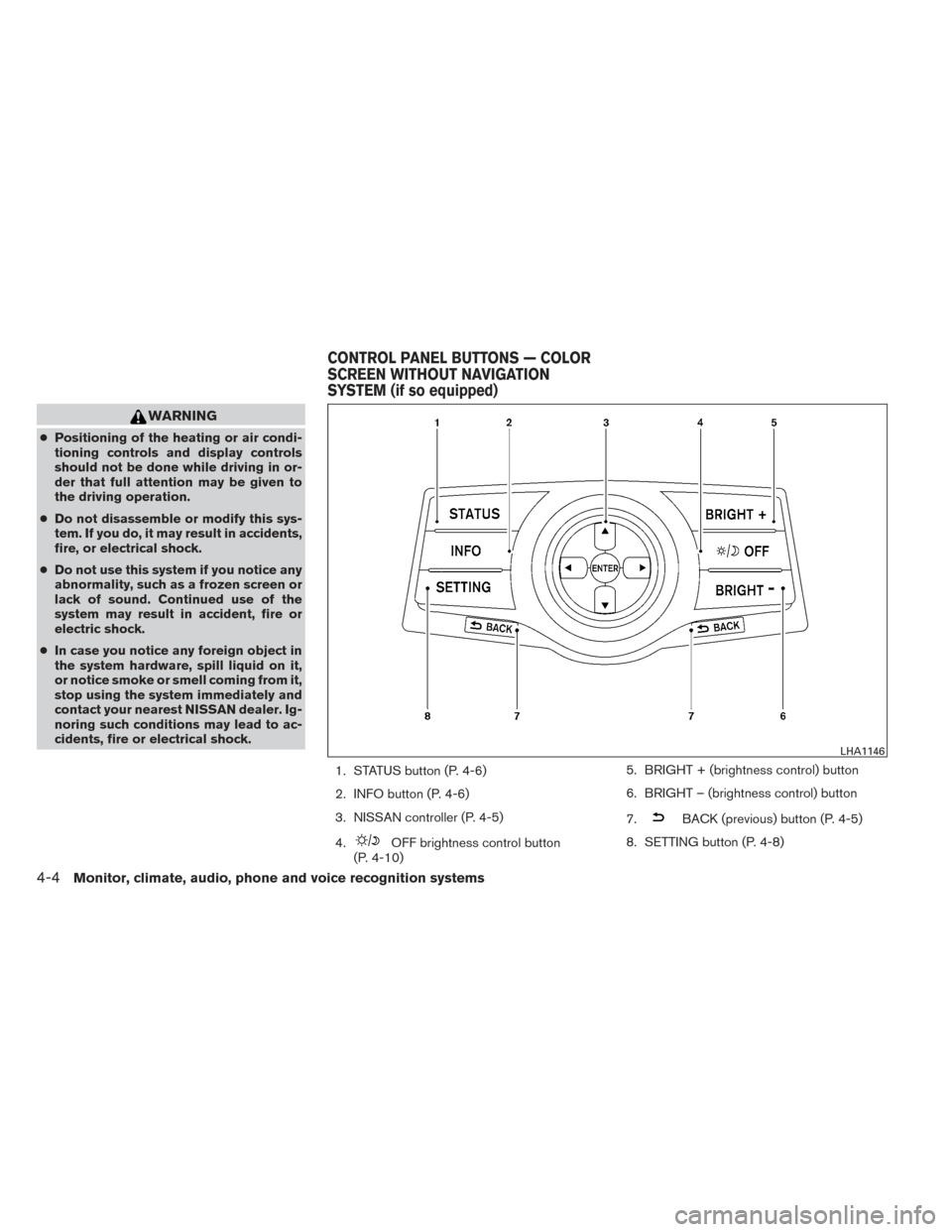
1. STATUS button (P. 4-6)
2. INFO button (P. 4-6)
3. NISSAN controller (P. 4-5)
4.
OFF brightness control button
(P. 4-10) 5. BRIGHT + (brightness control) button
6. BRIGHT – (brightness control) button
7.
BACK (previous) button (P. 4-5)
8. SETTING button (P. 4-8)
LHA1146
CONTROL PANEL BUTTONS — COLOR
SCREEN WITHOUT NAVIGATION
SYSTEM (if so equipped)
4-4Monitor, climate, audio, phone and voice recognition systems
Page 172 of 432
Menu ItemResult
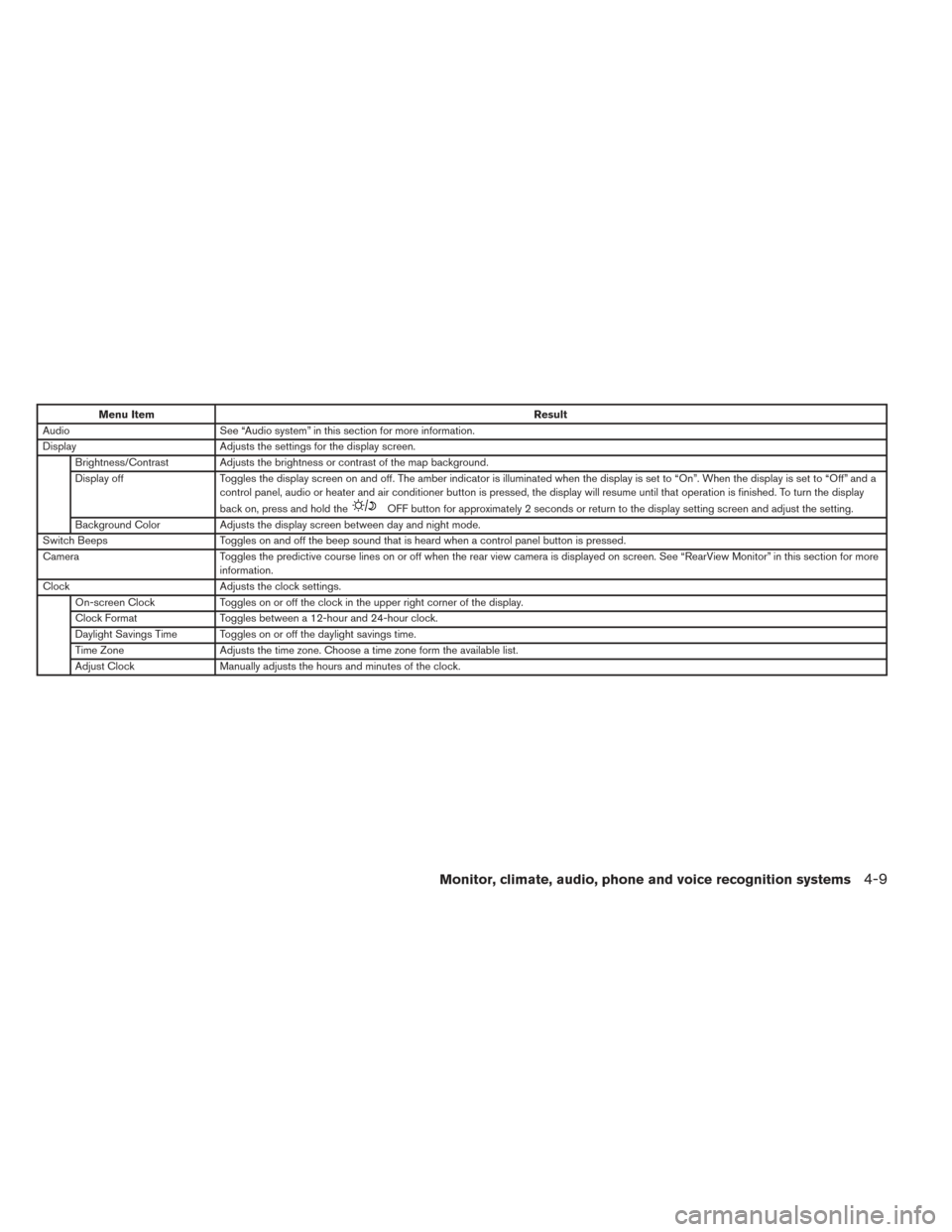
Audio See “Audio system” in this section for more information.
Display Adjusts the settings for the display screen.
Brightness/Contrast Adjusts the brightness or contrast of the map background.
Display off Toggles the display screen on and off. The amber indicator is illuminated when the display is set to “On”. When the display is set to “Off” and a
control panel, audio or heater and air conditioner button is pressed, the display will resume until that operation is finished. To turn the display
back on, press and hold the
OFF button for approximately 2 seconds or return to the display setting screen and adjust the setting.
Background Color Adjusts the display screen between day and night mode.
Switch Beeps Toggles on and off the beep sound that is heard when a control panel button is pressed.
Camera Toggles the predictive course lines on or off when the rear view camera is displayed on screen. See “RearView Monitor” in this section for more
information.
Clock Adjusts the clock settings.
On-screen Clock Toggles on or off the clock in the upper right corner of the display.
Clock Format Toggles between a 12-hour and 24-hour clock.
Daylight Savings Time Toggles on or off the daylight savings time.
Time Zone Adjusts the time zone. Choose a time zone form the available list.
Adjust Clock Manually adjusts the hours and minutes of the clock.
Monitor, climate, audio, phone and voice recognition systems4-9
Page 180 of 432
HOW TO USE THE SETTING
BUTTON
Press the SETTING button. This screen displays
and adjusts various settings and functions that
are available for your vehicle. When the amber
indicator next to an item is illuminated, the feature
is enabled.
Menu ItemResult
Display Adjusts the settings for the display screen
Brightness/Contrast Adjusts the brightness or contrast of the map background.
Display off Toggles the display screen on and off. The amber indicator is illuminated when the display is set to “On”. When the display is set to “Off” and a
control panel, audio or heater and air conditioner button is pressed, the display will resume until that operation is finished. To turn the display bac k
on, press and hold the
OFF button for approximately 2 seconds or return to the display setting screen and adjust the setting.
Background Color Adjusts the display screen between day and night mode.
Color Theme Changes the color of the background, arrows and bars on the screen.
Clock Adjusts the clock settings.
On-screen Clock Toggles on or off the clock in the upper right corner of the display.
Clock Format Toggles between a 12-hour and 24-hour clock.
Offset (hour) , Offset (min) Manually adjusts the hours and minutes of the clock.
Daylight Savings Time Toggles on or off the daylight savings time.
Time Zone Adjusts the time zone. Choose a time zone form the available list.
LHA1236
Monitor, climate, audio, phone and voice recognition systems4-17
Page 192 of 432
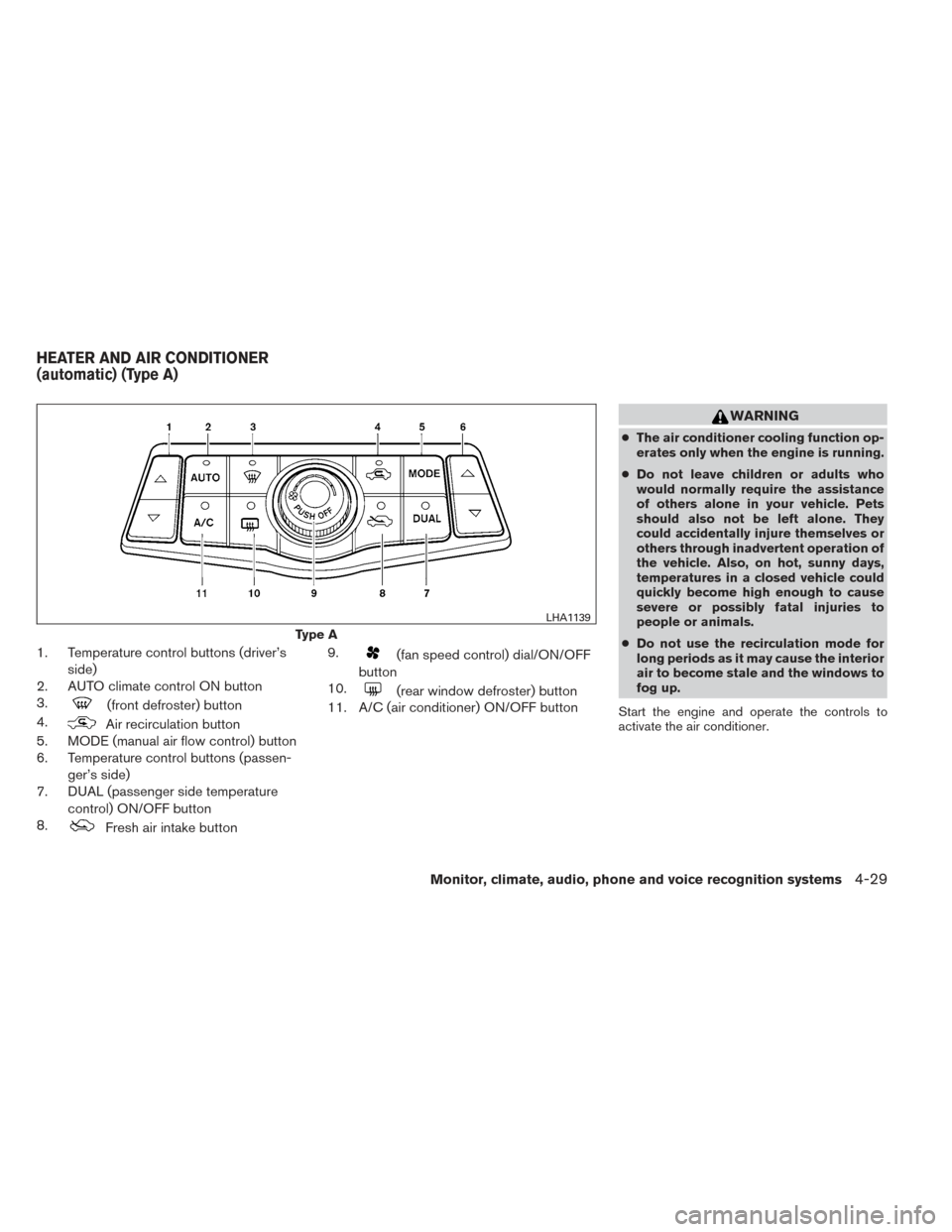
1. Temperature control buttons (driver’sside)
2. AUTO climate control ON button
3.
(front defroster) button
4.
Air recirculation button
5. MODE (manual air flow control) button
6. Temperature control buttons (passen-
ger’s side)
7. DUAL (passenger side temperature
control) ON/OFF button
8.
Fresh air intake button 9.
(fan speed control) dial/ON/OFF
button
10.
(rear window defroster) button
11. A/C (air conditioner) ON/OFF button
WARNING
● The air conditioner cooling function op-
erates only when the engine is running.
● Do not leave children or adults who
would normally require the assistance
of others alone in your vehicle. Pets
should also not be left alone. They
could accidentally injure themselves or
others through inadvertent operation of
the vehicle. Also, on hot, sunny days,
temperatures in a closed vehicle could
quickly become high enough to cause
severe or possibly fatal injuries to
people or animals.
● Do not use the recirculation mode for
long periods as it may cause the interior
air to become stale and the windows to
fog up.
Start the engine and operate the controls to
activate the air conditioner.
Type A
LHA1139
HEATER AND AIR CONDITIONER
(automatic) (Type A)
Monitor, climate, audio, phone and voice recognition systems4-29
Page 193 of 432
NOTE:● Odors from inside and outside the vehicle
can build up in the air conditioner unit. Odor
can enter the passenger compartment
through the vent.
● When parking, set the heater and air condi-
tioner controls to turn off air recirculation to
allow fresh air into the passenger compart-
ment. This should help reduce odors inside
the vehicle.
AUTOMATIC OPERATION
Cooling and/or dehumidified heating
(AUTO)
This mode may be used all year round as the
system automatically works to keep a constant
temperature. Air flow distribution and fan speed
are also controlled automatically.
1. Press the AUTO button on. (The indicator on the button will illuminate and AUTO will be
displayed.)
2. Operate the driver’s side temperature con- trol buttons.
● Adjust the temperature display to about
75°F (24°C) for normal operation. ●
The temperature of the passenger compart-
ment will be maintained automatically. Air
flow distribution and fan speed are also con-
trolled automatically.
● A visible mist may be seen coming from the
ventilators in hot, humid conditions as the air
is cooled rapidly. This does not indicate a
malfunction.
3. You can individually set driver’s and front passenger’s side temperature using each
temperature control button. When the DUAL
button or passenger’s side temperature but-
ton is pressed, the DUAL indicator will come
on. To turn off the passenger’s side tempera-
ture control, press the DUAL button.Heating (A/C OFF)
The air conditioner does not activate. When you
need to heat only, use this mode.
1. Press the A/C button. (A/C OFF will be displayed and A/C indicator will turn off.)
2. Operate the temperature control buttons to set the desired temperature.
● The temperature of the passenger compart-
ment will be maintained automatically. Air
flow distribution and fan speed are also con-
trolled automatically. ●
Do not set the temperature lower than the
outside air temperature. Otherwise the sys-
tem may not work properly.
● Not recommended if windows fog up.
Dehumidified defrosting or defogging
1. Press thefront defroster button on.
(The indicator light on the button will come
on.)
2. Operate the temperature control buttons to set the desired temperature.
● To quickly remove ice from the outside of the
windows, use the fan speed control dial to
set the fan speed to maximum.
● As soon as possible after the windshield is
clean, press the AUTO button to return to
the automatic mode.
● When the
front defroster button is
pressed, the air conditioner will automati-
cally be turned on at outside temperatures
above 36°F (2°C) . The air recirculate mode
automatically turns off, allowing outside air
to be drawn into the passenger compart-
ment to further improve the defogging per-
formance.
4-30Monitor, climate, audio, phone and voice recognition systems
Page 194 of 432
MANUAL OPERATION
Fan speed control
Turn thefan speed control dial to manually
control the fan speed.
Press the AUTO button to return to automatic
control of the fan speed.
Air recirculation
Press theair recirculation button to recir-
culate interior air inside the vehicle. The
indicator light on the button will come on.
The air recirculation cannot be activated when
the air conditioner is in the
front defrosting
mode or the
front defrosting and foot out-
let mode.
Fresh air intake
Press thefresh air intake button to draw
outside air into the passenger compartment.
The
indicator light on the button will come
on.
Automatic intake air control
In the AUTO mode, the intake air will be con-
trolled automatically. To manually control the in-
take air, press the
air recirculation button.
To return to the automatic control mode, press and hold the
air recirculation button or
press and hold the
fresh air intake button
for about 2 seconds. The indicator lights (both air
recirculation and fresh air intake buttons) will
flash twice, and then the intake air will be con-
trolled automatically.
Air flow control
Pressing the MODE button manually controls air
flow and selects the air outlet:
— Air flows from center and side
vents.
— Air flows from center and sidevents and foot outlets.
— Air flows mainly from foot outlets.
— Air flows from defroster and footoutlets.
To turn system off
Press the OFF button.
OPERATING TIPS
●When the engine coolant temperature and
outside air temperature are low, the air flow
from the foot outlets may not operate for a
maximum of 150 seconds. However, this is
not a malfunction. After the coolant tempera-
ture warms up, air flow from the foot outlets
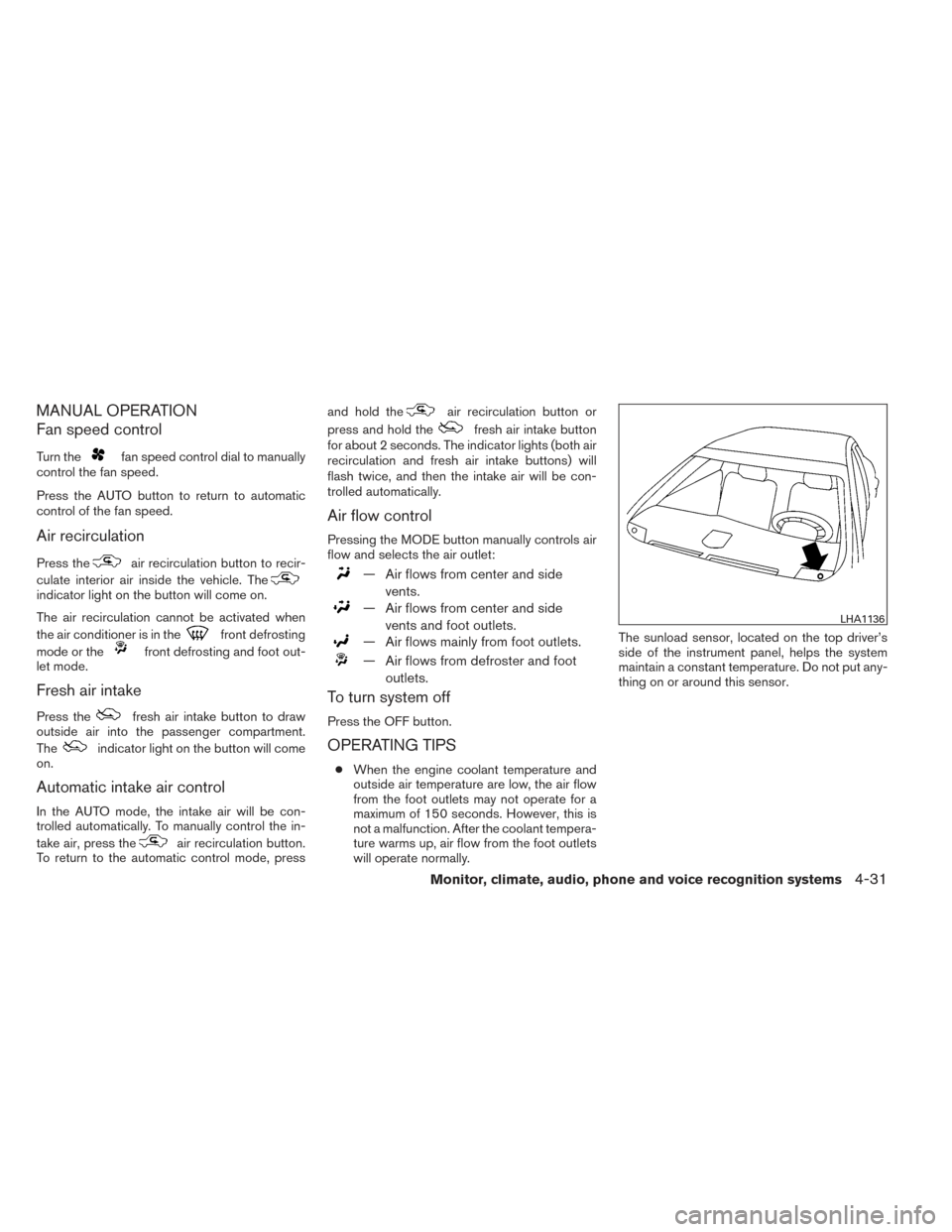
will operate normally. The sunload sensor, located on the top driver’s
side of the instrument panel, helps the system
maintain a constant temperature. Do not put any-
thing on or around this sensor.
LHA1136
Monitor, climate, audio, phone and voice recognition systems4-31