Page 74 of 397
two timers are not set to operate at the
same time, it is possible that the charger
will not start or the battery will not be
charged to the level expected.
•If the Li-ion battery warmer is operating
while the Climate Ctrl. Timer or Remote
Climate Control is being used, perfor-
mance of the Climate Control will be re-
duced.
•The Li-ion battery may not charge to the
expected level using the Charging Timer
when a Start time and End time are set
while the Li-ion battery warmer operates.
•Set only the Charging Timer End time
when charging in cold weather. The ve-
hicle automatically determines when to
start charging to fully charge the Li-ion
battery, even if the Li-ion battery warmer
operates. Charging ends before the set
End time if the Li-ion battery is fully
charged.
•The 12-volt battery can become dis-
charged if the charging timer is operated
repeatedly between the Li-ion battery
charges while the vehicle is not used for
an extended period of time.
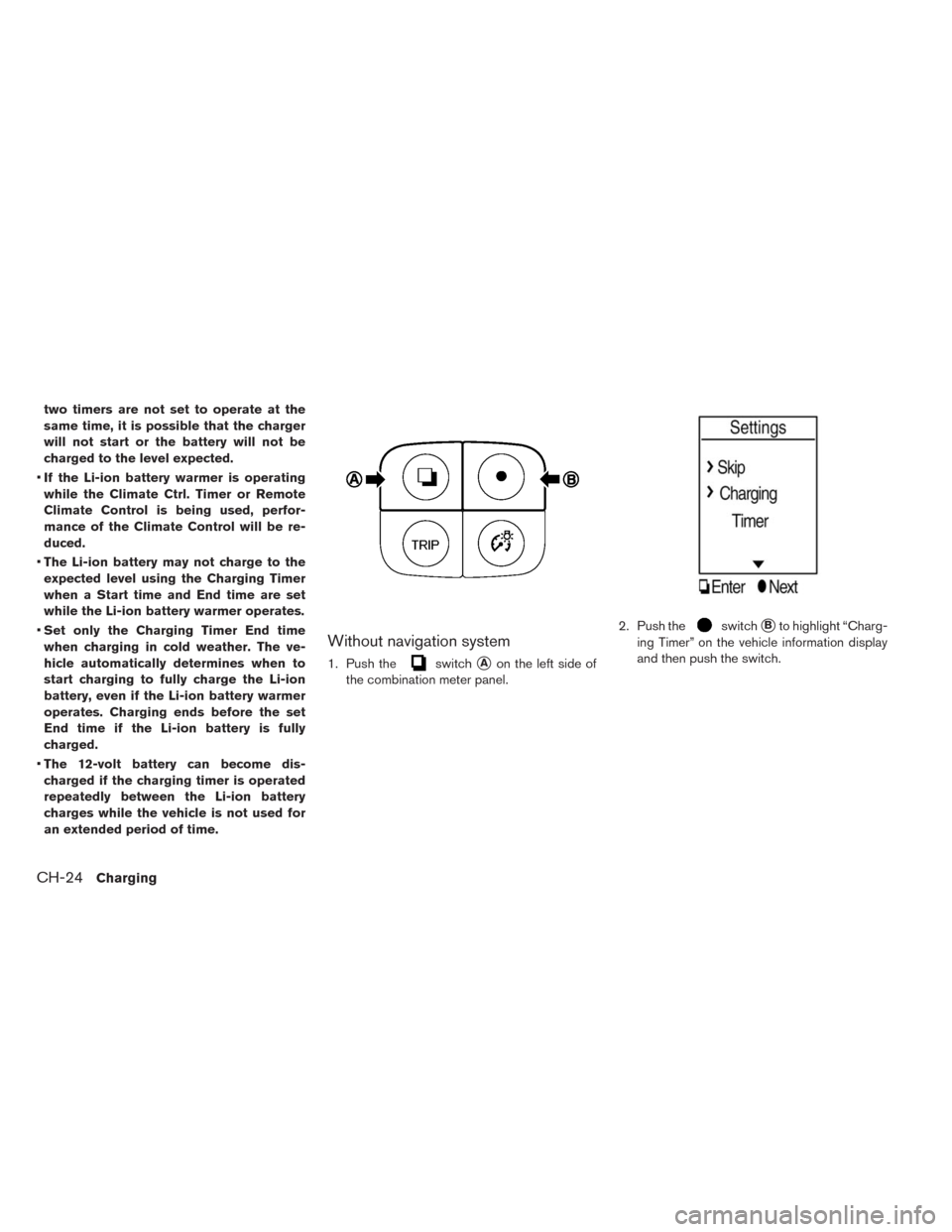
Without navigation system
1. Push theswitch�Aon the left side of
the combination meter panel.2. Push the
switch�Bto highlight “Charg-
ing Timer” on the vehicle information display
and then push the switch.
CH-24Charging
Page 76 of 397
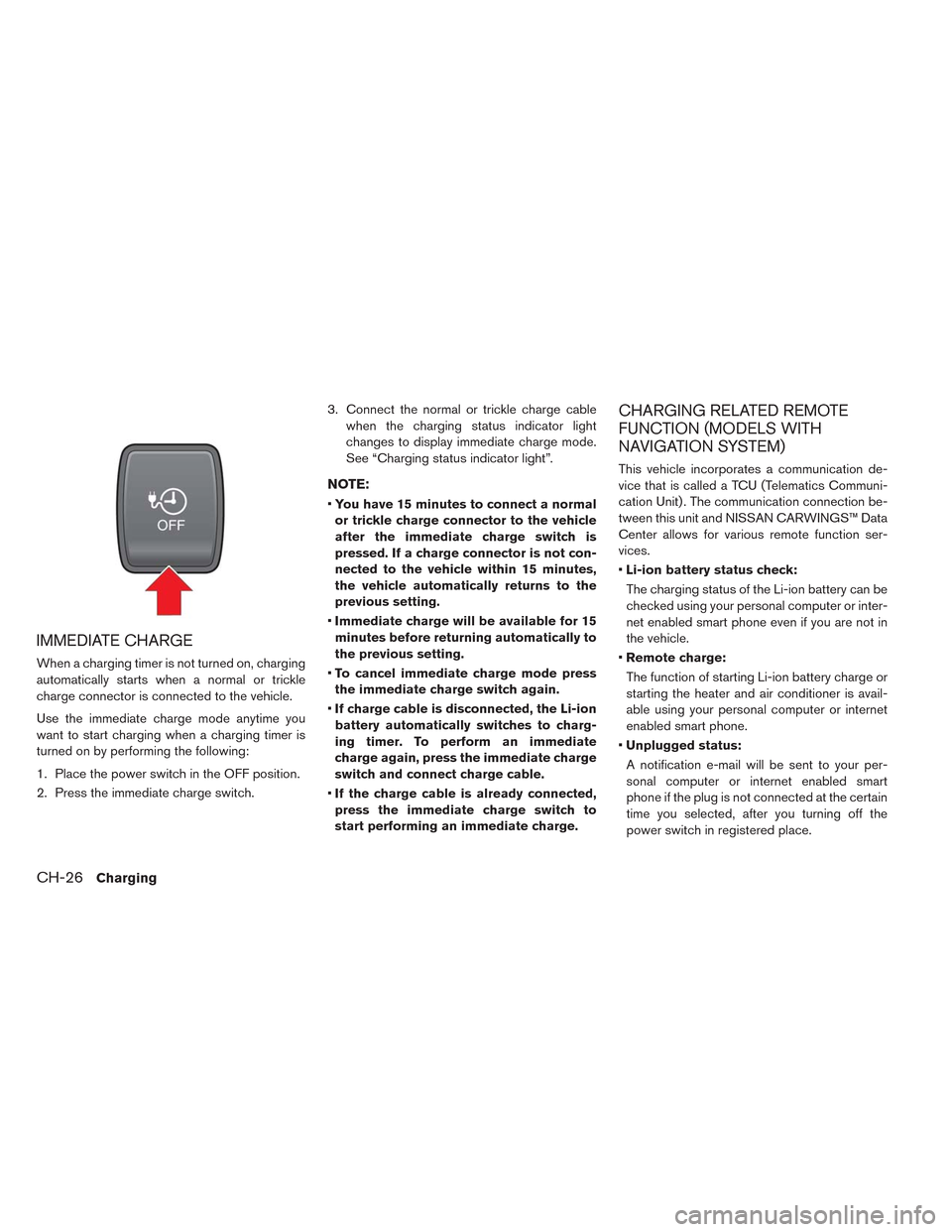
IMMEDIATE CHARGE
When a charging timer is not turned on, charging
automatically starts when a normal or trickle
charge connector is connected to the vehicle.
Use the immediate charge mode anytime you
want to start charging when a charging timer is
turned on by performing the following:
1. Place the power switch in the OFF position.
2. Press the immediate charge switch.3. Connect the normal or trickle charge cable
when the charging status indicator light
changes to display immediate charge mode.
See “Charging status indicator light”.
NOTE:
•You have 15 minutes to connect a normal
or trickle charge connector to the vehicle
after the immediate charge switch is
pressed. If a charge connector is not con-
nected to the vehicle within 15 minutes,
the vehicle automatically returns to the
previous setting.
•Immediate charge will be available for 15
minutes before returning automatically to
the previous setting.
•To cancel immediate charge mode press
the immediate charge switch again.
•If charge cable is disconnected, the Li-ion
battery automatically switches to charg-
ing timer. To perform an immediate
charge again, press the immediate charge
switch and connect charge cable.
•If the charge cable is already connected,
press the immediate charge switch to
start performing an immediate charge.
CHARGING RELATED REMOTE
FUNCTION (MODELS WITH
NAVIGATION SYSTEM)
This vehicle incorporates a communication de-
vice that is called a TCU (Telematics Communi-
cation Unit) . The communication connection be-
tween this unit and NISSAN CARWINGS™ Data
Center allows for various remote function ser-
vices.
•Li-ion battery status check:
The charging status of the Li-ion battery can be
checked using your personal computer or inter-
net enabled smart phone even if you are not in
the vehicle.
•Remote charge:
The function of starting Li-ion battery charge or
starting the heater and air conditioner is avail-
able using your personal computer or internet
enabled smart phone.
•Unplugged status:
A notification e-mail will be sent to your per-
sonal computer or internet enabled smart
phone if the plug is not connected at the certain
time you selected, after you turning off the
power switch in registered place.
CH-26Charging
Page 77 of 397
NOTE:
•Establishing the CARWINGS™ service is
necessary before using this service. See
LEAF Navigation System Owner’s Manual.
•To check the Li-ion battery charging status
using an internet enabled smart phone or
personal computer, the following condi-
tions must be met:
– The vehicle must be located in a cellu-
lar phone coverage area.
– The cellular phone must be located in
an area with cellular phone coverage.
– If using a computer, the computer must
be connected to the internet.
– Some cellular phones are not compat-
ible and cannot be used to check the
Li-ion battery charging status. Please
confirm beforehand.
•Certain remote functions required a com-
patible smart phone, which is not included
with vehicle.
•CARWINGS™ information system features
are included through a subscription ser-
vice which requires owner consent to ac-
tivate. The subscription must be active to
use these features.•CARWINGS™ communications may be re-
ceived at a verified e-mail address or by
SMS/text messaging-enabled mobile
phone.
•Standard text rates and/or data usage
may apply depending on your carrier.
ChargingCH-27
Page 79 of 397
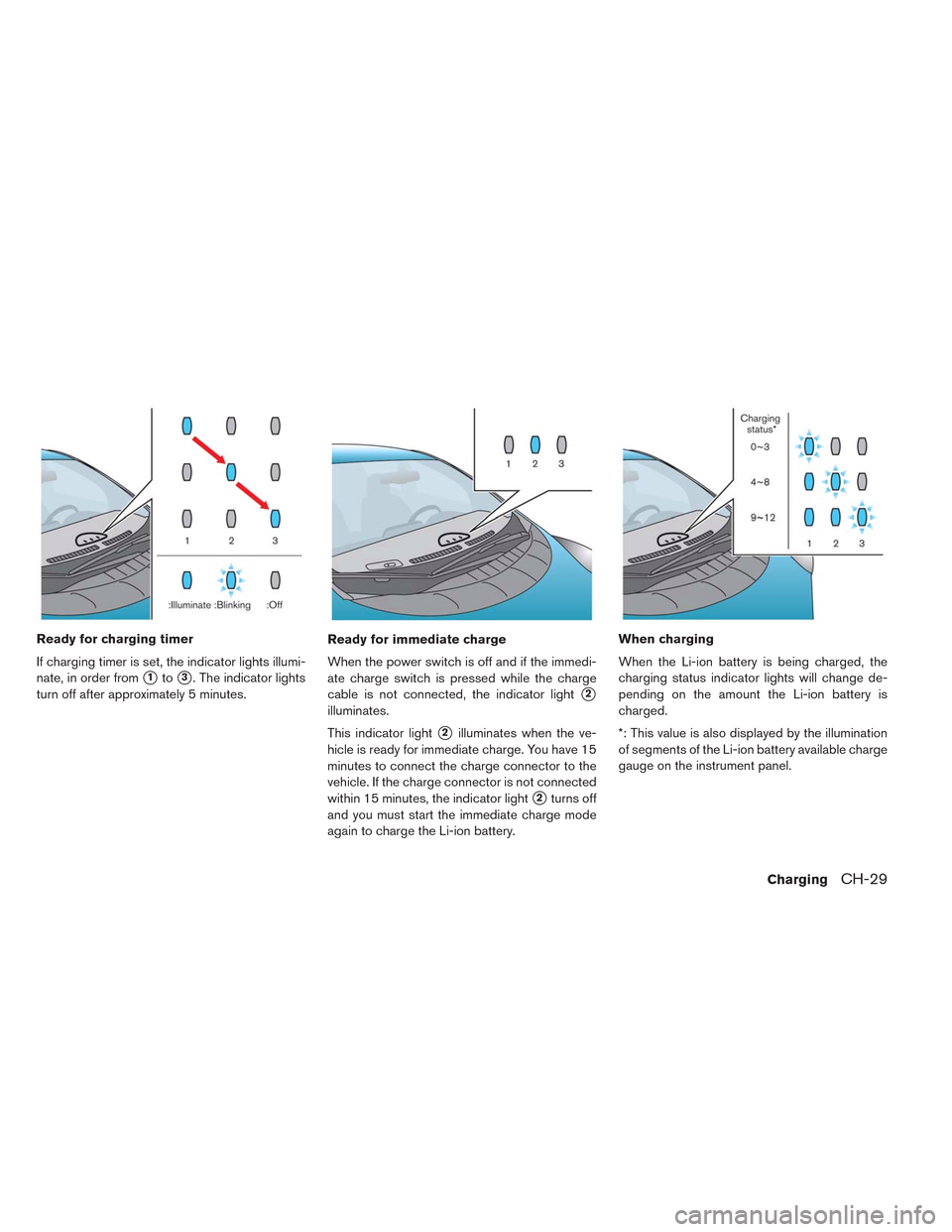
Ready for charging timer
If charging timer is set, the indicator lights illumi-
nate, in order from
�1to�3. The indicator lights
turn off after approximately 5 minutes.Ready for immediate charge
When the power switch is off and if the immedi-
ate charge switch is pressed while the charge
cable is not connected, the indicator light
�2
illuminates.
This indicator light
�2illuminates when the ve-
hicle is ready for immediate charge. You have 15
minutes to connect the charge connector to the
vehicle. If the charge connector is not connected
within 15 minutes, the indicator light
�2turns off
and you must start the immediate charge mode
again to charge the Li-ion battery.When charging
When the Li-ion battery is being charged, the
charging status indicator lights will change de-
pending on the amount the Li-ion battery is
charged.
*: This value is also displayed by the illumination
of segments of the Li-ion battery available charge
gauge on the instrument panel.
ChargingCH-29
Page 80 of 397
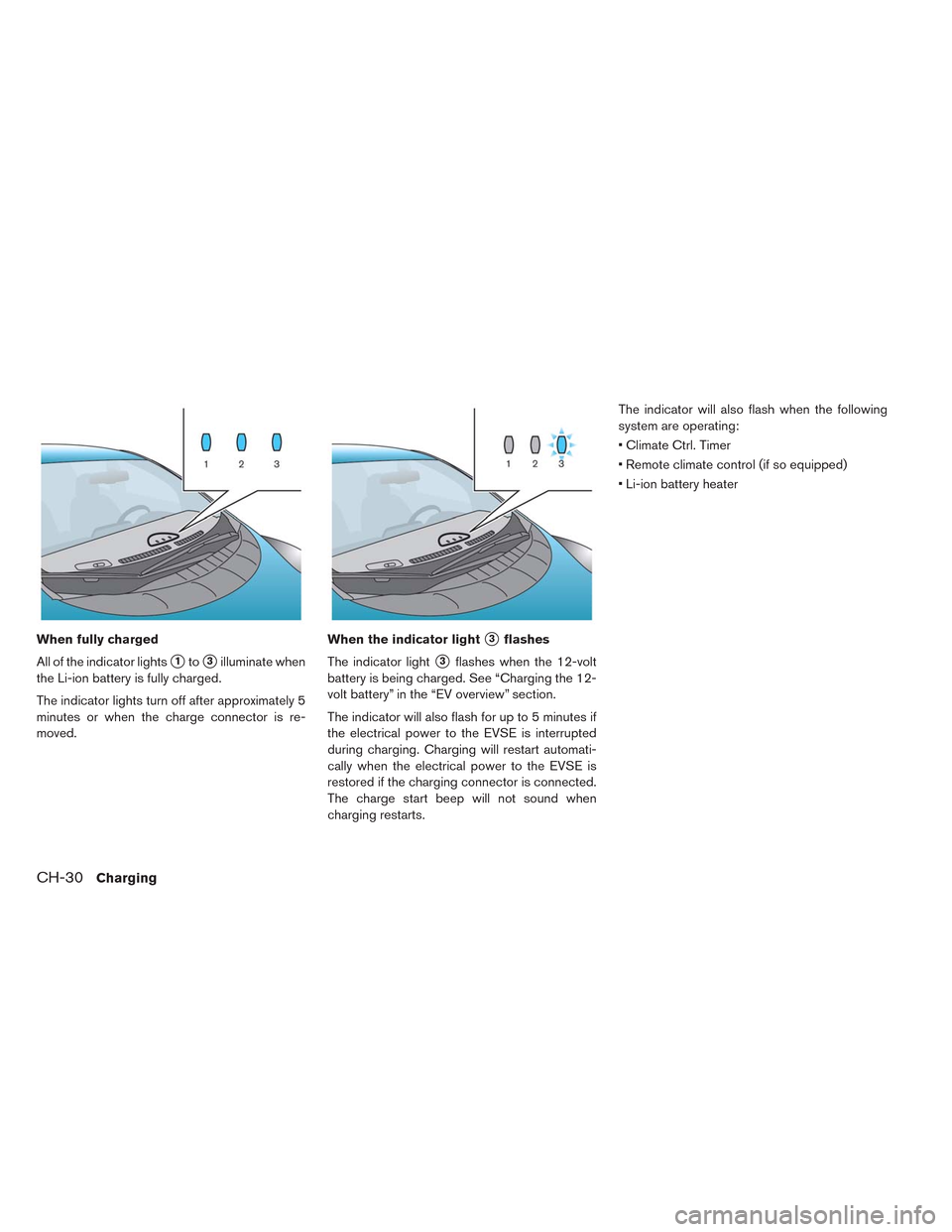
When fully charged
All of the indicator lights
�1to�3illuminate when
the Li-ion battery is fully charged.
The indicator lights turn off after approximately 5
minutes or when the charge connector is re-
moved.When the indicator light
�3flashes
The indicator light
�3flashes when the 12-volt
battery is being charged. See “Charging the 12-
volt battery” in the “EV overview” section.
The indicator will also flash for up to 5 minutes if
the electrical power to the EVSE is interrupted
during charging. Charging will restart automati-
cally when the electrical power to the EVSE is
restored if the charging connector is connected.
The charge start beep will not sound when
charging restarts.The indicator will also flash when the following
system are operating:
• Climate Ctrl. Timer
• Remote climate control (if so equipped)
• Li-ion battery heater
CH-30Charging
Page 81 of 397
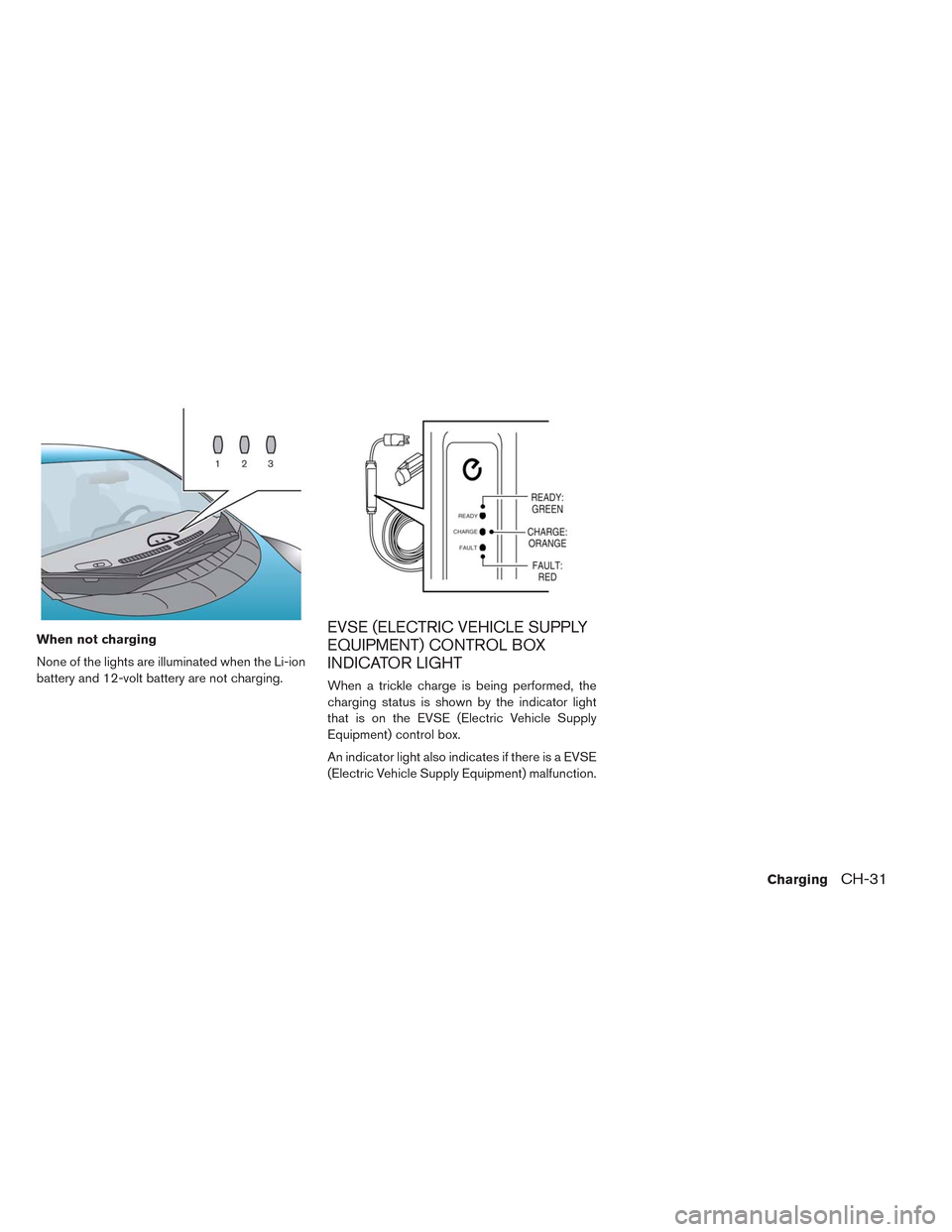
When not charging
None of the lights are illuminated when the Li-ion
battery and 12-volt battery are not charging.EVSE (ELECTRIC VEHICLE SUPPLY
EQUIPMENT) CONTROL BOX
INDICATOR LIGHT
When a trickle charge is being performed, the
charging status is shown by the indicator light
that is on the EVSE (Electric Vehicle Supply
Equipment) control box.
An indicator light also indicates if there is a EVSE
(Electric Vehicle Supply Equipment) malfunction.
ChargingCH-31
Page 82 of 397
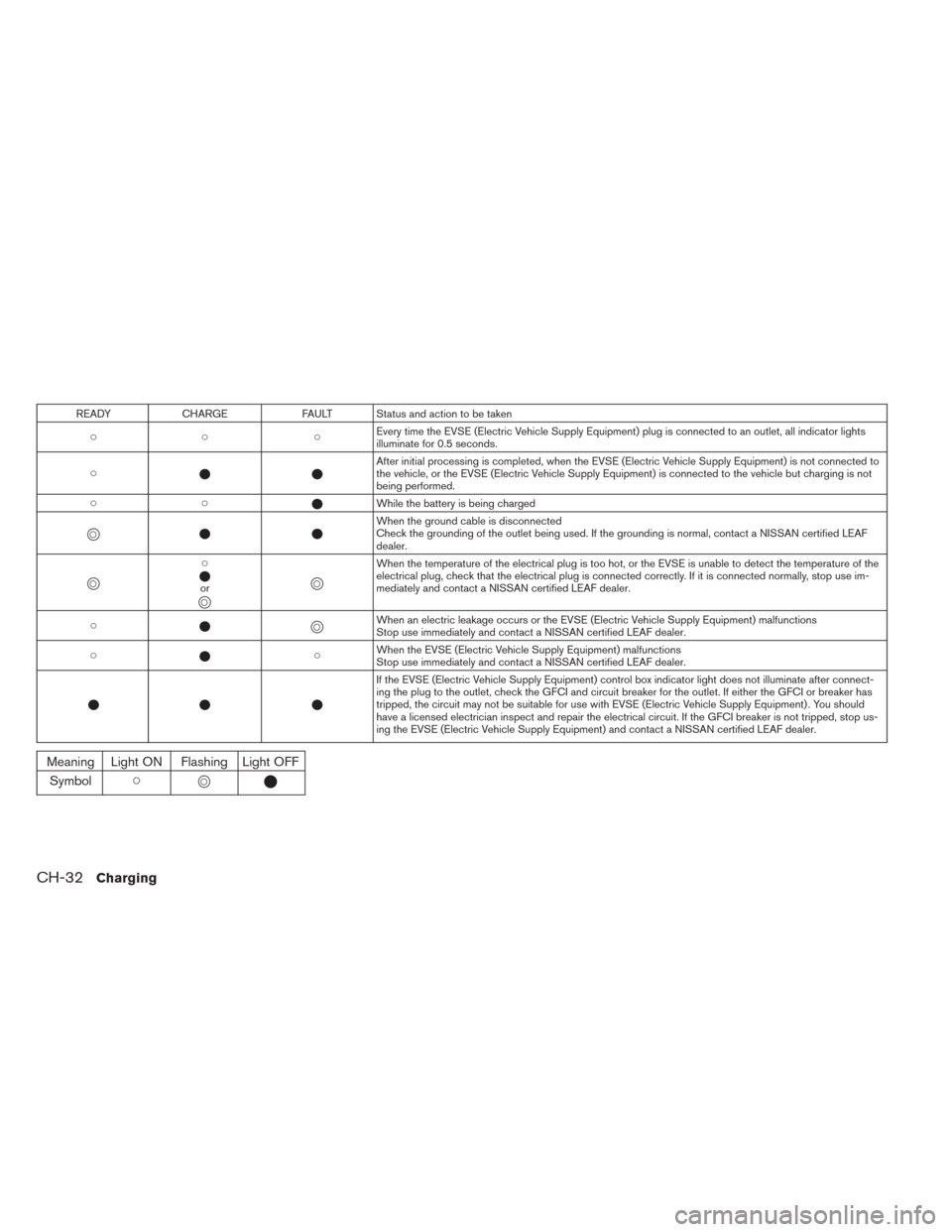
READY CHARGE FAULT Status and action to be taken
�� �Every time the EVSE (Electric Vehicle Supply Equipment) plug is connected to an outlet, all indicator lights
illuminate for 0.5 seconds.
���After initial processing is completed, when the EVSE (Electric Vehicle Supply Equipment) is not connected to
the vehicle, or the EVSE (Electric Vehicle Supply Equipment) is connected to the vehicle but charging is not
being performed.
���While the battery is being charged
�
���When the ground cable is disconnected
Check the grounding of the outlet being used. If the grounding is normal, contact a NISSAN certified LEAF
dealer.
�
�
�
�
or
�
��
�
When the temperature of the electrical plug is too hot, or the EVSE is unable to detect the temperature of the
electrical plug, check that the electrical plug is connected correctly. If it is connected normally, stop use im-
mediately and contact a NISSAN certified LEAF dealer.
��
�
�When an electric leakage occurs or the EVSE (Electric Vehicle Supply Equipment) malfunctions
Stop use immediately and contact a NISSAN certified LEAF dealer.
���When the EVSE (Electric Vehicle Supply Equipment) malfunctions
Stop use immediately and contact a NISSAN certified LEAF dealer.
�� �If the EVSE (Electric Vehicle Supply Equipment) control box indicator light does not illuminate after connect-
ing the plug to the outlet, check the GFCI and circuit breaker for the outlet. If either the GFCI or breaker has
tripped, the circuit may not be suitable for use with EVSE (Electric Vehicle Supply Equipment) . You should
have a licensed electrician inspect and repair the electrical circuit. If the GFCI breaker is not tripped, stop us-
ing the EVSE (Electric Vehicle Supply Equipment) and contact a NISSAN certified LEAF dealer.
Meaning Light ON Flashing Light OFF
Symbol��
��
CH-32Charging
Page 83 of 397
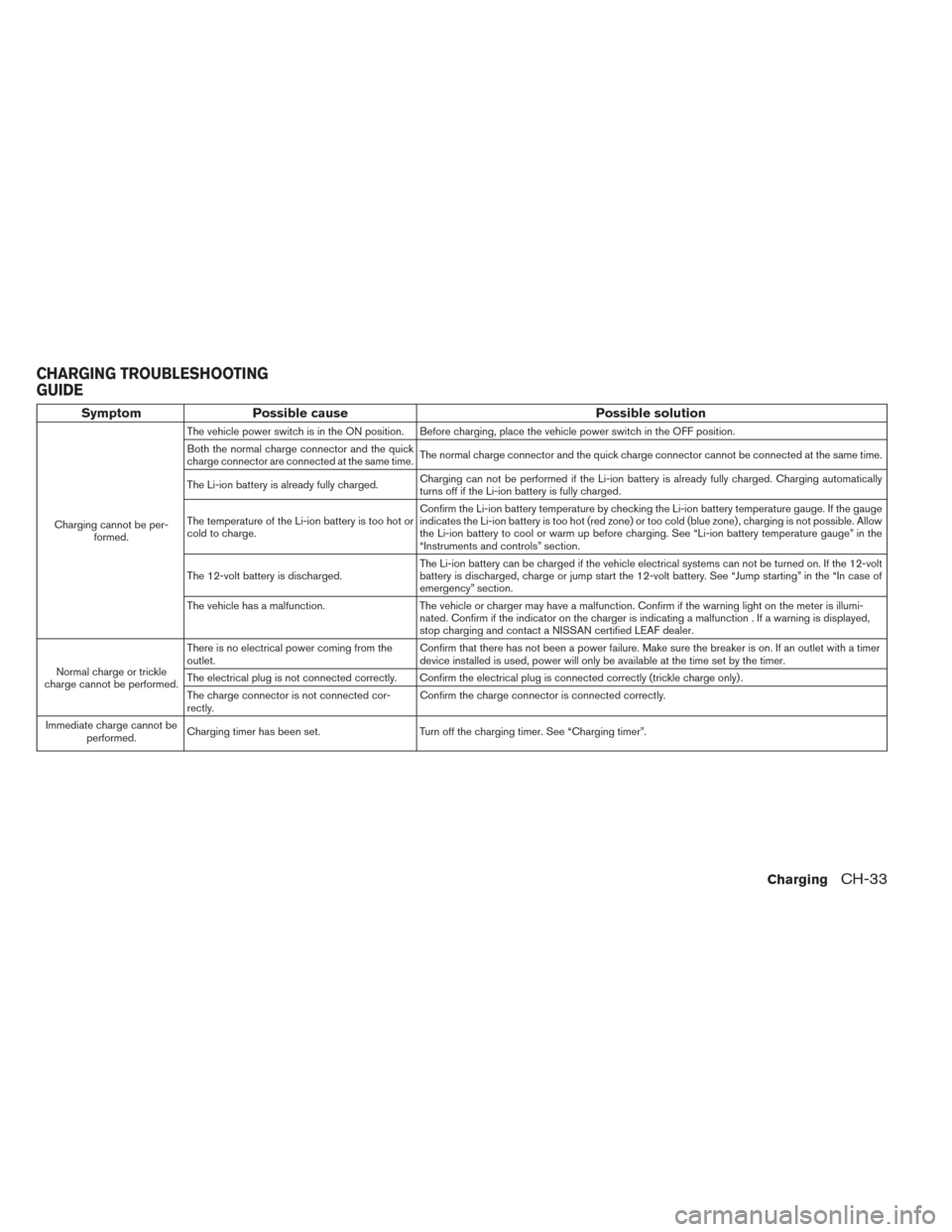
Symptom Possible cause Possible solution
Charging cannot be per-
formed.The vehicle power switch is in the ON position. Before charging, place the vehicle power switch in the OFF position.
Both the normal charge connector and the quick
charge connector are connected at the same time.The normal charge connector and the quick charge connector cannot be connected at the same time.
The Li-ion battery is already fully charged.Charging can not be performed if the Li-ion battery is already fully charged. Charging automatically
turns off if the Li-ion battery is fully charged.
The temperature of the Li-ion battery is too hot or
cold to charge.Confirm the Li-ion battery temperature by checking the Li-ion battery temperature gauge. If the gauge
indicates the Li-ion battery is too hot (red zone) or too cold (blue zone) , charging is not possible. Allow
the Li-ion battery to cool or warm up before charging. See “Li-ion battery temperature gauge” in the
“Instruments and controls” section.
The 12-volt battery is discharged.The Li-ion battery can be charged if the vehicle electrical systems can not be turned on. If the 12-volt
battery is discharged, charge or jump start the 12-volt battery. See “Jump starting” in the “In case of
emergency” section.
The vehicle has a malfunction. The vehicle or charger may have a malfunction. Confirm if the warning light on the meter is illumi-
nated. Confirm if the indicator on the charger is indicating a malfunction . If a warning is displayed,
stop charging and contact a NISSAN certified LEAF dealer.
Normal charge or trickle
charge cannot be performed.There is no electrical power coming from the
outlet.Confirm that there has not been a power failure. Make sure the breaker is on. If an outlet with a timer
device installed is used, power will only be available at the time set by the timer.
The electrical plug is not connected correctly. Confirm the electrical plug is connected correctly (trickle charge only) .
The charge connector is not connected cor-
rectly.Confirm the charge connector is connected correctly.
Immediate charge cannot be
performed.Charging timer has been set. Turn off the charging timer. See “Charging timer”.
CHARGING TROUBLESHOOTING
GUIDE
ChargingCH-33