2014 NISSAN LEAF tires
[x] Cancel search: tiresPage 283 of 397
light. Use a tire pressure gauge to check the tire
pressure.
• The CHECK TIRE PRESSURE warning ap-
pears on the vehicle information display when
the low tire pressure warning light is illuminated
and low tire pressure is detected. The CHECK
TIRE PRESSURE warning turns off when the
low tire pressure warning light turns off.
The CHECK TIRE PRESSURE warning ap-
pears each time the ignition switch is placed in
the ON position as long as the low tire pressure
warning light remains illuminated.
The CHECK TIRE PRESSURE warning does not
appear if the low tire pressure warning light illu-
minates to indicate a TPMS malfunction.
• Tire pressure rises and falls depending on the
heat caused by operation of the vehicle and the
outside temperature. A low outside temperature
can decrease the temperature of the air inside
the tire, which can cause a lower tire inflation
pressure. This may cause the low tire pressure
warning light to illuminate. If the warning light
illuminates in low ambient temperature, check
the tire pressure for all four tires.
For additional information, see “Low tire pressure
warning light” in the “Instruments and controls”section and “Tire Pressure Monitoring System
(TPMS)” in the “In case of emergency” section.
WARNING
• Radio waves could adversely affect
electric medical equipment. Those
who use a pacemaker should contact
the electric medical equipment manu-
facturer for the possible influences be-
fore use.
•
If the low tire pressure warning light
illuminates while driving, avoid sudden
steering maneuvers or abrupt braking,
reduce vehicle speed, pull off the road
to a safe location and stop the vehicle
as soon as possible. Driving with under-
inflated tires may permanently damage
the tires and increase the likelihood of
tire failure. Serious vehicle damage
could occur and may lead to an accident
and could result in serious personal in-
jury. Check the tire pressure for all four
tires. Adjust the tire pressure to the
recommended COLD tire pressure
shown on the Tire and Loading Informa-
tion label to turn the low tire pressure
warning light OFF. If the tire is flat,
repair it as soon as possible. (See “Flat
tire” in the “In case of emergency” sec-
tion for changing a flat tire.)
• When a wheel is replaced, the TPMS
will not function and the low tire pres-
sure warning light will flash for ap-
proximately 1 minute. The light will re-
main on after 1 minute. Contact a
NISSAN certified LEAF dealer as soon
as possible for tire replacement
and/or system resetting.
• Replacing tires with those not origi-
nally specified by NISSAN could affect
the proper operation of the TPMS.
• If you used the Emergency Tire Sealant
to repair a minor tire puncture, your
NISSAN certified LEAF dealer will also
need to replace the TPMS sensor in
addition to repairing or replacing the
tire .
• NISSAN recommends using only
NISSAN Genuine Emergency Tire Seal-
ant provided with your vehicle. Other
tire sealants may damage the valve
stem seal which can cause the tire to
lose air pressure.
Starting and driving5-3
Page 284 of 397
CAUTION
• The TPMS may not function properly
when the wheels are equipped with
tire chains or the wheels are buried in
snow.
• Do not place metalized film or any
metal parts (antenna, etc.) on the win-
dows. This may cause poor reception
of the signals from the tire pressure
sensors, and the TPMS will not func-
tion properly.
Some devices and transmitters may temporarily
interfere with the operation of the TPMS and
cause the low tire pressure warning light to illu-
minate. Some examples are:
• Facilities or electric devices using similar radio
frequencies that are near the vehicle.
• If a transmitter set to similar frequencies is being
used in or near the vehicle.
• If a computer (or similar equipment) or a DC/AC
converter is being used in or near the vehicle.FCC Notice:
For USA:
This device complies with Part 15 of the
FCC Rules. Operation is subject to the fol-
lowing two conditions: (1) This device may
not cause harmful interference, and (2) this
device must accept any interference re-
ceived, including interference that may
cause undesired operation.
NOTE:
Changes or modifications not expressly ap-
proved by the party responsible for compli-
ance could void the user’s authority to op-
erate the equipment.
For Canada:
This device complies with RSS-210 of In-
dustry Canada. Operation is subject to the
following two conditions: (1) this device
may not cause interference, and (2) this
device must accept any interference, in-
cluding interference that may cause unde-
sired operation of the device.
TPMS with Easy Fill Tire Alert
When tire pressure is low, the low tire pressure
warning light illuminates.
This vehicle provides visual and audible signals to
help you inflate the tires to the recommended
COLD tire pressure.
Vehicle set-up:
1. Park the vehicle in a safe and level place.
2. Apply the parking brake and push the P (Park)
position switch on the shift lever.
3. Place the power switch in the ON position. Do
not place in the READY to drive mode.
Operation:
1. Add air to the tire.
2. After a few seconds, the hazard indicators will
start flashing.
3. When the designated pressure is reached,
the horn beeps once and the hazard indica-
tors stop flashing.
4. Perform the above steps for each tire.
• If the tire is over-inflated more than approxi-
mately 4 psi (30 kPa) , the horn beeps and the
hazard indicators flash 3 times. To correct the
pressure, push the core of the valve stem on the
5-4Starting and driving
Page 286 of 397
6. When it is safe to do so, gradually turn the
steering wheel until both tires return to the
road surface. When all tires are on the road
surface, steer the vehicle to stay in the appro-
priate driving lane.
• If you decide that it is not safe to return the
vehicle to the road surface based on vehicle,
road or traffic conditions, gradually slow the
vehicle to a stop in a safe place off the road.
RAPID AIR PRESSURE LOSS
Rapid air pressure loss or a “blow-out” can occur
if the tire is punctured or is damaged due to
hitting a curb or pothole. Rapid air pressure loss
can also be caused by driving on under-inflated
tires.
Rapid air pressure loss can affect the handling
and stability of the vehicle, especially at highway
speeds.
Help prevent rapid air pressure loss by maintain-
ing the correct air pressure and visually inspect
the tires for wear and damage. See “Wheels and
tires” in the “Maintenance and do-it-yourself”
section of this manual.
If a tire rapidly loses air pressure or “blows-out”
while driving maintain control of the vehicle by
following the procedure below. Please note thatthis procedure is only a general guide. The ve-
hicle must be driven as appropriate based on the
conditions of the vehicle, road and traffic.
WARNING
The following actions can increase the
chance of losing control of the vehicle if
there is a sudden loss of tire air pressure.
Losing control of the vehicle may cause a
collision and result in personal injury.
• The vehicle generally moves or pulls in
the direction of the flat tire.
• Do not rapidly apply the brakes.
• Do not rapidly release the accelerator
pedal.
• Do not rapidly turn the steering wheel.
1. Remain calm and do not overreact.
2. Maintain a firm grip on the steering wheel with
both hands and try to hold a straight course.
3. When appropriate, slowly release the accel-
erator pedal to gradually slow the vehicle.
4. Gradually steer the vehicle to a safe location
off the road and away from traffic if possible.
5. Lightly apply the brake pedal to gradually stop
the vehicle.
6. Turn on the hazard warning flashers and either
contact a roadside emergency service tochange the tire or see “Flat tire” in the “In case
of emergency” section of this Owner’s
Manual.DRINKING ALCOHOL/DRUGS AND
DRIVING
WARNING
Never drive under the influence of alco-
hol or drugs. Alcohol in the bloodstream
reduces coordination, delays reaction
time and impairs judgement. Driving af-
ter drinking alcohol increases the likeli-
hood of being involved in an accident
injuring yourself and others. Additionally,
if you are injured in an accident, alcohol
can increase the severity of the injury.
NISSAN is committed to safe driving. However,
you must choose not to drive under the influence
of alcohol. Every year thousands of people are
injured or killed in alcohol-related accidents. Al-
though the local laws vary on what is considered
to be legally intoxicated, the fact is that alcohol
affects all people differently and most people
underestimate the effects of alcohol.
5-6Starting and driving
Page 290 of 397
NISSAN INTELLIGENT KEY®
BATTERY DISCHARGE
If the Intelligent Key battery is discharged, or
environmental conditions interfere with the Intel-
ligent Key operation, start the EV (Electric Ve-
hicle) system in the READY to drive mode ac-
cording to the following procedure:
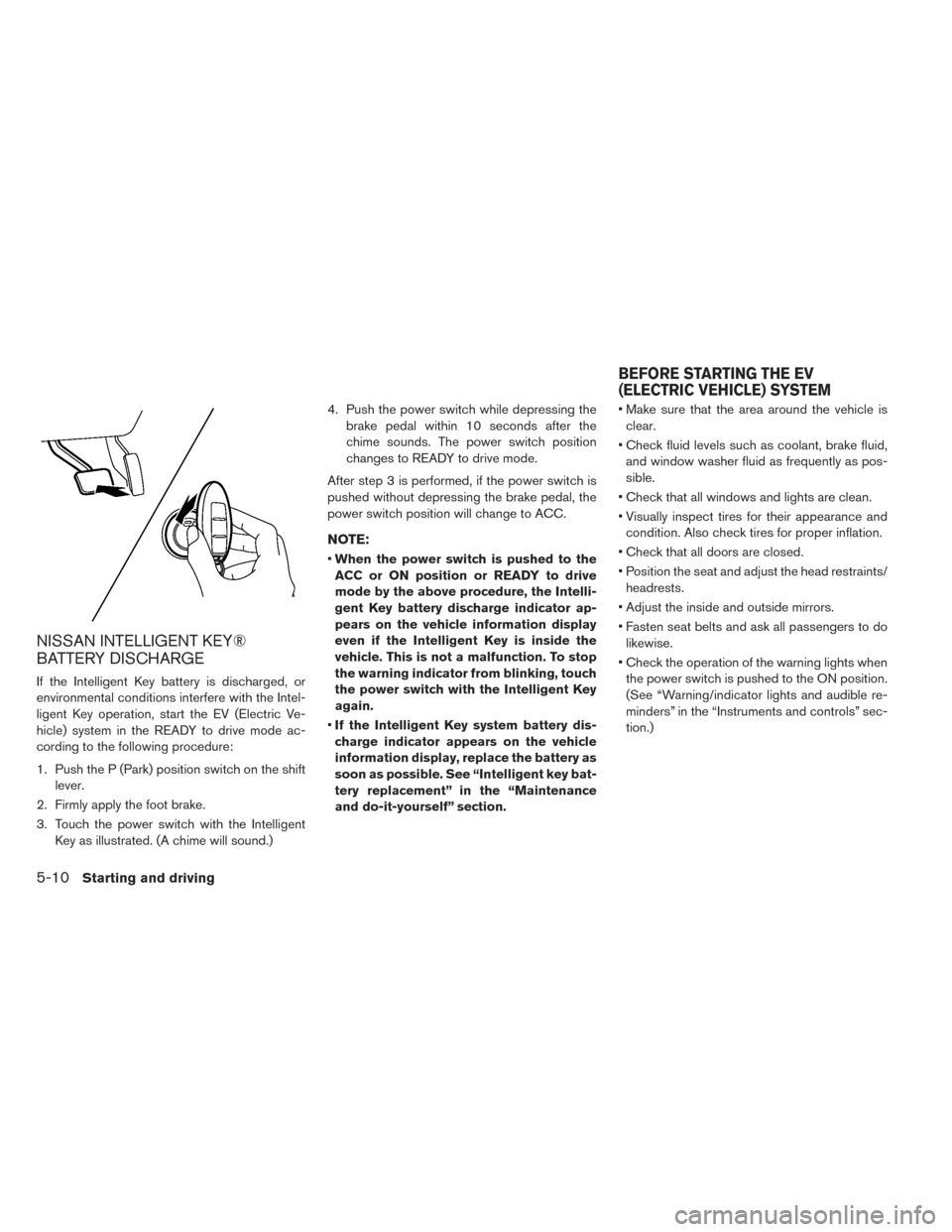
1. Push the P (Park) position switch on the shift
lever.
2. Firmly apply the foot brake.
3. Touch the power switch with the Intelligent
Key as illustrated. (A chime will sound.)4. Push the power switch while depressing the
brake pedal within 10 seconds after the
chime sounds. The power switch position
changes to READY to drive mode.
After step 3 is performed, if the power switch is
pushed without depressing the brake pedal, the
power switch position will change to ACC.
NOTE:
•When the power switch is pushed to the
ACC or ON position or READY to drive
mode by the above procedure, the Intelli-
gent Key battery discharge indicator ap-
pears on the vehicle information display
even if the Intelligent Key is inside the
vehicle. This is not a malfunction. To stop
the warning indicator from blinking, touch
the power switch with the Intelligent Key
again.
•If the Intelligent Key system battery dis-
charge indicator appears on the vehicle
information display, replace the battery as
soon as possible. See “Intelligent key bat-
tery replacement” in the “Maintenance
and do-it-yourself” section.• Make sure that the area around the vehicle is
clear.
• Check fluid levels such as coolant, brake fluid,
and window washer fluid as frequently as pos-
sible.
• Check that all windows and lights are clean.
• Visually inspect tires for their appearance and
condition. Also check tires for proper inflation.
• Check that all doors are closed.
• Position the seat and adjust the head restraints/
headrests.
• Adjust the inside and outside mirrors.
• Fasten seat belts and ask all passengers to do
likewise.
• Check the operation of the warning lights when
the power switch is pushed to the ON position.
(See “Warning/indicator lights and audible re-
minders” in the “Instruments and controls” sec-
tion.)
BEFORE STARTING THE EV
(ELECTRIC VEHICLE) SYSTEM
5-10Starting and driving
Page 297 of 397
• If you move the shift lever to the N (Neutral)
position, the cruise control will be canceled.
To reset at a faster cruising speed,use one of
the following methods.
• Depress the accelerator pedal. When the ve-
hicle attains the preferred speed, push and re-
lease the COAST/SET switch.
• Push and hold the ACCEL/RES switch. When
the vehicle attains the preferred speed, release
the switch.
• Push, then quickly release the ACCEL/RES
switch. Each time you do this, the set speed will
increase by about 1 MPH (1.6 km/h) .
To reset at a slower cruising speed,use one
of the following methods.
• Lightly tap the brake pedal. When the vehicle
attains the preferred speed, push the COAST/
SET switch and release it.
• Push and hold the COAST/SET switch. Re-
lease the switch when the vehicle slows down
to the preferred speed.
• Push, then quickly release, the COAST/SET
switch. Each time you do this, the set speed will
decrease by about 1 MPH (1.6 km/h) .To resume the preset speed,push and re-
lease the ACCEL/RES switch. The vehicle will
resume the last set cruising speed when the
vehicle speed is over 25 MPH (40 km/h) .Vehicle range depends on a number of factors.
Actual vehicle range will vary depending upon:
• speed,
• vehicle load,
• electrical load from vehicle accessories,
• traffic and road conditions,
NISSAN recommends the following driving
habits to help maximize vehicle range:
Before driving:
• Follow recommended periodic maintenance.
• Keep tires inflated to correct pressure.
• Keep wheels in correct alignment.
• Pre-heat or pre-cool the interior cabin while the
vehicle is charging.
• Remove unnecessary cargo from the vehicle.
While driving:
• Drive in ECO mode
– In the ECO position more regenerative
brake is applied when the accelerator pedal
is released in comparison to the D (Drive)
position and more power is provided to the
Li-ion battery.
INCREASING POWER ECONOMY
Starting and driving5-17
Page 302 of 397
ANTI-LOCK BRAKING SYSTEM
(ABS)
WARNING
• The Anti-lock Braking System (ABS) is
a sophisticated device, but it cannot
prevent accidents resulting from care-
less or dangerous driving techniques.
It can help maintain vehicle control
during braking on slippery surfaces.
Remember that stopping distances on
slippery surfaces will be longer than
on normal surfaces even with ABS.
Stopping distances may also be longer
on rough, gravel or snow covered
roads, or if you are using tire chains.
Always maintain a safe distance from
the vehicle in front of you. Ultimately,
the driver is responsible for safety.
• Tire type and condition may also affect
braking effectiveness.
– When replacing tires, install the
specified size of tires on all four
wheels.
– For detailed information, see
“Wheels and tires” in the “Mainte-
nance and do-it-yourself” section of
this manual.The Anti-lock Braking System (ABS) controls the
brakes so the wheels do not lock during hard
braking or when braking on slippery surfaces.
The system detects the rotation speed at each
wheel and varies the brake fluid pressure to pre-
vent each wheel from locking and sliding. By
preventing each wheel from locking, the system
helps the driver maintain steering control and
helps to minimize swerving and spinning on slip-
pery surfaces.
Using the system
Depress the brake pedal and hold it down. De-
press the brake pedal with firm steady pressure,
but do not pump the brakes. The ABS will oper-
ate to prevent the wheels from locking up. Steer
the vehicle to avoid obstacles.
WARNING
Do not pump the brake pedal. Doing so
may result in increased stopping dis-
tances.
Self-test feature
The ABS includes electronic sensors, electric
pumps, hydraulic solenoids and a computer. The
computer has a built-in diagnostic feature that
tests the system each time you push the power
switch in the READY to drive position and move
the vehicle at a low speed in forward or reverse.
When the self-test occurs, you may hear a
“clunk” noise and/or feel a pulsation in the brake
pedal. This is normal and does not indicate a
malfunction. If the computer senses a malfunc-
tion, it switches the ABS off and illuminates the
ABS warning light on the instrument panel. The
brake system then operates normally, but without
anti-lock assistance.
If the ABS warning light illuminates during the
self-test or while driving, have the vehicle
checked by a NISSAN certified LEAF dealer.
5-22Starting and driving
Page 304 of 397
the power switch is placed in the OFF position
then back to the ON position.
The computer has a built-in diagnostic feature
that tests the system each time you start the EV
(Electric Vehicle) and move the vehicle forward or
in reverse at a slow speed. When the self-test
occurs, you may hear a “clunk” noise and/or feel a
pulsation in the brake pedal. This is normal and is
not an indication of a malfunction.
WARNING
• The VDC system is designed to help
the driver maintain stability but does
not prevent accidents due to abrupt
steering operation at high speeds or
by careless or dangerous driving tech-
niques. Reduce vehicle speed and be
especially careful when driving and
cornering on slippery surfaces and al-
ways drive carefully.• Do not modify the vehicle’s suspen-
sion. If suspension parts such as shock
absorbers, struts, springs, stabilizer
bars, bushings and wheels are not
NISSAN recommended for your ve-
hicle or are extremely deteriorated the
VDC system may not operate properly.
This could adversely affect vehicle
handling performance, and the
warning may flash ormay il-
luminate.
• If brake related parts such as brake
pads, rotors and calipers are not
NISSAN recommended or are ex-
tremely deteriorated, the VDC system
may not operate properly and
may
illuminate.
• If traction motor control related parts
are not NISSAN recommended or are
extremely deteriorated, the
may
illuminate.
• When driving on extremely inclined
surfaces such as higher banked cor-
ners, the VDC system may not operate
properly and the
warning may illu-
minate. Do not drive on these types of
roads.• When driving on an unstable surface
such as a turntable, ferry, elevator or
ramp, the
warning may illuminate.
This is not a malfunction. Restart the
EV (Electric Vehicle) system after driv-
ing onto a stable surface.
• If wheels or tires other than the
NISSAN recommended ones are used,
the VDC system may not operate prop-
erly and the
warning may illumi-
nate.
• The VDC system is not a substitute for
winter tires or tire chains on a snow
covered road.
5-24Starting and driving
Page 306 of 397
•The predicted charging time displayed on
the meter and navigation system in-
creases when the Li-ion battery warmer
operates.
•Vehicle range may be substantially re-
duced in extremely cold conditions (for
example under -4°F (-20°C)) .
•Using the climate control system to heat
the cabin when outside temperature is
below 32°F (0°C) uses more electricity and
affects vehicle range more than when us-
ing the heater when the temperature is
above 32°F (0°C) .
•Climate control performance is reduced
when using the Climate Ctrl. Timer or Re-
mote Climate Control while the Li-ion bat-
tery warmer operates. Set only the charg-
ing timer [End Time] when charging in cold
weather. The vehicle automatically deter-
mines when to start charging to fully
charge the Li-ion battery, even if the Li-ion
battery warmer operates. Charging ends
before the set end time if the Li-ion bat-
tery is fully charged.FREEING A FROZEN DOOR LOCK
To prevent a door lock from freezing, apply deicer
through the key hole. If the lock becomes frozen,
heat the key before inserting it into the key hole or
use the remote keyless entry keyfob.
ANTI-FREEZE
In the winter when it is possible that the outside
temperature will drop below 32°F (0°C) , check
the antifreeze to ensure proper winter protection.
For additional information, see “Cooling system”
in the “Maintenance and do-it-yourself” section.
12-VOLT BATTERY
If the 12-volt battery is not fully charged during
extremely cold weather conditions, the 12-volt
battery fluid may freeze and damage the 12-volt
battery. To maintain maximum efficiency, the 12-
volt battery should be checked regularly. For ad-
ditional information, see “12-volt battery” in the
“Maintenance and do-it-yourself” section.
DRAINING OF COOLANT WATER
If the vehicle is to be left outside without anti-
freeze, drain the cooling system. Refill before
operating the vehicle. For details, see “Cooling
system” in the “Maintenance and do-it-yourself”
section.
TIRE EQUIPMENT
SUMMER tires have a tread designed to provide
superior performance on dry pavement. How-
ever, the performance of these tires will be sub-
stantially reduced in snowy and icy conditions. If
you operate your vehicle on snowy or icy roads,
NISSAN recommends the use of MUD & SNOW
or ALL SEASON tires on all four wheels. Consult
a NISSAN certified LEAF dealer for the tire type,
size, speed rating and availability information.
For additional traction on icy roads, studded tires
may be used. However, some U.S. states and
Canadian provinces prohibit their use. Check
local, state and provincial laws before installing
studded tires.
Skid and traction capabilities of studded
snow tires, on wet or dry surfaces, may be
poorer than that of non-studded snow tires.
5-26Starting and driving