2014 NISSAN JUKE wheel
[x] Cancel search: wheelPage 114 of 402
SIC3672
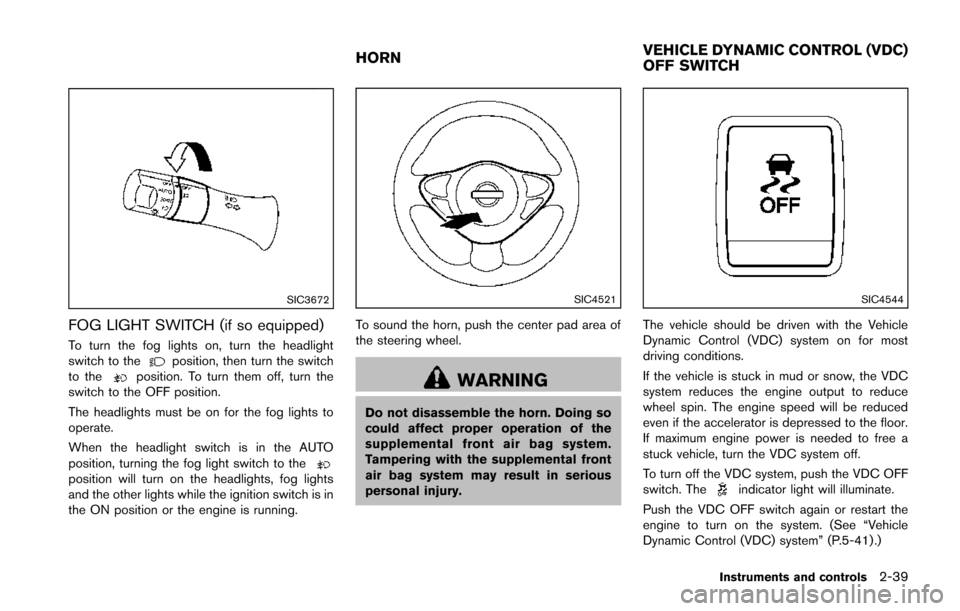
FOG LIGHT SWITCH (if so equipped)
To turn the fog lights on, turn the headlight
switch to theposition, then turn the switch
to theposition. To turn them off, turn the
switch to the OFF position.
The headlights must be on for the fog lights to
operate.
When the headlight switch is in the AUTO
position, turning the fog light switch to the
position will turn on the headlights, fog lights
and the other lights while the ignition switch is in
the ON position or the engine is running.
SIC4521
To sound the horn, push the center pad area of
the steering wheel.
WARNING
Do not disassemble the horn. Doing so
could affect proper operation of the
supplemental front air bag system.
Tampering with the supplemental front
air bag system may result in serious
personal injury.
SIC4544
The vehicle should be driven with the Vehicle
Dynamic Control (VDC) system on for most
driving conditions.
If the vehicle is stuck in mud or snow, the VDC
system reduces the engine output to reduce
wheel spin. The engine speed will be reduced
even if the accelerator is depressed to the floor.
If maximum engine power is needed to free a
stuck vehicle, turn the VDC system off.
To turn off the VDC system, push the VDC OFF
switch. The
indicator light will illuminate.
Push the VDC OFF switch again or restart the
engine to turn on the system. (See “Vehicle
Dynamic Control (VDC) system” (P.5-41) .)
Instruments and controls2-39
HORN VEHICLE DYNAMIC CONTROL (VDC)
OFF SWITCH
Page 150 of 402
SPA2809
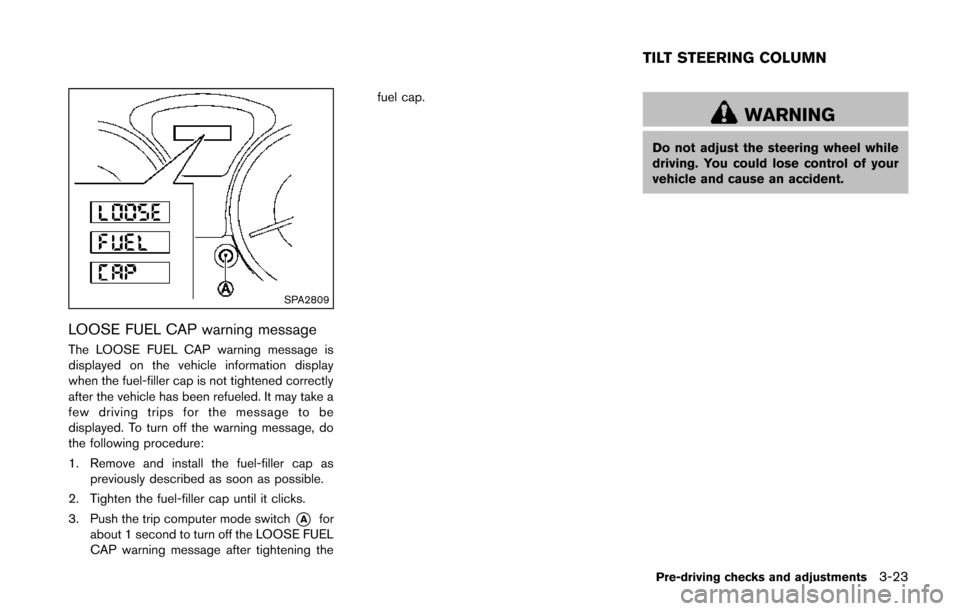
LOOSE FUEL CAP warning message
The LOOSE FUEL CAP warning message is
displayed on the vehicle information display
when the fuel-filler cap is not tightened correctly
after the vehicle has been refueled. It may take a
few driving trips for the message to be
displayed. To turn off the warning message, do
the following procedure:
1. Remove and install the fuel-filler cap aspreviously described as soon as possible.
2. Tighten the fuel-filler cap until it clicks.
3. Push the trip computer mode switch
*Afor
about 1 second to turn off the LOOSE FUEL
CAP warning message after tightening the fuel cap.
WARNING
Do not adjust the steering wheel while
driving. You could lose control of your
vehicle and cause an accident.
Pre-driving checks and adjustments3-23
TILT STEERING COLUMN
Page 151 of 402
3-24Pre-driving checks and adjustments
SPA2808
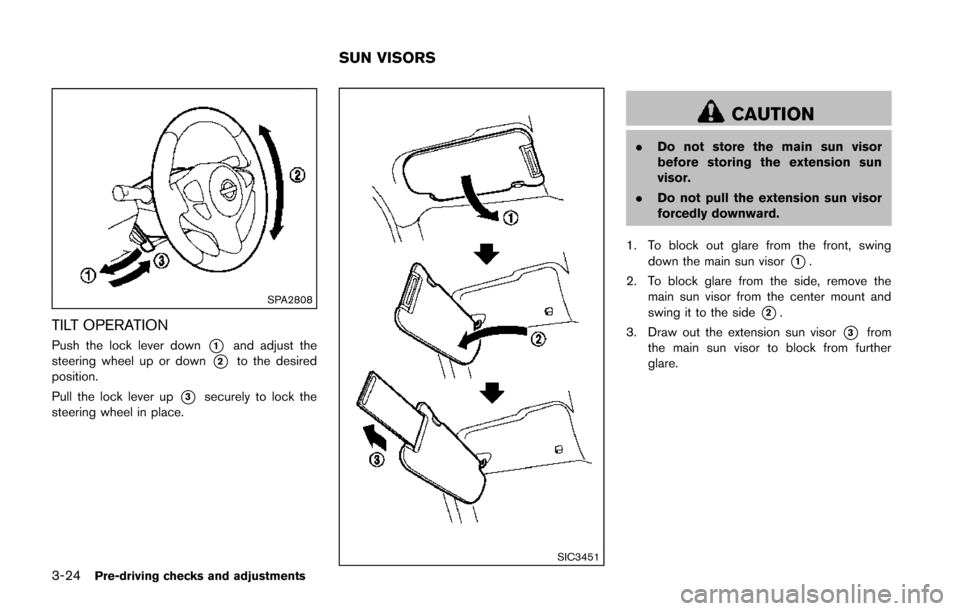
TILT OPERATION
Push the lock lever down*1and adjust the
steering wheel up or down
*2to the desired
position.
Pull the lock lever up
*3securely to lock the
steering wheel in place.
SIC3451
CAUTION
. Do not store the main sun visor
before storing the extension sun
visor.
. Do not pull the extension sun visor
forcedly downward.
1. To block out glare from the front, swing down the main sun visor
*1.
2. To block glare from the side, remove the main sun visor from the center mount and
swing it to the side
*2.
3. Draw out the extension sun visor
*3from
the main sun visor to block from further
glare.
SUN VISORS
Page 156 of 402
")
4 Heater, air conditioner, audio and phone sys-tems
Safety note ........................................................................\
.......... 4-3
Control panel buttons — color screen (Type A) ............... 4-3
How to use touch screen ................................................. 4-4
How to use the BACK button ......................................... 4-6
How to use brightness control and display
ON/OFF button ................................................................... 4-6
How to use the SETUP button ....................................... 4-6
Control panel buttons — color screen (Type B) ........... 4-10 How to use touch screen .............................................. 4-10
How to use the BACK button ...................................... 4-11
How to use the APPS·i button ..................................... 4-12
How to use brightness control button ........................ 4-15
How to use the ON·OFF button/Volume
control knob ....................................................................... 4-15
How to use the CAMERA button ................................ 4-15
RearView monitor (if so equipped) ................................... 4-15
How to read the displayed lines .................................. 4-16
Difference between predictive and
actual distances ................................................................ 4-17
Adjusting the screen (if so equipped) ........................ 4-19
Operating tips ................................................................... 4-19
Ventilators ........................................................................\
......... 4-19 Center ventilators ............................................................. 4-19
Side ventilators ................................................................. 4-20 Heater and air conditioner .................................................. 4-20
Manual air conditioner (if so equipped) ................... 4-21
Automatic air conditioner (with Integrated
Control System) ............................................................. 4-24
Operating tips (for automatic air conditioner) ........ 4-27
In-cabin microfilter ......................................................... 4-27
Servicing air conditioner .............................................. 4-27
Audio system ........................................................................\
.. 4-28 Audio operation precautions ....................................... 4-28
FM-AM-SAT radio with Compact Disc (CD) player
(Type A) ........................................................................\
.... 4-41
FM-AM-SAT radio with Compact Disc (CD) player
(Type B) ........................................................................\
.... 4-48
FM-AM-SAT radio with Compact Disc (CD) player
(Type C) ........................................................................\
... 4-57
CD/USB memory care and cleaning ........................ 4-68
Steering wheel switch for audio control .................. 4-69
Antenna ........................................................................\
.... 4-70
NissanConnect
TMApp smartphone integration (if
so equipped) ........................................................................\
.. 4-71
Registering with NissanConnect
TMApp .................. 4-71
Connect phone ............................................................... 4-71
Application download ................................................... 4-71
Car phone or CB radio ........................................................ 4-71
Page 224 of 402
.A new disc may be rough on the inner and
outer edges. Remove the rough edges by
rubbing the inner and outer edges with the
side of a pen or pencil as illustrated.
USB memory
.Do not touch the terminal portion of the USB
memory.
. Do not place heavy objects on the USB
memory.
. Do not store the USB memory in very humid
locations.
. Do not expose the USB memory to direct
sunlight.
. Do not spill any liquids on the USB memory.
Refer to the USB memory Owner’s Manual for
the details.
SAA3383
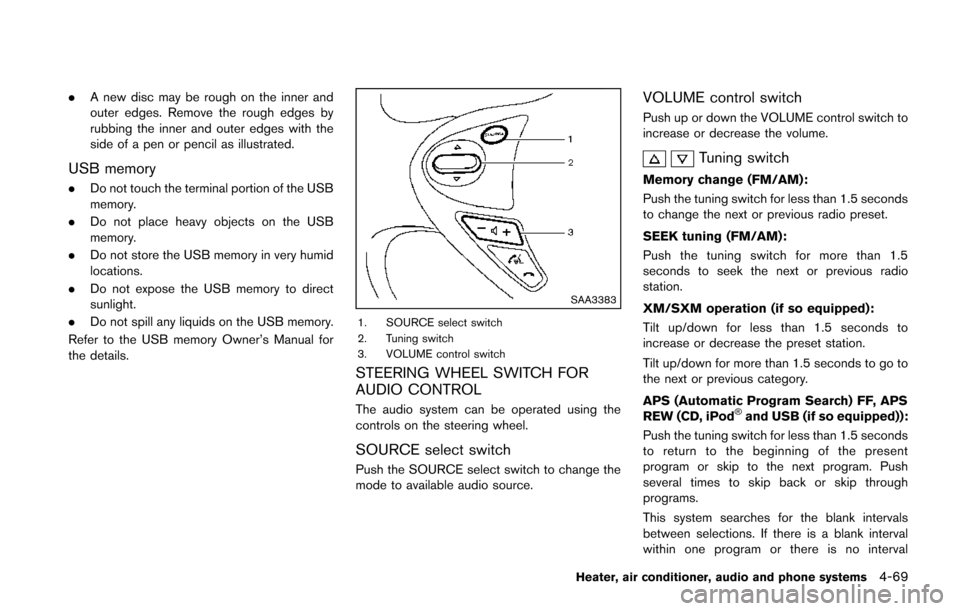
1. SOURCE select switch
2. Tuning switch
3. VOLUME control switch
STEERING WHEEL SWITCH FOR
AUDIO CONTROL
The audio system can be operated using the
controls on the steering wheel.
SOURCE select switch
Push the SOURCE select switch to change the
mode to available audio source.
VOLUME control switch
Push up or down the VOLUME control switch to
increase or decrease the volume.
Tuning switch
Memory change (FM/AM):
Push the tuning switch for less than 1.5 seconds
to change the next or previous radio preset.
SEEK tuning (FM/AM):
Push the tuning switch for more than 1.5
seconds to seek the next or previous radio
station.
XM/SXM operation (if so equipped):
Tilt up/down for less than 1.5 seconds to
increase or decrease the preset station.
Tilt up/down for more than 1.5 seconds to go to
the next or previous category.
APS (Automatic Program Search) FF, APS
REW (CD, iPod
®and USB (if so equipped)):
Push the tuning switch for less than 1.5 seconds
to return to the beginning of the present
program or skip to the next program. Push
several times to skip back or skip through
programs.
This system searches for the blank intervals
between selections. If there is a blank interval
within one program or there is no interval
Heater, air conditioner, audio and phone systems4-69
Page 229 of 402
4-74Heater, air conditioner, audio and phone systems
REGULATORY INFORMATION
Bluetooth trademark:
Bluetooth®is a trademark
owned by Bluetooth SIG, Inc.,
and licensed to Visteon Cor-
poration.
FCC Regulatory information
. CAUTION: To maintain compliance with
FCC’s RF exposure guidelines, use only
the supplied antenna. Unauthorized antenna,
modification, or attachments could damage
the transmitter and may violate FCC regula-
tions.
. Operation is subject to the following two
conditions:
1) this device may not cause interference
and
2) this device must accept any interference, including interference that may cause
undesired operation of the device
IC Regulatory information
.Operation is subject to the following two
conditions: (1) this device may not cause
interference, and (2) this device must accept
any interference, including interference that
may cause undesired operation of the
device. .
This Class B digital apparatus meets all
requirements of the Canadian Interference-
Causing Equipment Regulations.
USING THE SYSTEM
The NISSAN Voice Recognition system allows
hands-free operation of the Bluetooth®Hands-
Free Phone System.
If the vehicle is in motion, some commands may
not be available so full attention may be given to
vehicle operation.
Initialization
When the ignition switch is placed in the ON
position, NISSAN Voice Recognition is initia-
lized, which takes a few seconds. If the
button is pushed before the initialization com-
pletes, the system will not accept any command.
Operating tips
To get the best performance out of the NISSAN
Voice Recognition system, observe the follow-
ing:
. Keep the interior of the vehicle as quiet as
possible. Close the windows to eliminate
surrounding noises (traffic noises, vibration
sounds, etc.), which may prevent the system
from recognizing voice commands correctly.
. Wait until the tone sounds before speaking a
command. Otherwise, the command will not be received properly.
. Start speaking a command within 5 seconds
after the tone sounds.
. Speak in a natural voice without pausing
between words.
Giving voice command
To operate NISSAN Voice Recognition, push
and release thebutton located on the
steering wheel. After the tone sounds, speak a
command.
The command given is picked up by the
microphone, and voice feedback is given when
the command is accepted.
. If you need to hear the available commands
for the current menu again, say “Help” and
the system will repeat them.
. If a command is not recognized, the system
announces, “Command not recognized.
Please say again.” Repeat the command in
a clear voice.
. If you want to go back to the previous
command, you can say “Go back” or
“Correction” anytime the system is waiting
for a response.
. You can cancel a command when the
system is waiting for a response by saying,
“Cancel” or “Quit.” The system announces
“Cancel” and ends the VR session. You can
Page 230 of 402
also push and hold thebutton for 5
seconds on the steering wheel at any time to
cancel the VR session. Whenever the VR
session is cancelled, a double beep is
played to indicate you have exited the
system.
. If you want to adjust the volume of the voice
feedback, push the volume control switch (+
or−) on the steering wheel while being
provided with feedback. You can also use
the radio volume control knob.
Voice Prompt Interrupt:
In most cases you can interrupt the voice
feedback to speak the next command by
pushing the
button on the steering wheel.
One Shot Call:
To use the system faster, you may speak the
second level commands with the main menu
command on the main menu. For example, push
the
button and after the tone say, “Call
Redial.” Note: The combined command of Call
and (Speak Name) cannot be used.
How to say numbers
NISSAN Voice Recognition requires a certain
way to speak numbers in voice commands.
Refer to the rules and examples below.
. Either “zero” or “oh” can be used for “0”.
Example: 1-800-662-6200
— “One eight oh oh six six two six two oh
oh”, or
— “One eight zero zero six six two six two oh oh”
. Words can be used for the first 4 digits
places only.
Example: 1-800-662-6200
— “One eight hundred six six two six two oh
oh”,
— NOT “One eight hundred six six two sixty two hundred, and
— NOT “One eight oh oh six six two sixty two hundred.
. Numbers can be spoken in small groups.
The system will prompt you to continuing
entering digits, if desired.
Example: 1-800-662-6200
— “One eight zero zero”
The system repeats the numbers and
prompts you to enter more.
— “six six two” The system repeats the numbers and prompts you to enter more.
— “six two zero zero”
. You can say “Star” for “*” and “Pound” for
“#” at any time in any position of the phone
number. (Available only when using the
“Special Dialing” command.)
Example: 1-555-1212 *123
— “One five five five one two one two star
one two three”
. Say “pound” for “#”. Say “star” for “*”
(available when using the “Special Dialing”
command and the “Send” command during
a call) .
. Say “plus” for “+” (available only when using
the “Special Dialing” command).
. Say “pause” for a 2 second pause (available
only when storing a phone book number) .
See “Making a call by entering a phone
number” (P.4-77) and “List of voice com-
mands” (P.4-78) for more information.
NOTE:
For best results, say phone numbers as
single digits.
The voice command “Help” is available at any
time. Please say the “Help” command to get
information about how to use the system.
Heater, air conditioner, audio and phone systems4-75
Page 231 of 402
4-76Heater, air conditioner, audio and phone systems
INFO
.If you are controlling the telephone system
by voice command for the first time or do not
know the appropriate voice command,
speak “Help”. The system announces the
available commands.
. When you speak numbers, you can speak
both “zero” or “oh” for “0”.
Manual command selection
Commands can be selected manually. While the
commands are displayed on the audio screen,
select a command by operating the audio tuning
switch, and then push the
switch. Once a
command is manually selected, the voice
command function is cancelled. To return to
voice command mode, push the
switch to
cancel the current operation, and then perform
the first procedure of voice command.
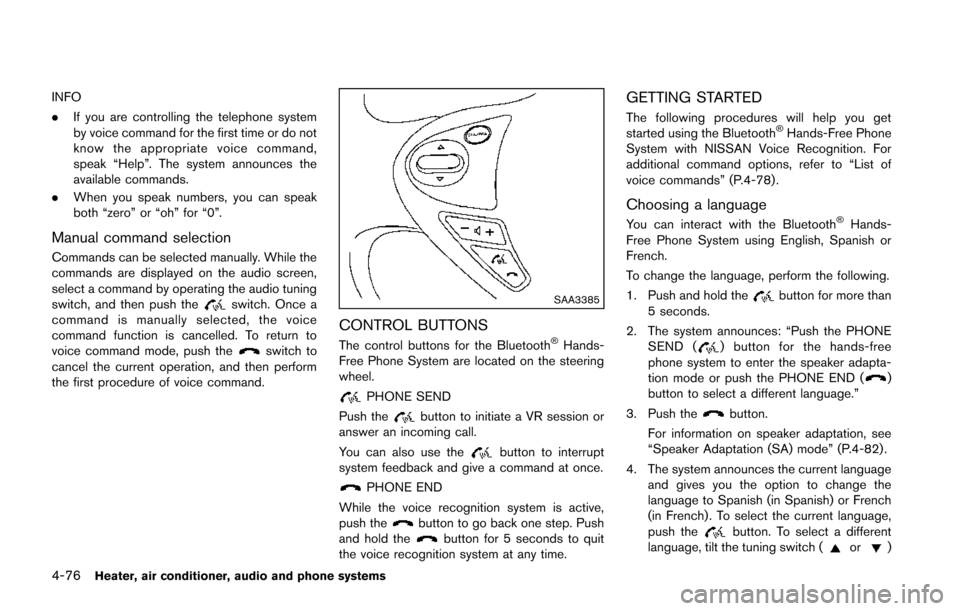
SAA3385
CONTROL BUTTONS
The control buttons for the Bluetooth®Hands-
Free Phone System are located on the steering
wheel.
PHONE SEND
Push the
button to initiate a VR session or
answer an incoming call.
You can also use the
button to interrupt
system feedback and give a command at once.
PHONE END
While the voice recognition system is active,
push the
button to go back one step. Push
and hold thebutton for 5 seconds to quit
the voice recognition system at any time.
GETTING STARTED
The following procedures will help you get
started using the Bluetooth®Hands-Free Phone
System with NISSAN Voice Recognition. For
additional command options, refer to “List of
voice commands” (P.4-78) .
Choosing a language
You can interact with the Bluetooth®Hands-
Free Phone System using English, Spanish or
French.
To change the language, perform the following.
1. Push and hold the
button for more than
5 seconds.
2. The system announces: “Push the PHONE SEND (
) button for the hands-free
phone system to enter the speaker adapta-
tion mode or push the PHONE END (
)
button to select a different language.”
3. Push the
button.
For information on speaker adaptation, see
“Speaker Adaptation (SA) mode” (P.4-82) .
4. The system announces the current language and gives you the option to change the
language to Spanish (in Spanish) or French
(in French) . To select the current language,
push the
button. To select a different
language, tilt the tuning switch (or)