2014 NISSAN JUKE transmission
[x] Cancel search: transmissionPage 84 of 402
SIC4124
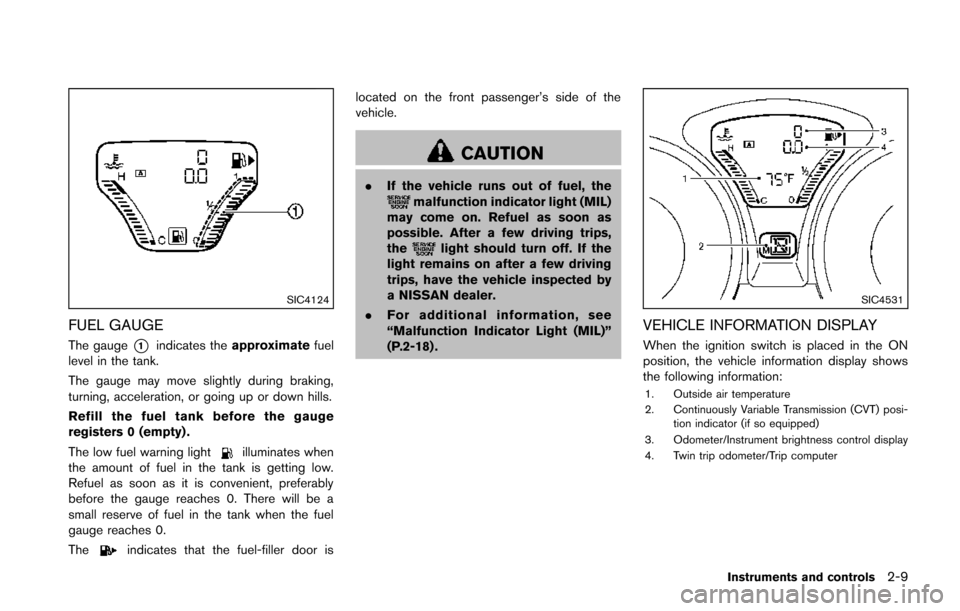
FUEL GAUGE
The gauge*1indicates theapproximate fuel
level in the tank.
The gauge may move slightly during braking,
turning, acceleration, or going up or down hills.
Refill the fuel tank before the gauge
registers 0 (empty) .
The low fuel warning light
illuminates when
the amount of fuel in the tank is getting low.
Refuel as soon as it is convenient, preferably
before the gauge reaches 0. There will be a
small reserve of fuel in the tank when the fuel
gauge reaches 0.
The
indicates that the fuel-filler door is located on the front passenger’s side of the
vehicle.
CAUTION
.
If the vehicle runs out of fuel, themalfunction indicator light (MIL)
may come on. Refuel as soon as
possible. After a few driving trips,
the
light should turn off. If the
light remains on after a few driving
trips, have the vehicle inspected by
a NISSAN dealer.
. For additional information, see
“Malfunction Indicator Light (MIL)”
(P.2-18) .
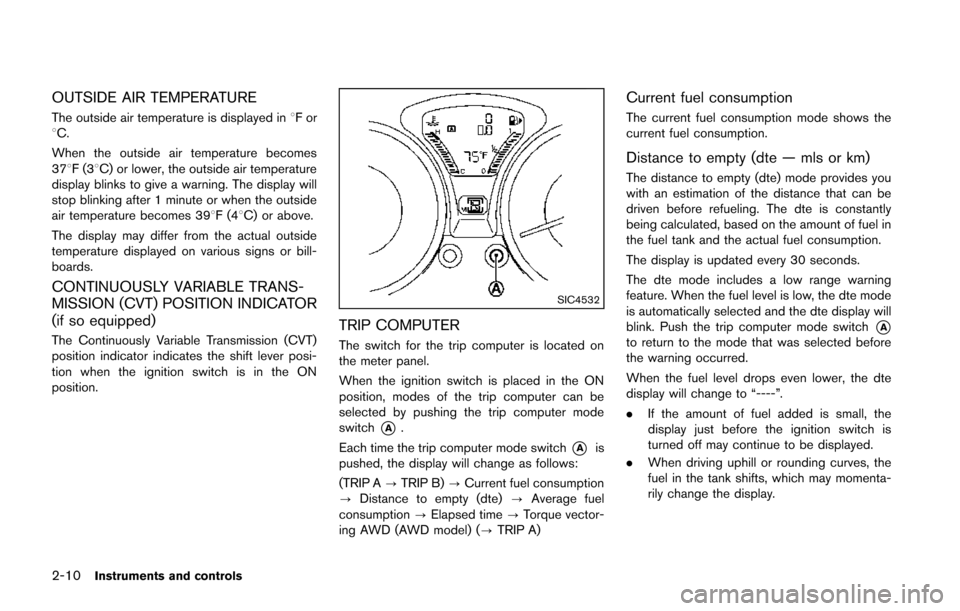
SIC4531
VEHICLE INFORMATION DISPLAY
When the ignition switch is placed in the ON
position, the vehicle information display shows
the following information:
1. Outside air temperature
2. Continuously Variable Transmission (CVT) posi-
tion indicator (if so equipped)
3. Odometer/Instrument brightness control display
4. Twin trip odometer/Trip computer
Instruments and controls2-9
Page 85 of 402
2-10Instruments and controls
OUTSIDE AIR TEMPERATURE
The outside air temperature is displayed in8For
8C.
When the outside air temperature becomes
378F(3 8C) or lower, the outside air temperature
display blinks to give a warning. The display will
stop blinking after 1 minute or when the outside
air temperature becomes 398F(4 8C) or above.
The display may differ from the actual outside
temperature displayed on various signs or bill-
boards.
CONTINUOUSLY VARIABLE TRANS-
MISSION (CVT) POSITION INDICATOR
(if so equipped)
The Continuously Variable Transmission (CVT)
position indicator indicates the shift lever posi-
tion when the ignition switch is in the ON
position.
SIC4532
TRIP COMPUTER
The switch for the trip computer is located on
the meter panel.
When the ignition switch is placed in the ON
position, modes of the trip computer can be
selected by pushing the trip computer mode
switch
*A.
Each time the trip computer mode switch
*Ais
pushed, the display will change as follows:
(TRIP A ?TRIP B) ?Current fuel consumption
? Distance to empty (dte) ?Average fuel
consumption ?Elapsed time ?Torque vector-
ing AWD (AWD model) (? TRIP A)
Current fuel consumption
The current fuel consumption mode shows the
current fuel consumption.
Distance to empty (dte — mls or km)
The distance to empty (dte) mode provides you
with an estimation of the distance that can be
driven before refueling. The dte is constantly
being calculated, based on the amount of fuel in
the fuel tank and the actual fuel consumption.
The display is updated every 30 seconds.
The dte mode includes a low range warning
feature. When the fuel level is low, the dte mode
is automatically selected and the dte display will
blink. Push the trip computer mode switch
*Ato return to the mode that was selected before
the warning occurred.
When the fuel level drops even lower, the dte
display will change to “----”.
.If the amount of fuel added is small, the
display just before the ignition switch is
turned off may continue to be displayed.
. When driving uphill or rounding curves, the
fuel in the tank shifts, which may momenta-
rily change the display.
Page 87 of 402
2-12Instruments and controls
All-Wheel Drive (AWD) warning light (AWD
model)*Low fuel warning lightCruise indicator light
Anti-lock Braking System (ABS) warning
lightLow tire pressure warning lightEngine start operation indicator light*
Low washer fluid warning light*Exterior light indicator
Brake warning lightP position selecting warning light*Front passenger air bag status light
Seat belt warning lightHigh beam indicator light
Charge warning lightSupplemental air bag warning lightMalfunction Indicator Light (MIL)
Door open warning lightVehicle Dynamic Control (VDC) warning lightSecurity indicator light
Electric power steering warning lightAll-Wheel Drive (AWD) indicator light (AWD
model)*Turn signal/hazard indicator lights
Engine oil pressure warning lightAll-Wheel Drive (AWD) -V indicator light
(AWD model)*Vehicle Dynamic Control (VDC) off indicator
light
Intelligent Key system warning light*Continuously Variable Transmission (CVT)
indicator light**: if so equipped
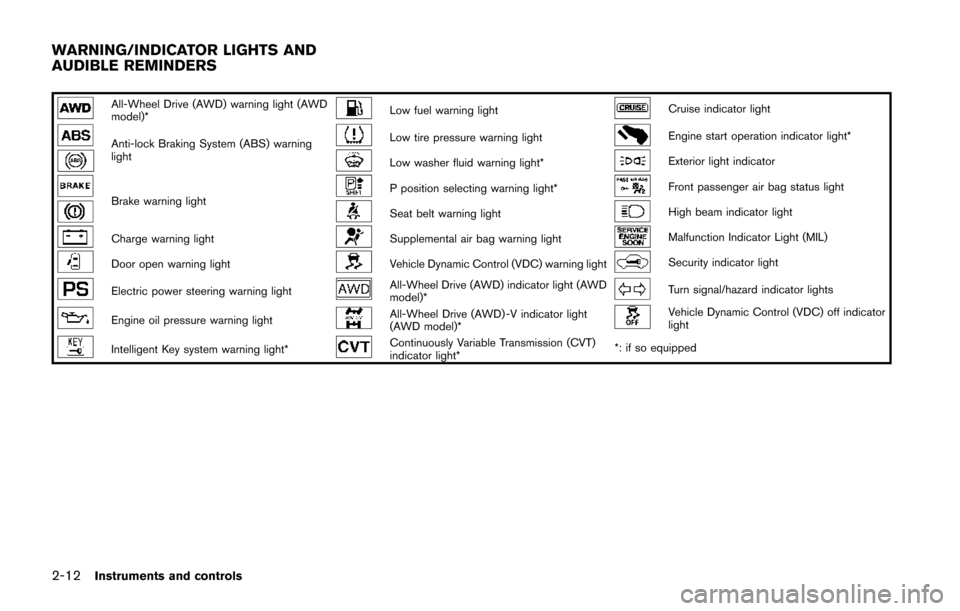
WARNING/INDICATOR LIGHTS AND
AUDIBLE REMINDERS
Page 92 of 402
occupied. For about 5 seconds after the ignition
switch is in the ON position, the system does
not activate the warning light for the front
passenger.
See “Seat belts” (P.1-10) for precautions on
seat belt usage.
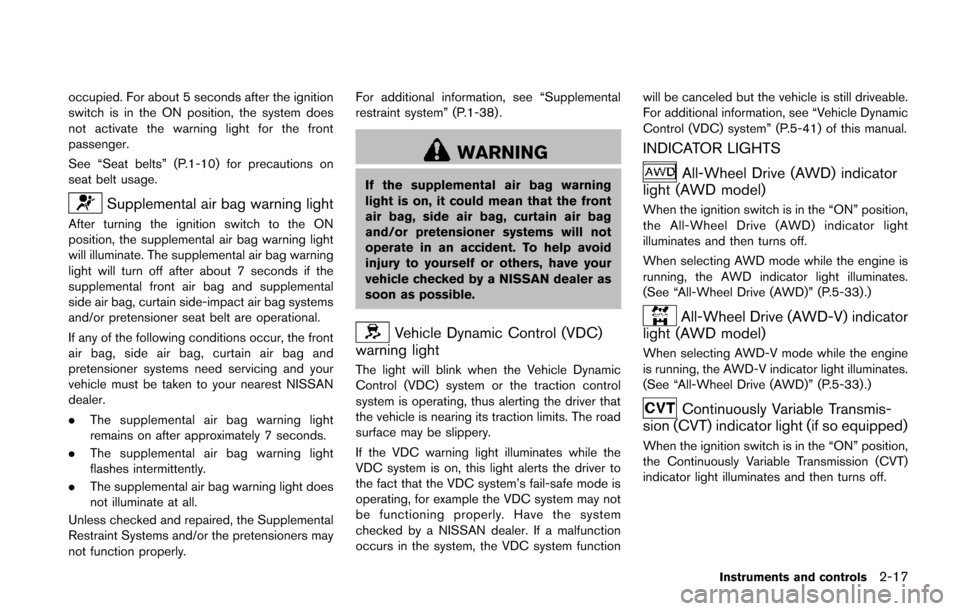
Supplemental air bag warning light
After turning the ignition switch to the ON
position, the supplemental air bag warning light
will illuminate. The supplemental air bag warning
light will turn off after about 7 seconds if the
supplemental front air bag and supplemental
side air bag, curtain side-impact air bag systems
and/or pretensioner seat belt are operational.
If any of the following conditions occur, the front
air bag, side air bag, curtain air bag and
pretensioner systems need servicing and your
vehicle must be taken to your nearest NISSAN
dealer.
.The supplemental air bag warning light
remains on after approximately 7 seconds.
. The supplemental air bag warning light
flashes intermittently.
. The supplemental air bag warning light does
not illuminate at all.
Unless checked and repaired, the Supplemental
Restraint Systems and/or the pretensioners may
not function properly. For additional information, see “Supplemental
restraint system” (P.1-38) .
WARNING
If the supplemental air bag warning
light is on, it could mean that the front
air bag, side air bag, curtain air bag
and/or pretensioner systems will not
operate in an accident. To help avoid
injury to yourself or others, have your
vehicle checked by a NISSAN dealer as
soon as possible.
Vehicle Dynamic Control (VDC)
warning light
The light will blink when the Vehicle Dynamic
Control (VDC) system or the traction control
system is operating, thus alerting the driver that
the vehicle is nearing its traction limits. The road
surface may be slippery.
If the VDC warning light illuminates while the
VDC system is on, this light alerts the driver to
the fact that the VDC system’s fail-safe mode is
operating, for example the VDC system may not
be functioning properly. Have the system
checked by a NISSAN dealer. If a malfunction
occurs in the system, the VDC system function will be canceled but the vehicle is still driveable.
For additional information, see “Vehicle Dynamic
Control (VDC) system” (P.5-41) of this manual.
INDICATOR LIGHTS
All-Wheel Drive (AWD) indicator
light (AWD model)
When the ignition switch is in the “ON” position,
the All-Wheel Drive (AWD) indicator light
illuminates and then turns off.
When selecting AWD mode while the engine is
running, the AWD indicator light illuminates.
(See “All-Wheel Drive (AWD)” (P.5-33) .)
All-Wheel Drive (AWD-V) indicator
light (AWD model)
When selecting AWD-V mode while the engine
is running, the AWD-V indicator light illuminates.
(See “All-Wheel Drive (AWD)” (P.5-33) .)
Continuously Variable Transmis-
sion (CVT) indicator light (if so equipped)
When the ignition switch is in the “ON” position,
the Continuously Variable Transmission (CVT)
indicator light illuminates and then turns off.
Instruments and controls2-17
Page 93 of 402
2-18Instruments and controls
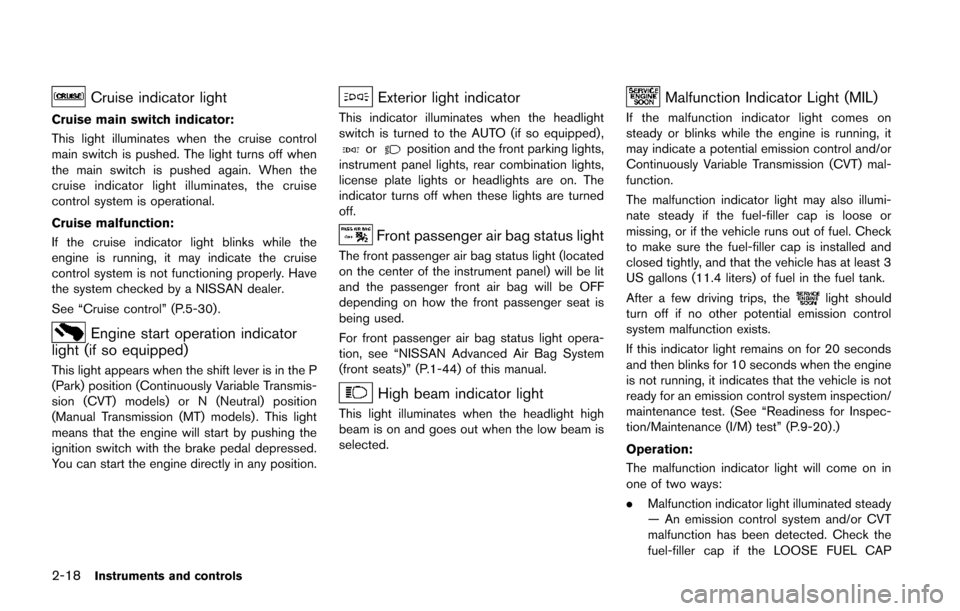
Cruise indicator light
Cruise main switch indicator:
This light illuminates when the cruise control
main switch is pushed. The light turns off when
the main switch is pushed again. When the
cruise indicator light illuminates, the cruise
control system is operational.
Cruise malfunction:
If the cruise indicator light blinks while the
engine is running, it may indicate the cruise
control system is not functioning properly. Have
the system checked by a NISSAN dealer.
See “Cruise control” (P.5-30).
Engine start operation indicator
light (if so equipped)
This light appears when the shift lever is in the P
(Park) position (Continuously Variable Transmis-
sion (CVT) models) or N (Neutral) position
(Manual Transmission (MT) models) . This light
means that the engine will start by pushing the
ignition switch with the brake pedal depressed.
You can start the engine directly in any position.
Exterior light indicator
This indicator illuminates when the headlight
switch is turned to the AUTO (if so equipped) ,
orposition and the front parking lights,
instrument panel lights, rear combination lights,
license plate lights or headlights are on. The
indicator turns off when these lights are turned
off.
Front passenger air bag status light
The front passenger air bag status light (located
on the center of the instrument panel) will be lit
and the passenger front air bag will be OFF
depending on how the front passenger seat is
being used.
For front passenger air bag status light opera-
tion, see “NISSAN Advanced Air Bag System
(front seats)” (P.1-44) of this manual.
High beam indicator light
This light illuminates when the headlight high
beam is on and goes out when the low beam is
selected.
Malfunction Indicator Light (MIL)
If the malfunction indicator light comes on
steady or blinks while the engine is running, it
may indicate a potential emission control and/or
Continuously Variable Transmission (CVT) mal-
function.
The malfunction indicator light may also illumi-
nate steady if the fuel-filler cap is loose or
missing, or if the vehicle runs out of fuel. Check
to make sure the fuel-filler cap is installed and
closed tightly, and that the vehicle has at least 3
US gallons (11.4 liters) of fuel in the fuel tank.
After a few driving trips, the
light should
turn off if no other potential emission control
system malfunction exists.
If this indicator light remains on for 20 seconds
and then blinks for 10 seconds when the engine
is not running, it indicates that the vehicle is not
ready for an emission control system inspection/
maintenance test. (See “Readiness for Inspec-
tion/Maintenance (I/M) test” (P.9-20) .)
Operation:
The malfunction indicator light will come on in
one of two ways:
. Malfunction indicator light illuminated steady
— An emission control system and/or CVT
malfunction has been detected. Check the
fuel-filler cap if the LOOSE FUEL CAP
Page 108 of 402
SIC3664
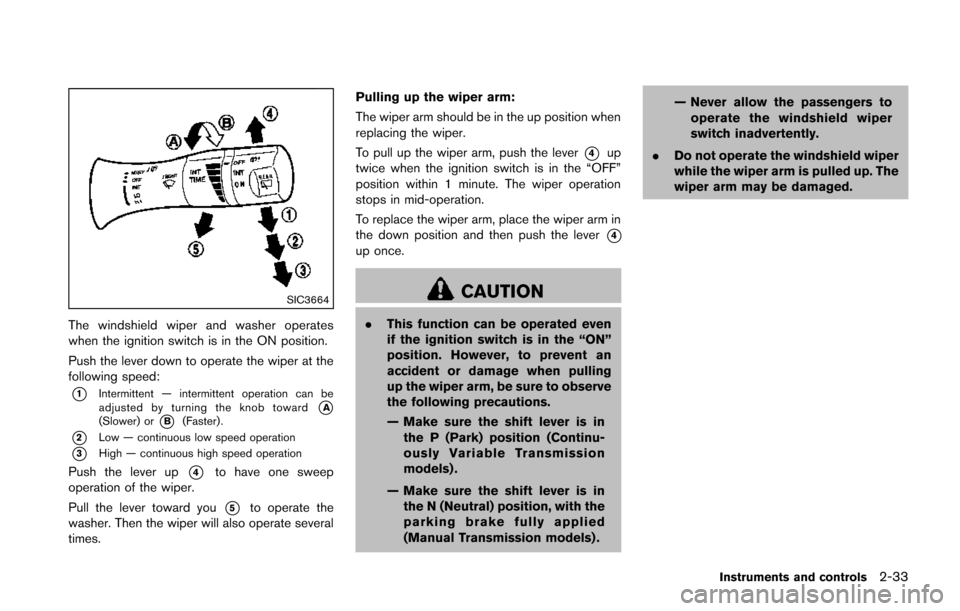
The windshield wiper and washer operates
when the ignition switch is in the ON position.
Push the lever down to operate the wiper at the
following speed:
*1Intermittent — intermittent operation can be
adjusted by turning the knob toward*A(Slower) or*B(Faster) .
*2Low — continuous low speed operation
*3High — continuous high speed operation
Push the lever up*4to have one sweep
operation of the wiper.
Pull the lever toward you
*5to operate the
washer. Then the wiper will also operate several
times. Pulling up the wiper arm:
The wiper arm should be in the up position when
replacing the wiper.
To pull up the wiper arm, push the lever
*4up
twice when the ignition switch is in the “OFF”
position within 1 minute. The wiper operation
stops in mid-operation.
To replace the wiper arm, place the wiper arm in
the down position and then push the lever
*4up once.
CAUTION
. This function can be operated even
if the ignition switch is in the “ON”
position. However, to prevent an
accident or damage when pulling
up the wiper arm, be sure to observe
the following precautions.
— Make sure the shift lever is in
the P (Park) position (Continu-
ously Variable Transmission
models) .
— Make sure the shift lever is in the N (Neutral) position, with the
parking brake fully applied
(Manual Transmission models) . — Never allow the passengers to
operate the windshield wiper
switch inadvertently.
. Do not operate the windshield wiper
while the wiper arm is pulled up. The
wiper arm may be damaged.
Instruments and controls2-33
Page 141 of 402
3-14Pre-driving checks and adjustments
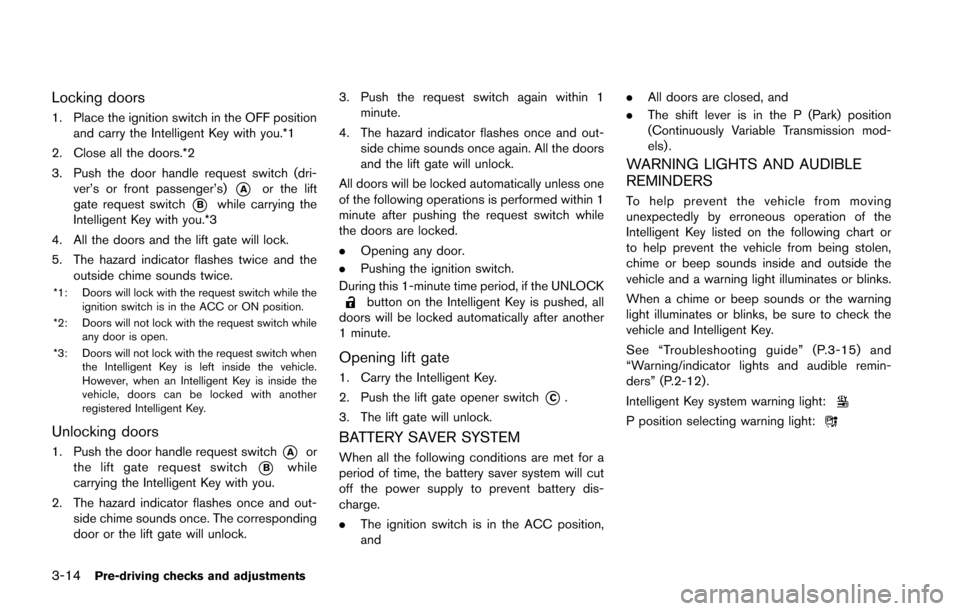
Locking doors
1. Place the ignition switch in the OFF positionand carry the Intelligent Key with you.*1
2. Close all the doors.*2
3. Push the door handle request switch (dri- ver’s or front passenger’s)
*Aor the lift
gate request switch
*Bwhile carrying the
Intelligent Key with you.*3
4. All the doors and the lift gate will lock.
5. The hazard indicator flashes twice and the outside chime sounds twice.
*1: Doors will lock with the request switch while the
ignition switch is in the ACC or ON position.
*2: Doors will not lock with the request switch while any door is open.
*3: Doors will not lock with the request switch when the Intelligent Key is left inside the vehicle.
However, when an Intelligent Key is inside the
vehicle, doors can be locked with another
registered Intelligent Key.
Unlocking doors
1. Push the door handle request switch*Aor
the lift gate request switch
*Bwhile
carrying the Intelligent Key with you.
2. The hazard indicator flashes once and out- side chime sounds once. The corresponding
door or the lift gate will unlock. 3. Push the request switch again within 1
minute.
4. The hazard indicator flashes once and out- side chime sounds once again. All the doors
and the lift gate will unlock.
All doors will be locked automatically unless one
of the following operations is performed within 1
minute after pushing the request switch while
the doors are locked.
. Opening any door.
. Pushing the ignition switch.
During this 1-minute time period, if the UNLOCK
button on the Intelligent Key is pushed, all
doors will be locked automatically after another
1 minute.
Opening lift gate
1. Carry the Intelligent Key.
2. Push the lift gate opener switch
*C.
3. The lift gate will unlock.
BATTERY SAVER SYSTEM
When all the following conditions are met for a
period of time, the battery saver system will cut
off the power supply to prevent battery dis-
charge.
. The ignition switch is in the ACC position,
and .
All doors are closed, and
. The shift lever is in the P (Park) position
(Continuously Variable Transmission mod-
els) .
WARNING LIGHTS AND AUDIBLE
REMINDERS
To help prevent the vehicle from moving
unexpectedly by erroneous operation of the
Intelligent Key listed on the following chart or
to help prevent the vehicle from being stolen,
chime or beep sounds inside and outside the
vehicle and a warning light illuminates or blinks.
When a chime or beep sounds or the warning
light illuminates or blinks, be sure to check the
vehicle and Intelligent Key.
See “Troubleshooting guide” (P.3-15) and
“Warning/indicator lights and audible remin-
ders” (P.2-12) .
Intelligent Key system warning light:
P position selecting warning light:
Page 142 of 402
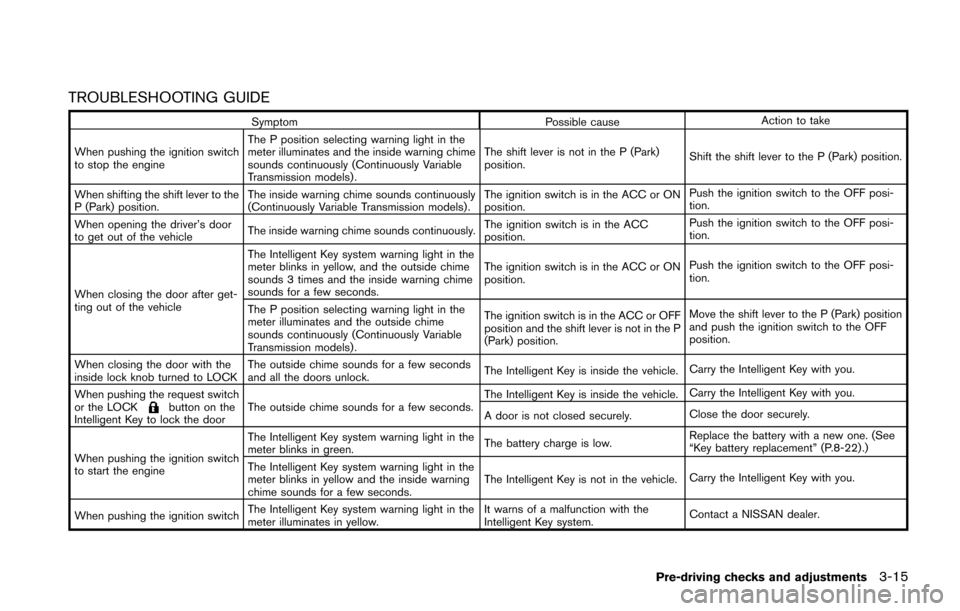
TROUBLESHOOTING GUIDE
SymptomPossible causeAction to take
When pushing the ignition switch
to stop the engine The P position selecting warning light in the
meter illuminates and the inside warning chime
sounds continuously (Continuously Variable
Transmission models) . The shift lever is not in the P (Park)
position.
Shift the shift lever to the P (Park) position.
When shifting the shift lever to the
P (Park) position. The inside warning chime sounds continuously
(Continuously Variable Transmission models) . The ignition switch is in the ACC or ON
position.Push the ignition switch to the OFF posi-
tion.
When opening the driver’s door
to get out of the vehicle The inside warning chime sounds continuously. The ignition switch is in the ACC
position.Push the ignition switch to the OFF posi-
tion.
When closing the door after get-
ting out of the vehicle The Intelligent Key system warning light in the
meter blinks in yellow, and the outside chime
sounds 3 times and the inside warning chime
sounds for a few seconds.
The ignition switch is in the ACC or ON
position.
Push the ignition switch to the OFF posi-
tion.
The P position selecting warning light in the
meter illuminates and the outside chime
sounds continuously (Continuously Variable
Transmission models) . The ignition switch is in the ACC or OFF
position and the shift lever is not in the P
(Park) position.
Move the shift lever to the P (Park) position
and push the ignition switch to the OFF
position.
When closing the door with the
inside lock knob turned to LOCK The outside chime sounds for a few seconds
and all the doors unlock.
The Intelligent Key is inside the vehicle.
Carry the Intelligent Key with you.
When pushing the request switch
or the LOCK
button on the
Intelligent Key to lock the door The outside chime sounds for a few seconds. The Intelligent Key is inside the vehicle.
Carry the Intelligent Key with you.
A door is not closed securely. Close the door securely.
When pushing the ignition switch
to start the engine The Intelligent Key system warning light in the
meter blinks in green.
The battery charge is low.Replace the battery with a new one. (See
“Key battery replacement” (P.8-22) .)
The Intelligent Key system warning light in the
meter blinks in yellow and the inside warning
chime sounds for a few seconds. The Intelligent Key is not in the vehicle.
Carry the Intelligent Key with you.
When pushing the ignition switch The Intelligent Key system warning light in the
meter illuminates in yellow. It warns of a malfunction with the
Intelligent Key system.
Contact a NISSAN dealer.
Pre-driving checks and adjustments3-15