2014 NISSAN FRONTIER air condition
[x] Cancel search: air conditionPage 167 of 434
The automatic unlock function can be de-
activated or activated.To deactivate or acti-
vate the automatic door unlock system, perform
the following procedure:
1. Close all doors.
2. Place the ignition switch in the ON position.
3. Within 20 seconds of performing Step 2, push and hold the power door lock switch to
the
position (UNLOCK) for more than
5 seconds.
4. When activated, the hazard indicator will flash twice. When deactivated, the hazard
indicator will flash once.
5. The ignition switch must be placed in the OFF and ON position again between each
setting change.
When the automatic door unlock system is deac-
tivated, the doors do not unlock when the ignition
switch is placed in the OFF position for manual
transmission models or the transmission is
placed in the P (Park) position for automatic
transmission models. To unlock the door manu-
ally, use the inside lock knob or the power door
lock switch (driver’s or front passenger’s side) .
CHILD SAFETY REAR DOOR LOCK
(Crew Cab models only)
Child safety locks help prevent the rear doors
from being opened accidentally, especially when
small children are in the vehicle.
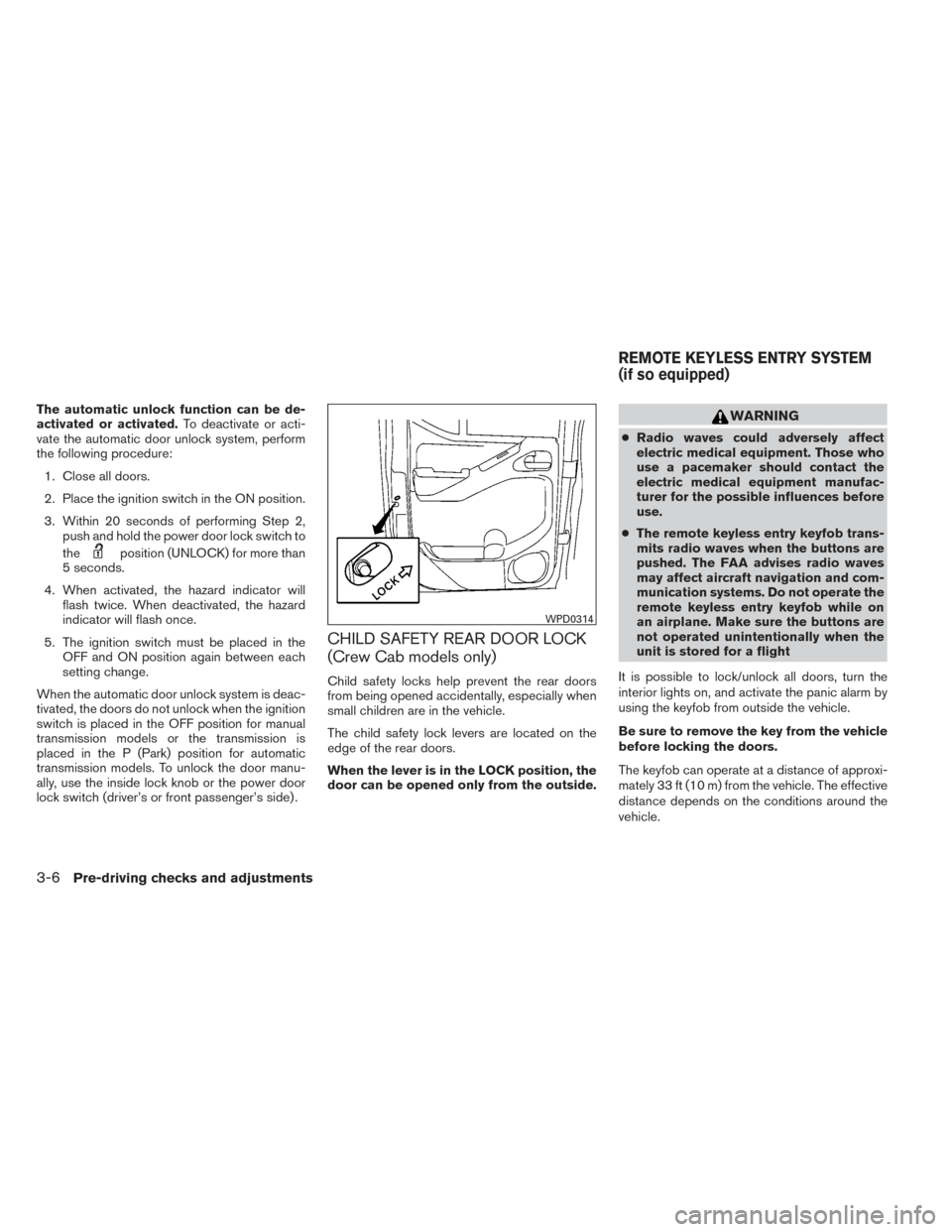
The child safety lock levers are located on the
edge of the rear doors.
When the lever is in the LOCK position, the
door can be opened only from the outside.
WARNING
● Radio waves could adversely affect
electric medical equipment. Those who
use a pacemaker should contact the
electric medical equipment manufac-
turer for the possible influences before
use.
● The remote keyless entry keyfob trans-
mits radio waves when the buttons are
pushed. The FAA advises radio waves
may affect aircraft navigation and com-
munication systems. Do not operate the
remote keyless entry keyfob while on
an airplane. Make sure the buttons are
not operated unintentionally when the
unit is stored for a flight
It is possible to lock/unlock all doors, turn the
interior lights on, and activate the panic alarm by
using the keyfob from outside the vehicle.
Be sure to remove the key from the vehicle
before locking the doors.
The keyfob can operate at a distance of approxi-
mately 33 ft (10 m) from the vehicle. The effective
distance depends on the conditions around the
vehicle.
WPD0314
REMOTE KEYLESS ENTRY SYSTEM
(if so equipped)
3-6Pre-driving checks and adjustments
Page 184 of 434
4 Monitor, climate, audio, phone and voice
recognition systems
Control panel buttons — color screen with
Navigation System (if so equipped)..................4-4
How to use the touch screen ....................4-5
How to use the BACK button ....................4-7
How to use the APPS – i button .................4-7
button...................................4-9
How to use the ON-OFF button/VOL
(volume) control knob ...........................4-9
How to use the CAMERA button .................4-9
RearView Monitor (if so equipped) ..................4-10
How to read the displayed lines .................4-10
Difference between predicted and actual
distances ..................................... 4-11
Adjusting the screen ........................... 4-13
Operating tips ................................. 4-14
Vents . .......................................... 4-15
Heater and Air Conditioner (manual)
(if so equipped) .................................. 4-16
Controls ...................................... 4-16
Heater operation .............................. 4-17
Air conditioner operation .......................4-19
Air flow charts ................................. 4-20
Heater and air conditioner (automatic)
(if so equipped) .................................. 4-23Automatic operation
........................... 4-24
Manual operation .............................. 4-25
Operating tips ................................. 4-26
Servicing air conditioner ........................... 4-27
Audio system .................................... 4-27
Radio ........................................ 4-27
FM radio reception ............................ 4-27
AM radio reception ............................ 4-28
Satellite radio reception (if so equipped) . . . ......4-28
Audio operation precautions ....................4-28
FM/AM radio with compact disc (CD) player
(if so equipped) ............................... 4-35
FM/AM/SAT radio with compact disc (CD)
player (Type A) (if so equipped) .................4-40
FM/AM/SAT radio with compact disc (CD)
player (Type B) (if so equipped) .................4-45
USB interface (models without Navigation
System) (if so equipped) .......................4-50
USB interface (models with Navigation
System) ...................................... 4-52
iPod®* player operation without Navigation
System (if so equipped) ........................ 4-54
iPod®* player operation with Navigation
System (if so equipped) ........................ 4-56
Page 187 of 434
WARNING
●Positioning of the heating or air condi-
tioning controls and display controls
should not be done while driving in or-
der that full attention may be given to
the driving operation.
● Do not disassemble or modify this sys-
tem. If you do, it may result in accidents,
fire, or electrical shock.
● Do not use this system if you notice any
abnormality, such as a frozen screen or
lack of sound. Continued use of the
system may result in accident, fire or
electric shock.
● In case you notice any foreign object in
the system hardware, spill liquid on it,
or notice smoke or smell coming from it,
stop using the system immediately and
contact your nearest NISSAN dealer. Ig-
noring such conditions may lead to ac-
cidents, fire or electrical shock.
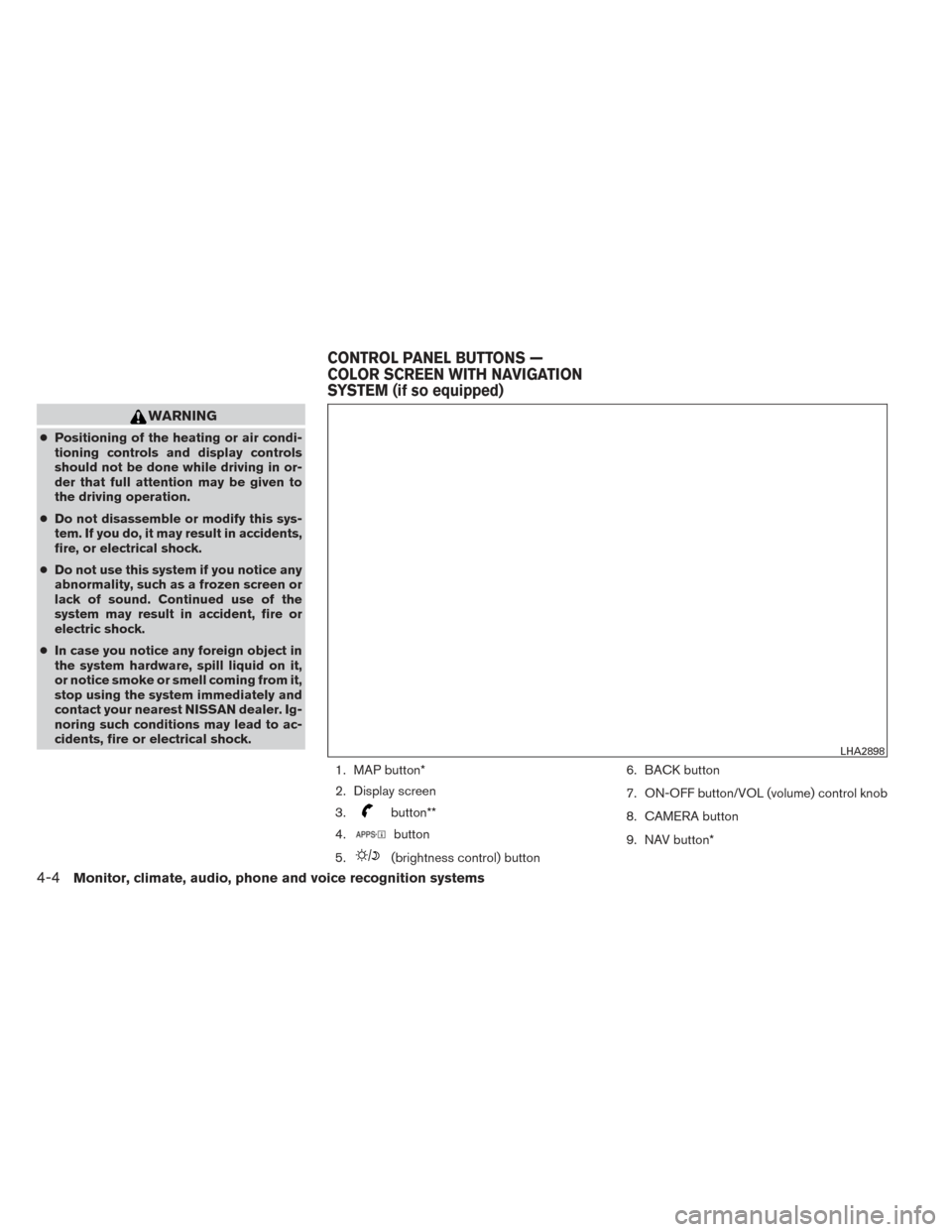
1. MAP button*
2. Display screen
3.
button**
4.
button
5.
(brightness control) button 6. BACK button
7. ON-OFF button/VOL (volume) control knob
8. CAMERA button
9. NAV button*
LHA2898
CONTROL PANEL BUTTONS —
COLOR SCREEN WITH NAVIGATION
SYSTEM (if so equipped)
4-4Monitor, climate, audio, phone and voice recognition systems
Page 199 of 434
WARNING
●The air conditioner cooling function op-
erates only when the engine is running.
●
Do not leave children or adults who would
normally require the assistance of others
alone in your vehicle. Pets should also not
be left alone. They could accidentally in-
jure themselves or others through inad-
vertent operation of the vehicle. Also, on
hot, sunny days, temperatures in a closed
vehicle could quickly become high
enough to cause severe or possibly fatal
injuries to people or animals.
● Do not use the recirculation mode for
long periods as it may cause the interior
air to become stale and the windows to
fog up.
NOTE: ● Odors from inside and outside the vehicle
can build up in the air conditioner unit. Odor
can enter the passenger compartment
through the vents.
● When parking, set the heater and air condi-
tioner controls to turn off air recirculation to
allow fresh air into the passenger compart-
ment. This should help reduce odors inside
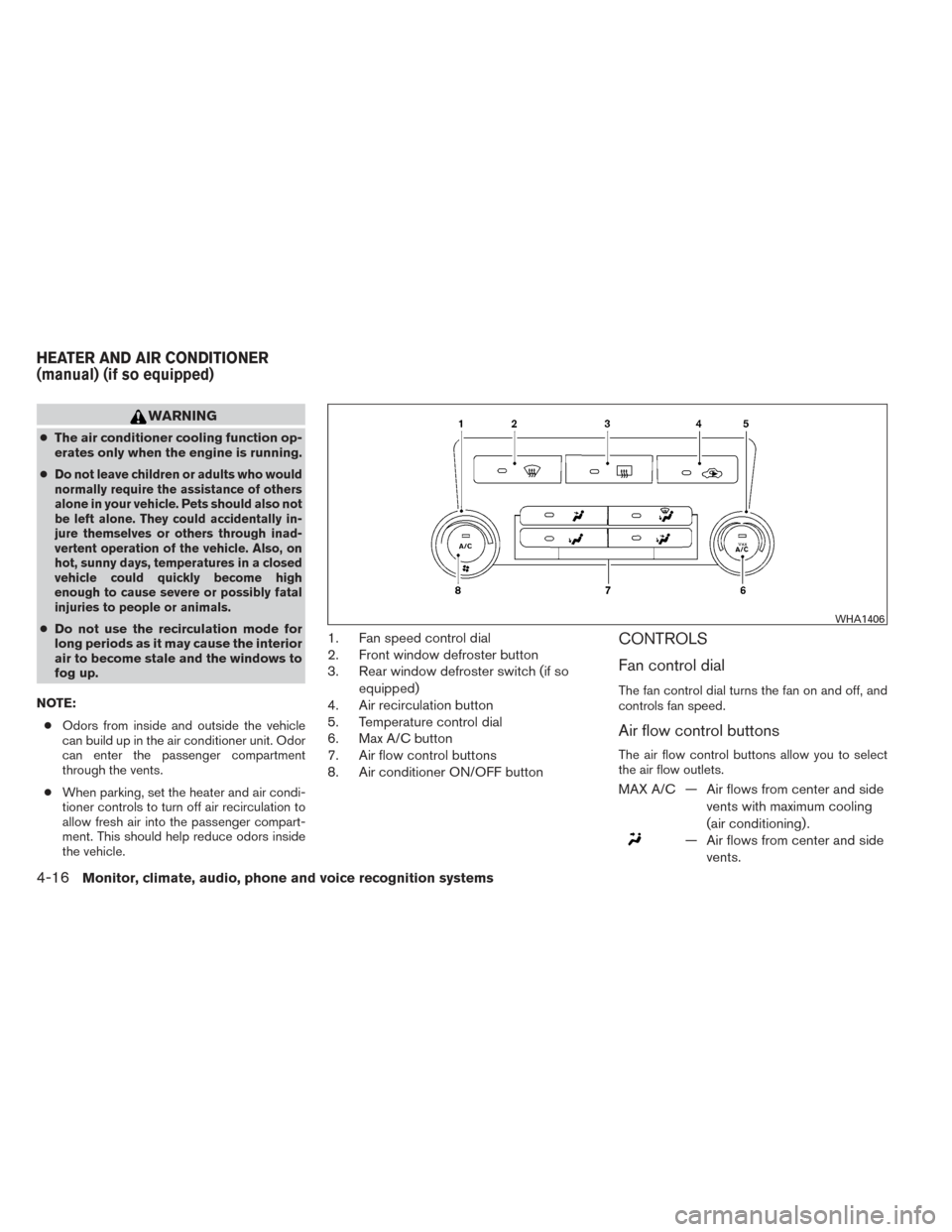
the vehicle.1. Fan speed control dial
2. Front window defroster button
3. Rear window defroster switch (if so
equipped)
4. Air recirculation button
5. Temperature control dial
6. Max A/C button
7. Air flow control buttons
8. Air conditioner ON/OFF buttonCONTROLS
Fan control dial
The fan control dial turns the fan on and off, and
controls fan speed.
Air flow control buttons
The air flow control buttons allow you to select
the air flow outlets.
MAX A/C — Air flows from center and side
vents with maximum cooling
(air conditioning) .
— Air flows from center and sidevents.
WHA1406
HEATER AND AIR CONDITIONER
(manual) (if so equipped)
4-16Monitor, climate, audio, phone and voice recognition systems
Page 200 of 434
— Air flows from center and sidevents and foot outlets.
— Air flows mainly from footoutlets.
— Air flows from defroster out-lets and foot outlets.
— Air flows mainly from defrosteroutlets.
Temperature control dial
The temperature control dial allows you to adjust
the temperature of the outlet air. To lower the
temperature, turn the dial to the left. To increase
the temperature, turn the dial to the right.
Air recirculation button
ON position (Indicator light on):
Interior air is recirculated inside the vehicle.
Press the
button to the on position when:
● driving on a dusty road.
● to prevent traffic fumes from entering pas-
senger compartment.
● for maximum cooling when using the air con-
ditioner. OFF position (Indicator light off):
Outside air is drawn into the passenger compart-
ment and distributed through the selected outlet.
Use the off position for normal heater or air con-
ditioner operation.
Air conditioner button
Start the engine, turn the fan control dial to the
desired position and press the
button to
turn on the air conditioner. The indicator light
comes on when the air conditioner is operating.
To turn off the air conditioner, press the
button again.
The air conditioner cooling function oper-
ates only when the engine is running.
Rear window and outside mirror
defroster switch (if so equipped)
For more information about the rear window de-
froster switch, see “Rear window and outside
mirror defroster switch” in the “Instruments and
controls” section of this manual.
HEATER OPERATION
Heating
This mode is used to direct heated air to the foot
outlets. Some air also flows from the defrost
outlets.
1. Press the
button to the OFF position
for normal heating. The indicator light on
the
button will go off.
2. Press the
air flow control button.
3.
Turn the fan control dial to the desired position.
4. Turn the temperature control dial to the de- sired position between the middle and the
hot position.
Ventilation
This mode directs outside air to the side and
center vents.
1. Press the
button to the OFF position.
The indicator light on the
button will
go off.
2. Press the
air flow control button.
3. Turn the fan control dial to the desired posi- tion.
4. Turn the temperature control dial to the de- sired position.
Monitor, climate, audio, phone and voice recognition systems4-17
Page 201 of 434
Defrosting or defogging
This mode directs the air to the defrost outlets to
defrost/defog the windows.1. Press the defrost/defog button
.
2. Turn the fan control dial to the desired posi- tion.
3. Turn the temperature control dial to the de- sired position between the middle and the
hot position.
● To quickly remove ice or fog from the win-
dows, turn the fan control dial to the highest
setting and the temperature control to the
full HOT position.
● When the
position is selected, the air
conditioner automatically turns on (the indi-
cator light on the
button will come on)
if the outside temperature is more than 36°F
(2°C) . This dehumidifies the air which helps
defog the windshield. The
mode au-
tomatically turns off, allowing outside air to
be drawn into the passenger compartment
to further improve the defogging perfor-
mance.
Bi-level heating
The bi-level mode directs warmed air to the side
and center vents and to the front and rear floor
outlets.
1. Press the
button to the OFF position.
The indicator light on the
button will
go off.
2. Press the
air flow control button.
3. Turn the fan control dial to the desired posi- tion.
4. Turn the temperature control dial to the de- sired position.
Heating and defogging
This mode heats the interior and defogs the wind-
shield.
1. Press the
air flow control button.
2. Turn the fan control dial to the desired posi- tion.
3. Turn the temperature control dial to the de- sired position between the middle and the
hot position. ●
When the
position is selected, the air
conditioner automatically turns on (however,
the indicator light on the
button will
not come on) if the outside temperature is
more than 36°F (2°C) . If the
air flow
control button is selected for more than one
minute, the air conditioning system will con-
tinue to operate until the fan control dial is
turned to OFF, the vehicle is shut off, or the
A/C button is used to turn off the compres-
sor even if the air flow control dial is turned to
a position other than the
position.
This dehumidifies the air which helps defog
the windshield. The
mode automati-
cally turns off, allowing outside air to be
drawn into the passenger compartment to
further improve the defogging performance.
Operating tips
Clear snow and ice from the wiper blades
and air inlet in front of the windshield. This
improves heater operation.
4-18Monitor, climate, audio, phone and voice recognition systems
Page 202 of 434
AIR CONDITIONER OPERATION
Start the engine, turn the fan control dial to the
desired position, and press the
button to
activate the air conditioner. When the air condi-
tioner is on, cooling and dehumidifying functions
are added to the heater operation.
The air conditioner cooling function oper-
ates only when the engine is running.
Cooling
This mode is used to cool and dehumidify the air.
1. Press the
button to the OFF position.
2. Press the
air flow control button.
3.
Turn the fan control dial to the desired position.
4. Press thebutton. The indicator light
on the
button will come on.
5. Turn the temperature control dial to the de- sired position.
● For quick cooling when the outside tem-
perature is high, push the
button to
the ON position. The indicator light on
the
button will come on. Be sure to
return the
to the OFF position for nor-
mal cooling. The indicator light on the
button will go off. You may also select MAX
A/C for quick cooling.
Dehumidified heating
This mode is used to heat and dehumidify the air.
1. Press the
button to the OFF position.
The indicator light on the
button will
go off.
2. Press the
air flow control button.
3. Turn the fan control dial to the desired posi- tion.
4. Press the
button on. The indicator
light on the
button will come on.
5. Turn the temperature control dial to the de- sired position.
Dehumidified defogging
This mode is used to defog the windows and
dehumidify the air.
1. Press the
air flow control button.
2. Turn the fan control dial to the desired posi- tion.
3. Press the
button. The indicator light
comes on.
When the
orpositions are se-
lected, the air conditioner automatically turns on
(however, the indicator light will not illuminate) if the outside temperature is more than 36°F (2°C) .
The air conditioning system will continue to op-
erate until the fan control dial is turned to OFF, the
air conditioner is turned OFF, or the vehicle is
shut off, even if a position other than the
air
flow control button is selected. This dehumidifies
the air which helps defog the windshield.
The
mode automatically turns off, allowing
outside air to be drawn into the passenger com-
partment to further improve the defogging perfor-
mance.
4. Turn the temperature control dial to the de- sired position.
Operating tips
●Keep the windows closed while the air con-
ditioner is in operation.
● After parking in the sun, drive for 2 or 3 min-
utes with the windows open to vent hot air
from the passenger compartment. Then,
close the windows. This allows the air con-
ditioner to cool the interior more quickly.
● The air conditioning system should be
operated for approximately 10 minutes
at least once a month. This helps pre-
vent damage to the system due to lack
of lubrication.
Monitor, climate, audio, phone and voice recognition systems4-19
Page 203 of 434
●A visible mist may be seen coming from the
ventilators in hot, humid conditions as the air
is cooled rapidly. This does not indicate a
malfunction.
● If the engine coolant temperature
gauge indicates engine coolant tem-
perature over the normal range, turn
the air conditioner off. See “If your
vehicle overheats” in the “In case of
emergency” section of this manual.
AIR FLOW CHARTS
The following charts show the button and dial
positions for MAXIMUM AND QUICK heating,
cooling or defrosting. For additional information
on heating and cooling, see “Heater and air con-
ditioner (manual)” in this section. The air recir-
culation (
) button should always be in
the OFF position for heating and defrost-
ing.
LHA2059
4-20Monitor, climate, audio, phone and voice recognition systems