Page 119 of 460
Features and controls
3-31
3
Keyless entry system
N00515500213
Press the remote control transmitter buttons to lock or unlock
the doors and the liftgate.
It can also help you signal for attention by setting off the panic
alarm.
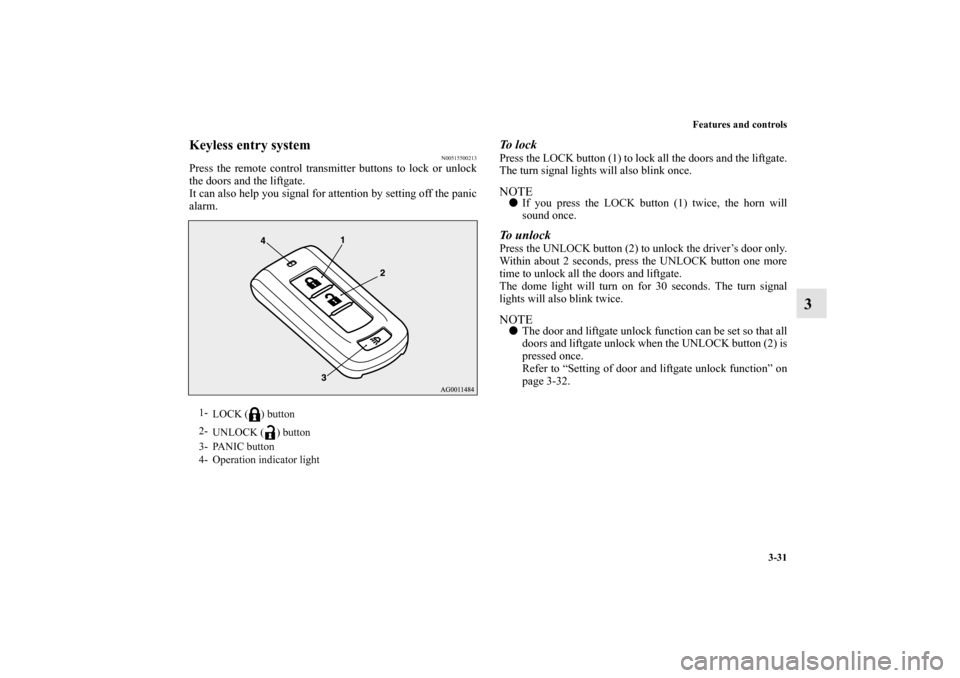
To l o c kPress the LOCK button (1) to lock all the doors and the liftgate.
The turn signal lights will also blink once.NOTE�If you press the LOCK button (1) twice, the horn will
sound once.To unlockPress the UNLOCK button (2) to unlock the driver’s door only.
Within about 2 seconds, press the UNLOCK button one more
time to unlock all the doors and liftgate.
The dome light will turn on for 30 seconds. The turn signal
lights will also blink twice.NOTE�The door and liftgate unlock function can be set so that all
doors and liftgate unlock when the UNLOCK button (2) is
pressed once.
Refer to “Setting of door and liftgate unlock function” on
page 3-32.
1-
LOCK ( ) button
2-
UNLOCK ( ) button
3- PANIC button
4- Operation indicator light
BK0162600US.book 31 ページ 2013年3月22日 金曜日 午後2時41分
Page 121 of 460

Features and controls
3-33
3
Using the panic alarm
N00544700060
If you are near your vehicle and feel threatened, you can acti-
vate the alarm to call attention as follows:
1. Press the PANIC button (3) for more than 1 second.
2. The headlights will blink on and off and the horn will
sound intermittently for about 3 minutes.
3. To turn off the alarm, press any button on the remote con-
trol transmitter.NOTE�The indicator light (4) comes on each time a button is
pressed.
�The F.A.S.T.-key can be used from about 40 feet (12 m)
away. However, this distance may change if your vehicle
is near a TV transmitting tower, a power station, or a radio
station.
�If the following conditions are observed after pressing the
LOCK (1) or UNLOCK (2) button on the remote control
transmitter, the buttery in the F.A.S.T.-key may need to be
replaced.
• The doors and the liftgate cannot be locked or unlocked.
• The panic alarm cannot be operated.
• The indicator light (4) is dim or does not come on.
�If you lose your F.A.S.T.-key, please contact an authorized
Mitsubishi Motors dealer for a replacement.
�If you wish to obtain an additional F.A.S.T.-key, please
contact an authorized Mitsubishi Motors dealer. A maxi-
mum of four F.A.S.T.-key can be programmed for your
vehicle.�To use the new remote control transmitters, it is necessary
to register the key with the electronic immobilizer and
keyless entry system.
Refer to “Electronic immobilizer (Anti-theft starting sys-
tem): Customer F.A.S.T.-key programming” on page 3-
29.
General information
N00562000065
Your F.A.S.T.-key operates on a radio frequency subject to
Federal Communications Commission (FCC) Rules (For vehi-
cles sold in U.S.A.) and Industry Canada Rules (For vehicles
sold in Canada). This device complies with Part 15 of FCC
Rules and Industry Canada licence-exempt RSS standard(s).
Operation is subject to the following two conditions.
�This device may not cause harmful interference.
�This device must accept any interference received, includ-
ing interference that may cause undesired operation of this
device.Procedure for replacing the remote control trans-
mitter battery
N00562100066
1. Before replacing the battery, remove static electricity from
your body by touching a metal grounded object.
WA R N I N G
!�Changes or modifications not expressly approved by
the party responsible for compliance could void the
user’s authority to operate the equipment.
BK0162600US.book 33 ページ 2013年3月22日 金曜日 午後2時41分
Page 122 of 460
3-34 Features and controls
3
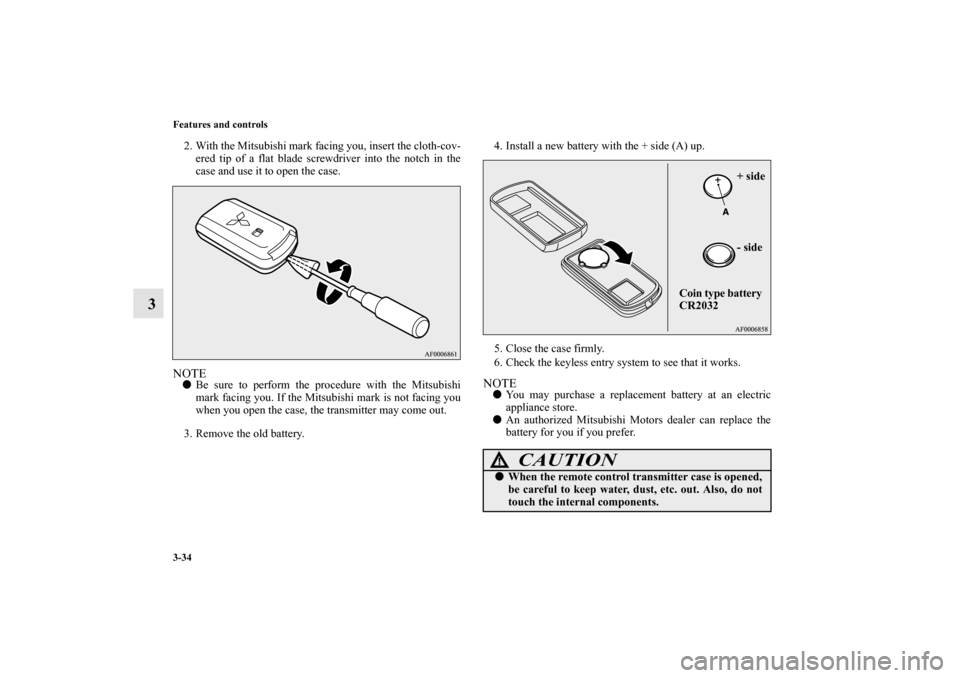
2. With the Mitsubishi mark facing you, insert the cloth-cov-
ered tip of a flat blade screwdriver into the notch in the
case and use it to open the case.NOTE�Be sure to perform the procedure with the Mitsubishi
mark facing you. If the Mitsubishi mark is not facing you
when you open the case, the transmitter may come out.
3. Remove the old battery.4. Install a new battery with the + side (A) up.
5. Close the case firmly.
6. Check the keyless entry system to see that it works.
NOTE�You may purchase a replacement battery at an electric
appliance store.
�An authorized Mitsubishi Motors dealer can replace the
battery for you if you prefer.
CAUTION
!�When the remote control transmitter case is opened,
be careful to keep water, dust, etc. out. Also, do not
touch the internal components.
+ side
- side
Coin type battery
CR2032
BK0162600US.book 34 ページ 2013年3月22日 金曜日 午後2時41分
Page 251 of 460
Features and controls
3-163
3
• When the remote control transmitter of the keyless entry
system or the F.A.S.T.-key is used to lock the vehicle.
• When the door lock/unlock switch or liftgate switch is
pressed to lock the vehicle while carrying the F.A.S.T.-
key.
Auto cut-out function
If the light is left switched on with the ignition switch is in
the “OFF” or “ACC” position or the operation mode is in
OFF or ACC, and a door or the liftgate is opened, it goes
off automatically after approximately 30 minutes.
The light will illuminate again after it automatically goes
off in the following cases:
• When the ignition switch is turned to the “ON” position
or the operation mode is put in ON.
• When the keyless entry system or the F.A.S.T.-key is
operated.
• When all doors and the liftgate are closed.
NOTE�When the key was used to start the engine: if the key is
removed while the doors and liftgate are closed, the light
is illuminated and after approximately 30 seconds it goes
off.
�When the F.A.S.T.-key was used to start the engine: if the
operation mode is put in OFF while the doors and liftgate
are closed, the light illuminates and after approximately
30 seconds it goes off.
�The time until the light goes off (delayed off) can be
adjusted. See your authorized Mitsubishi Motors dealer
for details.�The auto cut-out function cannot be operated when the
dome light switch is in the “ ” position.
Also, this function can be deactivated. See your autho-
rized Mitsubishi Motors dealer for details.
3- ( )
The light goes off regardless of whether a door or the
liftgate is open or closed.
BK0162600US.book 163 ページ 2013年3月22日 金曜日 午後2時41分
Page 273 of 460

5
Comfort controls
Vents. . . . . . . . . . . . . . . . . . . . . . . . . . . . . . . . . . . .5- 2
Heater without air conditioning function (if so
equipped) . . . . . . . . . . . . . . . . . . . . . . . . . . . . . .5- 6
Manual air conditioning (if so equipped). . . . . . . .5- 11
Automatic air conditioning (if so equipped) . . . . .5- 17
Important air conditioning operating tips . . . . . . .5- 28
Air purifier (if so equipped) . . . . . . . . . . . . . . . . . .5- 29
AM/FM electronically tuned radio with
CD player (if so equipped) . . . . . . . . . . . . . . . . .5- 30
To play tracks from USB device (if so equipped) .5- 43
To play tracks from a Bluetooth
® device
(vehicles with Bluetooth
® 2.0 interface) . . . . . .5- 56
Steering wheel audio remote control switches
(if so equipped) . . . . . . . . . . . . . . . . . . . . . . . . . .5- 59
Error codes . . . . . . . . . . . . . . . . . . . . . . . . . . . . . . .5- 60
Handling of compact discs . . . . . . . . . . . . . . . . . . .5- 62
Antenna . . . . . . . . . . . . . . . . . . . . . . . . . . . . . . . . .5- 64
General information about your radio . . . . . . . . . .5- 65
BK0162600US.book 1 ページ 2013年3月22日 金曜日 午後2時41分
Page 331 of 460
Comfort controls
5-59
5 Steering wheel audio remote control
switches
(if so equipped)
N00714800484
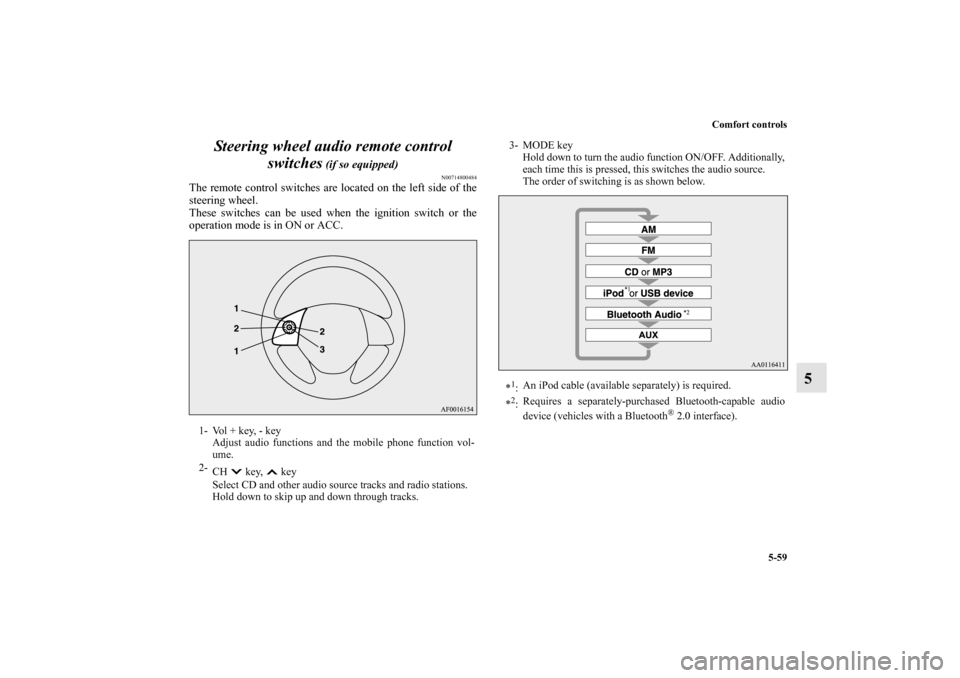
The remote control switches are located on the left side of the
steering wheel.
These switches can be used when the ignition switch or the
operation mode is in ON or ACC.1- Vol + key, - key
Adjust audio functions and the mobile phone function vol-
ume.
2-
CH key, key
Select CD and other audio source tracks and radio stations.
Hold down to skip up and down through tracks.
3- MODE key
Hold down to turn the audio function ON/OFF. Additionally,
each time this is pressed, this switches the audio source.
The order of switching is as shown below.
*1:An iPod cable (available separately) is required.
*2:Requires a separately-purchased Bluetooth-capable audio
device (vehicles with a Bluetooth
® 2.0 interface).
BK0162600US.book 59 ページ 2013年3月22日 金曜日 午後2時41分