2014 MITSUBISHI LANCER EVOLUTION ECU
[x] Cancel search: ECUPage 94 of 338

Free-hand Advanced Security Transmit
ter (F.A.S.T.-key) (if so equipped)
Features and controls 5-33
5
N00561601074
Your F.A.S.T.-key operates on a radio fre- quency subject to Federal Communications Commission (FCC) Rules (For vehicles sold in U.S.A.) and Industry Canada Rules (Forvehicles sold in Canada). This device com- plies with Part 15 of FCC Rules and Industry Canada licence-exempt RSS standard(s).Operation is subject to the following two con- ditions.
This device may not cause harmful inter- ference. This device must accept any interference received, including interference that maycause undesired operation.
N00561700094
1. Before replacing the battery, remove static electricity from your body by touching a metal grounded object.
2. With the Mitsubishi mark facing you, insert the cloth-covered tip of a flat blade screwdriver into the notch in the remote control transmitter case and use it to openthe case. 3. Remove the old battery.
• The doors cannot be locked or unlocked. • The trunk lid cannot be opened.• The panic alarm cannot be operated.• The indicator light (5) is dim or does not come on.
If you lose your F.A.S.T.-key, please contact an authorized Mitsubish
i Motors dealer for a
replacement. If you wish to obtain an
additional F.A.S.T.-
key, please contact an authorized Mitsubishi Motors dealer. A maximum of four F.A.S.T.- key can be programmed for your vehicle. To use the new remote control transmitters, it is necessary to register the key with both theelectronic immobilizer and keyless entry sys- tem. Also refer to “Electronic immobilizer (Anti-theft starting system): Customer F.A.S.T.- key programming” on page 5-27.
General information
NOTE
CAUTION Changes or modifications not expressly approved by the manufacturer for compli- ance could void the user’s authority to oper-ate the equipment.
Procedure for replacing the remote control transmitter battery
NOTE
Be sure to perform the procedure with the Mitsubishi mark facing you. If the Mitsubi- shi mark is not facing you when you open theremote control transmitter case, the transmit- ter may come out.
BK0200800US.bo
ok 33 ページ 2013年2月14日 木曜日 午後2時28分
Page 99 of 338

Trunk lid 5-38 Features and controls
5
Press the trunk button (Vehicles with keyless entry system or F.A.S.T.-key) or OPEN switch (Vehicles with F.A.S.T.-key). (See“Keyless entry system” on page 5-7, 5-29 or “Free-hand Advanced Security Transmitter (F.A.S.T.-key)” on page 5-11.) The trunk lid will pop up
slightly. Lift it to
open the trunk.
To open the trunk, pull up the trunk lid release lever, located to the left of the driver’sseat.
Pull the trunk lid downward as illustrated before the trunk lid closes completely. Gently slam the trunk lid from the outside so that it iscompletely closed.
CAUTION Do not stand behind the exhaust pipe when loading and unloading luggage. Heat from the exhaust could lead to burns.
To open Operation from outside the vehicle Using the remote control transmitter
Operation from inside the vehicle
CAUTION Do not use the trunk lid release lever while the vehicle is moving. If the trunk lid is opened, objects in the trunk could fall ontothe road and cause an accident.NOTE
The trunk area light comes on when the trunk lid is opened, and goes out when it is closed. The trunk area light remains illuminated for a certain period and then goes off automati- cally. Refer to “Interior light auto-cutout function (dome light and other lights)” onpage 5-164.
To close
CAUTION When closing the trunk lid, always ensure your or other person’s fingers cannot becaught by the trunk lid. Before starting the vehicle, be sure to con- firm that the trunk lid is locked. If the trunk lid opens while driving the vehicle, objects stored in the trunk could fall out onto theroad.
BK0200800US.bo
ok 38 ページ 2013年2月14日 木曜日 午後2時28分
Page 105 of 338
Sunroof (if so equipped) 5-44 Features and controls
5
N00549000068
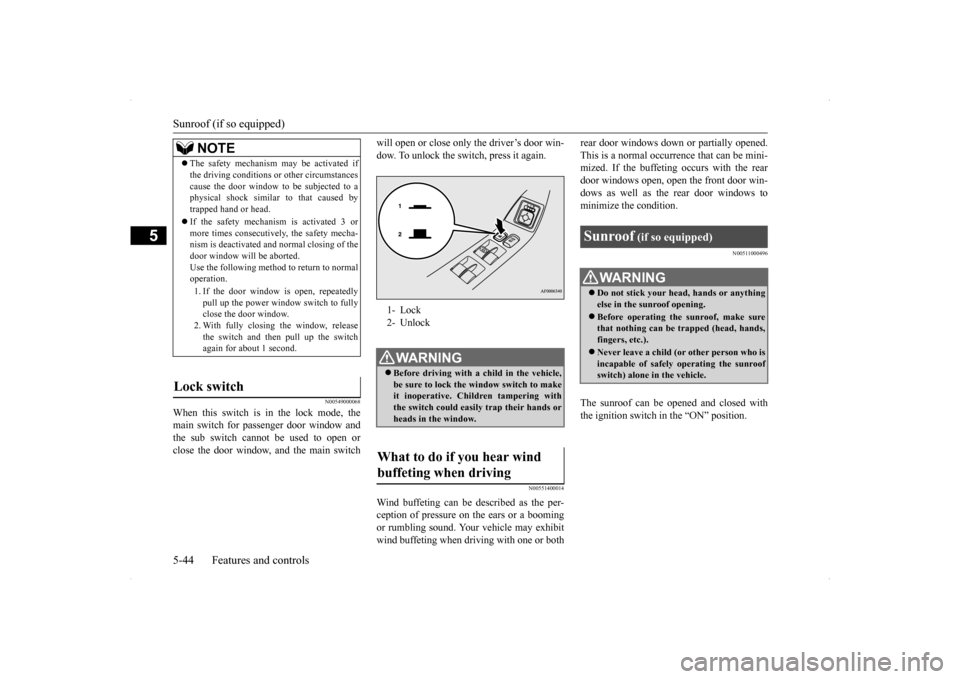
When this switch is in the lock mode, the main switch for passenger door window and the sub switch cannot be used to open orclose the door window, and the main switch
will open or close only the driver’s door win- dow. To unlock the switch, press it again.
N00551400014
Wind buffeting can be described as the per- ception of pressure on the ears or a booming or rumbling sound. Your vehicle may exhibitwind buffeting when driving with one or both
rear door windows down or partially opened. This is a normal occurrence that can be mini- mized. If the buffeting occurs with the rear door windows open, open the front door win-dows as well as the rear door windows to minimize the condition.
N00511000496
The sunroof can be opened and closed with the ignition switch in the “ON” position.
NOTE
The safety mechanism may be activated if the driving conditions or other circumstances cause the door window to be subjected to a physical shock similar to that caused by trapped hand or head. If the safety mechanism is activated 3 or more times consecutively, the safety mecha-nism is deactivated and normal closing of the door window will be aborted. Use the following method to return to normaloperation. 1. If the door window is open, repeatedly pull up the power window switch to fully close the door window. 2. With fully closing the window, releasethe switch and then pull up the switch again for about 1 second.
Lock switch
1- Lock 2- UnlockWA R N I N G Before driving with a child in the vehicle, be sure to lock the window switch to makeit inoperative. Children tampering with the switch could easily trap their hands or heads in the window.
What to do if you hear wind buffeting when driving
Sunroof
(if so equipped)
WA R N I N G Do not stick your head, hands or anything else in the sunroof opening. Before operating the sunroof, make sure that nothing can be trapped (head, hands, fingers, etc.). Never leave a child (or other person who is incapable of safely operating the sunroof switch) alone in the vehicle.
BK0200800US.bo
ok 44 ページ 2013年2月14日 木曜日 午後2時28分
Page 106 of 338
Sunroof (if so equipped)
Features and controls 5-45
5
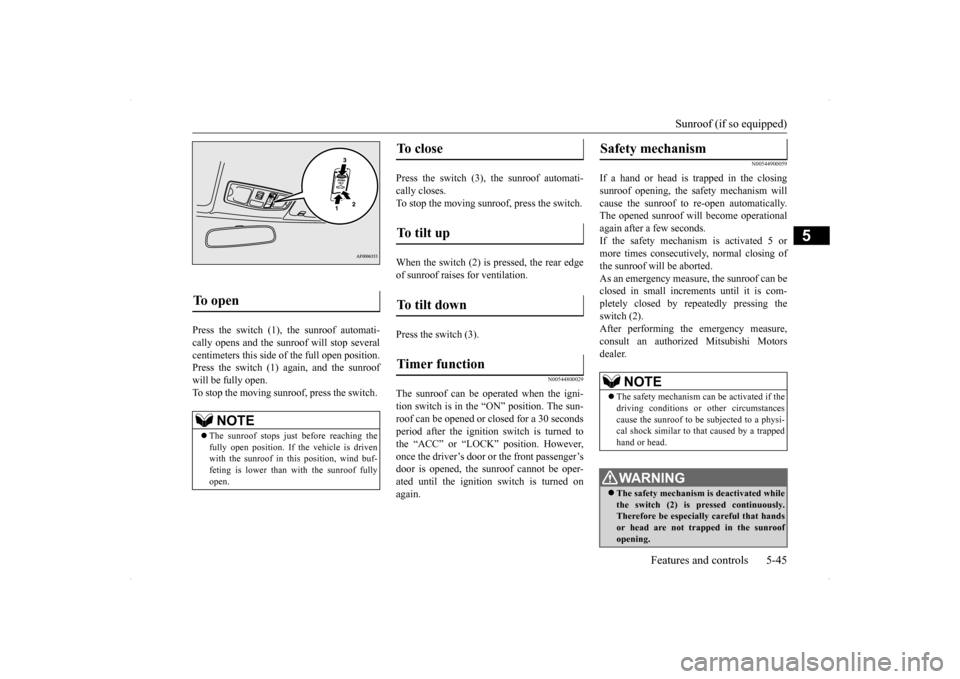
Press the switch (1), the sunroof automati- cally opens and the sunroof will stop several centimeters this side of the full open position. Press the switch (1) again, and the sunroofwill be fully open.To stop the moving sunroo
f, press the switch.
Press the switch (3), the sunroof automati- cally closes.To stop the moving sunroof, press the switch. When the switch (2) is pressed, the rear edge of sunroof raises for ventilation. Press the switch (3).
N00544800029
The sunroof can be oper
ated when the igni-
tion switch is in the “ON” position. The sun- roof can be opened or closed for a 30 secondsperiod after the ignition
switch is turned to
the “ACC” or “LOCK” position. However, once the driver’s door or the front passenger’sdoor is opened, the sunroof cannot be oper- ated until the ignition switch is turned on again.
N00544900059
If a hand or head is trapped in the closingsunroof opening, the safety mechanism willcause the sunroof to re-open automatically. The opened sunroof will become operational again after a few seconds.If the safety mechanism is activated 5 or more times consecutively, normal closing of the sunroof will be aborted.As an emergency measure, the sunroof can beclosed in small increments until it is com- pletely closed by repeatedly pressing the switch (2).After performing the emergency measure, consult an authorized Mitsubishi Motors dealer.
To open
NOTE
The sunroof stops just before reaching the fully open position. If the vehicle is driven with the sunroof in this position, wind buf- feting is lower than with the sunroof fullyopen.
To close
To tilt up
To tilt down
Timer function
Safety mechanism
NOTE
The safety mechanism can be activated if the driving conditions or other circumstances cause the sunroof to be subjected to a physi-cal shock similar to that caused by a trapped hand or head.WA R N I N G The safety mechanism is deactivated while the switch (2) is pressed continuously. Therefore be especially careful that handsor head are not trapped in the sunroof opening.
BK0200800US.bo
ok 45 ページ 2013年2月14日 木曜日 午後2時28分
Page 108 of 338

Parking brake
Features and controls 5-47
5
N00511400360
To park the vehicle, first bring it to a com- plete stop, fully engage the parking brake,and then move the gearshift lever to 1st (on a uphill) or “R” (Reverse) (on a downhill) posi- tion, for vehicles with a manual transaxle orset the gearshift lever to “P” (PARK) position on Twin Clutch SST vehicles.
When parking on a hill, apply the parking brake and turn the front wheels toward thecurb on a downhill grade, away from the curb on an uphill grade.
N00511500198
To adjust the steering wheel height, releasethe tilt lock lever while holding the steering wheel by hand, and raise or lower the steeringwheel to the desired height. After adjustment, securely lock the lever by pulling it upward.
Parking brake To apply 1- Pull the lever up without pushing the
button at the end of hand grip. When the parking brake is set and the ignition switch is in the “ON” position, the brake warning light in the instru-ment cluster will come on. Before driving, be sure to release the parking brake.
To release 1- Pull the lever up slightly. 2- Press and hold the button at the end of
the hand grip.
3- Push the lever downward.
CAUTION Before driving, be sure that the parking brake is fully released and brake warning light is off. If you drive without the parking brake fully released, the warning display will appear onthe information screen in the multi-informa- tion display. If a vehicle is driven without releasing theparking brake, the brakes will be overheated, resulting in ineffective braking and possible brake failure. Warning light Warning display
Steering wheel tilt lock lever
BK0200800US.bo
ok 47 ページ 2013年2月14日 木曜日 午後2時28分
Page 109 of 338

Inside day/night rearview mirror 5-48 Features and controls
5
N00548600070
Adjust the inside rear
view mirror only after
making any seat adjustments so as to have aclear view to the rear of the vehicle. Adjust the inside mirror to maximize the view through the rear window.
It is possible to move
the mirror up and down
to adjust its position. It is possible to move the mirror up/down and left/right to adjust its position.
1- Locked 2- ReleasedWA R N I N G After adjusting, make sure the lock lever is secured in the locked (1) position. Do not attempt to adjust the steering wheel while driving. This can be danger- ous. When releasing the tilt lock lever {moving it to the position (2)}, be sure to hold thesteering wheel firmly. Otherwise, the steering wheel may slip down too sud- denly.
ç
Inside day/night rearview mirror
WA R N I N G Do not attempt to adjust the inside rear- view mirror while driving. This can be dangerous.Be sure to adjust the mirror before driv- ing.Type 1 Ty p e 2
To adjust the vertical mirror position To adjust the mirror position
BK0200800US.bo
ok 48 ページ 2013年2月14日 木曜日 午後2時28分
Page 140 of 338

Limited-slip differential
Features and controls 5-79
5
N00517400014
A limited-slip differential is applied for front wheel differential. The features of this lim- ited-slip differential are described below: Just as with a conventional differential, the wheel on one side is allowed to turn at a dif-ferent speed from the wheel on the other side when the vehicle is cornering. The difference between the limited-slip differential and aconventional differential is that if the wheel on one side of the vehicle loses traction, a greater amount of torque is applied to thewheel on the other side to improve traction.
N00517500291
Overuse of the brake can cause poor brakeresponse and premature wear of the brakepads. When driving down a long or steep hill, use engine braking by downshifting.
N00517600380
Your vehicle is equipped with power brakes for more braking force with minimal brake pedal effort.Your brakes are designe
d to operate at full
capacity, even if the power assist is lost. If the power assist is lost, the effort needed topress the brake pedal is greater. If you lose the power assist for some reason, the brakes will still work. If the power brake unit or either of the two brake hydraulic systems stops working prop-
CAUTION The system may be malfunctioning. Park your vehicle in a safe place and stop the engine. Restart the engine again and check whether the display/indicator goes out. If they go out, there is no abnormal condition.If they do not go out or appear frequently, it is not necessary to stop the vehicle immedi- ately, but you should have your vehicleinspected by an authorized Mitsubishi Motors dealer or a repair facility of your choice as soon as possible.
Limited-slip differential
NOTE
Even if there is a difference in the amount of traction the wheels can get, if both of them are spinning, the limited-slip differential will not be effective.CAUTION Never start the engine while one of the front or rear wheels is jacked up and the other in contact with the ground; doing so may cause the vehicle to jump forward. Continuously attempting to extract the vehi- cle from snow, mud, etc. while using highengine rpm may damage the limited-slip dif- ferential. Using a compact spare wheel will adversely affect the limited-slip differential; replace the compact spare wheel with a standard sizewheel as soon as possible.
Service brake Brake pedal
WA R N I N G Do not leave any objects near the brake pedal or let a floor mat slide under it; doing so could prevent the full pedal stroke that would be necessary in an emergency. Make sure that the pedal canbe operated freely at all times. Make sure the floor mat is securely held in place.CAUTION It is important not to drive the vehicle with your foot resting on the brake pedal when braking is not required. This practice can result in very high brake temperatures, pre-mature pad wear, and possible damage to the brakes.
Power brakes
BK0200800US.bo
ok 79 ページ 2013年2月14日 木曜日 午後2時28分
Page 202 of 338

Bluetooth® 2.0 interface
Features and controls 5-141
5
N00564200016 N00564300017
The Bluetooth
® 2.0 interface is equipped
with a help function. If you say “Help” when the system is waiting for a voice command input, the system will tell you a list of the commands that can beused under the circumstances.
N00564400018
There are 2 cancel functions.If you are at the main menu, say “Cancel” to exit from the Bluetooth
® 2.0 interface.
If you are anywhere else within the system, say “Cancel” to return to the main menu.
N00564501029
The Bluetooth
® 2.0 interface is equipped
with a confirmation function.With the confirmation function activated, you are given more opportunities than normal to confirm a command when making various settings to the Bluetooth
® 2.0 interface. This
allows you to decrease the possibility that a setting is accidentally changed. The confirmation function can be turned on or off by following the steps below. 1. Press the SPEECH button (except for vehicles with Mits
ubishi Multi-Commu-
nication System) or PICK-UP button (for vehicles with Mits
ubishi Multi-Commu-
nication System). 2. Say “Setup.” 3. Say “Confirmation prompts.”4. The voice guide will say “Confirmationprompts are
N00564601121
It is possible to use a passcode as a securityfunction by setting a passcode of your choice for the Bluetooth
® 2.0 interface.
When the security function is turned on, it isnecessary to make a voice input of a 4-digit passcode in order to use all functions of the Bluetooth
® 2.0 interface, except for recep-
tion.
Use the following procedure to turn on the security function by setting a passcode. 1. Press the SPEECH button (except for vehicles with Mitsubishi Multi-Commu- nication System) or PICK-UP button (forvehicles with Mitsubishi Multi-Commu- nication System). 2. Say “Setup.”3. Say “Passcode.”4. The voice guide will say “Passcode is dis- abled. Would you like to enable it?” Answer “Yes.”Answer “No” to cancel the setting of the passcode and return to the main menu. 5. The voice guide will say “Please say a 4-digit passcode. Remember this passcode. It will be required to use this system.” Say a 4-digit number which you want toset as a passcode. 6. For confirmation purposes, the voice guide will say “Passcode <4-digit pass-code>. Is this correct?” Answer “Yes.” Answer “No” to return to the passcode input in Step 5. 7. When the registration of the passcode is completed, the voice guide will say “Pass- code is enabled” and the system willreturn to the main menu.
Useful voice commands Help function Canceling Confirmation function setting
Security function
Setting the passcode
BK0200800US.book
141 ページ 2013年2月14日 木曜日 午後2時28分