2014 MINI Paceman fuel
[x] Cancel search: fuelPage 187 of 218

▷Remove additional attachments, for in‐
stance a spoiler or telephone antenna, if
there is a risk that these may be damaged.▷Insert the remote control into the ignition
lock.
Automatic transmission
Before driving into the car wash, note the fol‐
lowing to ensure that the vehicle can roll:
1.Insert the remote control into the ignition
lock, even with Comfort Access.2.Move the selector lever to position N.3.Release the handbrake.4.Switch the engine off.5.Leave the remote control in the ignition
lock so that the vehicle can roll.
Hand car wash
If washing the vehicle by hand, use copious
quantities of water and car shampoo if neces‐
sary. Clean the vehicle with a sponge or a
washing brush by applying gentle pressure.
Before cleaning the windshield, deactivate the
rain sensor to avoid unintentional wiper activa‐
tion or switch off the ignition.
Adhere to the local regulations regarding
washing cars by hand.
Headlamps
Do not rub dry and do not use abrasive or caus‐
tic cleansers. Soak areas that have been soiled,
e.g., due to insects, with shampoo and rinse off
with copious quantities of water.
Thaw ice with a window deicer; do not use an
ice scraper.
Windows Clean the outside and inside surfaces of the
windows and the mirror glasses with window
cleaner.
Do not clean mirror glass with cleaners contain‐
ing quartz.
Wiper blades
Clean with soapy water and replace regularly to
avoid streaking.
Wax and preservative residue and soiling on
the windows cause streaking during window
wiping and lead to premature wear on the
wiper blades and malfunctions of the rain sen‐
sor.
Vehicle care Car care products
Regular cleaning and care contributes signifi‐
cantly to vehicle value retention.
The manufacturer recommends using cleaning
and care products from MINI, since these have
been tested and approved.
Original MINI CareProducts have been tested
on materials, in the laboratory, and in the field,
and offer optimum care and protection for MINI
vehicles.
Do not use cleansers that contain alcohol
or solvents
Do not use cleansers that contain alcohol or
solvents, such as lacquer thinners, heavy-duty
grease removers, fuel, or such; this could lead
to surface damage. ◀
Car care and cleaning products
Follow the instructions on the container.
When cleaning the interior, open the doors or
windows.
Only use products intended for cleaning vehi‐
cles.
Cleansers can contain substances that are dan‐
gerous and harmful to your health. ◀Seite 187CareMobility187
Online Edition for Part no. 01 40 2 911 521 - VI/13
Page 188 of 218

Vehicle paint
Regular care contributes to vehicle value reten‐
tion and protects the paintwork against the
long-term effects of paint-damaging substan‐
ces.
Environmental influences in areas with higher
air pollution or natural contaminants, such as
tree resin or pollen, can have an impact on the
vehicle paint. Therefore, it is important to tailor
the frequency and extent of your car care to
these influences.
Immediately remove especially aggressive sub‐
stances, such as spilled fuel, oil, grease, or bird
droppings, to prevent damage to the paint‐
work.
Correcting paint damage
Depending on the severity of the damage, re‐
pair stone impact damage or scratches imme‐
diately to prevent rust formation.
The manufacturer recommends having paint
damage corrected with a professional repair
paint job according to factory specifications us‐
ing original MINI paint materials.
Preservation
Preservation is needed when water no longer
beads off of the clean paint surfaces. Only use
paint preservation products that contain car‐
nauba or synthetic waxes.
Leather care The leather processed by the manufacturer is a
high quality natural product. Light graininess is
a typical feature of natural leather.
Particles of dust and road grime chafe in pores
and folds, and lead to increased wear and pre‐
mature degradation of the leather surface.
Therefore, remove dust from the leather regu‐
larly, using a cloth or vacuum cleaner.
Make especially sure that light-colored leather
is cleaned regularly as it is more susceptible to
soiling.Twice a year, treat the leather with a leather lo‐
tion as dirt and grease will attack the protective
layer of the leather.
Upholstery material care
Vacuum regularly with a vacuum cleaner to re‐
move superficial soiling.
In case of heavy soiling, e.g., beverage stains,
use a soft sponge or lint-free microfiber cloth in
combination with a suitable interior cleaner.
Follow the instructions on the container.
Clean the upholstery material down to the
seams using large sweeping motions. Avoid
rubbing the material vigorously.
Damage from Velcro® fasteners
Open Velcro® fasteners on pants or other
articles of clothing can damage the seat covers.
Ensure that any Velcro® fasteners are closed. ◀
Caring for special components Interior plastic parts These include:▷Imitation leather surfaces▷Lamp lenses▷Indicator covers▷Matte components
Clean with water and a solvent-free plastic
cleaner if necessary.
Do not use cleansers that contain alcohol
or solvents
Do not use cleansers that contain alcohol or
solvents, such as lacquer thinners, heavy-duty
grease removers, fuel, or such; this could lead
to surface damage. ◀
Rubber seals Only treat with water or a rubber care product.
When cleaning rubber seals, do not use silicone
sprays or other care products containing sili‐
cone; otherwise, noise and damage may result.
Seite 188MobilityCare188
Online Edition for Part no. 01 40 2 911 521 - VI/13
Page 190 of 218

Indicator/warning lampsVehicle equipment
This chapter describes all series equipment as
well as country-specific and special equipment
offered for this model series.Therefore, it alsodescribes equipment that may not be found in
your vehicle, for instance due to the selected
special equipment or the country version. This
also applies to safety-related functions and sys‐
tems.
Overview
The indicator and warning lamps can light up in
a variety of combinations and colors in display
area 1 or 2. The table contains information on
causes and how to respond. Note whether a
lamp lights up alone or in combination with an‐
other. Some lamps can light up in different col‐
ors. Corresponding distinctions are made in the
text. 12CauseHow to respondTurn signalThe high beams/headlamp flasher are
switched on.The front fog lamps are switched on.The rear fog lamps are switched on.Fasten safety belts.Fasten safety belt, refer to page 41.External temperature warningDrive conservatively, refer to
page 59.Lights up briefly:
Approx. 2.1 US gal/8 liters of fuel remain in
the tank.
Remains on:
The remaining range is no more than
30 miles/50 km, refer to page 60.Seite 190MobilityIndicator/warning lamps190
Online Edition for Part no. 01 40 2 911 521 - VI/13
Page 191 of 218
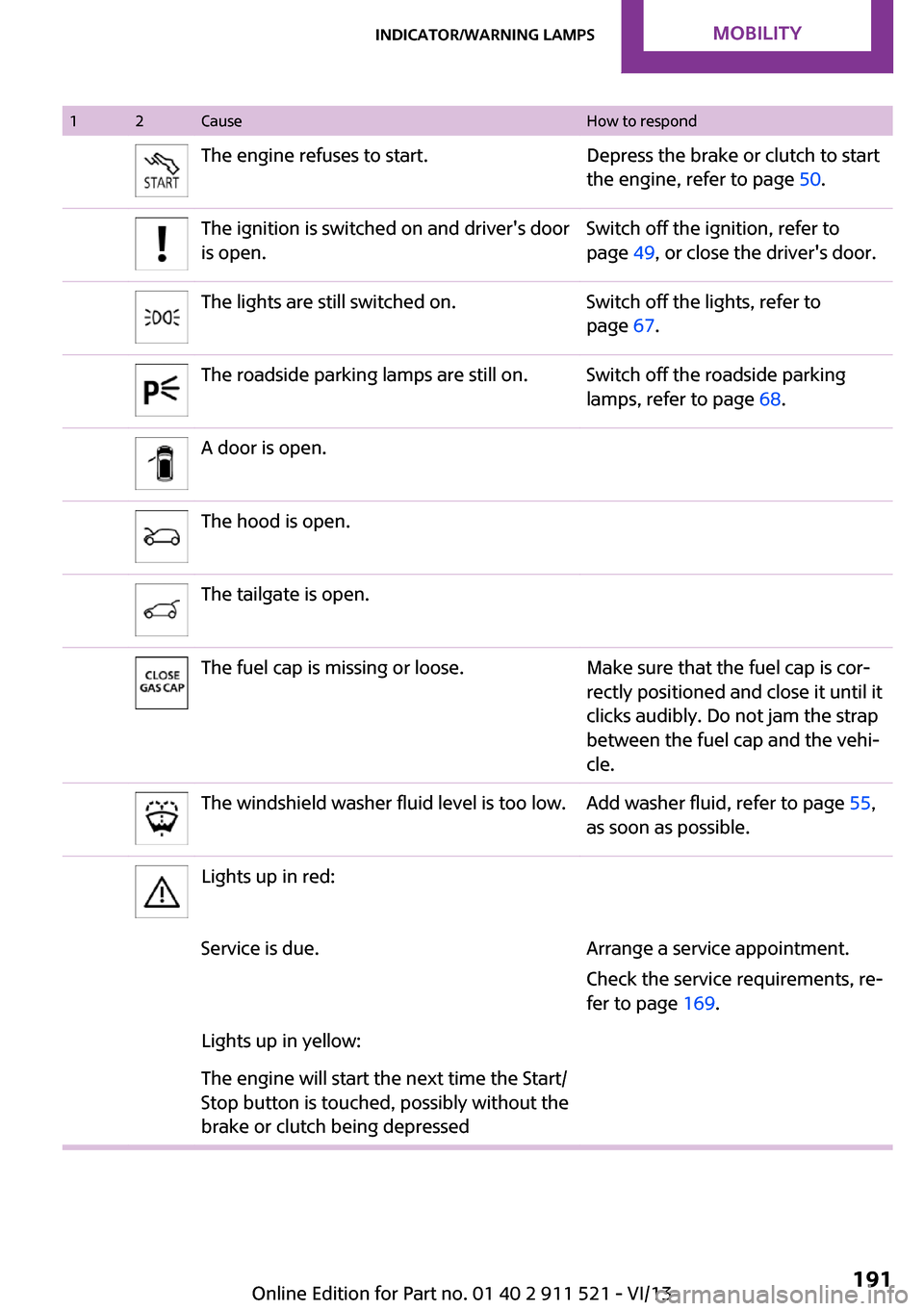
12CauseHow to respondThe engine refuses to start.Depress the brake or clutch to start
the engine, refer to page 50.The ignition is switched on and driver's door
is open.Switch off the ignition, refer to
page 49, or close the driver's door.The lights are still switched on.Switch off the lights, refer to
page 67.The roadside parking lamps are still on.Switch off the roadside parking
lamps, refer to page 68.A door is open.The hood is open.The tailgate is open.The fuel cap is missing or loose.Make sure that the fuel cap is cor‐
rectly positioned and close it until it
clicks audibly. Do not jam the strap
between the fuel cap and the vehi‐
cle.The windshield washer fluid level is too low.Add washer fluid, refer to page 55,
as soon as possible.Lights up in red:Service is due.Arrange a service appointment.
Check the service requirements, re‐
fer to page 169.Lights up in yellow:The engine will start the next time the Start/
Stop button is touched, possibly without the
brake or clutch being depressedSeite 191Indicator/warning lampsMobility191
Online Edition for Part no. 01 40 2 911 521 - VI/13
Page 195 of 218

12CauseHow to respondLights up in red:Have the system in question
checked immediately.The starter has failed orThe engine cannot be restarted.Ignition malfunctioning. The engine can
only be restarted when the brake is de‐
pressed or
Lighting system failed. Low beams/tail
lamps and brake lights still operational. All
other lamps failed.Depress the brake to restart the en‐
gine.Lights up in yellow:Brake light control failed or
The fuel supply is malfunctioning.You can continue your journey, but
moderate your speed and exercise
due caution. Have the system in
question checked immediately.Drive malfunctioning.You can continue your journey, but
moderate your speed and exercise
due caution. Transmission limp-
home program with reduced accel‐
eration is active. Have the system
checked immediately.Flashing:
Dynamic Stability Control DSC or Dynamic
Traction Control DTC is controlling drive and
braking forces, refer to page 81.Dynamic Traction Control DTC is activated,
refer to page 82.Dynamic Stability Control DSC and Dynamic
Traction Control DTC are deactivated, refer
to page 81.Driving stability limited during ac‐
celeration and cornering.
Driving style must be readjusted.Dynamic Stability Control DSC and Dynamic
Traction Control DTC failed.Driving stability limited during ac‐
celeration and cornering.
You can continue your journey, but
moderate your speed and exercise
due caution. Have the system
checked as soon as possible.Seite 195Indicator/warning lampsMobility195
Online Edition for Part no. 01 40 2 911 521 - VI/13
Page 207 of 218

CooperCooper SCooper S ALL4John Cooper Wor
ksApproved front axle loadManual transmissionlbs/kg2,050/9302,120/9622,180/9892,200/998Automatic transmis‐
sionlbs/kg2,120/9622,170/9842,220/1,0072,240/1,016Approved rear axle
loadlbs/kg1,910/8661,910/8662,020/9162,060/934Approved roof load ca‐
pacitylbs/kg165/75165/75165/75165/75Cargo area capacitycu ft/
liter11.6–38.1/
330–1,08011.6–38.1/
330–1,08011.6–38.1/
330–1,08011.6–38.1/
330–1,080
Capacities
NotesFuel tankUS gal/litersApprox. 12.4/
approx. 47Fuel quality, refer to
page 150Including reserve ofUS gal/litersApprox. 2.1/
approx. 8Seite 207Technical dataReference207
Online Edition for Part no. 01 40 2 911 521 - VI/13
Page 208 of 218

Everything from A to ZIndexA
ABS, Antilock Brake Sys‐ tem 81
Acoustic signal, refer to Check Control 65
Activated charcoal filter with automatic climate con‐
trol 91
Adaptive Light Control 69
Additives, engine oil 167
Airbags 72
Airbags, indicator/warning light 75
Air circulation, refer to Recir‐ culated air mode 88, 90
Air conditioner 87
Air conditioning 87
Air conditioning mode– Air conditioner 87– Automatic climate con‐
trol 89
Air distribution
– Automatic 90– Individual 88– Manual 88, 90
Air drying, refer to Cooling
function 91
Air flow rate 87, 90
Air pressure, refer to Tire infla‐ tion pressure 152
Air supply
– Air conditioner 87– Automatic climate con‐
trol 89
Alarm system 32
Alarm system
– Avoiding unintentional
alarms 32– Interior motion sensor 32– Tilt alarm sensor 32
ALL4 all-wheel system 83
All-wheel drive, refer to
ALL4 83
Alternating-code hand-held transmitter 93
Ambient lighting 71
Antifreeze, washer fluid 55
Antilock Brake System, ABS 81
Anti-slip control, refer to Dy‐ namic Stability Control
DSC 81
Anti-theft protection 23
Approved engine oils 167
Ashtray 96
Assistance, roadside 180
Assistance when driving off, refer to Hill drive-off assis‐
tant 83
Assistance with starting en‐ gine, refer to Jump-start‐
ing 180
Automatic– Air distribution 90– Air flow rate 90
Automatic car wash 186
Automatic climate control
– Automatic air distribution 90
Automatic, cruise control 84
Automatic headlamp con‐ trol 67
Automatic transmission with
Steptronic
– Kickdown 57– Overriding selector lever
lock 58
AUTO program with auto‐
matic climate control 90
AUX-IN port 130
Average fuel consumption 61
Average fuel consumption
– Setting the units 62Average speed 61
Average speed, refer to Com‐ puter 60
B Backrest curvature, refer to Lumbar support 37
Backrests, refer to Seats 36
Backup lamps, bulb replace‐ ment 175
Battery– Disposal 32– Remote control 22
Battery, refer to Vehicle bat‐
tery 178
Battery replacement
– Remote control 32
Belts, refer to Safety belts 38
Belt tensioners, refer to Safety belts 38
Bi-xenon headlamps 172
Blower, refer to Air flow rate 87, 90
Brake assistant 81
Brake discs, breaking in 110
Brake fluid, refer to Service re‐ quirements 64
Brake force distribution, elec‐ tronic 81
Brake pads, breaking in 110
Brakes
– Handbrake 51
Brakes, MINI maintenance
system 169
Brakes, service require‐ ments 64
Brake system, MINI mainte‐ nance system 169
Braking, notes 111
Seite 208ReferenceEverything from A to Z208
Online Edition for Part no. 01 40 2 911 521 - VI/13
Page 209 of 218

Breakdown assistance, Road‐side Assistance 180
Breaking in 110
Buckle tongue, rear– Height adjustment 39
Button for starting the engine,
refer to Start/Stop button 49
C
California Proposition 65 Warning 7
Car battery, refer to Vehicle battery 178
Car care products 187
Care, displays 189
Care, vehicle 187
Cargo area
– Comfort Access 30– Flat loading floor 99– Multi-function hook 101– Opening from the out‐
side 28– Partition net 100
Cargo area, enlarging
– Cargo cover 98
Cargo area lamp, refer to Inte‐
rior lamps 70
Cargo area tailgate, refer to Tailgate 28
Car horn, refer to Horn 14
Carpet, care 189
Car phone, refer to Tele‐ phone 136
Car wash 186
CBC, Cornering Brake Con‐ trol 81
CBS Condition Based Serv‐ ice 169
CD/DVD drives, care 189
Center armrest 103
Center console, refer to Around the center con‐
sole 17
Center rail 104
Center rail, refer to Storage compartments 104
Central locking– Comfort Access 30– From the inside 27– From the outside 24
Central locking system
– Concept 23– From the outside 23
Changes, technical, refer to
Safety 7
Changing wheels/tires 159
Check Control 65
Children, transporting 44
Child restraint fixing system
LATCH 45
Child restraint fixing sys‐ tems 44
Child restraint fixing systems, mounting 44
Child seat, mounting 44
Child seats, refer to Transport‐ ing children safely 44
Chrome parts, care 189
Circulation of air, refer to Re‐ circulated air mode 88, 90
Cleaning, displays 189
Cleaning, refer to Care 186
Climate 87
Climate mode
– Ventilation 91
Clock 59
Clock
– 12h/24h format 62
Closing
– From the inside 27– From the outside 24
Clutch, breaking in 110
Cockpit 14
Cold start, refer to Starting the engine 50
Combination instrument, refer to Displays 16
Combination switch, refer to Turn signal/high beams/
headlamp flasher 52
Combination switch, refer to Washer/wiper system 53
Comfort Access– In the car wash 31– Replacing the battery 32
Comfort area, refer to Around
the center console 17
Compartment for remote con‐ trol, refer to Ignition lock 49
Compass, digital 94
Computer 60
Computer, displaying informa‐ tion 60
Condition Based Service CBS 169
Confirmation signals for vehi‐ cle locking/unlocking 25
Consumption, refer to Aver‐ age fuel consumption 61
Control Display, care 189
Controls and displays 14
Control systems, driving stabil‐ ity 81
Convenient operation
– Windows 25
Coolant temperature 60
Cooling function, switching on and off 91
Cooling, maximum 90
Cornering Brake Control, CBC 81
Corrosion on brake discs 112
Cradle for telephone or mobile phone, refer to Snap-in
adapter 143
Cruise control 84
Cupholders 96
Current fuel consumption 61
Curve lights, refer to Adaptive Light Control 69
Cylinders, number of, refer to Engine data 204
D
Dashboard lighting, refer to Instrument lighting 70
Dashboard, refer to Cock‐ pit 14
Seite 209Everything from A to ZReference209
Online Edition for Part no. 01 40 2 911 521 - VI/13