2014 MINI 3 door sport mode
[x] Cancel search: sport modePage 105 of 240

System limitsSudden tire damage
Sudden serious tire damage caused by
external circumstances cannot be recognized in
advance. ◀
A natural, even tire inflation pressure loss in all
four tires will not be recognized. Therefore,
check the tire inflation pressure regularly.
The system could be delayed or malfunction in
the following situations:▷When the system has not been initialized.▷When driving on a snowy or slippery road
surface.▷Sporty driving style: spinning traction
wheels, high lateral acceleration (drifting).▷When driving with snow chains.
Actions in the event of a flat tire
Normal tires
1.Identify the damaged tire.
Do this by checking the air pressure in all
four tires.
The tire pressure gauge of the Mobility Sys‐
tem, refer to page 181, can be used for this
purpose.
If the tire inflation pressure in all four tires is
correct, the Flat Tire Monitor may not have
been initialized. In this case, initialize the
system.
If an identification is not possible, please
contact the service center.2.Fix the flat tire using the Mobility System,
refer to page 181.
Run-flat tires
Maximum speed
You may continue driving with a damaged tire at speeds up to 50 mph/80 km/h.
Continued driving with a flat tire
If continuing to drive with a damaged tire:1.Avoid sudden braking and steering maneu‐
vers.2.Do not exceed a speed of 50 mph/80 km/h.3.Check the air pressure in all four tires at the
next opportunity.
If the tire inflation pressure in all four tires is
correct, the Flat Tire Monitor may not have
been initialized. In this case, initialize the
system.
Possible driving distance with complete loss of
tire inflation pressure:
The possible driving distance after a loss of tire
inflation pressure depends on cargo load, driv‐
ing style and road conditions.
A vehicle with an average load has a possible
driving range of approx. 50 miles/80 km.
A vehicle with a damaged tire reacts differently,
e.g., it has reduced lane stability during brak‐
ing, a longer braking distance and different
self-steering properties. Adjust your driving
style accordingly. Avoid abrupt steering ma‐
neuvers or driving over obstacles, e.g., curbs,
potholes, etc.
Because the possible driving distance depends
on how the vehicle is used during the trip, the
actual distance may be shorter or longer de‐
pending on the driving speed, road conditions,
external temperature, cargo load, etc.
Continued driving with a flat tire
Drive moderately and do not exceed a
speed of 50 mph/80 km/h.
Your car handles differently when you lose tire
inflation pressure, e.g., your lane stability is re‐
duced when braking, braking distances are lon‐
ger and the self-steering properties will
change. ◀
Seite 101SafetyCONTROLS101
Online Edition for Part no. 01 40 2 957 280 - X/14
Page 114 of 240

The DSC system is switched off.
Activating DSC Press button.
DSC OFF and the DSC OFF indicator
lamp go out.
Indicator/warning lights
When DSC is deactivated, DSC OFF is displayed
in the instrument cluster.
The indicator lamp lights up: DSC is de‐
activated.
Automatic activation When DSC is deactivated, automatic activation
occurs in the following situations:▷Failure of Dynamic Damping Control.▷The vehicle has a flat tire.▷When activating cruise control in TRACTION
or DSC OFF mode.
DTC Dynamic Traction
Control
The concept
The DTC system is a version of the DSC where
forward momentum is optimized.
The system ensures maximum headway on
special road conditions or loose road surfaces,
e.g., unplowed snowy roads, but with some‐
what limited driving stability.
Activating the Dynamic Traction Control DTC
provides maximum traction. Driving stability is
limited during acceleration and when driving in
curves.
Therefore drive with appropriate caution.
You may find it useful to briefly activate DTC
under the following special circumstances:
▷When driving in slush or on uncleared,
snow-covered roads.▷When freeing vehicle from deep snow or
driving off from loose grounds.▷When driving with snow chains.
Deactivating/activating DTC Dynamic
Traction Control
Activating DTC Press button.
TRACTION is displayed in the instru‐
ment cluster and the indicator lamp for DSC
OFF lights up.
Deactivating DTC Press button again.
TRACTION and the DSC OFF indicator
lamp go out.
Performance Control
Performance Control enhances the agility of the
vehicle.
To increase maneuverability, with a corre‐
spondingly sporty driving style, wheels are
braked individually.
Dynamic Damping Con‐
trol
The concept
The tuning of the suspension can be changed
with the system.
Programs
The system offers several different programs.
Select the programs via the Driving Dynamics
Control, refer to page 111.
Seite 110CONTROLSDriving stability control systems110
Online Edition for Part no. 01 40 2 957 280 - X/14
Page 115 of 240
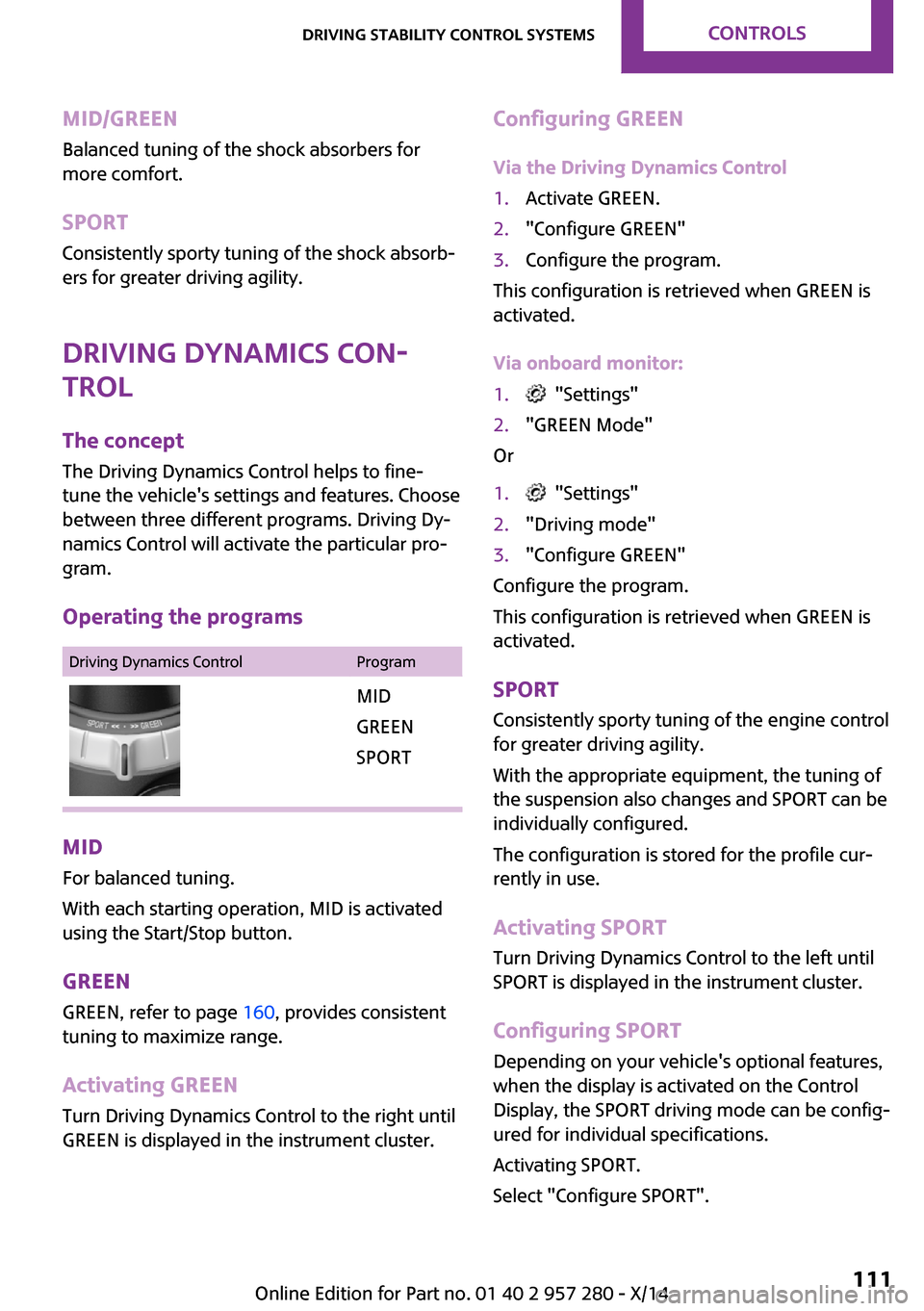
MID/GREENBalanced tuning of the shock absorbers for
more comfort.
SPORT Consistently sporty tuning of the shock absorb‐
ers for greater driving agility.
Driving Dynamics Con‐
trol
The concept
The Driving Dynamics Control helps to fine-
tune the vehicle's settings and features. Choose
between three different programs. Driving Dy‐
namics Control will activate the particular pro‐
gram.
Operating the programsDriving Dynamics ControlProgramMID
GREEN
SPORT
MID For balanced tuning.
With each starting operation, MID is activated
using the Start/Stop button.
GREEN GREEN, refer to page 160, provides consistent
tuning to maximize range.
Activating GREEN
Turn Driving Dynamics Control to the right until
GREEN is displayed in the instrument cluster.
Configuring GREEN
Via the Driving Dynamics Control1.Activate GREEN.2."Configure GREEN"3.Configure the program.
This configuration is retrieved when GREEN is
activated.
Via onboard monitor:
1. "Settings"2."GREEN Mode"
Or
1. "Settings"2."Driving mode"3."Configure GREEN"
Configure the program.
This configuration is retrieved when GREEN is
activated.
SPORT
Consistently sporty tuning of the engine control
for greater driving agility.
With the appropriate equipment, the tuning of
the suspension also changes and SPORT can be
individually configured.
The configuration is stored for the profile cur‐
rently in use.
Activating SPORT
Turn Driving Dynamics Control to the left until
SPORT is displayed in the instrument cluster.
Configuring SPORT
Depending on your vehicle's optional features,
when the display is activated on the Control
Display, the SPORT driving mode can be config‐
ured for individual specifications.
Activating SPORT.
Select "Configure SPORT".
Seite 111Driving stability control systemsCONTROLS111
Online Edition for Part no. 01 40 2 957 280 - X/14
Page 116 of 240

Configure the program.
SPORT can also be configured before it is acti‐
vated:1. "Settings"2."Driving mode"3."Configure SPORT"
This configuration is retrieved when SPORT is
activated.
Configuring driving program
Settings can be made for the following driving
programs in Driving mode:
▷GREEN, refer to page 111.▷SPORT, refer to page 111.
Displays
Program selection With Driving Dynamics Control
turned on a list of programs is
displayed and can be selected.
Selected program The instrument cluster displays
the selected program.
Display on the onboard monitor
Program changes can be displayed on the on‐
board monitor.
1."Settings"2."Control display"3."Driving mode info"Drive-off assistant
This system supports driving off on inclines. The
parking brake is not required.1.Hold the vehicle in place with the foot
brake.2.Release the foot brake and drive off with‐
out delay.
After the foot brake is released, the vehicle is
held in place for approx. 2 seconds.
For vehicles with respective equipment ver‐
sions, the possible holding duration amounts to
2 minutes.
Driving off without delay
After releasing the foot brake, start driv‐
ing without delay, since the drive-off assistant
will not hold the vehicle in place for more than
approx. 2 seconds and the vehicle will begin to
roll back. ◀
Seite 112CONTROLSDriving stability control systems112
Online Edition for Part no. 01 40 2 957 280 - X/14
Page 152 of 240

Removing the cargo floor panel
On 5-door models: To change the position of
the cargo floor panel, first fold up the rear part
of the cargo floor panel.
Grasp the cargo floor panel in the rear and fold
slightly upward. Next, pull it backward from the
supports.
The cargo floor panel can be removed from the
cargo area above the tail lamps.
Lower position
▷Larger objects can be transported.▷Space for smaller objects remains between
the fixed and variable cargo area floor.Folded up position
The variable cargo floor panel may not be
used as a partition net to separate the
cargo area and the vehicle interior.▷Only use the variable cargo floor in the
folded-up position when the backrests are
folded up and locked.▷Always secure cargo against shifting, using
straps, belts and lashing eyes, e.g.
If you don't follow these precautions you can
endanger vehicle's occupants and damage the
cargo floor during braking. ◀
Fold up the cargo floor panel in the lower posi‐
tion and push it behind the locks on the left
and right, arrow.
▷You've reached the maximum cargo
height.▷The cargo net can be loaded with light‐
weight and flat objects.
Upper position
▷With the backrests folded down, a long, flat
loading surface is produced.Seite 148CONTROLSStorage compartments148
Online Edition for Part no. 01 40 2 957 280 - X/14
Page 160 of 240

LoadOn 3-door modelsOn 5-door models
The maximum load is the sum of the weight of
the occupants and the cargo.
The greater the weight of the occupants, the
less cargo that can be transported.
Stowing cargo
▷Cover sharp edges and corners on the
cargo.▷Heavy cargo: stow as far forward as possi‐
ble, directly behind and at the bottom of
the rear passenger seat backrests.▷Very heavy cargo: when the rear seat is not
occupied, secure each of the outer safety
belts in the opposite buckle.▷If necessary, fold down the rear backrests
to stow cargo.▷Do not stack cargo above the top edge of
the backrests.Securing cargo
Lashing eyes in the cargo area
Without storage compartment package: to se‐
cure the cargo there are two lashing eyes, ar‐
row 1, in the cargo area.
With storage compartment package: to secure
the cargo there are six lashing eyes, arrows 1
and 2, in the cargo area.
Securing cargo
▷Smaller and lighter items: secure with re‐
taining straps or with draw straps.▷Larger and heavy objects: secure with
cargo straps.
Attach the cargo straps, retaining straps or
draw straps to the lashing eyes in the cargo
area.
Securing cargo
Stow and secure the cargo as described
above; otherwise it may present a danger to
the occupants, e.g., during braking and evasive
maneuvers. ◀
Roof-mounted luggage
rack
Note Installation only possible with roof rack.
Roof racks are available as special accessories.
Seite 156DRIVING TIPSLoading156
Online Edition for Part no. 01 40 2 957 280 - X/14
Page 181 of 240

On 5-door models: COOPER STire sizePressure specifications in
bar/PSISpecifications in
bar/PSI with cold
tires195/55 R 16 87 H M
+S RSC
195/55 R 16 87 V M
+S A/S RSC
195/55 R 16 87 W
RSC2.8 / 412.8 / 41175/60 R 16 86 H M
+S XL RSC
205/45 R 17 88 V M
+S XL A/S RSC
205/45 R 17 88 V M
+S XL RSC
205/45 R 17 88 W XL
RSC
205/40 R 18 86 W XL
RSC3.1 / 453.1 / 45
Tire identification marks
Tire size 205/45 R 17 84 V
205: nominal width in mm
45: aspect ratio in %
R: radial tire code
17: rim diameter in inches
84: load rating, not for ZR tires
Y: speed rating, before the R on ZR tires
Speed letter T = up to 118 mph, 190 km/h
H = up to 131 mph, 210 km/h
V = up to 150 mph, 240 km/h
W = up to 167 mph, 270 km/h
Y = up to 186 mph, 300 km/h
Tire Identification NumberDOT code: DOT xxxx xxx 0814
xxxx: manufacturer code for the tire brand
xxx: tire size and tire design
0814: tire age
Tires with DOT codes meet the guidelines of
the U.S. Department of Transportation.
Tire age DOT … 0814: the tire was manufactured in the
8th week of 2014.
Recommendation Regardless of wear and tear, replace tires at
least every 6 years.
Uniform Tire Quality Grading
Quality grades can be found where applicable
on the tire sidewall between tread shoulder
and maximum section width.
For example: Treadwear 200; Traction AA;
Temperature A
DOT Quality Grades
Treadwear
Traction AA A B C
Temperature A B C
All passenger car tires must conform to Federal
Safety Requirements in addition to these
grades.
Treadwear The treadwear grade is a comparative rating
based on the wear rate of the tire when tested
under controlled conditions on a specified gov‐
ernment test course. For example, a tire graded
150 would wear one and one-half, 1 g, times as
well on the government course as a tire gradedSeite 177Wheels and tiresMOBILITY177
Online Edition for Part no. 01 40 2 957 280 - X/14
Page 232 of 240

Direction indicator, refer toTurn signals 65
Display, electronic, instrument cluster 73
Display, engine tempera‐ ture 82
Display lighting, refer to In‐ strument lighting 91
Displays 72
Displays, cleaning 215
Disposal, coolant 192
Disposal, vehicle battery 206
Distance control, refer to PDC 121
Distance to destination 82
Divided screen view, split screen 23
Door lock, refer to Remote control 34
Drive mode, GREEN mode 160
Drive-off assistant 112
Drive-off assistant, refer to DSC 109
Driving Dynamics Control 111
Driving Excitement, SPORT 82
Driving instruction, GREEN mode 162
Driving instructions, break- in 152
Driving mode 111
Driving notes, general 152
Driving stability control sys‐ tems 109
Driving style analysis 164
Driving tips 152
DSC Dynamic Stability Con‐ trol 109
DTC Dynamic Traction Con‐ trol 110
Dynamic Damping Con‐ trol 110
Dynamic Stability Control DSC 109
Dynamic Traction Control DTC 110 E
Electronic displays, instrument cluster 73
Electronic oil measure‐ ment 188
Electronic Stability Program ESP, refer to DSC 109
Emergency detection, remote control 35
Emergency release, fuel filler flap 168
Emergency service, refer to Roadside Assistance 207
Emergency start function, en‐ gine start 35
Energy Control 78
Engine, automatic reel-off 62
Engine, automatic Start/Stop function 62
Engine compartment 186
Engine compartment, working in 186
Engine coolant 191
Engine idling when driving, coasting 163
Engine oil 188
Engine oil, adding 189
Engine oil additives 189
Engine oil change 190
Engine oil filler neck 189
Engine oil types, alterna‐ tive 190
Engine oil types, ap‐ proved 190
Engine start during malfunc‐ tion 35
Engine start, jump-start‐ ing 207
Engine start, refer to Starting the engine 61
Engine stop 61
Engine temperature, dis‐ play 82
Entering a car wash 212
Equipment, interior 137 Error displays, see Check Con‐
trol 73
ESP Electronic Stability Pro‐ gram, refer to DSC 109
Exchanging wheels/tires 179
Exhaust system 153
Exterior mirror, automatic dimming feature 54
Exterior mirrors 53
External start 207
External temperature dis‐ play 77
External temperature warn‐ ing 77
Eyes for securing cargo 156
F Failure message, see Check Control 73
False alarm, refer to Uninten‐ tional alarm 44
Fan, refer to Air flow 131, 133
Favorites buttons, onboard monitor 24
Filler neck for engine oil 189
Fine wood, care 214
First aid kit 207
Fitting for towing, see tow fit‐ ting 210
Flat tire, changing wheels 202
Flat Tire Monitor FTM 100
Flat tire, repairing 181
Flat tire, Tire Pressure Monitor TPM 96
Flat tire, warning lamp 97, 100
Flooding 153
Floor carpet, care 215
Floor mats, care 215
Fogged up windows 131
Fold-out position, windshield wipers 67
Foot brake 153
Front airbags 93 Seite 228REFERENCEEverything from A to Z228
Online Edition for Part no. 01 40 2 957 280 - X/14